
Binance Wallet (Web3): How to Create, Send, Receive & Back Up (2026)
Table of contents

Binance new user rewards
20% trading fee rebate
Official Binance registration. Complete identity verification (KYC) to trade and withdraw.
If you're asking "how to use Binance Web3 Wallet," the core flow is just four steps: create the wallet → back it up immediately → receive → send, and it can be done in about 5 minutes. The two easiest pitfalls: backing up nothing before clearing the cache or switching devices, and picking the wrong network when receiving or sending (TRC20 / ERC20 / BEP20 are not interchangeable). The detailed steps are in the "Step-by-step walkthrough" section at the end.
Bottom line first: if you only buy, sell, trade spot or trade futures, a Binance exchange account is enough most of the time — you don't need to create a separate Binance Wallet. You only really need a Web3 self-custody wallet when you're moving assets on-chain, connecting to DApps, doing DeFi, farming airdrops, buying NFTs or trading on-chain meme coins.
The biggest feature of Binance Wallet is that it's built directly into the Binance App and uses an MPC Keyless, seed-phrase-free scheme. Unlike a traditional wallet, it doesn't ask you to write down 12 seed words up front, which makes it easier for people touching Web3 for the first time.
But note: "no seed phrase" is not the same as "no recovery responsibility." Binance Wallet is still a self-custody wallet — your device, backups, recovery method, and the on-chain transactions you sign are all your responsibility. Binance officially defines it as a self-custody wallet, not an ordinary exchange account.
If you already use MetaMask comfortably, there's no need to switch just because Binance released its own wallet; and if you're planning to hold larger amounts long term, you should also consider a hardware wallet.
Note: this article explains wallet mechanisms and use cases and is not investment advice. On-chain transfers, approvals and signatures are usually irreversible — always follow the real-time pages of the wallet and the blockchain network.
About 11 minutes to read. Two things to remember first: Binance Wallet and your exchange balance are two separate systems, with completely different asset ownership; and "no seed phrase" does not mean Binance takes on the recovery responsibility.
First, separate them: Binance Wallet ≠ Binance exchange balance
This is the easiest thing for beginners to confuse. Open the Binance App and you can see both your exchange assets and enter Binance Wallet, but the two are fundamentally different.
| Dimension | Binance exchange account | Binance Wallet |
|---|---|---|
| Type | Custodial account | Self-custody wallet |
| Who safeguards it | The Binance platform | You, the user |
| Main use | Buy/sell, spot, futures, earn, deposit, withdraw | DApps, DeFi, on-chain trading, airdrops, NFTs |
| Has its own on-chain wallet address | Not the primary usage | Yes |
| Forgot the login password | Can go through the platform recovery flow | Recovery depends on your backup method |
| Operational mistake | Sometimes can contact support | On-chain actions are usually harder to recover |
| Must a beginner open it | No | No |
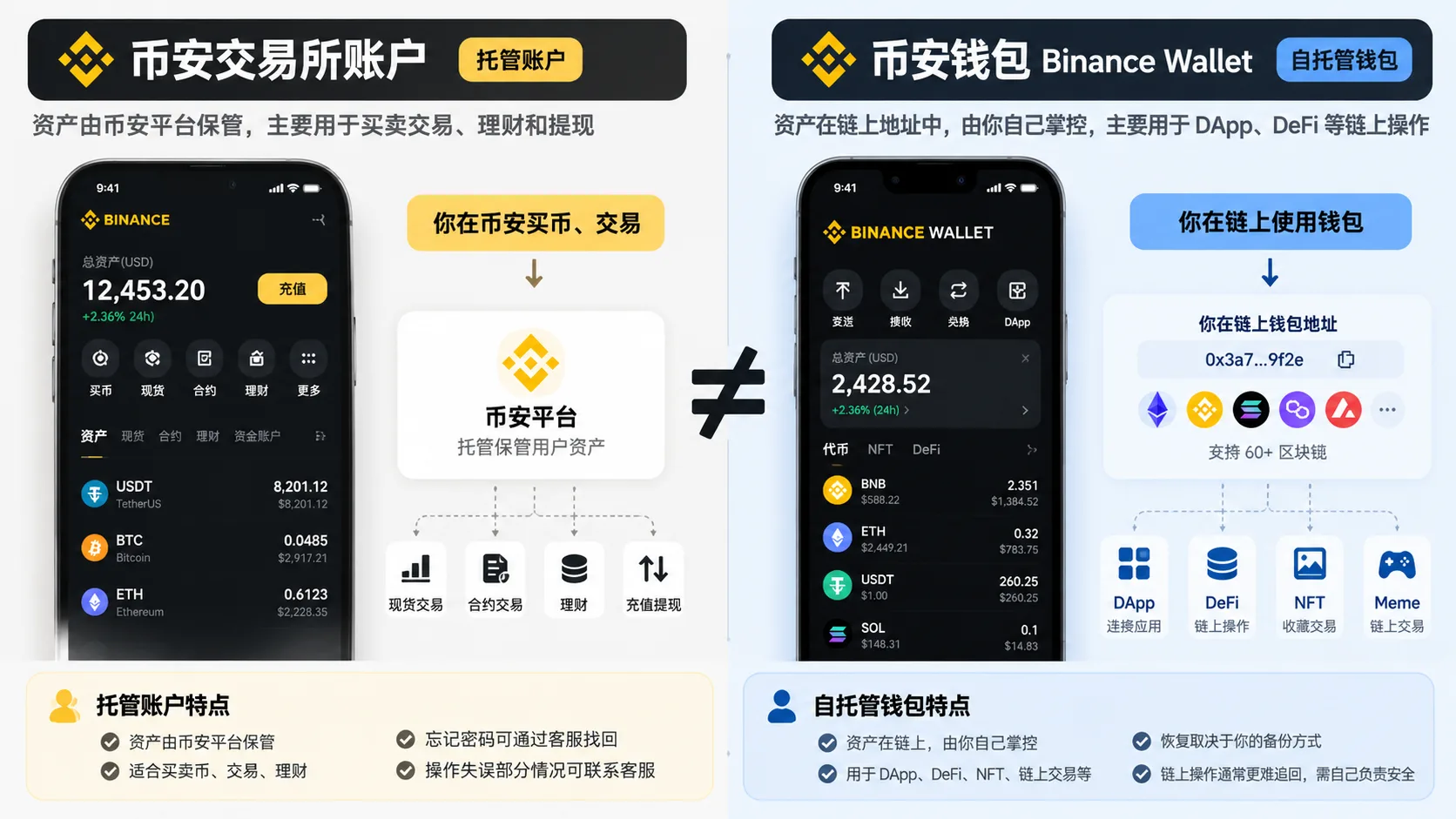
In one sentence: an exchange account is "assets held in custody by Binance," while Binance Wallet is "assets at an on-chain wallet address you control."
So if you searched "Binance wallet" only because you want to buy USDT, buy BTC, trade spot, sell coins or check your Binance balance — what you actually need is a Binance exchange account, not Binance Wallet. Most beginners should get this clear first.
What is Binance Wallet?
Binance Wallet is a self-custody Web3 wallet built into the Binance App, and it also offers on-chain trading from the desktop web. As of 2026, the main capabilities Binance officially describes include:
- Support for 60+ blockchains;[2]
- MPC Keyless, seed-phrase-free wallet;
- Up to 5 Keyless Wallets per account;[3]
- Cross-chain swap;
- DApps and DeFi;
- On-chain asset management;
- Security Center;
- Wallet security scan.
If you're already a Binance user, its biggest advantage isn't really "absolutely more secure," but rather: the path between the Binance exchange and the Web3 wallet is smoother. You don't have to first download a completely unfamiliar wallet, write down a seed phrase, then figure out how to add a network on your own.
What does MPC "no private key" actually mean?
The Binance Keyless Wallet is not "a wallet without cryptographic private keys." What it really means is: the user doesn't have to directly hold a full private key or a traditional seed phrase the way a traditional wallet requires.
Binance currently explains that the Keyless Wallet uses MPC (Multi-Party Computation), generating 3 Key Shares that are stored separately.[1]
A simple way to think about it: a traditional wallet is more like "one complete secret that mainly relies on you to keep"; an MPC wallet is more like "splitting the information needed to control the wallet so the complete secret doesn't sit in one place long term." The main goal is to reduce the risk of a single point of exposure.
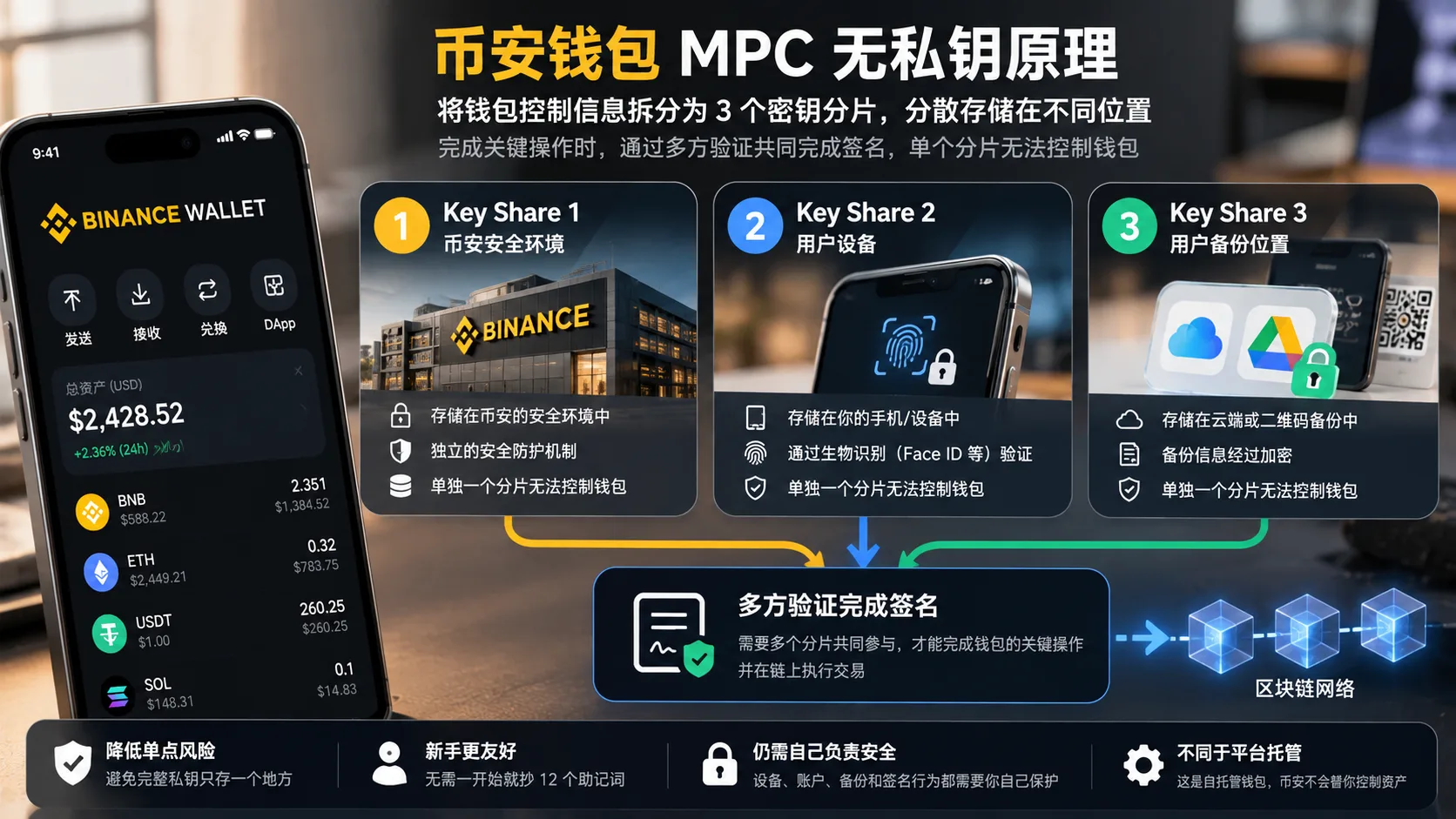
But this doesn't mean an MPC wallet is "absolutely safer" — it just changes the risk model.
What does a traditional seed-phrase wallet fear more?
- Seed phrase exposure;
- Saving it as a photo in the cloud;
- Losing the seed phrase;
- Writing down a wrong word;
- Having the seed phrase phished by a fake page.
What does an MPC wallet depend more on?
- Your device security;
- Your Binance account security;
- Your backup method;
- Passkey;
- Your cloud-account security;
- The recovery flow.
So the real question isn't "which technology sounds more advanced," but: which recovery and security mechanism do you actually understand and can manage correctly long term?
An important change: Binance Wallet has more than one backup method
Many old tutorials say "Binance Wallet always requires a recovery password," but by 2026 that's no longer accurate. Binance currently explains that the Keyless Wallet can use a recovery password to protect the shares; but if you use Quick Backup, Face ID or similar can replace the recovery password.[4]
In other words, there's more than one backup method: some rely on a recovery password, some on biometrics, and some on a QR code you keep offline yourself. For how each one works and what it relies on for recovery, see the comparison table under "Step-by-step walkthrough → Back up the wallet" at the end.
The more convenient a backup method is, the more you need to understand what it actually relies on for recovery.
Binance Wallet vs MetaMask vs hardware wallet
When actually choosing a wallet, start with this table.
| Dimension | Binance Wallet | MetaMask | Hardware wallet |
|---|---|---|---|
| Type | Self-custody hot wallet | Self-custody hot wallet | Cold signing device |
| Typical scheme | MPC Keyless | SRP or social login | Private key signs inside the device |
| Must you write a seed phrase yourself | Not in Keyless mode | SRP mode: yes; social login mode: not by default | Usually still need a recovery phrase backup |
| Ease of getting started | Low | Medium | Medium |
| Binance integration | Very strong | Weaker | Weaker |
| DApp generality | Strong | Very broad | Usually paired with a software wallet |
| Frequent on-chain activity | Suitable | Suitable | Relatively inconvenient |
| Long-term large-amount storage | Not recommended to rely on one hot wallet alone | Not recommended to rely on one hot wallet alone | More suited to long-term isolated storage |
| Cost | Free | Free | Requires buying a device |
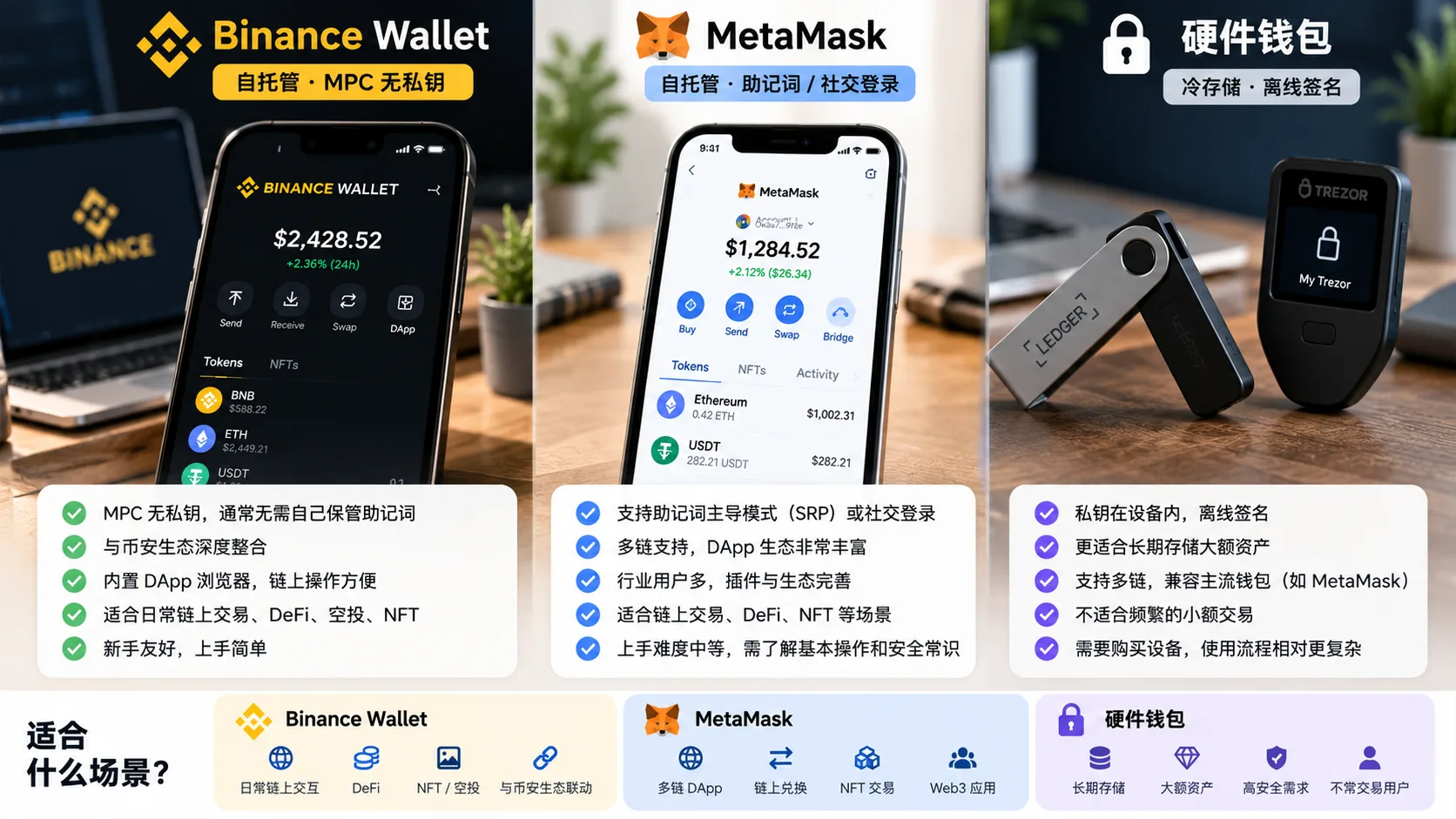
One old belief needs updating here: MetaMask no longer means "you must keep 12 words yourself." MetaMask currently officially supports two main creation methods: Secret Recovery Phrase, and Google / Apple / Telegram social login. In social-login mode, MetaMask still generates an SRP, but it is encrypted and sharded, so by default you don't need to keep this SRP yourself; recovery requires the corresponding social account and MetaMask password.
So today the real difference is closer to this: Binance Wallet is designed around MPC Keyless and the Binance ecosystem from the start; MetaMask is more independent and more general, and offers both the traditional SRP and the new social-login scheme.
How to choose between Binance Wallet and MetaMask?
Case 1: First time on-chain
If you already have a Binance account and this is your first time touching DApps, on-chain swaps, DeFi, airdrops, meme coins or NFTs, Binance Wallet is usually easier to understand. Not because it's "more advanced," but because: it's directly inside the Binance App, Keyless mode doesn't ask you to write a seed phrase on the first step, wallet swaps and DApps are integrated together, and the learning cost for a Binance user is lower.
But the biggest real on-chain risk is often not the wallet technology itself — it's what you sign.
Case 2: Already comfortable with MetaMask
Just keep using MetaMask; there's no need to switch wallets for the sake of switching. MetaMask still has some clear strengths: very broad DApp support, a mature browser ecosystem, no dependence on one exchange, mature multi-account and multi-network management, and it suits users already familiar with Web3. MetaMask also now supports the social-login mode, not only the traditional SRP path.
Case 3: Holding larger amounts long term
At this point the real question is no longer "Binance Wallet or MetaMask," but hot wallet or cold storage. Both Binance Wallet and MetaMask are wallets used in a daily online environment. If an asset won't be touched for a long time, the amount is too large for you to afford losing, you rarely connect DApps, and you value isolating the private key from everyday internet-connected devices, you can consider a cold-signing solution like a hardware wallet.
A hardware wallet isn't "absolutely safe once you buy it" either — seed phrase exposure, an unreliable device source, and malicious signing can all still cause losses.
Who should use Binance Wallet? Who shouldn't?
| Your situation | Better fit |
|---|---|
| Only buy, sell and trade | Binance exchange account |
| First time on-chain | Binance Wallet |
| Already comfortable with MetaMask | Keep using MetaMask |
| Frequently connect various DApps | Binance Wallet / MetaMask |
| Don't want to manage a traditional seed phrase | Binance Keyless Wallet |
| Prefer traditional SRP, offline self-management | MetaMask SRP mode |
| Long-term large-amount storage | Consider a hardware wallet |
| Large long-term holdings + occasional on-chain activity | Cold wallet for the bulk, hot wallet for operating funds |
For most people buying BTC or USDT for the first time, an exchange account is enough to start. Only create an on-chain wallet once you clearly know why you need one.
Is Binance Wallet safe?
It uses mainstream self-custody wallet security technology, but don't read "it uses MPC" as "nothing can go wrong." Binance Wallet currently includes: MPC multi-party computation, three Key Shares, Passkey, Quick Backup, Security Center, wallet risk scan, approval checks, and suspicious-transaction and address risk warnings.
The Security Center, launched in 2026, checks: wallet backup, wallet operating environment, high-risk assets, contract approvals, and suspicious on-chain interactions. But Binance itself also explicitly reminds that a security scan cannot cover all risks. So wallet security still mainly depends on: your device, account, backups and signing behavior.
6 risks that really matter
1. Self-custody means the final responsibility is yours
Binance Wallet is not "a Binance exchange account on a different page." If you transfer to the wrong address, pick the wrong network, sign a malicious approval, or lose the necessary recovery conditions, you may not be able to just contact support like when you forget an exchange password.
2. Quick Backup ≠ nothing to manage
Quick Backup only reduces the burden of managing a traditional recovery password. Your Binance account, device, Passkey, biometrics and email must still be protected.
3. Cloud backup means protecting your Apple / Google account
If you use cloud backup, the cloud account itself is part of the recovery chain. Don't reuse weak passwords, and don't casually log in on unfamiliar devices.
4. Never import a stranger's seed phrase or private key
If someone tells you "this wallet has money in it, just import it" or "this is an airdrop-only wallet," don't import it. Whoever holds the original private key or seed phrase may control the wallet.
5. The biggest risk is often you signing a malicious approval
Common dangerous scenarios include: free airdrops, fake mints, high-yield mining, private Telegram links, fake official sites in search ads, "wallet verification," and unlimited token approvals. If you don't understand the signature content, don't confirm it.
6. Don't keep all your assets in one hot wallet
A wallet that connects to DApps every day, tests airdrops and signs various contracts is not suitable for also holding all your long-term assets. A more practical approach: separate your operating wallet from your long-term storage wallet.
Is "no seed phrase" definitely safer than MetaMask?
No. The biggest feature of MPC is reducing the single-point risk of a complete secret sitting in one place; the advantage of the traditional SRP model is simpler logic, high generality, direct wallet migration, and a clear user control model.
| Risk | MPC Keyless | Traditional SRP |
|---|---|---|
| Single-point exposure of the complete secret | Relatively spread out | Very high risk once the SRP leaks |
| Recovery logic | More complex | Simple and direct |
| Wallet migration | Depends on the wallet mechanism | Relatively high generality |
| Writing down a wrong seed word | No such problem | Can happen |
| Platform dependence | Relatively high | Relatively low |
| Beginner onboarding | Simpler | Need to understand the seed phrase first |
So there's no point arguing "which is absolutely safer, MPC or seed phrase." The more meaningful question is: can you correctly manage this kind of wallet yourself?
Can Binance Wallet export a private key?
Yes, but the accurate wording is: you can convert a Binance Keyless Wallet into a private-key wallet. Binance officially offers a "convert to private-key wallet" feature; once converted, you can access the private key for each corresponding network.
But there's a very important limitation: once converted, you cannot convert back to the original Keyless Wallet.[5] The original Keyless recovery mechanism also no longer applies, and from then on you must keep the private key yourself. So unless you have a clear migration need, don't convert just to "see what the private key looks like."
Step-by-step walkthrough: from creating to transferring, in one pass
Below we go in the order create → backup → receive → send → restore. The Binance App UI keeps updating, so the exact menu names depend on what you see on your own phone.
1. Create the wallet
- Open the official Binance App (download from an official channel — don't use an APK from an unknown source);
- Switch to the Wallet tab at the bottom and enter Web3;
- Tap Create Wallet and choose the Keyless Wallet;
- Complete verification with your device Passkey, Face ID or fingerprint;
- Finish the backup right away (next step — don't skip it);
- Check your wallet's security status in the Security Center.
Binance currently supports creating up to 5 Keyless Wallets per account, which you can name and manage separately (for example "daily wallet," "DApp wallet," "airdrop wallet," "small test wallet") — this isolates risk better than concentrating all on-chain activity at one address.[3]
2. Back up the wallet (the first thing after creating)
Backup is the most important — and most often skipped — step in the whole chain. Binance explains that accessing the wallet requires at least two key shares: one share lives on your device, another is encrypted and stored in the cloud or in a QR code, protected by a recovery password that "only you know."[1] In other words: if you clear the cache, uninstall the app, or switch phones without backing up, the share on the device is gone and recovery becomes very hard.
The three backup methods — how each works and what it relies on for recovery:
| Method | How to do it | What recovery relies on | Who it suits |
|---|---|---|---|
| Quick Backup | Follow the prompt and use Face ID / biometrics | No recovery password — MFA + liveness/face verification | People who don't want another password |
| Cloud backup (iCloud / Google Drive) | Set a recovery password; encrypted shares stored in the cloud | Cloud account + recovery password | People who use the same Apple ID / Google account |
| QR code backup | Generate a QR code and keep it offline yourself | QR code + recovery password | People who want to keep the recovery material themselves |
One key point: if you forget the recovery password, Binance can't retrieve it for you and doesn't store it. With cloud backup, your Apple ID or Google account becomes part of the security chain, so at minimum use a strong unique password + two-factor authentication + review logged-in devices regularly.
3. Receive tokens
There are two common ways to receive:
Withdraw from the Binance exchange into the wallet (move coins from your exchange account onto the on-chain wallet):
- Tap Receive on the wallet home page;
- Choose Withdraw from Binance exchange;
- Pick the token and network (get the network right), then continue; if you have withdrawal whitelist enabled, add the wallet address to the whitelist first;
- Enter the transfer amount, choose whether to send from your Spot or Funding account, check the network fee and the final received amount, then withdraw.[6]
Receive by address or QR code (someone sends to you):
- Tap Receive and choose a receiving method;
- Pick the token and network to receive;
- The system generates a QR code and wallet address — share them or let the sender scan. Always double-check the address and network match, because the same token on different networks (TRC20 / ERC20 / BEP20) may not use the same address, and sending to the wrong network is usually very hard to recover.[6]
4. Send tokens
- Tap Send on the Assets page (or open a specific token, then tap Send);
- Pick the token to send and the matching network;
- Enter the recipient address and confirm;
- Enter the amount, check the address, and continue;
- If the address is flagged as high risk, a warning appears — cancel and re-check rather than forcing confirm;
- Check the transaction details and gas fee, make sure you have enough of the native token to pay gas, and confirm.[6]
To move coins from the wallet back to your Binance exchange account, use Send the same way, but choose Binance deposit address as the recipient and double-check the network matches.[6]
5. Restore the wallet (after switching phones / reinstalling)
Log in to the Binance App → Assets → Wallet → tap Restore Wallet, and choose the method you originally backed up with:
| Restore method | What you need | Notes |
|---|---|---|
| Restore from iCloud / Google Drive | Cloud-storage permission + recovery password | Binance doesn't store the password; if you forget it you can't restore |
| Restore with QR code | Scan the QR code + recovery password | Don't keep the QR code in chat, email or a public drive |
| Quick Backup restore | No recovery password — MFA + liveness/face verification | Your account KYC info must match |
The hardest case: if you forget the recovery password AND lose the device at the same time, Binance can't help you recover. So treat the recovery password and QR code like the asset itself — keep them separately, offline, and in more than one place.[7]
I already have MetaMask — do I need Binance Wallet?
In most cases: you don't need another wallet just to "have one more wallet." If your MetaMask is already set up for backups, connecting DApps, managing networks, checking approvals, and organizing assets clearly, keep using it without any problem.
Binance Wallet is really better suited for: people who mainly use Binance, are about to enter Web3 for the first time, but don't want to deal with a traditional SRP up front. What it mainly lowers is the "barrier to entering Web3," not that it must replace MetaMask.
My selection criteria: ask yourself just 3 questions
1. Do I actually need an on-chain wallet?
If you only buy BTC, ETH, USDT, sell coins, trade spot or trade futures, an exchange account is enough. If you want DApps, DeFi, NFTs, airdrops, on-chain memes, or control over your own on-chain address, then you really need a Web3 wallet.
2. How do I want to manage the recovery credential?
Don't want to manage a traditional seed phrase → Binance Keyless Wallet; already familiar with SRP, or prefer an independent wallet ecosystem → MetaMask.
3. Is this money for operating or long-term storage?
Daily small amounts, frequent signing → hot wallet; long-term large amounts, rare activity → consider a separate cold-storage solution. Don't let one wallet handle everything.
The 7 most common beginner mistakes
1. Thinking you must open a Binance Wallet before buying coins
No. Just use the exchange account to buy coins.
2. Treating the exchange balance as your own on-chain wallet
The two are not the same thing.
3. Not checking the backup after creating the wallet
After creation, first confirm the Backup / Security status.
4. Thinking Keyless means Binance can recover anything for you
No. Keyless changes the key-management method, not turning it back into platform custody.
5. Importing a seed phrase or private key someone sent you
Don't do it.
6. Connecting your wallet the moment you see an airdrop
Free doesn't mean safe.
7. Keeping long-term assets and airdrop-hunting funds in one wallet
Better to separate them.
FAQ
Is Binance Wallet custodial or self-custody?
Binance Wallet is a self-custody wallet. You are responsible for wallet control and on-chain operations, which is a different system from the custodial balance in the Binance exchange.
What's the difference between Binance Wallet and the Binance exchange balance?
The exchange balance is mainly used for buying, selling, trading, earn, deposits and withdrawals, and is held in custody by the platform. Binance Wallet is used to manage on-chain assets, connect DApps and execute on-chain transactions, and you take on the wallet security responsibility yourself.
Is Binance Wallet safe?
It uses mechanisms like MPC, Key Shares, Passkey, backups and the Security Center to reduce some risks, but it's still a self-custody hot wallet. Phishing, malicious approvals, device security and user mistakes can still cause losses.
Does Binance Wallet need a seed phrase?
The Keyless Wallet doesn't require you to keep a traditional 12/24-word seed phrase — it uses MPC and Key Share mechanisms. Binance Wallet also supports importing an existing seed-phrase or private-key wallet.
Does Binance Wallet always require a recovery password?
Not necessarily. A normal MPC backup can use a recovery password; when using Quick Backup, Binance says Face ID or similar can replace the recovery password.
Which is better for beginners, Binance Wallet or MetaMask?
If you're already a Binance user entering Web3 for the first time, Binance Wallet's integration is easier to understand. If you value independence, a broad DApp ecosystem and the traditional Web3 workflow, MetaMask is also mature.
Does MetaMask still require keeping 12 seed words yourself?
Not necessarily. The traditional SRP mode still generates 12 words; but the Google / Apple / Telegram login mode encrypts and shards the SRP, so by default you don't need to keep it yourself.
Can Binance Wallet create multiple wallets?
Yes. Binance currently supports up to 5 Keyless Wallets per account.
Which chains does Binance Wallet support?
As of 2026, Binance officially says it supports 60+ blockchains, including Ethereum, Solana, BNB Smart Chain, Polygon and Arbitrum. Whether a specific coin and network are supported still depends on what the wallet shows at the time.
Can Binance Wallet export a private key?
You can access the private key through the "convert to private-key wallet" feature. But after conversion you can't revert to the original Keyless Wallet, so don't do it casually without a clear migration need.
Should large assets go in Binance Wallet or MetaMask?
For long-term assets you don't need to touch and that are large in amount, don't only choose between two hot wallets. It's more sensible to separate daily operating funds from long-term storage assets, and consider a cold-storage solution like a hardware wallet according to your own security ability.
How do I transfer tokens with Binance Web3 Wallet?
Tap Send on the Assets page, pick the token and network, enter the recipient address, enter the amount, then check the gas fee and address before confirming. The wallet needs enough of the native token to pay the on-chain gas fee; if the address is flagged high risk, stop and re-check instead of forcing confirm.
How do I restore my Binance Web3 Wallet after switching phones or reinstalling?
Log in to the Binance App → Assets → Wallet → Restore Wallet, and choose the method you backed up with: iCloud / Google Drive restore needs cloud permission plus your recovery password, QR code restore needs the QR code plus the password, and Quick Backup restore needs no password but requires MFA and liveness/face verification.
Is there a fee to receive with Binance Web3 Wallet?
For an on-chain transfer from someone else's address, the sender pays the gas fee and you normally don't pay extra to receive. But the "withdraw to wallet" path from the Binance exchange incurs a network fee under Binance's withdrawal rules, and the final received amount is shown before you confirm.
Further reading
- How to Choose a Bitcoin Wallet? Cold, Hot, and Hardware Wallets Compared (2026)
- Where to Store USDT Bought on Binance/OKX? Exchange or Withdraw to a Wallet (2026)
- What Is a Seed Phrase? Why No One Can Recover Your Assets If You Lose It (2026)
- How to Choose a Cold Wallet? Which Is Safest? Hardware Wallet Picks + Seed Phrase Storage (2026)
- Is Binance Safe? Is It a Scam? SAFU Reserve + $4.3B Settlement, Verified Item by Item (2026)
Data verification notes
The key facts in this article were checked against Binance's official documentation and MetaMask's official materials on 2026-11-02, item by item:
- MPC Keyless mechanism: the Keyless Wallet uses multi-party computation (MPC), generating 3 Key Shares stored separately, so the user doesn't have to directly hold a full private key or a traditional seed phrase. Source: Binance official "What is the Binance Keyless Wallet and why back it up."
- Supported networks: as of 2026, Binance Wallet supports 60+ blockchains. Source: Binance official "Binance Wallet FAQ."
- Wallet count: up to 5 Keyless Wallets per account. Source: Binance official "Binance Wallet FAQ."
- Quick Backup: Face ID or similar security verification can replace the traditional recovery password. Source: Binance official "What is the Binance Keyless Wallet and why back it up."
- Private-key conversion: after converting to a private-key wallet, you cannot revert to the original Keyless Wallet, and the original recovery mechanism no longer applies. Source: Binance official "Convert to a private-key wallet."
- Send and receive: sending goes "Send → pick token/network → enter address → amount → check gas fee → confirm", and gas is paid from the wallet's native token balance; receiving goes through "withdraw from Binance exchange" or "wallet address / QR code", and the address and network must match. Source: Binance official "How to send and receive tokens on Binance Wallet."
- Wallet restore: log in → Assets → Wallet → Restore Wallet, then restore via iCloud / QR code / Quick Backup; if you forget the recovery password and lose the device at the same time, Binance cannot help restore. Source: Binance official "How to restore my Binance Wallet."
This article is based on Binance's official public documentation and MetaMask's official materials. Supported networks, backup methods, feature entries and security mechanisms may continue to change — for actual operations, refer to the Binance App, MetaMask and the latest official pages.
After an asset is transferred on the wrong network, wrongly authorized, or the wallet control credential is exposed, recovery is usually very difficult. This article introduces wallet mechanisms and use cases and is not investment advice.
- Binance official: What is the Binance Keyless Wallet and why back it up
- Binance official: Binance Wallet FAQ
- Binance official: Binance Wallet Security Center
- Binance official: Convert to a private-key wallet
- Binance official: Web3 Wallet security guide (Binance MPC wallet)
- MetaMask official: Restore your wallet (Secret Recovery Phrase and password)
- MetaMask official: Create a new wallet (Google / Apple / Telegram social login)
- Binance official: How to send and receive tokens on Binance WalletStep-by-step flow for sending, receiving, and transferring to/from the exchange, plus gas-fee notes
- Binance official: How to restore my Binance WalletiCloud / QR code / Quick Backup restore methods and their limits
- 2026-11-02UpdateRetitled to "How to Use Binance Web3 Wallet", added the full create/backup/receive/send/restore walkthrough, and added two official sources (send-receive and restore).
- 2026-10-16UpdateAdded evidence-chain superscripts and "Data verification notes"; updated the key-fact verification date.
See ourEditorial Policy and the correction process in ourCorrections Policy.
The CoinTrailHub editorial team focuses on crypto education for beginners, exchange security and P2P trading risk. This article is compiled from official sources and public data, reviewed by humans, and strives for accuracy but is not investment advice.
Last updated:2026-09-29 · Content reviewed by humans · Learn more
© 2026 CoinTrailHub · Original content. Reproduction or rewriting without permission is prohibited.