
How to Choose a Bitcoin Wallet? Cold Wallet/Hot Wallet/Hardware Wallet Compared (2026)
Table of contents

Binance new user rewards
20% trading fee rebate
Official Binance registration. Complete identity verification (KYC) to trade and withdraw.
Author: CoinTrailHub · Focused on Bitcoin security and wallet evaluation · Last reviewed: August 8, 2026
30-second answer: how to choose a BTC wallet?
If you're searching "which Bitcoin wallet is best," the real question isn't which wallet ranks first, but which storage method fits your holding size and usage scenario.
For most long-term BTC holders, a hardware wallet (Ledger or Trezor) is the top choice in 2026; a hot wallet for small everyday use; a hardware wallet + cold storage + multisig tiered plan for large assets (>$10,000).
| Your situation | Recommended plan | One-liner |
|---|---|---|
| Just bought a little BTC, still learning | Mobile hot wallet (Trust Wallet) | Get familiar with the basics first, build the habit of writing down your seed phrase by hand |
| Holding $1,000+, planning to hold long-term | Hardware wallet (Ledger/Trezor) | The hardware wallet's cost is usually low relative to the scale of assets it protects long-term |
| Holding $10,000+, security first | Hardware wallet + cold storage + off-site seed phrase | Tiered storage; a single point of compromise doesn't affect core assets |
| Large BTC held long-term, rarely touched | Coldcard Mk4 / multisig plan | A dedicated device managing dedicated assets |
| Enterprise/family co-management | 2-of-3 multisig | Multiple authorizations required to transfer, eliminating single-point risk |
One sentence: once you hold more than $1,000, buying a hardware wallet is the highest cost-effectiveness security investment in crypto.
Table of contents
- 30-second answer: how to choose a BTC wallet
- Top BTC wallets of 2026 (by use case)
- Ledger vs Trezor vs Coldcard: detailed 2026 comparison
- Recent hardware wallet security incident reminders
- 5 core principles of BTC wallet security
- The essential difference between the four wallet types
- Four wallet types compared
- BTC storage methods not recommended (pitfalls)
- How to safely set up a hardware wallet (5 steps)
- Pre-purchase checklist for a hardware wallet
- Tiered storage and multisig
- FAQ
Why choosing the right wallet matters more than timing your entry?
In recent years, several wallet security incidents have repeatedly reminded users: even hardware wallets long considered secure can carry risk from firmware vulnerabilities, supply-chain risk, or human error. When choosing a BTC wallet, the point isn't finding an "absolutely safe" device, but building a correct storage system.
This article starts from the choices you actually face: how much BTC you hold, how long you plan to hold, how often you need to operate — then tells you how to store at each stage.
This article does not constitute investment advice; it is only education on wallet selection and security.
It's recommended to first understand BTC basics: What Is Bitcoin (BTC)? How It Works, Value, and Risks (2026)
Top BTC wallets of 2026 (by use case)
If you're choosing a BTC wallet for the first time, you can refer directly to the recommendations below. They're compiled from public technical materials, product documentation, community feedback, and long-term industry usage, scoring across five dimensions — security architecture, user experience, open-source transparency, privacy capability, and community recognition:
| Rank | Wallet | Official site | Type | Price | Score | Best for | Drawback |
|---|---|---|---|---|---|---|---|
| #1 | Ledger Nano S Plus | ledger.com | Hardware | ~$79 | 5/5 | Beginners' top pick, best overall experience | Closed-source security chip; once had a customer-data leak (not private keys) |
| #2 | Trezor Safe 3 | trezor.io | Hardware | ~$79 | 5/5 | Users who value open-source transparency | No security chip (relies on a general MCU), slightly larger physical attack surface |
| #3 | Coldcard Mk4 | coldcard.com | Hardware | ~$158 | 5/5 | BTC geeks, pure-Bitcoin long-term storage | BTC-only, high learning curve, need to follow firmware security updates |
| 4 | Keystone 3 Pro | keyst.one | Hardware | ~$119 | 4/5 | Users who prefer air-gapped QR solutions | Shorter brand history, smaller community |
| 5 | Electrum | electrum.org | Desktop | Free | 4/5 | Advanced BTC feature needs | Desktop-only, private keys on an internet-connected device |
| 6 | Trust Wallet | trustwallet.com | Hot wallet | Free | 3/5 | Beginner entry, everyday small amounts | Inherent hot-wallet risk; private keys on an internet-connected phone |
Scoring dimension notes:
- Security architecture — private-key isolation method, security chip, anti-tamper mechanism
- User experience — setup difficulty, smoothness of everyday operation, app ecosystem
- Open-source transparency — whether the code is auditable, community participation
- Privacy capability — address management, CoinJoin support, anonymity
- Community recognition — user base, security history, long-term maintenance
Important 2026 reminder: hardware wallet security is relative. Several security incidents in recent years (see "Recent hardware wallet security incident reminders" below) remind us — any device can carry unknown risk. The key isn't picking a wallet that will "never fail," but combining, tiering storage, and continuously following security updates.
The brands above are examples based on public market information and do not constitute purchase recommendations. Prices and features are subject to the latest announcements on each brand's official website.
Quick selection by need:
| Your need | Recommendation | One-line reason |
|---|---|---|
| First BTC wallet for a beginner | Ledger Nano S Plus | Fastest to learn, richest ecosystem |
| Open-source transparency matters most | Trezor Safe 3 | Fully open source, auditable |
| Long-term BTC storage (rarely touched) | Coldcard Mk4 | BTC-only, richer privacy and advanced security features |
| Small everyday payments | Trust Wallet | Free, convenient on mobile |
| Advanced BTC features (custom fees, etc.) | Electrum | The most feature-rich BTC desktop wallet |
| Enterprise/family co-management | Multisig plan (2-of-3) | Multiple authorizations required to transfer |
Ledger vs Trezor vs Coldcard: detailed 2026 comparison
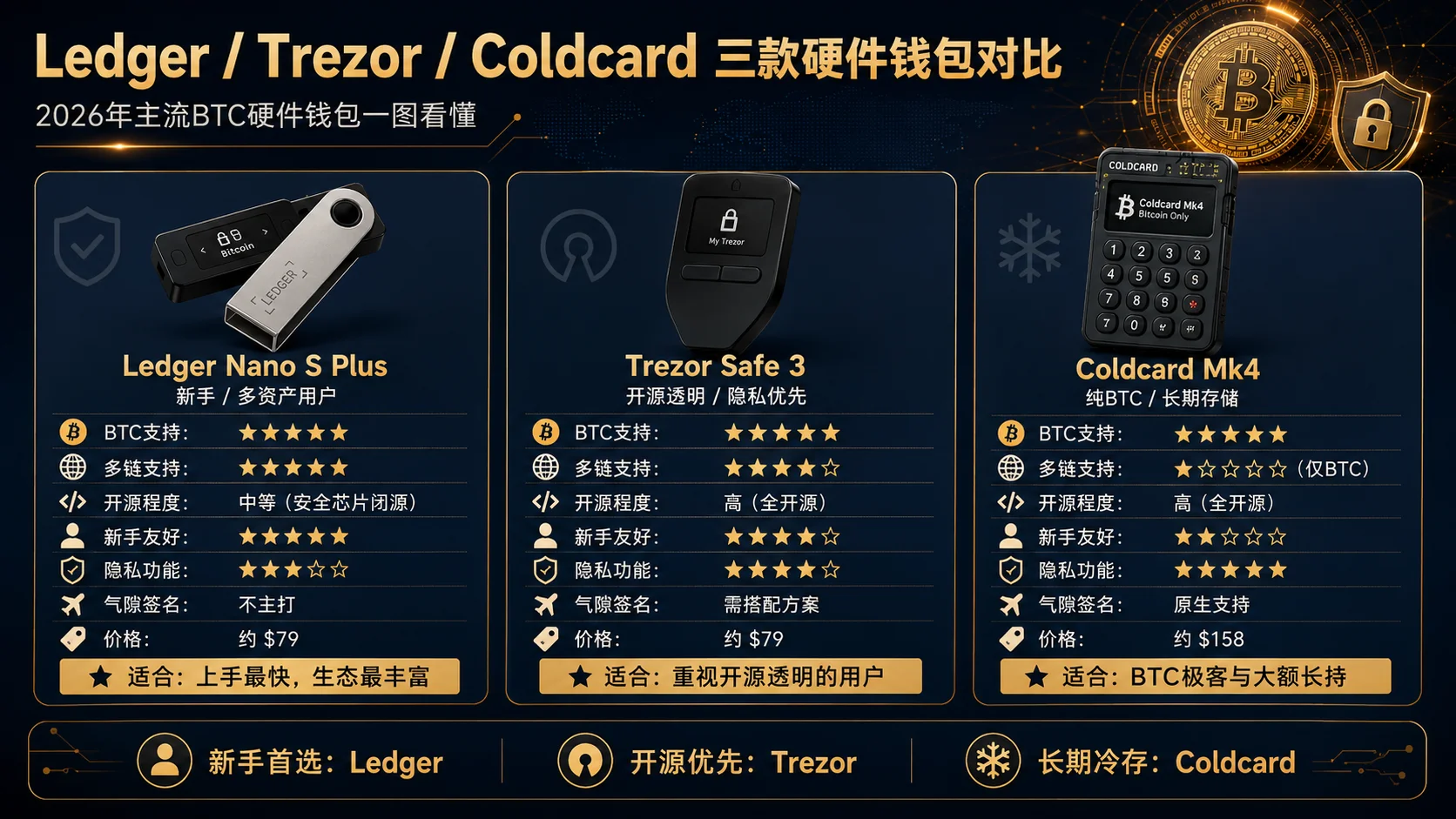
"Ledger or Trezor, which is better?" is one of the most-searched BTC wallet questions. Here's a detailed comparison of the three mainstream hardware wallet brands:
| Dimension | Ledger | Trezor | Coldcard |
|---|---|---|---|
| BTC support | 5/5 | 5/5 | 5/5 |
| Multi-chain support | 5/5 | 4/5 | 1/5 (BTC only) |
| Open-source level | Medium (security chip closed-source) | High (fully open source) | High (fully open source) |
| Beginner-friendly | 5/5 | 4/5 | 2/5 |
| Privacy features | 3/5 | 4/5 | 5/5 |
| Air-gapped signing | Requires Stax model | Requires Keep model | Native support (SD card/QR) |
| Price range | $79 – $279 | $79 – $199 | $158 – $249 |
| Best for | Multi-asset investors, beginners | Open-source enthusiasts, privacy-focused users | Long-term BTC holders, geeks |
Selection advice:
- Beginners/multi-asset users → Ledger Nano S Plus (fastest to learn, richest ecosystem)
- Open-source/privacy first → Trezor Safe 3 (fully open source and auditable, high community trust)
- Pure-BTC large long-term holding → Coldcard Mk4 (BTC-only, richer privacy and advanced security features, but higher learning curve)
Whichever you pick, it's orders of magnitude safer than not using a hardware wallet. What matters more is building the correct seed-phrase management habit.
Recent hardware wallet security incident reminders
In recent years, several hardware-wallet-related security incidents have reminded users: even security-focused devices can have firmware defects or design oversights. The core lessons of these incidents include:
- Any wallet can have unknown vulnerabilities — firmware and software defects may go undiscovered for a long time; security requires continuous review, not a one-time judgment
- Firmware updates can't fix an already-generated seed phrase — a seed phrase created with a vulnerable version is still unsafe even after updating firmware; you must migrate to a new seed phrase
- Tiered storage limits losses — even if one wallet is compromised, assets in other tiers are unaffected
- Continuously follow security developments — crypto changes fast; regularly checking your wallet's security announcements and firmware updates is a basic habit
If you're using any hardware wallet: regularly visit the manufacturer's official site to check security announcements, update firmware in time, and if you have security concerns, migrate assets to a newly generated seed-phrase address as soon as possible.
5 core principles of BTC wallet security
These aren't "knowledge points" — they're experience distilled from countless incidents and community lessons. The biggest problem for new users usually isn't device security, but seed-phrase management habits.
Principle one: the biggest security hole isn't technology, it's people
According to statistics from security firms like SlowMist, private-key leakage and phishing attacks are among the largest-loss categories in blockchain security incidents. These attacks have different technical principles, but they share one thing in common — the victim handed over their private key or seed phrase with their own hands.
The following practices have each cost someone their entire assets:
- Screenshotting the seed phrase into the phone's photo album (cloud sync = uploaded to the cloud)
- Sending the seed phrase to a messaging app (a copy lives on the server)
- Clicking a "wallet official site" ad link in a search engine to download (a fake site, looks identical)
- Entering the seed phrase after receiving a "wallet upgrade" DM (a real wallet team will never ask for your seed phrase)
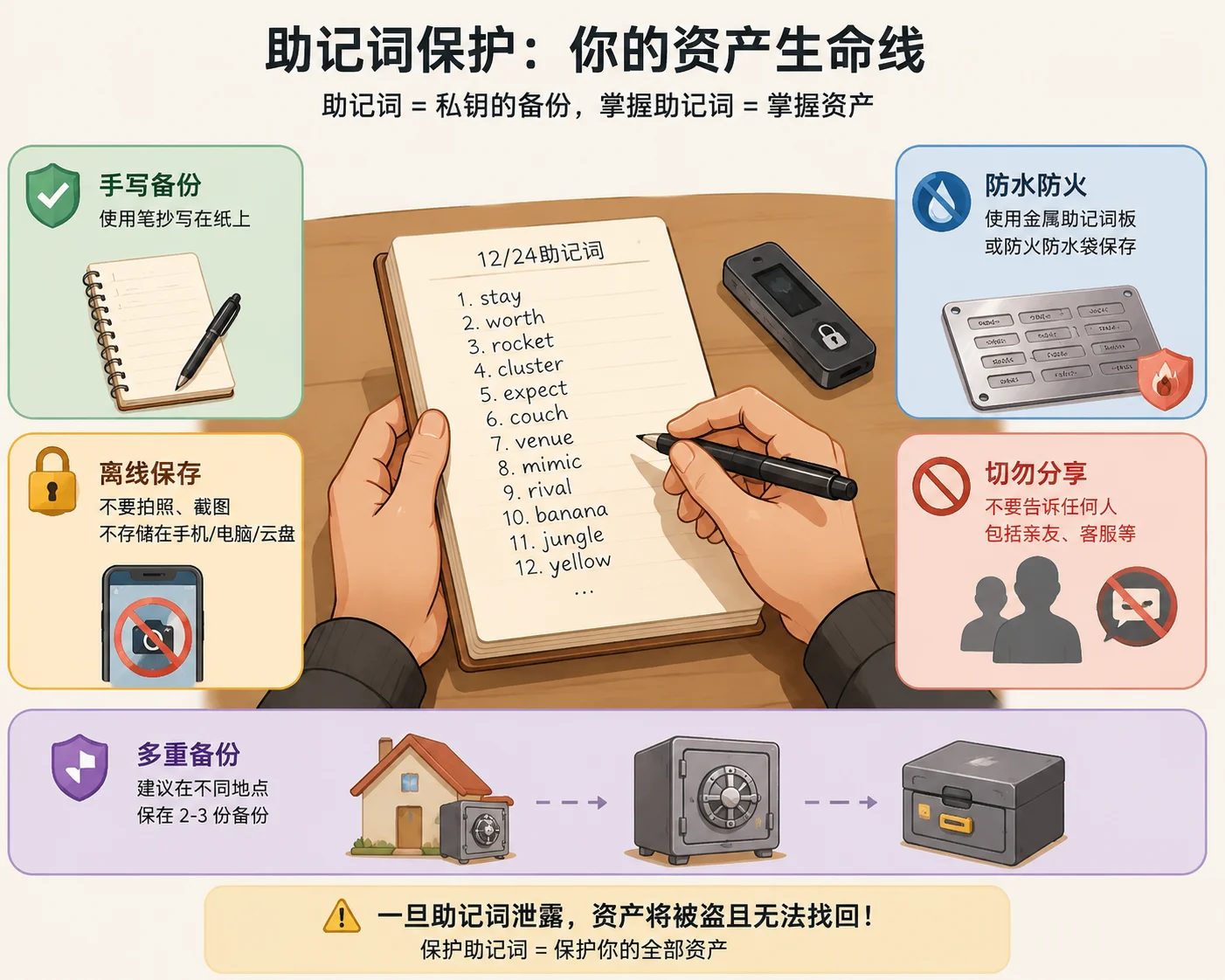
The weakest link in a security system is always the user themselves. The best hardware wallet can't save someone who types their seed phrase into a phishing site.
Principle two: skimping on $79 may cost you $79,000
There's a classic paradox in crypto: many people are willing to spend a few hundred dollars on a hardware wallet to protect thousands of dollars of BTC, but many others feel "free is good enough."
The problem is that "free" can be very expensive. A computer infected with a trojan, or a phished hot wallet, is enough to wipe out a position accumulated over years in an instant.
$79 = one Ledger Nano S Plus. Is your crypto holding worth $79? If yes, buy one.
Principle three: the chance of a hardware wallet breaking is far lower than the chance of an exchange having solvency problems
Some people worry about what happens if the hardware wallet breaks. The answer: as long as the seed phrase is intact, your BTC is intact. Buy a new device, import the seed phrase, recover in 10 minutes.
By contrast, what are the probability and speed of recovering assets when an exchange has solvency problems? FTX users waited two years and are still going through bankruptcy proceedings.
Principle four: the seed phrase is everything, everything else is secondary
Whatever wallet you use — a $279 Ledger Stax, a self-built offline cold wallet, or the free Trust Wallet on your phone — the only thing that can recover your assets is one thing: the seed phrase.
- Hardware wallet lost → the seed phrase saves you
- Phone stolen → the seed phrase saves you
- Computer infected → the seed phrase saves you
- Seed phrase lost → nothing saves you
That's why every security recommendation ultimately boils down to one sentence: write the seed phrase down offline by hand, store it off-site, and never let anyone see it. For more detailed seed-phrase backup methods, see What Is a Seed Phrase? Why No One Can Help You Recover Your Assets If You Lose It (2026).
Principle five: don't put the private keys to your entire net worth within one hand's reach
Professional crypto asset management has a core principle: tiered storage.
Simply put: don't keep all your BTC under a single private key. Manage everyday funds, long-term holdings, and never-touch funds with three different private keys — even if the outermost layer is compromised, core assets are unaffected.
The specifics are expanded later in this article.
The essential difference between the four wallet types
You've seen the rankings and decision tables. If you want to understand "why this choice," keep reading.
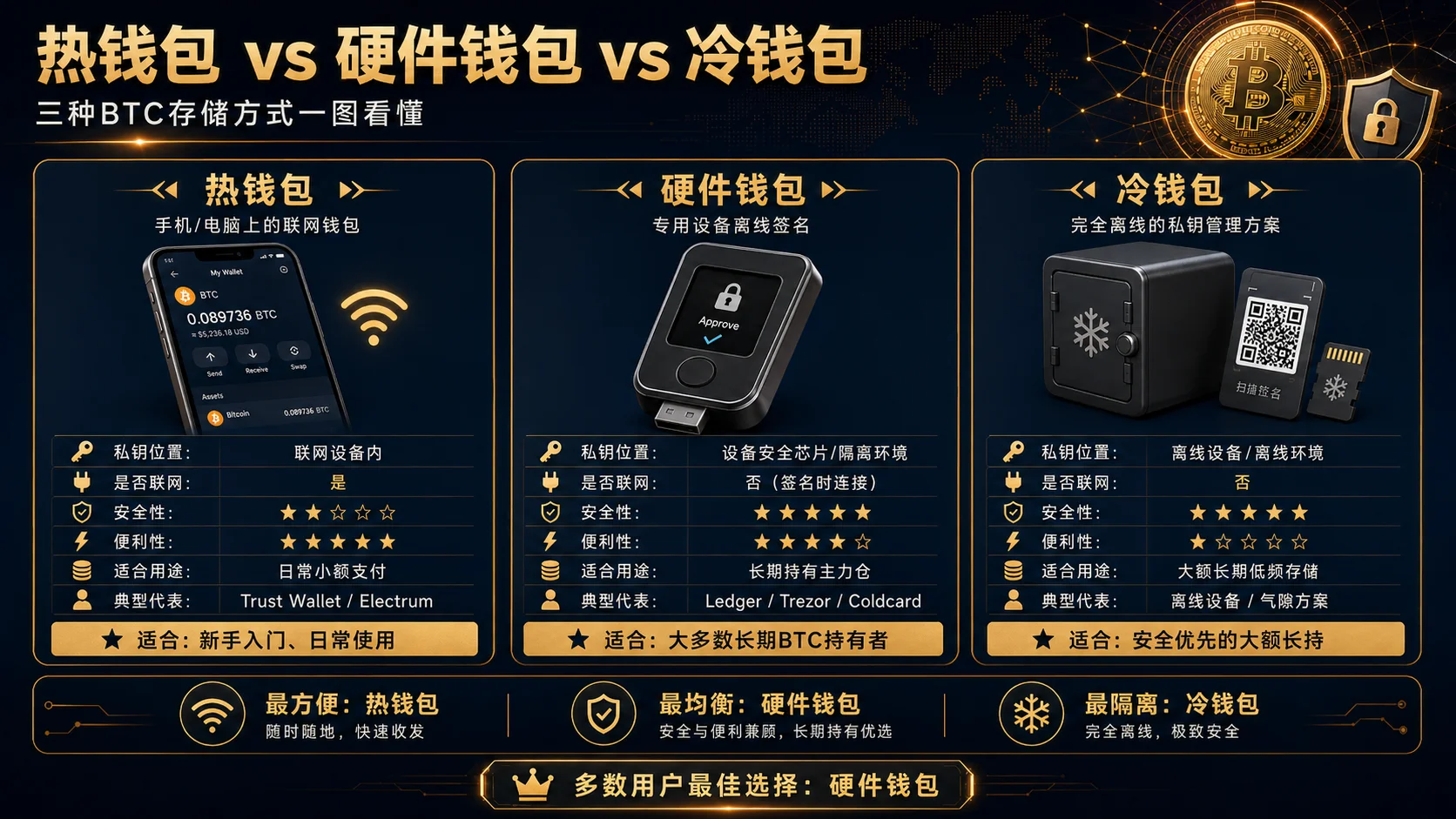
Remember one core fact first: a Bitcoin wallet doesn't store BTC itself — it manages the private keys needed to access on-chain assets. BTC always lives on the blockchain. Whoever holds the private key controls the BTC at the corresponding address. So choosing a wallet is, in essence, choosing a private-key management plan.
Hot wallet: your everyday pocket change
Software wallet on an internet-connected device. Mobile apps and browser extensions are both hot wallets.
Advantages: convenient — scan to pay, DApp interaction, one-click swap, with an experience close to traditional payment apps. Free, multi-chain support.
Risks: private keys live on an internet-connected device and can theoretically be stolen remotely by malware or phishing sites. Security advice: for long-term holders, it's usually recommended to keep only everyday-use amounts in a hot wallet, rather than storing most long-term assets there.
Three things you must never do:
- Never download a wallet from a search-engine ad or third-party site (only from the official site or official app store)
- Never screenshot or digitally store the seed phrase (write it on paper by hand, lock it up)
- Never click unfamiliar links and then sign a transaction with a hot wallet
Representative hot wallets: Trust Wallet (mobile), Electrum (BTC-only desktop), MetaMask (browser extension, but doesn't natively support BTC).
Hardware wallet: the best solution for the vast majority
A small physical device designed specifically for securely storing private keys. Private keys are generated and stored in the device's internal security chip and never leave the device; transaction signing is done inside the device. Even if you connect to a trojan-infected computer, the attacker can't steal the private key.
Advantages: extremely high security, with convenience close to a hot wallet — plug in USB, enter PIN, press a physical button to confirm the transaction.
Key security steps:
- The seed phrase is only shown on the hardware wallet's screen and only backed up on paper. No genuine hardware wallet will ever ask you to enter the seed phrase on a computer
- Buy only from the official site. Second-hand or third-party marketplace hardware wallets may have been tampered with — pre-loaded with a known seed phrase, and your coins get transferred out the moment you deposit
See the "Top Bitcoin wallet rankings" and "Ledger vs Trezor vs Coldcard" tables above for mainstream product comparisons.
Cold wallet (offline wallet): the last line of defense for large long-term holdings
Private keys are generated and stored in a completely offline environment, and signing transactions is also done offline (e.g., transferring signed transactions via QR code or SD card); the private key never touches the internet from generation to signing. Common implementations include: an old phone/computer that never goes online + open-source wallet software (e.g., Electrum offline mode), or a dedicated air-gapped hardware device.
Advantages: extremely high security — because there's no network connection, remote attacks are physically impossible. Very low cost — an old device will do.
Limitations: cumbersome to operate, every transfer requires: create the transaction on the offline device → transfer it to an online device via SD card/QR code to broadcast → wait for confirmation. A certain technical threshold. If the offline device breaks and the seed-phrase backup is also lost, assets can never be recovered.
A cold wallet generally suits long-term holders with larger amounts and low-frequency operations. For most individual users, a hardware wallet is the better choice — security close to a cold wallet, without the two-device collaboration of every transfer.
Traditional paper wallet: why it's no longer recommended
Paper wallets were popular between 2010–2015 but are no longer recommended. Core flaws: the private key may have been recorded by an online tool during generation, paper fears fire/water/fading, using it requires importing into an internet-connected device (zeroing out security), and it doesn't support seed-phrase recovery.
If you need a low-cost offline solution, handwritten seed phrase + two paper backups stored off-site is safer and more flexible than a paper wallet.
Four wallet types compared
| Dimension | Hot wallet | Cold wallet | Hardware wallet | Paper wallet |
|---|---|---|---|---|
| Typical security level | Lower (relies on device security) | High (relies on operational skill) | High (suits most users) | Low (no longer recommended in modern times) |
| Convenience | 5/5 | 1/5 | 4/5 | 1/5 |
| Cost | Free | ~$0 (old device) | $55 – $279 | ~$0 |
| Ease of use | Simple | Harder | Simple | Medium |
| Private key touches internet | Yes | No | No | When used |
| Remote-attack defense | Weak | Extremely strong | Extremely strong | Strong (before use) |
| Recommended for large holdings | No | Yes | Strongly recommended | No |
BTC storage methods not recommended (pitfalls)
The following storage methods are occasionally discussed in the community, but from a security perspective they're not recommended for storing BTC:
| Not-recommended method | Why some people use it | Why you shouldn't |
|---|---|---|
| Long-term coins on an exchange | Convenient for trading, no need to manage private keys | The platform holds the private keys; history has Mt.Gox, FTX and other bankruptcy precedents — you don't truly hold the BTC |
| Storing BTC in MetaMask | Already have MetaMask, don't want to install another wallet | MetaMask doesn't natively support the BTC network; any tutorial telling you to "add BTC to MetaMask" is a wrapped token or a scam |
| Paper wallet | Was once popular, zero cost | Private key may leak during generation, paper damage is irreversible, no seed-phrase recovery — already obsolete in the industry |
| Screenshot/cloud storage of the seed phrase | Convenient to view anytime | Cloud services can be breached, phone albums auto-sync to the cloud — equivalent to making the private key public |
| Buying hardware wallets second-hand/third-party | Cheaper | The device may be pre-loaded with a known seed phrase — your coins get transferred out the moment you deposit |
| A bookmarked "official site" | Convenient to click each time | Phishing sites impersonate the official site via SEO/ads — you think you're on the real site, but you're on a fake one |
One simple principle: if you don't fully control the private key (and only you control it), then you don't fully own those BTC.
How to safely set up a hardware wallet (5 steps)
This is the step most easily skipped, but also where the most mistakes happen:
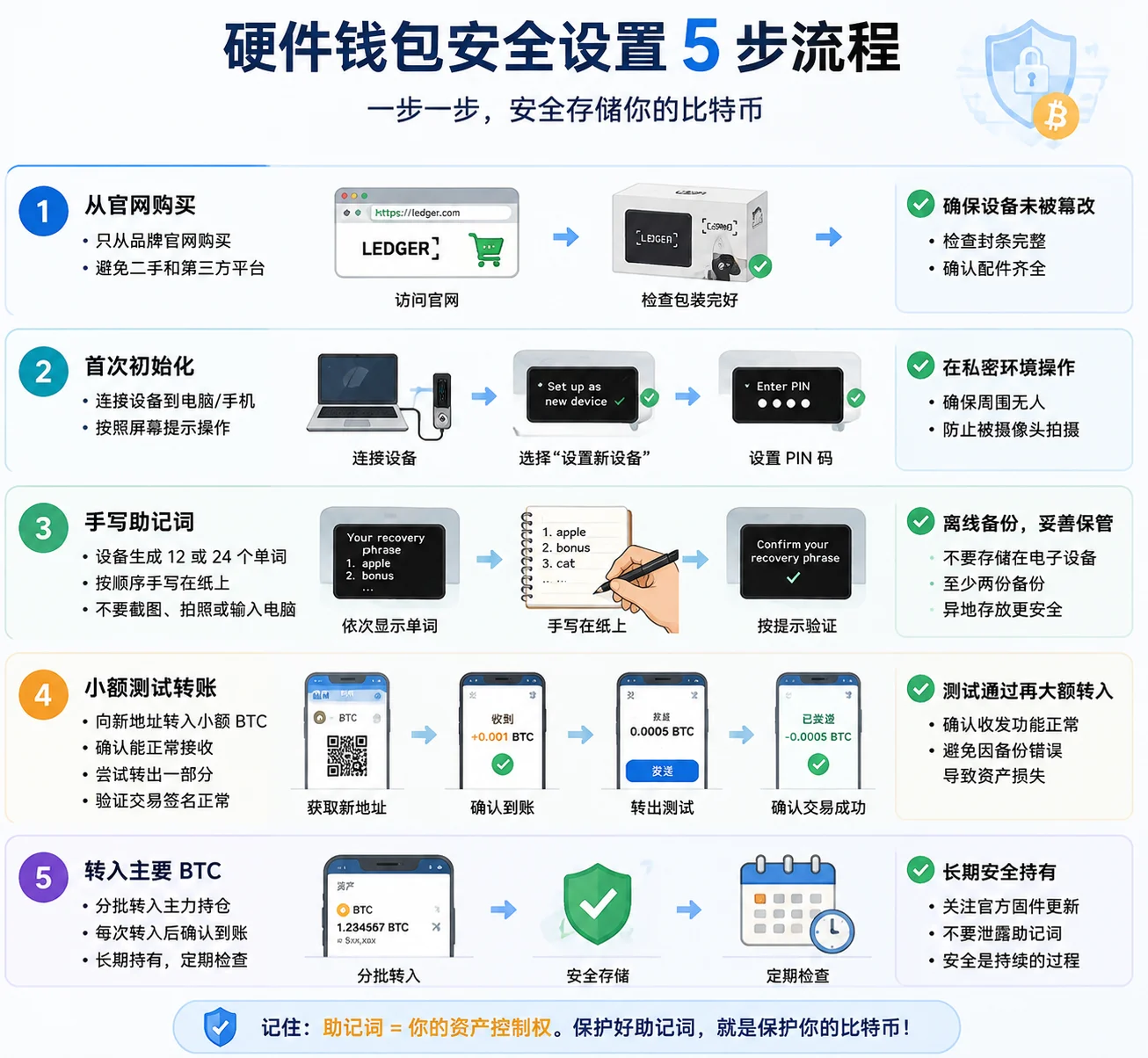
Step 1: buy from the official site Buy only from brand official sites like ledger.com, trezor.io, coldcard.com. Avoid second-hand platforms and third-party marketplaces — the device may have been tampered with.
Step 2: first-time initialization After unboxing, the device guides you to generate a new wallet. Make sure you do this in a private environment with no cameras or other people around.
Step 3: write down the seed phrase by hand The device screen shows 12 or 24 seed words one by one. Write them down by hand with paper and pen — don't screenshot, don't photograph, don't type them into a computer. After writing, double-check that the order is correct.
Step 4: small test transfer Transfer a small amount of BTC (e.g., $10) to the new wallet address and confirm it's received correctly. Then try sending some out to verify you can sign a transaction normally.
Step 5: transfer in the main BTC After the test passes, transfer your main holdings into the hardware wallet address in batches. It's recommended not to transfer everything at once, but to send one batch, confirm it arrives, then send the next.
Note: many people skip the "send-out test" in step 4 — they only discover the seed phrase was copied wrong when they need to send out, and by then it's too late.
Pre-purchase checklist for a hardware wallet
Before clicking "buy," confirming the following can avoid the vast majority of hardware-wallet-related security incidents:
- Is it bought from the brand's official site? — devices from non-official channels (second-hand platforms, third-party marketplaces) may have been tampered with
- Is the packaging intact? — after receiving, check the seal and packaging for signs of being opened
- Was first-time initialization done by you yourself? — if the device shows a seed phrase or address right after power-on, it has been pre-set
- Did you refuse any "pre-generated seed phrase"? — the seed phrase must be generated by your own device; no one can generate it for you
- Do you understand that a seed phrase ≠ a password? — the seed phrase is the plaintext form of the private key and doesn't need any "online activation"
Advanced: tiered storage and multisig
The three-tier storage system
Once holdings exceed $10,000, it's recommended to build a tiered system:
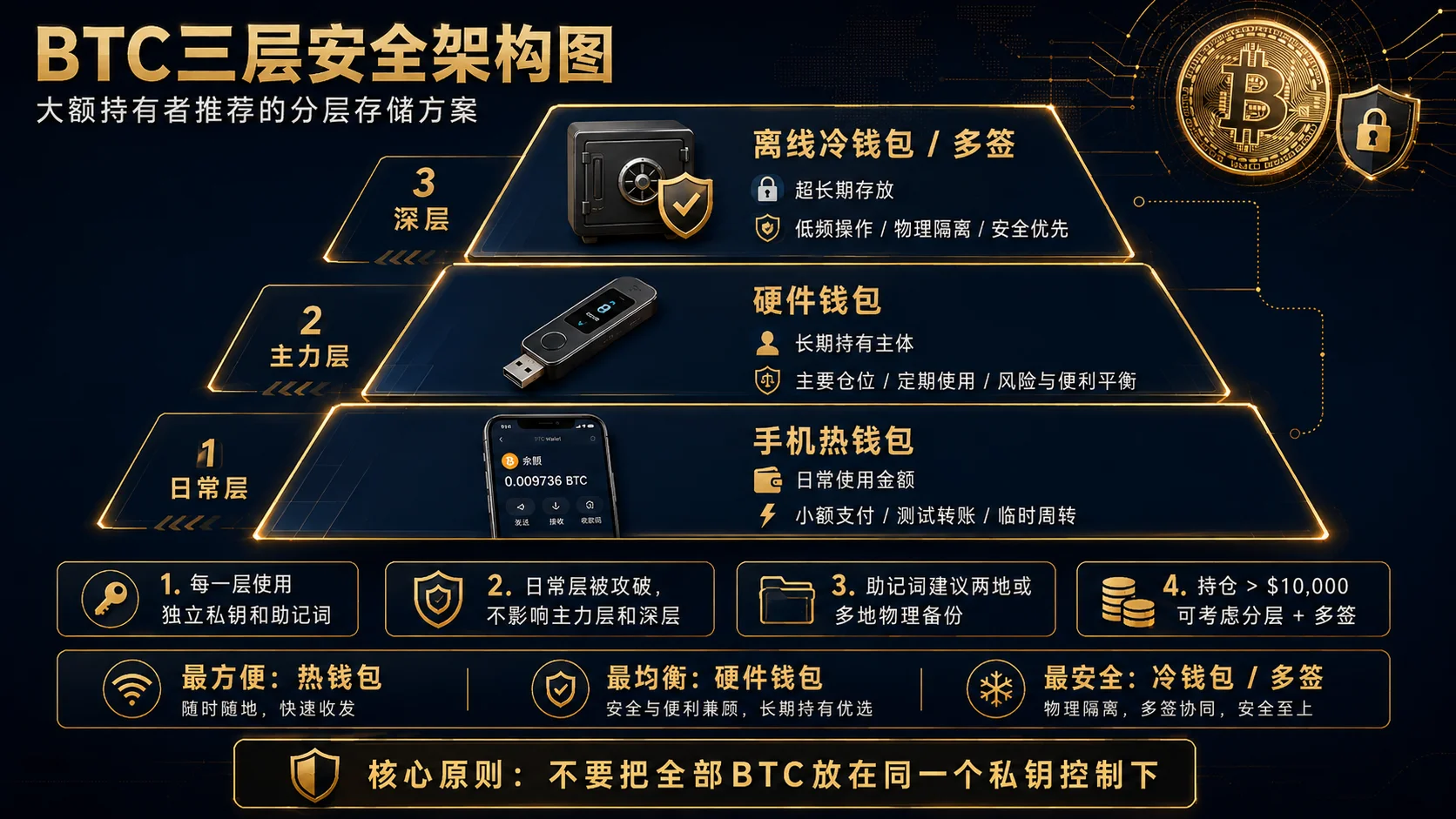
| Tier | Method | Share | Purpose |
|---|---|---|---|
| Everyday tier | Mobile hot wallet | Everyday-use amount | Daily spending, small transfers, testing DApps |
| Main tier | Hardware wallet | The bulk of long-term holdings | Main holdings, accessed periodically |
| Deep tier | Offline cold wallet | Ultra-long-term storage | Ultra-long-term holding, physically isolated, basically never touched |
Each tier has independent private keys and seed phrases. If the everyday tier is compromised, the main and deep tiers are unaffected. For the complete plan of private-key generation, storage, and management, see Bitcoin Private Key Security: 6 Decisions That Decide Whether You Lose Your BTC (2026).
Off-site seed-phrase backup: store physical backups of the seed phrase in two different geographic locations (e.g., home + bank safe-deposit box) to guard against single-location risks like fire or theft.
Multisig wallet: the ultimate security plan
Multisig requires multiple private keys to sign together to initiate a transaction. The classic setup is 2-of-3 — any 2 of the 3 keys can sign to transfer.
Applicable scenarios:
- Institutional/family co-management: the company CFO and CTO each hold a key; a transfer requires both to agree
- Individual enhanced security: hardware wallet A + hardware wallet B + cold wallet C, three keys in three places. An attacker would need to compromise two of the three locations simultaneously to move assets
Multisig limitations: more complex to operate, slightly higher fees. Suits users with large holdings and extremely high security requirements.
FAQ
What wallet should a beginner use for their first BTC purchase?
Holdings < $1,000: download Trust Wallet or TokenPocket (mobile app), follow the guide to create a wallet, write the seed phrase by hand on paper, and store it offline. Once you're familiar with the basics, consider buying a hardware wallet when holdings exceed $1,000. The most important thing is to build correct security habits early — many people think "it's not much money anyway" and casually screenshot the seed phrase during small-amount trial-and-error, but that habit becomes a fatal weakness when holdings grow later.
Is Bitcoin safe on an exchange?
Not completely. An exchange account essentially means you've entrusted the platform to custody your assets; the platform holds the private keys. While top exchanges (like Binance) usually have strong security measures and proof of reserves, history — Mt.Gox, FTX, etc. — shows that in extreme cases users may face asset-loss risk. Advice: trading funds can stay on an exchange short-term; the main long-term holding position should use a self-custody hardware wallet. For a detailed comparison of exchange custody vs self-custody, see Where to Store the USDT You Bought?.
Ledger or Trezor, which is better?
Both are the industry's most mainstream hardware wallet brands with excellent security records. Ledger has a larger user base (6 million+ globally) and a friendlier app experience, but its security chip is closed-source; Trezor is fully open source and auditable with high community trust, but supports slightly fewer coins. See the "Ledger vs Trezor vs Coldcard" table above for details. Beginners should pick Ledger (fast to learn); open-source and privacy-first users should pick Trezor.
Is Ledger safe?
Ledger's core security design is that private keys are stored in a separate security chip and never leave the device. Since its founding in 2014, over 6 million devices have been sold worldwide, and there is currently no publicly disclosed incident of a large-scale private-key leak directly caused by remote compromise of the Ledger security chip. But note: Ledger has historically had customer-data leaks (involving e-commerce order information, not on-device private keys), reminding users that the accompanying services of a hardware wallet maker also need privacy attention. The biggest risk users face is usually not the device itself being compromised, but: ① seed-phrase leakage (screenshots, cloud storage, phishing); ② malicious signing (clicking confirm without understanding the transaction); ③ supply-chain risk (buying a tampered device from an unofficial channel). So whether Ledger is safe largely depends on whether you follow the correct usage habits.
Is Trezor safe?
Trezor uses an open-source design — all code can be audited by the community, meaning security researchers can continuously check for vulnerabilities rather than relying on the manufacturer's claims. Trezor's security record is equally excellent. As with Ledger, the biggest risk users face comes from seed-phrase management and phishing attacks, not the device's cryptographic security itself. Whichever hardware wallet you choose, correct seed-phrase management habits matter more than brand choice.
Are hardware wallets really safe?
Hardware wallets are currently one of the best solutions for individual users to securely store crypto assets, but they're not absolutely safe. The design principle is that the private key never leaves the device and transaction signing is done inside the device — even if the connected computer is infected with a trojan, it can't steal the private key. But note: ① any device can have unknown firmware defects — update firmware in time and follow security announcements; ② the physical security of the hardware wallet and seed-phrase backup are equally important; ③ devices bought from unofficial channels may be tampered with, so buy from the official site.
What if my wallet device (phone/hardware wallet/cold wallet) is lost?
No matter which device is lost, as long as the seed phrase remains, assets can be recovered. Buy a new device and import the seed phrase — based on the BIP39 standard, it works across brands. Phones, Ledger, Trezor, Coldcard, offline cold wallets all follow this logic. But conversely: losing the seed phrase = never recoverable. Safe backup of the seed phrase is more important than any device.
How much BTC needs a hardware wallet?
Generally, when BTC holdings reach about $1,000 or more, the hardware wallet's cost (from ~$79) starts to be a reasonable share of the protected assets. A practical rule of thumb: if your BTC holdings are large enough that losing them would hurt, it's time to consider buying one.
Where should BTC be stored for long-term holding?
Recommended plan: hardware wallet (main) + offline cold wallet (deep storage) + off-site seed-phrase backup. Don't keep all your BTC under a single private key. See "The three-tier storage system" above for details.
Can a Bitcoin wallet be frozen?
A self-custody wallet has no centralized account-freezing mechanism — because you control the private key, no third party can stop you from initiating a transaction on-chain. But note: ① on-chain addresses may be flagged by certain service providers or compliance tools, affecting your interaction experience on specific platforms; ② assets in an exchange account may be frozen by the platform; ③ the real-world legal environment and on-chain technology are two different layers. For long-term holders, the self-control offered by a self-custody wallet is currently the most reliable choice.
What's the difference between a hot wallet and an exchange account?
With a hot wallet you hold the private key yourself, and the assets are controlled by you on-chain. With an exchange account the platform holds the private key, and what you see is a number in a database. The FTX incident is the most extreme example.
Is a Bitcoin hardware wallet worth it? How much BTC needs one?
When BTC holdings reach about $1,000 or more, the hardware wallet's cost (from ~$79) starts to be a reasonable share of the protected assets. A practical rule of thumb: if your BTC holdings are large enough that losing them would hurt, it's time to consider buying one.
One easily overlooked point: a hardware wallet defends not only against external hackers, but also against malware on your own device. A trojan-infected computer can silently swap in a hacker's address when you copy an address — and the hardware wallet's "confirm the address on screen" step lets you do a final manual check before signing.
What if I lose my seed phrase?
If the seed phrase is completely lost and the wallet device is also inaccessible — assets can never be recovered. The Bitcoin network has no "recover password" or "customer-support reset" function; this is the cost of decentralized design.
If you just can't find the seed-phrase backup but the wallet device still works (the mobile hot-wallet app still opens, the hardware wallet still unlocks), immediately: ① open the wallet and create a new wallet with a new seed phrase; ② transfer all assets from the old wallet to the new wallet address; ③ properly back up the new seed phrase. This is the last window for rescue — once the device breaks or the app is uninstalled, the opportunity is gone forever.
That's why we keep emphasizing: the seed phrase must be written offline by hand, in at least two copies, stored off-site. This isn't optional; it's the only safety net.
Can MetaMask store BTC?
It can't directly store native BTC. MetaMask natively only supports Ethereum and compatible chains. Consider Trust Wallet, Electrum, or a hardware wallet to manage native BTC.
Summary
There's no standard answer to choosing a wallet — only the plan that fits your current stage. Three principles to close:
- Holdings large enough that losing them would hurt → get a hardware wallet. $79 invested vs your holdings — the math is clear.
- The seed phrase is everything. A lost device can be replaced; a lost seed phrase can never be recovered.
- Don't rely on a single point. Tiered storage + off-site backup; any single failure won't affect the whole.
Not your keys, not your coins. Choosing the right wallet and managing your seed phrase well matters more than timing the market or buying the dip.
BTC security knowledge center
The following articles are arranged by learning path to help you systematically master Bitcoin storage security:
Beginner:
- What Is a Crypto Wallet? Wallet Addresses, Seed Phrases, and Asset Security (2026) — understand wallet principles from zero
- What Is Bitcoin (BTC)? How It Works, Value, and Risks (2026) — the first BTC lesson
Intermediate:
- What Is a Seed Phrase? Why No One Can Help You Recover Your Assets If You Lose It (2026) — seed-phrase backup and recovery in practice
- What Is a Cold Wallet? How to Store Your Seed Phrase Safest (2026, 5 Methods Compared) — anti-phishing, anti-leak
Advanced:
- Bitcoin Private Key Security: 6 Decisions That Decide Whether You Lose Your BTC (2026) — deep dive into private-key security
- Why Is Bitcoin Valuable? Scarcity, Decentralization, Network Effects — understanding BTC's long-term value
Related:
- Where to Store the USDT You Bought on Binance/OKX? Exchange or Withdraw to a Wallet (2026) — exchange custody vs self-custody compared
Disclaimer
This article is for education on Bitcoin wallet selection and security and does not constitute investment advice, financial advice, or trading advice.
Crypto asset prices are volatile, and wallet usage involves technical operations like private-key management and seed-phrase backup. Users should judge the storage plan suited to them based on their own circumstances and technical ability, and take full responsibility for their own private-key security. The specific brands mentioned are only industry examples and do not represent purchase recommendations or endorsements. Before choosing and using any wallet product, please refer to official website information and make judgments in accordance with the laws and regulations of your location.
- 2026-09-15UpdateChanged the title to "How to Choose a Bitcoin Wallet" to match search intent, added official sources and verification date.
See ourEditorial Policy and the correction process in ourCorrections Policy.
The CoinTrailHub editorial team focuses on crypto education for beginners, exchange security and P2P trading risk. This article is compiled from official sources and public data, reviewed by humans, and strives for accuracy but is not investment advice.
Last updated:2026-09-15 · Content reviewed by humans · Learn more
© 2026 CoinTrailHub · Original content. Reproduction or rewriting without permission is prohibited.