
Bitcoin Private Key Security: 6 Decisions That Decide Whether You Lose Your BTC (2026)
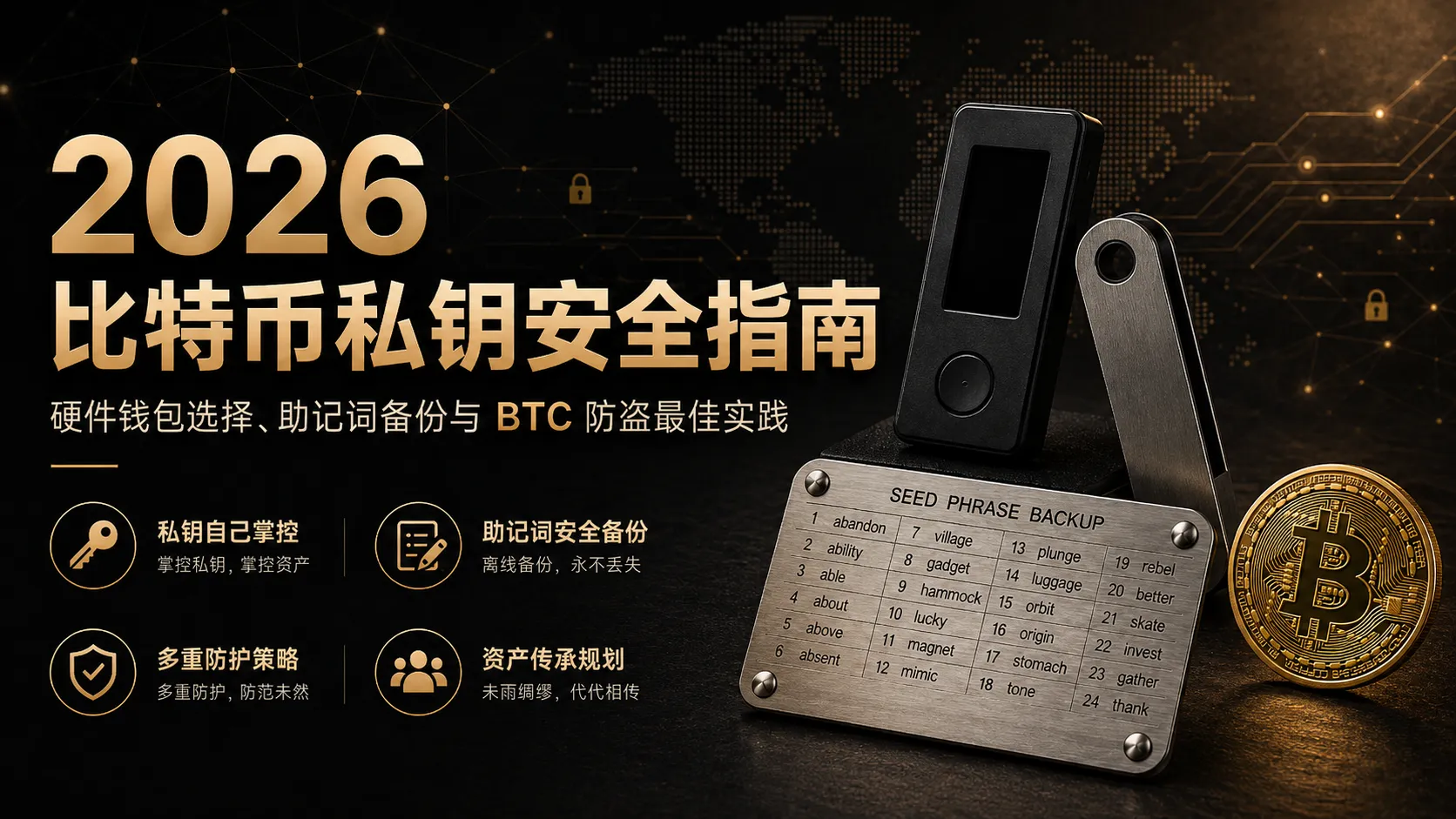
Table of contents

Binance new user rewards
20% trading fee rebate
Official Binance registration. Complete identity verification (KYC) to trade and withdraw.
Bitcoin has never been lost because the blockchain was attacked — losing coins almost always has one cause: the private key wasn't managed properly. Seed phrase leaks, lost backups, clicking phishing links, and exchange problems — those are the real risks.
In the winter of 2023, a friend called me in the middle of the night, voice shaking. His 2.3 BTC on an exchange had been transferred out — the attacker used leaked personal information to complete an "account recovery" through customer support.
The exchange wasn't hacked. He didn't leak his password. But he lost all his BTC. Stay in crypto long enough, and you'll definitely know someone who has lost coins.
This article isn't here to explain "what a private key is" — that basic concept is one search away. What we're solving here are the questions you're actually agonizing over: where to keep BTC, which hardware wallet to choose, how to back up your seed phrase, whether to add a Passphrase, whether to use multisig, and how to leave it to your family.
This article is security-knowledge education and does not constitute investment advice. Please verify the authenticity of all tools and services through official channels.
Core information: what is your BTC security plan?
If you don't want to read the whole article, remember these few points:
- Only hold a small amount of BTC and trade often → keep it on a major exchange like Binance or OKX, with Google Authenticator enabled
- Plan to hold long-term, amount exceeds one month's salary → buy a hardware wallet, stamp the seed phrase on a metal plate
- Holding a large amount → add a Passphrase on top of the hardware wallet (and back up the Passphrase itself)
- Regardless of position size: never screenshot, never store in cloud drives, never tell anyone your seed phrase — this is an iron rule
- Tell at least one family member today that you have BTC, so they know where to look if something happens
About 11 minutes to read. First, remember two things: once a seed phrase has ever existed in any electronic form (screenshot, notes app, cloud drive), it's already leaked; the most common way coins are lost isn't being cracked — it's a flawed backup method, so always do a recovery test after backing up.
Where should you keep your Bitcoin? Exchange vs hot wallet vs hardware cold wallet
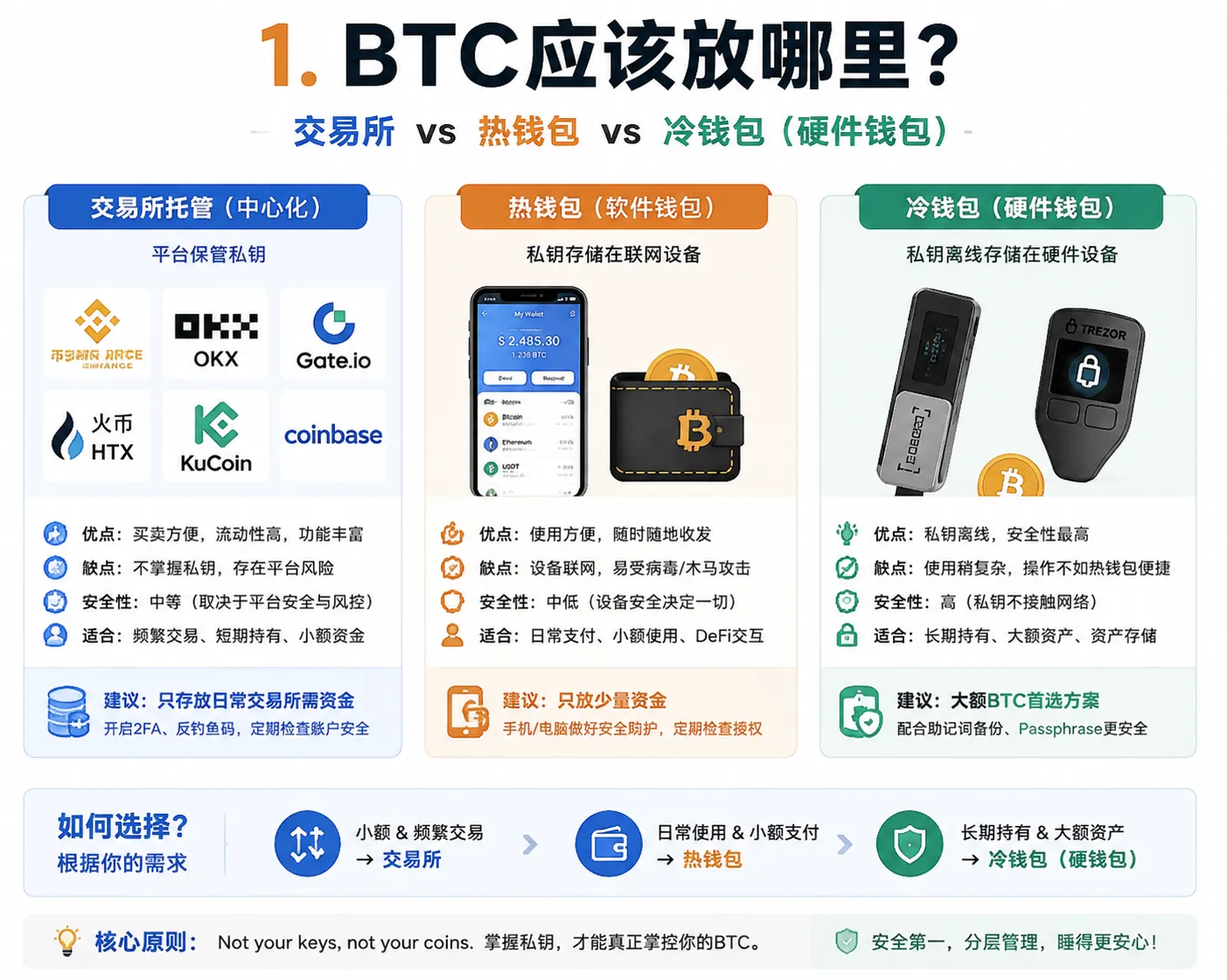
This is the first and most important choice you face. Pick the wrong storage method, and all the security measures after it may be wasted.
The essential difference between the three storage methods
- Exchange custody: platforms like Binance and OKX keep your private keys for you. Your account balance represents the platform's liability to you, not direct control of an on-chain private key. Suited to daily trading and small amounts.
- Software wallet (hot wallet): private keys are stored on an internet-connected device (phone or computer), like Trust Wallet. Convenient but not suited to large amounts — the device is online long-term, and its attack surface is far larger than offline solutions.
- Hardware wallet (cold storage): private keys are stored on a dedicated offline device, like Ledger or Trezor. For long-term holders, cold storage is generally considered one of the highest-security ways to protect private keys.
Real-world choices are more nuanced than "exchanges are bad, wallets are good":
| Scenario | Recommended approach | Notes |
|---|---|---|
| Small trading funds, frequent operations | Mainstream exchange + strong security settings (2FA, anti-phishing code) | Prioritize convenience; choose a large platform with public proof of reserves |
| Medium amount, mostly long-term holding | Hardware wallet + split between exchange | Keep the bulk in the hardware wallet untouched; keep the amount needed for trading on the exchange |
| Important assets, long-term storage, no trading | Hardware wallet + Passphrase, consider multisig cold storage | Assets at this scale are worth a weekend to set up a complete security plan |
A common long-term-holding split example
- Exchange account: only holds the funds needed for daily trading, with Google 2FA + anti-phishing code enabled.
- Hardware wallet A (Ledger + Passphrase): main position, seed phrase backed up on a metal plate in a home safe.
- Hardware wallet B (Trezor): cold backup position, stored in another city — fire and flood won't notify you in advance.
Insider tip #1: an exchange's "proof of reserve" only proves that it held those assets at a given moment, not that it hasn't pledged the same assets to multiple creditors. Binance and OKX are among the few mainstream exchanges that periodically publish audit reports, but there is always a gap between self-custody and custody — to understand why "Not your keys, not your coins," see Why Bitcoin Doesn't Need Banks: UTXO, Nodes, PoW.
If you're still unsure which method to use:
- Where to Store the USDT You Bought on Binance/OKX? Exchange or Withdraw to a Wallet (2026)
- How to Do Binance KYC? Review Time, Failure Reasons, and Solutions (2026)
Best hardware wallet of 2026: Ledger, Trezor, or Coldcard?
If you've decided to buy a hardware wallet (you should, if your BTC exceeds one month's salary), the next question is: which of these three?
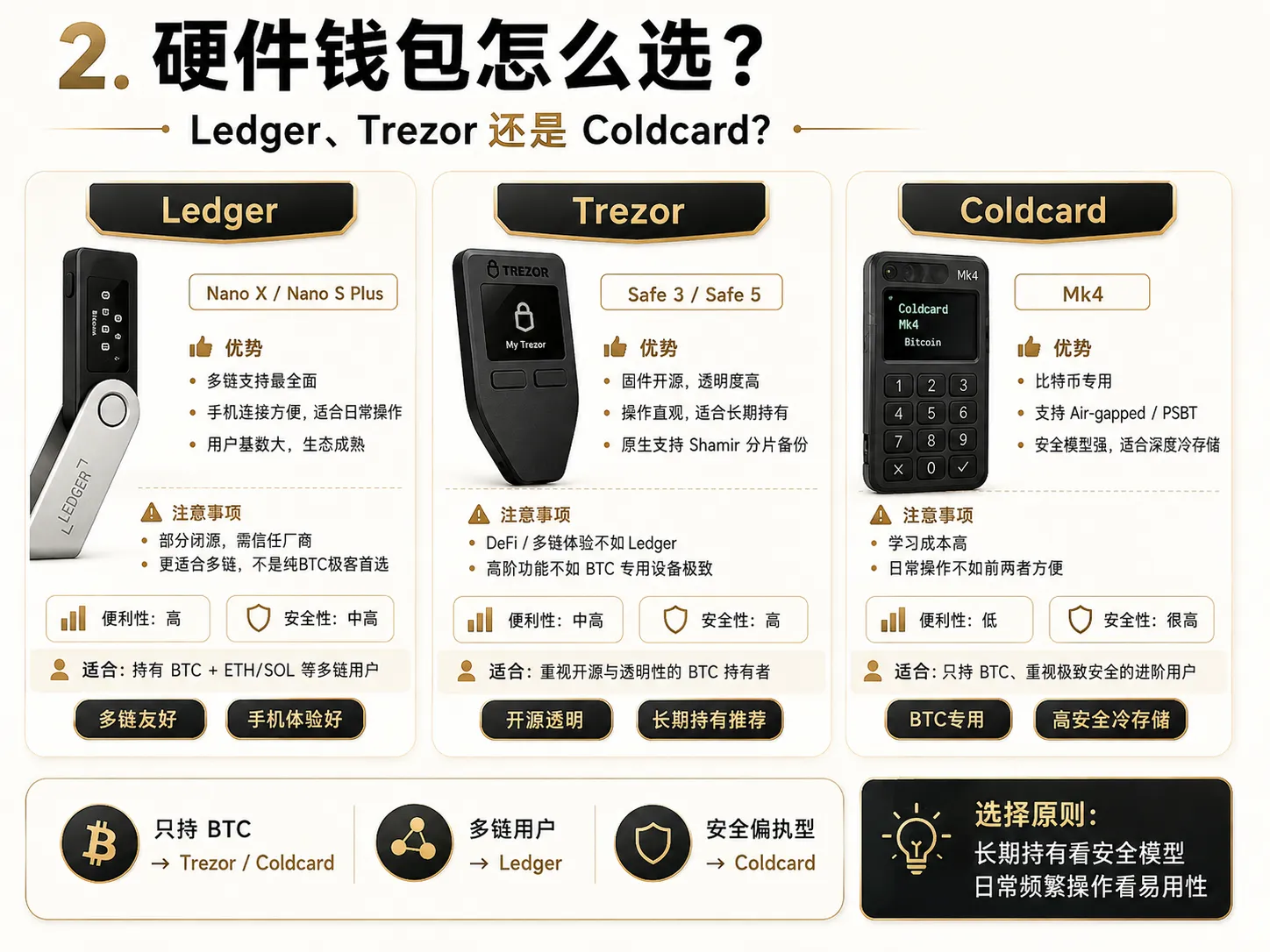
Skip the specs — answer three questions first
- Do you hold only BTC, or also ETH/SOL? → BTC-only, prioritize Coldcard or Trezor; multi-chain users, choose Ledger
- How much do you care about open source? → Care a lot, choose Trezor (fully open-source firmware, most transparent community auditing); care less, choose Ledger (partially closed-source but largest user base, problems get discovered first)
- What's your budget? → $80 budget, Ledger Nano S Plus; $150+, Trezor Safe 5 or Coldcard Mk4
If you're still unclear on the specific differences between hot wallets, cold wallets, and hardware wallets, see How to Choose a Bitcoin Wallet? Cold Wallet/Hot Wallet/Hardware Wallet Compared (2026).
My real usage experience (used all three for over a year, updated 2026.08)
Ledger Nano X (2024–present, daily driver)
Pros: smooth Bluetooth connection to phone, supports the most coins. Bring it on business trips and sign anytime.
Cons: in 2023 Ledger launched the "Recover" seed-phrase backup service, which sparked controversy — although it's optional and I didn't enable it, it reminded users that closed-source firmware means you can't independently audit all the code the way you can with an open-source project. If you value a fully transparent security model, this is worth considering.
One line: the most convenient multi-chain choice, suited to users who need to operate frequently.
Trezor Safe 3 (2023–present, cold backup)
Pros: fully open source, firmware code is public on GitHub for anyone to audit. Physical button operation is clear and intuitive. Natively supports Shamir shard backup (SLIP-39), which Ledger still doesn't have. If you prefer touchscreen operation, choose the higher-spec Trezor Safe 5.
Cons: DeFi transaction support isn't as comprehensive as Ledger. If you hold only BTC, this drawback doesn't exist.
One line: for BTC-only users who value transparency, this is the most reassuring choice.
Coldcard Mk4 (2024–present, deep storage)
Pros: Bitcoin-only, air-gapped design — transfer transaction data via SD card or QR code, physically no contact with a computer. Maximum security. Supports Partially Signed Bitcoin Transactions (PSBT), a toy for advanced users.
Cons: high learning curve. The first setup took 2 hours, and I got the derivation path wrong once — the screen showed a balance of 0, and my heart rate definitely went over 120 in that moment. But once familiar, you'll realize this "inconvenience" is actually its security advantage.
One line: for the paranoid — but if you hold more than 1 BTC, paranoia is justified.
Insider tip #2: no matter which brand you pick, the first thing after receiving the package isn't "start using it" — it's check whether the device has been tampered with. A genuine hardware wallet will always force you to generate a new seed phrase on first boot. If the device arrives "pre-loaded" with a seed phrase, or the tamper-evident sticker shows signs of peeling, don't use it — contact the manufacturer for a replacement. Also, never buy a second-hand hardware wallet on marketplace apps.
How to back up your seed phrase safely? 5 methods compared and recovery testing
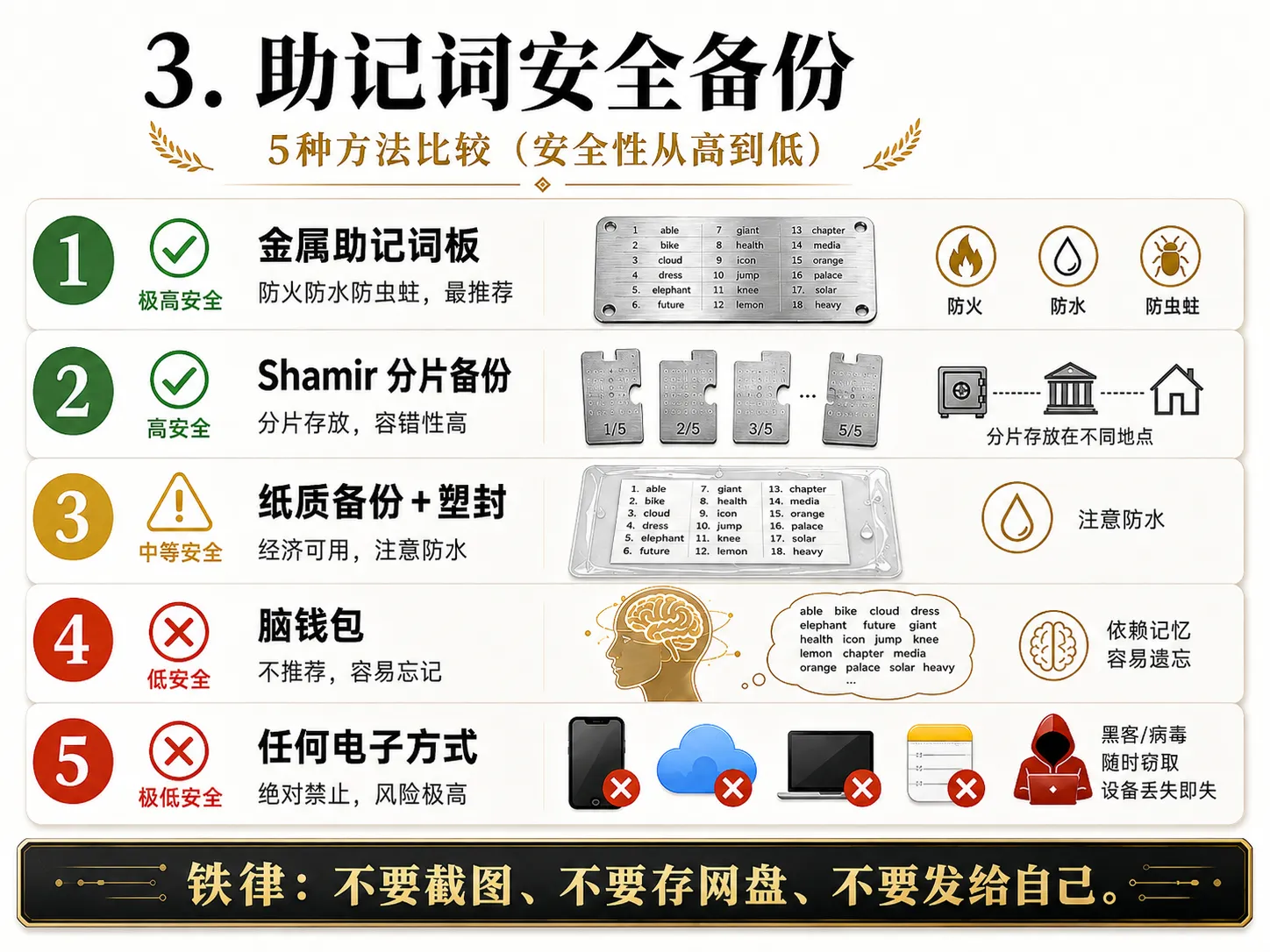
This is the single most important decision in this article. Most BTC thefts or permanent losses aren't caused by the private key being "cracked" — they're caused by a flawed backup method. For the basic concepts and beginner protection of seed phrases, see What Is a Cold Wallet? How to Store Your Seed Phrase Safest (2026, 5 Methods Compared).
I've tried various backup methods. Here's my real ranking from highest to lowest security:
#1: Metal seed phrase plate · Recommended
I've used a metal seed-phrase backup plate — stamping the words one by one into a steel plate took over half an hour, and my fingers were red by the end.
But worth it. A steel plate fears no fire (melting point 1300°C+), no water, no rats. A piece of paper can be destroyed by a spilled cup of coffee; a steel plate won't.
Cost: $50–150. Suited to: people holding more than 0.1 BTC.
The products on the market (Billfodl, Cryptotag, SteelWallet, etc.) all fall into this category — pick whichever is convenient to buy.
#2: Shamir shard backup · Advanced recommendation
Split the seed phrase into 3 shards (or 5) using the Shamir algorithm; any 2 (or 3) can recover the full seed phrase, and a single shard is useless on its own.
2-of-3 example:
- Shard A → home safe
- Shard B → bank safe deposit box (a few dozen dollars a year)
- Shard C → a trusted family member in another city
Even if two locations are destroyed at once, the third can still recover. Even if one location is stolen, the attacker only has a meaningless data fragment.
Note: Trezor is one of the most well-known wallets that natively supports the SLIP-39 Shamir backup standard. Ledger and Coldcard use the traditional single-seed-phrase scheme (BIP39) and require third-party tools to implement sharding.
#3: Paper + lamination · Minimum viable method
Handwrite (don't print! printers have cache), then seal with a laminator. At least it's waterproof.
#4: Brain wallet · Never recommended
"I'll just memorize the 12 words." — This is the most dangerous confidence I've ever seen. Human brains forget, make mistakes, and have accidents.
#5 (red line): any electronic method · Absolutely forbidden
- Screenshot saved to phone → album auto-backs up to iCloud/Google Photos = seed phrase uploaded to the cloud
- Typed into a notes app/Word → malware can scan local documents
- WeChat/email "sent to my own alt account" → chat history lives on a server
- Uploaded to any cloud drive → account stolen = seed phrase leaked
In 2023, multiple users had their seed phrases leaked via iCloud auto-backup of their photo albums, with total losses exceeding millions of dollars.
What you must do after backing up: Seed Phrase recovery test
After creating a wallet, immediately do a seed phrase recovery test — this is the standard step for professional Bitcoin users managing wallets:
- Delete the wallet app
- Re-import with the seed phrase
- Confirm the balance displays correctly
Insider tip #3: the recovery test is the security step I've seen skipped most often. I used to skip it too — until I once helped a friend recover a wallet and found he'd copied one word wrong (wrote "noon" instead of "moon"), and his phone was already broken. We eventually recovered it by brute-forcing the BIP39 English word list. Spending 5 minutes on a recovery test is ten thousand times cheaper than spending 5 days recovering a miscopied word.
What is a Bitcoin Passphrase? Is it worth enabling?
A Passphrase (also called the "25th word") is an advanced feature of BIP39: beyond the 12/24 seed words, you set an additional string yourself. The same seed words + a different Passphrase = a completely different wallet.[1] If you're still unfamiliar with how seed phrases are generated, it's recommended to read What Is a Seed Phrase? Why No One Can Help You Recover Your Assets If You Lose It (2026) first.
What it solves
Scenario one: seed phrase stolen. If someone steals your seed-phrase steel plate, without the Passphrase they'll only see an empty wallet. Your real assets are hidden in the "hidden wallet" protected by the Passphrase.
Scenario two: physical coercion. When someone forces you to unlock your wallet, you can open the wallet without the Passphrase — with a small amount of BTC as bait inside. The bulk of your assets are in the Passphrase wallet, whose existence the attacker doesn't even know about.
What it can't solve — the real risk of losing your Passphrase
Similar cases have appeared multiple times in the crypto community: users set a complex Passphrase, then forgot a case variant, a special-character position, or the exact spelling, and ultimately couldn't recover the large assets in the hidden wallet. A Passphrase has no "forgot password" function — once lost, it's lost forever.
My own lesson was smaller but still painful enough: the first time I set a Passphrase, I used a Chinese sentence. When recovering, I discovered the problem — the BIP39 standard specifies that the Passphrase uses UTF-8 encoding (with NFKD normalization), but if the input method handling, character encoding, or Unicode normalization result differs between recovery and creation, even a seemingly identical Passphrase can generate a completely different wallet.[2] In the end I recovered my assets on the original device, but in those few seconds when the balance showed 0 — I'm not ashamed to admit my legs went weak.
Lesson: for most users, it's recommended to choose a combination of English words that is easy to record and recover accurately, avoiding complex characters or irreproducible input methods. And — write it down, store it somewhere different from the seed phrase.
Decision framework: should you add a Passphrase?
| Your situation | Recommendation |
|---|---|
| BTC value < $1,000 | It's okay not to. Good seed-phrase backup is enough. A Passphrase adds a layer of "might forget it in the future" risk |
| BTC value $1,000 ~ $10,000 | Recommended. Use a simple but hard-to-guess English + number combination, stamped on a metal plate, stored in a different location from the seed phrase |
| BTC value > $10,000 | Strongly recommended. This is the lowest-cost extra security layer |
| You frequently switch between wallet apps | Be careful! Use only English + numbers for the Passphrase, and lock in one wallet brand |
Are Bitcoin multisig wallets safe? Who are they for?
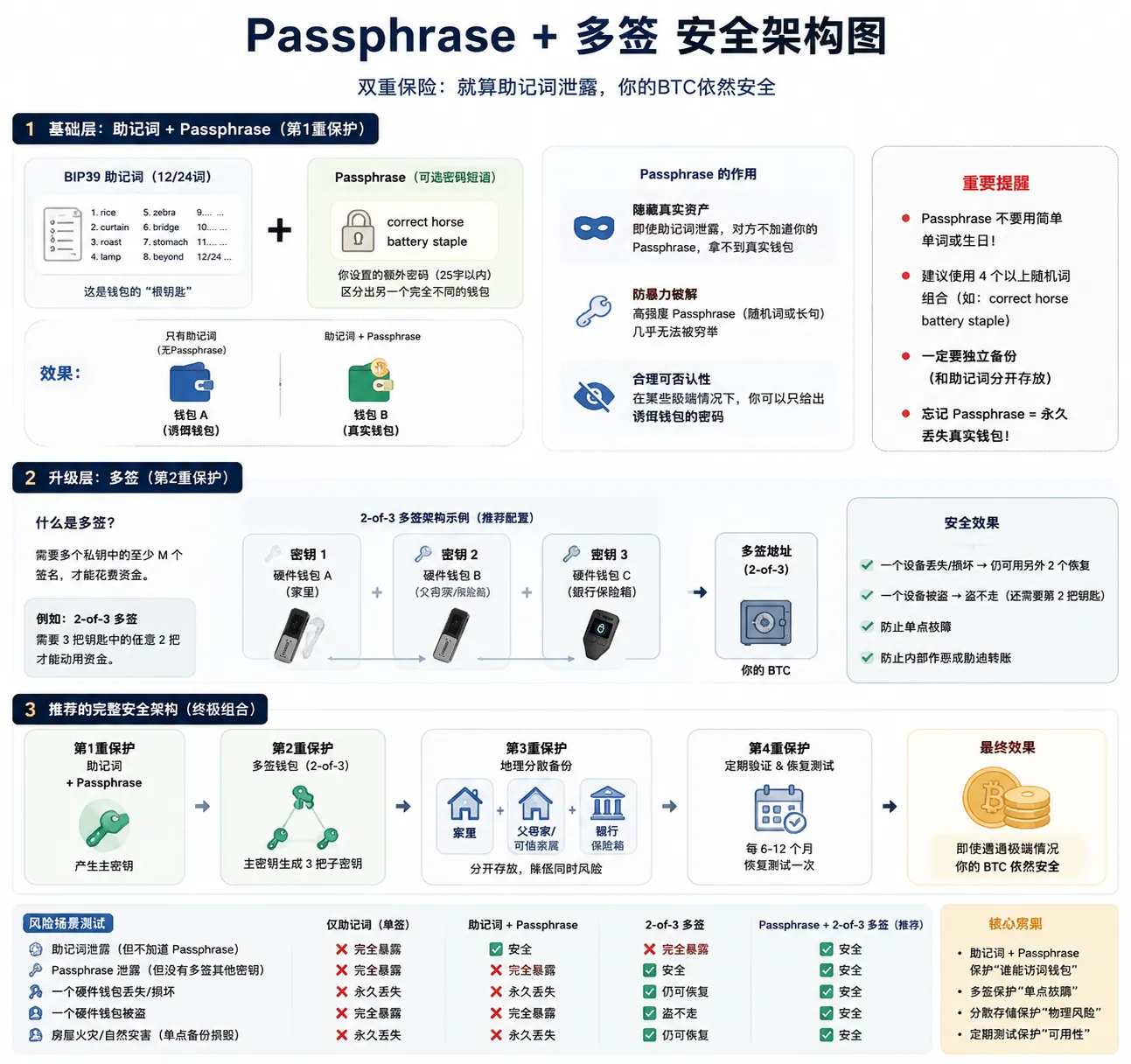
Multisig is Bitcoin's most powerful security mechanism: a transaction needs M of N private keys to sign. The most common is 2-of-3: 3 private keys in different locations, any 2 signing together to transfer.
But multisig is also the most "over-recommended" solution. Not everyone needs it.
3 self-test questions
Question 1: does your BTC exceed two years of your salary?
- Yes → seriously consider multisig
- No → a single-signature hardware wallet + Passphrase is likely enough
Question 2: do you have at least two secure, independent physical storage locations?
- Yes → you have the basic conditions for multisig
- No → solve the physical storage problem first
Question 3: are you willing to operate two devices for every transfer?
- Yes → you have the patience to handle multisig
- No → you'll likely make a rookie mistake in some urgent transfer
My real experience setting up multisig
The first time I set up 2-of-3 multisig with Sparrow Wallet, it took a whole afternoon. The flow was roughly:
- Use 3 hardware wallets to generate 3 sets of seed phrases (back up each set!)
- Export the public key (xpub) from each wallet
- Combine the 3 xpubs into a 2-of-3 wallet in Sparrow
- Test: first send 0.0001 BTC in, then sign it out with two devices
The pitfall I hit: I forgot to label which device each xpub corresponded to. When I later wanted to retest the recovery flow, I completely mixed up which xpub matched which hardware wallet. Now I've labeled each device: "Key A - Ledger - home", "Key B - Trezor - bank", "Key C - Coldcard - parents' house".
Insider tip #4: the biggest hidden cost of multisig isn't money — it's time and organizational discipline. You need to maintain 3 sets of seed-phrase backups, record the xpub and derivation path for each device, and periodically test the recovery flow — and this information cannot be stored all in one place. If your life situation is unstable (frequent moves, no fixed secure storage point), multisig may actually increase the risk of loss.
If you want multisig without the hassle
Recommended: use Unchained Capital or Casa's collaborative custody scheme:
- You hold 2 keys
- The platform holds 1 key
- For daily transfers you sign with your own 2 keys
- If you lose one, the platform can assist recovery (requires identity verification + a waiting period)
The cost is a service fee of $100–250 per year. But for users holding large BTC who don't want to manage the full multisig setup themselves, this is the most pragmatic path.
Bitcoin inheritance planning: how to let your family inherit your BTC
Bitcoin's decentralization has a cruel side: if you leave the world with your private key, your BTC is permanently locked on the blockchain.
This isn't hypothetical. In 2018, the CEO of the QuadrigaCX exchange died suddenly, and the roughly $190 million in crypto assets he alone held custody of still can't be accessed today. Your family doesn't want to become the next news headline.
Choose a plan based on your family's technical level
If your family doesn't understand crypto at all:
The simplest plan — some custody platforms offer account inheritance or beneficiary-related services in specific jurisdictions (like Coinbase supporting beneficiary designation in the US), plus a will explaining:
- Which platforms you hold crypto assets on
- How to contact the platform to start the inheritance process
- What legal documents are needed
This isn't the most "decentralized" plan, but it's the plan your family can actually operate. They don't need to understand private keys; they just need to contact customer support + provide legal documents.
If your family has basic crypto knowledge:
DIY shard plan:
- Split the seed phrase into 3 shards (2-of-3 Shamir shards or simple grouping)
- Shard 1 → home safe (spouse knows the password)
- Shard 2 → kept by a lawyer/law firm
- Shard 3 → bank safe deposit box
- Write a clear recovery guide: which wallet app, the recovery steps, how to test
- Name a "technical executor" in the will who understands crypto
If your family themselves use crypto:
Use Casa Inheritance or Unchained Capital's inheritance plans directly. These plans include:
- Designated beneficiaries and a waiting period (like 6 months)
- Periodic "heartbeat checks" — if you don't respond within the waiting period, assets automatically enter the inheritance process
- Legal compliance support
Regardless of which plan you choose, two things to do today
- Let your family know you have BTC. If your family doesn't know the asset exists, they'll never go looking.
- Write a "open this if something happens to me" envelope. You don't need to write the seed phrase, but be clear: where the assets are, who to contact, what documents are needed.
6 BTC theft cases and how to prevent them
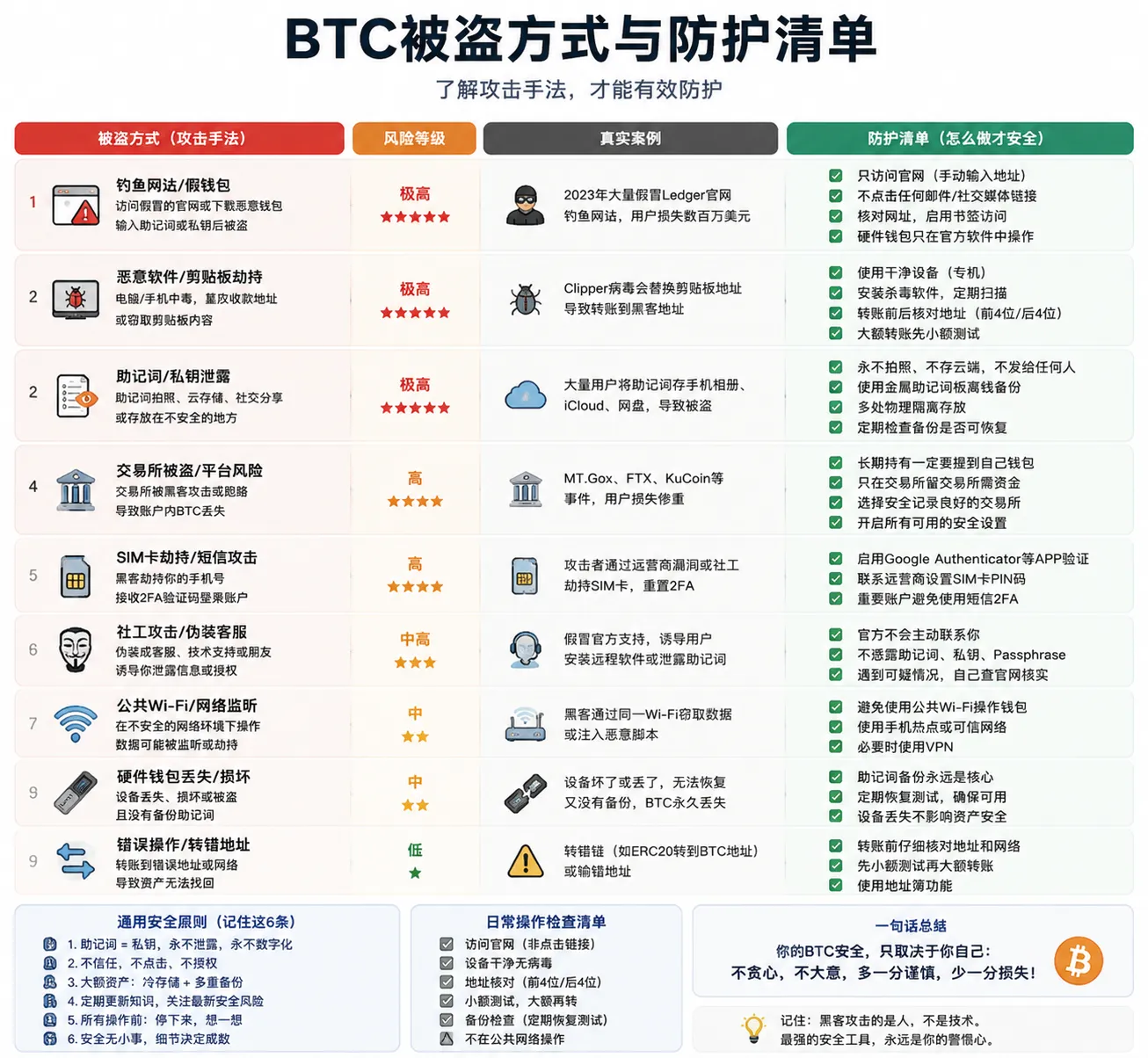
Knowing the attacker's methods is the first step of defense. These are things that really happened — some to people I know, some are cases I tracked in the security community.
1. Phishing sites tricking you into entering your seed phrase (most common, biggest loss)
Attackers run ads on Google that imitate the Ledger site — like 1edger.com vs ledger.com, note the first character is the number 1, not the letter l. The page looks identical to the real site. You enter your seed phrase to "recover your wallet" — and the next second your BTC is gone.
In 2024, a phishing ad sat at the #1 spot of Google search results for 6 hours before being taken down.
How to prevent: never enter your seed phrase on any webpage. A hardware wallet's seed phrase is only ever entered on the device itself and never leaves the device.
2. Clipboard hijacking (low technical skill, high hit rate)
Your computer has malware that monitors your clipboard. You copy a BTC address to send to, and the malware swaps in the attacker's address the instant you paste.
How to prevent: verify the first 6 and last 6 characters of the address before sending. For large transfers, first test with 0.0001 BTC. Don't operate wallets on untrusted computers.
3. Fake wallet apps (easiest for beginners to fall for)
Fake wallet apps occasionally appear on the App Store and Google Play — same name and logo as the real wallet, but the code uploads your seed phrase to the attacker's server.
How to prevent: only download wallet apps from the official website link. Check download counts — real wallets have millions of downloads, fake ones only have hundreds or thousands.
4. Social engineering — impersonating customer support (happens every day)
Attackers impersonate Binance customer support on Telegram/WeChat: "Your account has a security risk, you need to verify your seed phrase to protect your assets."
Remember this: in this world, no one — customer support, official, project team, or police — will ever ask you for your seed phrase to "help" you. Never. More anti-fraud and anti-theft tips can be found in Crypto Wallet Security Basics: Anti-Fraud and Anti-Theft Measures Every Beginner Must Learn.
5. "Dust attack" — privacy leak
Attackers send a tiny amount of BTC to your address (like 0.000005 BTC), aiming to get you to merge this "dust" into your next transaction. Once merged, the attacker can analyze the relationship between multiple addresses you control and pinpoint your holdings and identity.
How to prevent: use a wallet that supports UTXO control (coin control), like Sparrow Wallet or Electrum, and manually select which UTXOs to spend, avoiding automatically merging small amounts of unknown origin.[3]
6. QR code swap — in-person transaction trap
You agree to an in-person transaction with a seller, who shows a QR code for you to scan and pay. You scan and confirm — but that QR code isn't a receiving address; it's a malicious transaction tricking you into signing.
How to prevent: after scanning, carefully check the transaction details — amount, address, fee. Have the other party send 0.0001 BTC as a test first.
Bitcoin private key security checklist (10 steps)
- Step 1: my seed phrase has never existed in any electronic form (no screenshots, no documents, no cloud backups)
- Step 2: my seed phrase is recorded on physical media (metal plate > paper + lamination), stored in a secure location
- Step 3: I've done a seed phrase recovery test — successfully recovered with the seed phrase after deleting the wallet
- Step 4: large BTC (over one month's salary) is stored on a hardware cold wallet
- Step 5: the hardware wallet's PIN isn't 1234 or a birthday
- Step 6: I verify the first 6 and last 6 characters of the address before every transfer
- Step 7: I've never revealed my seed phrase on any website, app, or chat
- Step 8: if holding more than $1,000 in BTC, I've set a Passphrase (and backed it up somewhere different from the seed phrase)
- Step 9: I understand the 6 common theft methods and can recognize phishing sites and social-engineering attacks
- Step 10: my family knows I have BTC, and knows who to contact and what to do if something happens
FAQ
Q1: What to do if I lose my Bitcoin private key? Seed phrase stolen but BTC still there?
Don't wait, don't hesitate. Immediately create a new wallet on a clean device, generate a new seed phrase, and transfer all BTC out of the old wallet. The attacker may be waiting for your balance to grow before striking. You still have a window — but it won't be long.
Q2: I lost my seed phrase but the wallet app still opens — can I recover it?
If the app can still show the seed phrase (usually in the "security settings" or "backup" menu), copy it down immediately. If it can't be viewed but you can still transfer: immediately move all BTC to a new wallet whose seed phrase you've already backed up. Move assets first, then deal with the old wallet. Don't close the app, don't restart the phone.
Q3: Which is better, 12 seed words or 24?
Security-wise, 12 words (128 bits of randomness) is already enough — brute-forcing it requires more energy than all computers on Earth running until the sun dies.[4] The reason to choose 24 words isn't "more secure" — it's fault tolerance: if 3 of 24 words are destroyed, recovery may still be possible; if 2 of 12 words are destroyed, it's very dicey. If you back up on a metal plate, 12 is enough; if you can only use paper, 24 is better insurance.
Q4: Is the Ledger hardware wallet safe?
As the hardware wallet brand with the largest user base, Ledger has an overall good security record and uses a Secure Element security chip. But the 2023 "Recover" optional-service controversy reminds users: closed-source firmware means you can't independently audit all the code the way you can with an open-source project, so you need to maintain a basic level of trust judgment toward the manufacturer.
Q5: Is the Trezor hardware wallet safe? What real benefit does open source bring?
Trezor's security model is built on full open source — the firmware code is public on GitHub, and any security researcher can audit it. This means backdoors are harder to hide and vulnerabilities get discovered faster. For users who value transparency and verifiability, Trezor is currently one of the most reliable choices. Note: Trezor Safe 3 uses physical buttons, and Safe 5 offers a touchscreen.
Q6: Is a Passphrase safe? Could it actually cause me to lose coins?
A Passphrase itself is a secure cryptographic tool (part of the BIP39 standard). What really causes coin loss isn't the Passphrase — it's a person forgetting the Passphrase they set. Use a combination of English words, stamp it on a metal plate, and store it somewhere different from the seed phrase. If you use non-ASCII characters or complex special symbols, you need to ensure the future recovery environment can accurately input the same string — for most users, a combination of English words is easier to recover in the long term (see the Passphrase section in the main text).
Q7: Will Bitcoin be cracked by quantum computing in the future?
The 2026 consensus is: for at least the next 10 years, a practical quantum computer capable of breaking the secp256k1 elliptic curve will not appear. The Bitcoin community is already researching quantum-resistant signature schemes. What you should worry about today is screenshotting your seed phrase onto your phone — the probability of that causing coin loss is far higher than quantum-computer cracking.
Q8: Is BTC in Binance and OKX accounts safe?
For daily trading amounts, yes — major exchanges have cold-wallet storage, proof of reserves, and insurance funds. But there's a gap between "safe" and "absolutely safe." Remember: "Not your keys, not your coins" — what's in an exchange account is a platform liability relationship; only what's controlled by on-chain private keys is truly your coin. Use both, manage them separately.
Q9: What is Bitcoin Cold Storage?
Bitcoin Cold Storage refers to storage methods that keep private keys offline long-term, including hardware wallets, air-gapped signing devices, and multisig cold-storage schemes. Unlike a hot wallet, cold storage greatly reduces the risk of remote attacks by minimizing the private key's exposure to internet-connected environments.
Q10: Does a hardware wallet need to be connected to a computer or phone every day?
No. A hardware wallet's main purpose is signing transactions — it only needs to connect when you need to transfer. If you're just long-term holding BTC (HODL), the hardware wallet can stay in a safe and remain offline. Connect it periodically (like every 6 months) to check for firmware updates.
If you only do 5 things today
Read the long article and don't know where to start? In priority order, complete these 5 steps first:
- Buy a hardware wallet (from the official site) — worth it once BTC exceeds one month's salary
- Stamp the seed phrase onto a metal plate — don't use paper, don't photograph it, don't store it on any electronic device
- Delete all electronic backups — check your phone's photo album, notes, and cloud drives to make sure the seed phrase isn't on any internet-connected device
- Complete a recovery test — delete the wallet app, recover with the seed phrase, confirm the balance is correct
- Tell a family member you have BTC — you don't need to share the seed phrase, just let them know the asset exists and the recovery path
After these 5 steps, your BTC security level has gone from "high risk" to "basically safe." The remaining Passphrase, multisig, and inheritance planning can be filled in gradually.
Summary
The essence of BTC private key security isn't learning a set of knowledge — it's an ongoing decision process.
Just remember these 6 decisions:
- Where to keep it — if BTC exceeds one month's salary, buy a hardware cold wallet; if not, keep it on a major exchange
- Which to buy — BTC-only, choose Trezor or Coldcard; multi-chain, choose Ledger
- How to back up — metal plate > paper, never use electronic devices to store the seed phrase, do a recovery test
- Add a Passphrase or not — add it once above $1,000, but be sure to back up the Passphrase itself
- Multisig or not — only worth serious consideration above two years of salary
- Inheritance planning — tell your family today that you have BTC, the rest can be improved gradually
Bitcoin gives you the ability to be the "sovereign bank" of your own assets — while placing 100% of the responsibility in your hands. No customer support, no appeals, no "I forgot my password."
This isn't a set of knowledge. It's a set of decisions. Make the choices, execute them fully — and your BTC will truly belong to you.
Data verification notes
The key facts in this article were verified on 2026-09-15 against the BIP39 specification and the Sparrow Wallet official documentation, item by item:
- BIP39 Passphrase: BIP39 allows an optional Passphrase (commonly called the "25th word") to be added beyond the 12/24 seed words; the same seed words with different Passphrases generate completely different wallets. Source: BIP39 specification (Bitcoin BIPs).
- Passphrase encoding: BIP39 specifies that the Passphrase uses UTF-8 encoding with NFKD normalization; different input methods or character encodings may generate different wallets. Source: BIP39 specification (Bitcoin BIPs).
- UTXO control: Sparrow Wallet supports coin control, allowing you to manually select which UTXOs to spend and avoid automatically merging small inputs. Source: Sparrow Wallet.
- Security of 12 seed words: in BIP39, 12 words correspond to 128 bits of entropy (plus a 4-bit checksum), making brute-force enumeration impractical in reality. Source: BIP39 specification (Bitcoin BIPs).
Related reading
- What Is a Crypto Wallet? Wallet Addresses, Seed Phrases, and Asset Security (2026)
- How to Choose a Bitcoin Wallet? Cold Wallet/Hot Wallet/Hardware Wallet Compared (2026)
- Why Is Bitcoin Valuable? Scarcity, Decentralization, Network Effects
- How to Dollar-Cost Average into Crypto? The Hassle-Free DCA BTC/ETH Method (2026)
About the author
The CoinTrailHub security research team has long focused on Bitcoin wallet security, self-custody technology, and digital asset risk management. This article is compiled based on public technical standards (BIP39, BIP32, BIP44, SLIP-39), official documentation, and real user experience. Content is for education and information only, and does not constitute investment or security advice.
Reference sources
The technical content of this article references the following authoritative sources; advanced readers are encouraged to read the original documents directly:
- Bitcoin Developer Documentation — official Bitcoin developer documentation
- BIP39: Mnemonic code for generating deterministic keys — seed phrase generation standard
- BIP32: Hierarchical Deterministic Wallets — hierarchical deterministic wallet standard
- Trezor Firmware (GitHub) — Trezor open-source firmware
- Ledger Security Policy — Ledger official security description
- Sparrow Wallet Documentation — open-source Bitcoin wallet documentation
- SLIP-39: Shamir's Secret-Sharing for Mnemonic Codes — Shamir shard backup standard
Disclaimer
This article is for education and informational reference only and does not constitute any form of investment advice, financial advice, or legal advice. The crypto market is highly risky and volatile, and any investment decision should be made based on independent research and after consulting a licensed professional.
Any products, services, or third-party tools mentioned in this article (including but not limited to Ledger, Trezor, Coldcard, Casa, Unchained Capital, Sparrow Wallet, Electrum, Binance, OKX, etc.) do not represent CoinTrailHub's official endorsement. Always verify the accuracy and timeliness of information through official channels.
The ultimate responsibility for private key management and asset security lies entirely with the user. CoinTrailHub and its authors assume no responsibility for any asset loss resulting from the use of the information in this article.
- 2026-10-17UpdateAdded evidence-chain superscripts and the "Data verification notes" section.
- 2026-09-15UpdateAdded official sources and verification date.
See ourEditorial Policy and the correction process in ourCorrections Policy.
The CoinTrailHub editorial team focuses on crypto education for beginners, exchange security and P2P trading risk. This article is compiled from official sources and public data, reviewed by humans, and strives for accuracy but is not investment advice.
Last updated:2026-09-15 · Content reviewed by humans · Learn more
© 2026 CoinTrailHub · Original content. Reproduction or rewriting without permission is prohibited.