
Binance KYC: How to Verify Your Identity — Review Time, Failure Reasons & Fixes (2026)
Table of contents

Binance new user rewards
20% trading fee rebate
Official Binance registration. Complete identity verification (KYC) to trade and withdraw.
Right after you sign up for Binance, many beginners see a prompt:
You need to complete identity verification before you can use more products and services.
That step is KYC — Know Your Customer.
When I walked through the Binance sign-up flow, I noticed that what actually trips up most beginners is not the sign-up itself, but the identity verification right after.
They don't know which document to choose.
They don't know how to take the photo.
They don't know what to do when face verification fails.
And they don't know how long the review takes.
So this article follows the actual verification order inside the Binance App and explains the KYC flow, review time, failure reasons and how to fix them.
Supported document types, review times and verification requirements may differ by region, so always follow what the Binance App or official website actually shows.
This article is for basic Crypto operation education only and is not investment, financial or trading advice. It does not collect personal identity information, and it does not offer account registration, identity verification or remote-operation services on your behalf.
Table of contents
- What is Binance KYC?
- Why complete KYC after signing up?
- What to prepare before KYC
- The Binance KYC verification flow
- How long does Binance KYC review usually take?
- Common reasons Binance KYC fails
- What to do after Binance KYC fails
- The most common KYC mistakes for beginners
- Binance KYC FAQ
- What to learn after completing KYC
30-second summary
If this is your first Binance KYC, remember these points:
- Use your own real identity information
- Make sure your country/region matches your document
- Keep document photos clear, complete and unobstructed
- Keep good lighting during face verification
- If the review fails, read the on-screen reason first, then resubmit
- Do not let someone else verify on your behalf
- Never send your ID, passport, face screenshot or verification code to strangers
To put it simply:
KYC is not hard — the key is real information, clear photos, and never letting someone else operate on your behalf.
If all goes well you can submit the verification within 10 minutes. The two places beginners most often get stuck are picking the wrong region of residence / document-issuing region, and submitting document photos that have glare or cut-off edges.
1. What is Binance KYC?
KYC stands for Know Your Customer.
In short, the platform needs to confirm:
- Who you are
- Whether the identity information is really yours
- Whether your account meets the relevant compliance requirements
On a crypto exchange, KYC usually involves:
- Selecting your country or region of residence
- Filling in personal information
- Uploading your national ID, passport or driver's license
- Completing face verification
- In some cases, submitting proof of address or supplementary documents
For beginners, there is no need to overthink KYC.
You can understand it as:
Signing up creates the entry; KYC confirms the account belongs to you.
In Binance's official identity verification guidance, the personal-account verification flow generally includes selecting your region of residence, your document-issuing country/region and your document type, then completing verification as prompted.[1]
Official source: Binance identity verification guide
One important warning:
KYC involves ID documents, face verification and personal data — sensitive information.
Be wary of anyone who asks you to send document photos, verification codes, account passwords to LINE, Telegram, Discord or an unknown email.
2. Why complete KYC after signing up?
Many beginners assume they can use every feature right after signing up for Binance.
In practice, some features may require identity verification first, for example:
- Buying crypto
- Deposits and withdrawals
- Withdrawal limits
- Fiat-related features
- Certain products and services
- Account security and risk controls
Binance's official guidance also notes that completing identity verification usually helps unlock deposits, withdrawals, trading and more account features.[2]
Official source: Why complete identity verification
So the safer order is:
Sign up for Binance → complete KYC → enable security settings → then learn to buy USDT, deposit and withdraw.
Do not rush into large operations right after signing up.
3. What to prepare before KYC
Before starting verification, prepare:
- Your own identity document
- A phone that can take photos
- A well-lit environment
- A stable network connection
- Real information that matches your document
- Yourself operating, not someone else on your behalf
Commonly accepted documents include:
- National ID
- Passport
- Driver's license
Supported document types may differ by region — follow what the Binance page shows.
The two most important things before KYC:
First, keep your information consistent.
Your name, date of birth, document number and other details should match what you fill in.
Second, keep your photos clear.
The document corners must be complete and the text legible — no glare, obstruction or blur.
4. The Binance KYC verification flow
If this is your first time verifying your identity, understand this order first:
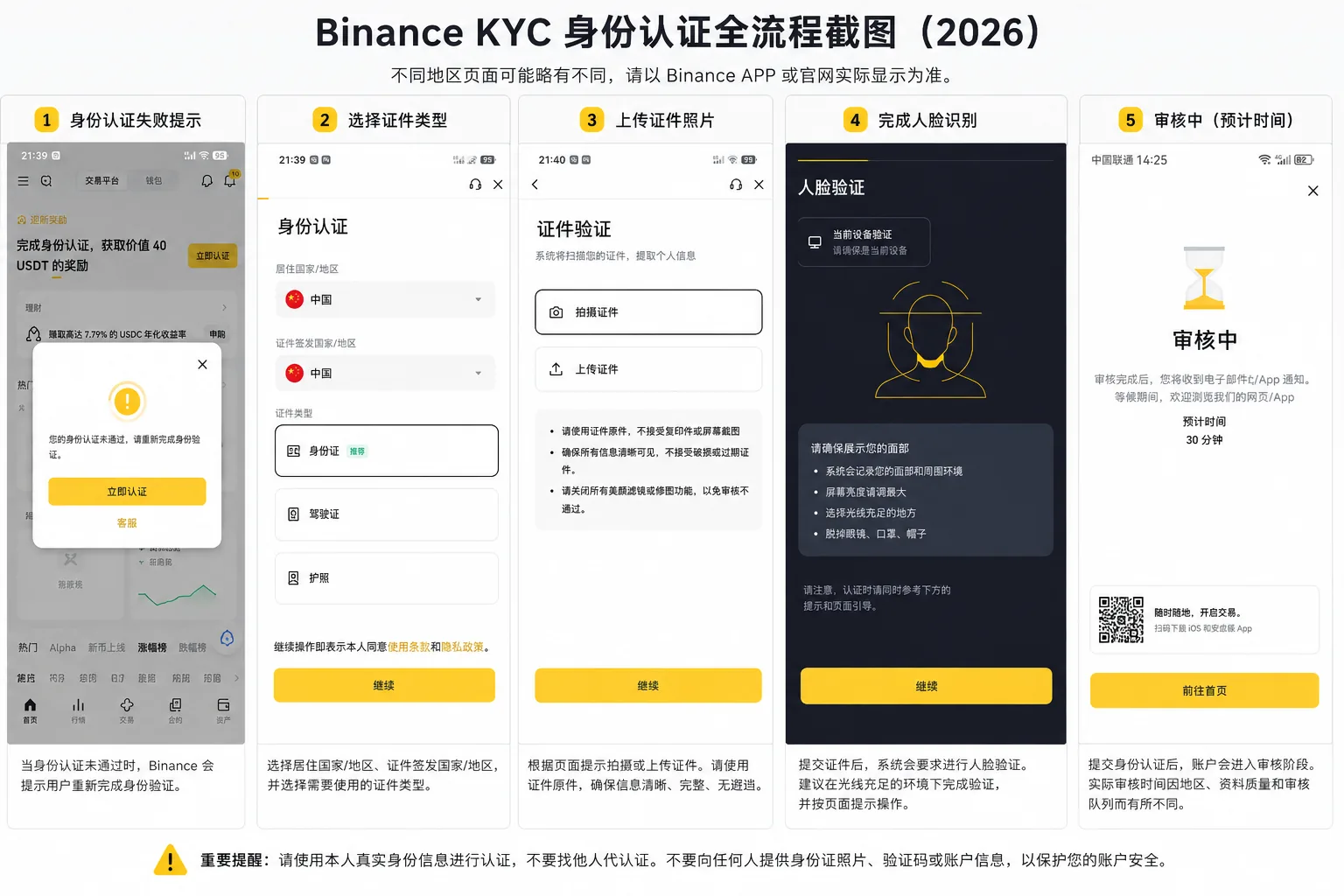
Open the identity verification page → select country/region → choose document type → upload documents → complete face verification → wait for the review result.
Step 1: Open the identity verification page
After signing up and logging into Binance, go to the account center or identity verification page.
You will usually see:
- Identity Verification
- Verification
- Verify Now
- Get Verified
If a verification prompt pops up right after sign-up, you can also enter from there.
Step 2: Select your country or region of residence
After entering the verification page, the system asks you to select your country or region of residence.
Fill this in truthfully — do not pick at random.
A wrong selection can cause document-type mismatches or block the flow.
Step 3: Select the country or region that issued your document
Next, the page may ask you to select the country or region that issued your document.
For example, if you use a national ID, select the issuing region that matches it.
Do not pick another region just because it "looks easier to pass".
Step 4: Choose your document type
Common document types include:
- National ID
- Passport
- Driver's license
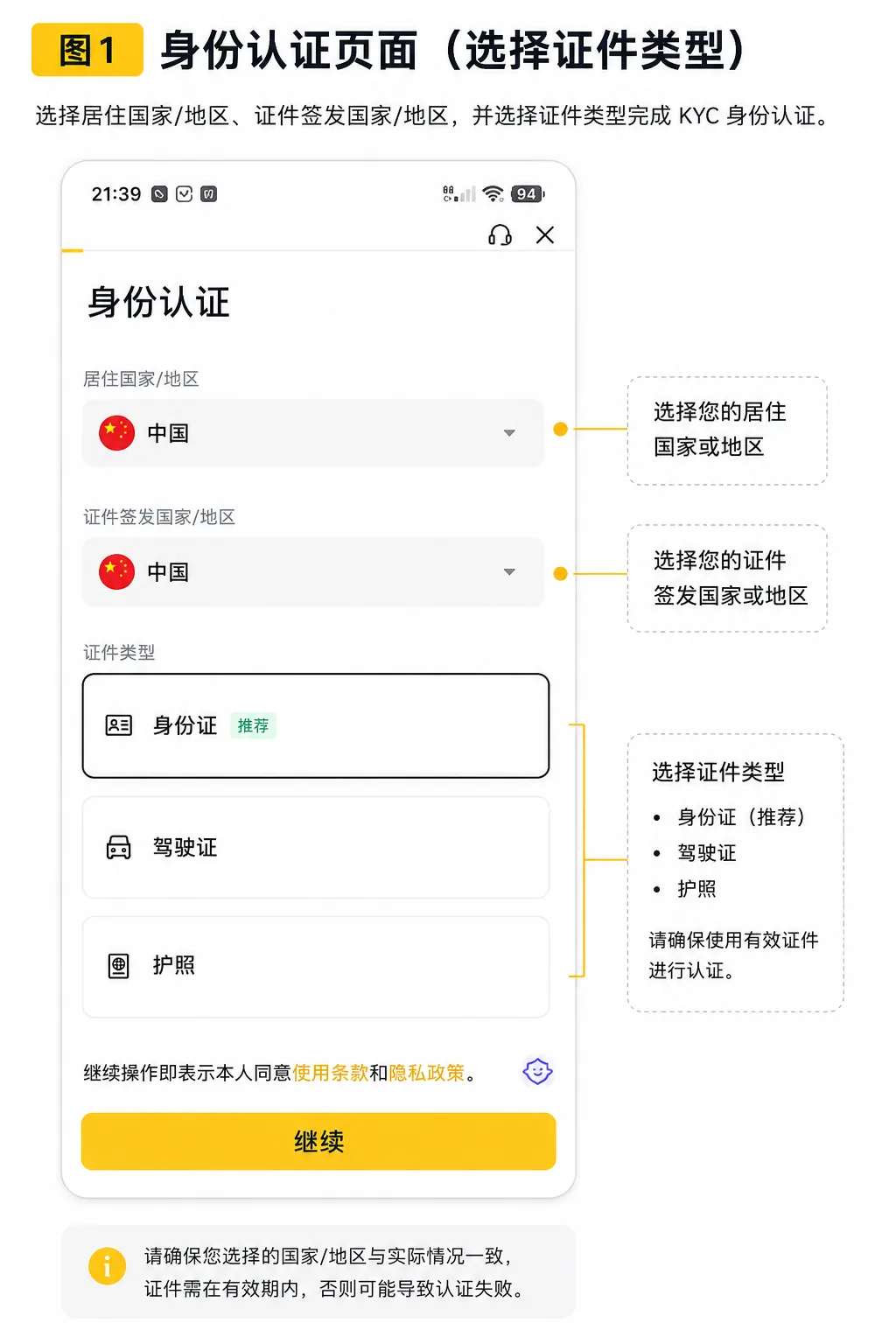
The page may look different by region.
Beginners should prefer the document they use most often, with the clearest information and that is not expired.
Step 5: Upload document photos
When uploading, keep these in mind:
- All four corners of the document visible
- Text clearly legible
- No glare
- No obstruction
- No over-cropping
- Do not upload an expired document
- Do not use someone else's document
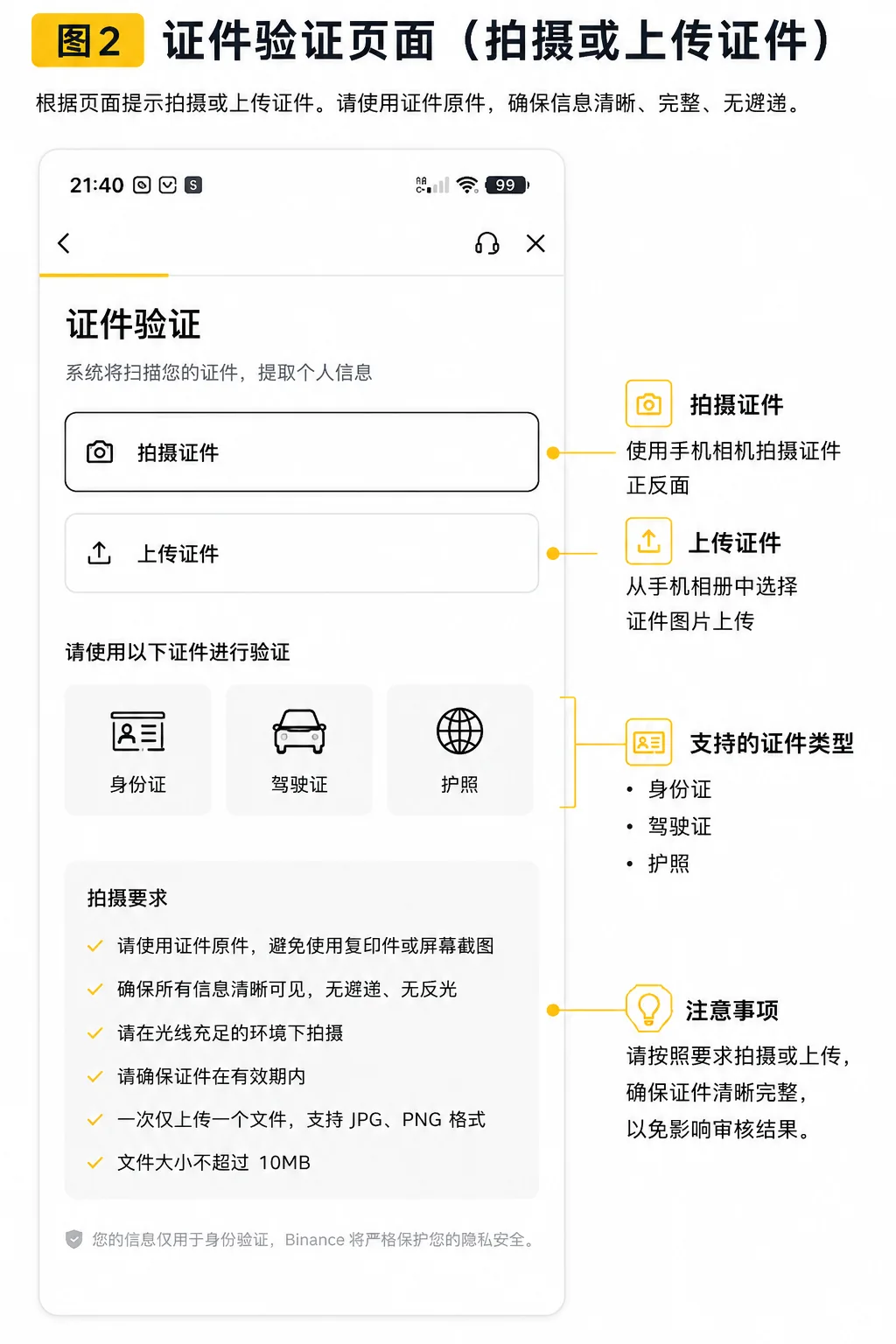
If you use a national ID, you may need to upload both the front and back.
If you use a passport, make sure the data page is clear and complete.
Do not show real IDs, passports, faces or document numbers in screenshots you share. If you are making a tutorial screenshot, show only the flow pages and blur out any sensitive information.
Step 6: Complete face verification
After submitting documents, the system usually asks for face verification.
Recommendations:
- Do it in a well-lit place
- No hats
- No sunglasses
- No masks
- Do not let someone else do it for you
- Follow the on-screen prompts to turn your head, blink or complete the requested action
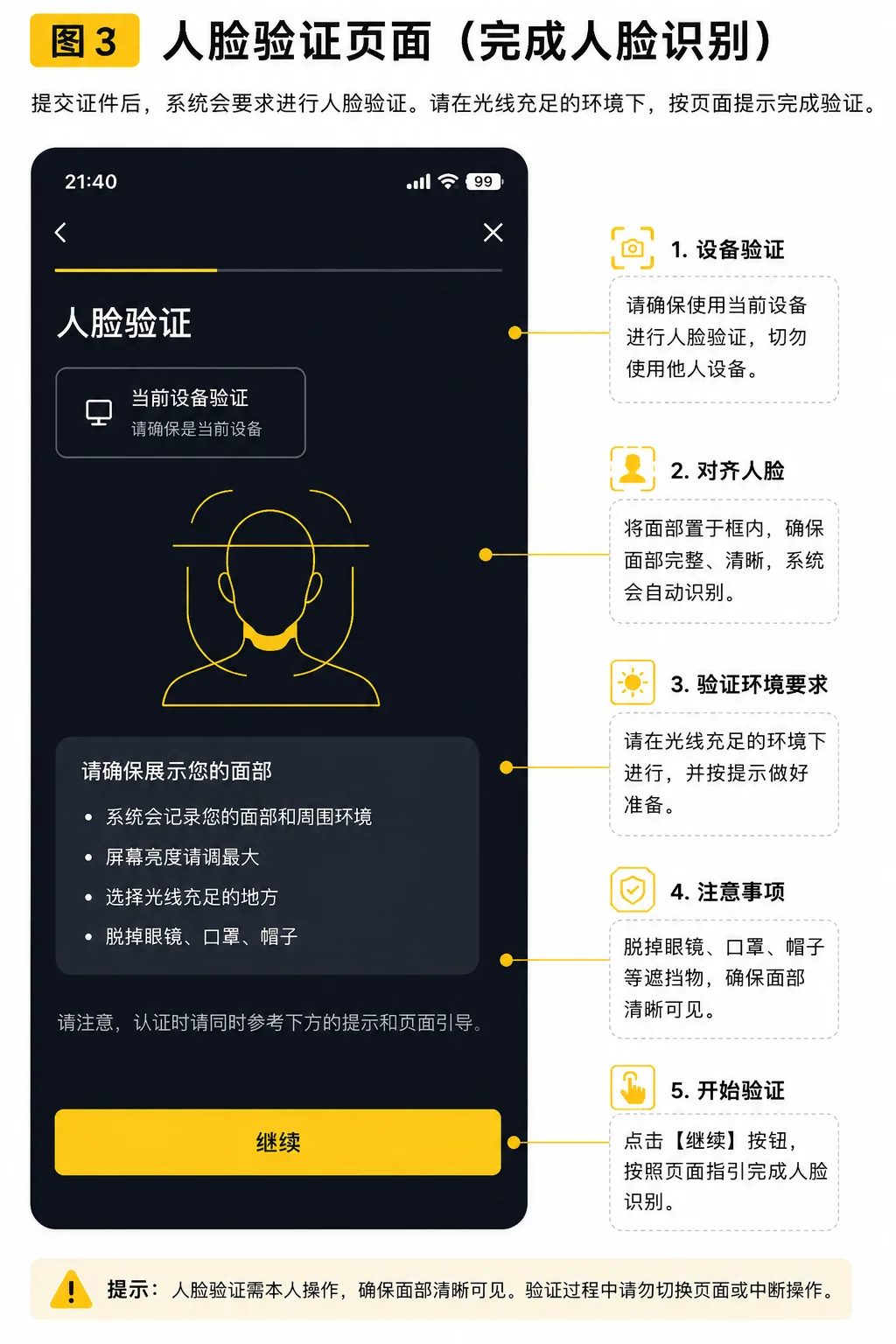
If face verification fails, do not panic — first check the lighting, network and camera permission.
Step 7: Wait for the review result
After submitting, wait for the system review.
Once approved, your account will show the corresponding verification status.
If the review fails, the page usually shows a reason or a resubmit entry.
To see exactly where to tap at each KYC step in the app and how to pass face verification, watch How to complete Binance identity verification — KYC walkthrough video.
If you can't receive the email or SMS verification code, or get "wrong code" / "expired" errors, read Binance sign-up: not receiving the verification code? Email & SMS troubleshooting (2026).
5. How long does Binance KYC review usually take?
KYC review time is not fixed.
From actual tests and beginner feedback, most standard identity verifications complete within minutes to a few hours.
The page shown in our test displayed an estimated review time of 30 minutes, but the actual time still depends on what your account page shows.
Binance's official Help Center wording is "usually reviewed within 48 hours", though special cases can take longer.[3] The two are not contradictory: 30 minutes is the on-screen estimate, 48 hours is the official upper bound, and the actual time depends on what your account page and email notifications show.
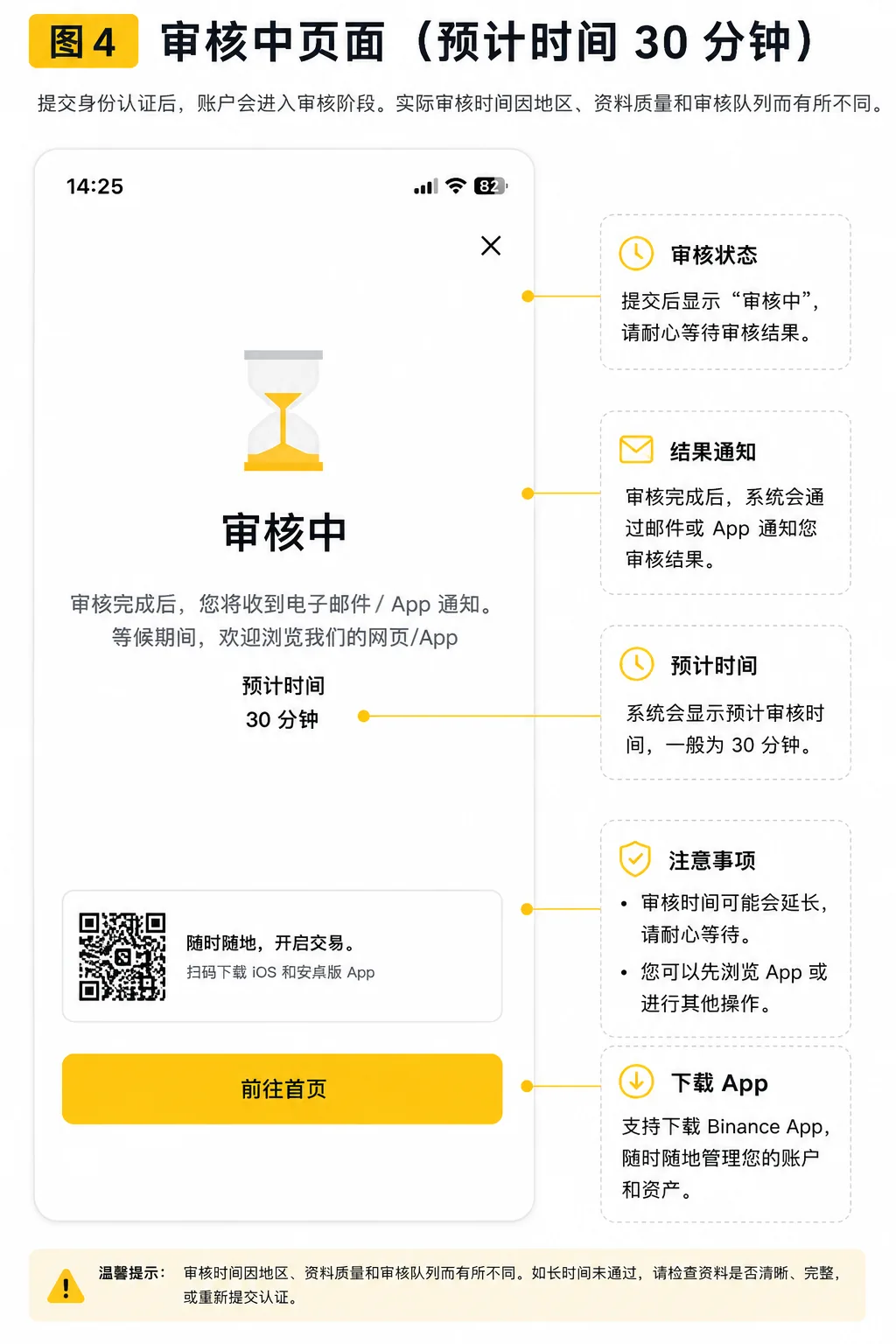
Some users pass faster, some take longer.
It depends on:
- Your region
- Document type
- Photo quality
- Review queue
- Whether supplementary information is needed
If it takes longer than expected, first check:
- Whether the page asks for supplementary information
- Whether you received an email
- Whether the app shows a verification status update
- Whether you submitted a blurry or incomplete photo
Do not believe claims like "paid faster review" or "internal fast pass".
Those are often entry points for scams.
6. Common reasons Binance KYC fails
A failed KYC does not always mean your account has a serious problem.
Often it is just that the information, photo or steps do not meet requirements.
| Failure reason | How to fix |
|---|---|
| Blurry document photo | Retake a clear photo and make sure the text is legible |
| Glare or shadows on the document | Move to a spot with soft light; do not let light hit the document directly |
| Cut-off document edges | Leave a margin when shooting; do not crop too tightly |
| Wrong information | Check name, document number and date of birth one by one before submitting |
| Expired document | Resubmit with a document that is still valid |
| Face verification failed | Move to better lighting, keep your face unobstructed and follow the prompts |
The table above is a quick reference for the six failure reasons; see the sections below for details and exact steps.
1. Blurry document photo
If the resolution is too low or out of focus, the system may not read the document information.
How to fix:
Retake a clear photo and make sure the text is legible.
2. Glare or shadows on the document
If strong glare covers the name, number, photo or other key information, it may fail.
How to fix:
Move to a spot with soft light, and do not let light shine directly on the document.
3. Cut-off document edges
If the four corners are not fully captured, it can also fail.
How to fix:
Leave a small margin when shooting, and do not crop too tightly.
4. Wrong information
For example, wrong name order, a mistyped document number, or a mismatched date of birth can all affect the review.
How to fix:
Check everything one by one before submitting, and do not use nicknames, abbreviations or other non-document information.
5. Expired document
An expired document usually cannot pass verification.
How to fix:
Resubmit with a document that is still valid.
6. Face verification failed
Common causes include dim lighting, a blurry camera, a covered face, or network lag.
How to fix:
Move to a well-lit place, keep your face unobstructed, and follow the on-screen prompts.
7. What to do after Binance KYC fails
If verification fails, do not blindly resubmit over and over.
Follow this order instead.
Step 1: Read the failure reason first
Open the verification page and read the system prompt.
If it mentions a photo problem, retake the photo.
If it mentions mismatched information, check your details.
If it mentions an invalid document, switch to a valid one.
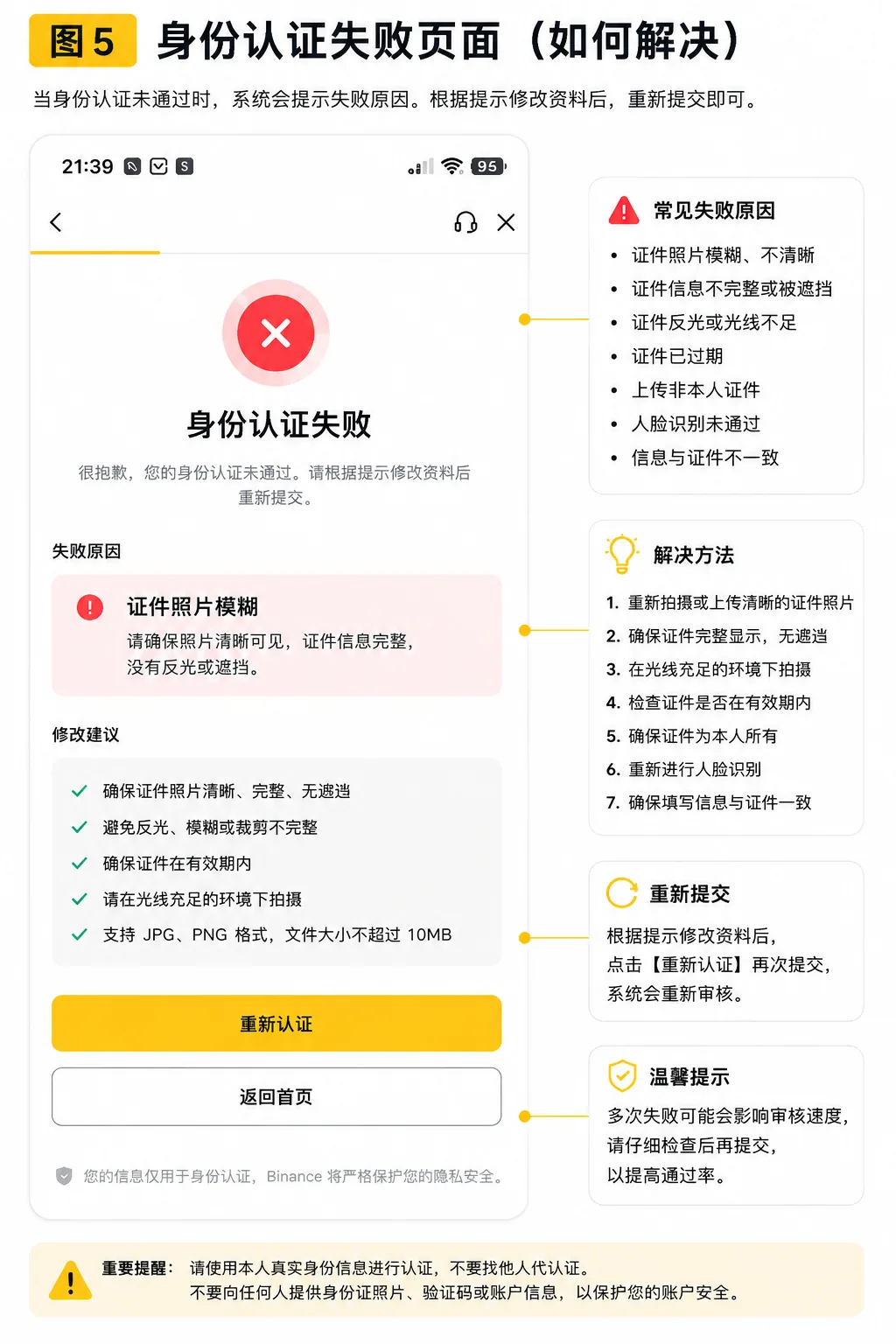
Step 2: Re-check your document
Before resubmitting, check:
- Is the document expired?
- Does the name match?
- Is the document number correct?
- Is the photo clear?
- Are all four corners visible?
- Is there any glare or obstruction?
Step 3: Redo face verification
If the problem is face verification, you can:
- Move to a place with better lighting
- Clean the camera lens
- Turn off beauty mode or filters
- Keep your face unobstructed
- Complete the on-screen actions slowly
Step 4: Do not let someone else verify for you
This is the most important.
Do not seek out so-called "support", "teachers", "verification passing" or "internal channels".
Having someone else verify can lead to:
- An account whose identity is not yours
- Difficulty appealing later
- Withdrawal or risk-control problems
- Personal data leaks
- An account you cannot fully control
Step 5: Contact official support if needed
If you are sure your information is correct but still cannot pass, contact Binance through official support channels.
Do not contact "support" through Telegram DMs, LINE groups or unknown emails.
8. The most common KYC mistakes for beginners
1. Verifying with someone else's identity
This is strongly discouraged.
An exchange account should use your own identity information.
Otherwise, when you later face risk controls, withdrawals or account recovery, it is hard to prove the account is yours.
2. Sending document photos to strangers
KYC can involve sensitive information such as your ID, passport and face verification.
Do not send this to strangers, and do not let someone else operate remotely on your behalf.
3. Selecting the wrong region
If your region of residence or document-issuing region is wrong, it can cause a document-type mismatch.
Beginners should not pick at random — fill in the real information.
4. Carelessly photographed documents
Blurry, glare-affected, obstructed or cut-off photos are among the most common problems.
Before submitting, take a moment to check whether the photo is clear.
5. Blindly resubmitting after failure
After a failure, read the reason first; do not blindly keep submitting.
Binance may limit identity verification attempts: some official guidance mentions up to 10 attempts per day, and if you are rejected 10 times within 24 hours you may need to wait 24 hours before trying again — follow what your account page shows.[4] Blindly resubmitting can actually trigger the limit faster.
If you fail multiple times, you may need to wait or follow the page's instructions.
9. Binance KYC FAQ
1. Is Binance KYC mandatory?
Many features usually require identity verification before they can be used, depending on what the current Binance page shows.
2. How long does Binance KYC review take?
The time is not fixed.
Some users pass quickly, some take longer.
Follow the on-screen prompt and email notifications.
3. Can I resubmit after Binance KYC fails?
Usually you can resubmit as prompted.
First read the failure reason, then fix your information or retake the document photo.
4. Can I verify with someone else's ID?
It is not recommended and not safe.
The account should use your own real identity information.
Otherwise the risk is high later, during appeals, withdrawal risk controls or security verification.
5. Does KYC affect asset safety?
KYC itself is an identity verification process.
What really affects account safety is whether you protect your password, verification codes, devices and security settings.
After completing KYC, keep enabling 2FA and anti-phishing codes, and regularly check your login devices.
6. Will I be asked to re-verify after passing?
It is possible.
If your document expires, your identity information changes, regional rules change or the platform requires supplementary verification, you may need to update your identity information.
Binance's official guidance on updating identity information also notes that in some cases you may need to resubmit or update your verification details.[5]
Official source: Binance — updating identity information
10. What to learn after completing KYC
After completing KYC, do not rush into complex trading.
A safer order is:
- Enable Binance security settings
- Learn what USDT is
- Learn how to buy USDT
- Learn deposits and withdrawals
- Learn wallet addresses and withdrawal networks
- Learn seed phrases and wallet security
If you haven't read the sign-up guide yet:
Binance sign-up tutorial (2026)
If you are still new to the basics, continue with:
What is Crypto? Cryptocurrency, Web3 wallets and on-chain assets (2026)
What is USDT? Tether's uses and risks (2026)
What is a crypto wallet? Wallet addresses, seed phrases and asset safety (2026)
Summary
Binance KYC is not complicated.
What really matters:
- Use your own real identity information
- Select the correct country or region
- Upload clear, complete document photos
- Keep good lighting during face verification
- Do not let someone else verify for you
- Do not send document photos or verification codes to strangers
- After a failure, read the reason first, then resubmit
For beginners, KYC is not the end — it is the prerequisite step before basic exchange operations.
After completing KYC, set up your account security first, then learn to buy USDT, deposit/withdraw and keep your wallet safe.
Related articles
How to trade spot on Binance: market orders, limit orders and trade history (2026, tested)
OKX KYC identity verification guide: how long it takes and how to fix failures (2026) — the KYC guide for OKX users
Binance sign-up tutorial (2026) — haven't signed up yet? Read the account-opening flow first
Binance/OKX account security checklist: 2FA, anti-phishing code and withdrawal allowlist (2026) — the next step after KYC: account security
How to buy your first USDT: a complete guide from sign-up to arrival (works for Binance/OKX) — the full flow for buying your first USDT after passing KYC
Data verification notes
The key facts in this article were checked against Binance's official Help Center KYC guidance on 2026-10-16, item by item:
- Verification flow: personal-account identity verification generally includes selecting your region of residence, document-issuing country/region and document type, then completing verification as prompted. Source: Binance Help Center — Identity Verification (KYC).
- Purpose of verification: completing identity verification usually helps unlock deposits, withdrawals, trading and more account features. Source: Binance Help Center — Identity Verification (KYC).
- Review time: Binance's official wording is that review is usually completed within 48 hours, though special cases can take longer. Source: Binance Help Center — Identity Verification (KYC).
- Attempt limit: some official guidance mentions up to 10 attempts per day, and 10 rejections within 24 hours means waiting 24 hours before trying again. Source: Binance Help Center — KYC FAQ.
- Re-verification: when a document expires, information changes or the platform requires supplementary verification, you may need to resubmit or update your verification details. Source: Binance Help Center — KYC FAQ.
Author's note
The CoinTrailHub editorial team has long focused on the basics of Crypto, exchanges and on-chain assets.
This article is compiled from Binance's official identity verification material, public help documents, common beginner questions and the actual operation flow, and is updated as the platform pages change.
This article is for basic Crypto education only. It does not collect personal information and does not offer account registration, identity verification or operation services on your behalf.
Platform rules, available features and verification requirements may change over time — always follow what the official Binance page actually shows.
- 2026-10-16UpdateAdded evidence-chain citations and "Data verification notes", updated the key-fact verification date.
- 2026-09-15UpdateAdded Binance official sources, HowTo structured data and verification date.
- 2026-09-23UpdateAdded the official review-time wording (48 hours) and the daily verification attempt limit, plus an internal link to the KYC walkthrough video.
See ourEditorial Policy and the correction process in ourCorrections Policy.
The CoinTrailHub editorial team focuses on crypto education for beginners, exchange security and P2P trading risk. This article is compiled from official sources and public data, reviewed by humans, and strives for accuracy but is not investment advice.
Last updated:2026-09-23 · Content reviewed by humans · Learn more
© 2026 CoinTrailHub · Original content. Reproduction or rewriting without permission is prohibited.