
First time buying USDT? Complete step-by-step from registration to receiving funds (Binance/OKX)
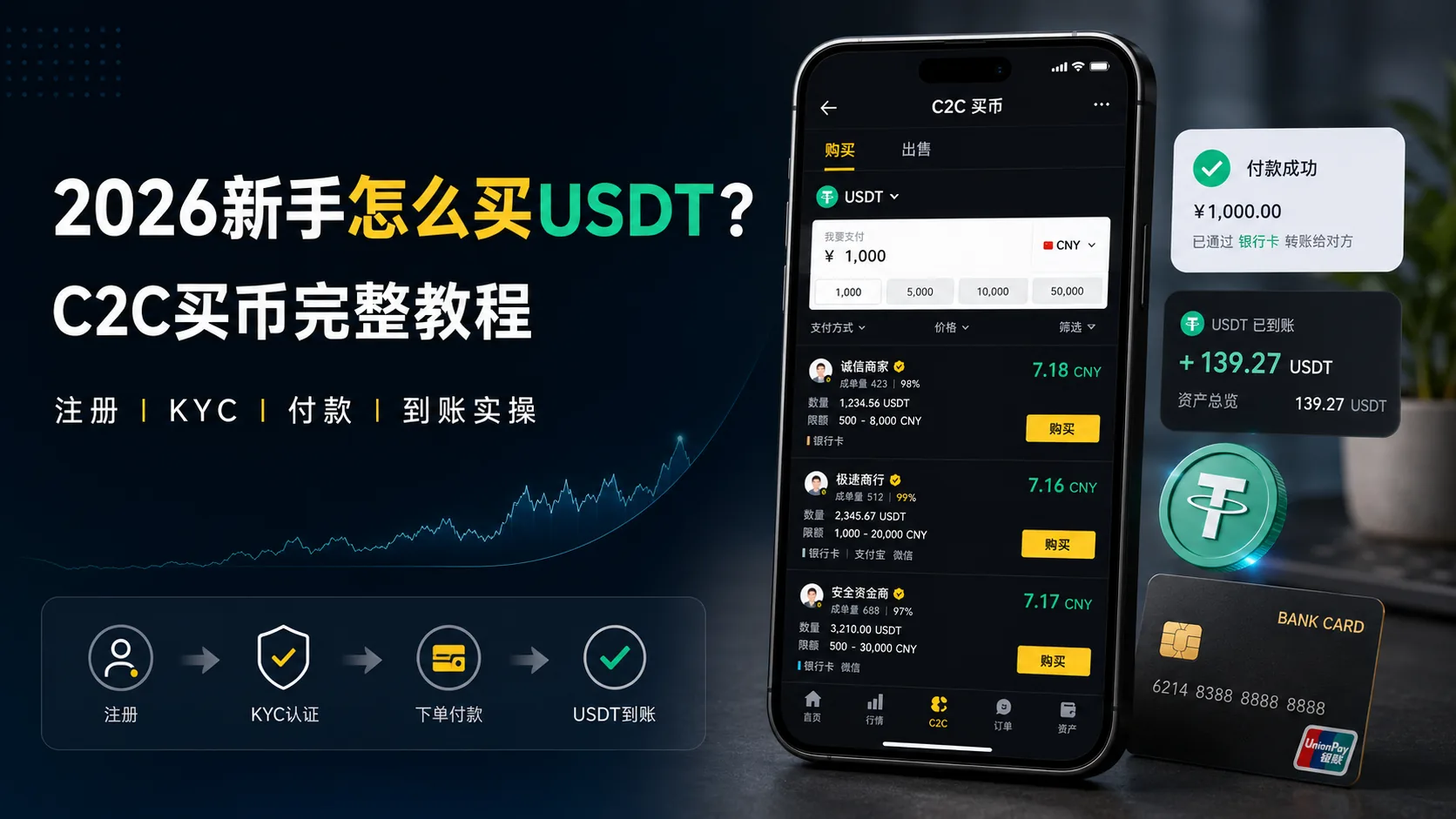
Table of contents

Binance new user rewards
20% trading fee rebate
Official Binance registration. Complete identity verification (KYC) to trade and withdraw.
For most beginners, the place where their first buy stalls is not registration.
The account is set up, KYC passed — but when they actually open the P2P buy page on Binance or OKX, many people don't know what to do next.
Dozens of merchants lined up:
Which one do you pick?
Does a few cents of price difference matter?
You paid but the merchant hasn't released the coins — is something wrong?
These are the most common problems when buying USDT for the first time.
Many guides just say "register → KYC → buy on P2P", but in practice there are a lot of details in between.
So this article doesn't just list simple steps — it unfolds in the order of the problems you'll actually hit on your first buy.
After reading, you'll know:
- ① When you open the P2P page, which column to look at first, and in what order to judge whether a merchant is pickable
- ② What happens in the 2–10 minutes after you pay, when to wait, when to nudge, when to appeal
- ③ 6 easy-to-miss details of a first buy (merchant choice, trading time, payment method, etc.)
- ④ The 7 questions beginners hit most, such as waiting after payment and what to do when a merchant doesn't reply
Risk note: Crypto prices are volatile, and P2P trading involves fiat transfers. For your first buy, test with a small amount (roughly $20–50) and only increase it once you know the flow. The following is based on real operating experience; the platform's pages may change with app versions.
If it goes smoothly, the whole order-to-receipt flow takes about 20 minutes. The two places people trip most: forgetting to come back and tap "I've paid" after transferring, and the merchant saying they didn't receive the money and asking you to send it again.
Contents: Get 4 things ready in 3 minutes · Binance or OKX? · Register + KYC · Opening the P2P page · Filtering merchants · Placing order + paying · The anxiety window after paying · Confirm receipt · 6 easy-to-miss details · FAQ
Get these 4 things ready in 3 minutes before buying
Don't open the P2P page and only then realize you're missing something.
| What | Why you need it | The easy trap |
|---|---|---|
| Government-issued photo ID | KYC identity verification | Expired, blurry photo, or name doesn't match your payment account — all will stall you |
| Your own bank account | To transfer to the merchant | Some accounts have daily transfer limits — check yours before a larger buy |
| A phone number | Registration + security verification | Use a long-term number, not a temporary one |
| A small test amount | First-time trial | Keep it to roughly $20–50; raise it once you're familiar |
The first time I bought, the most nerve-wracking part was the few minutes after paying — money sent, USDT not yet in, page showing "waiting for merchant to release". It's uncomfortable. But after going through it once, I found that as long as you use a legitimate platform, follow the process, and keep the order and payment records, most trades complete without issue.
Binance or OKX? How a beginner decides
Don't agonize — one table settles it:
| Your situation | Pick | Why |
|---|---|---|
| You just want to buy USDT, nothing else for now | OKX | Cleaner interface, less clutter on the P2P page |
| You'll also buy BTC/ETH etc. after | Binance | More coins, better depth |
| You plan to go on-chain / DeFi / NFT later | Binance | Fuller ecosystem, more tutorials |
| A modest phone | OKX | Lighter app |
| You want to try both | Register both | No conflict — I use both myself |
Below I'll use Binance as the example. Use the Binance sign-up link BN522 (OKX users use OK800); the process is almost identical.
OKX users who want to see every tap, watch How to buy USDT on OKX — hands-on video.
Register + KYC: 3 time-saving tips
I won't repeat the registration steps (enter phone → set password → enter code). Here are 3 things that save you time:
1. Register with email rather than a phone number. Later, changing your phone won't require rebinding. But still bind a phone number + Google Authenticator for security.
2. For the KYC photo, place your ID on a dark background. A white background reflects light and the AI recognition often fails. Many people stall on KYC not because the info is wrong, but because the photo is too blurry.
3. For face verification, find good lighting. Don't do it at night under a desk lamp — side light casts shadows and the failure rate is high. Facing a window in daylight is fastest.
Detailed steps with screenshots: How to pass Binance KYC: review time, failure reasons and fixes (2026) / OKX KYC identity verification: review time and how to fix failures (2026).
Haven't installed the Android app yet: Binance Android download and install guide.
Opening the P2P page: where to look first
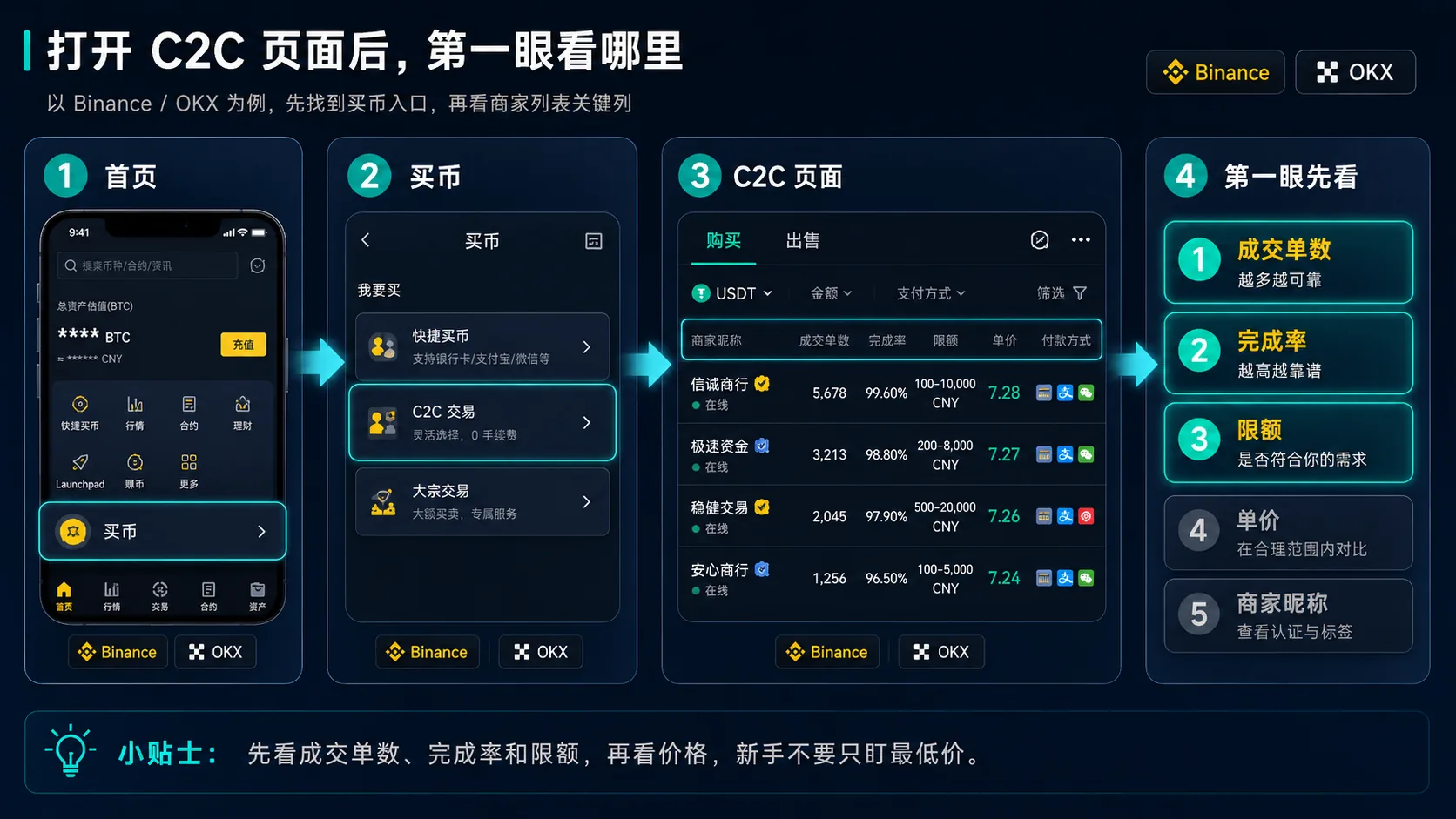
KYC passed — now you're on the P2P buy page:
- Binance: Home → "Buy Crypto" → "P2P Trading"
- OKX: Home → "Buy Crypto" → "P2P"[1]
You'll see a list; left to right it's: merchant name, unit price, limit, payment methods, completed orders, completion rate.
Let your eyes scan in this order: completion rate → completed orders → limit → price → merchant name
Why this order?
- Completion rate and completed orders are the key signals of a merchant's trading performance (check first)
- Limit determines whether you can buy (second most important — skip if it doesn't fit)
- Price is basically the same across merchants (P2P is competitive, a few cents don't matter)
- Merchant name gets a final glance (to rule out garbled or fake names)
Many beginners open the P2P page and look at price first, but a merchant's trading record and completion rate matter just as much. If you pick a merchant with few completed orders and a low completion rate just to save a few cents, release speed and experience can suffer.
How to filter merchants: rule out obviously bad ones in 30 seconds
Beginners should prefer merchants with higher volume and a better completion rate. The filtering logic below is for reference (specific criteria may differ by platform and region):
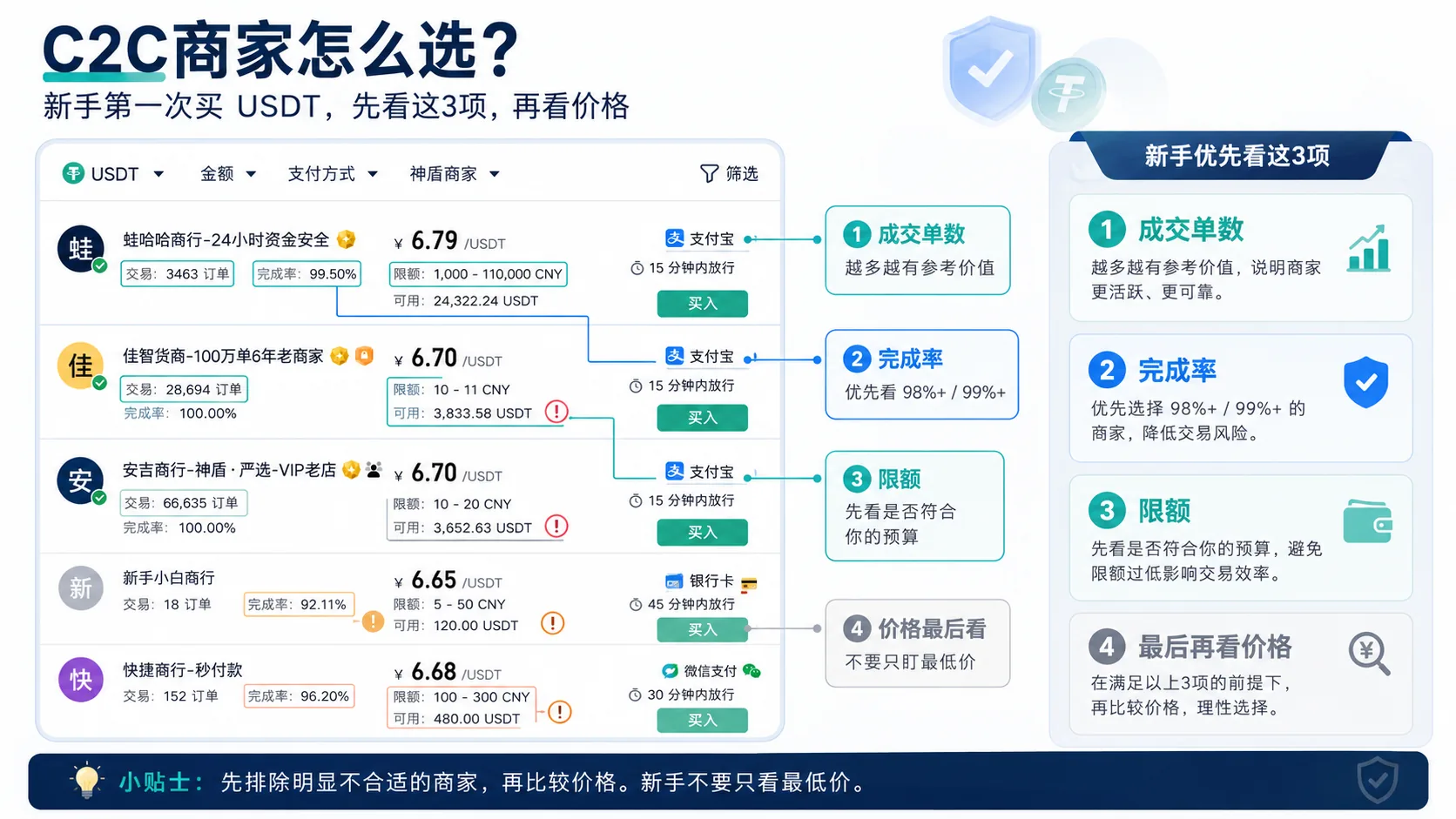
Open the P2P page — dozens of merchants listed

  ├─ Enough volume?
  │   └─ Few completed orders → be cautious; beginners can prefer merchants with a richer record
  │
  ├─ Completion rate at a high level?
  │   └─ Clearly low → be cautious (higher is generally more reliable)
  │
  ├─ Minimum limit ≤ your budget?
  │   └─ No → switch (don't over-buy to meet a limit; test small the first time)
  │
  ├─ Price clearly abnormal?
  │   └─ Much lower than the reference price → be cautious (abnormal price may hide risk)
  │
  ├─ Merchant name normal?
  │   └─ Pure numbers, garbled text, meaningless letter strings → switch
  │
  └─ All passed → open it, check recent reviews, place the order if fine
Why is this decision tree useful? Because it doesn't depend on "how you feel about the merchant" — every step has a relatively clear basis. The scariest part of a first buy is the uncertainty; this logic turns subjective judgment into an ordered checklist.
Two signals beginners miss most
- High order count but low completion rate: this merchant may be high-volume but sloppy — slow to release, poor at handling disputes. Beginners should prefer a completion rate close to 99%.
- Special badges next to the merchant name: some platforms show verification badges, merchant tiers, etc. — use them as a reference.
Placing the order + paying: every step from "Buy" to completing the transfer
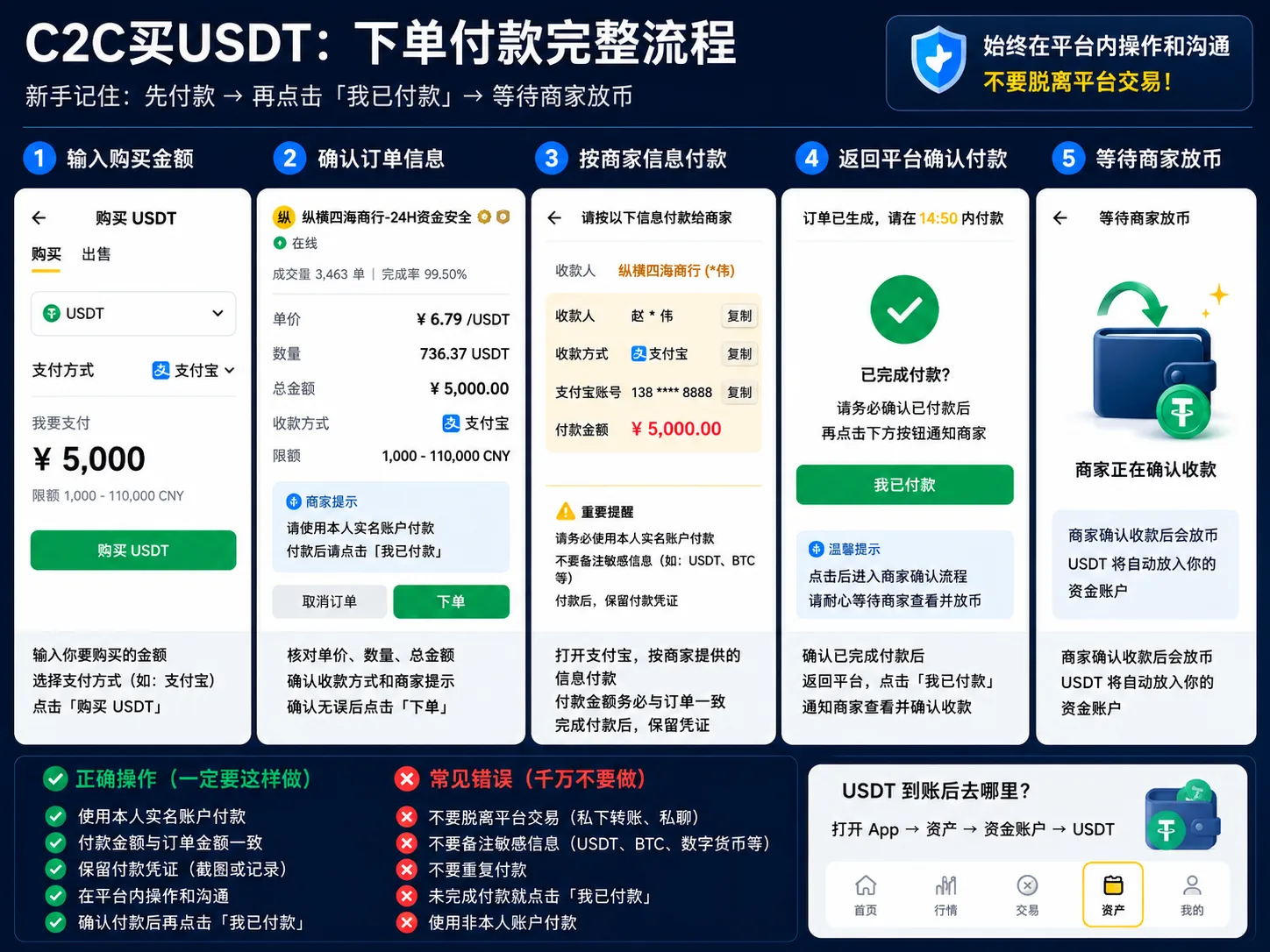
Spend 10 seconds confirming before tapping "Buy"
- Is the amount right? (your small test amount)
- Is the payment method right? (do you have this bank account / payment method)
- Do you meet the merchant's limit?
If all good, tap "Buy". The system locks the order.
After placing the order, you'll see the merchant's receiving details
The page shows the merchant's name, bank account / payment account, and transfer amount.
Also note the order's payment countdown: P2P orders usually require payment within 15–30 minutes; overdue orders may be auto-cancelled by the system. The exact time follows the countdown on the page.[2]
Don't rush to transfer yet. Look at two things:
- Whether the merchant wrote special instructions in the remarks (e.g. "put 123 in the reference")
- Whether the amount is exact to the cent (e.g. 198.73, not 198)
Notes when transferring
- Transfer the exact amount to the cent. If the merchant says 198.73, send 198.73 — not more, not less.
- Fill the reference exactly as the merchant says. If they didn't specify, leave the reference empty.
- Don't add information unrelated to the order; pay according to the platform's order prompts and the merchant's requirements.
- After transferring, screenshot the payment proof (a screenshot of the successful transfer page in your bank app).
- Go back to the platform and tap "I've paid" or "Mark as paid".[3]
To see exactly how each Binance P2P buy step is tapped in the app, watch How to buy crypto via Binance P2P — hands-on video.
The anxiety window after paying: how the status changes, and when to worry
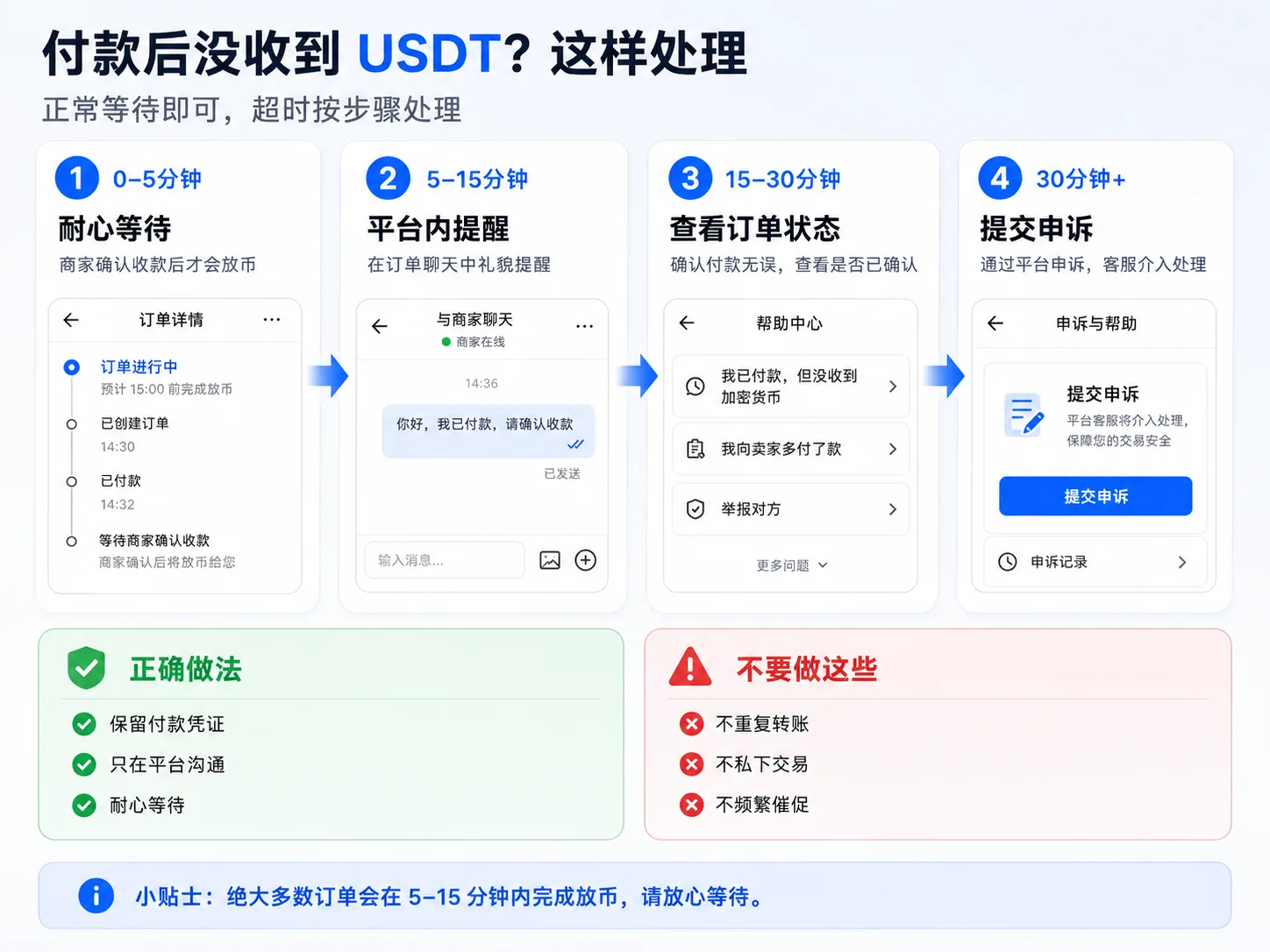
After tapping "I've paid" comes the most psychologically stressful 2–10 minutes of a first buy.
The status goes through three stages
You tap "I've paid"
  ↓
Status ①: Paid, waiting for merchant confirmation
  ↓ (merchant opens their bank app and confirms receipt)
Status ②: Merchant confirmed receipt
  ↓ (merchant taps "release" on the platform)
Status ③: Completed — USDT received
In most cases the merchant releases shortly after confirming receipt; the exact speed depends on the merchant and the payment channel. P2P is manual release, not automatic — the merchant needs time to open their bank app and confirm the money arrived.
When to wait, when to nudge, when to appeal
| Time | Status | What to do |
|---|---|---|
| 0–5 min after transfer | Waiting for merchant | Wait. Don't nudge. The merchant may be handling several orders at once |
| 5–10 min | Not released yet | Send a message in the platform: "Hi, I've transferred, please confirm" |
| 10–15 min | Not released, no reply | Send another, slightly more urgent but polite |
| 15–30 min | Not released, merchant replied | Ask the reason. They may say "the bank is delayed" — that's normal |
| 15–30 min | Not released, no reply at all | Consider appealing, but wait 5 more minutes — sometimes the merchant just stepped away |
| Over 30 min | Replied or not | Appeal. Tap "Appeal" on the order page and upload your payment screenshot[4] |
Common merchant replies, and how to judge them
"The bank is delayed, wait a moment" → Normal. Cross-bank transfers can genuinely be delayed; wait 5–10 minutes. "Your amount is wrong" → Check your bank app. If you transferred wrong, negotiate with the merchant. If not, prove it with a screenshot. "Send it again, I didn't receive it" → Likely a problem. Don't send a second time. Screenshot your payment record and send it; if they still insist, appeal directly. No reply at all → Wait 30 minutes, then appeal.
The single most important mindset tip
The anxiety in the minutes after paying is really "is the money I sent gone?". The platform escrows the trade in the middle; higher-volume, better-rated verified merchants are generally lower risk. The platform provides order records and an appeal channel for abnormal situations. That said, any P2P trade still requires caution.
To fully understand the pitfalls of P2P, read: Binance P2P USDT pitfalls: 6 mistakes beginners make (2026).
Confirm receipt + the first thing to do after buying
After the merchant releases, go to "Assets" or "Wallet" and confirm your USDT balance updated.
Once you've confirmed receipt, prioritize:
- Bind Google Authenticator (safer than SMS codes)
- Set a separate funds password (different from your login password)
- Turn on the anti-phishing code
Why does this matter? Because your exchange account now holds real money. Password leaked = assets moved out. Five minutes of security setup is the best investment. How to set up Google 2FA: Binance/OKX binding steps (2026) / Binance/OKX account security checklist: 2FA, anti-phishing code, withdrawal whitelist (2026)
New accounts may have withdrawal limits; check your account's actual status in the "Account limits" or "Security center" page before withdrawing.
6 easy-to-miss details of a first buy
These come from situations that come up often in real operation; a little attention makes the whole flow smoother.
1. Different payment methods confirm at different speeds
Payment methods differ in speed, depending on the bank, the channel, and the merchant. Some methods confirm quickly; cross-bank transfers can be delayed by bank processing time. When placing an order, note which methods the merchant supports and pick one that suits you.
2. Peak trading hours can change the wait
During high-volume P2P periods, merchants handle more orders at once and wait times can shift. If you can, operate off-peak for a smoother experience.
3. Merchant badges and tier systems
Different platforms have different merchant tier systems and badges; follow what the page shows. Generally, higher-tier verified merchants are more stable in volume and completion rate, and beginners can prefer them. Judge using completed orders and completion rate together.
4. Risk-control rules differ by payment method
Different payment platforms have different risk-control rules; some are sensitive to large transfers to unfamiliar recipients. For a small first buy, a bank transfer and most methods work fine. If you hit an interception, follow the payment platform's prompts.
5. Watch for bank or payment-channel maintenance windows
Some banks or channels have scheduled maintenance; check for notices before transferring. If a transfer is delayed, confirm the status through your bank's or channel's support.
6. There are 1–2 minutes between "I received it" and the actual release
This isn't the merchant stalling on purpose. After confirming receipt, the merchant still has to operate on the platform — enter the funds password, tap confirm to release. Some exchanges even require a second verification for this step. So if the merchant says "received" but the coins haven't arrived, don't panic — wait another minute.
FAQ
1. The merchant hasn't replied for 10 minutes — was I scammed?
Don't worry yet. P2P merchants usually handle multiple orders at once and can't reply instantly. Send a polite reminder. Higher-volume, better-rated verified merchants are generally lower risk. But any P2P trade still needs caution — if there's no reply after 30 minutes, appeal through the platform.
2. The merchant asks to move to another messaging app for "easier communication" — normal?
As a rule, prefer the platform's own messaging and don't leave the platform for the trade. The in-platform chat is the record you'll rely on if something goes wrong. If a merchant insists on an external channel, switch merchants.
3. Can I cancel after paying?
Once you've paid, you can't cancel unilaterally. You can cancel before paying. But once money is sent, you can only ask the merchant to reject the order or appeal. So before paying, confirm the amount, merchant, and payment method — regretting after paying is painful.
Also: don't cancel too often. Some official guidance notes that cancelling 3 orders in one day may pause your buying for the day; the exact rule follows the platform.[5] So think before you order — don't treat cancelling as trial-and-error.
4. The merchant says they didn't receive the money and asks me to send again?
Never send a second time. Screenshot your bank transfer record and send it to the merchant. If they still insist, appeal directly and submit the transfer screenshot as evidence to platform support. Support can see both sides and judge who's lying.
5. How do I confirm the USDT I bought is real?
Completing a trade in a legitimate platform's P2P section means the platform manages the merchants and orders. The key risk to avoid is off-platform private deals — if someone asks you to leave the platform and transfer directly for a "cheaper price" or "no fee", be suspicious.
6. What if my bank or payment platform does a risk check?
If your bank or payment platform runs a risk check or transaction review after the transfer, describe your transaction honestly and cooperate with the normal risk-control process. Rules differ by bank and platform; follow their requirements if you hit a limit.
7. For a first buy, Binance or OKX?
If you only care about the P2P buying experience, OKX's interface distracts beginners less and is quicker to pick up. If you plan to learn crypto long-term — understand BTC/ETH, explore DeFi and on-chain assets — Binance's features and ecosystem are richer and worth keeping as one of your platforms. Registering both doesn't conflict.
Conclusion
A first buy isn't really about "learning the steps" — it's about getting through those uncertain minutes after paying. Once you complete the first trade, you'll have a full picture of the P2P flow and later operations will feel familiar.
Just remember these bottom lines:
- Don't add information unrelated to the order
- Prefer merchants with higher volume and better completion rate
- Test with a small amount the first time
- Set up security immediately after buying
- No merchant reply within 30 minutes after paying → appeal
After your first buy, continue in this order:
- 7 things to know before buying crypto for the first time — knowledge before you buy
- Binance P2P USDT pitfalls: 6 mistakes beginners make (2026) — step through the pitfalls early
- What is a crypto wallet? Wallet addresses, seed phrases and asset safety (2026) — understand where your coins live
- Binance/OKX account security checklist: 2FA, anti-phishing code, withdrawal whitelist (2026) — what to do right after buying
- Crypto learning path for beginners — a systematic route
Data verification notes
The key facts in this article were checked on 2026-09-23 against Binance and OKX official help documents, item by item:
- P2P entry point: Binance's official help gives the path as App home "Add Funds" → "P2P Buy", where you can filter in the self-selection area or match in the quick area; OKX can enter "P2P Buy" from the home page. Entry names may change by version. Source: Binance official help — How to buy crypto via P2P on the Binance App; OKX official help — How to buy/sell crypto via P2P.
- Payment deadline: orders have a payment countdown; overdue orders are auto-cancelled by the system. The exact minutes are shown on the order page; official docs don't fix a single value. Source: Binance official help — P2P appeal processing rules.
- Marking as paid: the buyer should tap "I've completed the payment, notify the seller" only after actually paying; the seller releases after confirming receipt. Don't tap it before paying. Source: Binance official help — How to buy crypto via P2P on the Binance App.
- Order appeal: you can submit a reason, description and payment screenshot via "Need help" → "Appeal" on the P2P order page, and track progress. Source: Binance official help — How to appeal a cancelled/completed P2P order.
- Cancellation limit: Binance's official help explicitly notes that cancelling three orders in one day blocks buying for the rest of the day. Source: Binance official help — How to buy crypto via P2P on the Binance App.
Disclaimer: This article shares operating experience and is not investment advice. Crypto trading carries price-volatility, policy-change and counterparty risks. P2P trading involves fiat transfers; choose a compliant platform and complete every step within the platform. The author is not responsible for losses from your own missteps or market changes.
© 2026 CoinTrailHub. Original content; contact us for commercial reprint authorization.
- Binance official help — How to buy crypto via P2P on the Binance AppP2P entry point, notifying the seller after payment, and the 3-cancellations-per-day buying limit
- OKX official help — How to buy/sell crypto via P2PQuick-buy vs self-selection flows, and the 0-fee label on the page
- Binance official help — How to appeal a cancelled/completed P2P orderAppeal entry point, reasons and materials when funds are not released after payment
- Binance official help — P2P appeal processing rulesAutomatic cancellation on timeout, and release deadlines for instant payment methods
- 2026-10-17UpdateAdded evidence-chain superscripts and the data-verification notes.
- 2026-09-23UpdateRetitled to "first time buying USDT" to avoid keyword overlap; added P2P payment deadlines and cancellation limits; added Binance/OKX hands-on video internal links.
See ourEditorial Policy and the correction process in ourCorrections Policy.
The CoinTrailHub editorial team focuses on crypto education for beginners, exchange security and P2P trading risk. This article is compiled from official sources and public data, reviewed by humans, and strives for accuracy but is not investment advice.
Last updated:2026-09-23 · Content reviewed by humans · Learn more
© 2026 CoinTrailHub · Original content. Reproduction or rewriting without permission is prohibited.