
Binance P2P USDT Buying Guide: 6 Common Beginner Pitfalls (2026)
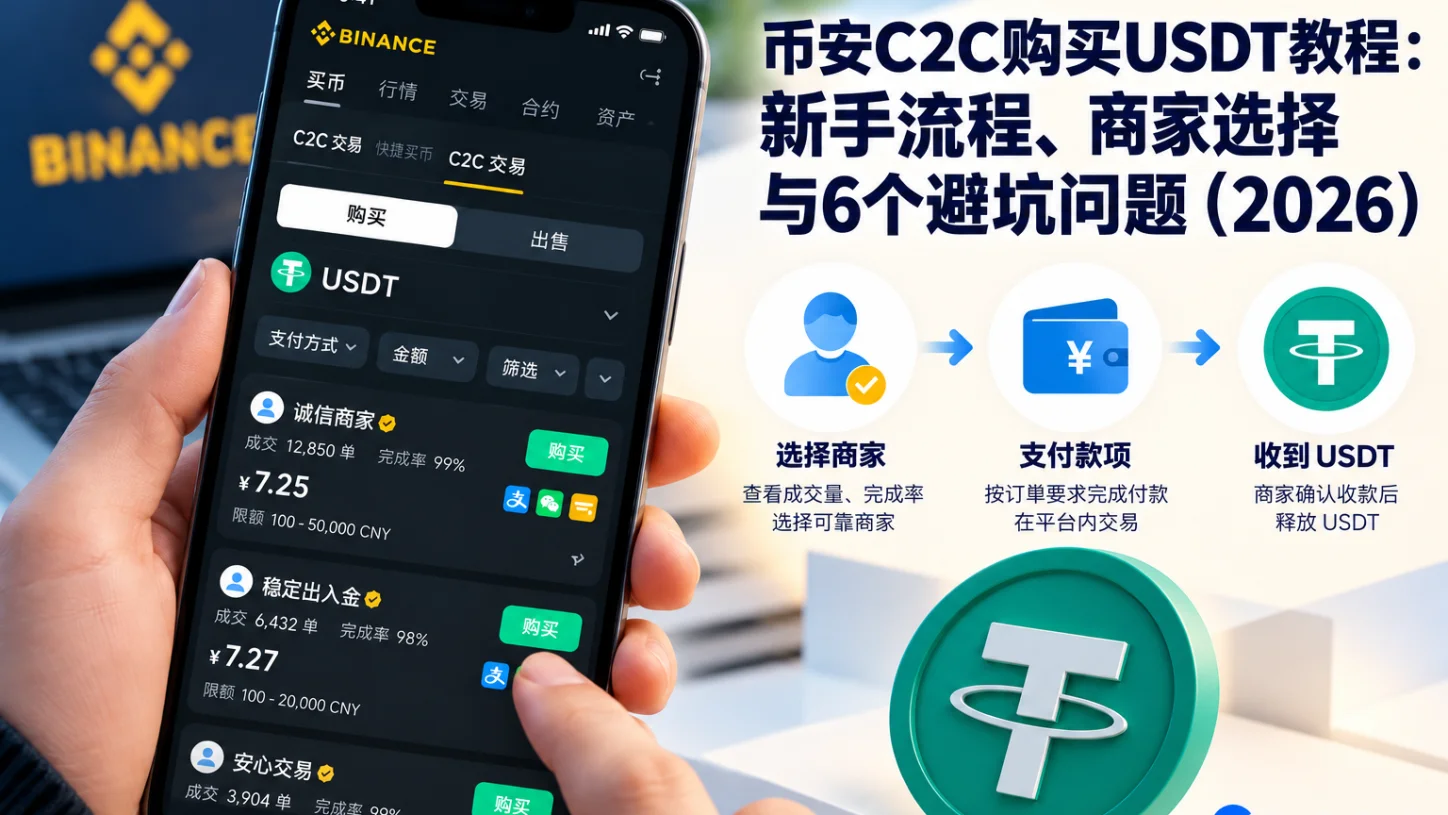
Table of contents

Binance new user rewards
20% trading fee rebate
Official Binance registration. Complete identity verification (KYC) to trade and withdraw.
What should you watch out for when buying USDT on Binance P2P? Beginners most often hit six kinds of problems: choosing a seller by price alone, using a payment account that doesn't meet the requirements, entering the wrong amount or note, the seller not releasing coins after payment, being steered into off-platform trades, and having a bank card or account restricted.
Of these, paying successfully but not receiving USDT is the problem to handle first. If you've already paid, don't cancel the order lightly, and don't transfer again just because the seller asks. First verify your bank payment status, keep the payment proof, and then handle it through the appeal function inside the Binance order.
This article uses buying USDT on Binance P2P as the example, and covers the normal purchase flow, how to choose a seller, the six common mistakes, what to do when something goes wrong, and the information to check before paying.
If all goes smoothly, one P2P order takes about 15 minutes. The two easiest places to slip up are: the payment account and the verified identity aren't the same person, and the seller tells you to cancel the order first and then get a refund.
Timeliness note: This article is compiled from Binance's public P2P trading rules, order appeal instructions and safety tips. Supported fiat currencies and payment methods may differ by region, account and app version, and are subject to the platform's current display and the applicable laws where you are.
Risk note: P2P order escrow can reduce some counterparty risk, but it cannot guarantee your bank account won't be restricted, nor eliminate the possibility of fraud, payment disputes and fund loss. This article is educational content about operations, not investment or legal advice.
1. What are the risks of buying USDT on Binance P2P? Six common problems first
Binance P2P (Peer-to-Peer) is a way for users to buy and sell digital assets directly with each other. The buyer pays fiat to the seller according to the order, and the platform helps both sides complete the trade through order management and a crypto-asset escrow mechanism.[1]
The main risk of Binance P2P isn't the name "USDT" itself, but problems that can appear in who you pay, order processing, your counterparty and the source of funds.
When using P2P for the first time, look at the table below first.
| Common problem | Correct approach |
|---|---|
| Choosing a seller by price alone | Also check order count, completion rate, verification and order terms |
| Using a payment account that doesn't qualify | Pay with your own verified account, avoid third-party accounts |
| Entering the wrong amount or note | Amount matches the order; note is truthful and compliant |
| Seller not releasing coins after payment | Verify bank payment status, keep proof, use order appeal |
| Being steered into off-platform trades | Stay in the platform order; don't transfer privately via WeChat or Telegram |
| Bank card or account restricted | Confirm the restriction type, contact the bank or the relevant authority |
These six problems are concentrated in the seller selection, payment, order dispute and account protection stages.
If you've already paid but haven't received USDT, you can jump straight to section 6, "Seller not releasing coins after payment".
2. How to buy USDT on Binance P2P? Seven steps to the full flow
For first-time Binance users, buying USDT through P2P generally includes logging into your account, filtering sellers, creating an order, paying and confirming the assets arrive.
Before actually using it, confirm that your location, account identity and payment method meet the applicable rules.
Step 1: Log into the official Binance app
Log in through the official Binance website or a proper app distribution channel. Don't use an install package from a stranger, and don't enter your account and password through unknown links in chat groups.
Step 2: Enter the P2P trading page
Find "Buy Crypto" or the related trading entry in the Binance app and enter the P2P page. Page names and entry locations may differ across Binance app versions.
Step 3: Choose USDT and a payment method
Choose "Buy", then USDT. If your account supports the relevant fiat trading, filter sellers by the fiat currency, amount and payment method shown on the page.
Step 4: Check the seller's information
Focus on the seller's quote, completion rate, order count, verification status, trading limit and order terms. Don't place an order just because one seller quotes the lowest price.
Step 5: Create a buy order
Enter the buy amount, and check the expected USDT amount, seller information and order rules. After confirming, move to payment.
Step 6: Pay according to the order
Use your own verified payment account that meets the platform's requirements to pay the corresponding amount to the confirmed receiving account in the order.[2] After the payment actually succeeds, return to the Binance order and tap "I have paid" as the page prompts. Don't tap "I have paid" before you've actually paid.
Step 7: Confirm the USDT arrives
Wait for the seller to verify the payment and release the USDT. After the order is complete, check the order status and the corresponding asset balance in the Binance app.
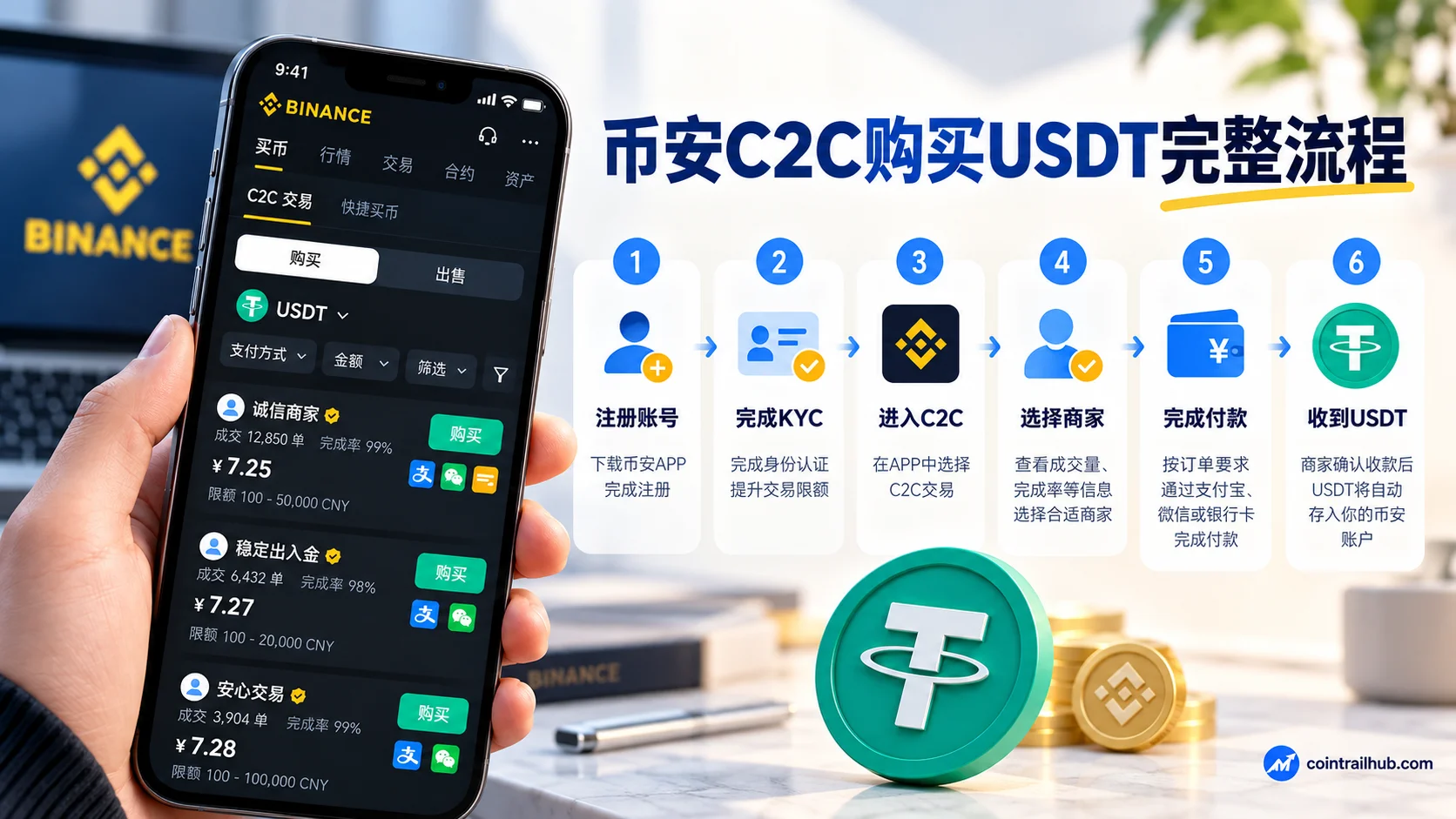
| Step | Key point |
|---|---|
| 1. Log into the official Binance app | Use the official channel; don't install unknown packages |
| 2. Enter the P2P page | Find the "Buy Crypto" entry, enter P2P |
| 3. Choose USDT and payment method | Filter by fiat, amount and payment method |
| 4. Check the seller | Look at quote, completion rate, order count, verification, limit, terms |
| 5. Create an order | Check the USDT amount, seller and order rules |
| 6. Pay per the order | Pay with your own verified account; tap "I have paid" after paying |
| 7. Confirm USDT arrival | Wait for the seller to release; check order status and balance |
The most important distinction here: a successful bank payment doesn't mean the Binance order is automatically complete. The buyer still needs to report the payment status in the order flow and wait for the seller to confirm.[3]
For detailed steps, read How to Buy USDT on Binance (2026): P2P Buying Steps, Choosing a Seller & Payment.
3. Mistake 1: looking only at price, not seller reputation
1. Why do Binance P2P sellers quote different USDT prices?
Binance P2P quotes come from different counterparties. Even for the same USDT amount, different sellers may set different unit prices, order amount limits, payment methods and trading conditions.
For example, buying 100 USDT:
| Seller | Unit price (USD/USDT) | 100 USDT total (USD) |
|---|---|---|
| Seller A | 1.00 | 100 |
| Seller B | 1.02 | 102 |
| Difference | 0.02 | 2 |
The above is a calculation example, not the current real-time USDT quote.
Between a seller quoting $1.00 and one quoting $1.02, buying 100 USDT differs by only $2 in total. If the cheaper seller has few historical orders, a low completion rate, or extra payment requirements, the savings may not be worth the later dispute and waiting costs.
2. How to choose a Binance P2P seller?
You can first look at these six indicators.
| Indicator | What to look at |
|---|---|
| Completion rate | The ratio of historical orders completed |
| Order count | Historical volume, to judge whether the seller participates stably long-term |
| Verification badge | The seller's verification status |
| Trading limit | Whether the per-order/daily limit matches your needs |
| Payment method | Whether it supports a method you're familiar with and can pay with |
| Order terms | Extra requirements, arrival instructions, etc. |
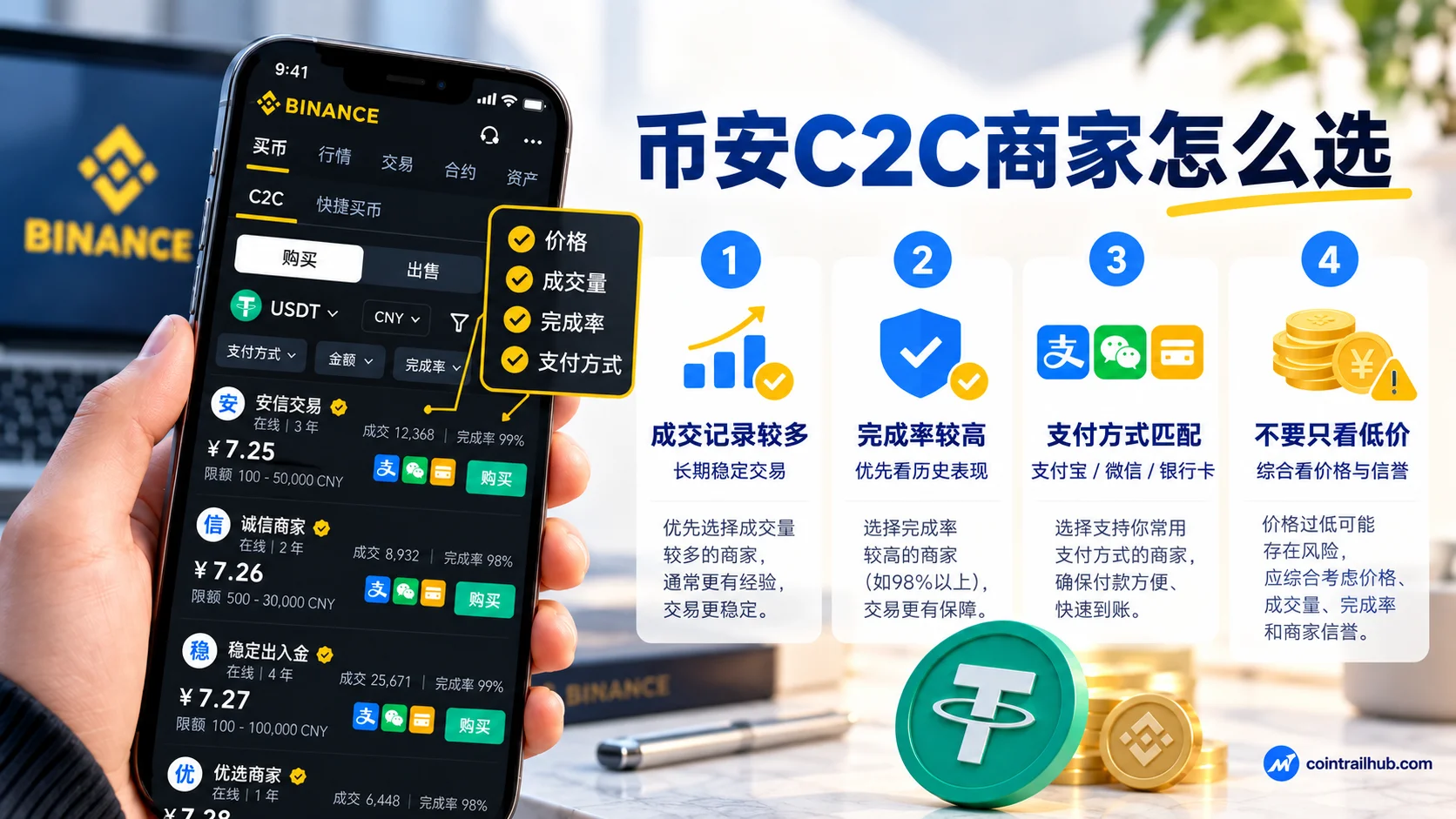
Completion rate and volume help judge a seller's historical performance, but they don't guarantee that a future trade won't have problems.
3. What completion rate makes a Binance P2P seller reliable?
There's no universal standard. For example: Seller A has a 99% completion rate but only 20 orders; Seller B has 98% but 3,000 historical orders. You can't conclude Seller A is more reliable just because 99% is higher than 98%. You also need to look at the statistics period, trading limit, payment method and current order conditions.
4. What if the seller asks for extra verification info?
If a seller asks for your bank password, SMS code, Binance login password or wallet seed phrase, stop immediately. If a seller claims you need to pay an extra "verification fee", "account unfreezing fee" or "deposit", don't transfer directly — verify through Binance official support first.
Conclusion of this section: A P2P seller's price is only a cost factor; trade records and order terms also need checking. Historical trading data is a reference, not a safety guarantee.
4. Mistake 2: the payment account doesn't match the receiving information
1. Can I pay with a family member's or friend's bank card on Binance P2P?
Generally you shouldn't use a third-party account instead of your own. Binance's official P2P rules emphasize that the payment account should match your verified identity. Third-party payment may cause the seller to be unable to verify the source of funds, refuse to release coins, or lead to an order dispute.
For example, if your Binance verification uses your own information but the actual payment account belongs to someone else, this can trigger identity-verification problems.
2. What to check before paying in P2P?
| Check item | Explanation |
|---|---|
| Payee name | Matches the order |
| Receiving account | Matches the order; don't pay to a new account sent in chat |
| Payment amount | Matches the order amount due |
| Payment account | Your own verified account |
| Note / reference number | Fill in as the order requires |
Before paying, also check the actual payee information in the bank or payment app, not just the text the seller sent in chat.
3. What if the seller asks you to change the receiving account?
For example, the order shows the payee as Person A, but the seller sends a different account in chat and asks you to pay Person B. In this case, don't transfer to the new account directly. Pause payment, confirm the receiving information the order currently allows, and verify through platform support.
4. What if I've already transferred to the wrong payee?
If the funds have already left:
- Keep the bank transfer proof and transaction records;
- Keep the current P2P order number;
- Contact the paying bank or payment provider to check whether the payment can be stopped or recovered;
- Explain the situation through the official Binance order or support channel;
- Don't pay any extra fees to the counterparty.
A bank transfer that has already completed successfully can't necessarily be recovered.
Conclusion of this section: Before paying in P2P, confirm that your payment identity matches the order's receiving information. For a receiving account outside the order, don't pay just because the seller asked in chat.
5. Mistake 3: entering the wrong payment amount or note
1. How should I fill in the Binance P2P payment note?
Handle it according to the real transaction information, the platform order requirements and the payment provider's legal rules. If the order requires a specific reference number, check it correctly; if there's no note requirement, don't add unrelated content on your own.
If a seller asks you to fill in an untrue purpose — for example, disguising the actual trade as another payment to evade review — don't do it.
2. Will writing "USDT" in the note freeze my bank card?
You can't simply assume that "USDT" in the note will definitely freeze your bank card, nor that omitting it will avoid bank risk control. Banks and payment providers usually manage risk by combining account trading behavior, payment background, fund flow and legal requirements. The payment note isn't the only factor deciding whether funds are safe.
3. What if I enter the wrong payment amount?
For example, the order shows $100 due, but you actually sent $110. Paying more doesn't mean Binance will automatically refund the difference, and you can't assume the seller will give you more USDT for the overpayment.
| Item | Amount (USD) |
|---|---|
| Order due | 100 |
| Actually sent | 110 |
| Difference | 10 (overpaid) |
After a payment amount error, the most important thing is not to keep transferring without verifying.
4. What if I forgot to tap "I have paid" after paying?
If you've actually paid but didn't confirm it in the Binance order, return to the original order as soon as possible to check its status. If the order still allows you to mark it normally, do so according to the real payment situation. If the order has closed or timed out, keep the payment record and contact Binance official support — don't place a new order or pay again.
5. What information should I keep as payment proof?
It's recommended to keep:
- The Binance P2P order number;
- The bank payment amount and time;
- The bank or payment platform transaction ID;
- The order chat records related to the dispute;
- Necessary payment proof.
When submitting materials through official channels, avoid leaking your account password, verification codes and unrelated sensitive personal information.
Conclusion of this section: The amount should match the order, and the note should be truthful and compliant. When a payment anomaly already occurred, first verify the fund status, then resolve it through the order or official support.
6. Mistake 4: the seller won't release coins after payment, or asks you to cancel the order
This is a key abnormal situation to understand when buying USDT on Binance P2P.
1. Why didn't I receive USDT after paying on Binance P2P?
The normal Binance P2P flow is: the buyer pays according to the order and confirms the payment status; after the seller verifies the actual receipt, the platform releases the escrowed USDT according to the trade flow.
If you've paid but haven't received USDT, it could be a bank payment delay, an order status anomaly, mismatched payment information, or the seller not handling it in time.
| Possible cause | How to confirm |
|---|---|
| Bank payment delay | Check the actual arrival status in the bank app |
| Order status anomaly | Check whether the Binance order is normal |
| Payment info mismatch | Check the receiving account and amount |
| Seller hasn't handled it | Contact the seller through order chat |
So USDT not arriving doesn't necessarily mean the seller is scamming. First verify whether the funds actually left, then check the Binance order status.
2. Paid but no coins released on Binance P2P? Five steps
Step 1: Open the original P2P order. Log into the Binance app, enter the P2P order history, and find the problem order. Confirm the order number, buy amount, payment method, seller name and order status.
Step 2: Verify the bank payment status. Open the official bank or payment app and check whether the transfer actually completed. Distinguish "transfer submitted" from "payment successful". If payment is still processing, confirm with the payment provider first — don't transfer again.
Step 3: Check whether you marked "I have paid" correctly. If the bank confirms the payment actually succeeded, check whether the Binance order was marked "I have paid" according to the real situation. If the order has closed, don't create a new order to replace the original trade.
Step 4: Contact the seller inside the order. Use the Binance order chat to explain the payment amount and time. If you need to submit payment proof, do so as the platform requires; don't send sensitive info like bank passwords or verification codes.
Step 5: Appeal through the Binance order. If the seller doesn't respond, or the order can't be resolved for a long time, submit evidence through the help or appeal entry on the order page. Binance provides an appeal flow for P2P orders, where you can fill in the issue reason, upload proof and check the progress as the current app prompts.[4] Official reference: How to Appeal for P2P Orders on the Binance App.
3. What materials do I need for a Binance P2P appeal?
| Material | Explanation |
|---|---|
| P2P order number | To locate the problem order |
| Bank payment proof / records | To prove the actual payment amount and time |
| Payment amount and time | Matching the order |
| Order chat records | The chat with the seller |
| Necessary payment proof | Don't leak passwords, verification codes or other sensitive info |
When submitting materials, make sure they're truthful and complete, and provide them through Binance's official designated channel. Don't fake payment screenshots to speed things up, and don't send SMS codes or bank card passwords to the seller.
4. I've paid, but the seller asks me to cancel the order — what do I do?
If you've actually paid, don't cancel the order just because the seller asks. Be especially wary of these lines:
- "Cancel the order first and I'll refund you right away."
- "The order has a problem; cancel it and buy again."
- "Add me on WeChat and I'll process the refund faster."
- "Cancel the order and I'll give you a cheaper quote."
Before canceling, verify the payment status, refund arrangement and correct processing procedure through official channels. If the seller claims a refund was made, base it on the actual arrival record in your own bank or payment account, not just a screenshot the other side sent.
5. How soon after paying can I appeal on Binance P2P?
There's no universal number of minutes for all orders. Check the current order's payment status, countdown, appeal rules and available entries. If the payment succeeded but the seller didn't release coins as the order rules require, contact the seller or submit an appeal as the Binance page prompts. Don't mistake the response window at one stage of the appeal for "all sellers must release coins within the same time after payment".
6. Will a Binance P2P appeal definitely get my USDT back?
Not necessarily. Binance can handle disputes based on platform rules, order records, actual payment proof and the information both sides provide, but it can't guarantee the same outcome in every case. If you paid to an account outside the order, used a third-party account, or already traded off-platform, dispute handling may be more complicated.
Conclusion of this section: If you've paid but haven't received USDT, first verify the actual payment status, keep the order and transaction proof, then handle it through Binance's official appeal channel. Don't cancel a paid order directly, and don't transfer again.
7. Mistake 5: trading privately via WeChat or Telegram, off the Binance platform
1. Why do some sellers ask to trade via WeChat?
Some counterparties may claim the platform chat is inconvenient, or promise a better price for private trading. For example, you create an order on Binance to buy 500 USDT, but the seller asks you to cancel it and complete the trade by transferring via WeChat, promising each USDT two cents cheaper.
In this case, the trade has already left the original P2P order and escrow mechanism. If the seller goes silent after payment, refuses to release coins, or there's a fund dispute, the platform may not be able to provide the same help through the normal order flow.
2. What are the risks of off-platform Binance P2P trades?
| Risk | Possible consequence |
|---|---|
| Losing platform escrow | No guarantee coins are released after payment |
| Can't use order appeal | The platform finds it hard to help through the order flow |
| Seller goes silent | Funds may be unrecoverable |
| Fraud / phishing | Risk from unknown links and fake sites |
Trading on the platform isn't absolutely safe either, but it keeps the order, chat and corresponding trade records.
3. Which behaviors should trigger immediate caution?
Request 1: Cancel the order and pay privately. A normal P2P order should be completed in the platform's required flow, not switched to another method just because the seller promises a discount.
Request 2: Paying an extra deposit. If a seller claims you must pay an "unfreezing fee", "verification fee" or "extra deposit" to release USDT, stop and verify through official channels.
Request 3: Providing a verification code or account password. Never reveal your Binance login password, SMS code, authenticator dynamic code or wallet seed phrase to anyone.
Request 4: Downloading unfamiliar software. If the other side sends a remote control tool, an unknown install package, or a login link for another site, be alert to device control and phishing risks.
4. What if I've already been steered into a private trade?
If you haven't paid yet, stop the trade, keep the chat records, and don't transfer to unknown accounts. If you've already paid, contact the bank or payment provider as soon as possible to check the fund situation, and submit the order and payment proof to Binance official support. If fraud is involved, report it in time according to local law and the relevant authority's requirements.
Conclusion of this section: Binance P2P trades should be completed according to the platform's order rules. Private trading may lose some order protection — don't accept an abnormal payment arrangement just for a small discount.
8. Mistake 6: ignoring bank card restrictions and Binance account security
1. Will buying USDT on Binance P2P freeze my bank card?
It's possible, but not every P2P trade leads to a frozen account. Payment account restrictions may involve:
- The bank detecting an abnormal transaction;
- The payment provider requiring verification of the transaction background;
- The transaction involving funds suspected of fraud;
- An anti-money-laundering or anti-fraud risk investigation;
- A relevant authority legally imposing a payment stop or freeze;
- The transaction violating applicable law or payment service rules.
So you can't conclude that "a seller with a high completion rate will never freeze your card", nor blame every bank card restriction on buying USDT.
2. How to reduce bank card risk on Binance P2P?
First, confirm that your trading activity and payment method comply with local law and payment provider rules. Second, use your own account that meets the identity verification requirements, check the payment counterparty and order information, and don't use third-party accounts of unknown origin. If a seller asks you to fill in a fake transaction purpose or change the receiving account outside the order, stop and verify.
These measures can reduce some operational and counterparty risk, but can't guarantee your bank account won't be restricted.
3. My bank card is already frozen — what do I do?
First confirm the specific restriction type.
| Restriction type | Handling direction |
|---|---|
| Bank risk-control payment stop | Contact the bank to verify and cooperate with explanation |
| Transaction background review | Truthfully provide transaction info and proof |
| Fraud-fund investigation | Cooperate with the relevant authority, handle per law |
| Judicial freeze | Handle per the relevant authority's requirements |
Different situations have different handling procedures. Don't uniformly assume the card will be auto-unrestricted after 24 or 48 hours. If the bank asks you to explain the fund purpose, truthfully provide the transaction info and necessary proof — don't fake the payment background.
4. What security settings should I enable after buying USDT?
Even if the P2P order completes smoothly, you still need to protect the assets in your Binance account. It's recommended to complete these settings first.
First: use a strong, unique password. Don't reuse your Binance account password with email, social platforms or other sites.
Second: enable two-factor authentication. Set up an authenticator, Passkey or other security method according to what the account currently supports. Multiple authentication factors improve account security compared to relying on the password alone.
Third: set an anti-phishing code. Set an anti-phishing code in Binance's official Security Center to help identify fake official emails.
Fourth: check device management. Regularly review account login devices; when you see an unfamiliar device, handle it through the official flow and check for abnormal account operations.
Fifth: set a withdrawal address whitelist as needed. If your account supports it, use a withdrawal address whitelist to reduce the risk of sending to unknown addresses.
For complete steps, read Binance/OKX Account Security Checklist: How to Enable 2FA, Anti-Phishing Code and Withdrawal Whitelist (2026).
Conclusion of this section: Bank account restrictions and Binance account security are two different problems. The former needs verification with the payment provider or relevant authority; the latter should be protected in advance through passwords, two-factor authentication and anti-phishing measures.
9. What are the fees for buying USDT on Binance P2P?
Binance P2P usually doesn't charge an extra platform trading fee for ordinary users' buy/sell trades, but the specific rules may vary by service, market and user identity.[5]
Note that zero platform trading fee doesn't mean every seller's purchase cost is the same. The actual cost of P2P buying mainly comes from the seller's quote difference, possible payment service fees, and the final USDT amount you actually receive.
1. How much do different USDT quotes differ in cost?
Take buying 500 USDT as an example.
| Seller | Unit price (USD/USDT) | 500 USDT total (USD) |
|---|---|---|
| Seller A | 1.00 | 500 |
| Seller B | 1.02 | 510 |
| Difference | 0.02 | 10 |
The above numbers are simulated, not real market quotes, and don't include any possible payment service fees.
When buying 500 USDT, a $0.02 difference in unit price means a $10 difference in total cost. So the quote is a reference for purchase cost, but it can't replace seller reputation and order safety checks.
2. Are P2P fees the same as spot trading fees?
No.
| Stage | Fee explanation |
|---|---|
| Buying USDT via P2P | Usually no platform trading fee; cost comes from seller quote difference |
| Spot trading | Charged at the spot fee rate; can be deducted with BNB |
| On-chain withdrawal | On-chain fee charged by the chosen network |
Buying USDT via P2P, spot trading and on-chain withdrawal are three different stages. Fee rebates for registering Binance with referral code BN522 should be calculated according to the applicable products and campaign rules shown on the platform — don't interpret it as "every P2P order refunds 20% of the purchase amount".
10. Do I need to withdraw USDT immediately after buying on Binance P2P?
No. Buying USDT on Binance P2P and transferring USDT to an external wallet are two different operations.
After the P2P order completes, you can check the asset balance and decide the next step based on the account's available services and your own needs. If you need to transfer USDT to an external wallet or another exchange, you must additionally check the receiving address and blockchain network.
1. Why is it easy to choose the wrong network when withdrawing USDT?
USDT can be issued and circulate on multiple blockchain networks, including Ethereum, TRON and BNB Smart Chain. USDT on different networks doesn't automatically bridge across chains. If the receiving platform only supports one network and you choose an incompatible network when sending, the assets may not arrive normally.
2. What to check before withdrawing?
| Check item | Explanation |
|---|---|
| Receiving address | Exactly matches the target address |
| Blockchain network | Matches the network the receiver supports |
| Coin | Confirm it's USDT and the corresponding network |
| Memo / Tag | Required for some coins or platforms |
For your first transfer, you can test with a small amount as long as it meets the platform's minimum withdrawal amount. But even if the test succeeds, you still need to re-check the address and network every time you withdraw afterward.
For detailed network fees and arrival times, read Which Network for Binance Withdrawals? TRC20, ERC20, BEP20 Fees and Arrival Time (2026).
11. A safety checklist before buying USDT on Binance P2P
For your first USDT purchase, check each item below before paying.
| Check item | Standard |
|---|---|
| Seller | Checked order count, completion rate, verification and order terms |
| Payment account | Your own verified account |
| Receiving info | Matches the order |
| Payment amount | Matches the order |
| Note | Filled in as the order requires |
| Trade scope | Stayed on the platform throughout |
| Payment proof | Kept after paying |
These measures can't fully eliminate risk, but they help reduce common operating errors and trade disputes. For beginners, the most important thing is to understand pre-payment checks, post-payment confirmation and abnormal-order handling — not blindly increase the purchase amount.
FAQ
1. Is buying USDT on Binance P2P safe?
Binance P2P provides order management, crypto-asset escrow and a dispute appeal mechanism, which can reduce some counterparty risk, but it can't completely avoid fraud, bank account restrictions or payment disputes. Buyers still need to check seller information and payment conditions.
2. Do I need identity verification to buy USDT on Binance P2P?
Usually you need to complete the corresponding identity verification. The specific KYC requirements depend on your location, account status and Binance's current trading rules. Completing verification doesn't mean every region can use the same payment methods.
3. What completion rate makes a Binance P2P seller reliable?
There's no universal safe percentage. Compare completion rate, historical volume, statistics period, verification badge and order terms together — don't look at just one number.
4. Can I pay with a family member's bank card on Binance P2P?
Usually you shouldn't use a third-party payment account. If the payer's name doesn't match the verified identity, it may cause order disputes and fund risk.
5. How should I write the Binance P2P payment note?
Follow the real transaction information, order requirements and payment provider rules. Don't fill in an untrue transaction purpose, and don't fabricate a note just to evade review because the seller asks.
6. What if the seller won't release coins after I pay on Binance P2P?
First confirm the bank payment succeeded, then check whether the order is correctly marked as paid. If the seller still hasn't released USDT, keep the payment proof and handle it through Binance order chat or the appeal function.
7. Can I cancel a Binance P2P order after paying?
After paying, don't cancel directly without verifying. Especially when a seller asks you to "cancel first and then refund", verify through platform official support, confirm the fund and order status, and handle it through the correct procedure.
8. How long after paying will I receive USDT on Binance P2P?
There's no universal arrival time. It depends on the bank payment status, the seller's confirmation time, the order flow and the platform's handling. If it exceeds the order's normal processing range, appeal as the page prompts.
9. The Binance P2P order timed out and closed, but I already paid — what now?
Keep the actual payment proof, order number and bank records, and contact Binance official support immediately. Don't pay again or create a new order to replace the original.
10. Will buying USDT on Binance P2P freeze my bank card?
There's a possibility of the account being reviewed, restricted, payment-stopped or frozen by the bank, but not every trade leads to this. Verify the specific situation with the payment provider or relevant authority; there's no auto-unfreeze time that applies to all cases.
11. Can I use Alipay, WeChat or a bank card on Binance P2P?
The actually available methods depend on your location, the trading services Binance supports, the seller's order and the payment provider's rules. Before using, also confirm the payment method complies with local law and service terms.
12. Are there fees for buying USDT on Binance P2P?
Ordinary P2P trades usually don't charge an extra platform trading fee, but seller quotes differ and payment services may also incur fees. Check the order's final payment amount before buying.
13. I can't find the balance in Binance after buying USDT — what do I do?
First check whether the P2P order completed, then check the relevant asset account and transaction records currently shown in the Binance app. Since account structure and interface change, don't conclude USDT didn't arrive just because one account page is empty.
14. How much USDT should I buy the first time?
There's no universal amount. Decide within the limits of local law, the platform's order limits and your own risk tolerance — don't take on an unacceptable fund loss just to get familiar with the flow.
15. Can I leave USDT in Binance after buying it?
You can decide based on the account's available services and your needs, but exchange custody carries platform and account security risk. Transferring to your own wallet carries the risk of private key management and network choice. Different storage methods each need their own safety measures.
16. Does a Binance P2P appeal guarantee recovering my funds?
No guarantee. The outcome depends on order records, payment proof, both sides' trading behavior and Binance platform rules. If you paid to an account outside the order or traded privately, it may be harder to handle.
12. Summary: the key to buying USDT on Binance P2P is checking before paying and keeping evidence after paying
The basic operation of buying USDT on Binance P2P isn't complicated, but it involves real fiat payment. If the receiving information is wrong, the order status is abnormal, or there's a seller dispute, it can lead to fund loss.
For your first purchase, focus on three principles.
First, check the seller and receiving information before paying. Besides the USDT quote, check the trade records, completion rate, order terms, and whether your payment account qualifies.
Second, keep the original order and payment proof if something goes wrong after paying. If you've paid but haven't received USDT, first confirm the bank payment status, then handle it through Binance's official order or appeal function — don't cancel the order lightly or pay again.
Third, follow platform and payment rules and protect your account in advance. Don't trade privately off the normal order, don't use unqualified third-party payment accounts, don't fill in a fake transaction purpose, and don't reveal verification codes or passwords to anyone.
For beginners buying USDT for the first time, understanding the normal flow and how to handle anomalies matters more than chasing the lowest quote.
Data verification notes
The key facts in this article were checked on 2026-10-08 against Binance's official P2P guide, item by item:
- P2P trading mechanism: P2P is users buying and selling digital assets directly with each other; the platform provides order management and crypto-asset escrow. Source: Binance P2P official trading guide.
- Payment account requirement: the buyer should use a payment account matching their verified identity; a third-party account may cause order disputes. Source: Binance P2P official trading guide.
- Payment and coin release: a successful bank payment doesn't mean the order is automatically complete; the buyer marks "I have paid" in the order, and the seller releases coins after confirming receipt. Source: Binance P2P official trading guide.
- Order appeal: P2P orders can be appealed through the entry on the order page by submitting the issue reason and payment proof; the platform intervenes per the rules. Source: Binance P2P official trading guide.
- P2P fees: ordinary P2P buy/sell usually doesn't charge an extra platform trading fee; cost mainly comes from seller quote differences and payment channel fees. Source: Binance P2P official trading guide.
Recommended reading
- How to Buy USDT on Binance (2026): P2P Buying Steps, Choosing a Seller & Payment — the complete flow from choosing a seller, placing an order, paying to receiving USDT
- Binance/OKX Account Security Checklist: How to Enable 2FA, Anti-Phishing Code and Withdrawal Whitelist (2026) — 2FA, anti-phishing code, device management and withdrawal address whitelist
- Which Network for Binance Withdrawals? TRC20, ERC20, BEP20 Fees and Arrival Time (2026) — common USDT withdrawal networks, fees and arrival conditions
- Can You Recover a Wrong-Chain Transfer? Withdrawal Networks and Wallet Addresses — possible situations and handling after sending USDT on the wrong network
References
This article is compiled from Binance's official public guides. References include:
- Binance: P2P order appeal instructions
- Binance: P2P third-party payment risk notice
- Binance: off-platform P2P trading risks
- Binance: P2P risk notice and safety tips
Official materials may change as rules update. Matters like trading eligibility, payment methods, fees and appeal entries are subject to Binance's current official announcements and the actual page.
Disclaimer: This article is meant to help beginners understand the operating flow and common risks of buying USDT on Binance P2P, and does not constitute investment, financial, tax or legal advice. Digital assets and P2P fiat trading may involve price volatility, fraud, fund loss, account restrictions and regulatory risk. Readers should comply with local law, confirm eligibility to use the platform and payment services, and assess trading risk on their own.
© 2026 CoinTrailHub. All rights reserved.
- 2026-10-17UpdateAdded evidence-chain superscripts and Data Verification Notes.
- 2026-10-08UpdateRewrote the whole article into a "six mistakes + five appeal steps" structure, focused on checking before paying and keeping evidence after paying, with risk-neutral wording.
- 2026-10-02UpdateRewrote the article from a Binance P2P perspective, neutralized risk wording, and added an October flow check.
See ourEditorial Policy and the correction process in ourCorrections Policy.
The CoinTrailHub editorial team focuses on crypto education for beginners, exchange security and P2P trading risk. This article is compiled from official sources and public data, reviewed by humans, and strives for accuracy but is not investment advice.
Last updated:2026-10-08 · Content reviewed by humans · Learn more
© 2026 CoinTrailHub · Original content. Reproduction or rewriting without permission is prohibited.