
Which Network for Binance Withdrawals? TRC20, ERC20, BEP20 Fees and Arrival Time (2026)
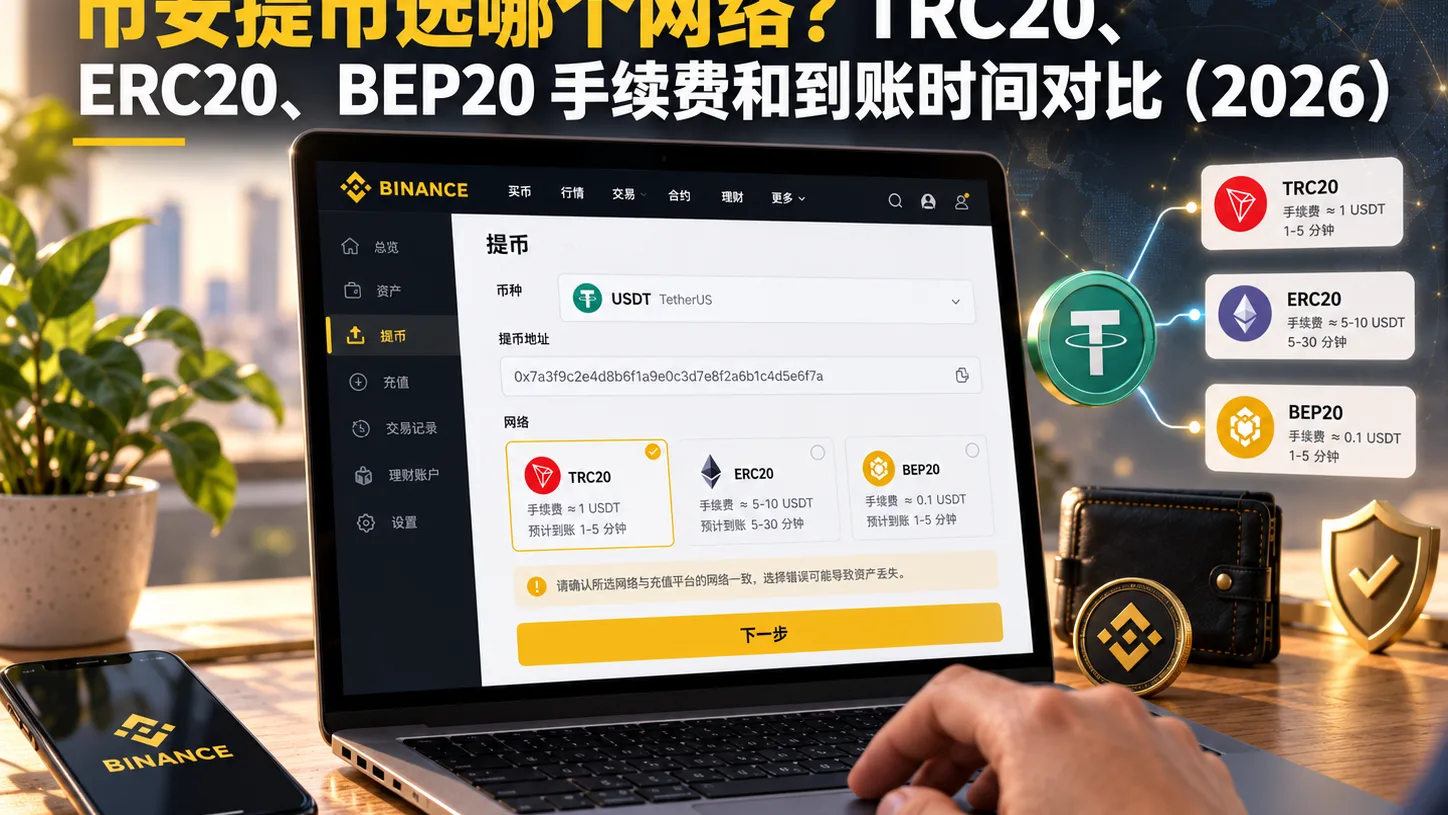
Table of contents

Binance new user rewards
20% trading fee rebate
Official Binance registration. Complete identity verification (KYC) to trade and withdraw.
Which network to choose for a Binance withdrawal? Remember the single most important sentence first:
First pick the network your recipient supports, then compare fees. Don't do it backwards.
That said, if the recipient is also a Binance user, you can use Binance Pay to transfer directly — usually free and instant, with no need to pick an on-chain network or pay a withdrawal fee.
Many people used to reflexively pick TRC20 for USDT, because for a long time its reputation was "cheap and widely supported."
But by 2026, that experience no longer applies directly.
Take the September 2026 Binance public fee snapshot as an example: withdrawing USDT via BNB Smart Chain (BEP20) costs about 0.01 USDT, Ethereum (ERC20) about 0.30 USDT, and Tron (TRC20) about 1.50 USDT.[1]
In other words:
TRC20 is no longer necessarily cheaper than ERC20, and you can't assume it's the cheapest Binance USDT withdrawal network anymore.
Binance currently also supports USDT transfers on Arbitrum, Optimism, Polygon, Solana and more, and some of those routes may have lower withdrawal fees than TRC20.
So the truly correct order of choosing should be:
What the recipient supports → where you'll use the coin next → only then compare fees.
This article only answers three questions:
- Roughly how much TRC20, ERC20 and BEP20 withdrawal fees cost;
- How long it generally takes to arrive;
- How to actually choose when withdrawing.
Note: this article explains Binance withdrawal network selection and is not investment, trading, tax or legal advice. Binance withdrawal fees, minimum withdrawal amounts and network availability can all change dynamically — before submitting, refer to what your account's withdrawal page shows.
Core information
If you only remember three sentences:
- The Binance withdrawal network must match the deposit network your recipient supports;
- A September 2026 public fee snapshot shows TRC20's USDT withdrawal fee was higher than ERC20's;
- BEP20, Arbitrum, Optimism and other networks may be cheaper, but only chooseable when the recipient supports them too.
Using the September 2026 public data as reference:
| Network | USDT withdrawal fee (ref) | Min withdrawal (ref) | Address format |
|---|---|---|---|
| BEP20 (BNB Smart Chain) | ~0.01 USDT | ~3 USDT | starts with 0x |
| ERC20 (Ethereum) | ~0.30 USDT | ~5 USDT | starts with 0x |
| TRC20 (Tron) | ~1.50 USDT | ~5 USDT | starts with T |
These are September 2026 point-in-time figures, not permanent rates.
Binance officially states that crypto withdrawal fees adjust with current network conditions and may do so without notice; every time you withdraw, refer to the network fee and final credited amount shown on the withdrawal page.[2]
So don't memorize "TRC20 = 1.5 USDT" or "ERC20 = 0.3 USDT" as fixed rules.
When actually operating, check the page again.
About 14 minutes to read. Remember first: pick the network your recipient supports before comparing fees; two 0x addresses looking the same does not mean you can freely choose between ERC20 and BEP20.
Who should and shouldn't read this
| Your situation | Where to focus |
|---|---|
| First time withdrawing USDT from Binance, unsure which chain | Section 5 "How to choose the network" |
| Sending USDT to OKX, another exchange or a wallet | Check the recipient's deposit network first |
| Going to Ethereum to use Uniswap etc. | The ERC20 part |
| Going into BNB Chain to use dApps | The BEP20 part |
| Already sent to the wrong network | Section 8 "What to do if you picked the wrong network" |
| Just want to know the tech difference between ERC20 and BEP20 | Sections 2 and 3 |
Table of contents
- What is a withdrawal fee, really?
- TRC20, ERC20, BEP20 fee comparison
- Address prefixes: how to tell
Tand0xapart - How is arrival time actually calculated?
- How to actually choose the Binance withdrawal network
- Why you can't default to TRC20 anymore in 2026
- Should you pick Arbitrum, Optimism or Solana?
- What to do if you picked the wrong network
- Common misconceptions
- Final pre-withdrawal checklist
- FAQ
1. What is a withdrawal fee, really?
The easiest thing to confuse on your first withdrawal:
A withdrawal fee and a trading fee are not the same thing.
When you buy or sell BTC, ETH or USDT on the Binance spot market, that's a trading fee.
When you withdraw USDT from Binance to an external wallet or another exchange, what you see is the withdrawal fee / network fee.
Binance officially states that withdrawing to an on-chain address outside Binance usually incurs network-related fees, which are adjusted according to current blockchain network conditions.
For an ordinary user, the simplest understanding is:
When you initiate a withdrawal, just look at the network fee and final credited amount shown on the Binance page.
It is usually not calculated as:
withdrawal amount × some percentage
For example, at a given moment, the withdrawal fee for the same coin on the same network is 1.5 USDT, then:
- withdrawing 10 USDT;
- withdrawing 100 USDT;
- withdrawing 1,000 USDT;
the per-withdrawal fee shown on the page usually does not scale 100x just because the amount grew 100x.
This is why small withdrawals especially need attention to the fee ratio.
For example:
Withdraw 5 USDT, fee 1.5 USDT
The fee equals 30% of the withdrawal amount.
Whereas:
Withdraw 1,000 USDT, fee still 1.5 USDT
The ratio is only 0.15%.
2. TRC20, ERC20, BEP20 fee comparison
In the past, many Chinese tutorials would tell you directly:
TRC20 is cheapest, ERC20 is most expensive.
That experience no longer applies in 2026.
Multiple September 2026 data snapshots based on Binance's public fee page show:
| Network | USDT withdrawal fee (ref) | Min withdrawal (ref) |
|---|---|---|
| BEP20 (BNB Smart Chain) | ~0.01 USDT | ~3 USDT |
| ERC20 (Ethereum) | ~0.30 USDT | ~5 USDT |
| TRC20 (Tron) | ~1.50 USDT | ~5 USDT |
In the September 2026 public fee snapshot, the USDT withdrawal fees of BEP20, ERC20 and TRC20 already differ from the common past assumption. The image below shows the fees and how to choose among the three networks using the real withdrawal-screen logic.
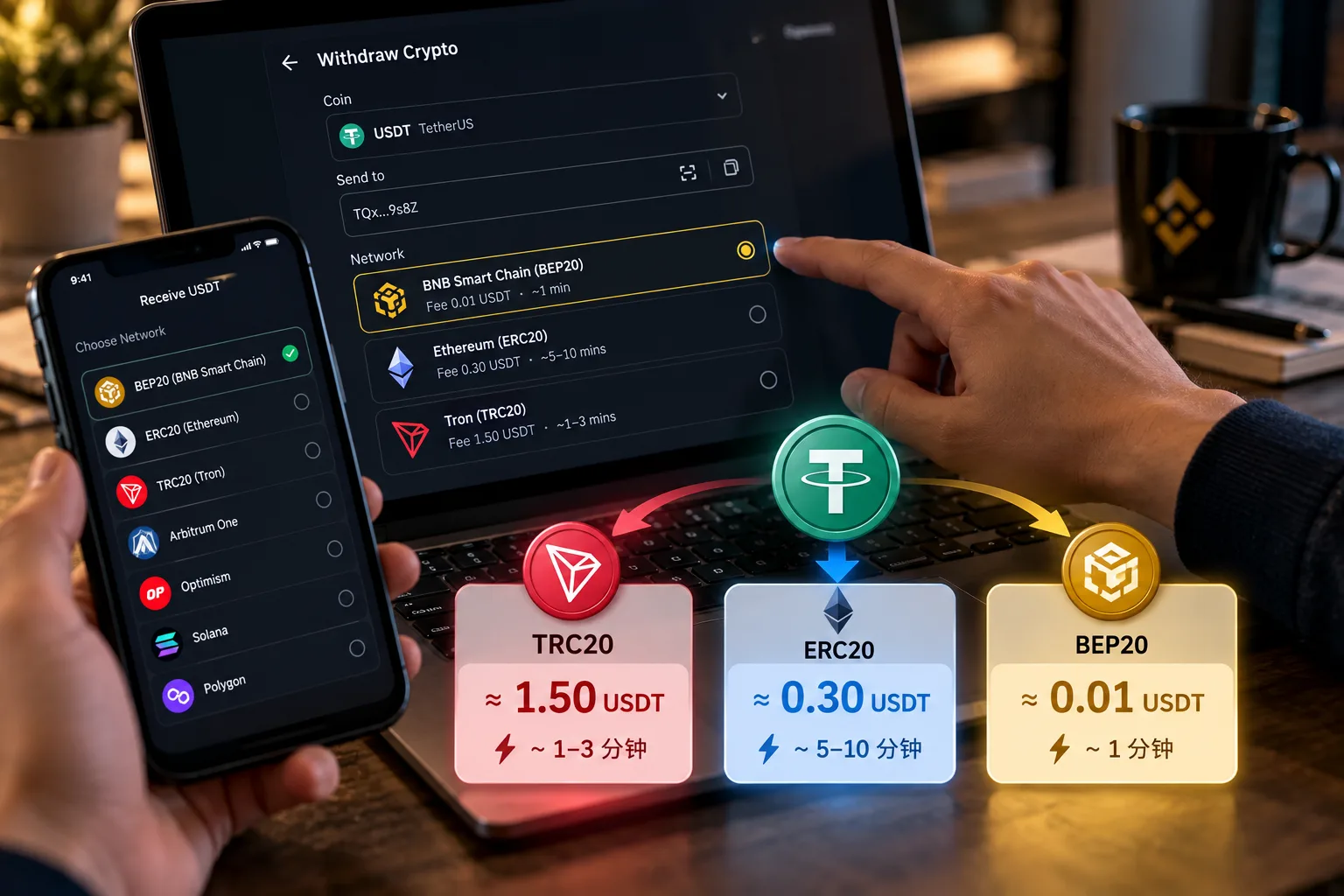
That is to say, at this point in time, withdrawing USDT via ERC20 was actually cheaper than TRC20, and BEP20 was clearly lower than both.
The September 7 and September 12, 2026 public fee snapshots both showed this set of figures.
But it's still worth emphasizing:
This is a fee snapshot, not a permanent price list.
Binance officially states that withdrawal fees change dynamically, so when actually withdrawing, refer to what your page shows.
BEP20: very low fee, but the recipient must support it
BEP20 refers to:
BNB Smart Chain (BSC)
In the September 2026 public data, Binance's USDT BEP20 withdrawal fee was as low as about 0.01 USDT.
Its characteristics include:
- Usually lower withdrawal fee;
- Faster on-chain confirmation;
- Supported by Binance and many Web3 wallets;
- Suited for users who need to enter the BNB Chain ecosystem.
But it has one precondition that cannot be crossed:
The recipient must explicitly support USDT-BEP20 / BNB Smart Chain.
For example, you're about to withdraw USDT to another exchange.
If the other exchange's USDT deposit page only has:
- TRC20;
- ERC20;
and does not have:
- BEP20 / BSC;
then even if Binance's BEP20 costs only 0.01 USDT, don't pick it.
A cheap fee cannot make up for network incompatibility.
On whether BEP20 and native USDT are the same thing, see What Is BEP20 USDT? Binance-Peg BSC-USD vs Native USDT.
TRC20: widely supported, but no longer necessarily cheapest
TRC20 refers to:
USDT on the Tron network.
It has long been popular mainly because:
- Mainstream platforms generally support it;
- More wallets support it;
- On-chain confirmation is usually fast;
- In the past its cost was relatively lower than the Ethereum mainnet.
But by 2026, the more accurate phrasing is:
TRC20 is still a common USDT transfer network, but it's not guaranteed to be Binance's cheapest withdrawal network.
In the September 2026 public data, Binance's USDT-TRC20 withdrawal fee was about 1.5 USDT, higher than the ERC20, BEP20, Arbitrum and Optimism routes at the time.
So when picking TRC20 now, you should look at:
whether the recipient supports it + the actual fee at the time.
Not reflexively click TRC20 the moment you see USDT.
ERC20: can no longer be simply equated with "most expensive"
ERC20 refers to:
The Ethereum mainnet.
Many old tutorials will tell you:
Transferring USDT via ERC20 can cost 5 dollars, 10 dollars or even tens of dollars once.
Such high-Gas scenarios did occur in the past.
But here you must separate two things:
The real-time Gas you pay when you send an Ethereum transaction from a non-custodial wallet yourself
and
the fixed withdrawal fee Binance charges you on its withdrawal page
are not exactly the same calculation.
Binance estimates and adjusts its own withdrawal fee according to network conditions.
In some September 2026 public data, Binance's USDT ERC20 withdrawal fee was about:
0.30 USDT
lower than TRC20's:
1.50 USDT
at the time. So:
Don't see ERC20 and immediately conclude it's the most expensive.
Compare again on the day you actually withdraw.
3. Address prefixes: how to tell T and 0x apart?
After picking the network correctly, you still need to check the address.
Address formats for the three common networks:
| Network | Common address format | Easiest place to get it wrong |
|---|---|---|
| TRC20 | starts with T |
Relatively easy to identify |
| ERC20 | starts with 0x |
Looks the same as BEP20 |
| BEP20 | starts with 0x |
Looks the same as ERC20 |
TRC20 addresses are usually easy to identify.
What's actually easy to get wrong:
ERC20 and BEP20.
Ethereum and BNB Smart Chain both use the EVM address system, so common addresses are both:
0x + 40 hexadecimal characters
with a total length of usually 42 characters.
ERC20 and BEP20 addresses look the same — are the networks the same?
No.
This is a very easy point to misunderstand when withdrawing.
The Ethereum and BNB Smart Chain addresses corresponding to the same private key can have exactly the same address string.
For example:
0x1234……abcd
This address can be used on both:
- Ethereum;
- BNB Smart Chain;
But on the two chains, the:
- USDT balance;
- transaction history;
- block confirmations;
- smart contracts;
are all independent of each other.
So:
Addresses looking the same does not mean you can pick any network.
If it's your own non-custodial wallet and you hold the private key or seed phrase, when a transfer went to the wrong EVM network that you also control, in some cases you can recover it by switching the network and adding the corresponding token.
But if the receiving address belongs to an exchange:
whether it auto-credits depends on whether the exchange supports that coin on that network.
This is why, when checking the address, you can't just look at:
0x
You must also verify the network name.
4. How is arrival time actually calculated?
Many tutorials like to write directly:
- BEP20: 1 minute;
- TRC20: 3 minutes;
- ERC20: 10–30 minutes.
It's not recommended to write those figures as guaranteed times.
A Binance on-chain withdrawal actually goes through:
Binance processing the withdrawal → broadcasting the on-chain transaction → block confirmations → the receiving platform reaching the required confirmations → the receiving platform crediting the account
Therefore:
On-chain success ≠ the receiving exchange account has already shown the balance.
Binance officially states that crypto withdrawals can usually be processed quickly, but blockchain network congestion may cause delays.
A rough way to understand it:
| Network | General experience |
|---|---|
| BEP20 | On-chain confirmation usually fast |
| TRC20 | On-chain confirmation usually fast |
| ERC20 | Depends on the Ethereum network and the recipient's confirmation requirements |
If withdrawing to your own Web3 wallet, you can usually see the asset once on-chain confirmation is done.
If withdrawing to a centralized exchange, it may require a specific number of confirmations before crediting your account, so the final arrival time may be later than the on-chain success time.
What if a withdrawal hasn't arrived for a long time?
First step:
Don't immediately send another one.
First find the withdrawal's:
TxID (transaction hash)
Binance officially states that you can find the TxID in the withdrawal record and click it to view the transaction status on the corresponding blockchain.[3]
You can generally check it this way:
Then first look at Binance's withdrawal status.
If it shows Processing
It means the withdrawal is still being processed.
Wait for now.
If it shows Completed
Binance officially states that Completed means the funds have been successfully sent.[4]
At this point, click the TxID to check the on-chain status.
If it succeeded on-chain but the receiving exchange still hasn't credited it, gather:
- TxID;
- coin;
- network;
- amount;
- receiving address;
and contact the receiving platform to inquire.
5. How to actually choose the Binance withdrawal network?
Don't memorize:
Which is the best — TRC20, BEP20 or ERC20?
No single network suits every case.
The correct method is only four steps.
Step 1: Open the recipient's deposit page first
For example:
You're about to transfer USDT from Binance to OKX.
First go to:
OKX → Deposit → USDT
and see which deposit networks OKX currently opens for you.
For example, it may include:
- TRC20;
- ERC20;
- Arbitrum;
- Solana;
- other networks.
Only networks the recipient explicitly supports go into the next round of comparison.
Step 2: Return to Binance and choose USDT withdrawal
Go to:
Binance → Assets → Withdraw → USDT
Fill in the receiving address, then look at the currently available withdrawal networks.
Binance's current official flow is the same: fill in the withdrawal address, then choose the network and confirm again that the chosen network matches the target platform.
Step 3: Find networks both sides support
Suppose the receiving platform supports:
- TRC20;
- ERC20;
- Arbitrum.
Binance also supports:
- TRC20;
- ERC20;
- Arbitrum;
- BEP20.
Then the networks you can actually choose are only:
- TRC20;
- ERC20;
- Arbitrum.
Even if Binance's BEP20 is cheaper:
rule it out directly.
Because the receiving platform hasn't opened BEP20.
Step 4: Then compare fees and purpose
When both sides support them, then compare:
- Withdrawal fee;
- Minimum withdrawal amount;
- Network status;
- What you plan to do after the asset arrives.
This is the correct order.
In practice, you don't need to first judge which chain is "best"; instead filter in a fixed order: first confirm which networks the recipient supports, then the asset's future use, and only finally compare the real-time fees among the networks both sides support.
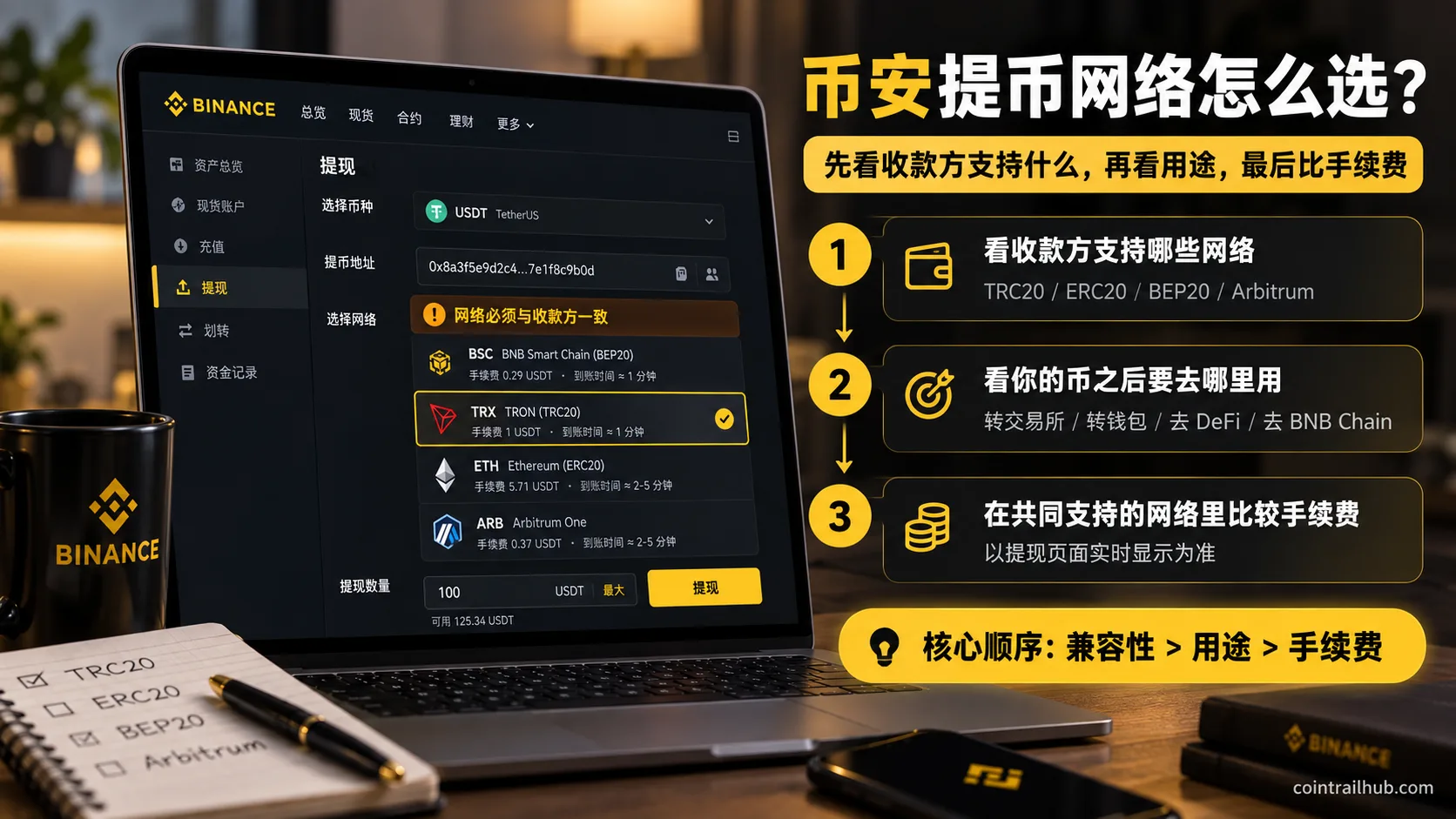
So the priority should be:
Compatibility → future use → fee
Not the reverse.
How to choose in different scenarios?
| Scenario | Selection logic |
|---|---|
| Transfer to another exchange | Compare fees among the networks both sides support |
| Transfer to your own Web3 wallet | Look at which ecosystem you'll use next |
| Going to Ethereum for DeFi | Ethereum / ERC20 |
| Going to BNB Chain for dApps | BNB Smart Chain / BEP20 |
| The recipient only supports TRC20 | You can only pick TRC20 |
| The recipient supports several low-cost networks | Compare Binance's current actual withdrawal fee |
If the next step after withdrawal is to cash out to fiat, see Binance withdrawal tutorial 2026: how to sell USDT to your bank account? Fees, arrival, and freeze risk.
6. Why you can't default to TRC20 anymore in 2026
Many users have formed a habit:
Withdraw USDT = TRC20
This experience came from past years.
But now the USDT networks Binance supports have clearly grown.
In the September 2026 public fee data, besides the three traditional routes, there are several low-cost networks, for example:
- Arbitrum One;
- Optimism;
- Polygon;
- Solana;
- BNB Smart Chain;
- opBNB, etc.
Some routes' Binance USDT withdrawal fee is lower than TRC20.
For example, one set of September 2026 public data:
| Network | USDT withdrawal fee (ref) |
|---|---|
| BNB Smart Chain | ~0.01 USDT |
| Optimism | ~0.04 USDT |
| Polygon POS | ~0.07 USDT |
| Arbitrum One | ~0.10 USDT |
| Ethereum | ~0.30 USDT |
| Tron | ~1.50 USDT |
Multiple public data snapshots in the same period showed the same or a similar fee structure.
What's really worth remembering here isn't:
which chain ranks first forever.
But:
TRC20 can no longer be treated as a synonym for "default cheapest."
7. Should you pick Arbitrum, Optimism or Solana?
You can consider them, but first separate the network types.
Arbitrum, Optimism, Base
are Layer 2 networks in the Ethereum scaling ecosystem.
Whereas:
Solana is an independent Layer 1 chain.
Solana is not an Ethereum L2.
Why are these networks worth looking at?
The main reason is simply:
the fee may be lower.
For example, withdrawing the same USDT, in some September 2026 Binance public fee snapshots:
- BEP20 about 0.01 USDT;
- Optimism about 0.04 USDT;
- Polygon about 0.07 USDT;
- Arbitrum One about 0.10 USDT;
- Ethereum about 0.30 USDT;
- Tron about 1.50 USDT.
But cheap is only the second step.
The first step is always:
whether the recipient supports it.
For example, the recipient only opens:
- ERC20;
- TRC20.
Then even if Binance shows:
BEP20 0.01 USDT
it has nothing to do with you.
Because that network isn't in the set both sides support.
8. What to do if you picked the wrong network?
Conclusion first:
Picking the wrong network doesn't necessarily mean the asset is permanently lost, but you also can never assume it's definitely recoverable.
Binance's 2026-updated wrong-network guidance also clearly distinguishes cases: if the receiving wallet supports the relevant network too, recovery is relatively easy; if it went into a custodial wallet or an exchange, you usually need to contact the platform, and recovery is not guaranteed.
It mainly splits into four cases.
1. Sent to your own non-custodial wallet
For example:
You meant to use ERC20, but sent USDT to your own EVM wallet address via BSC.
If:
- the wallet address really belongs to you;
- you hold the private key / seed phrase;
- the asset actually exists on the corresponding network;
in many cases you can switch to the network it was actually sent on and add the corresponding token to see the asset.
This case isn't necessarily "the coins are gone."
2. Sent to an exchange that supports that network
For example, you thought you picked the wrong network, but after checking you find the receiving exchange actually supports it too.
First:
- check the TxID;
- check the on-chain status;
- check the deposit record.
If it still hasn't credited, contact the platform's support.
3. Sent to an exchange that doesn't support that network
This case is much more troublesome.
The asset may already be at the address on that chain, but the exchange system won't auto-credit your account.
Whether it can be recovered depends on the platform:
- whether it offers a deposit recovery feature;
- whether it supports manual processing;
- whether it has the ability to handle assets on that network;
- whether it charges a recovery fee.
At this point, don't keep testing transfers.
Save:
TxID + address + network + amount
and contact the receiving platform.
4. The address itself was wrong
This is not the same problem as "picking the wrong network."
If funds were sent to:
- a stranger's address;
- a wrong address;
- an address you can't control;
then recovery is usually much harder than simply picking the wrong EVM network.
After an on-chain transaction is confirmed, it generally can't be directly reversed like a bank-card transfer.
If you already transferred to the wrong place, see Sent to the Wrong Chain? Can You Recover It? Withdrawal Network and Wallet Address (2026) for the full troubleshooting and recovery flow.
9. Common misconceptions
"TRC20 is always cheapest"
Wrong.
In the September 2026 Binance public fee data, TRC20's USDT withdrawal fee was at one point higher than ERC20, BEP20, Arbitrum, Optimism and several other networks.
"ERC20 is definitely the most expensive"
Also wrong.
The real-time Gas when you operate Ethereum from your own wallet isn't directly equal to the USDT withdrawal fee Binance charges you on its page.
In the end, look at the Binance withdrawal page.
"Both are 0x addresses, so ERC20 and BEP20 are interchangeable"
Wrong.
The address format being the same doesn't mean the network is the same.
Ethereum and BNB Smart Chain are two different blockchains.
"The cheapest fee is the best"
Wrong.
The first criterion is always:
whether the recipient supports it.
If the receiver doesn't support it, you can't pick it no matter how cheap.
"If Binance shows Completed, the other side should credit instantly"
Not necessarily.
Completed means Binance has finished sending.
Whether the receiving platform has reached the required block confirmations and credited the account is the next step.
"The coins are definitely gone after picking the wrong network"
Not necessarily.
A compatible wallet you control can sometimes recover.
But if it went into an exchange that doesn't support that network, whether it can be recovered is up to the platform and not guaranteed.
10. Final pre-withdrawal checklist
Before submitting a withdrawal, check these 6 items in order.
1. Coin matches
Withdrawing:
USDT
then confirm the receiving page is also:
USDT
Don't send USDT to another token's deposit entry just because the address format looks similar.
2. Network matches
If the recipient shows:
USDT — TRON (TRC20)
Binance should also select:
TRON / TRC20
If the other side shows:
USDT — Ethereum (ERC20)
Binance should select:
Ethereum / ERC20
The networks on both sides must correspond.
3. Check the address
After pasting, at least verify:
- the first few characters;
- the last few characters;
- whether any character is missing;
- whether there's a stray space;
- whether clipboard malware replaced it.
4. Don't judge the network by 0x alone
ERC20 and BEP20 can both use:
0x
addresses.
So you must also verify:
the network name.
5. Look at the real-time fee and minimum withdrawal
The:
- 0.01 USDT;
- 0.30 USDT;
- 1.50 USDT;
in this article are all September 2026 public fee snapshots.
The number you actually need to look at is:
what the Binance page shows before you click to confirm the withdrawal.
Likewise, the Minimum Withdrawal amount should refer to the real-time page.
6. For a first large transfer, test with a small amount first
If this is:
- your first transfer to this address;
- your first time using this network;
- a relatively large amount;
you can first send a small test that meets the minimum withdrawal amount.
Confirm:
coin, network, address, arrival result
are all correct before deciding whether to continue.
Paying one extra small withdrawal fee is usually much simpler than handling assets after a wrong-network transfer.
FAQ
Should I pick TRC20 or ERC20 to withdraw USDT from Binance?
First check which network the recipient supports.
If they only support TRC20, pick TRC20.
If both TRC20 and ERC20 are supported, look at the fee shown on the Binance withdrawal page at that moment, and where you plan to use the asset next.
Don't keep assuming TRC20 is definitely cheaper than ERC20.
In the September 2026 public fee snapshot:
- TRC20: about 1.50 USDT;
- ERC20: about 0.30 USDT.
But this price can still change later.
Which is cheapest, TRC20, ERC20 or BEP20?
There's no permanent answer.
In the September 2026 public fee snapshot:
- BEP20: about 0.01 USDT
- ERC20: about 0.30 USDT
- TRC20: about 1.50 USDT
BEP20 was the lowest at that time.
But Binance adjusts withdrawal fees dynamically, so you can't treat that ranking as a permanent rule.
Why can withdrawing USDT via ERC20 now be cheaper than TRC20?
Because the fee shown on the Binance withdrawal page can't simply be understood as:
the real-time Gas of you sending an Ethereum transaction yourself.
Binance estimates and adjusts its withdrawal fee according to network conditions and its withdrawal mechanism.
So the Binance withdrawal fee for the same asset on different networks can show a ranking different from past experience.
Is the Binance withdrawal fee fixed or percentage-based?
Binance officially states that withdrawals charge a fixed fee, but that fixed value itself adjusts with network conditions.[5]
So:
for the same time, same coin and same network, the withdrawal fee usually doesn't increase as a percentage of the withdrawal amount.
This is also why small withdrawals should pay more attention to the fee ratio.
Why can ERC20 and BEP20 addresses be the same?
Because Ethereum and BNB Smart Chain both use the EVM address system.
The same private key can correspond to the same 0x address on both networks.
But the two networks':
- balances;
- transactions;
- block states;
are independent of each other.
So even if the address looks the same, you still must pick the right network.
How long does a Binance withdrawal take to arrive?
There's no fixed number of minutes that applies to every withdrawal.
The actual process includes:
Binance processing → broadcasting the transaction → block confirmations → receiving platform confirmation → crediting
BEP20 and TRC20 on-chain confirmation is usually fast, but the final arrival still depends on:
- Binance withdrawal processing;
- current network conditions;
- the confirmation count the receiving platform requires.
Binance shows Completed, but the other side hasn't credited — what now?
First find:
TxID
then check the on-chain transaction status.
If it has confirmed on-chain, contact the receiving platform with the TxID.
Binance officially also suggests checking the transaction details via TxID after Completed and inquiring with the receiving platform or wallet.
What is the minimum withdrawal amount?
It differs by network and may adjust.
In the September 2026 public snapshot:
- BEP20: about 3 USDT;
- ERC20: about 5 USDT;
- TRC20: about 5 USDT;
- Arbitrum One: about 3 USDT;
- Optimism: about 3 USDT.
But don't hard-code these figures long term.
Binance officially states that each asset has a minimum withdrawal amount, which should refer to the current withdrawal page or the deposit/withdrawal fee page.[6]
After choosing the network: if you already sent to the wrong chain, see Sent to the Wrong Chain? Can You Recover It? Withdrawal Network and Wallet Address; on whether to withdraw USDT to a wallet or leave it on the exchange, see Where to Store USDT Bought on Binance/OKX? Exchange or Withdraw to a Wallet.
Final summary: don't ask which chain is cheapest first
For choosing a Binance withdrawal network, the real judgment order is only three steps:
First: which networks the recipient supports.
Second: where you'll use the coin after it arrives.
Third: compare real-time fees among the networks both sides support.
There's one old habit worth breaking in 2026 in particular:
Don't default to TRC20 for USDT withdrawals anymore.
From the September 2026 Binance public fee snapshot:
- BEP20;
- Optimism;
- Polygon;
- Arbitrum;
and other networks may all have lower USDT withdrawal fees than TRC20, and even Ethereum ERC20 was lower than TRC20 at that time.
But no matter how much the fees differ, it can't change the most basic rule:
Only networks that both the sender and receiver support are networks you can actually choose.
If the final purpose of your withdrawal is to cash out to fiat, see How to Withdraw USDT to Your Bank Account: Steps, Fees, Timing and Account-Freeze Risks (2026) for the specific path to your bank account.
Data verification notes
The key facts in this article were checked against Binance's official documentation on 2026-10-16, item by item:
- USDT withdrawal fee reference: in the September 2026 public fee snapshot, BEP20 was about 0.01 USDT, ERC20 about 0.30 USDT, and TRC20 about 1.50 USDT. Source: Binance crypto withdrawal fee.
- Dynamic fee adjustment: crypto withdrawal fees adjust with current network conditions and may do so without notice; refer to the network fee and credited amount shown on the withdrawal page. Source: Binance crypto withdrawal fee.
- TxID lookup: you can find the TxID in the withdrawal record and click it to view the transaction status on the corresponding blockchain. Source: Binance how to find the transaction ID (TxID).
- Meaning of Completed: a withdrawal record showing Completed means the funds have been successfully sent. Source: Binance how to check blockchain transaction status.
- Fee form: withdrawals charge a fixed fee, but that fixed value itself adjusts with network conditions. Source: Binance crypto withdrawal fee.
- Minimum withdrawal: each asset has a minimum withdrawal amount, which should refer to the current withdrawal page or the deposit/withdrawal fee page. Source: Binance crypto withdrawal fee.
- 2026-10-16UpdateAdded evidence-chain superscripts and "Data verification notes"; updated the key-fact verification date.
See ourEditorial Policy and the correction process in ourCorrections Policy.
The CoinTrailHub editorial team focuses on crypto education for beginners, exchange security and P2P trading risk. This article is compiled from official sources and public data, reviewed by humans, and strives for accuracy but is not investment advice.
Last updated:2026-09-26 · Content reviewed by humans · Learn more
© 2026 CoinTrailHub · Original content. Reproduction or rewriting without permission is prohibited.