
Binance withdrawal tutorial 2026: how to sell USDT to your bank account? Fees, arrival, and freeze risk
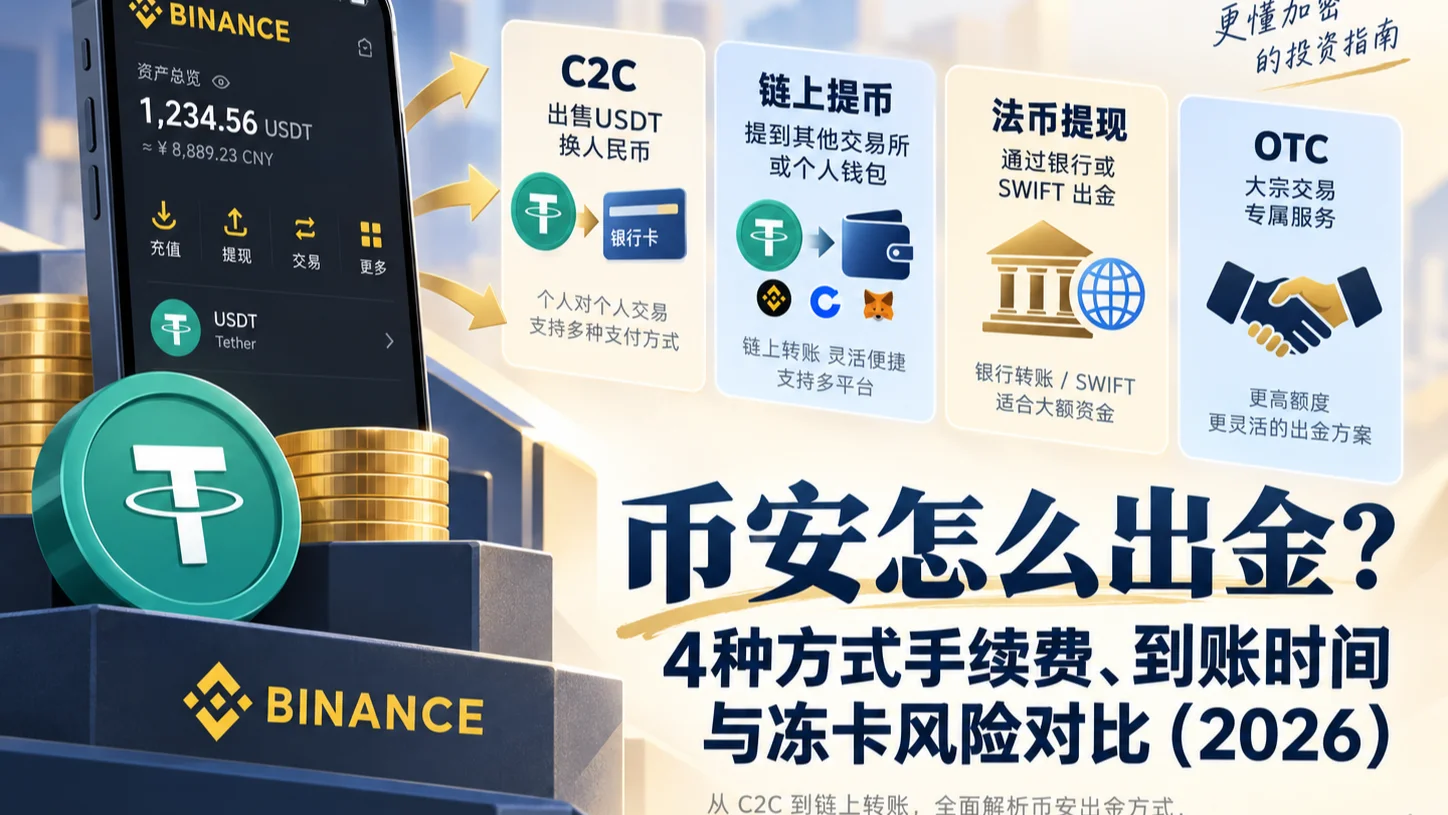
Table of contents

Binance new user rewards
20% trading fee rebate
Official Binance registration. Complete identity verification (KYC) to trade and withdraw.
How do you withdraw from Binance to your bank account? If you hold USDT on Binance and want to sell it and receive fiat (such as USD) in your bank account, you can use the P2P sell feature your account supports: go to "P2P → Sell", choose USDT, a fiat currency, and a payment method, compare buyer offers, then create an order. After the buyer pays, open your own bank App to confirm the real arrival, then return to Binance to release the coins.
Withdrawing from Binance means converting the crypto assets in your account into usable fiat and completing the transfer through a supported payout channel. P2P selling and USD bank withdrawal are different methods; moving USDT to another exchange or wallet is an on-chain withdrawal, not the same as having received fiat.
This article contains two sets of verifiable data:
- 2026-09-23 P2P check: a CoinTrailHub account could access the USDT/CNY P2P sell entry and kept records of an actually completed sell order.
- 2026-10-08 bank-withdrawal interface: the Binance App showed a BPay USD SWIFT withdrawal fee of 25 USD with an estimated 0–3 business days. This is an interface record, not a successful withdrawal statement.
If all goes well, you can finish a P2P sell within 10 minutes. The two easiest places to trip up are: releasing the coins as soon as a buyer marks "paid", and only looking at who offers the highest price without checking the merchant's completion rate, limits, and payment terms.
How to choose a Binance withdrawal method?
| Funds and needs | Corresponding method |
|---|---|
| Holding USDT, want to receive local fiat | Check USDT/fiat P2P sell |
| Holding USDT, want to receive another fiat | Check the P2P or fiat-conversion services your account supports |
| Already have a withdrawable USD fiat balance | Check USD SWIFT bank withdrawal |
| Want to send USDT to another Binance user | Binance Pay user-to-user transfer |
| Want to move USDT to OKX | On-chain withdrawal |
| Want to move USDT to a personal wallet | On-chain withdrawal |
Selection advice: first decide whether you want to receive fiat or just move crypto assets. To receive fiat in a bank account, focus on comparing P2P and available fiat withdrawals; to move to another wallet, use on-chain withdrawal; if the recipient is also a Binance user, prefer Binance Pay user-to-user transfer, which is usually free and instant.
The specific services available are subject to the actual page of your Binance account.
1. What's the difference between Binance fiat withdrawal and on-chain withdrawal?
Many people search "Binance withdrawal" but actually have two completely different needs.
The first is fiat cash-out.
For example:
USDT → P2P sell → buyer transfers → bank account receives fiat.
Or the account already holds a withdrawable USD fiat balance, which is then sent to a bank account through a supported SWIFT channel.
The second is on-chain withdrawal.
For example:
Binance USDT → an OKX USDT deposit address.
After the transfer, the asset is still USDT — it hasn't become fiat in a bank account.
| Operation | Result after completion |
|---|---|
| P2P sell USDT | Receive the fiat payout agreed in the order |
| USD SWIFT withdrawal | Send USD through a bank channel |
| USDT on-chain withdrawal | Another platform or wallet receives USDT |
If you just want to move USDT from Binance to another exchange, read the dedicated on-chain withdrawal tutorial. This article focuses on how to receive fiat.
2. How to sell USDT to a bank account on Binance? A seven-step tutorial
What to prepare before withdrawing?
Before using P2P to sell USDT, first confirm:
- Your Binance account meets the relevant identity-verification requirements;
- You've set up applicable account security verification;
- The P2P page has enough sellable USDT;
- You've added a real-name payment method in your own name that meets platform requirements.
Is USDT in the Spot account — do I need to transfer it first?
First check the sellable balance shown on the P2P page. If it's short, check which account holds the assets and transfer according to the current App prompts. Binance's official web P2P tutorial also requires confirming the funding account balance is sufficient before selling.[1]
Step 1: enter the P2P trading page
Open the Binance App and log in.
Enter the P2P page from the home P2P entry or the trade menu in the current version.
If the page offers a quick zone, a self-select zone, or other zones, choose according to the order requirements.
Step 2: select "Sell USDT"
Switch to "Sell", and choose USDT.
Then choose a fiat currency your account supports, and filter a payment method such as a bank card that you own.
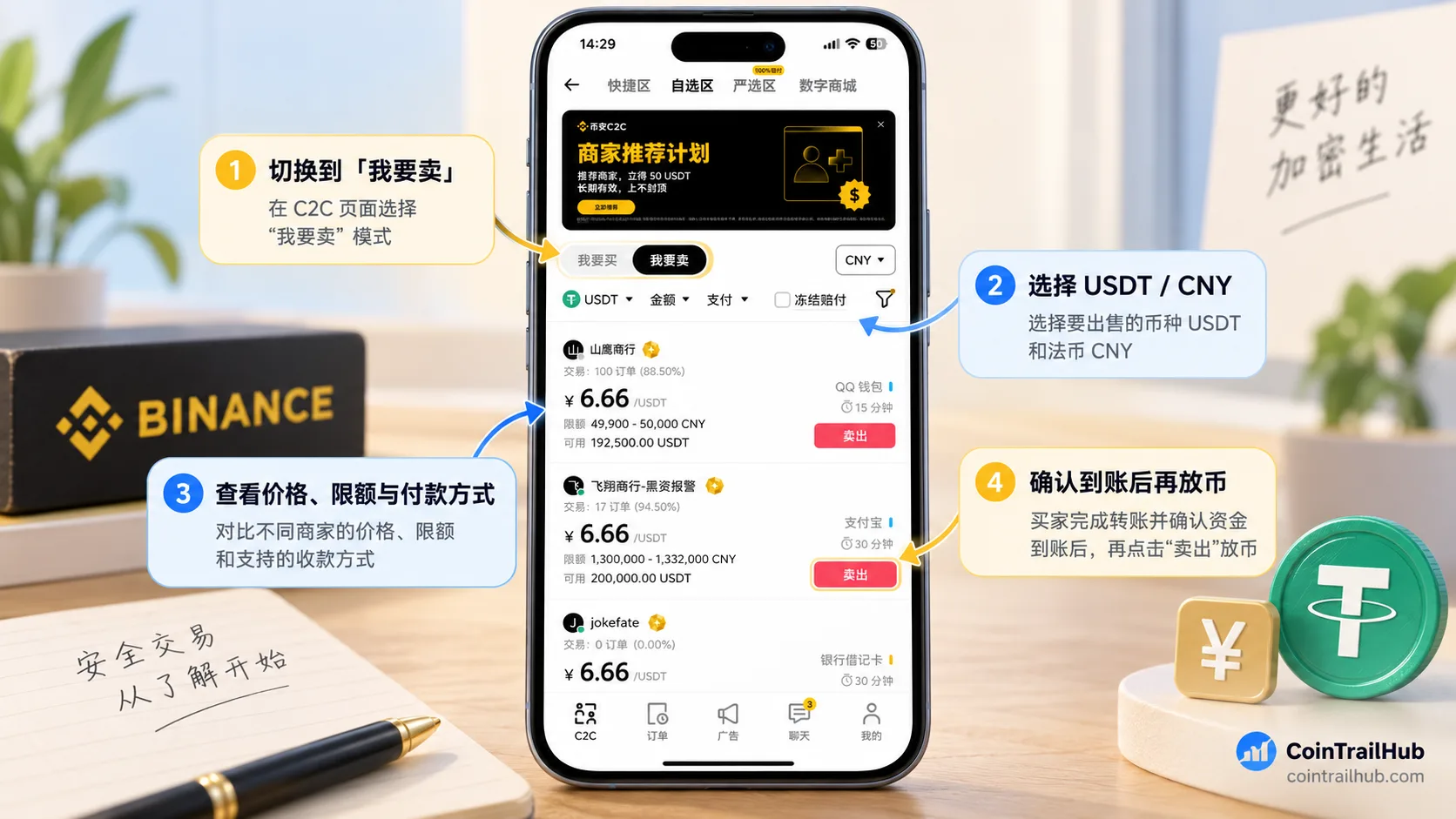
Binance P2P sell interface: switch to "Sell", choose USDT/fiat and a payment method.
Step 3: compare buyer offers
After entering the self-select zone, look at different buyers' ad information.
| Buyer ad info | What to check |
|---|---|
| USDT unit price | How much fiat you can expect to receive |
| Trade limits | Whether your sell amount meets the requirement |
| Historical completion rate | Reference for the buyer's past performance |
| Trade count | Reference for historical trade scale |
| Payment method | Whether it supports your receiving account |
| Trade terms | Whether they meet the order requirements |
How to judge: don't just look at who offers the highest price — also check the merchant's record, trade limits, and payment terms.
Step 4: create a sell order
After choosing a buyer, enter the USDT quantity you plan to sell.
Before submitting, verify the fill price, expected fiat payout, payment deadline, and your receiving account.
Create the order after confirming everything is correct.
Step 5: wait for the buyer to pay
After creating the order, wait for the buyer to complete the transfer per the platform flow.
When the buyer marks "paid", don't release the coins immediately.
That status is the buyer's payment confirmation in the order, not proof that your bank account has received the money.
Step 6: check the real bank arrival
Open your own bank App and check the actual transaction statement.
| Item to verify | What to confirm |
|---|---|
| Actual arrival | Your bank account really received the money |
| Received amount | Matches the P2P order amount |
| Payment info | Meets the order and platform real-name requirements |
| Transaction record | Can be matched to the current order |
Don't release the coins based only on the buyer's payment screenshot, SMS, or chat message.
If the paid amount doesn't match, the payer is unusual, or the buyer asks to refund off-platform, pause the release and verify through the original order.
Step 7: confirm receipt and release the coins
After confirming the real arrival and that the order info is correct, return to the Binance P2P order.
Follow the current interface prompts to complete the receipt confirmation and coin release, and do the necessary security verification.
Full sequence: create order → buyer pays → bank confirms arrival → seller releases coins.[2]
This is the most important operating rule for P2P cash-out.
3. How much does it cost to sell USDT on Binance P2P?
The actual cost of selling coins on Binance P2P mainly depends on the fill price, any applicable trading fee, and possible payment-channel fees.
Some trading zones have a zero-fee policy for users — for example, the official Verified Merchant zone upgrade announcement lists the relevant arrangement — but the current order rules prevail.[3]
Even without an extra platform fee, different buyers may offer different prices.
How much can you receive for selling 1,000 USDT?
| Example USDT unit price | Amount for 1,000 USDT |
|---|---|
| 0.99 USD | 990 USD |
| 1.00 USD | 1,000 USD |
| 1.01 USD | 1,010 USD |
These are mathematical examples, not real-time USDT/fiat rates, and don't deduct any other possible fees.
For the same 1,000 USDT sold, every 0.01 unit difference in fill price changes the payout by 10 units of fiat.
So when comparing P2P ads, focus on the final amount you actually receive, not simply "zero fees".
4. 2026 test: can you still sell USDT on Binance P2P?
A CoinTrailHub account checked on September 23, 2026 could still enter the USDT/CNY P2P sell page.
At the time, the account showed:
- A USDT/CNY trading entry;
- The P2P "Sell" feature;
- Corresponding merchant ads and payment methods.
The site also kept records of a previously completed USDT/CNY sell order.
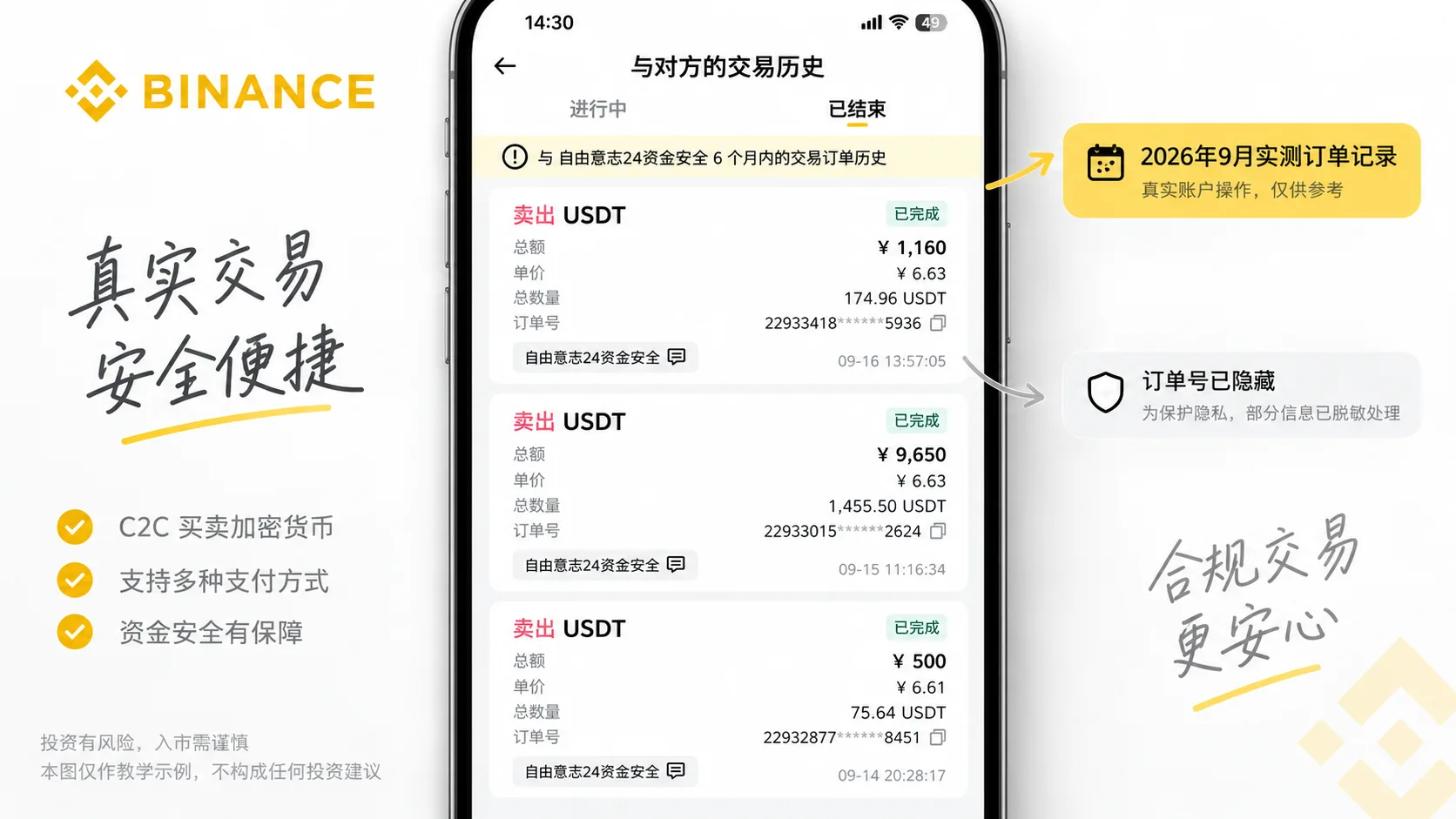
CoinTrailHub kept a real P2P sell record, retaining the original fill time and public info.
The value of this data set is that the article not only introduces the steps, but also provides the actual usage evidence of a specific account at check time.
Note that this test account was in the CNY market; for other fiat markets, availability depends on the actual page of your local account.
Historical orders, however, can't prove every account has the same features, nor that every trade carries no fund risk.
The October 8, 2026 revision of this content did not re-run a P2P sell payment test.
5. How much does the Binance Verified Merchant zone compensate for a bank freeze? What conditions apply?
The Binance P2P Verified Merchant zone is a trading zone with specific merchant admission and service rules.
Its protection mechanism isn't a guarantee that "your bank account will never be frozen" — rather, in eligible cases of a specific judicial freeze, you can apply for the corresponding compensation.
Per Binance's Verified Merchant zone rules and announcement updated in August 2026:
| Rule item | Explanation |
|---|---|
| Maximum compensation ratio | Up to 100% when eligible |
| Per-order cap | Up to 100,000 USDT |
| Main applicable cases | Compliance-related compensation cases tied to funds traded with Verified Merchants |
| Restriction type | Judicial freezes meeting the rules |
| Application requirements | Meet the time-limit and evidence conditions in the rules |
The rules set further requirements on feedback time, freeze duration, freeze reason, and compensation materials, including a 30-day feedback period and six-month-or-longer judicial freeze in specific cases.[4]
Up to 100% compensation in the Verified Merchant zone doesn't mean every frozen bank account gets a full payout.
General bank internal risk control, non-counter restrictions, and judicial freezes are not exactly the same situations either.
If your receiving account is restricted, first confirm the specific type with the bank, keep the order and receipt records, and handle it per the platform or relevant authority's requirements.
For detailed handling, continue reading USDT withdrawal to a bank account: full steps, fees, and freeze risk.
6. How does Binance USD bank withdrawal work? BPay SWIFT real fees
Besides P2P selling USDT, Binance also offers some supported fiat bank-withdrawal services.
USD SWIFT withdrawal is sending an eligible USD fiat balance to your own bank account through a supported bank-transfer channel.[5]
Here you must distinguish USDT from USD:
USDT is a crypto asset; USD is a fiat dollar balance.
If you only have USDT, first confirm whether the account provides a suitable conversion and USD withdrawal channel — you can't treat the two as the same asset.
What did the real App interface show on October 8, 2026?
In the Binance App page screenshot CoinTrailHub obtained on October 8, 2026, the USD withdrawal page showed:
| USD withdrawal item | What the screenshot showed |
|---|---|
| Service method | Bank transfer (SWIFT) |
| Service provider | BPay |
| Withdrawal fee | 25 USD |
| Estimated processing time | 0–3 business days |
An announcement Binance published on January 19, 2026 also confirms the USD SWIFT withdrawal fee was reduced from 60 USD to 25 USD per transaction.[6]
This fee and time are for the corresponding channel and don't represent uniform conditions across all regions, accounts, and banks.
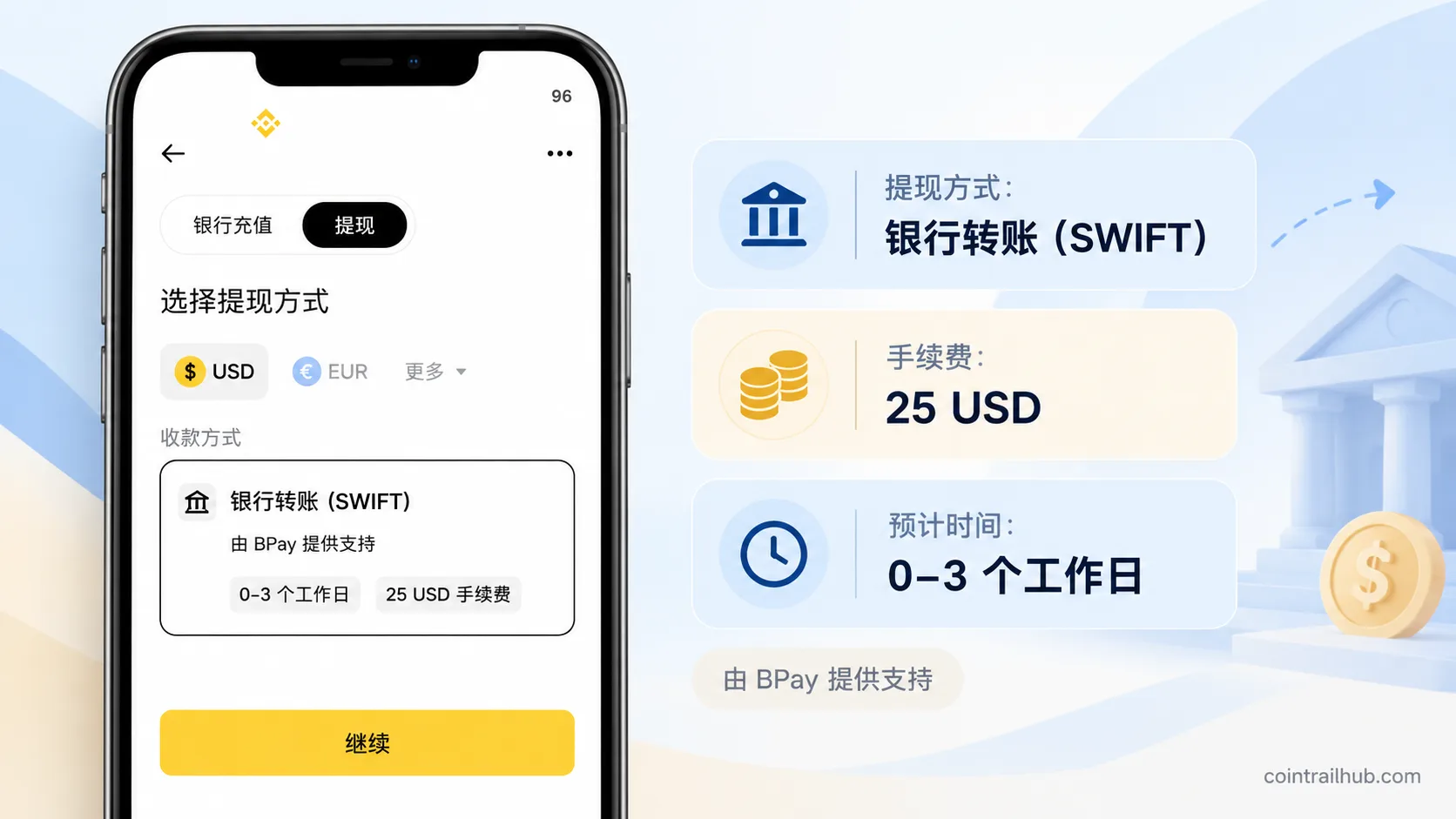
Explanatory image made from the actual Binance App USD withdrawal page on October 8, 2026. The original screenshot shows a BPay SWIFT withdrawal fee of 25 USD and an estimated 0–3 business days. This page record doesn't mean a bank withdrawal was completed.
What cost ratio does a 25 USD SWIFT fee represent?
25 USD is a fixed fee, so the smaller the amount, the higher the fee ratio.
| Assumed withdrawal amount | 25 USD fee ratio |
|---|---|
| 100 USD | 25% |
| 500 USD | 5% |
| 1,000 USD | 2.5% |
| 5,000 USD | 0.5% |
These are mathematical examples, don't mean every amount meets platform withdrawal limits, and don't include intermediary bank, receiving bank, or currency-conversion fees.
For example, withdrawing 500 USD, the 25 USD fixed fee alone is 5% of the amount; withdrawing 5,000 USD, it's 0.5%.
But a larger amount doesn't necessarily mean SWIFT is cheaper than P2P. Calculate all fees and confirm your bank supports it.
How do you make a Binance USD SWIFT withdrawal?
Following the features your account actually supports, the general flow is:
- Open the Binance App and enter the fiat withdrawal page.
- Select USD and bank transfer (SWIFT).
- Complete BPay activation or the necessary additional verification as prompted.
- Enter the withdrawal amount.
- Fill in your own receiving bank details that meet the requirements.
- Verify the fee, receiving info, and estimated processing time.
- Complete the security verification, submit the request, and check the withdrawal record.
Having USDT in your account doesn't mean you can directly initiate a USD SWIFT bank withdrawal with USDT.
First confirm whether you can obtain a withdrawable USD balance through a method your account supports, and the corresponding conversion cost.
Why might the actual arrival be less than the page shows?
Besides the fixed fee shown on the withdrawal page, there may be:
| Fee source | Where to check |
|---|---|
| BPay/platform withdrawal fee | Binance withdrawal order |
| Intermediary bank fee | Bank remittance details |
| Receiving bank fee | The actual receiving bank |
| Currency-conversion fee | The bank's actual exchange rate |
So when comparing SWIFT's cost, focus on the final amount the bank actually receives, not just the nominal 25 USD fee.
7. How to choose between P2P and SWIFT withdrawal? How long does each take?
The biggest difference between P2P and SWIFT is that one is paid by a P2P buyer, while the other is processed through a fiat bank-transfer service.
| Current situation | Method to check |
|---|---|
| Holding USDT, want to receive local fiat | P2P quotes and receiving terms |
| Already have a withdrawable USD fiat balance | SWIFT fees and bank support |
| Holding USDT, want to convert to USD and withdraw | Conversion service, conversion cost, and SWIFT fees |
Arrival time also differs:
P2P depends on the buyer's real payment and bank credit; SWIFT depends on the payment service and bank clearing.
The October 8, 2026 BPay screenshot shows SWIFT estimated at 0–3 business days, but this isn't a guaranteed arrival time. Follow the actual order and bank processing.
Selection order: first confirm the asset type and account-available services, then compare the final amount received, estimated time, and receiving requirements.
8. What to do when a Binance withdrawal doesn't arrive or the bank card is abnormal
When withdrawal problems arise, don't mix up a P2P non-arrival with a SWIFT bank-withdrawal delay.
| Problem type | Priority check |
|---|---|
| P2P buyer marked paid but nothing arrived | Your own bank's actual statement |
| P2P received amount mismatch | Order amount, payer, and bank record |
| P2P payer is unusual | Order real-name requirements and payment info |
| SWIFT exceeded estimated time | Withdrawal order and bank processing status |
| SWIFT received less than expected | Platform fee, bank fee, and conversion difference |
| Bank card is restricted | The specific restriction type confirmed by the bank |
When P2P payment is abnormal, pause the coin release first. Keep the order and actual statement, and resolve the dispute through the original order on the platform.
When a SWIFT withdrawal is delayed, first check the fiat withdrawal status. If the platform shows processed but the bank hasn't credited it, contact the corresponding channel to check.
When a bank card is restricted, first confirm whether it's bank risk control or a judicial freeze. Keep the P2P order, payment record, and bank notice, and handle it per the actual requirements.
There's no way to guarantee a bank won't restrict an account by splitting transactions, using someone else's bank card, or controlling a fixed amount.
FAQ
1. How do I sell USDT to a bank account on Binance?
Enter the Binance P2P sell page, choose USDT, a fiat currency, and your own payment method, compare buyer offers, then create an order. After the buyer pays, confirm the real arrival in your bank App, then release the coins.
2. Can you still cash out USDT/CNY via Binance P2P in 2026?
An account CoinTrailHub checked on September 23, 2026 could still enter the USDT/CNY sell page and kept a completed sell order. Whether other accounts and other fiat markets can, depends on the actual page.
3. How much does it cost to sell USDT on Binance P2P?
It depends on the trading zone, order rules, and actual fill price. Some zones offer a zero-fee arrangement, but different buyer quotes also affect the actual amount received.
4. How long does a Binance withdrawal usually take?
P2P depends on the buyer's payment and the bank's actual credit; SWIFT depends on the payment service and bank clearing. You can't promise a uniform arrival time for all orders.
5. The buyer shows paid, but the bank hasn't received anything — what now?
Don't release the coins. Open your own bank App to check the real statement, and if necessary communicate through the original P2P order or request platform assistance.
6. Can selling coins on Binance P2P freeze your bank account?
It's possible to encounter bank risk control or a judicial freeze. Verify the payment info and order, and keep the real transaction records — but you can't guarantee completely avoiding the risk.
7. Does the Binance Verified Merchant zone always compensate 100% for a freeze?
No. Only orders that meet the official compensation conditions and pass review may be compensated. The maximum compensation ratio doesn't mean every freeze gets a full payout.
8. What's the Binance USD SWIFT withdrawal fee? How long does it take?
The Binance App screenshot on October 8, 2026 shows the BPay USD SWIFT withdrawal fee at 25 USD with an estimated 0–3 business days. The fee is also supported by Binance's January 2026 official announcement; the actual figure follows what's shown before you submit the order.
9. Can you withdraw USDT directly via SWIFT?
USDT is a crypto asset; USD is a fiat dollar balance. First confirm whether the account supports converting USDT to a withdrawable USD balance and the corresponding conversion and bank-withdrawal services — you can't treat the two as the same asset.
Summary: how to choose a Binance withdrawal method?
If you want to sell USDT to a bank account: focus on the P2P sell flow, verify the order, and confirm the real bank arrival before releasing coins.
If you already have a withdrawable USD fiat balance: check the BPay SWIFT service and verify the 25 USD fixed fee and the bank's actual receiving terms.
If you just want to move USDT: use on-chain withdrawal, and don't confuse it with fiat cash-out.
Whichever method you choose, base your decision on the services your account actually has, the final amount received, and the transaction records.
Recommended reading
- Binance deposit tutorial 2026: P2P buy USDT, bank card, and on-chain deposits — understand the full deposit/withdrawal correspondence, starting with P2P buy USDT vs on-chain deposit
- USDT withdrawal to a bank account: full steps + fees + arrival time + freeze risk (2026) — learn more about bank-card restrictions, receipt verification, and handling anomalies
- Which network to choose for Binance withdrawals? TRC20, ERC20, BEP20 fees and arrival time compared (2026) — understand the network choice for moving USDT to another exchange or wallet
Official references
1. Binance: how to sell crypto via P2P trading on the App
https://www.binance.com/en/support/faq/detail/360039385091
Introduces the App-side P2P crypto-sell flow.
2. Binance: how to sell crypto via P2P (web)
https://www.binance.com/en/support/faq/detail/360041106311
Introduces the web-side P2P crypto-sell steps and notes.
3. Binance: P2P Verified Merchant zone and service rules
https://www.binance.com/en/support/faq/detail/9ac3ef41b8424d6ea5f109de27ae2307
Explains the Verified Merchant zone's admission, trading, and compensation rules.
4. Binance: P2P Verified Merchant zone service upgrade announcement
https://www.binance.com/en/support/announcement/detail/558730ce4e6d4a15b145265f519038d0
Announces the Verified Merchant zone compensation cap and zero-fee arrangement.
5. Binance: announcement on lowering SWIFT USD withdrawal fees
https://www.binance.com/en/support/announcement/detail/ec128eef73b14bd093e1f17fdb1d7608
Announces the USD SWIFT withdrawal fee reduced from 60 USD to 25 USD.
6. Binance: how to withdraw fiat via bank transfer
https://www.binance.com/en/support/faq/detail/39a6a88400584380b0f0a6f1f5c35ca3
Introduces the fiat bank-transfer withdrawal flow and requirements.
Data verification notes
The key facts in this article were checked against Binance's official P2P and fiat-withdrawal documentation on 2026-10-16, item by item:
- Check balance before P2P sell: Binance's official web P2P tutorial requires confirming the funding account balance is sufficient before selling. Source: Binance how to sell crypto via P2P (web).
- P2P cash-out sequence: create order → buyer pays → bank confirms arrival → seller releases coins. Source: Binance how to sell crypto via P2P trading on the App.
- Zone zero-fee arrangement: some trading zones offer a zero-fee arrangement for users; the current order rules prevail. Source: Binance P2P Verified Merchant zone service upgrade announcement.
- Verified Merchant zone compensation conditions: compensation has further requirements on feedback time, freeze duration, and materials, including a 30-day feedback period and six-month-or-longer judicial freeze in specific cases. Source: Binance P2P Verified Merchant zone and service rules.
- USD SWIFT withdrawal: an eligible USD fiat balance can be withdrawn to your own bank account through a supported bank-transfer channel. Source: Binance how to withdraw fiat via bank transfer.
- SWIFT fee reduction: Binance's announcement confirms the USD SWIFT withdrawal fee was reduced from 60 USD to 25 USD per transaction. Source: Binance announcement on lowering SWIFT USD withdrawal fees.
Disclaimer
This article is only for introducing Binance P2P selling, fiat bank withdrawal, and related operating risks, and does not constitute investment, legal, or tax advice.
Specific payment channels, fees, compensation conditions, and arrival times may change. Follow applicable laws, platform rules, and bank requirements.
CoinTrailHub does not provide payment-on-behalf, cash-out-on-behalf, bank-card rental, or private trade-brokering services.
- Binance: how to sell crypto via P2P trading on the AppApp P2P sell flow
- Binance: how to sell crypto via P2P (web)Web P2P sell steps and notes
- Binance: P2P Verified Merchant zone and service rulesVerified Merchant zone admission, trading, and compensation rules
- Binance: P2P Verified Merchant zone service upgrade announcementCompensation cap and zero-fee arrangement
- Binance: announcement on lowering SWIFT USD withdrawal feesUSD SWIFT withdrawal fee reduced from 60 USD to 25 USD
- Binance: how to withdraw fiat via bank transferFiat bank-transfer withdrawal flow and requirements
- 2026-10-16UpdateAdded evidence-chain superscripts and "Data verification notes"; updated the key-fact verification date.
- 2026-09-23UpdatePublished the original, recording the Binance USDT/CNY P2P sell feature and actual orders.
- 2026-10-08UpdateOptimized the "withdraw to bank account" search intent, trimmed duplicate content, adjusted the FAQ to 9 items; added a real BPay USD SWIFT interface with fixed-fee analysis while keeping the original P2P test data.
See ourEditorial Policy and the correction process in ourCorrections Policy.
The CoinTrailHub editorial team focuses on crypto education for beginners, exchange security and P2P trading risk. This article is compiled from official sources and public data, reviewed by humans, and strives for accuracy but is not investment advice.
Last updated:2026-10-08 · Content reviewed by humans · Learn more
© 2026 CoinTrailHub · Original content. Reproduction or rewriting without permission is prohibited.