
Binance deposit tutorial 2026: how to deposit via P2P buy USDT, bank card, and on-chain transfer
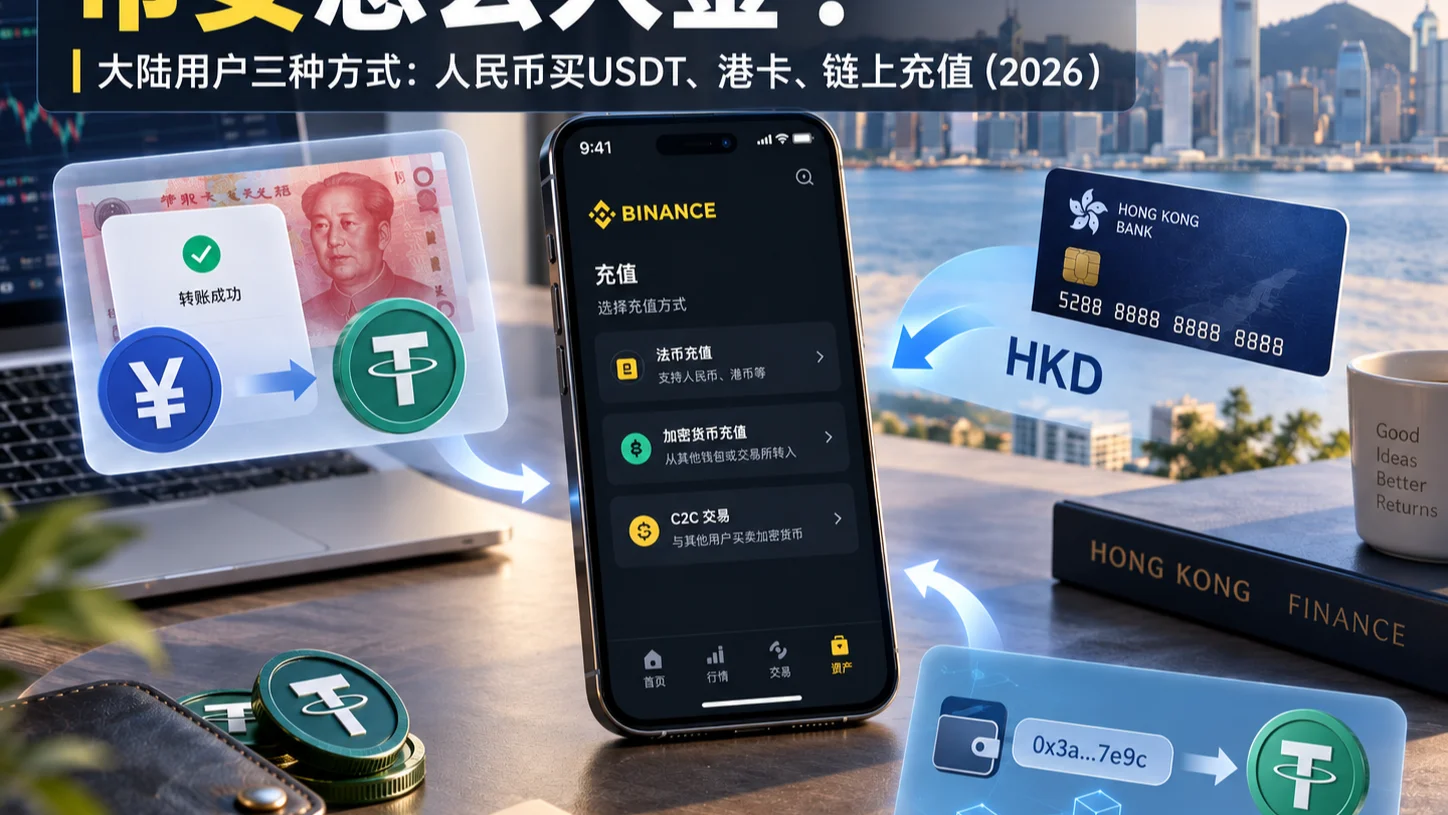
Table of contents

Binance new user rewards
20% trading fee rebate
Official Binance registration. Complete identity verification (KYC) to trade and withdraw.
How do you deposit on Binance? Open the Binance App, tap "Add Funds" on the home page or enter the "Deposit" page, and choose from the available options P2P buy USDT, bank-card purchase, bank transfer, or on-chain deposit. If you plan to buy USDT through P2P, you first select a merchant and complete payment; if you already hold USDT in another wallet or exchange, you can send it directly to a Binance deposit address.
Binance deposits fall into two categories:
- Fiat deposit: buying crypto with a payment method your account supports, or topping up fiat through a supported bank channel.
- Crypto deposit: transferring USDT, BTC, ETH, or other assets you already hold from another exchange or wallet into Binance.
What does "Binance deposit" mean? It means adding funds or crypto assets to your Binance account through a payment or transfer method the platform supports. P2P buying, bank-card purchasing, and on-chain deposits are not the same operation — they use different entry points and crediting flows.
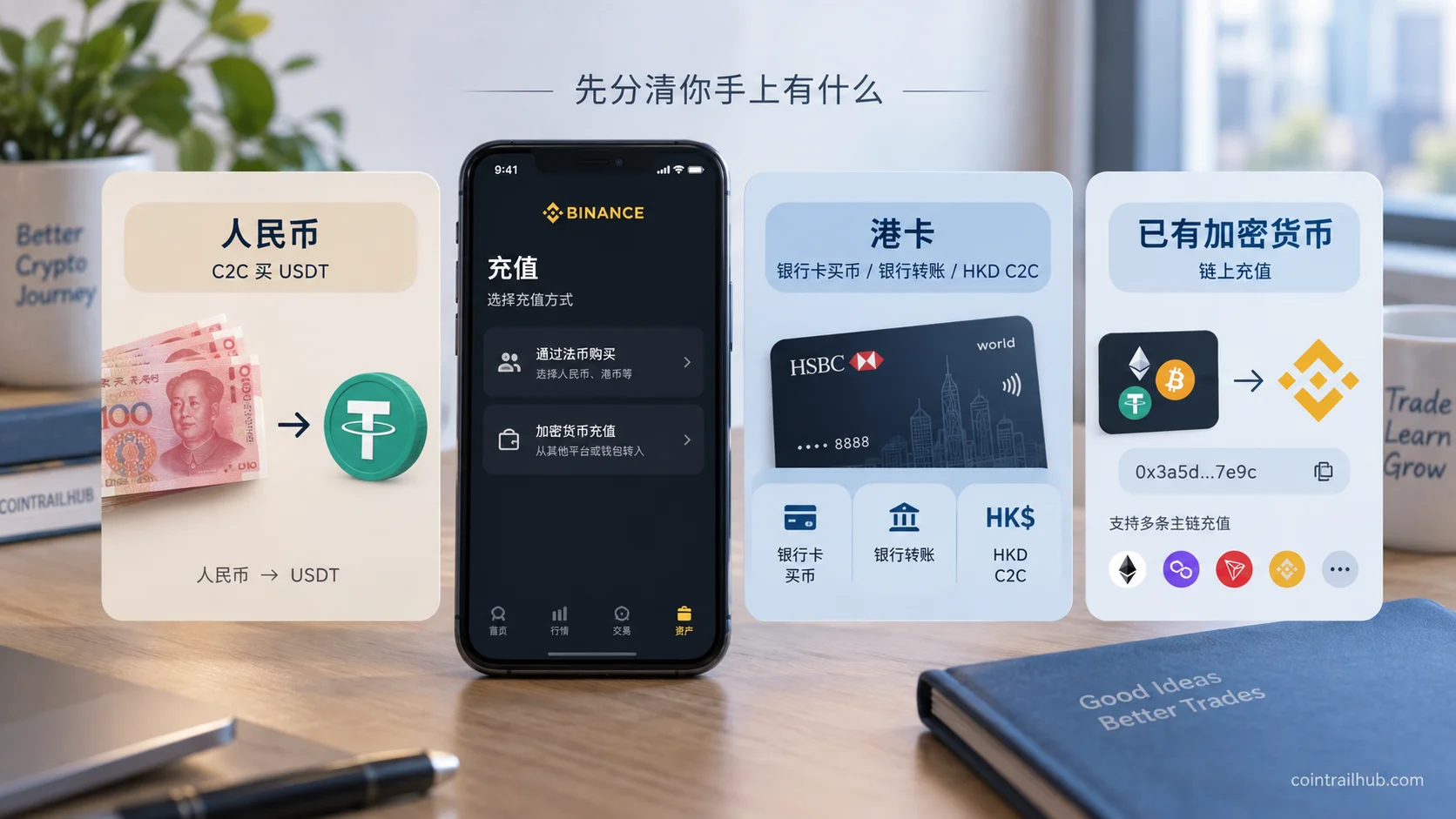
How to choose a Binance deposit method? Check this table first
| Funds you currently hold | Corresponding deposit method |
|---|---|
| Local fiat such as USD | P2P buy USDT |
| A supported bank card | Bank-card purchase |
| An available bank-transfer channel | Fiat bank-transfer deposit |
| USDT already on another platform | USDT on-chain deposit |
| BTC or ETH already in a wallet | On-chain deposit of the corresponding coin |
If you don't hold any crypto yet, check the P2P or other fiat buying entry first; if you already hold USDT, you can use an on-chain deposit directly without buying again.
Usage note: the Binance App shows the deposit methods currently available for your account. You can view the relevant features on the "Add Funds" or "Deposit" page and follow the on-page prompts. Specific payment channels, limits, fees, and eligibility are subject to the actual page.
This article introduces each method in the order of a real deposit, including steps, where the funds land, fees, and how to handle problems.
If all goes well, you can finish one deposit method within 10 minutes. The two easiest places to trip up are: choosing an on-chain deposit network that doesn't match the sender, and paying an account outside the P2P order.
1. Where is the Binance deposit entry? App and web
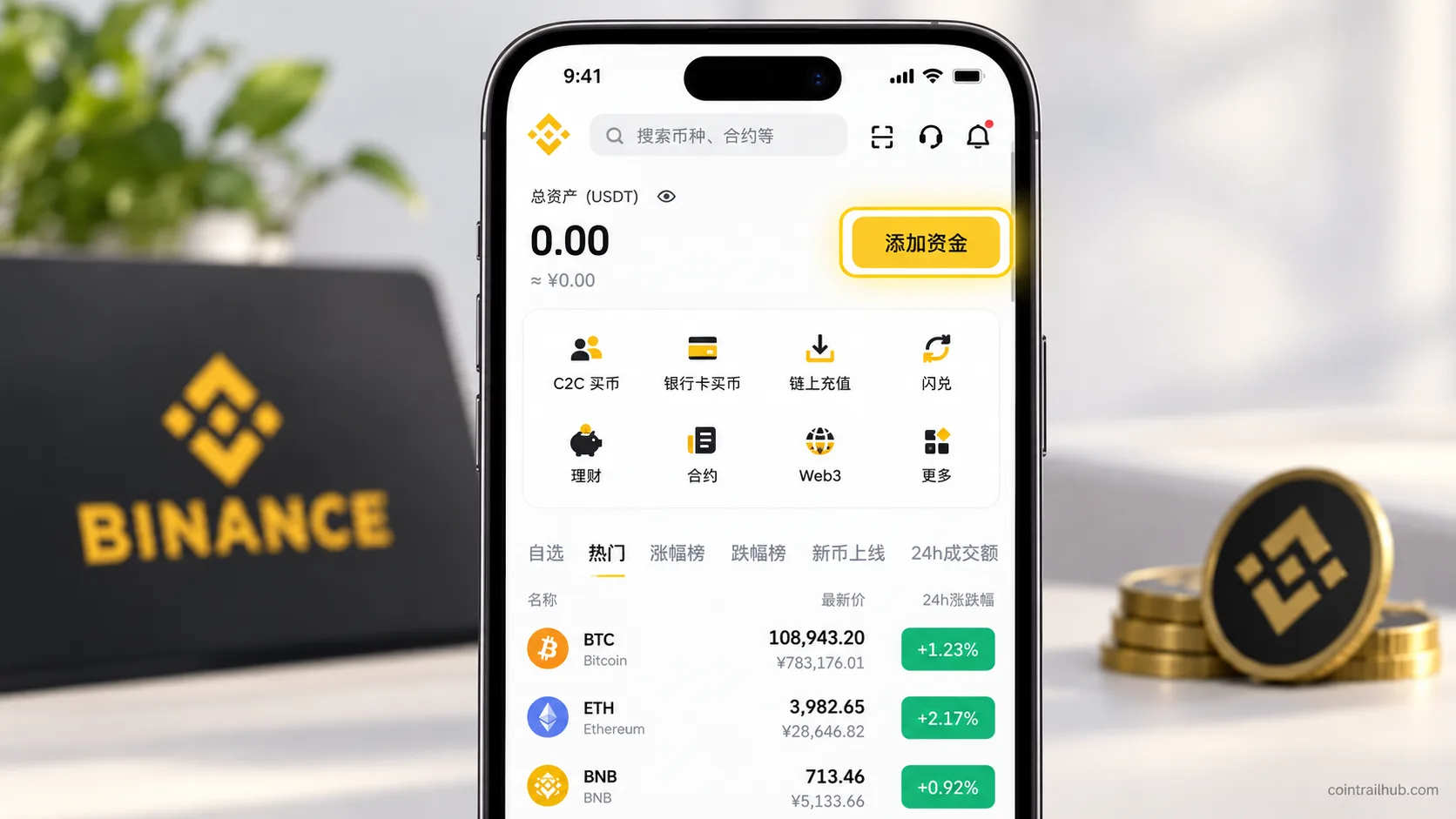
1. Binance App deposit entry
Open the Binance App and log in.
Find "Add Funds" or "Deposit" on the home page, then choose P2P buy, bank-card purchase, fiat deposit or bank transfer, or on-chain deposit based on the source of funds.
2. Binance web deposit entry
Log in through the official Binance website, and look for "Deposit" or "Buy Crypto" in the top menu or assets menu.
Button positions differ between web and App, but the underlying operation is the same.
3. What to prepare before your first deposit?
| Preparation | What to confirm |
|---|---|
| Binance account | Registered and able to log in normally |
| Identity verification | Meets the requirements of the corresponding service |
| Payment method | Uses a payment channel your account supports |
| Deposit coin | Confirm the asset you want to buy or transfer in |
| Account security | Applicable two-factor authentication enabled |
Completing these basic checks reduces unverified-account, wrong-payment-info, and interrupted-operation situations.
2. How to deposit via Binance P2P buy USDT? Full steps
Buying USDT via Binance P2P means paying fiat to a seller through a platform order; the seller confirms receipt and releases USDT per the trading rules.
It suits users who want to buy USDT with a fiat payment method available to their account.
Note that P2P buying is not a direct fiat deposit to a Binance official bank account — it's a buy/sell completed with a counterparty through a platform order.
Step 1: open the P2P buy page
Log in to the Binance App.
In the interface that supports this entry, choose:
Home → Add Funds → P2P Buy
After entering, you'll usually see a quick zone and a self-select zone.
Step 2: choose buy USDT
Enter the "Buy" page.
Choose USDT, and set the fiat currency and purchase amount your account supports.
For example, if you plan to buy USDT with 500 units of fiat, enter that amount in the field.
The page shows the expected USDT amount based on merchant quotes.
Step 3: choose the quick zone or self-select zone
| Trading mode | Practical difference |
|---|---|
| Quick zone | The system matches available ads by amount and payment method |
| Self-select zone | You compare merchant prices and terms yourself |
The quick zone skips merchant filtering; the self-select zone lets you view different merchants' quotes, order completion rates, trade counts, and payment terms.
On your first purchase, regardless of mode, always check the order price and payment info first.
Step 4: confirm the merchant and order amount
After choosing an eligible ad, enter the purchase order.
On the confirmation page, check:
- Whether the asset is USDT;
- The actual payment amount;
- The expected USDT amount;
- The seller's receiving method;
- The order payment deadline.
Merchant quotes can differ, so the same fiat amount may buy a different amount of USDT.
Step 5: pay per the order info
After creating the order, review the receiving info the platform shows.
Complete payment using a payment method the order supports.
Before paying, verify the recipient, receiving account, amount due, and order requirements.
If the other party provides a different receiving account outside the platform order, don't switch the payment target without verification.
Step 6: notify the seller you've paid
After the payment actually succeeds, return to the original Binance P2P order.
Tap:
"I have completed the payment, notify the seller"
This step notifies the seller to check receipt — it is not a second payment.
Don't tap "paid" early if the bank transfer hasn't gone through yet.
Step 7: wait for the seller to release USDT
After the seller confirms actual receipt, the platform releases the USDT per the order flow.
Check the order record for completion, then check the asset balance.
If you've paid but the seller doesn't release the coins for a long time, contact them through the original order and request assistance per the platform prompts.
What are the fees for P2P buy USDT?
Ordinary P2P buying usually doesn't charge an additional platform trading fee, but merchant quotes may differ and payment-channel fees may apply.[1]
For example:
| Example USDT unit price | Cost to buy 100 USDT |
|---|---|
| 0.99 USD | 99 USD |
| 1.00 USD | 100 USD |
| 1.01 USD | 101 USD |
These are calculation examples, not real-time P2P quotes.
For the same 100 USDT, a 0.02 unit difference in quote changes the final payment by 2 units of fiat.
So when buying via P2P, don't only look at the platform fee — compare the actual fill price and order terms too.
For the complete self-select/quick-zone, merchant-selection, payment, and order-anomaly walkthrough, see the dedicated tutorial Binance buy USDT tutorial 2026: P2P flow, choosing a merchant, and payment. This article focuses on how to use P2P as a deposit method and won't repeat every merchant-dispute and anomaly case.
3. How to deposit via Binance bank card? Which cards work?
Buying crypto with a bank card on Binance means using a card-payment service the platform currently supports to buy digital assets directly with fiat.
Unlike P2P, bank-card purchases are usually processed through a payment channel the platform integrates, rather than by you picking a specific P2P merchant.
Step 1: enter the bank-card purchase page
Open the Binance App and tap "Add Funds" or a buy-related entry.
Look for the bank-card purchase option among the payment methods shown.
If the current interface shows a card-payment service, you can view the supported coins and payment terms.
Step 2: choose the coin
Select the USDT, BTC, ETH, or other supported asset you want to buy.
Confirm the asset is correct.
Step 3: enter the purchase amount
Enter the fiat amount you're ready to pay.
The page usually shows the expected crypto amount, quote, and related fees.
The payment currencies actually available depend on your account and the payment service provider.
Step 4: add or choose a bank card
Follow the current Binance page prompts to add a supported bank card.
Some transactions may require security verification from the issuing bank.
Step 5: verify the payment amount
Before submitting, check:
| Order item | What to verify |
|---|---|
| Fiat amount | The actual amount charged to the card |
| Purchase coin | USDT, BTC, or another asset |
| Expected receipt | The digital-asset amount shown |
| Payment fee | The fees listed on the current order |
Submit the payment after verifying.
The final cost of a bank-card purchase should be based on the actual charged amount and expected receipt amount on the order confirmation page.
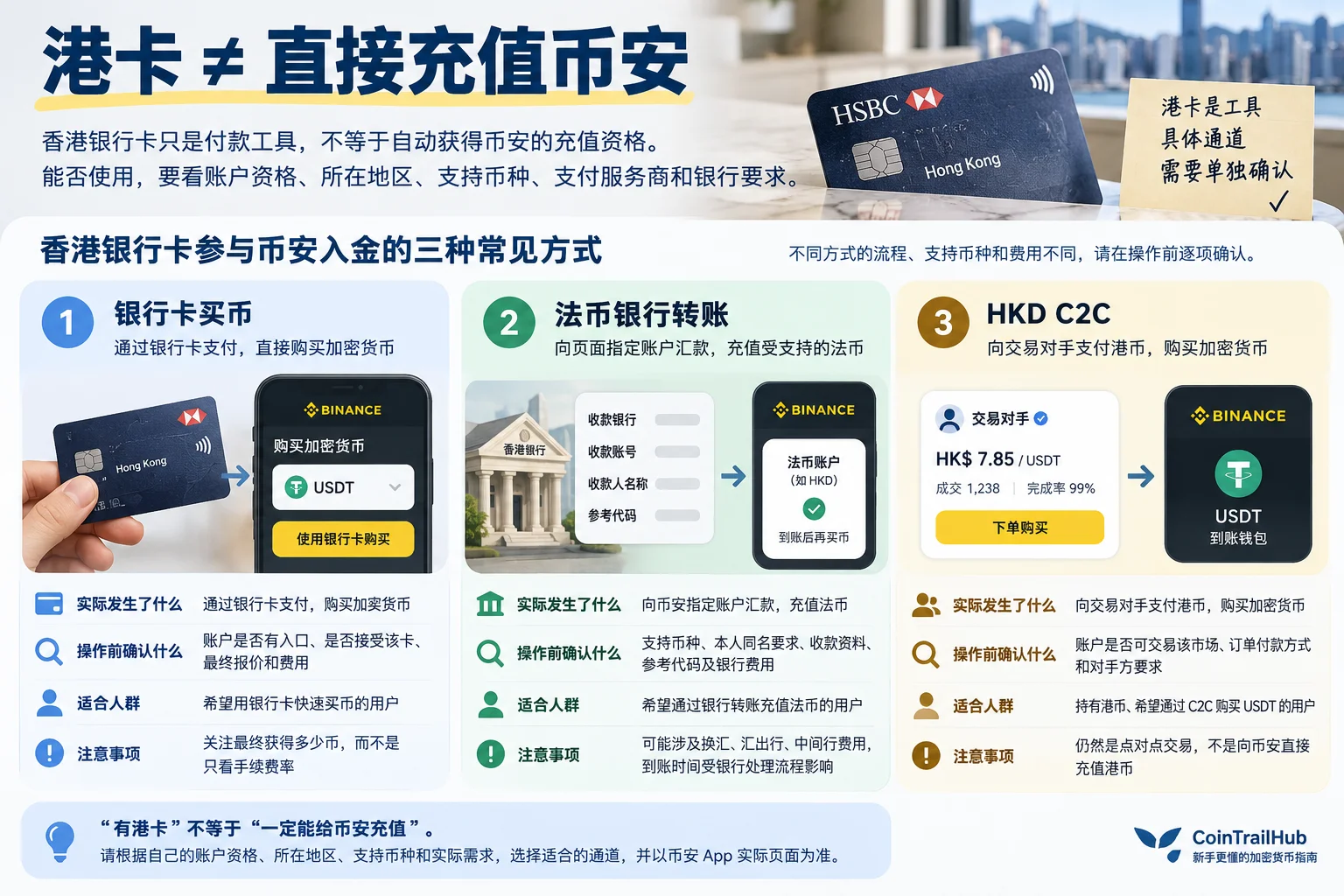
Which bank cards can be used for Binance deposits?
Whether a bank card can be used to buy crypto on Binance depends on the payment channels available to your account, the card type, and the payment service provider's support.
Having a bank card doesn't mean every Binance card-purchase or bank-transfer feature is automatically open to you.
Three common scenarios need to be judged separately:
| Card usage | Operating condition |
|---|---|
| Direct card purchase | The card and payment channel support it |
| Fiat bank transfer | The account offers the corresponding fiat deposit service |
| P2P buy with local fiat | The account shows available P2P ads in that fiat |
These three methods have different payment flows and fees and should not be treated as the same deposit channel.
4. How to deposit via Binance bank transfer?
A bank-transfer deposit adds fiat to the corresponding fiat service or account through a supported bank-transfer channel Binance provides.
It's different from buying directly with a bank card, and different from a P2P payment to a seller.
Step 1: check the fiat deposit feature
Open the Binance deposit page.
If the account offers a fiat bank-transfer option, choose the corresponding deposit service.
Step 2: choose the fiat currency
Select the currency you want to deposit from the available list.
Different accounts may show different fiat deposit channels.
Step 3: review the bank-transfer instructions
Carefully check the receiving account, reference number, transfer limits, and other conditions on the current Binance page.
If a dedicated reference number is required, fill it in per the page prompts.
Step 4: complete the transfer
Transfer from a payment account that meets the platform and bank requirements.
Keep the bank payment receipt after submitting.
Step 5: check the deposit status
After the transfer, check the processing status in the Binance deposit record or the corresponding fiat account.
Bank transfers can involve clearing, bank business hours, or platform review, so not every transaction credits immediately.
How do bank transfer and bank-card purchase differ?
| Deposit method | How funds are processed |
|---|---|
| Bank-card purchase | Buys digital assets through a card-payment service |
| Bank-transfer deposit | Adds fiat through a supported bank channel |
Decide whether you want to buy digital assets directly or top up fiat first, then check the corresponding feature and fees.
5. How to do a Binance USDT on-chain deposit?
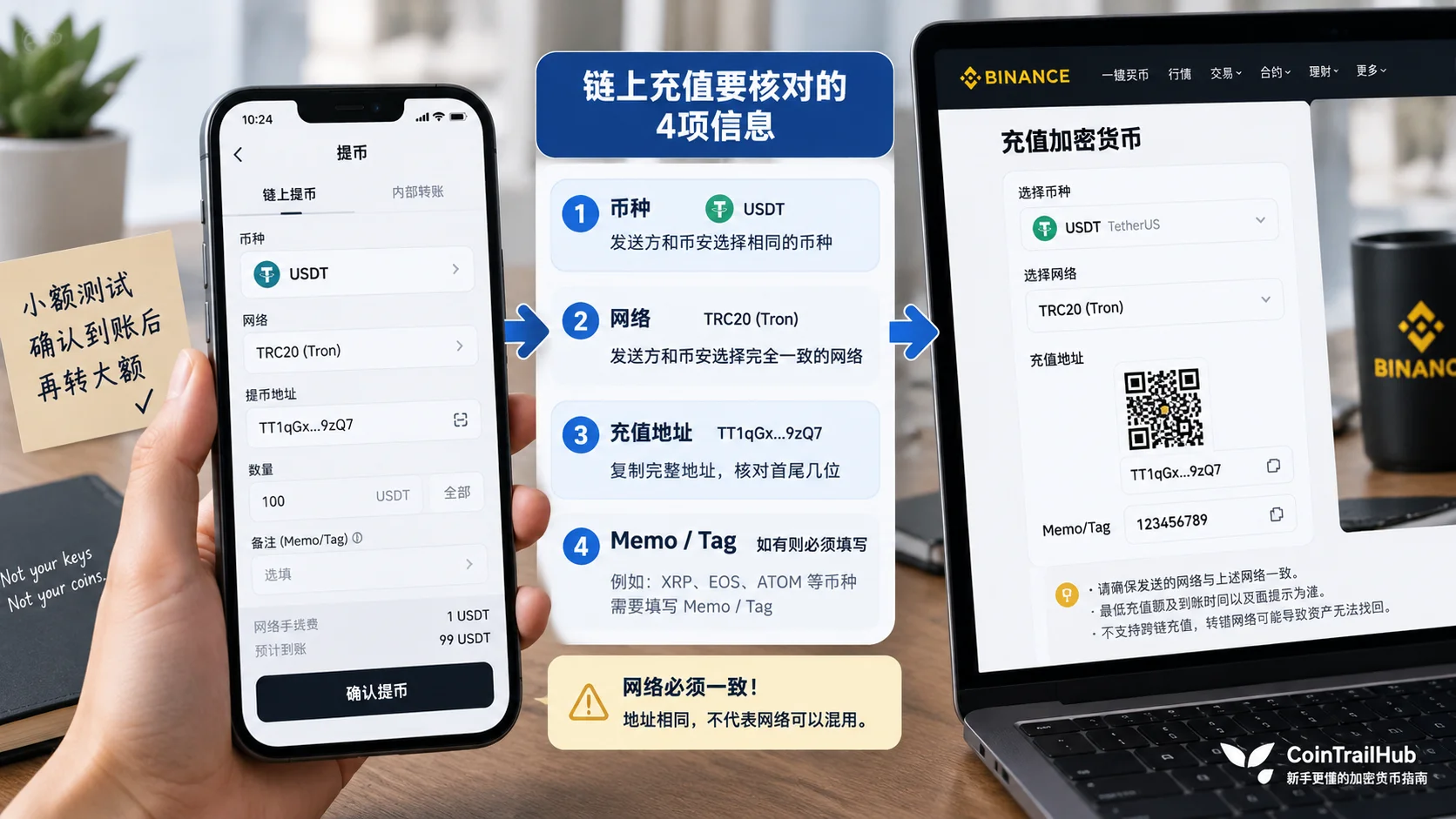
A Binance on-chain deposit sends crypto assets you already hold on another exchange or wallet to a Binance deposit address over the corresponding blockchain network.
If you already hold USDT, you usually don't need to buy it again via P2P — you can use a supported on-chain deposit directly.
For example:
Another exchange's USDT → choose withdrawal network → Binance USDT deposit address → wait for network confirmation → asset credited.
The most important things throughout the process:
Same coin, same network, correct deposit address.
Step 1: enter the Binance on-chain deposit
Open the Binance App.
Per the official tutorial, in a version that supports this interface, enter:
Add Funds → On-chain Deposit
You may also reach the page via "Deposit" or "Deposit Crypto".
Step 2: choose the deposit coin
To deposit USDT, choose USDT.
To deposit BTC or ETH, choose BTC or ETH respectively.
Don't use the wrong deposit entry just because two asset names look similar.
Step 3: choose the deposit network
Choose a blockchain network Binance currently supports.
For example, USDT can exist on multiple networks.
| USDT network | What the sender must choose |
|---|---|
| ERC20 | The Ethereum network |
| TRC20 | The TRON network |
| BEP20 | BNB Smart Chain |
The sender's network must match the one chosen on the Binance deposit page.[2]
Don't use a network just because it has cheaper fees when the receiving side doesn't support it.
Step 4: copy the deposit address
After choosing the network, Binance shows the corresponding deposit address.
Copy the full address and paste it into the sender's withdrawal page.
It's a good idea to check the first and last characters and confirm you didn't copy an address for another asset or network.
Step 5: check whether a Memo/Tag is needed
Some assets require a Memo or Tag in addition to the deposit address.[3]
If the current Binance deposit page clearly shows this field, fill it in completely per the official page.
If the current asset doesn't require one, don't add it yourself.
Step 6: check the minimum deposit amount
Some coins and networks have a minimum deposit requirement.[4]
The sender may also deduct a withdrawal fee.
So check the final expected arrival amount, not just the amount you entered to send.
Step 7: initiate the transfer
Back on the other exchange or wallet, confirm:
- The coin is correct;
- The network is correct;
- The deposit address is correct;
- The Memo/Tag is correct (if needed);
- The actual transfer amount is correct.
Confirm before sending.
Step 8: wait for on-chain confirmation and Binance crediting
After sending, you can check the on-chain transaction record via the TxID (transaction hash).
But an on-chain success doesn't necessarily mean Binance has reached its required crediting confirmation count.[5]
You still need to check the Binance deposit record and the actual account balance.
Where USDT on-chain deposits most often go wrong
| Common mistake | Possible result |
|---|---|
| Wrong coin selected | The asset can't be recognized or credited normally |
| Sender and deposit network mismatch | May not credit automatically, or cause loss |
| Wrong deposit address | The asset may be sent to the wrong address |
| Required Memo/Tag omitted | May need an extra recovery process |
| Below the minimum deposit amount | May not be credited to the balance |
In these situations, keep the full transaction records and contact Binance official support. Not every mistaken deposit can be recovered.
6. How much are Binance deposit fees? How long do they take?
Binance's different deposit methods have different fees.
P2P buying, bank-card payment, bank transfer, and on-chain deposits each use a different fee mechanism.
Fee comparison for the main deposit methods
| Deposit method | Fee source |
|---|---|
| P2P buy USDT | Merchant quote differences and payment-channel fees |
| Bank-card purchase | Payment-service fees and the actual purchase quote |
| Bank transfer | Bank remittance, currency conversion, and possible channel fees |
| USDT on-chain deposit | The sender's withdrawal fee or network fee |
A normal on-chain deposit usually doesn't have a separate Binance crediting fee as its main cost, but the other platform's withdrawal fee still needs to be counted.[6]
What does each deposit method wait for?
| Deposit method | Crediting condition |
|---|---|
| P2P buy USDT | The seller confirms receipt and releases the coins |
| Bank-card purchase | Payment-service confirmation and order processing |
| Bank transfer | Bank clearing and platform processing complete |
| On-chain deposit | Blockchain confirmation and platform crediting requirement met |
Don't judge other methods by one method's arrival speed.
For example, the core of P2P is whether the seller completes receipt confirmation, while the core of an on-chain deposit is network confirmation and the platform crediting rule.
Which Binance deposit method is cheaper?
There's no one-size-fits-all answer.
If you plan to buy USDT with fiat, when comparing P2P and bank-card purchase, check how much USDT each method ultimately yields at the same time and the same payment amount.
If you already hold USDT, compare the networks the sender supports and the corresponding withdrawal fees — you don't need to buy USDT again.
7. Where do I see my assets after a Binance deposit? Do I need to transfer?
After a deposit completes, check the corresponding order record and the Binance assets page.
Different deposit methods may map to different asset records.
1. Check USDT after a P2P buy
Open the P2P order record.
Confirm the order status is complete, then check the USDT balance on the assets page.
Account structures can change across versions, so rely on the current asset overview.
2. Check USDT after an on-chain deposit
Open the deposit record.
Check whether the deposit transaction is complete.
If so, confirm the USDT was credited to the account chosen at deposit time or shown on the page.
3. Check assets after a bank-card purchase
Enter the bank-card purchase order record.
Confirm the payment and purchase order are complete, then check the corresponding coin balance.
4. Check the balance after a fiat bank transfer
First check the fiat deposit record.
Confirm whether the bank transfer was credited to the relevant account or service.
Do I have to transfer manually after buying USDT?
Not necessarily.
It depends on Binance's current account structure and the balance required for your next operation.
If the asset is already directly usable, you don't need to mechanically transfer it manually.
If a trading page says the balance is insufficient, first check which account actually holds the asset, then handle it with the feature the page provides.
8. What if a Binance deposit doesn't arrive? Troubleshoot by case
When a Binance deposit doesn't arrive, first determine whether the problem is in the payment, the platform order, or the blockchain transfer.
Different cases have different handling.
Case 1: P2P paid but USDT hasn't arrived
First check whether the real payment succeeded.
Then return to the original Binance P2P order and see whether the seller confirmed receipt and released the USDT.
If you've paid but the seller hasn't released the coins, handle it through the order's contact or appeal channel.
Don't cancel an already-paid order just because the seller asked you to.
Case 2: bank card charged but the coins haven't arrived
Check the Binance purchase order and the card-payment record.
If the payment service still shows processing, verify the current order status.
Don't pay again while the first transaction's status is unclear.
Case 3: bank transfer hasn't arrived
Check whether the transfer was actually sent successfully.
Verify the receiving account, reference number, and actual payment amount the deposit page requires.
If necessary, submit the bank-transfer proof through official support.
Case 4: on-chain shows success but Binance hasn't credited
Find the TxID the sender provides.
Check the transaction status on a block explorer, then verify:
- Deposit coin;
- Deposit network;
- Deposit address;
- Minimum deposit amount;
- Whether a Memo/Tag is needed;
- Whether the platform confirmation count was reached.
Case 5: wrong USDT deposit network chosen
Stop sending assets to the wrong address.
Save the sending network, deposit address, TxID, and transaction amount.
Confirm through Binance's official help channel whether the deposit meets recovery conditions.
An on-chain transfer, once confirmed, usually can't be directly reversed, and recovery isn't guaranteed.
Binance deposit troubleshooting table
| Anomaly | Priority check |
|---|---|
| P2P paid but coins not released | Order status, payment record, appeal entry |
| Card charged but not credited | Payment order and bank charge record |
| Bank transfer not arrived | Bank statement and deposit reference number |
| On-chain transfer not arrived | TxID, network, and deposit confirmation count |
| Wrong on-chain deposit network | Stop resending and request official review |
This table helps quickly distinguish the problem type.
For detailed handling, also consider the current Binance order status and official help flow.
9. What to watch before and after a Binance deposit?
What's most easily overlooked before a deposit isn't some complex feature — it's whether the fund source, transaction info, and deposit network are correct.
1. Don't mix up steps across deposit methods
P2P buying requires checking the order payment info.
On-chain deposits require checking the deposit network and address.
Bank transfers require checking the bank account and reference number.
2. Don't pay to an account outside the order
If a P2P seller suddenly asks you to use a different receiving account, verify through the original order's official channel first.
3. Don't choose a network only by its fee
First confirm both the sender and Binance support that network.
4. Don't assume a bank charge equals a Binance credit
A successful bank payment, a successful on-chain transaction, and a Binance asset credit are different states.
5. Keep the necessary payment and transaction records
P2P order numbers, bank payment records, and on-chain TxIDs are all important evidence for later troubleshooting.
Compliance and risk note: when using the relevant services, follow the applicable laws of your location, plus the requirements of the platform and payment institutions. P2P escrow, bank-card verification, and on-chain confirmation help complete the flows, but none can guarantee a trade is completely risk-free.
For more on P2P trade disputes, third-party payments, and bank-card risk, read Binance P2P buy USDT pitfalls: 6 mistakes beginners make (2026).
FAQ
1. How do I deposit on Binance?
Log in to the Binance App, enter "Add Funds" or "Deposit", and choose P2P buy, bank-card purchase, fiat bank transfer, or on-chain deposit. The method depends on the funds you hold and the features available to your account.
2. What does "Binance deposit" mean?
A Binance deposit means adding fiat funds or crypto assets to your Binance account through a supported payment or transfer method.
3. How do I buy USDT with fiat on Binance?
If your account offers the corresponding P2P service, enter the P2P buy page, choose USDT, an available fiat currency, and a payment method, create an order, and complete payment per the actual order.
4. Can I deposit with a bank card on Binance?
Check the bank-card purchase service currently open to your account. Whether a specific card works depends on the card type, the account, and the payment service provider's support.
5. Which bank cards work for Binance deposits?
Check the currently supported bank-card purchase, bank-transfer, and P2P features. These are different services — having a card doesn't mean every feature is available.
6. How much are Binance deposit fees?
There's no single rate. P2P focuses on the merchant's fill price, bank-card purchase on the actual payment fee, bank transfer on the remittance fee, and on-chain deposit on the sender's withdrawal or network fee.
7. How long does a Binance deposit usually take?
It depends on the method. P2P waits for the seller's release; bank-card purchase and bank transfer depend on payment processing; on-chain deposits depend on network confirmation and platform crediting requirements.
8. Should I use TRC20 or ERC20 for a Binance USDT deposit?
Choose the same network that both the sender and the Binance deposit page support. Once the network matches, then compare the current withdrawal fee and restrictions.
9. Where do I find the Binance USDT deposit address?
Log in to the Binance App, enter the on-chain deposit, and choose USDT and the corresponding network. The page shows the deposit address and the Memo/Tag when needed.
10. Where do I see my USDT after a Binance deposit?
Check the asset overview and the corresponding account, and confirm the crediting status through the P2P order or deposit record.
11. Do I have to transfer after a successful Binance deposit?
Not necessarily. Whether a transfer is needed depends on the current account structure and the feature you'll use next.
12. My USDT on-chain deposit hasn't arrived — what now?
Check the TxID, coin, network, deposit address, minimum deposit amount, and confirmation count. If necessary, request a review through Binance's official support channel.
10. Summary: how do you deposit on Binance?
In 2026, the Binance deposit method mainly depends on the funds you hold.
If you hold fiat: check the P2P buy, bank-card purchase, or bank-transfer services your account supports.
If you already hold USDT: deposit to Binance over the corresponding blockchain network.
If you already hold BTC or ETH: choose the corresponding coin and a supported deposit network.
Key points during the operation:
- Choose the right method: distinguish P2P, bank card, bank transfer, and on-chain deposit.
- Verify the info: check the order for fiat payment; check coin, network, and address for on-chain deposits.
- Confirm the credit: check the order completion status, deposit record, and actual asset balance.
For first-time Binance users, understanding the differences between deposit methods matters more than mechanically following some old tutorial.
Recommended reading
- Binance buy USDT tutorial 2026: P2P flow, choosing a merchant, and payment — for users who want to learn P2P ordering, merchant selection, payment, and receipt in detail
- Binance registration tutorial 2026: the full account-opening flow — understand Binance registration and account-verification basics
- Binance P2P buy USDT pitfalls: 6 mistakes beginners make (2026) — understand P2P payment disputes, merchant anomalies, and bank-card risk
- Which network to choose for Binance withdrawals? TRC20, ERC20, BEP20 fees and arrival time compared (2026) — understand asset-transfer networks, fees, and arrival issues
- Binance spot trading: market orders, limit orders, and trade records (2026 test) — understand how to use spot trading once funds have arrived
- First time buying USDT? The full flow from registration to receipt (Binance/OKX) — for your first deposit, start with the beginner flow from registration to receipt
Official references
1. Binance Academy: your guide to Binance deposit and withdrawal
https://www.binance.com/en/academy/articles/your-guide-to-binance-deposit-withdrawal
Introduces Binance's digital-asset deposit, withdrawal, and other funding methods.
2. Binance: how to deposit and withdraw cryptocurrency on Binance
https://www.binance.com/en/support/faq/detail/85a1c394ac1d489fb0bfac0ef2fceafd
Introduces the Binance App's on-chain deposit, coin and network selection, deposit address, and account settings.
3. Binance: how to deposit cryptocurrency on Binance
https://www.binance.com/en/support/faq/detail/115003764971
Introduces deposit networks, deposit addresses, Memo/Tag, and deposit-record lookup.
4. Binance: how to buy crypto via P2P trading on the App
https://www.binance.com/en/support/faq/detail/360039384951
Introduces the basic P2P buying, payment-confirmation, and asset-release operations.
Data verification notes
The key facts in this article were checked against Binance's official deposit guides and the Binance Academy guide on 2026-10-16, item by item:
- P2P buy fees: ordinary P2P buying usually doesn't charge an additional platform trading fee; the cost mainly shows up as merchant quote differences and payment-channel fees. Source: Binance how to buy crypto via P2P trading on the App.
- Network match: the sender's withdrawal network must match the deposit network chosen on the Binance deposit page, otherwise it may not credit automatically. Source: Binance how to deposit cryptocurrency on Binance.
- Memo/Tag: some assets require a Memo or Tag in addition to the deposit address; fill it in completely when the page shows the field. Source: Binance how to deposit cryptocurrency on Binance.
- Minimum deposit: some coins and networks have a minimum deposit requirement; below the requirement it may not credit normally. Source: Binance how to deposit and withdraw cryptocurrency on Binance.
- Crediting confirmation count: an on-chain success doesn't mean Binance's required crediting confirmation count is reached; still check the deposit record and account balance. Source: Binance how to deposit and withdraw cryptocurrency on Binance.
- On-chain deposit fees: the main cost of an on-chain deposit is usually the sender's withdrawal or network fee, not a Binance crediting fee. Source: Binance Academy guide to Binance deposit and withdrawal.
Disclaimer
This article only introduces Binance deposits, P2P buying, bank-card payment, bank transfer, and on-chain deposit flows, and does not constitute investment, legal, tax, or other professional advice.
Actual features, fees, payment channels, and crediting conditions may change with Binance services, payment channels, and blockchain networks. Follow applicable laws and service rules, and assess fund and trading risks yourself.
- Binance Academy: your guide to Binance deposit and withdrawalDigital-asset deposit, withdrawal, and other funding methods
- Binance: how to deposit and withdraw cryptocurrency on BinanceApp on-chain deposit, coin and network selection, deposit address, and account settings
- Binance: how to deposit cryptocurrency on BinanceDeposit network, deposit address, Memo/Tag, and deposit-record lookup
- Binance: how to buy crypto via P2P trading on the AppP2P buying, payment confirmation, and asset release
- 2026-10-16UpdateAdded evidence-chain superscripts and "Data verification notes"; updated the key-fact verification date.
- 2026-09-22UpdatePublished the original, covering CNY P2P, bank-card, and on-chain deposits.
- 2026-10-08UpdateRebuilt the article around the "Binance deposit" search intent; completed P2P, bank-card, bank-transfer, and on-chain deposit steps; added deposit-method comparison, fee, arrival, and troubleshooting tables; refined the FAQ.
See ourEditorial Policy and the correction process in ourCorrections Policy.
The CoinTrailHub editorial team focuses on crypto education for beginners, exchange security and P2P trading risk. This article is compiled from official sources and public data, reviewed by humans, and strives for accuracy but is not investment advice.
Last updated:2026-10-08 · Content reviewed by humans · Learn more
© 2026 CoinTrailHub · Original content. Reproduction or rewriting without permission is prohibited.