
What Is Binance Pay? Sending, Receiving, Fees and Limits Explained (2026)
Table of contents

Binance new user rewards
20% trading fee rebate
Official Binance registration. Complete identity verification (KYC) to trade and withdraw.
Binance Pay is a cryptocurrency send, receive and payment feature provided by Binance. Eligible users can use a Binance UID, email address, phone number or receiving QR code to send USDT, BTC and other cryptocurrencies to other Binance users inside the App, and can also pay at merchants that support Binance Pay.
If you want to send 100 USDT to a friend and both of you can use Binance Pay, you usually don't need to fill in a TRC20, ERC20 or other blockchain network address — transfers between regular users are usually instant, and usually don't incur on-chain network fees.
Note that Binance Pay is not the same as your Binance UID. Binance Pay is a payment feature; the UID is a number that identifies your Binance account. Sending by UID is just one way of using Binance Pay.
Also, not every Binance Pay transaction is free. Regular user-to-user transfers, cross-border remittances, merchant payments and sending assets to a DeFi wallet may have different fees and limits.
Four conclusions first:
| What users ask | Short answer |
|---|---|
| Transfer fee | Regular user-to-user transfers are usually free |
| Arrival time | Usually instant between Binance accounts |
| Transfer methods | UID, email, phone number, QR code |
| Daily limit | The official regular-user standard is $8 million equivalent; your actual limit may be lower |
How to decide? If the recipient also uses Binance and both accounts support Pay, you can usually consider Binance Pay first; if you're sending USDT to a wallet whose private keys you control, you need to check the on-chain transfer method.
Below we go through features, fees, setup, sending, receiving, limits and troubleshooting in order.
If all goes well you can finish your first transfer in 3 minutes. The two easiest places to slip: treating Binance Pay as the UID or the now-retired Pay ID, and assuming every Pay transfer is free.
1. What is Binance Pay? How is it different from an on-chain transfer?
Binance Pay can be understood as a set of cryptocurrency payment tools Binance provides, and the most common scenario is transfers between Binance users.
For example, you want to send 100 USDT to a friend:
With Binance Pay, you fill in the recipient's UID, email or phone number in the supported transfer entry, confirm the amount, and send. The recipient usually receives the assets in their Binance Funding Wallet.
With a regular on-chain withdrawal, you fill in the destination wallet address, choose a blockchain network, and pay the corresponding fee per platform and network rules.
| Comparison | Binance Pay user-to-user | On-chain withdrawal |
|---|---|---|
| Recipient info | UID, email, phone number or QR code | On-chain wallet address |
| Arrival time | Usually instant | Depends on network confirmations |
| Fee | Usually free | May incur a withdrawal fee |
| Where funds go | Binance account | Destination on-chain address |
The most important difference is where the funds go. Binance user-to-user transfers usually happen inside the platform's account system, while on-chain withdrawals send assets to a self-custody wallet or another supported on-chain address.
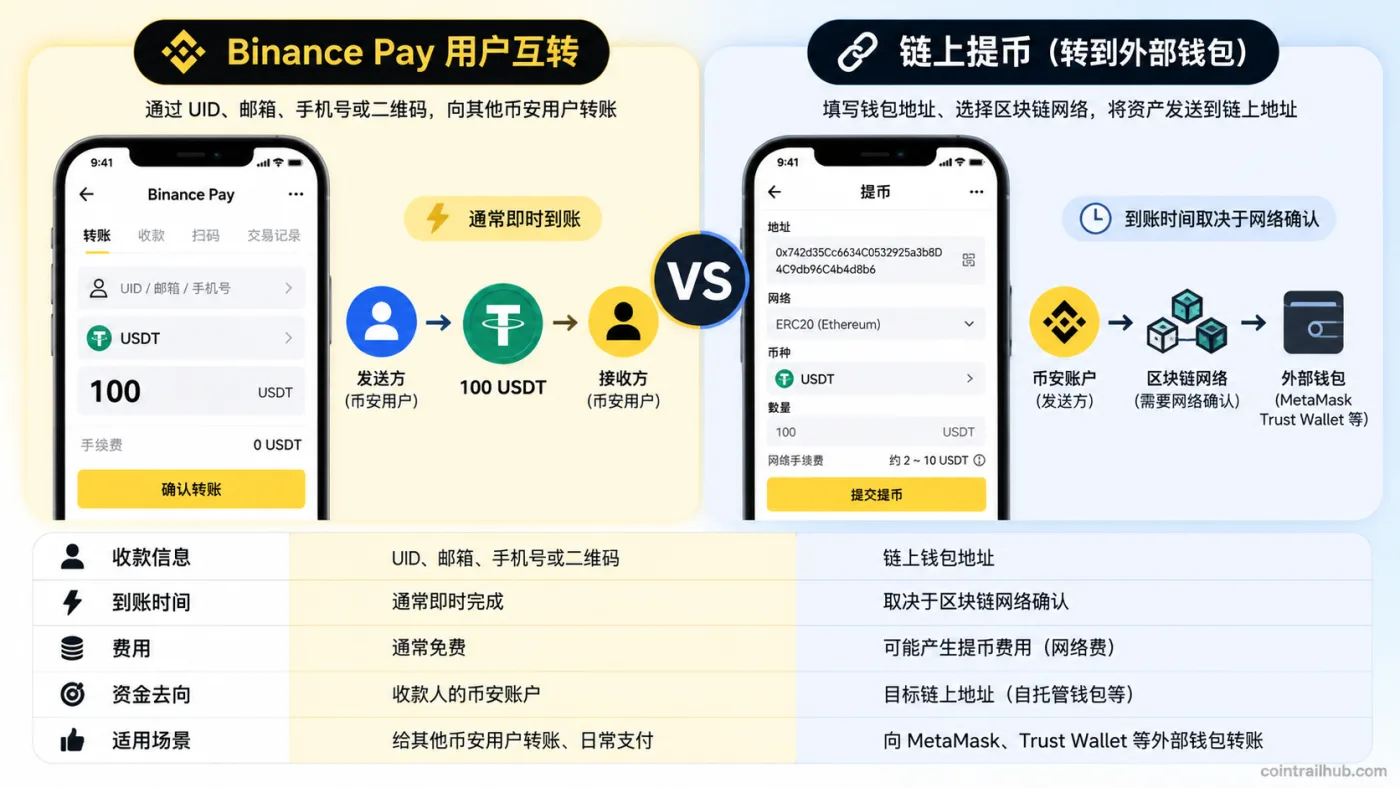
Binance Pay user-to-user transfers usually arrive instantly with no on-chain network fee; on-chain withdrawals require a wallet address and network, and arrival depends on blockchain confirmations.
However, Binance Pay also includes some on-chain wallet features, so you can't treat every Pay transaction as an internal platform transfer.
Is Binance Pay the same as the UID? Where do I find the UID?
No.
- Binance Pay: Binance's cryptocurrency payment feature.
- Binance UID: the unique number identifying a Binance account.
- Pay ID: a payment identifier used in the past, now discontinued.
To see your UID, open the Binance App and look for UID info in the profile center or account-information page. The exact entry may differ between versions.
Binance's official announcement confirms that Pay ID support ended on January 1, 2025 (UTC), but sending and receiving via Binance ID, email and phone number are unaffected by that change.[1]
So when you see old tutorials asking for a Pay ID, don't mistake it for the current Binance UID.
2. How much does Binance Pay cost? Does sending 100 USDT cost money?
Regular Binance users transferring to each other with Binance Pay usually pay no fee.
For example, if you send 100 USDT to a friend and the confirmation page shows a fee of 0, the sender is usually deducted 100 USDT and the recipient receives 100 USDT.
But that doesn't mean every Binance Pay feature is permanently free.
Fees for different payment methods
| Payment method | Fee rule |
|---|---|
| Regular user-to-user transfer | Usually free; some high-frequency transactions may be charged |
| Pay remittance feature | Some regions charge by amount or provider rules |
| Pay transfer to DeFi wallet | May incur network fees and platform fees |
| Merchant payment | Subject to merchant agreement and business rates |
When judging fees, first confirm which payment feature you're using, then look at the payment confirmation page.
1. Why are regular user transfers usually free?
Regular Pay transfers between Binance accounts are usually processed through the platform's account system, so they don't need to pay on-chain network fees like an external blockchain transfer.
However, some high-frequency users may need to pay a fee after exceeding their applicable monthly free quota. This depends on the rules that apply to your account.
2. How much is the Binance Pay remittance fee?
In Binance's official fee description, the C2C option of the Pay remittance feature in certain regions uses these reference fees:
| Remittance amount | Reference fee for applicable regions |
|---|---|
| Below $100 | $0.50 |
| $100 or above | $1 |
This is a fee rule for a specific remittance product, not a unified fee for ordinary friend transfers.[2] If you remit through a third-party service provider, fees may also vary by region, amount and provider.
3. Do transfers to a DeFi wallet cost money?
Possibly.
Sending assets to a DeFi wallet via Binance Pay may involve on-chain network fees, platform fees or other applicable fees.
Different blockchains have different fee structures, so you can't write a single fixed rate.
Before paying, check the actual deduction amount, network fees, platform fees and any exchange rate involved. If the fees don't match your expectation, cancel and re-check before proceeding.
3. How do I set up Binance Pay? Do I need a separate registration?
Binance Pay doesn't require registering a separate payment account, but you need an eligible Binance account, the required identity verification completed, and to be in a region where the feature is supported.
Step 1: Find the Binance Pay entry
Open the Binance App, log in, and look for "Pay" or "Binance Pay" on the home screen.
Some App versions may also let you enter the payment page through the scan feature.
If you don't see the entry, first check the App version, account eligibility and region support.
Step 2: Complete the payment security setup
On first use, the system may ask you to set a payment PIN, nickname or complete other security verification.
The payment PIN is a security credential for authorizing transactions — don't share it, and don't set it the same as your usual password.
Step 3: Enable and check the feature
After completing the on-screen setup, check whether you can access the send, receive, transaction history and payment-limit pages.
Accounts that have already completed the setup may not need to enable it again.
Before first use, it's recommended to understand the receiving methods and the fee confirmation page first — don't jump straight into a large transfer.
4. How do I send money with Binance Pay? Using 100 USDT as an example
Suppose you want to send 100 USDT to a friend who has an eligible Binance account for Binance Pay.
Step 1: Enter the transfer feature
Open the Binance App, enter Binance Pay, and choose the feature for transferring to another Binance user.
Different App versions may show it as "Pay," "Transfer," "Send" and similar names.
Step 2: Fill in the recipient's info
In the supported entry, choose one way to identify the recipient:
- Binance UID
- The email bound to their Binance account
- Phone number
- Binance Pay receiving QR code
For example, if the friend gives you their Binance UID, fill that number into the recipient field.
Note: the UID is not an on-chain wallet address and not the old Pay ID. Don't put a UID into the wallet-address field of a regular on-chain withdrawal.
Step 3: Choose USDT and the amount
Choose USDT and enter 100.
On the payment confirmation page, check the actual deduction amount, receiving amount and applicable fees.
Step 4: Verify the recipient
Check the recipient account info the system shows.
If the recipient info doesn't match what you expected, or you can't confirm the person's identity, don't proceed with the payment.
Step 5: Complete payment verification
Enter the payment PIN or complete other identity verification as prompted.
Pay transfers between regular Binance users are usually instant, but the specific status should be based on the system record.
Step 6: Check the transaction history
After the transfer, go to the Binance Pay transaction history and check the payment status, currency and amount.
The recipient can check their Funding Wallet and receiving records.
When sending to an unfamiliar account for the first time, send a small test amount the platform allows first, confirm arrival, then consider further transfers.
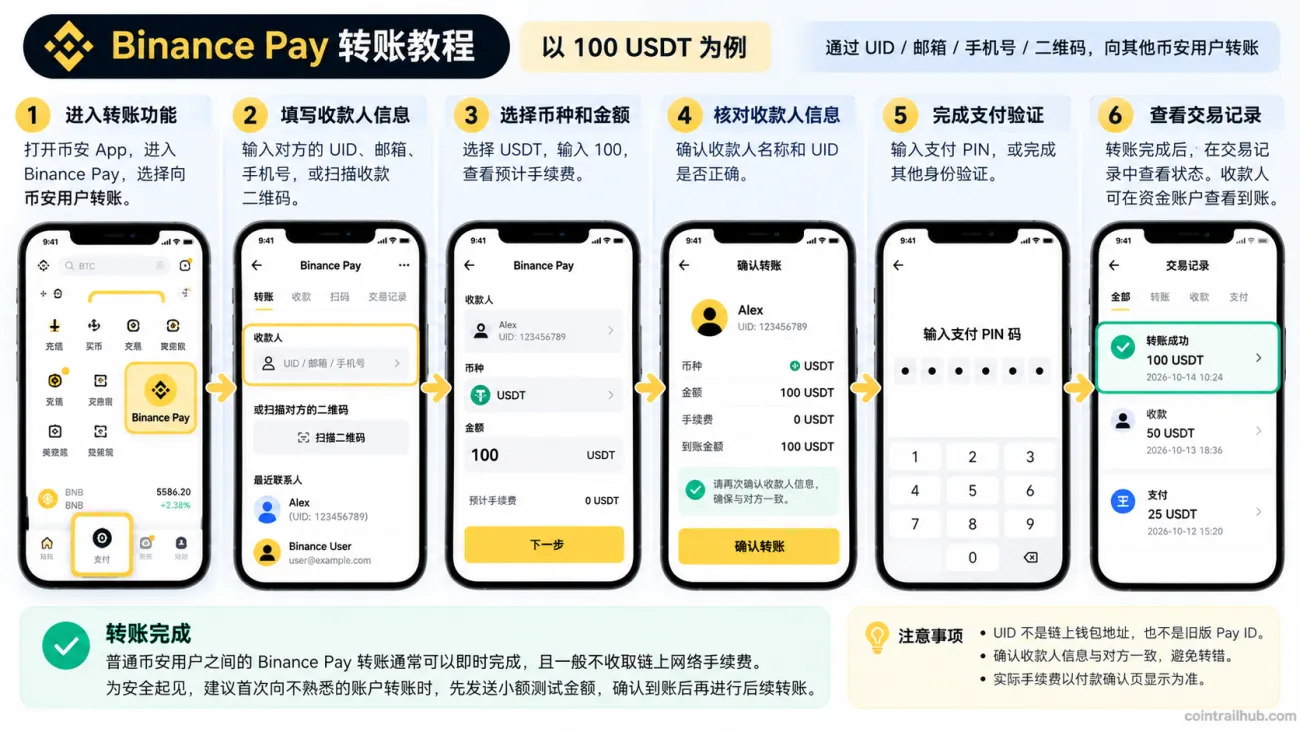
Binance Pay transfer flow: enter the payment feature, fill in the recipient UID, choose USDT and amount, verify the account, complete payment verification, and check the transaction history. The App screens in the image are illustrative; always follow the current Binance version.
5. How do I receive money with Binance Pay? How do I generate a QR code?
Besides sending assets, Binance Pay can also receive payments from eligible Binance users.
Method 1: Use a receiving QR code
- Open the Binance App and enter Binance Pay.
- Choose the "Receive" feature.
- Open your receiving QR code.
- Share the QR code with the payer.
- The other person scans and confirms the payment.
- Check the arrival in your account balance and transaction history.
Some receiving pages support specifying a currency or amount — follow the options the current App shows.
Method 2: Receive via UID, email or phone number
If sending a QR code isn't convenient, you can provide the account-identification info the current Pay transfer entry supports.
For example, give the payer your Binance UID, and they fill it into the supported user-transfer page to send the payment.
From a privacy standpoint, when receiving from people you don't know, prefer the platform's receiving QR code or UID, and avoid unnecessarily exposing your private phone number.
Where does the money go after I receive it with Binance Pay?
Assets received from regular Binance Pay user transfers usually go to your Binance Funding Wallet.
If you get a transfer notification but can't find the asset in your Spot Wallet, first check the Funding Wallet and the Binance Pay transaction history.
Don't confirm arrival just from a "success" screenshot the payer sends. Rely on your own account records and actual available balance.
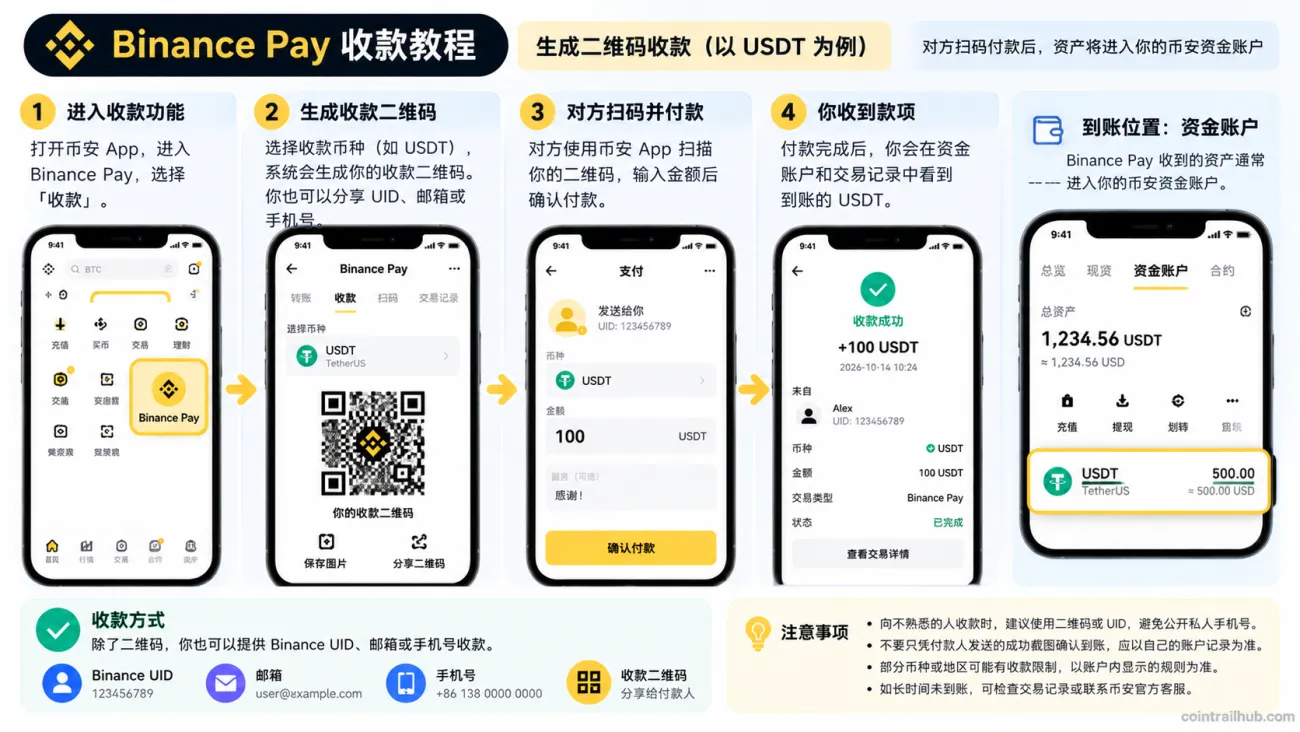
Binance Pay receiving flow: enter the receive feature, generate a QR code, the payer scans and transfers, then check the transaction history and Funding Wallet balance. The App screens in the image are illustrative; always follow the current Binance version.
6. What are the Binance Pay limits? How much can I send per day?
Binance Pay's payment limits relate to your account VIP level, but your actual available limit may also be affected by monthly limits, account status, region eligibility and specific product rules.
Official daily payment limits
| Account level | Daily payment limit |
|---|---|
| Regular user to VIP 3 | $8 million |
| VIP 4 | $16 million |
| VIP 5 | $24 million |
| VIP 6 | $40 million |
| VIP 7 | $64 million |
| VIP 8 | $80 million |
| VIP 9 | $96 million |
These figures come from Binance's May 2026 payment-limit update; the daily limit resets at 00:00 UTC.[3]
Note especially: $8 million is the official product-level daily limit, not a guaranteed amount an ordinary user can actually send right away. Your personal available limit should be based on the restriction shown in your account.
How do I check my Binance Pay limit?
Open the Binance App and look for "My payment limit" or similar in the Binance Pay settings page.
Some versions may use this path:
Pay → + → Settings → My payment limit
You can view the applicable monthly or other payment restrictions in your account. If the interface changes, follow what's actually shown.
Is there a limit on receiving with Binance Pay?
Binance's official daily-payment-limit description states that the daily limit applies to sending cryptocurrency or making payments, and does not set the same daily payment cap for receiving cryptocurrency.[4]
But accounts may still be subject to identity-verification, risk-control, region and other applicable rules.
What's the limit for transfers to a DeFi wallet?
Binance has stated that on-chain transfers to a DeFi wallet via Binance Pay have a total daily limit of $100,000 equivalent, resetting at 00:00 UTC.[5]
This is a different scenario from the regular Binance Pay payment limit — don't mix them up.
7. Which currencies does Binance Pay support? Can I pay with fiat directly?
Binance Pay supports many cryptocurrencies, with common assets including USDT, USDC, BTC, ETH and BNB.
According to Binance's June 2026 product introduction, user-to-user transfers support over 300 cryptocurrencies, while merchant payments support over 80.
These two numbers differ because the available-currency ranges for user transfers and merchant payments are not fully the same. The actual supported range may change by region and product.
Can I pay with fiat currency directly?
You can't treat a regular Binance Pay crypto payment as the same as a fiat bank-card payment.
For example, if your account holds 100 USDT and the payment scenario supports USDT, you can use Binance Pay to complete the payment.
But if you only have a fiat bank balance, you can't use Binance Pay directly like a bank-card or fiat payment-app balance.
Some regions may offer fiat remittance services — check the locally available products and payment methods.
8. Where can I spend with Binance Pay?
Besides transferring to other Binance users, Binance Pay can also be used at merchants that support this payment method.
Possible scenarios include travel booking, digital goods, some online services and merchants that accept crypto.
The general payment flow is:
- Choose Binance Pay on the merchant's checkout page.
- Scan the QR code with the Binance App, or open a supported payment link.
- Check the merchant name, currency and amount.
- Review the exchange rate, fees and actual deduction amount.
- Complete payment verification and save the order record.
Whether a merchant accepts Binance Pay can change at any time — don't rely on old tutorials to judge whether a merchant still supports it.
If the payment involves asset conversion, also pay attention to the exchange-rate difference, not just the fee.
9. What to do if a Binance Pay transfer fails or the money doesn't arrive
When a transfer fails, first confirm the specific error type — don't repeatedly resubmit the same payment.
| Problem | What to check first |
|---|---|
| Can't find Binance Pay | App version, account eligibility and region support |
| Can't enter the recipient | Whether the UID, email or phone number is correct |
| "Insufficient balance" | Available balance, payment currency and fees |
| "Limit exceeded" | Account monthly quota and applicable restrictions |
| Recipient doesn't see the funds | Funding Wallet and payment history |
| Wrong payment PIN | Verify the PIN or reset it via the official process |
Different errors need different handling — identifying the problem first is usually more effective than retrying the payment.
1. "Insufficient balance"
Check the available balance of the chosen currency, and whether you need to pay an additional fee.
Holding other cryptocurrencies in your account doesn't mean they can necessarily be used directly for the current payment.
2. The recipient says they didn't receive the USDT
First check your own Binance Pay transaction history to confirm whether the payment succeeded, is processing or failed.
If it shows success, have the recipient check their Funding Wallet and the balance of the corresponding currency.
If the records on both sides disagree, verify further through official Binance support.
3. Why doesn't Pay ID work anymore?
Binance has stopped supporting the old Pay ID.
Use the Binance UID, email, phone number or receiving QR code that the current Binance Pay page supports instead. Past transactions completed via Pay ID can still be found in the relevant history.
4. Where did the funds go after a failed transaction?
Judge based on the actual payment method.
Some payment flows may involve transferring assets from other accounts or products. If the payment failed, check your Funding Wallet, Spot Wallet and related product balances.
For the specific remittance transactions listed in Binance's official fee description, the payment amount and applicable fee are refunded per the relevant rules after a failure.
If you can't confirm the fund status, keep the transaction record and contact official support — don't blindly pay the same recipient again.
10. Is Binance Pay safe? What to check before transferring
Binance Pay provides account verification, payment PIN and other security mechanisms, but these can't judge for you whether a recipient is trustworthy.
Fake payment screenshots
Someone may send an edited "payment success" image and demand that you immediately deliver goods or release assets.
The correct approach is to check your own account's transaction history and actual received balance.
Impersonating Binance support
If someone asks you to send USDT via Binance Pay to "verify your account," "lift risk control" or "claim a reward," be highly alert.
Don't transfer just because the other person claims to be Binance staff.
Wrong receiving QR code
A merchant's or person's receiving QR code may be swapped.
Before paying, check the recipient, currency and amount shown on the page — especially don't scan QR codes from unknown sources.
Can I cancel a transfer after it's done?
Binance's official FAQ states that completed Binance Pay transactions cannot be directly reversed.[6]
So the most important thing before paying isn't speed — it's confirming the recipient account is correct.
For unfamiliar recipients, especially don't skip verification just because the other person is urging you.
11. Binance Pay vs on-chain withdrawal: how to choose?
| Your actual need | Suggested method |
|---|---|
| Send USDT to a Binance user | Check Binance Pay first |
| Transfer to a self-custody wallet | Check on-chain withdrawal and network |
| Spend at a Pay-supporting merchant | Compare the Pay quote with other payment methods |
| Receive fiat to a bank account | Check the compliant off-ramp available in your region |
When deciding, first clarify what asset the recipient needs and where the asset ultimately goes.
If it's just sending USDT between two eligible Binance accounts, Binance Pay is usually more convenient; if the destination is a self-custody wallet, you need to confirm the relevant on-chain transfer feature, address and network.
FAQ
1. What is Binance Pay?
Binance Pay is a cryptocurrency send, receive and payment feature provided by Binance. Eligible users can use a UID, email, phone number or QR code to transfer between accounts.
2. Is there a fee to send 100 USDT with Binance Pay?
Pay transfers between regular Binance users are usually free. But some high-frequency transactions or special remittance services may charge — go by the transaction confirmation page.
3. How long does a Binance Pay transfer take to arrive?
Pay transfers between regular Binance users are usually instant. Remittance and on-chain-wallet-related transactions may need different processing times.
4. How much can I send per day with Binance Pay?
Binance's published daily product payment limit for regular users is $8 million equivalent, but your actual available limit may be lower — go by what your account shows.
5. Is there a fee to receive with Binance Pay?
Receiving between regular accounts usually doesn't incur a separate on-chain network fee. Other payment products should be checked against their actual rates.
6. Can Binance Pay send to Trust Wallet?
A regular Binance Pay user-to-user transfer can't directly be treated as an on-chain transfer to Trust Wallet. You need to use the applicable on-chain withdrawal or related wallet-transfer feature, and confirm the network and fees.
7. Are Binance Pay and the Binance UID the same?
No. Binance Pay is a payment service, and the UID is the number identifying your Binance account. The UID can be used as recipient info in the supported Binance Pay user-transfer entry.
8. Are Pay ID and UID the same?
No. Pay ID is the old payment identifier, and Binance stopped supporting it on January 1, 2025. Current transfers should use the Binance UID and other methods the page supports.
9. Can I use Binance Pay without KYC?
You usually need to complete Binance's required identity verification and meet your region's and account's feature-eligibility requirements. Just completing registration doesn't necessarily mean you can use it.
10. Can I cancel a Binance Pay transfer after it's done?
Completed Binance Pay transactions cannot be directly reversed. So you must confirm the recipient, currency and amount before paying.
11. Can Binance Pay replace a bank card or fiat payment app?
It can't be directly equated. Binance Pay mainly serves cryptocurrency payments, and its fund nature, merchant acceptance, regional availability and transaction rules all differ from ordinary fiat payment tools.
Summary: who is Binance Pay for?
If you already have a Binance account and often need to send USDT, BTC and other cryptocurrencies to other Binance users, Binance Pay is a feature worth knowing.
Regular user-to-user transfers usually don't need on-chain network fees, arrive fast, and don't require repeatedly filling in blockchain addresses.
But remember three distinctions before using it:
First, regular user transfers being free doesn't mean every Binance Pay service is free. Remittances, merchant payments and on-chain-wallet-related transactions may involve different fees.
Second, the official product limit isn't the same as your actual transferable amount. Go by the limits and restrictions shown in your account.
Third, an in-Binance account transfer isn't the same as an on-chain withdrawal. If the destination is a self-custody wallet, use the applicable on-chain transfer method.
On first use, check the fee confirmation page and account limit, get familiar with the flow via a small test, then decide whether to make further transfers.
Data verification notes
The key facts in this article were checked against Binance's official Binance Pay announcements, service-fee and limit descriptions on 2026-10-16, item by item:
- Pay ID shutdown date: Binance stopped supporting Pay ID on January 1, 2025 (UTC); sending and receiving via Binance ID, email and phone number are unaffected. Source: Binance Pay to gradually stop supporting Pay ID (updated 2024-11-27).
- Pay remittance reference fees: for the C2C option of the Pay remittance feature in certain regions, a single remittance below $100 costs $0.50 and $100 or above costs $1 — this is a specific remittance-product rule, not the ordinary friend-transfer rate. Source: Binance Pay service fees (updated 2026-01-08).
- Daily payment limits: regular users through VIP 3 have an $8 million equivalent limit, with higher limits at higher VIP levels (VIP 9 is $96 million); the daily limit resets at 00:00 UTC. Source: Binance Pay transaction limits (updated 2026-05-05).
- Receiving limit rule: the daily payment limit applies to sending cryptocurrency or making payments, and does not set the same daily payment cap for receiving cryptocurrency. Source: Binance Pay transaction limits (updated 2026-05-05).
- DeFi-wallet transfer limit: on-chain transfers to a DeFi wallet via Binance Pay have a total daily limit of $100,000 equivalent, resetting at 00:00 UTC. Source: Binance Pay transaction limits (updated 2026-05-05).
- Transactions cannot be reversed: completed Binance Pay transactions cannot be directly reversed. Source: Binance Pay Frequently Asked Questions.
Recommended reading
- How to register on Binance: email/phone sign-up, verification code and referral code (2026) — for readers who don't yet have a Binance account or haven't finished basic setup.
- Binance KYC: How to Verify Your Identity — Review Time, Failure Reasons & Fixes (2026) — to understand identity-verification requirements and common review issues.
- Binance withdrawal tutorial 2026: how to sell USDT to your bank account? Fees, arrival, and freeze risk — to distinguish crypto transfers from fiat off-ramp.
- Binance withdrawal network choice: TRC20, ERC20, BEP20 fee comparison — to understand network choice before sending to an external wallet.
- How Much Are Binance Fees? Spot/Futures/Withdrawal Rates, BNB Discount + BN522 Rebate Saving Up to 40% — to further understand different trading and transfer fees.
Disclaimer
This article introduces Binance Pay's payment features, operating steps, fees and risk identification, and does not constitute investment advice. Binance Pay's service eligibility, region support, fees, limits and available currencies may change — always refer to Binance's latest official rules and your own account's actual display.
- 2026-10-16UpdateAdded evidence-chain superscripts and "Data verification notes"; updated the key-fact verification date.
- 2026-10-14UpdateVerified Binance Pay fees, daily limits, current transfer methods and the Pay ID shutdown announcement; added the difference between UID and Binance Pay, where receiving funds land, DeFi-wallet transfer limits and common failure troubleshooting.
- 2026-10-14UpdateOptimized search-intent matching, adjusted steps and fee explanations, improved the HTML comparison tables, FAQ and official source links, and reduced repeated explanations.
See ourEditorial Policy and the correction process in ourCorrections Policy.
The CoinTrailHub editorial team focuses on crypto education for beginners, exchange security and P2P trading risk. This article is compiled from official sources and public data, reviewed by humans, and strives for accuracy but is not investment advice.
Last updated:2026-10-14 · Content reviewed by humans · Learn more
© 2026 CoinTrailHub · Original content. Reproduction or rewriting without permission is prohibited.