
Not receiving your Binance verification code? Email and SMS troubleshooting (2026)
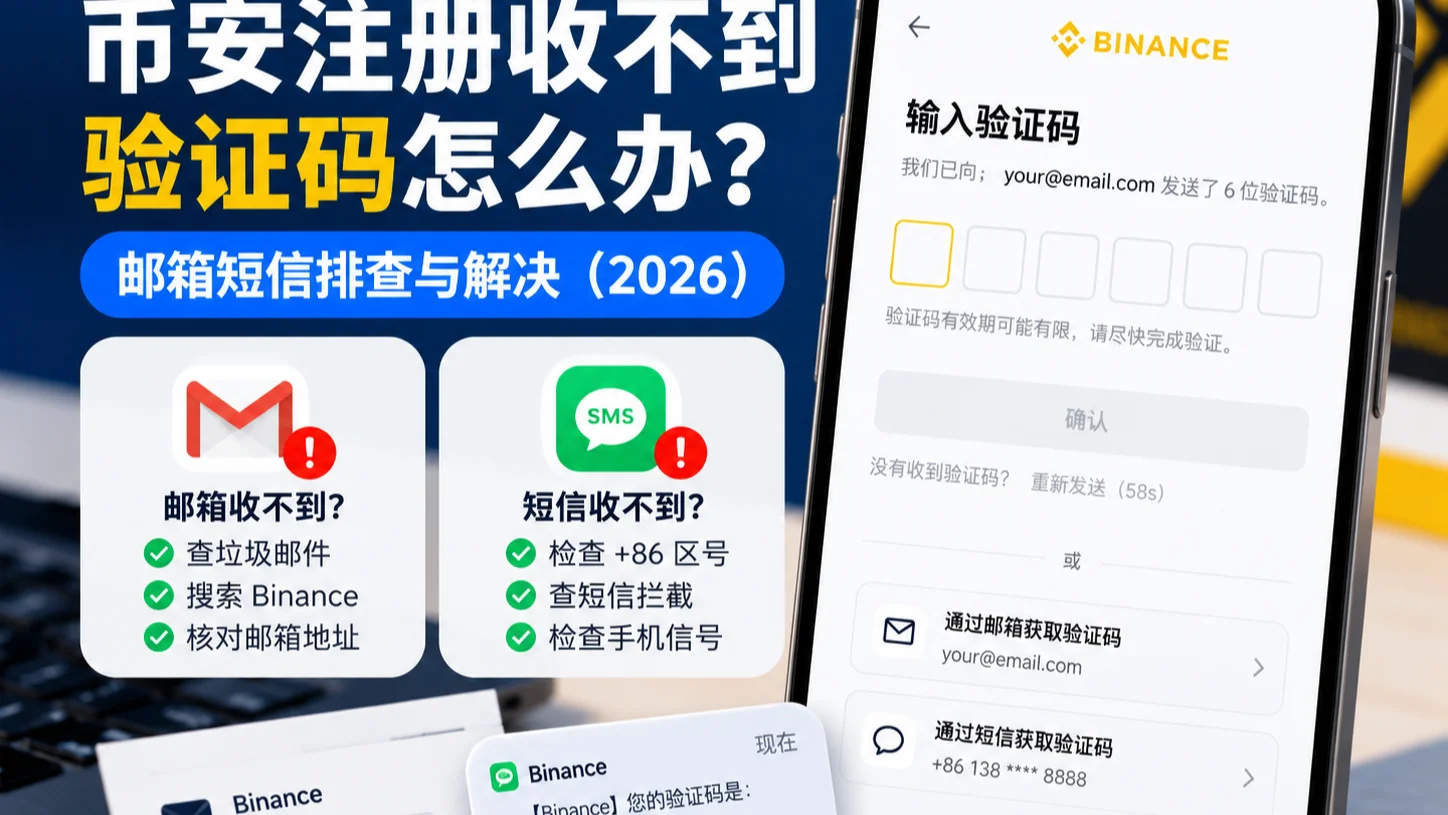
Table of contents

Binance new user rewards
20% trading fee rebate
Official Binance registration. Complete identity verification (KYC) to trade and withdraw.
This article is compiled from the Binance official Help Center and public registration and security-verification documentation; the verification-code validity period, send interval, and available methods are subject to Binance's current page.
What should you do if you're not receiving your Binance verification code? First, stop repeatedly tapping "Resend" — otherwise you may trigger a request-frequency limit. Whether Gmail, Outlook, or another provider isn't receiving the email, or your phone number isn't receiving the SMS, you can troubleshoot with the methods below.
Email not received: open spam and "all mail," search for "Binance," double-check the registered email address, then request a new code as prompted.
SMS not received: confirm the country code and phone number are correct, check SMS blocking, signal, and SIM card; if the page offers a voice verification code, try it.
Received but says wrong or expired: check which request the current code corresponds to, and request a new one if needed.
Says too many requests: stop sending repeatedly and wait for the page's limit to clear.
Says failed to send: try switching network, browser, or device.
If these still don't resolve it, use the troubleshooting table below. Accounts that are already registered need the original account verification or the official recovery flow — don't open duplicate accounts.
About 8 minutes to read. Remember first: when a code doesn't arrive, don't keep tapping "Resend" — the more you tap, the easier you get rate-limited; if it says your email or phone is already registered, recover the original account instead of registering again.
Not receiving a Binance code? Start with this troubleshooting table
Binance verification failures mainly fall into three categories: not received, received but unusable, and the system failed to send.
| Current symptom | What to do first |
|---|---|
| No verification code in email | Check spam, search all mail, verify the recipient address |
| No SMS on the phone | Check SMS blocking, verify the country code, check signal |
| Shows "failed to send" | Switch network or browser and retry |
| Code is wrong | Confirm it's the code for the current request |
| Code is expired | Get a new code as prompted on the page |
| Too many requests | Pause requests and wait for the page's limit to clear |
| Original email or phone is deactivated | Use another verification method or the official reset flow |
Before troubleshooting, note these points: first check whether the page is asking for an email code, an SMS code, or the dynamic code from your authenticator — waiting on the wrong channel doesn't help; don't request codes from multiple devices or pages in a row, or you won't tell which one matches the current flow; confirm you've actually tapped "Get code" and the page shows no "failed to send" error; when a code doesn't arrive, the official guidance suggests waiting about 10 minutes before retrying, but follow the on-page countdown.[1]
Binance email code not arriving? Troubleshoot in these 6 steps
If you're registering with email and the page says a code was sent, but Gmail, Outlook, Yahoo, or another provider hasn't received it, try these in order.
1. Search for "Binance" first — don't just check the inbox
Open your email and type this in the search box:
Binance
Check these locations:
- Inbox
- Spam
- Promotions or ads
- Archived mail
- Filtered or quarantined mail
Some email providers may automatically categorize the verification email, so it may not be in your main inbox.
If you find the relevant email, confirm it belongs to the registration request you just made, then use the code in it.
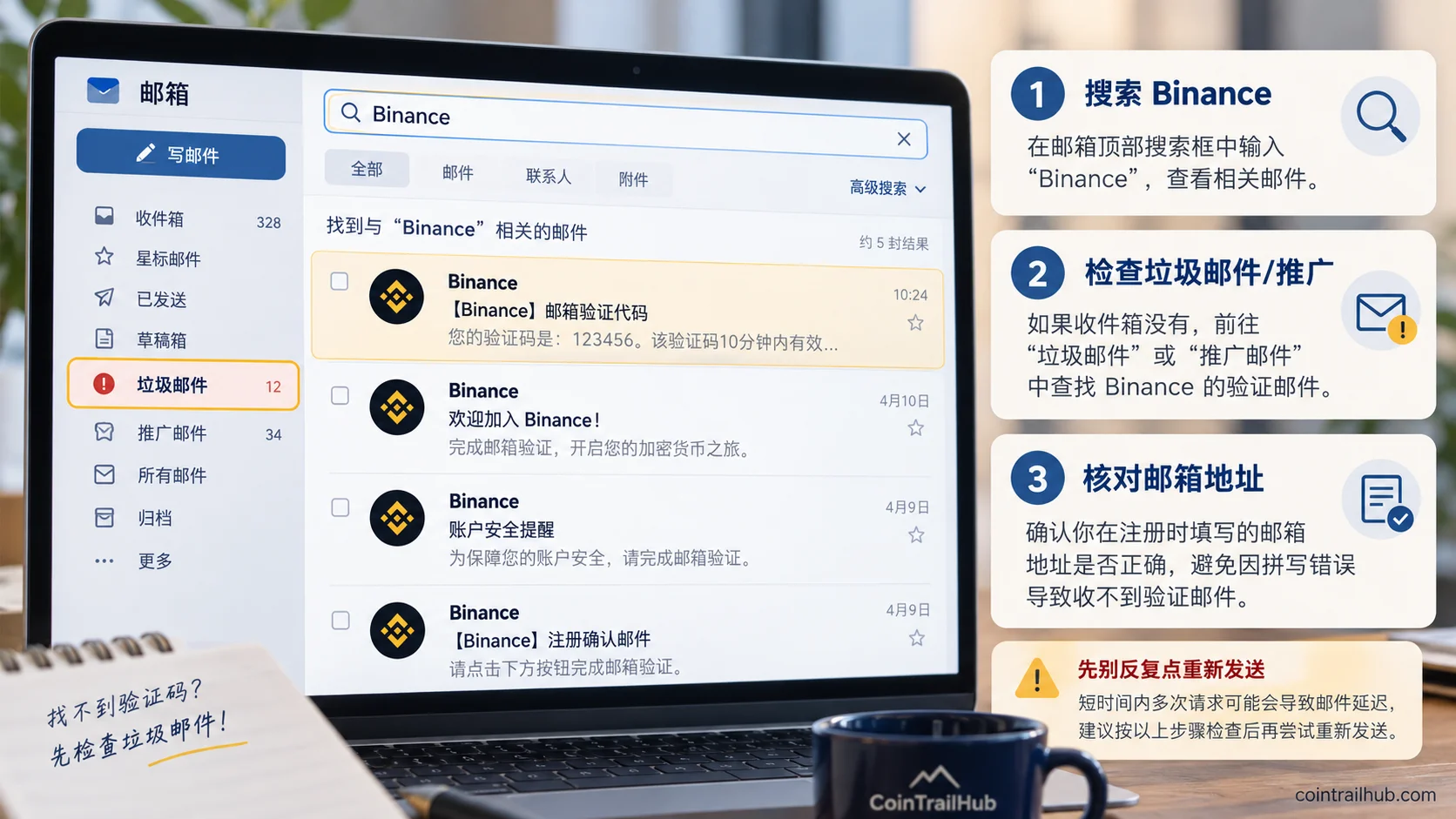
Figure 1: when the Binance email code doesn't arrive, first search for "Binance," then check spam and the email address, to avoid requesting codes repeatedly.
2. Check whether the email address is entered correctly
Return to the Binance registration page and confirm the email address.
Common problems include:
- Typing
.comas.con - Missing a letter in the email username
- The browser auto-filling a different email
- Logged into a work email on your phone but registering with a personal one
In particular, check the full email address, not just the domain suffix.
If the page lets you edit the registration email, correct it first, then request a code as prompted.
If the system says the email is already registered, don't immediately assume the previous account was never created — use the official login or account-recovery flow to confirm the status.
3. Check whether the email can receive mail at all
Send a plain test email from another email address you trust.
If even ordinary mail doesn't arrive, the problem may be with the email account itself, for example:
- The mailbox storage is full
- The mailbox is temporarily blocked from receiving mail
- A filter rule has added the sender to a blocklist
- The mail client hasn't synced for a long time
- The email provider is experiencing delays
First restore normal mail reception, then return to Binance to verify again.
4. Check blocking settings by email type
| Email type | Key places to check |
|---|---|
| Gmail | Spam, All Mail, filters |
| Outlook | Junk email, safe senders, blocked senders |
| Yahoo | Spam, filters, blocked addresses |
| Other providers | Spam/junk, anti-spam rules, blocklist |
If ordinary mail arrives fine and only Binance mail is missing, further check the sender-filtering rules.
Whether your email can receive Binance codes shouldn't be judged just by which provider you use; it also depends on email rules, the provider's service status, and account settings.
5. Add the confirmed Binance sender to your safe-senders list
If Binance mail keeps landing in spam, you can configure a safe sender or whitelist based on the sender information published in Binance's official Help Center.
Note: whitelisting is to improve delivery, not proof that a message showing this sender is definitely genuine.
Sender names can be spoofed. If you see a suspicious email, use Binance's official "verification channel" to check it — don't click suspicious links in the email directly.
6. Still nothing? Check whether it's an email-address or account problem
If your email receives other mail normally, the filter rules are fine, and you still don't get the Binance code, try once more after the send limit clears.
If the account has already been created, first check whether another security-verification method is available.
If the current email truly can't be used, follow the official account-recovery or verification-reset flow — don't repeatedly try to create multiple accounts.
Email troubleshooting conclusion: first confirm the recipient address, then check blocking and mail reception, and finally handle the code request itself.
Binance SMS code not arriving? Check your phone number like this
Binance's list of countries and regions supporting SMS verification includes many country codes, but that doesn't mean every phone number will definitely receive the code, nor that the account automatically meets all registration and service eligibility requirements.[2]
Whether a phone number can receive SMS also depends on the carrier, number range, blocking rules, and the sending service.
1. Check the country code and phone number
First check that the country code is selected correctly (for example, +1 for the US, +44 for the UK, +52 for Mexico, +55 for Brazil).
With the country code selected separately, you normally just enter your local phone number in the box — follow the on-page input format.
Rule out:
- Wrong country code
- One digit missing or extra in the phone number
- Using an old number that's already deactivated
- Looking at the wrong SIM's message inbox in a dual-SIM phone
If it's a foreign number, select the corresponding country or region code.
2. Check the phone's SMS blocking history
Often the SMS isn't entirely missing — it's just been categorized by the phone system or an SMS-filtering tool.
iPhone users:
Open the "Messages" app and check the categories the system currently provides, such as unknown senders and junk, and whether the carrier has enabled an SMS-filtering service. Category names may vary by iOS version and region.
Android users:
Open the "Messages" app and check spam and blocked messages; if the phone has a built-in security center or phone manager, check its harassment/blocking records too.
Setting names differ by manufacturer — the point is to confirm the code wasn't misjudged as spam.
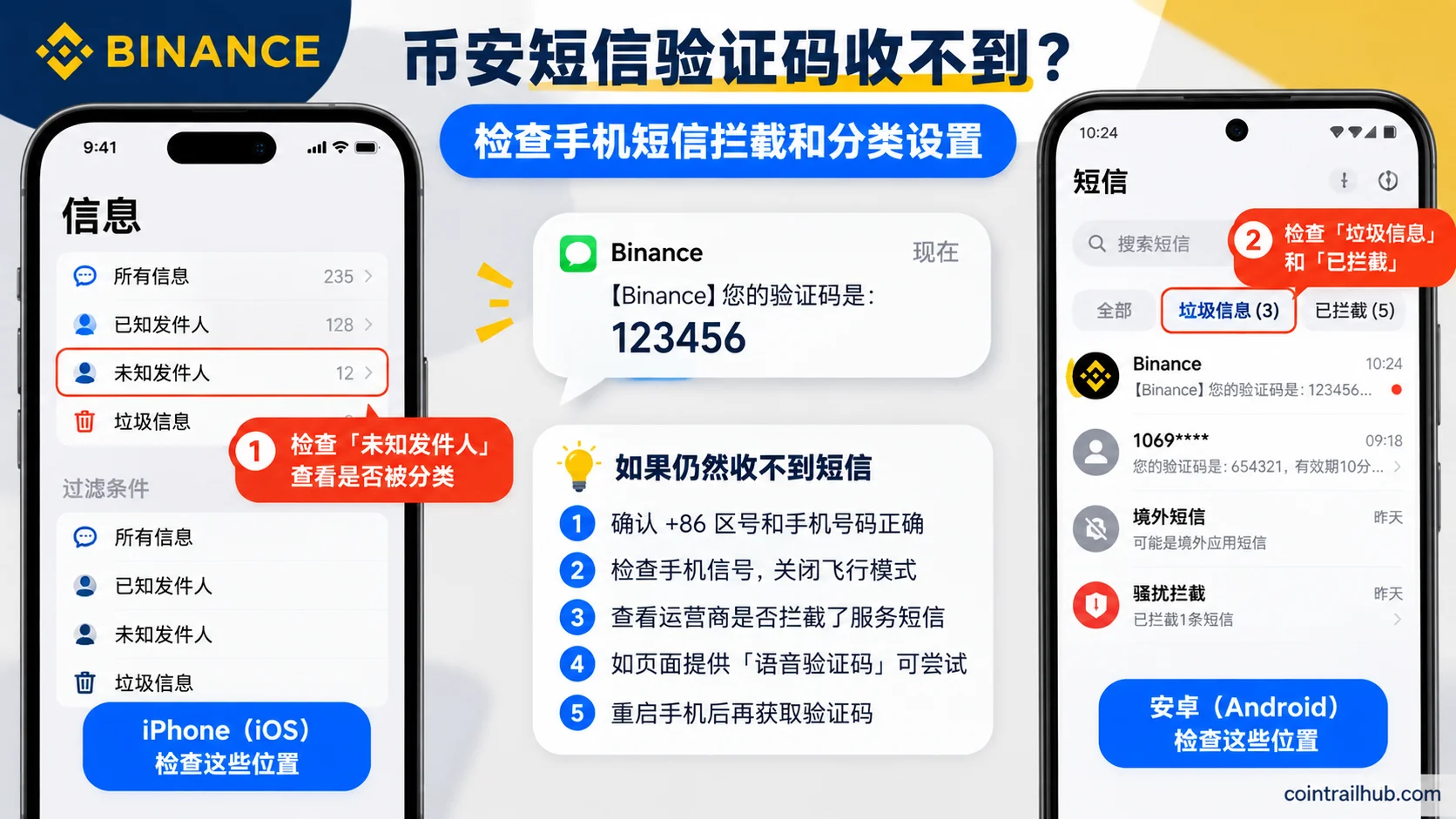
Figure 2: when the Binance SMS code doesn't arrive, iPhone users can check unknown senders and junk, Android users can check spam and blocked messages; the exact entry varies by OS version. Interface illustration — use your actual phone display.
3. Check the phone signal, then restart the phone
SMS verification depends on the number's ability to receive SMS, not just on Wi-Fi speed.
If you're in a place with weak signal — a basement, elevator, or parking garage — move to a spot with stable signal first.
Then:
- Confirm airplane mode is off.
- Check that the SIM used for receiving SMS is enabled.
- Restart the phone.
- Wait until the page allows requesting the code again.
Note: switching between Wi-Fi and mobile data mainly helps troubleshoot request issues on the registration page; it can't replace solving a carrier-side SMS reception problem.
4. Check whether the carrier is blocking service SMS
If other SMS arrives normally and only Binance's verification SMS never comes, contact your carrier to ask.
You can explain it like this:
"My number receives normal text messages, but the verification SMS from one site never arrives. Please check whether there's any blocking of international-app SMS, international SMS, or enterprise service SMS."
Don't ask support to blindly disable all security blocking — first confirm the specific problem.
Delivery can also differ when using a roaming number, certain virtual-carrier number ranges, or when strict anti-spam blocking is enabled.
5. If the page offers a "voice verification" option, try it
This is one of the solutions explicitly listed in Binance's official SMS troubleshooting guide.[3]
If the verification page offers a voice option, follow the prompt to have the system read the code aloud over a phone call.
But note:
- Not every region or every verification flow shows this option.
- Don't trust someone who proactively calls you to ask for your verification code, claiming to be Binance support.
- Voice verification must be used from an official verification flow that you initiated yourself.
6. Still nothing? Decide whether you need to change or reset the binding
If this is only first-time registration, first confirm whether the account has actually been created and whether the page currently allows changing the phone number.
If the account already exists and the bound old number isn't receiving codes, follow Binance's account-security phone-number reset flow.
Important: after changing a Binance account's bound phone number, withdrawals, internal transfers, and P2P may be temporarily restricted. Binance's different interfaces describe this differently — commonly 24–48 hours — so the actual restriction scope and recovery time follow the account-page notice.[4]
So don't casually modify the security settings of an already-working account over a temporary SMS delay.
Code says wrong, expired, or failed to send — how to fix it?
Receiving a code doesn't mean it will pass. The following errors need separate handling.
| Page message | What to do |
|---|---|
| Code is wrong | Check the input and the current request |
| Code has expired | Request a new one as prompted |
| Too many requests | Pause and wait for the limit to clear |
| Failed to send | Switch network or device and retry |
| Can't process request | Clear browser cache or switch browsers |
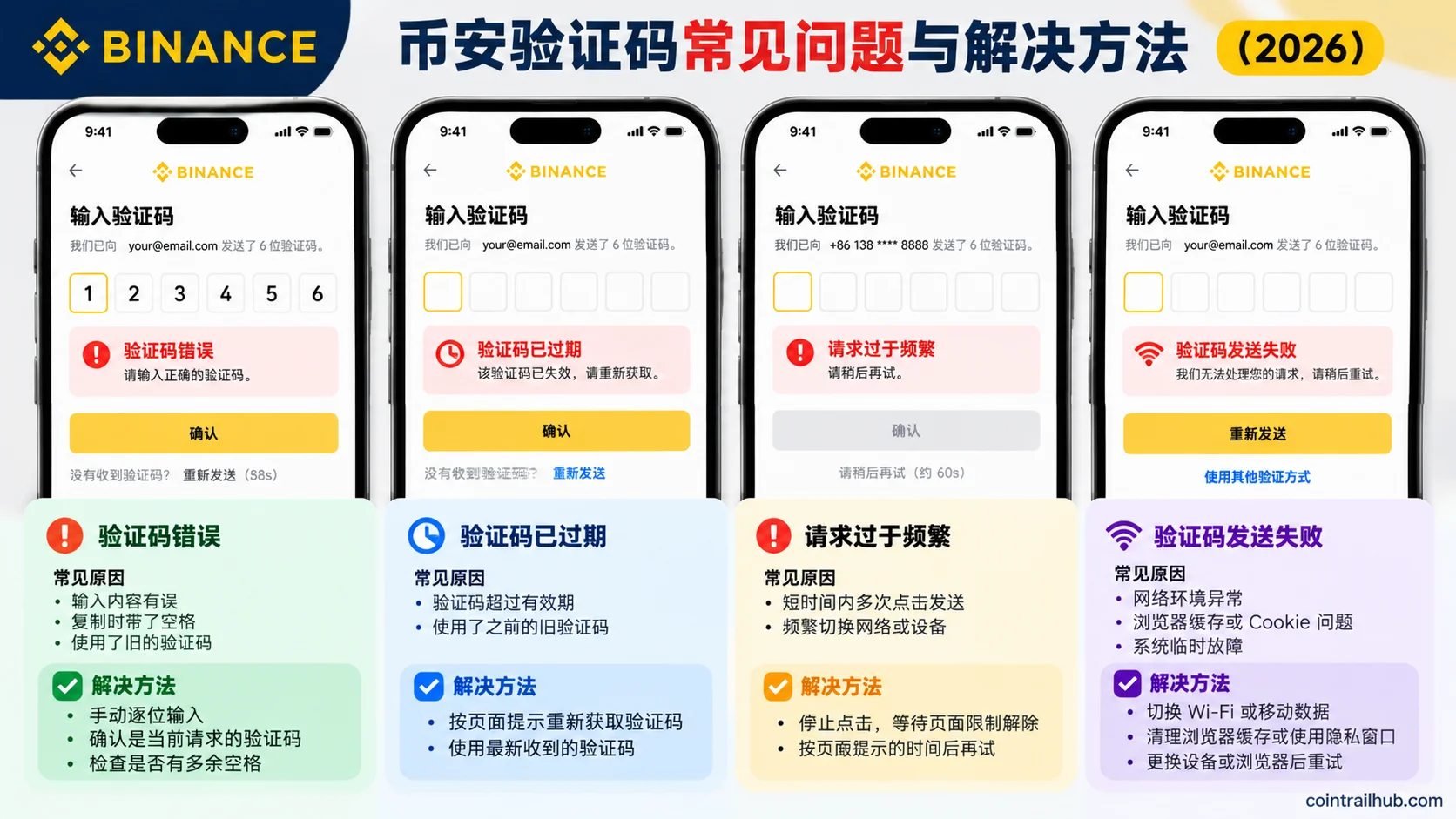
Figure 3: common Binance verification-code problems include wrong input, expired code, too many requests, and failed to send — use a different fix for each. Interface illustration — use the actual Binance App or website notice.
I did receive a code, so why does it say wrong?
First check whether the code belongs to the operation you're doing right now.
For example, you may have requested email verification once, then tapped resend, and now two emails are in your inbox.
Use the valid code matching the current page; don't mix codes from different requests.
If copy-pasting reports an error, try typing manually and confirm there are no extra spaces.
How long before a code expires?
Binance's code validity may differ between verification flows.
Don't assume every code is valid for 5, 10, or 30 minutes. Read the specific notice on the current verification page and in the email.
If it shows expired, request a new one at the page's allowed time.
What if it says "too many requests"?
Stop tapping first.
This message usually means the current operation is rate-limited, but this prompt alone doesn't confirm the account is frozen or banned.
If the page shows a retry countdown, wait it out completely.
If there's no clear countdown, don't retry every few seconds. Pause the request and resume after the limit clears.
What if it says "failed to send"?
This needs separate handling in this article, because it's different from an email that was sent but never arrived.
Per Binance's official verification-code troubleshooting guide, try in order:
- Switch from Wi-Fi to mobile data, or use another working network.
- Try the verification flow in a desktop browser.
- Clear the browser cache and cookies.
- Reopen the official Binance website in a private window.
- Try the official verification page on another device.
If the page shows "We are unable to process your request, please try again later," the same browser and network steps apply.[5]
Before proceeding, confirm you're on the real Binance website — don't troubleshoot through registration links or pages shared by strangers.
Registered with Apple ID — why was the code sent to a different email?
One situation is easy to miss: you created a Binance account with Apple ID and enabled Apple's "Hide My Email" feature.
In that case, the email Binance uses may not be exactly the one you normally check.
Apple may use a private relay address and forward mail to the receiving email configured in your Apple account.
If you logged in or created an account with Apple ID and aren't receiving codes:
- Open "Settings" on your Apple device.
- Go to the Apple-account-related settings.
- Check Sign-In & Security, hidden email addresses, and mail-forwarding settings.
- Confirm which email is actually receiving Binance mail.
- Return to your email and check the inbox and spam.
Setting paths may vary with the Apple system version.
This kind of situation may not be Binance failing to send — the mail may have gone to the forwarding channel configured by Apple's hidden email.
Not registered yet — can I change the email or phone and re-register?
First distinguish "registration not yet complete" from "account already exists."
| Account status | What to do |
|---|---|
| Registration info not yet submitted | Go back and check or edit the email/phone |
| Says email or phone already registered | First check whether an account was already created |
| Registered but can't log in | Try another verification method or official recovery |
| Old email or phone is deactivated | Use the security-verification reset flow |
Don't treat "didn't receive the code" as "registration failed." If the page says the phone or email is already linked to an account, first confirm the existing account's status and use Binance's official login or "forgot account" appeal flow — don't register endlessly.
If the account hasn't been created and the page lets you go back and edit, you can continue registering with an email or phone you control long-term; if the account already exists, changing the binding is an account-security operation that requires completing verification as the platform requires. After a reset, withdrawals, internal transfers, and P2P may be temporarily restricted (commonly 24–48 hours; follow the account-page notice).
When must you contact Binance official support?
The following situations are no longer ordinary email/SMS delays and can be escalated to an official support request:
- Email and phone both receive other messages normally, but Binance verification keeps failing.
- The page says the account, device, or operation is under a security restriction.
- The originally bound email or phone is permanently deactivated.
- There is currently no usable security-verification method.
- The verification page keeps saying the system can't process the request.
- You received a code or login notification you never requested.
When contacting support, prepare the following non-sensitive information:
| Information | What to provide |
|---|---|
| Problem type | Registration, login, or security-setting change |
| Verification channel | Email or SMS |
| Error text | The exact error shown on the page |
| Device environment | iPhone, Android, Windows, or Mac |
| Steps already tried | Checked blocking, restarted, switched network, etc. |
Never give anyone your login password, SMS code, email code, authenticator code, or wallet seed phrase, no matter who asks. Official support is reachable from the Binance App or the Help Center you open yourself — you don't need a "support phone number" found through a search engine.
How to tell a received Binance code isn't phishing
If you receive a Binance code without having initiated a registration, login, or other security-verification action, stay alert.
Don't trust a sender just because the message shows "Binance."
Stop if you encounter any of the following:
- An email asks you to send the code to support.
- An SMS asks you to click an unfamiliar link to unfreeze your account.
- Someone asks you to complete identity verification via screen sharing.
- After an unknown-login alert, someone proactively calls to ask for your code.
- Someone asks you to transfer assets to a so-called "secure account."
Binance provides an official verification channel to check whether a suspicious URL, email, phone number, or social account is officially verified.
If you've set a Binance Anti-Phishing Code, also check that official messages show the correct personal code.
When handling verification-code issues, only enter the code on the official registration or login page you opened yourself — never forward it to anyone.
FAQ
1. What should I do if I'm not receiving the Binance email verification code?
First confirm the email address is correct, then search for "Binance" across the whole mailbox and check spam, filters, and blocklists. If the email can't receive mail normally, fix the email account first; if the email is fine, request a new code as prompted on the Binance page.
2. Why isn't my phone number receiving the Binance SMS code?
Your country may be on Binance's published SMS-verification coverage list, but actual reception still depends on the carrier, number, signal, and SMS-blocking rules. First check the country code, number, SMS-blocking history, and signal, then try the other verification methods the official page offers.
3. Can Gmail or Outlook receive Binance verification codes?
Don't judge "yes" or "no" purely by the email provider. Focus on whether the email receives mail normally, whether the code email is being filtered, and whether the email address was entered correctly. Binance officially recommends using a regular, long-term, usable email address.
4. How long does a Binance verification code usually take to arrive?
There's no fixed guarantee that applies to all regions and channels. Binance's official troubleshooting suggests that in some cases you can retry after about 10 minutes, while also following the send interval and limits shown on the current page.
5. I received a code, but it says wrong or expired. What now?
First confirm the code belongs to the current request; don't mix codes from multiple emails. Enter it manually and remove extra spaces; if it says expired, request a new one as prompted — don't assume a single fixed validity period.
6. Binance says "too many requests" — how long do I wait?
There's no single fixed wait time for all users and flows; follow what the verification page shows. First stop tapping and don't keep sending requests during the limit period.
7. If the Binance SMS doesn't arrive, can I use email or voice verification instead?
It depends on whether the current page offers "switch to another verification method" or a voice option. If the account previously bound an email, passkey, or authenticator, you may be able to use it; the options for first-time registration and existing accounts aren't necessarily the same.
What to do after resolving the verification-code issue?
If you've successfully completed verification, first confirm the account was actually created, then continue with the subsequent registration and identity-verification steps as required by the Binance page.
If the account is already logged in normally, it's recommended to set a strong password, passkey, or authenticator early, and make sure the bound email and phone remain usable long-term — don't rely on SMS codes as the account's only security measure.
Finally, remember this handling order:
Email not received → check the recipient address and filter rules.
SMS not received → check the phone number, blocking history, and carrier.
Code unusable → check validity, the current request, and the page error.
No verification method works → use Binance's official account-recovery flow.
Once you confirm the failure type, you avoid wasting time repeatedly tapping "Resend."
Data verification notes
The key facts in this article were verified on 2026-10-16 against Binance's official Help Center verification-code documentation, item by item:
- Retry waiting suggestion: when a code doesn't arrive, the official troubleshooting guidance suggests waiting about 10 minutes before retrying; in practice, follow the on-page countdown and send-interval limits. Source: Binance official: Why am I not receiving emails.
- SMS coverage: Binance's list of countries and regions supporting SMS verification includes many country codes, but being listed doesn't mean every number will definitely receive the code, nor that the account automatically meets all service eligibility. Source: Binance official: Countries and regions supporting SMS verification.
- Voice verification code: voice verification is one of the solutions explicitly listed in Binance's official SMS troubleshooting guide, but not every region or verification flow offers it. Source: Binance official: Why am I not receiving SMS verification codes.
- Functional restrictions after resetting security verification: after security-verification reset operations such as changing the bound phone number, withdrawals, internal transfers, and P2P may be temporarily restricted; Binance's different interfaces describe this differently — commonly 24–48 hours — and the actual restriction follows the account-page notice. Source: Binance official: Reset 2FA when you can't access your account.
- Failed-to-send troubleshooting: when "failed to send" or "we are unable to process your request" appears, the official guidance suggests trying, in order, switching networks, using a desktop browser, clearing cache and cookies, using a private window, and changing devices. Source: Binance official: How to fix 2FA verification code errors.
Related reading
- Binance registration tutorial 2026: the full account-opening flow (with screenshots)
- How to do Binance KYC? Review time, failure reasons, and fixes (2026)
- Binance / OKX account security settings checklist: how to enable 2FA, anti-phishing code, and withdrawal whitelist (2026)
- Binance tutorial 2026: registration, download, KYC, P2P buying, and withdrawal guide
- How to enable the Binance anti-phishing code? Hands-on video for spotting phishing emails
Content compiled on October 9, 2026. This article is an independent troubleshooting guide and has not reproduced every registration-failure scenario on a real device; the actual code validity period, send limits, alternative verification methods, and regional service availability are subject to Binance's current page and the applicable local rules.
- 2026-10-16UpdateAdded evidence-chain superscripts and data verification notes; updated the verification date for key facts.
See ourEditorial Policy and the correction process in ourCorrections Policy.
The CoinTrailHub editorial team focuses on crypto education for beginners, exchange security and P2P trading risk. This article is compiled from official sources and public data, reviewed by humans, and strives for accuracy but is not investment advice.
Last updated:2026-10-09 · Content reviewed by humans · Learn more
© 2026 CoinTrailHub · Original content. Reproduction or rewriting without permission is prohibited.