
How to Download the Binance Android App? 2026 Official APK & Google Play Guide

Table of contents

Binance new user rewards
20% trading fee rebate
Official Binance registration. Complete identity verification (KYC) to trade and withdraw.
Can't find Binance in your app store? That's normal for the Binance Android app. Android users have only two official channels: if you don't have Google Play, download the APK from the Binance website; if you do, install it from the official store.[1] The only rule: download only from binance.com or the official Google Play listing — ignore "latest version APK" links anywhere else. If Google Play works normally, prefer the store; otherwise use the official APK. With luck you can be done in about 5 minutes, and you don't need to register an account just to download the app.
First, decide: Binance official APK or Google Play?
| Download method | When to use |
|---|---|
| Binance official APK | You don't have Google Play and your device supports APK installs |
| Google Play | The app can be installed in your current region and on your device |
How to choose? If you can install Binance normally through Google Play, prefer the store — later updates are easier. If you don't have Google Play, use the official Binance APK directly; you don't need to install the Google service framework just to download the app.
Official APK: Open the Binance download page → choose Android → download the APK → open the installer.
Google Play: Enter the store from the Binance website → check the official app → tap Install.
If you can't find Binance on Google Play, first check the app's availability for your region and device, then look at the official website's download options. Installing the app doesn't mean every Binance service is available in your location.
The two easiest places to trip up: getting the "latest version" from a cloud drive, group chat, or third-party APK site, and trying to install an incomplete installer after a download was interrupted.
1. Why can't you find the Binance app in China?
In Huawei, Xiaomi, OPPO and vivo app stores in China, you usually can't find the Binance app. This is because Binance isn't listed in mainland China's app stores — it's not a problem with your phone or network.
Android users have only two legitimate download channels:
- No Google Play: download the Android APK from the Binance website and sideload it.
- Google Play available: install from the official store page reached through the Binance website.
The most important point: not finding it in an app store doesn't mean you should turn to third-party websites, cloud drives or group chats for "the latest Binance APK". Those installers can't be verified as genuine. The only legitimate paths are the official APK and Google Play.
2. Official Binance Android download entry
How to find the Android download button on the Binance website?
- Open your phone's built-in browser, Chrome or Edge.
- Type binance.com into the browser address bar.
- Enter the official site and find "Download" or "Download App".
- Open the official download page and find "Android Download".
- Get the installer using the option currently shown on the page.
If you've already opened the official download page, you can start directly from the Android download section — no need to look for the menu on the homepage again.
Note: the download entry may change with website redesigns, devices or regions. Don't judge an installer's source by search-result text like "Binance official" or "2026 latest version" alone.
3. No Google Play? Official APK download method
Android phones without Google Play can download the Android APK from the Binance website, then install it using the phone's built-in installer. You don't need to install Google Play or sign in to a Google account first.
Step 1: Download the Android APK from the Binance website
Open your phone browser and go to:
Binance official download page
Find "Android Download" on the page and choose the official APK download method.
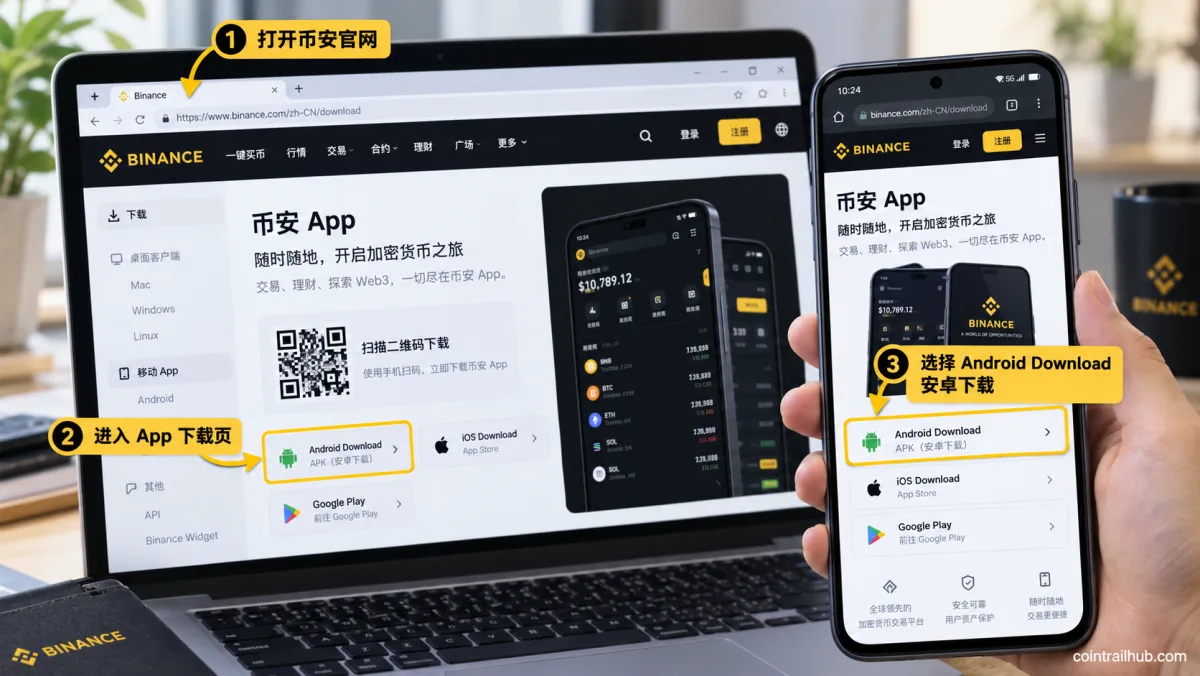
Figure 1: Open the Binance official download page, find "Android Download", and choose the official APK download.
Wait for the browser to show the download is complete. If the download is interrupted, delete the incomplete file and get it again from the official page.
Don't turn to group chats, cloud drives or unfamiliar APK sites just because a download failed.
Step 2: Find the downloaded APK file
Once the APK download completes, tap the browser's download-complete notification.
If no notification appears, open your phone's built-in file manager:
File manager → Downloads / Download → the APK you just downloaded
Find the installer and tap to open it. The APK filename may change with official versions, so don't rely on a fixed filename to identify it.
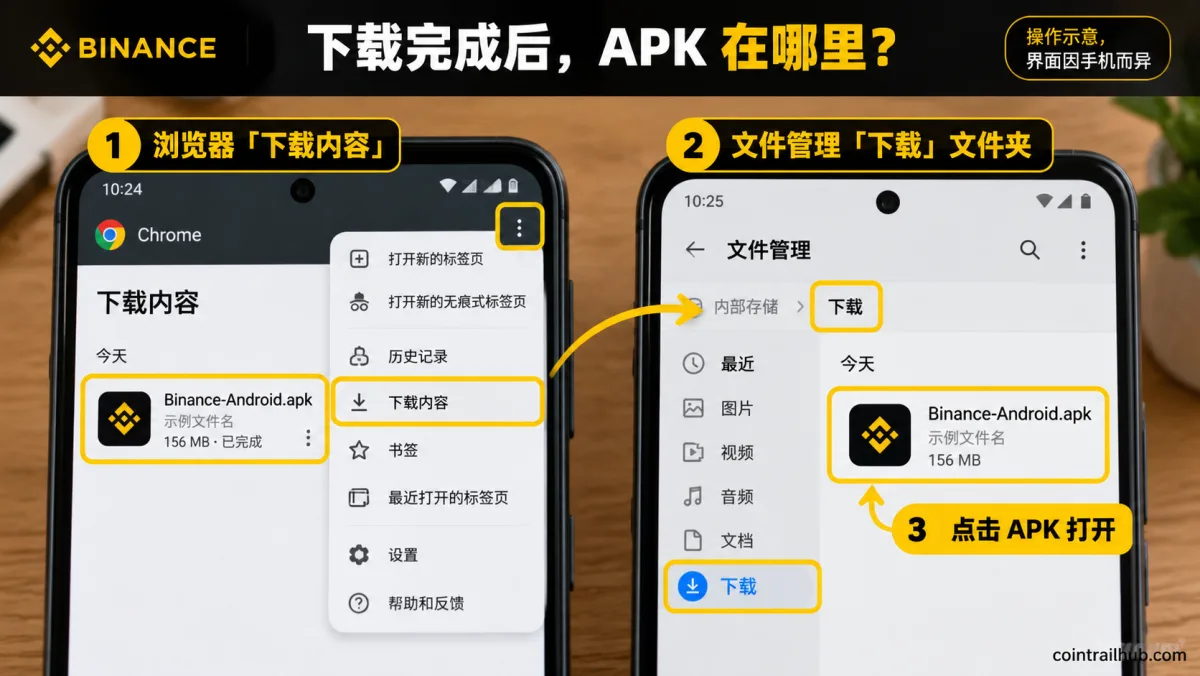
Figure 2: After downloading the Binance APK, you can find the installer in the browser "Downloads" or the phone "File manager → Download" folder. The image is illustrative; the actual filename and interface depend on your phone.
Step 3: Open the APK and complete the install
After tapping the installer, Android usually shows an install confirmation screen.
Confirm the install source and app info, then continue with the system's normal install flow.
If you see "installing apps from this source isn't allowed", it usually means the current browser or file manager lacks permission to install external apps. After confirming the source, follow the system prompts to check the install-source authorization for the current app.
Note: if your phone clearly reports malware, an abnormal file signature or a tampered installer, stop the install — don't turn off security detection to force it through.
After installing, tap "Open" to launch the Binance app. If you temporarily enabled an external-source install permission, it's a good idea to revoke the authorization you no longer need.
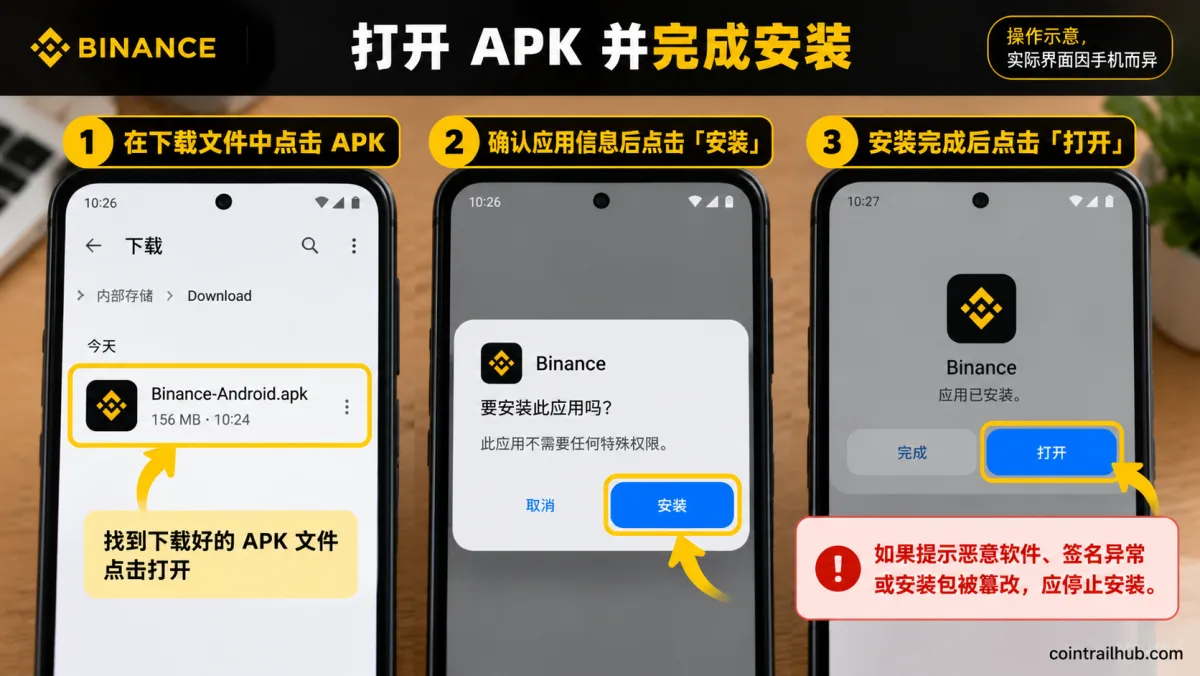
Figure 3: After finding the downloaded Binance APK, confirm the app info, tap "Install", and tap "Open" once installed. The image is illustrative; the actual interface depends on your phone system.
No Google Play — do I need to install the Google service framework?
Usually you don't need to install Google Play or the Google service framework just to download and install the Binance official APK.[2]
An Android APK can be installed through a compatible device's system install mechanism, but whether the app can run all its features still depends on the system version, app dependencies and device compatibility.
How to download the app from the Binance registration page?
Besides the Binance website download page, you can also tap "Register on Binance now" at the top of this article, enter the Binance page, and find the app download entry.
Find the Android download option and follow the page prompts to get the official installer, then open the APK to complete the install.
The page may look slightly different on different phones. If you don't see a download entry, you can reach the app download page through the "Download" link at the top of the Binance website.
If the APK has downloaded but is blocked by Xiaomi, OPPO, vivo or another phone's "pure mode" or install permission, read the dedicated guide on downloading and installing the Binance app on Chinese Android phones.
4. Have Google Play? Google Play download method
If Google Play can normally provide the Binance app for your device and region, using the official store is usually more convenient — no need to manually find an APK file, and later updates can go through the app store too.
Step 1: Open Binance's official Google Play page
You can first open Binance's official install instructions:
How to Download & Install Binance
Find the Google Play Store download entry on the page.
The Binance Google Play app address verified this time is:
When visiting, still cross-check the store page currently linked from the Binance website to confirm the app applies to your location and account type.
Step 2: Check the app info and install
After entering Google Play, first check the app name, developer info and page source.
As of this verification, the public page shows the following:
| Verification item | Public info |
|---|---|
| App name | Binance: Buy Bitcoin & Crypto |
| Developer display name | Binance Inc. |
| App identifier | com.binance.dev |
This info is used to check the store app. com.binance.dev is the app identifier in the Google Play page URL, used to identify the official app in the store — it isn't the only basis for verifying the authenticity of an APK file.[3] App details may change by region and update; follow the current official entry.
After confirming the page and device availability, tap "Install" and wait for Google Play to finish downloading and installing.
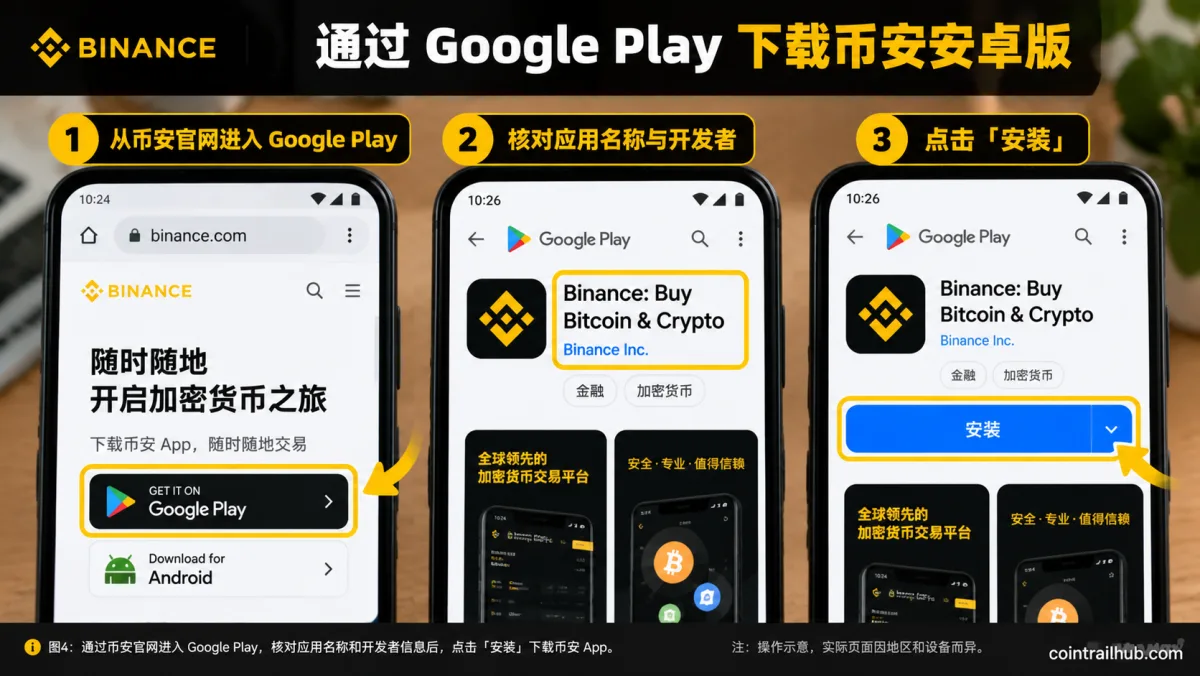
Figure 4: Enter Google Play through the Binance website, check the app name and developer info, then tap "Install". The image is illustrative; the actual interface depends on the current Google Play page.
Step 3: Open the Binance app
After installation, Google Play usually shows "Open". Tap it to enter the app.
Users who already have a Binance account can sign in following the page prompts; users without an account should first check service eligibility for their region before deciding whether to register.
What if Binance doesn't appear on Google Play?
Binance not appearing on Google Play doesn't directly prove the app has been delisted worldwide.
First check through the Google Play entry provided on the Binance website. If the page says the device is incompatible, the region is unavailable, or the app can't be installed, confirm the reason from the prompt.
If you can't install from the store, check whether the Binance website currently offers an Android APK suitable for your device. Don't use unverified third-party installers to get around service restrictions.
What's the difference between the official APK and Google Play?
| Download method | Install and update differences |
|---|---|
| Binance official APK | May need install-source authorization; update following Binance's official instructions |
| Google Play | Usually no external-APK permission needed; updates go through Google Play |
If Google Play works normally, prefer installing through the store; if you don't have Google Play, use the compatible APK provided on the Binance website.
If you also need the iPhone, iPad or Windows/Mac version, see Binance Download 2026: Official Android APK / iOS / Desktop — How to Spot a Fake Binance.
5. Genuine-version check: verify the official Android app
When judging the source of the Binance Android app, the most important thing is to confirm where the installer came from — not just the icon, name or version number.
Fake apps may use similar logos, login screens and filenames, so you can't judge by appearance alone.
How to verify the official download source?
| Download source | How to verify |
|---|---|
| Binance official site | Check binance.com and the official download page |
| Google Play | Cross-check against the current store entry on the Binance website |
| Third-party APK sites | Filename and version number alone can't confirm it's genuine |
If the installer came from an unverified third-party site, stop the install and get it again from the official Binance page.
What is the Binance Android app version in 2026?
As of 11 October 2026, this check of Binance's official English download page shows the Android version as 3.21.6.[4]
This is the record of this official webpage check. Binance may update the installer later; when downloading, follow the version actually shown on the official page.
Are APK links from Binance Square reliable?
Binance Square contains articles published by community users. Even if an article is under the Binance domain, it doesn't mean every external APK download address shared by the author is an official Binance file-distribution channel.
If you see an unfamiliar APK domain or a cloud-drive address, go back to the Binance official download page to check.
6. What to do if the Binance APK fails to install
If you've downloaded the APK but opening it shows "problem parsing the package", "app not installed", "install conflict", or it crashes after installing, the cause may be file integrity, system compatibility or app signature.
Don't delete an old app that's still working normally just to fix the error, and don't swap in an unverified third-party installer.
For detailed troubleshooting, see the dedicated guide on Binance Android app install failures.
7. Binance Android download FAQ
What is the official Binance Android app download address?
Go to https://www.binance.com/en/download to open the Binance official download page, choose Android, and download and install using the method currently offered on the official site.
Can I download Binance without Google Play?
Yes. A compatible Android phone can get the Android APK from the Binance website; downloading the installer itself usually doesn't require Google Play or a Google account.[5]
What if Binance doesn't appear on Google Play?
First check whether your region and device support installing it, then check through the Google Play entry provided on the Binance website. If the store isn't available, see whether the official website offers an APK suitable for your device.
Where is the downloaded Binance APK?
It's usually in the phone browser's download history or the file manager's Download / 下载 folder. After finding the APK you just downloaded, follow the system prompts to open and install it.
What if installing the Binance APK prompts about unknown sources?
First confirm where the APK came from. For a normal install-source permission prompt, check the authorization as required by Android; if malware, an abnormal signature or file tampering is clearly detected, stop the install.
Do I need to register an account before downloading the Binance app?
Usually not. Downloading and installing the app, account registration, KYC identity verification and trading-service eligibility are separate matters.
How do I update the Binance Android app?
Google Play users usually update through the store; official APK users should follow the update instructions provided in the Binance official app and download page.
8. After downloading: what's next
Installing the Binance app is just the start. The next steps are usually three:
- Register an account: open an account with an email or phone number in a few minutes — see How to register on Binance (2026).
- KYC identity verification: you must complete identity verification before you can deposit or trade — see Binance KYC: how to verify your identity (2026).
- Learn the basics: buying, selling, deposits, withdrawals and fee rules — see Binance Beginner Tutorial 2026.
Downloading the app doesn't require registration, but registration, verification and trading eligibility are three separate things — go through them in order.
9. Summary
No Google Play: open the Binance official download page, choose the Android APK, open the installer after downloading and install it.
Have Google Play: enter the official app store page through the Binance website, check the app info and tap Install.
Check the official source when installing. If you hit a clear security warning, don't turn off your phone's protection features.
Related reading
- How to register on Binance: email/phone sign-up, verification code and referral code (2026)
- Binance Download 2026: Official Android APK / iOS / Desktop — How to Spot a Fake Binance
- How to Install the Binance App on Xiaomi/OPPO/vivo/Honor Phones
- Binance Android App Won't Install? Fix APK Parse Errors, Conflicts & Security Warnings (2026)
- Binance registration tutorial 2026: ID KYC + face verification full flow (20% rebate · tested)
- Binance Complete Tutorial Hub
Data verification notes
The key facts in this article were checked on 2026-10-16 against Binance's official download page and Google Play public info, point by point:
- Two official Android download methods: Android users can download and install the Binance app through the Binance official APK or Google Play. Source: Binance official app download page.
- APK install doesn't depend on Google services: downloading and installing the Binance official APK usually doesn't require additionally installing Google Play or the Google service framework. Source: Binance Learn — how to download and install Binance.
- Google Play app identifier: com.binance.dev is the app identifier in the Google Play page URL, used to identify the official app in the store — not the only basis for verifying an APK file's authenticity. Source: Binance app page on Google Play.
- Android version verification record: as of 11 October 2026, a check of Binance's official English download page shows the Android version as 3.21.6. Source: Binance official app download page.
- No registration needed to download: a compatible Android phone can get the Android APK from the Binance website; downloading the installer itself usually doesn't require Google Play or a Google account. Source: Binance Learn — how to download and install Binance.
App versions, page info and store availability may change at any time; follow the Binance official download page and what's actually shown on your device.
Disclaimer
This article only explains how to download and install the Binance international Android app, and is not investment advice. Whether the app can be used, and account registration, identity verification and trading eligibility, depend on local law, device compatibility and Binance's current service rules. This article does not claim to have tested installation on every Android phone.
- Binance official app download pageAndroid official download entry and APK
- Binance Learn — how to download and install BinanceAPK install does not require Google services
- Binance app page on Google PlayAndroid main app package name com.binance.dev
- 2026-10-20UpdateAdded a "download only from binance.com or the official Google Play" rule and time estimate to the intro; added an "After downloading" section linking to registration/KYC/beginner tutorial.
- 2026-10-17UpdateTitle now leads with the entity word "Binance Android download"; H2s rewritten to remove questions; added "why you can't find the Binance app in China".
- 2026-10-16UpdateAdded evidence-chain superscripts and Data Verification Notes; updated the key-fact verification date.
- 2026-09-24UpdateRe-tested the official Android version 3.19.8 to 3.20.6; added the 09-24 verification screenshot.
- 2026-10-05UpdateRestructured the download channels, APK vs Google Play choice, genuine-version checks and fake-app avoidance; split off domestic-phone install restrictions and install failures into dedicated guides.
- 2026-10-11UpdateRefined the APK and Google Play download flows; added the Google Play official app check info (developer Binance Inc., package name com.binance.dev); updated the Android version check to 3.21.6.
See ourEditorial Policy and the correction process in ourCorrections Policy.
The CoinTrailHub editorial team focuses on crypto education for beginners, exchange security and P2P trading risk. This article is compiled from official sources and public data, reviewed by humans, and strives for accuracy but is not investment advice.
Last updated:2026-10-20 · Content reviewed by humans · Learn more
© 2026 CoinTrailHub · Original content. Reproduction or rewriting without permission is prohibited.