
How to Prevent Wallet Theft? Seed Phrases, Wrong-Chain Transfers and Approval Risks (2026)
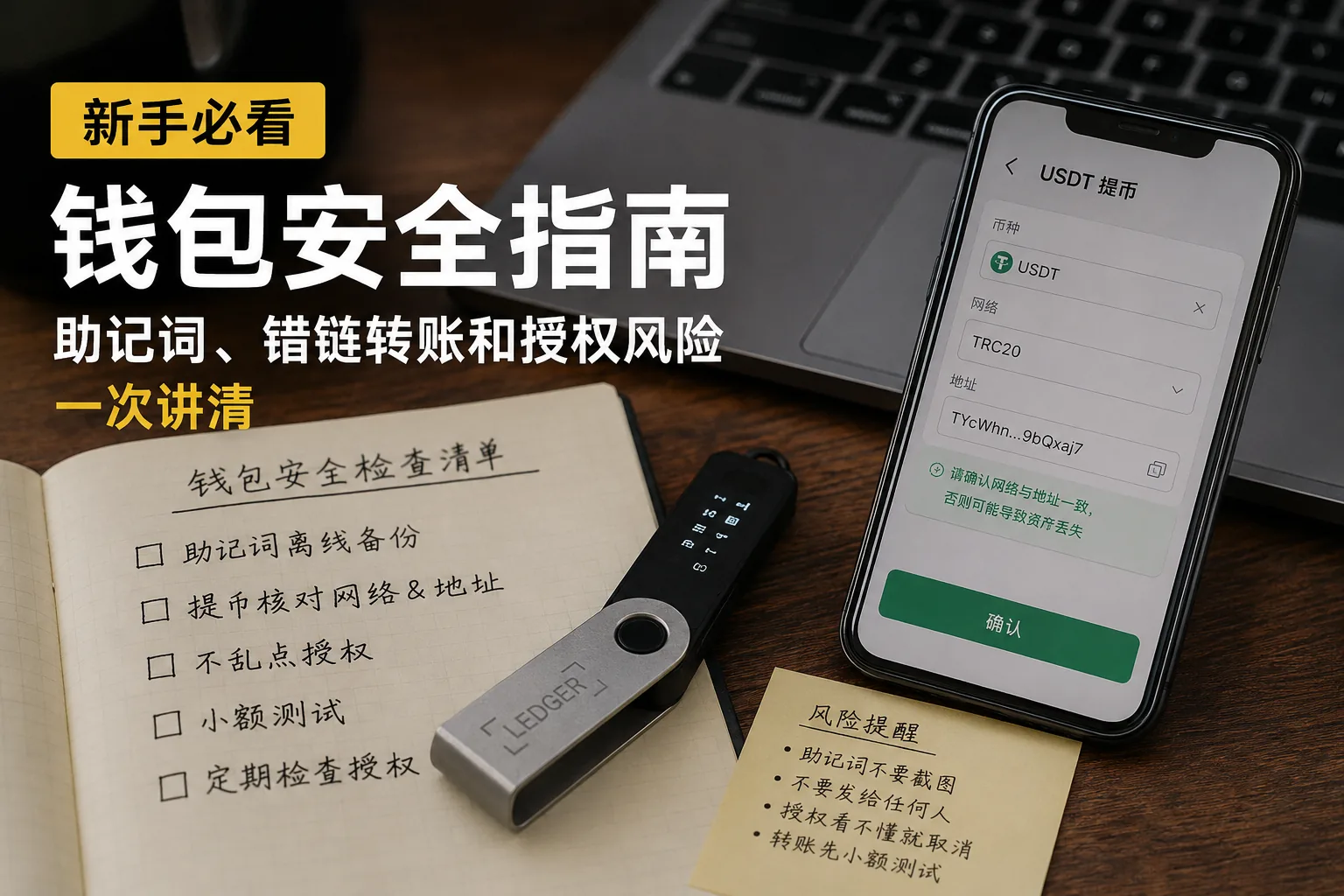
Table of contents

Binance new user rewards
20% trading fee rebate
Official Binance registration. Complete identity verification (KYC) to trade and withdraw.
For a beginner using a wallet, the scariest thing isn't not knowing how to operate — it's not understanding and still clicking.
Screenshot your seed phrase.
Pick a withdrawal network at random.
Confirm a wallet approval without reading.
Do any of these three wrong, and your assets can become very hard to deal with.
A wallet isn't Alipay, and it isn't an exchange account.
If an exchange has a problem, you can probably still reach support.
But if a wallet has a problem, often no one can help you reverse it.
So this article skips the complex tech and only covers three things:
Don't store your seed phrase carelessly.
Don't only check the address when withdrawing.
Don't click confirm on an approval you don't understand.
If you haven't yet sorted out the difference between an exchange account and a wallet, read this first: Where to Keep the USDT You Bought on Binance/OKX? On the Exchange or Withdraw to a Wallet (2026).
Get these 6 actions right first
| Beginner scenario | Most common mistake | Safer approach |
|---|---|---|
| Creating a wallet | Screenshot the seed phrase | Back it up by hand, offline |
| Downloading a wallet | Install whatever the search returns | Download from the official site or official app store |
| Withdrawing from an exchange | Only check the address, not the network | Check coin, network and address |
| First transfer | Send everything at once | Test with a small amount first |
| Connecting a DApp | Click confirm without understanding | Cancel if you don't understand |
| Claiming an airdrop | Click around with your main wallet | Use a small test wallet |
This table looks simple, but when wallet accidents happen, the root cause is almost always one of these actions.
If you haven't sorted out wallet addresses, hot wallets and cold wallets, read first: What Is a Crypto Wallet? Wallet Addresses, Seed Phrases and Asset Security (2026).
About 5 minutes to read. First remember the two easiest mistakes: screenshotting your seed phrase, and checking only the address when withdrawing.
1. A seed phrase is not an ordinary password
When you first create a wallet, you'll see 12 or 24 English words.
That's the seed phrase.
It looks ordinary, so many people instinctively screenshot it.
This step is very dangerous.
A seed phrase isn't an ordinary password — it's more like the master key to your wallet.
Whoever gets your seed phrase can restore your wallet on another phone or computer.[1]
They don't need your phone.
They don't need your email.
They don't need a verification code.
And they don't need to log into your original device.
So never keep your seed phrase in these places:
- Phone photo album
- WeChat favorites
- QQ files
- Email drafts
- Cloud notes
- Cloud drive
- Browser bookmarks
- Any online document
The safer way is still a handwritten offline backup.
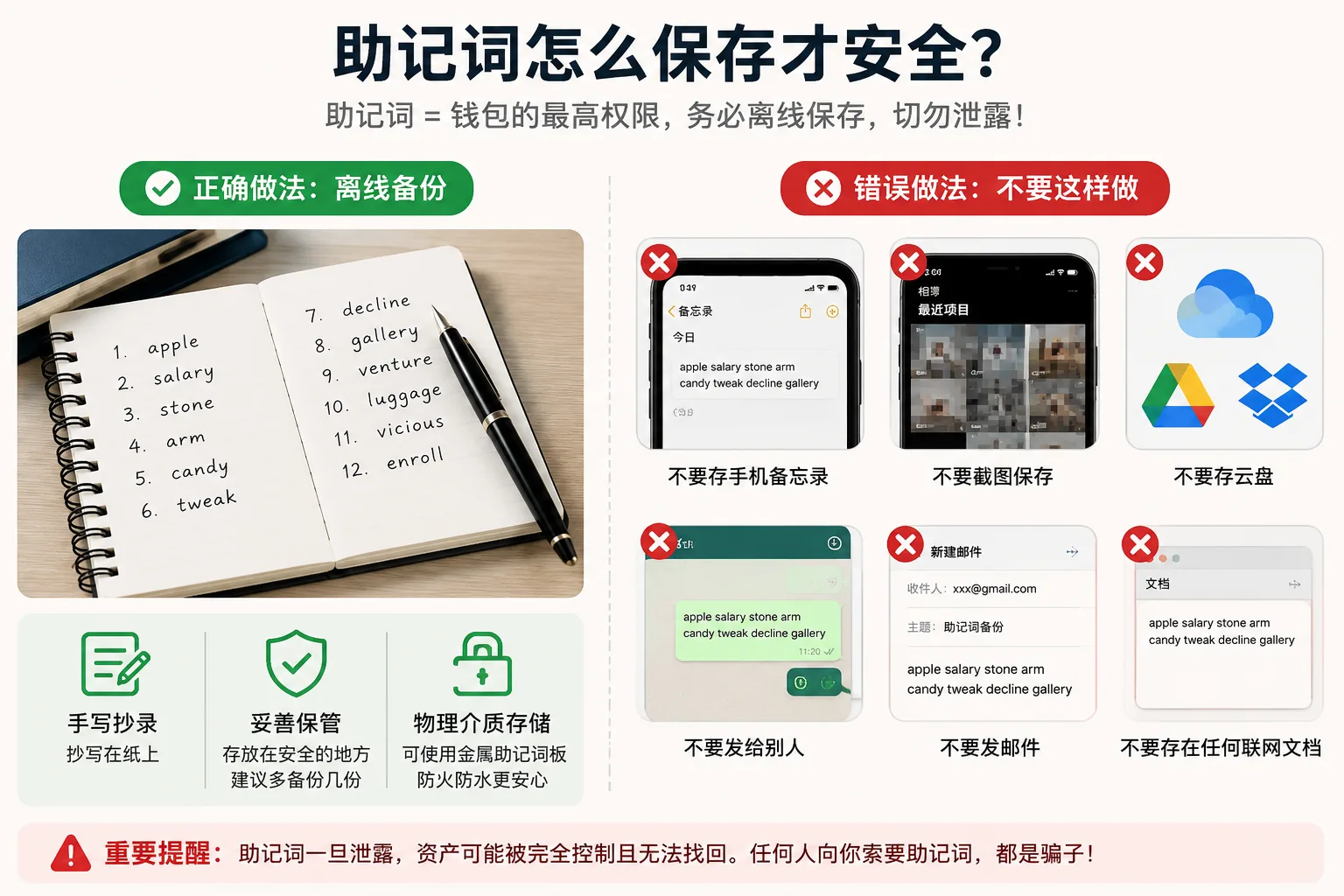
You can write two copies and keep them in two different places.
Once the amount grows, consider sturdier options like a metal seed plate or a hardware wallet.
The basic bottom line is one line:
Keep your seed phrase off the internet.
To dig into this on its own, read: What Is a Seed Phrase? Why No One Can Help You Recover Assets If You Lose It (2026).
You can also check MetaMask's official guidance on seed phrases and private keys. The core principle is simple: never tell anyone your seed phrase or private key.[2]
2. A wallet password and a seed phrase are not the same
A wallet password mainly unlocks the wallet app on your current device.
For example, when you open MetaMask, Trust Wallet or the OKX Web3 Wallet, you enter a password.
That password protects the wallet on this phone or this computer.
But the seed phrase is different.
The seed phrase can restore the whole wallet.
In other words:
If you forget the wallet password, you can usually still recover it as long as the seed phrase exists.[3]
If you lose the seed phrase, remembering the wallet password perfectly is useless.
So don't get the priorities backwards.
The wallet password matters, but the seed phrase matters more.
The really fatal thing isn't forgetting the wallet password — it's leaking or losing the seed phrase.
3. Don't install just any wallet app from a search
Fake wallets are a trap beginners easily fall into.
Android users especially need to be careful.
Many people download their first wallet by searching:
"MetaMask download"
"MetaMask wallet download"
"Trust Wallet download"
"wallet Chinese version download"
Then click into a site that looks a lot like the official one.
The problem is, many fake wallet sites now look extremely real.
The logo looks right.
The page looks right.
The buttons look right too.
Some fake wallets even open normally after installation.
But the moment you create a wallet in it, or import a seed phrase, your assets could be at risk.
When downloading a wallet, I suggest this order:
- Prefer entering the download page from the wallet's official site
- On mobile, prefer App Store or Google Play
- Don't click wallet links in group chats, DMs or comment sections
- Don't install APK files sent by strangers
- Check the official domain and developer name before downloading
If someone tells you:
"This is a special domestic version."
"This version has lower fees."
"The official download is too slow, use my link."
The more convenient it sounds, the more careful you should be.
A wallet isn't an ordinary app.
If you download the wrong ordinary app, at worst you delete and reinstall it.
If you download the wrong wallet, that can be an asset risk.
4. When withdrawing, don't only check the address — check the network
This is where beginners misjudge most easily.
Many people think:
"Copying the address correctly is enough."
But in crypto, a correct address doesn't mean the network is also correct.
For example, stablecoins like USDT and USDC can live on many networks:
- Ethereum
- Tron
- BNB Chain
- Arbitrum
- Base
- Polygon
- Solana
What you see is all USDT, but the networks they're on can be completely different.
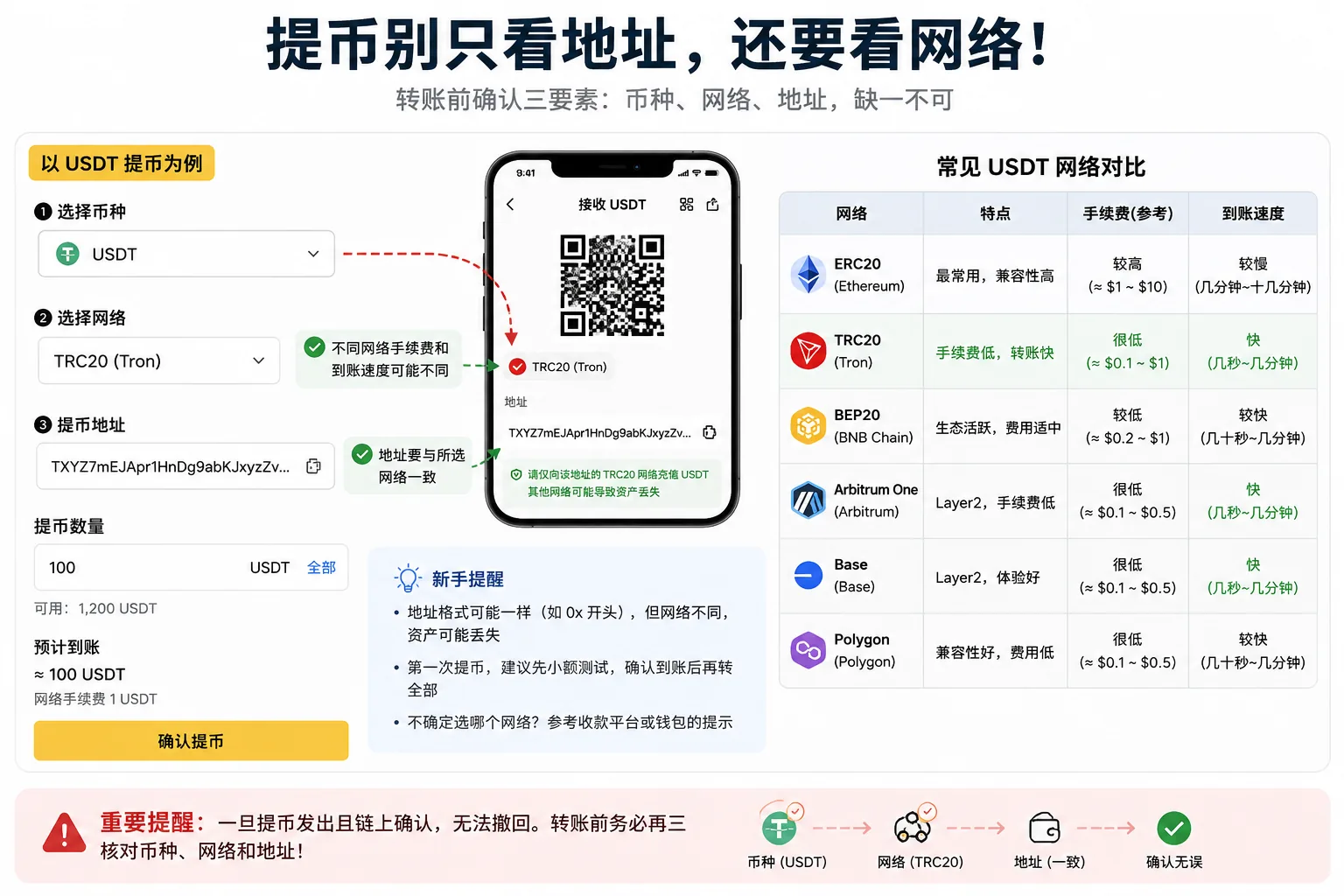
Some EVM networks in particular all have 0x-prefixed addresses, which makes beginners even more likely to assume they're the same.
| Network | Common beginner misconception | Reminder |
|---|---|---|
| Ethereum / ERC20 | "Most universal, so it must fit" | Fees may be higher; confirm support first |
| Tron / TRC20 | Choosing it only because it's cheap | Common for USDT, but not every wallet fits |
| BNB Chain / BEP20 | "Address looks like 0x, so it's the same" | Similar address doesn't mean same network |
| Arbitrum / Base | "It's exactly the same as Ethereum" | Different network; confirm support before depositing |
| Polygon | Choosing it just for low fees | Awkward if the recipient doesn't support it |
| Solana | Sending USDC/USDT without checking | Different address format; confirm separately |
Always confirm three things before transferring:
Is the coin right?
Is the network right?
Does the recipient address support this network?
When transferring to an address for the first time, test with a small amount first.
Send a little, confirm it arrives, then send the rest.
This step looks slow, but it's worth it.
If you've already transferred on the wrong chain, or want to understand how different networks are handled in advance, read: Can You Recover a Wrong-Chain Transfer? Withdrawal Networks and Wallet Addresses (2026).
If you still can't tell the difference between USDT and USDC, read: USDT vs USDC: What's the Difference? Which Is Safer and How to Choose (2026).
5. If the coin doesn't show up, don't panic about it being lost
Here's another problem beginners often run into:
"I clearly transferred successfully, why can't I see it in my wallet?"
Don't panic yet.
Not showing in the wallet doesn't necessarily mean the assets didn't arrive.
It could be these reasons:
- You're looking at the wrong network
- The wallet isn't switched to the right chain
- The token isn't set to auto-display
- You need to add the token contract manually
- Block confirmations aren't done yet
- You transferred to a network the platform doesn't support
A safer handling order is:
First, check the exchange withdrawal record.
Second, find the TxID / hash.
Third, check the transaction status on the relevant block explorer.
Fourth, if it shows success on-chain, check the wallet network and token display.
Fifth, if you transferred to an exchange, contact its support.
One thing to note here:
Checking the transaction hash is fine, but don't hand your seed phrase to anyone to "recover your assets".
You can give support the transaction hash, coin, network, time and address.
But never give out the seed phrase.
6. A wallet approval is not an ordinary login confirmation
Many beginners think that as long as they don't leak the seed phrase, the wallet is safe.
That's not entirely true.
There's another risk called malicious approval.
When you connect to a DApp, airdrop page, NFT page or staking page, the wallet may pop up an approval request.
Some approvals are normal interactions.
But some approvals give the other party a lot of power.
If you click confirm all the way without understanding, you leave an opening for a malicious contract.
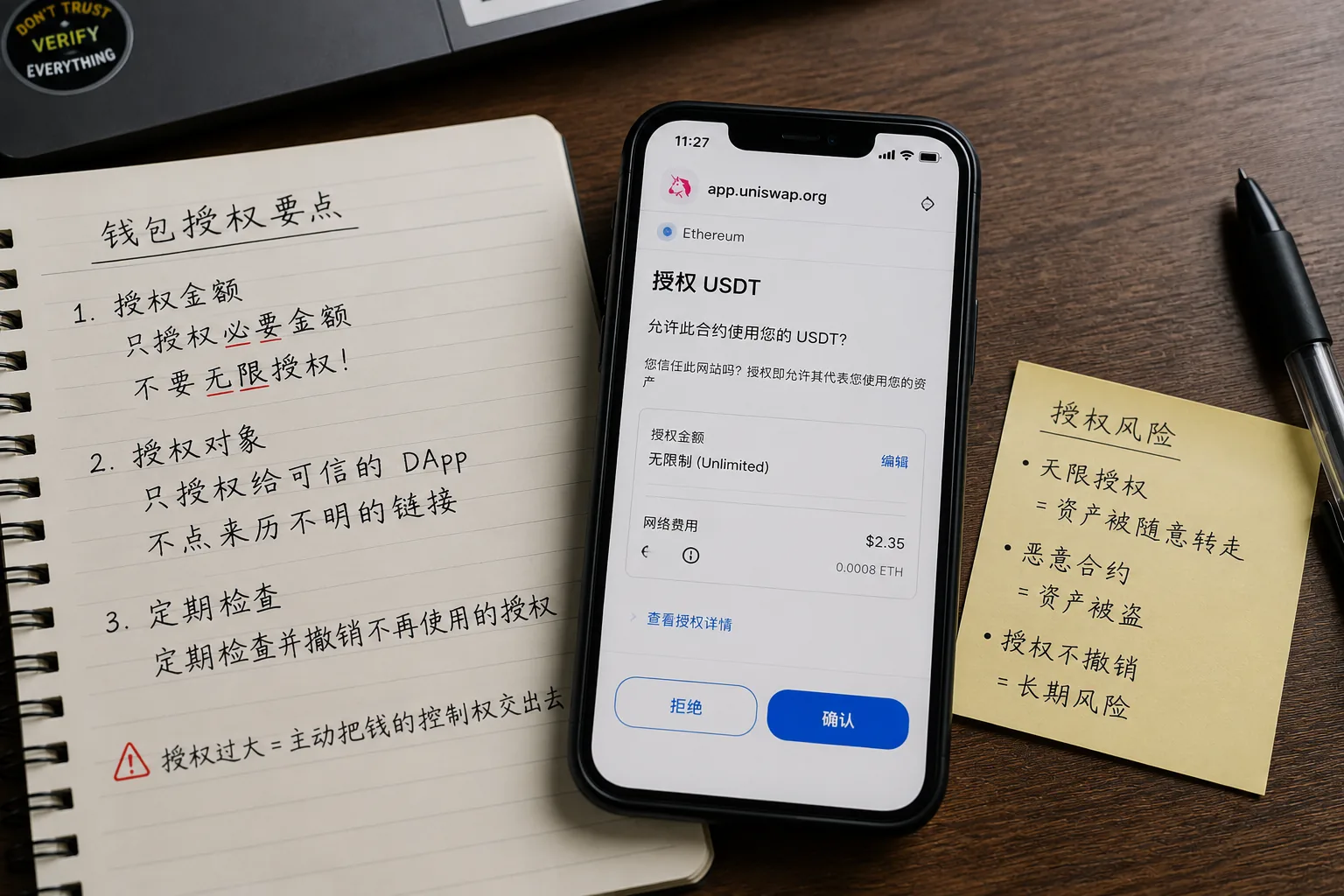
Common baits include:
- Free airdrops
- Limited-time claims
- NFT minting
- High staking rewards
- New-project whitelists
- Wallet subsidies
- Asset unlocks
- Official migrations
These pages love to create urgency:
"Last 10 minutes."
"Once it's gone, it won't reopen."
"Claim your reward now."
"Arrives automatically after approval."
The purpose of these words is to make you stop thinking and click quickly.
My judgment is simple:
When a wallet popup appears, don't immediately click confirm.
At least look at:
- Whether you opened this site yourself
- Whether the domain is correct
- Which assets it wants you to approve
- Whether the approval amount is abnormal
- Whether you really understand this signature
If you don't understand it, the safest choice is not to click.
Missing one airdrop isn't a loss.
Having your wallet emptied is the real problem.
If you connect to DApps often, periodically use the Etherscan Token Approval Checker or Revoke.cash to review your wallet approvals and revoke the ones you don't need.[4]
7. Don't use your main wallet to click airdrops
If you want to try on-chain projects, airdrops, NFTs or new protocols, prepare a separate small wallet.
Keep only a small amount of assets in it.
Its job is testing.
Don't take the wallet that holds long-term assets and connect it to websites everywhere.
And definitely don't use your main wallet to claim airdrops.
I personally prefer to split wallets into three types:
Test wallet:
for trying new projects, airdrops, NFTs or unfamiliar protocols.
Daily wallet:
for transfers, receiving and regular DApps.
Long-term wallet:
connect to few sites, approve little, mainly hold relatively long-term assets.
Using one wallet for everything will sooner or later cause problems.
8. A hot wallet is convenient, but don't treat it as a safe
Hot wallets are convenient.
Wallets like MetaMask, Trust Wallet and the OKX Web3 Wallet open fast and are easy to interact with, good for daily use.
But hot wallets have a natural problem:
They're often online.
Often connected to sites.
Often signing.
Often approving.
Often exposed to a complex on-chain environment.
So hot wallets suit small amounts and daily operations, not holding large amounts long-term.
If your asset amount already keeps you up at night, consider sturdier management:
- Split wallets
- Separate large and small amounts
- Reduce interactions for long-term assets
- Use a hardware wallet
- Review approvals regularly
- Keep an offline backup
A hardware wallet isn't a cure-all.
If you photograph your seed phrase, or sign carelessly on a phishing site, a hardware wallet won't save you.
But when the amount grows, your security approach really does need to level up.
9. Beginner wallet security checklist
Run through this checklist before each use of your wallet.
- Is the seed phrase backed up offline
- Is there no screenshot of the seed phrase
- Is the wallet app from an official channel
- Is there no unfamiliar APK installed
- Have you never entered the seed phrase into a webpage
- Do you confirm coin, network and address before transferring
- Do you test with a small amount on the first transfer
- When assets don't show, do you check the transaction hash first
- Do you separate the main wallet from the test wallet
- Do you review approvals regularly
- Do you avoid claiming airdrops with the main wallet
- Are large assets separate from the daily wallet
You don't need to get every item perfect in one day.
But at least start changing these habits from the first time you use a wallet.
Related reading
- What Is a Cold Wallet? How to Store Your Seed Phrase Most Safely (2026)
- Binance Account Hacked? 4-Step Recovery + 5 Causes
FAQ
1. Can I store the seed phrase in my phone's notes?
Not recommended.
Phone notes, photo albums, cloud drives and email are all online environments.
It's best to store the seed phrase offline.
2. What if I forget the wallet password?
If the seed phrase still exists, you can reinstall the wallet and restore it.
If the seed phrase is also lost, it's very hard to recover.
So the seed phrase matters more than the wallet password.
3. What if I chose the wrong network when transferring?
First, don't keep doing random operations.
Use a block explorer to check the transaction status, then confirm whether the receiving platform or wallet supports that network.
If you transferred to an exchange, contact its support, but don't provide the seed phrase.
4. The coin doesn't show in my wallet — is it lost?
Not necessarily.
It may be the wrong network, a token that hasn't been added, or block confirmations not done yet.
Check the transaction hash first, then decide the next step.
5. Can I click airdrop links?
It's not that you can never click them, but don't click them with your main wallet.
If you really want to try, use a dedicated small test wallet.
6. Would official support ask for my seed phrase?
No.
Whether it's a wallet's official support, an exchange's support, or a so-called asset recovery team, none should ask for your seed phrase or private key.[5]
If someone asks you for your seed phrase, you can basically treat it as high risk.
Author's note
This article was compiled by the CoinTrailHub editorial team, based on exchange account security, wallet use, withdrawal networks and common beginner operating problems.
We focus on the real pitfalls beginners hit — seed-phrase storage, wrong-chain transfers, fake wallets, malicious approvals and fake support — rather than complex on-chain technical theory.
This article does not provide investment advice, only helps beginners understand the basic operating boundaries of wallet security.
A few honest words at the end
It's normal for a crypto beginner to focus on the market.
But the wallet is something you really can't put off.
If you misjudge the market, you still have a chance to review and learn.
But a leaked seed phrase, a wrong-chain transfer or a malicious approval often gives you no second chance.
As soon as you start using a wallet, get these things right:
Store the seed phrase offline.
Check the network before transferring.
Test with a small amount the first time.
Don't approve what you don't understand.
Don't connect your main wallet to random sites.
These actions aren't complicated.
But they can help you avoid many of the pitfalls beginners fall into most.
Wallet security isn't something only advanced users need to understand.
The more of a beginner you are, the more you need to get this step right.
Data verification notes
The key facts in this article were checked on 2026-10-16 against MetaMask's official support docs and the public descriptions of on-chain approval tools, point by point:
- Seed phrase equals wallet control: whoever gets your seed phrase doesn't need your phone, email or verification code to restore your wallet on another device. Source: MetaMask official support — seed phrase and private keys.
- Never give the seed phrase or private key to anyone: the core principle of the official security guidance is to never tell anyone your seed phrase or private key, and legitimate support won't ask for it either. Source: MetaMask official support — seed phrase and private keys.
- Wallet password vs seed phrase: a wallet password only unlocks the wallet app on the current device, while the seed phrase can restore the whole wallet, so if you forget the password you can usually still recover as long as the seed phrase exists. Source: MetaMask official support — seed phrase and private keys.
- Regularly review and revoke approvals: use the Etherscan Token Approval Checker or Revoke.cash to check approved contracts and revoke the approvals you don't need. Source: Etherscan Token Approval Checker; Revoke.cash (approval revoke tool).
- Support won't ask for the seed phrase: wallet support, exchange support and so-called asset recovery teams should never ask for your seed phrase or private key; treat such requests as high risk. Source: MetaMask official support — seed phrase and private keys.
- 2026-10-16UpdateAdded evidence-chain superscripts and Data Verification Notes; updated the key-fact verification date.
- 2026-09-15UpdateAdded official sources and verification date.
See ourEditorial Policy and the correction process in ourCorrections Policy.
The CoinTrailHub editorial team focuses on crypto education for beginners, exchange security and P2P trading risk. This article is compiled from official sources and public data, reviewed by humans, and strives for accuracy but is not investment advice.
Last updated:2026-09-15 · Content reviewed by humans · Learn more
© 2026 CoinTrailHub · Original content. Reproduction or rewriting without permission is prohibited.