
Crypto Scam Prevention: 5 Scams I Have Seen and the 1 Rule That Keeps Your Assets Safe
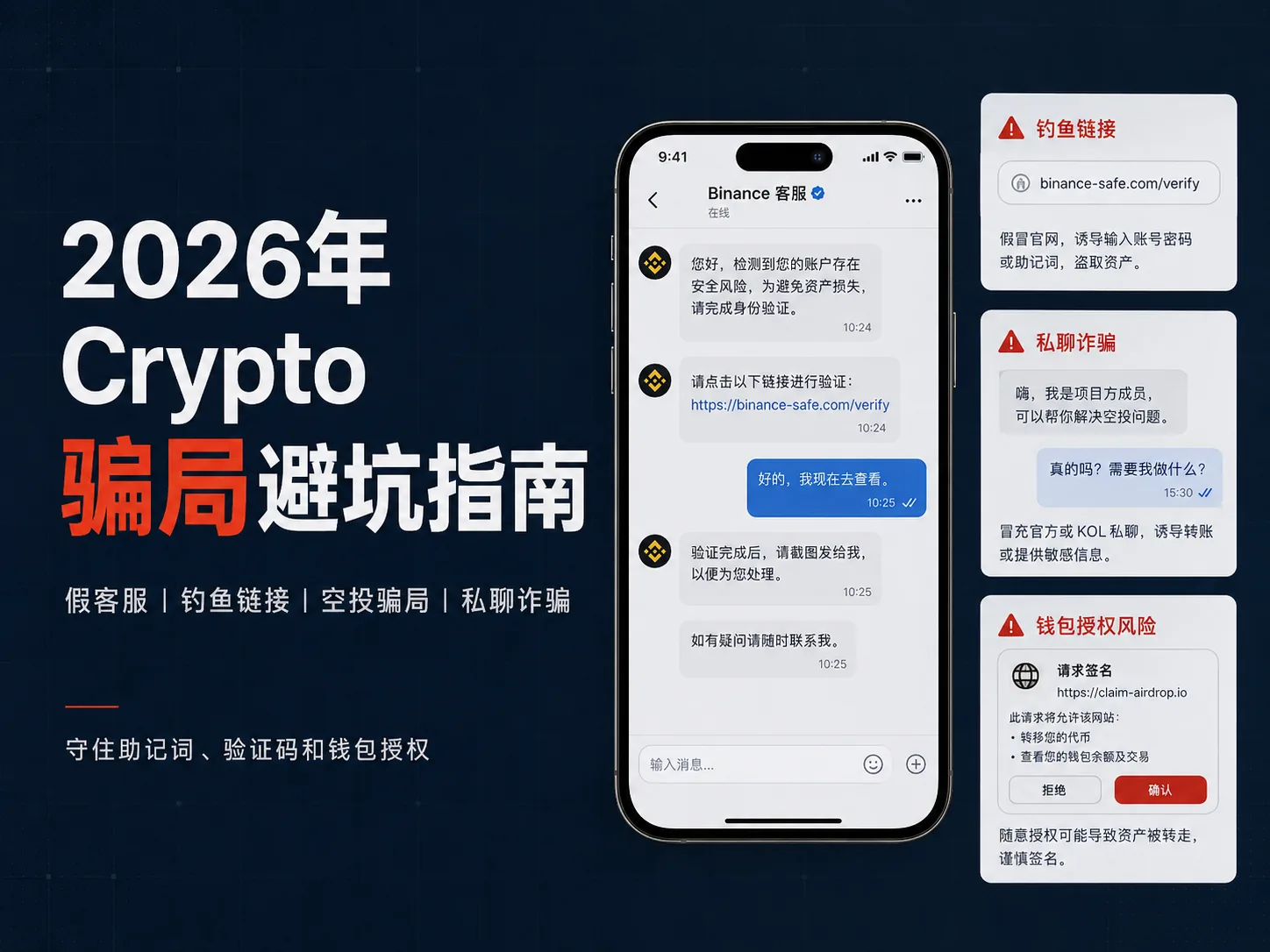
Table of contents

Binance new user rewards
20% trading fee rebate
Official Binance registration. Complete identity verification (KYC) to trade and withdraw.
A lot of beginners get scammed in crypto for the first time not because they were too greedy, but because they were too panicked.
The account won't open — panic.
A withdrawal hasn't arrived — panic.
The wallet pops up a wall of English — panic.
Someone in a group says "I'm support, let me help you" — even more panic.
That state is exactly what scammers love.
The more anxious you are, the more they rush you.
The less you understand, the more professional they pretend to be.
The more you fear losing your assets, the more they push you to click links, hand over codes, connect your wallet, or move funds to a so-called "safe account."
So this article isn't the dry, official security write-up.
I'll only cover the situations beginners actually run into:
When should you stop?
When should you close the page?
When should you just block them?
When should you go back and handle it inside the official app?
Remember one sentence first:
If anyone asks you to leave the official page, transfer funds privately, enter your seed phrase, hand over a verification code, download an unfamiliar app, or sign a wallet approval you can't read — stop.
This article is for beginner crypto security education only. It does not constitute investment, legal, cybersecurity or asset-recovery advice. Security rules vary by platform; always go by the platform's official website, app pages and help center.
Remember these 6 sentences first — they block most scams
Beginners don't need to understand all security knowledge up front.
If you just remember these 6 sentences, you'll dodge most basic traps:
- Anyone asking for your seed phrase is a danger signal.
- Anyone asking for your verification code — don't give it.
- Anyone telling you to move funds to a "safe account" is almost always a scam.
- Any crypto project that guarantees returns or says you can't lose — be wary.
- Anyone telling you to leave the official app and handle it in a private chat — stop.
- Anything that makes you nervous and pushes you to act right now — wait 30 minutes.
Many crypto scams aren't technically sophisticated. They run on a single moment of panic.
When you panic, you're more likely to do what someone tells you.
When you do what they tell you, your assets can be gone.
Account looks abnormal — wait.
Withdrawal failed — wait.
Support is rushing you — wait.
Airdrop countdown — wait.
Something that's genuinely safe won't be permanently lost because you waited 30 minutes.
But a lot of scams rely on those 30 minutes to push you into the pit.
About 6 minutes to read. First remember two things: never give out your seed phrase or verification code, and anything telling you to move funds to a "safe account" is basically a scam.
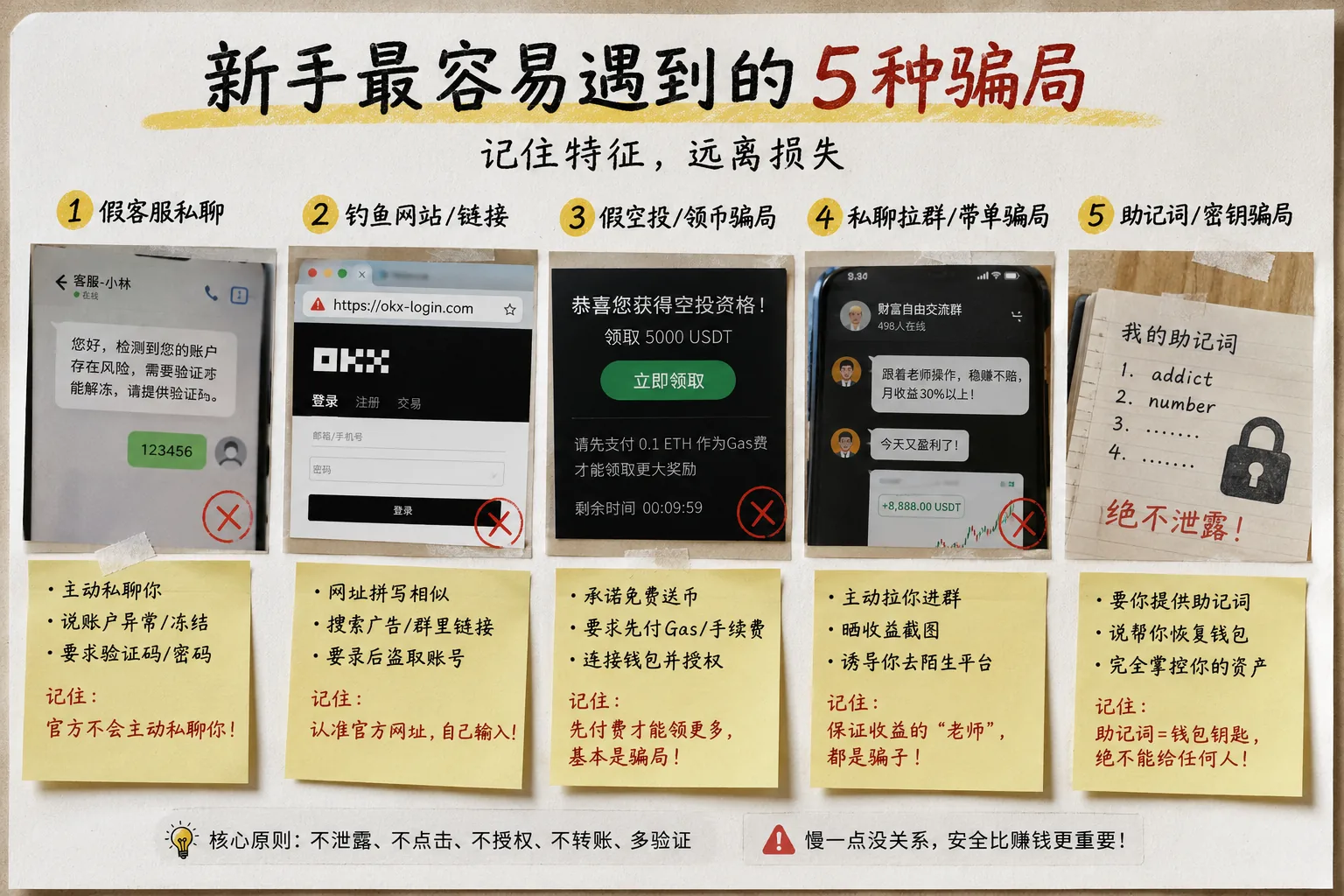
Scenario 1: You just joined a group and someone DMs you, "let me teach you"
Many beginners join a Telegram group, WeChat group or Discord community for the first time and ask:
"How do I buy USDT?"
"How do I connect my wallet?"
"Why hasn't my withdrawal arrived?"
And immediately, someone DMs you.
They sound very enthusiastic:
"I'll teach you."
"Yours is simple."
"Send me a screenshot."
"Send me your address, I'll check for you."
"If you can't do it, I'll take remote control and do it for you."
This is when you need to be very careful.
Genuinely reliable people generally won't immediately ask you to move to a private chat, transfer funds, grant remote control, download software, or read your verification code out loud.
The trap beginners fall into most easily is thinking the other person is "just being helpful."
But a lot of scams start with fake helpfulness.
Watch out for fake Telegram / Discord "official bots" too
In 2026 there's an even more common version:
You just joined a group, and an "official bot" or "support bot" DMs you right away.
It might say:
- Click this link to complete verification;
- Connect your wallet to lift the risk control;
- Submit a ticket;
- Enter the official support channel;
- Download the new version of the app;
- Verify your seed phrase to restore your wallet.
It looks like automated support, but it may actually be a phishing entry point.
Remember:
Official support will never reach out through a DM bot to ask for your verification code, seed phrase, funds password or wallet approval.
When something goes wrong, always go back to the official app or official website to handle it.
What to do when you get this kind of DM?
My advice is simple:
- Don't send account screenshots;
- Don't send verification codes;
- Don't send your funds password;
- Don't send your seed phrase or private key;
- Don't allow remote control;
- Don't download software the other person sends;
- Don't click links the other person sends;
- Don't follow them to an unfamiliar platform to deposit.
You can ask questions in public, but don't hand over key operations to someone in a private chat.
Especially when the other person is rushing you to "do it right now" — stop.
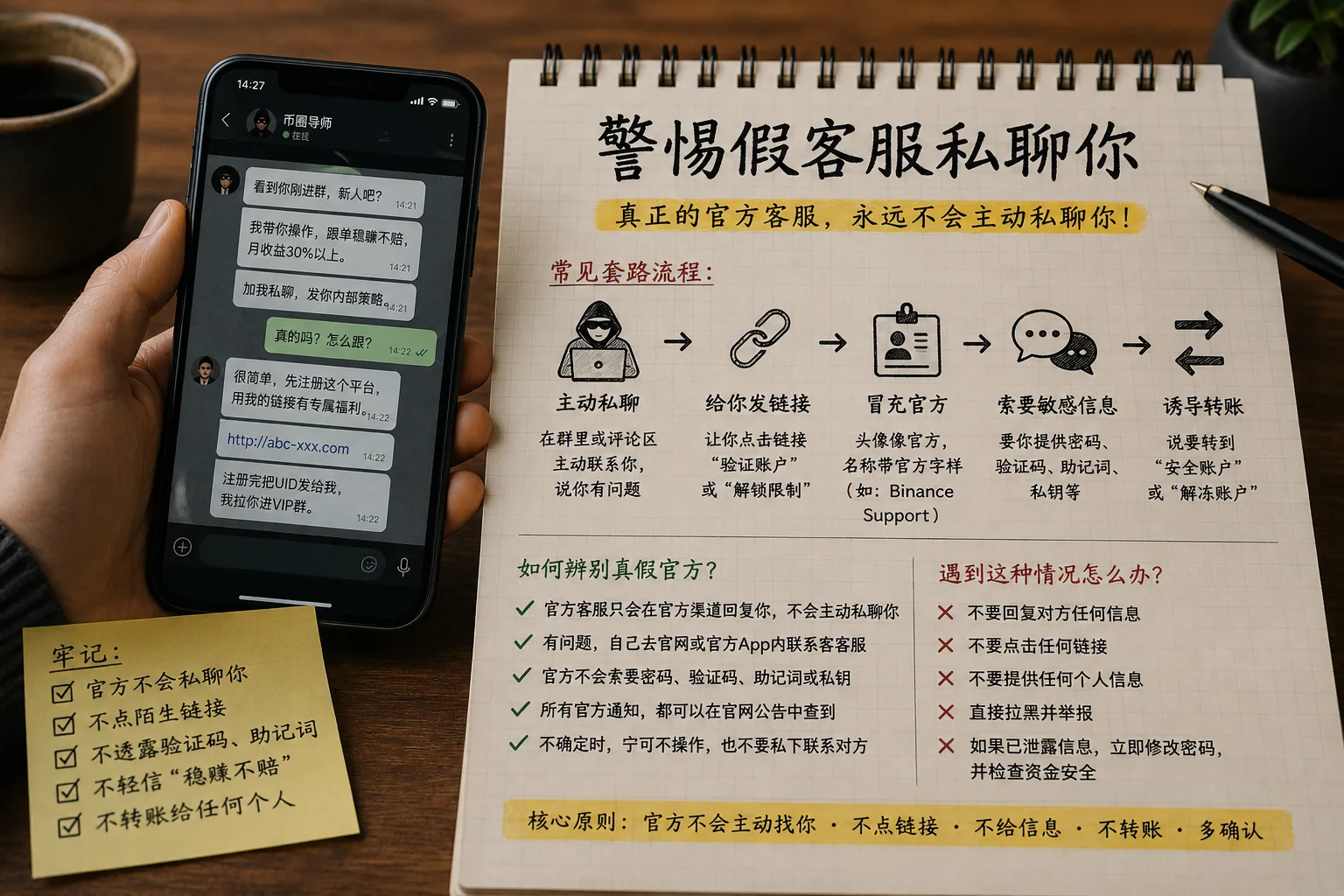
Scenario 2: Your account has a problem, and someone immediately impersonates support
Fake support is one of the scams beginners hit most often.
The common scripts are:
- Your account is at risk;
- Your assets have been frozen;
- Your withdrawal failed;
- Your account needs secondary verification;
- Your wallet has a security risk;
- You need to move funds to a "safe account";
- You need to click a link to lift the risk control;
- You need to provide a verification code to confirm your identity.
Scammers love the words "account abnormal," "funds frozen" and "withdrawal failed."
Because the moment those words come out, beginners panic.
And the moment they panic, they're likely to comply.
But you need to remember:
Real platform support will never reach out to you in Telegram, WeChat, Discord or X DMs to ask for your verification code, password, funds password, seed phrase or private key.
Trading platforms' security guides also repeatedly remind users not to log in through unfamiliar links and not to leak passwords, verification codes or security information to anyone.[1] See: OKX: Crypto Security Guide
Be especially careful of AI fake support in 2026
Fake support doesn't only send text anymore.
They might send:
- Voice messages;
- Video;
- AI face-swaps;
- AI voice cloning;
- An avatar that looks like an official;
- A professional-looking "support badge."
But to judge whether support is real, don't look at how human their voice sounds or how professional their video is.
Look at only one thing:
Are they asking you to leave the official app?
As long as someone asks you through DMs, group chats, voice or video to provide a verification code, seed phrase or funds password, or tells you to move funds to a so-called "safe account," treat it as high risk.
The correct approach
If you really run into an account problem, handle it in this order:
- Stop the private chat conversation;
- Go back to the official app or website;
- Enter the support channel from inside the app;
- Check in-app notifications;
- Don't click unfamiliar links;
- Don't transfer to any "safe account";
- Don't send the verification code to anyone.
In one sentence:
Real problems get handled inside the official app; a private chat can't solve a real account problem.
Scenario 3: You search for the official site, and click into a phishing site
Many beginners think they're being careful:
"I didn't click a link in a group — I searched for it myself."
But there are traps here too.
Some phishing sites buy ads, or build a page that looks just like the official one.
When you search for an exchange, wallet or airdrop project, what you click may not be the official site, but an imitation page.
These pages can look extremely real:
- The logo looks right;
- The layout looks right;
- The login box looks right;
- The download button looks right;
- The support popup looks right too.
But the moment you enter your account, password or verification code, or connect your wallet to approve, the risk starts.
The most common phishing link entry points
These are the places beginners click phishing links most easily:
- Search-result ads;
- Telegram group links;
- WeChat group links;
- Discord DMs;
- X DMs;
- Comment-section links;
- Links from fake support;
- Fake airdrop claim links;
- Fake wallet download pages.
How to lower the risk?
You don't need to write code or understand complex security technology.
Just do these first:
- Bookmark the official sites of the exchanges and wallets you use;
- Type the official domain manually before logging into an exchange or wallet;
- Don't click login links from private chats;
- Only download apps from the official site or the official app store;
- Check the domain carefully before logging in;
- Don't trust the ads at the top of search results;
- Don't enter your seed phrase on unfamiliar web pages;
- Don't connect your main wallet to unfamiliar sites.
Most important of all:
Any webpage that asks you to enter your seed phrase to "verify your wallet" can basically be closed.
A seed phrase is not a verification code.
A seed phrase is not a login password.
A seed phrase is definitely not a tool support uses to help you fix a problem.
Scenario 4: You see a free airdrop, and your wallet gets approved
Airdrops are the easiest way to get a beginner's attention.
Because they look "free."
The common scripts are:
- Claim free tokens;
- Your wallet is eligible;
- The official airdrop is about to end;
- Connect your wallet to claim rewards;
- Just pay a small gas fee;
- Arrives automatically after approval.
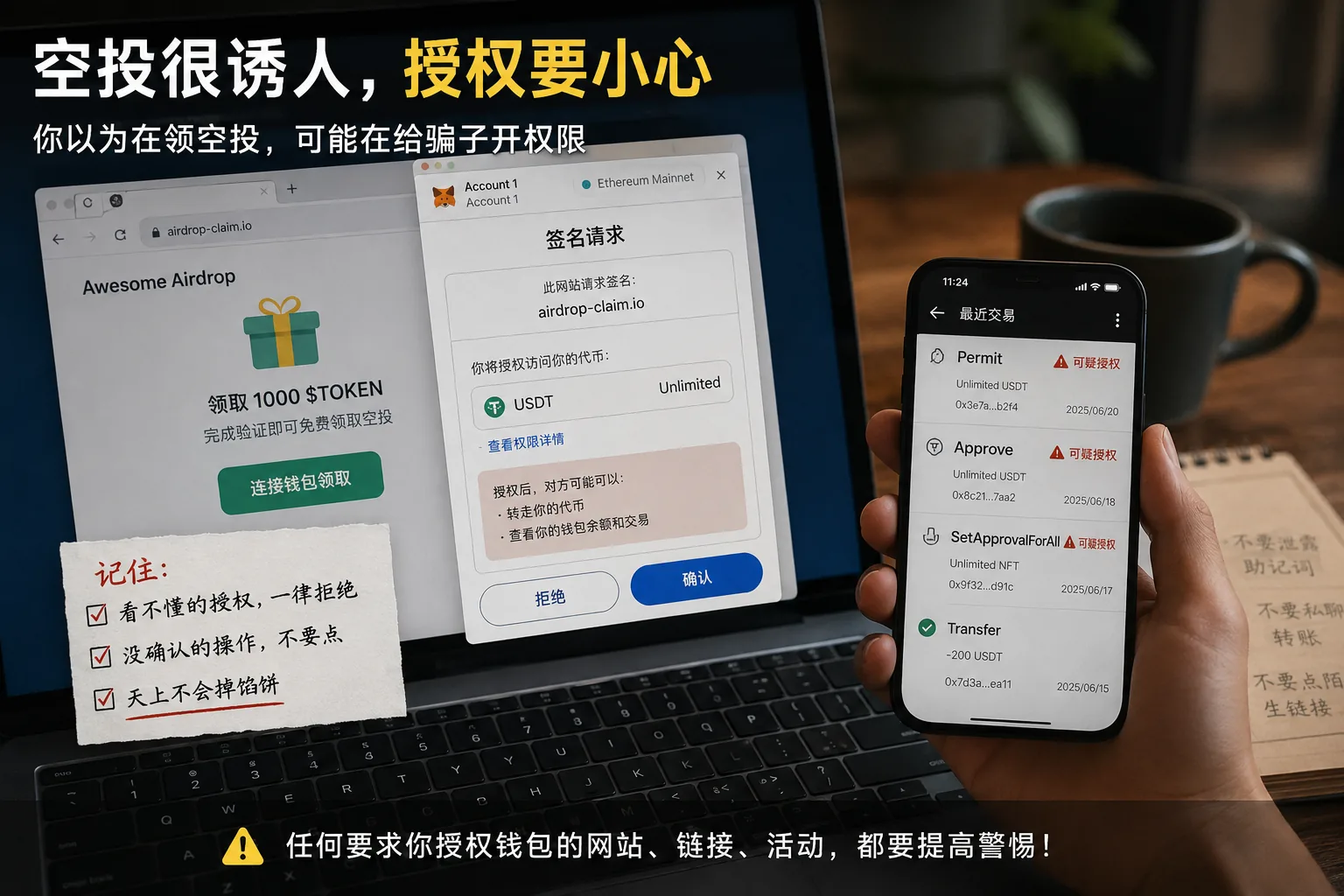
The problem is, many fake airdrops aren't trying to give you coins at all — they're trying to get you to connect your wallet, sign and approve.
You think you just clicked "confirm."
In reality, you may have given some contract permission to move your assets.
Revoke.cash's approval learning material also specifically explains token approvals and mechanisms like Permit; beginners should at least know this: a wallet approval is not an ordinary "login," and some approvals affect your asset permissions.[2] See: Revoke.cash: Learn About Token Approvals
If you see these words and don't understand them, refuse
Especially when these words appear in a wallet popup, beginners should not click around:
- Permit
- Approve
- SetApprovalForAll
- Unlimited approval
- Sign message
- Claim reward
- Verify wallet
- Increase allowance
If you can't understand what the wallet popup is asking you to sign, don't click confirm.
Many beginners think they're just "claiming an airdrop," when in reality they may be approving someone to move their tokens or NFTs.
One more thing to be especially careful about:
Any airdrop that requires you to "pay gas / a fee first in order to claim a bigger reward" should be treated with heavy suspicion.
Normal on-chain interactions may need gas, but if a page keeps using "bigger reward," "unlock now," and "last step" to push you to pay, it sounds a lot like a scam script.
Surging in 2026: TON / Mini App fake games, fake tasks, fake airdrops
Now a lot of scams are no longer packaged as traditional websites, but as:
- TON mini games;
- Mini App tasks;
- Fake points events;
- Fake NFT minting;
- Fake domain grabs;
- Fake community whitelists;
- Fake airdrop checker pages.
They look like mini games, community tasks and event pages.
But underneath, they may still be luring you to:
- Connect your wallet;
- Sign an approval;
- Pay a fee;
- Approve an NFT;
- Approve unlimited allowance;
- Download an unfamiliar plugin or app.
"Free" isn't always actually free.
Sometimes what you pay isn't money — it's wallet permission.
Always separate your main wallet from your test wallet
Beginners should at least have one idea:
Keep your main wallet and test wallet separate.
Don't connect your main wallet to unfamiliar sites.
Keep only a small amount in your test wallet, to try airdrops, DApps and on-chain interactions.
If your assets grow later, then consider hardware wallets, multi-sig wallets and other higher-level security options.
When you're just starting out, don't dump all your assets into one wallet that keeps connecting to unfamiliar sites.
Scenario 5: Someone says they can make you money, and first gets you to deposit on another platform
This scam is very common.
The other person may not scam you directly at first.
They'll chat with you first, build trust, then slowly say:
"I'll take you through the trades."
"This platform has very stable returns."
"My friend works inside."
"This channel isn't open to ordinary people."
"Try a small amount first, and add more once you've profited."
Some scammers even let you "see profit" the first few times.
But that profit may just be a backend number, not real money you can withdraw.
Once you've put in a bigger amount, all kinds of problems start appearing:
- Withdrawal failed;
- Account risk control;
- You need to pay tax;
- You need to pay a margin;
- You need to pay an unfreeze fee;
- You need to upgrade your membership;
- You need to deposit more before you can withdraw.
The nastiest part of this scam is that it doesn't grab your money right away — it first makes you believe you've "really earned."
The FTC also repeatedly stresses in its crypto scam warnings that promises of quick money, guaranteed returns, or requests to pay in cryptocurrency should all be treated with high caution.[3] See: FTC: What To Know About Cryptocurrency and Scams
How to judge trading-signal and fake-platform risk?
As long as these signals appear, be wary:
- Guaranteed returns;
- "Can't lose";
- Posting profit screenshots every day;
- Telling you to download an unfamiliar trading app;
- Telling you to deposit on a platform you don't know;
- Requiring extra fees before withdrawal;
- Support only appears in private chat;
- The platform has no clear company information;
- You can't verify the platform's background through public channels.
Crypto itself is already high-risk.
A stranger telling you they can make you stable money is itself unreasonable.
A more efficient way to judge whether a platform is trustworthy is to check public information item by item — reserves, fees and regulatory registration — rather than listening to someone guarantee returns. We walked through this full process with Bitget, and you can apply the same method directly: Is Bitget Safe? Reserves, Fees and the 2026 Controversy, Verified Item by Item.
Scenario 6: Your withdrawal failed, and they tell you to pay an unfreeze fee
A lot of scams end up stuck at "withdrawal."
You see the platform showing you've earned a lot, and you want to take it out.
Then the page says:
- Account abnormal;
- Withdrawal failed;
- You need to pay tax;
- You need to unfreeze;
- You need to pay a margin;
- You need to pay a verification fee;
- You need to upgrade your account;
- You need to deposit more before you can withdraw.
At this point a lot of people have already put money in and don't want to give up, so they keep paying.
That's exactly what the scammer wants.
Remember this bottom line
If a platform requires you to deposit more before you can take your own money out, treat it with high suspicion.
A normal platform may have KYC, risk control, review and compliance requirements.
But the "pay more before you can withdraw" script is extremely common in scams.
Especially when they also rush you:
"Handle it today, or the account is permanently frozen."
"If you don't top up the margin, your profit will be zeroed."
"Just one last step — it arrives right after you pay."
The more they talk like this, the less you should act on impulse.
Scenario 7: After you've been scammed, the "asset recovery" second scam shows up
After being scammed, a lot of people immediately go online for help.
Then the second wave of scammers shows up.
They'll say:
- I can help you recover it;
- I know an on-chain security team;
- I can hack back into the scammer's wallet;
- I can freeze the other address;
- Pay the fee first;
- Pay the technical service fee first;
- Transfer a margin deposit first.
This is called a recovery scam (second scam).
Beginners are most likely to get scammed a second time because they can't let it go.
What to do first after being scammed?
Don't keep transferring money.
First, preserve evidence:
- Chat records;
- The other party's links;
- The other party's accounts;
- Payment records;
- Wallet addresses;
- Transaction hash (TxID);
- Trading platform order records;
- Relevant screenshots and emails.
If the amount is large, besides keeping chat records, wallet addresses and the TxID, you can also submit information to the relevant platforms, banks, police or cybercrime reporting channels according to your local rules. The FBI's cryptocurrency investment fraud page also reminds victims to keep relevant transaction and communication information.[4] See: FBI: Cryptocurrency Investment Fraud
Most important of all:
Don't trust an "asset recovery expert" who reaches out to you in a private chat.
A channel that can genuinely handle the problem usually won't first ask you to transfer more money.
The 6 bottom lines beginners should hold
This table matters more than memorizing a bunch of complicated terms.
| Bottom line | Why it matters |
|---|---|
| Never give out your seed phrase or private key | This is the highest wallet permission; giving it out is basically handing over your wallet |
| Never give out verification codes or funds password | The other party may log in or operate your account directly |
| Don't click links from private chats | A lot of phishing sites hide in private chats and group links |
| Don't trade outside the official platform | Private trades and off-platform chats are much harder to dispute |
| Don't believe guaranteed returns | "Can't lose," "principal guaranteed," "high returns" are high-frequency scam scripts |
| Refuse any wallet approval / signature you can't read | A lot of scams are completed by you "just clicking confirm" |
Hold these 6 lines, and beginners can at least dodge most obvious scams.
Binance's security education content also repeatedly reminds users to watch out for fake support, phishing links, investment scams and social engineering attacks.[5] See: Binance: Ultimate Guide to Avoid Crypto Scams
Build these 3 habits before transferring or approving
A lot of security problems aren't about not knowing big technology, but about missing a few basic moves.
1. Double-check the address before transferring
Don't copy-paste and confirm right away.
At least do this:
- Check the first 4 characters of the address;
- Check the last 6 characters of the address;
- Confirm the network matches;
- Test with a small amount the first time;
- Don't copy wallet addresses on unfamiliar devices.
Some clipboard-hijacking trojans replace the wallet address with a scammer's address when you copy it.
So always check the last few characters before transferring — don't mechanically click confirm.
2. Before connecting your wallet to a site, think about whether it's your main wallet
If you're just trying an airdrop, DApp, mini game or test task, don't use your main wallet.
A more stable approach is:
- Main wallet: connect to unfamiliar sites as little as possible;
- Test wallet: keep only a small amount, use it for trying things;
- Large assets: later, consider a hardware wallet or a higher-level option.
3. If you can't read the approval, don't click confirm
A wallet popup is not an ordinary popup.
It might be:
- Approving a token;
- Signing a message;
- Sending a transaction;
- Approving an NFT;
- Approving unlimited allowance;
- Allowing a contract to use your assets.
If you can't read it, refuse.
Don't click confirm just because the page says "claim reward," "verify wallet" or "unlock airdrop."
Already clicked a link, approved your wallet, or got scammed — what now?
Different situations need different handling.
| Situation | What you should do first |
|---|---|
| Only clicked a link, entered nothing | Close the page, check whether anything was downloaded or any wallet was connected |
| Entered your exchange account password | Change the password immediately, check logged-in devices, enable or reset two-factor authentication |
| Gave out a verification code | Check account security immediately, change the password, contact official support |
| Entered your seed phrase | Stop using the old wallet, create a new wallet as soon as possible and move remaining assets |
| The wallet made a suspicious approval | Check and revoke approvals as soon as possible, move assets if necessary |
| Already transferred money to a scammer | Keep the TxID, address, chat records and payment records, go through official appeal or local reporting |
| Someone says they can recover the assets | Be highly suspicious — don't transfer more money |
Fast self-rescue checklist after you've approved
If you suspect you just approved a suspicious contract, handle it in this order:
- Close the relevant DApp page right away;
- Disconnect your wallet from that site;
- Open the wallet's built-in approval management;
- Revoke all approvals you can't read or whose source you don't know;
- If the wallet has no built-in approval management, refer to tools like Revoke.cash;
- Move remaining assets to a new wallet, testing with a small amount first;
- Record the TxID, contract address, site link and screenshots;
- Don't trust a "security expert" who reaches out to you in a private chat.
Note:
Revoking an approval does not guarantee you can get back assets that have already been moved.
Its purpose is to lower the risk of further assets being moved later.
FAQ
1. What's the most obvious sign of a fake support?
The most obvious is someone DMing you out of nowhere and creating a sense of urgency.
For example:
- Account abnormal;
- Assets frozen;
- Withdrawal failed;
- Identity verification needed;
- You need to move to a safe account;
- You need to click a link to handle it.
When you really have a platform problem, only enter support from the official app or website.
2. If I only clicked a phishing link but entered nothing, can I be hacked?
Not necessarily.
If you only opened the page without entering an account, verification code or seed phrase, and didn't download a file, connect a wallet or approve, the risk is usually lower.
But to be safe, I suggest you:
- Close the page;
- Don't click again;
- Check whether any suspicious file was downloaded;
- Check whether the wallet has any unfamiliar approvals;
- For important accounts, check two-factor authentication and logged-in devices.
3. Can I still recover if I sent my seed phrase to someone?
If your seed phrase has already been sent to someone, stop treating the original wallet as a safe wallet.
The more reliable approach is:
- Create a new wallet right away;
- Confirm the new wallet's seed phrase is stored offline;
- Move the old wallet's remaining assets out as soon as possible;
- Stop using the old wallet to hold assets.
Changing your exchange password does not protect a wallet whose seed phrase has already leaked.
4. Is every airdrop a scam?
Not necessarily.
But for beginners, unfamiliar airdrops are high-risk.
Especially if they require you to:
- Enter your seed phrase;
- Download an unfamiliar app;
- Pay high fees;
- Approve unlimited allowance;
- Transfer funds to unlock rewards;
- DM support before you can claim.
These should all be treated with caution.
5. How do I revoke a wallet approval?
Different networks and wallets work differently.
Generally you can use the wallet's built-in approval management, or mainstream block explorers and approval-checker tools to view and revoke suspicious approvals.
But beginners should not click around on unfamiliar "revoke approval" sites.
Confirm the tool's source first — preferably enter from the wallet's official help center or a mainstream security tool.
6. Can I get my money back after being scammed?
Not necessarily.
On-chain transfers are usually very hard to reverse.
If assets have already been moved, whether you can recover them depends on the transaction path, platform cooperation, whether the other party used a centralized exchange, local law enforcement and platform rules.
So the most important thing in crypto security isn't recovering after the fact — it's not handing over permissions in the first place.
7. Is a hardware wallet always safe?
A hardware wallet can greatly improve asset custody security, but it's not an "invincible safe."
Beginners should note:
- Don't download so-called firmware upgrades through unfamiliar links;
- Don't enter your seed phrase into a computer, web page or phone screenshot;
- Don't confirm transactions on devices you don't trust;
- Still read the approval and transaction content in wallet popups carefully;
- Still store your seed phrase offline and properly.
A hardware wallet lowers the risk of private-key exposure, but it can't judge phishing sites, malicious approvals or scam scripts for you.
A final word: don't rush to make money first — first don't hand out your door key
The most dangerous moment in crypto often isn't a market crash.
It's when you see a message and suddenly get anxious:
Afraid of missing an airdrop.
Afraid the account will be frozen.
Afraid the withdrawal will fail.
Afraid the coin will pump.
Afraid others are earning and you're not.
That state is exactly what scammers love.
So for a beginner entering crypto, the first lesson isn't making money.
The first lesson is protecting yourself.
Don't rush to click links.
Don't rush to trust support.
Don't rush to connect your wallet.
Don't rush to approve.
Don't rush to transfer.
As long as you can do this:
Don't leak your seed phrase, don't give out verification codes, don't click unfamiliar links, don't trust private-chat trading signals, and read wallet approvals before signing.
You've already avoided most of the traps beginners fall into.
Crypto isn't something you can't learn.
But the first step is definitely to guard your own door key.
In crypto, staying alive matters far more than getting rich for a moment.
Guard your door key, and you've already won the starting line.
Recommended reading
- What Is a Crypto Wallet? Wallet Addresses, Seed Phrases and Asset Security (2026)
- What Is a Seed Phrase? Why No One Can Help You Recover Assets If You Lose It (2026)
- Can You Recover a Wrong-Chain Transfer? Withdrawal Networks and Wallet Addresses (2026)
- Where to Keep the USDT You Bought on Binance/OKX? On the Exchange or Withdraw to a Wallet (2026)
- How to Deposit, Withdraw and Sell USDT: A Complete Beginner Guide to Fiat On/Off-Ramps (2026)
- How to Buy USDT on Binance (2026): P2P Buying Steps, Choosing a Seller & Payment
- How to Buy USDT on OKX: P2P Step-by-Step, Payment Methods & Avoiding Account Freezes (2026)
References
Some security reminders in this article reference public security education materials from the FTC, FBI, OKX, Binance and Revoke.cash. For specific platform rules, account handling, wallet approval management and appeal processes, always go by each platform's official website, app pages and help center.
Data verification notes
The key facts in this article were all checked on 2026-10-16 against public security education materials from OKX, Revoke.cash, the FTC, the FBI and Binance, item by item:
- Anti-phishing and information leakage: trading platform security guides remind users not to log in through unfamiliar links and not to leak passwords, verification codes or security information to anyone. Source: OKX "Crypto Security Guide."
- Wallet approval mechanism: token approvals and mechanisms like Permit are not an ordinary "login," and some approvals affect your asset permissions. Source: Revoke.cash "Learn About Token Approvals."
- Scam recognition: promises of quick money, guaranteed returns, or requests to pay in cryptocurrency should all be treated with high caution. Source: FTC "What To Know About Cryptocurrency and Scams."
- Handling after a scam: victims should keep chat records, wallet addresses, TxID and other transaction and communication information for reporting. Source: FBI "Cryptocurrency Investment Fraud."
- Social engineering attacks: watch out for fake support, phishing links, investment scams and social engineering attacks. Source: Binance "Ultimate Guide to Avoid Crypto Scams."
Risk notice
This article is for beginner crypto security education only, and does not constitute investment, trading, legal, cybersecurity or asset-recovery advice.
Digital assets carry risks including price volatility, platform rule changes, wallet approvals, private-key leaks, phishing attacks and irreversible on-chain transfers. Before any action, go by the platform's official website, app pages, the wallet's official guidance and local laws and regulations.
Author's note
The CoinTrailHub editorial team has long followed crypto beginner tutorials, trading platform workflows, stablecoins, wallet security and on-chain asset education. Our content aims to be readable, avoid pitfalls and follow step-by-step for beginners; we do not encourage blind trading and do not make any profit promises.
- OKX: Crypto Security GuideAnti-phishing; never leak passwords or verification codes
- Revoke.cash: Learn About Token ApprovalsHow token approvals and Permit work
- FTC: What To Know About Cryptocurrency and ScamsWarning signs of guaranteed returns and crypto payment scams
- FBI: Cryptocurrency Investment FraudPreserving evidence and reporting after a scam
- Binance: Ultimate Guide to Avoid Crypto ScamsWarnings about fake support, phishing and investment scams
- 2026-10-16UpdateAdded evidence-chain superscripts and Data Verification Notes; updated the key-fact verification date.
See ourEditorial Policy and the correction process in ourCorrections Policy.
The CoinTrailHub editorial team focuses on crypto education for beginners, exchange security and P2P trading risk. This article is compiled from official sources and public data, reviewed by humans, and strives for accuracy but is not investment advice.
Last updated:2026-07-02 · Content reviewed by humans · Learn more
© 2026 CoinTrailHub · Original content. Reproduction or rewriting without permission is prohibited.