
How to Buy USDT on OKX: P2P Step-by-Step, Payment Methods & Avoiding Account Freezes (2026)
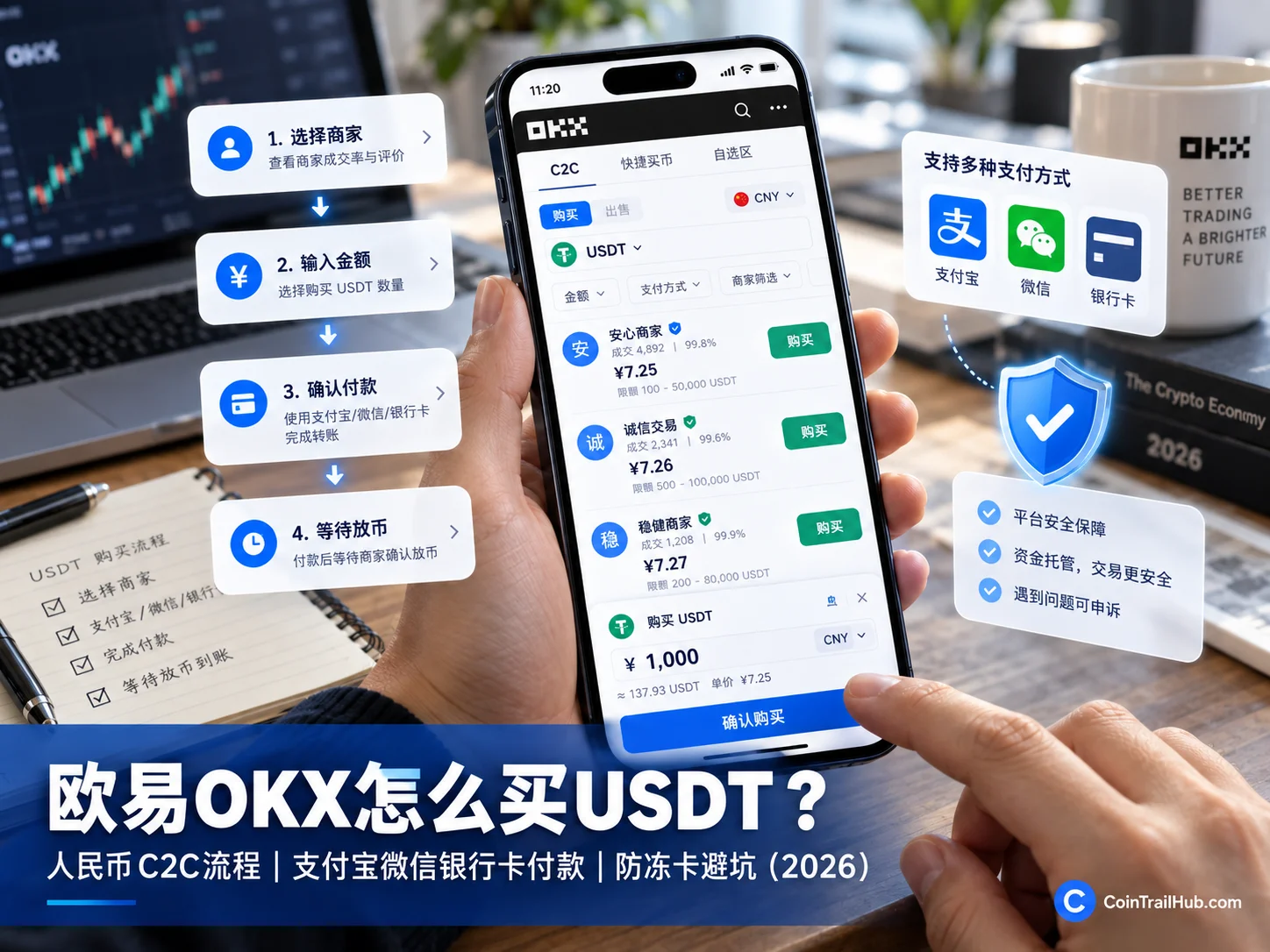
Table of contents

Binance new user rewards
20% trading fee rebate
Official Binance registration. Complete identity verification (KYC) to trade and withdraw.
Buying USDT on OKX is not hard — the hard part is your first payment: there are so many sellers, which one do you choose? How do you pay? And what if the seller does not release the coins after you transfer the money?
How do you buy USDT on OKX? Open the OKX App, go to "P2P trading", select USDT, filter sellers and enter the amount, check the recipient details, pay, then tap "I have paid" and wait for the seller to release the coins to your account. The prerequisite is that your account supports the relevant fiat P2P service.
Before your first purchase, do not rush to transfer money. Solve these four questions first:
| What beginners worry about most | The direct solution |
|---|---|
| Too many sellers, afraid of picking wrong | Compare completion rate, trade history, limits and payment requirements — not just the lowest price |
| Not sure how to pay | Only use a payment method the order supports and that you can legally use, and check the recipient and amount |
| Paid, but the seller won't release | Keep the proof, contact the seller inside the order or open a dispute; do not cancel an already-paid order on your own |
| Bought USDT but can't withdraw | Check whether T+N protection was triggered, and check the restriction scope and release time |
There is also one easily confused risk: a frozen payment account is not the same as your USDT being locked. A payment account freeze is handled by the bank, payment provider or relevant authorities; OKX T+N is a temporary usage restriction the platform puts on some P2P purchases. The two have different causes and different solutions.
Applicability note: P2P trading, fiat and payment methods depend on your account's region, identity verification and platform rules. This article is operational and risk education, does not guarantee that every region can use P2P, and is not investment, legal or trading advice.
Buying USDT on OKX P2P means using the OKX P2P market to buy USDT from platform sellers with fiat. The money does not go directly into an OKX official account — it is transferred to the seller according to the order details, while the platform holds the USDT in escrow and releases it after the seller confirms receipt. Beginners should remember two things: pay only according to the order details, and resolve any dispute only through the in-order chat and official appeal channels.
Table of contents
- What to prepare before buying USDT on OKX?
- OKX quick buy vs self-select trading: what's the difference?
- How to buy USDT on OKX: the full steps
- How do bank transfer and card payments work?
- OKX USDT buying fees and actual cost
- How to choose a P2P seller?
- What to do if the seller does not release coins or the order is abnormal?
- Will buying USDT freeze my account? What is T+N?
- Where to check your USDT after buying?
- FAQ
If all goes well you can complete one order within 10 minutes. The two places beginners trip up most are: transferring to a new payment code or new account sent by the seller in private chat, and forgetting to go back to the order and tap "I have paid" — or cancelling an already-paid order yourself.
1. What to prepare before buying USDT on OKX?
1. Complete registration and identity verification
Before using OKX P2P, you usually need to complete the platform's identity verification and make sure your account has the relevant permissions.
If you can't place an order or select a payment method after entering P2P, first check your verification status, account region and whether there are feature restrictions.
If you don't have an account yet, read How to sign up for OKX.
If you have registered but not verified, read OKX KYC: how to verify your identity — review time, failure reasons and fixes (2026).
2. Prepare your own verified payment account
Use a payment account that matches the name on your OKX identity verification, and confirm that the payment method complies with the platform, the payment provider and local rules.
Do not use a friend's or family member's account to pay on your behalf, and do not accept requests from strangers to bypass the real-name check.
3. Check whether fiat P2P is available
Enter the OKX P2P buying page and check whether your fiat currency is offered, and whether the sellers you see support the payment method you can use.
Being able to register on OKX does not mean you can definitely use P2P; having a bank account does not mean you can definitely buy USDT with it.
OKX officially notes that the supported fiat currencies and payment methods vary by registration region, so always follow what your account page shows.[1]
4. Keep the first amount small
For your first USDT purchase, there is no need to go big or chase the absolute lowest price.
More important is choosing an amount you can afford to risk, within the seller's minimum limit, and completing one full flow from order to arrival.
2. OKX quick buy vs self-select trading: what's the difference?
OKX P2P offers quick buy and self-selection of sellers, and the exact names vary by app version and region.
Quick buy reduces the step of picking a seller; self-select lets you compare prices, limits and payment methods yourself.
| Buying method | Features and when to use |
|---|---|
| Quick buy | Follow the trade plan shown by the system, reducing the seller-screening step |
| Self-select trading | Compare seller quotes, completion rate, order limits and payment methods yourself |
For your first time on OKX P2P, you can start by understanding quick buy; if you want to compare different sellers, use self-select trading.
Whichever you choose, always check the order before paying. Quick buy is not a risk guarantee, and self-select is not "the lower the price the better".
3. How to buy USDT on OKX: the full steps
Method 1: Quick buy
Step 1: Open the OKX P2P buying entry
Open the OKX App and find "P2P trading" on the home page or in the buy-crypto feature, enter quick buy and select Buy.

If your version does not show the exact same button, look for "Buy crypto" or "P2P", and follow what the app actually shows.
Step 2: Select USDT and enter the amount
On the buy page, select USDT and enter the amount you want to pay.
The page shows the expected USDT amount and the current quote. Confirm the coin, fiat currency and quantity before moving to the next step.
Step 3: Choose a payment method
Open the payment method selection page and check the methods available for this order.
Do not assume that because a guide mentions bank transfer or cards, those methods apply to your account.
Step 4: Confirm the order details
Check these four things in particular:
- The actual payment amount;
- The expected USDT amount;
- The seller's payment details;
- The payment countdown and other order notes.
If the page shows an asset usage restriction, understand the condition first, then decide whether to continue.
Step 5: Complete the payment
Pay using your own verified account, following the recipient details shown on the order.
Do not change the payment target based on a new QR code or new account sent by the seller in chat.
Step 6: Tap "I have paid"
After confirming the bank or payment app has completed the transfer, return to the OKX order page and tap "I have paid".
If the platform asks you to upload payment proof, submit it as prompted.
Do not tap "I have paid" before the money is actually sent, and do not forget to come back and confirm after it is sent.
Step 7: Wait for the USDT to arrive
After the seller confirms actual receipt, the platform releases the escrowed digital assets.
If the seller delays releasing, first contact them inside the order; if that doesn't work, enter the appeal process.
Method 2: Self-select trading
Self-select trading suits users who want to compare seller quotes, trade history and terms.
Step 1: Enter P2P self-select trading
Open the OKX App, go to "P2P trading", and find self-select trading or the seller quote list.
Select "Buy" and set the coin to USDT.
Step 2: Filter USDT sellers
The page usually shows seller quotes, trade limits, payment methods and historical trade information.
Do not only look for the lowest quote. First filter out orders whose terms don't suit you, then compare prices.

Step 3: Enter the purchase amount
Tap a suitable seller and enter the amount.
For example, if you plan to buy about $100 worth of USDT, the page calculates the expected amount based on the seller's current unit price.

For your first operation, the amount should meet the seller's minimum limit, but avoid exceeding your risk tolerance just to reach the minimum.
Step 4: Check the order confirmation page
Before paying, confirm the following:
- The coin you are buying is USDT;
- The actual payment amount is correct;
- The seller's payment method and details are clear;
- There is enough time left on the order;
- Whether T+N or another restriction is shown;
- Your account meets the relevant trading conditions.

If the countdown is almost over but you have not paid, do not transfer in a rush; handle it according to platform rules or choose a new suitable order.
Step 5: Pay according to the order's recipient details
Check the recipient name, account, amount and order notes, then complete the transfer through the corresponding payment app.
If the other party asks you to send to an account outside the order, stop and do not replace the order details with off-platform chat content.
Step 6: Return to OKX immediately after paying
After the transfer, go back to the OKX order, tap "I have paid", and submit proof as required.

If the countdown is abnormal or the order status changes after payment, keep the proof and contact the platform. Do not cancel an already-paid order on your own, and do not pay twice.
Step 7: Check whether the seller released the coins
After the seller confirms receipt, the platform releases the USDT.

After the order completes, go to the "Assets" page and check that the USDT has been credited.
According to the OKX official buy-crypto FAQ, assets bought via P2P usually go to the funding account.[2]
4. Can I use bank transfer or a card to buy USDT on OKX?
Whether you can use a bank transfer or card to buy USDT depends first on whether the OKX order offers that payment option, and second on whether your account meets the usage rules.
There is no need to use an unfamiliar payment account just because a seller is a few cents cheaper.
| Payment method | What to check before paying |
|---|---|
| Bank transfer | Your own name, the recipient's name, account number and the order amount |
| Debit/credit card | Whether the order supports it and whether your account can use it |
| Payment app / wallet | Whether the seller offers it and whether the recipient details match |
There is no absolute ranking of payment methods. Which one you can use is determined by the order, your account and the applicable rules together.
1. How to pay by bank transfer
If the OKX P2P order supports bank transfer, the three key steps are:
- Select bank transfer on the seller filter or order page.
- Check the recipient, payment amount and payment notes specified by the order.
- Pay with your own account that complies with the rules, then return to OKX and tap "I have paid".
Do not pay a new account the seller mentions in chat just because they claim the recipient account "temporarily changed".
2. How to pay by card
If the order offers a card payment, first confirm the option applies to your account, then follow the payment details shown on the order.
In particular, do not treat a card number sent privately by a stranger as the official OKX order recipient details.
Whether card payment is available depends on the method actually offered by the order and the card issuer's rules.
3. How to pay by bank account
For bank account payment, first check that your own name matches the name on your OKX account.
Before transferring, check the recipient, bank account number and amount again.
If the bank flags the transaction, rejects it or restricts your account, do not retry repeatedly or switch to someone else's account to bypass the restriction. Follow the formal requirements of the bank and the platform.
4. Which payment method is least likely to get frozen?
No payment method can guarantee freedom from bank or payment-provider risk control.
Using your own verified account, following the rules, and refusing third-party payment and off-platform trading can reduce some disputes, but it cannot guarantee that a transaction will never trigger a review or restriction.
5. How much are OKX USDT buying fees? How much USDT do I get for $1,000?
OKX P2P usually does not charge a platform matching fee, but the actual cost of buying USDT is still affected by the seller's quote and any possible payment channel fees.[3]
For the same $1,000, different sellers have different USDT unit prices, so the final amount you receive differs.
The formula is: expected USDT = payment amount ÷ price per USDT.
Below are simulated quotes, used only to explain the calculation and not representing real-time P2P market rates.
| Seller quote | Expected USDT for $1,000 |
|---|---|
| $1.00 / USDT | 1,000.00 USDT |
| $1.01 / USDT | 990.10 USDT |
| $1.02 / USDT | 980.39 USDT |
For the same $1,000, the two simulated quotes above differ by about 19.61 USDT.
But you cannot choose a seller by price alone, because order limits, payment methods, completion rate and trading requirements also determine whether the trade can be completed.
What does "0 fees" on OKX P2P mean?
Here you need to distinguish three concepts:
- Platform matching fee: OKX P2P usually does not charge this.
- Seller buy quote: determines how much USDT you get for the same payment amount.
- Payment channel fee: if the bank or payment provider has related fees, they are calculated separately.
So seeing "0 fees" does not mean every seller offers the same buying price.
6. How to choose an OKX P2P seller? Don't just look at the lowest price
For your first self-select purchase, choosing a seller matters more than chasing a tiny price difference.
Some sellers have a low quote but a high minimum amount; some have a good completion rate but payment terms that don't suit you; some have complex order notes that beginners easily mess up.
When choosing a seller, check these six things first:
| Screening criterion | What to check |
|---|---|
| Seller quote | The actual price per USDT and the amount you will receive |
| Completion rate | Historical order completion and any obvious anomaly |
| Trade volume | Whether the historical trade record is sufficient |
| Trade limit | The minimum and maximum amount per order |
| Payment method | Whether it supports a payment account you can legally use |
| Seller requirements | Whether the order notes and additional conditions are reasonable |
These indicators should be looked at together. A high completion rate and large historical volume offer some reference, but do not mean the trade is risk-free.
Which sellers should you skip?
If you encounter the following, do not rush to pay just because the quote is cheap:
- The seller asks you to pay a recipient outside the order.
- The seller asks you to use someone else's payment account.
- The other party asks to move to Telegram, WhatsApp or another chat app to complete the trade.
- The seller asks for an extra deposit or fee first.
- The order amount, recipient details and actual requirements contradict each other.
- You cannot understand or cannot meet the seller's additional conditions.
For your first purchase, choosing a seller with clear rules, a suitable amount and a usable payment method is more meaningful than finding the lowest quote.
7. What to do if the seller does not release the coins after you pay?
If the money is transferred but the seller does not release the coins, do not cancel the order first, and do not transfer another payment.
First check whether the payment record shows success, whether the order has confirmed payment, and whether the recipient and amount match the order.
Then handle it according to the actual problem.
| Problem | How to handle |
|---|---|
| Not paid yet, order about to time out | Stop rushing to pay; cancel or re-select according to the order rules |
| Paid, but seller did not release | Keep the payment record, contact the seller in the order, and appeal if necessary |
| Paid, but forgot to tap "I have paid" | Check the order status, handle promptly through the official entry and upload proof |
| Wrong amount paid | Keep the original payment proof, explain to the seller and handle under platform dispute rules |
| Paid, order unexpectedly cancelled | Contact OKX support immediately with the order number and payment record |
| Payment account restricted by the bank | Check with the bank and relevant authorities; do not pay again or use someone else's account |
When an order is abnormal, the most important thing is to keep evidence and follow the official process — do not privately negotiate any so-called "unfreezing fee" or deposit off-platform.
How to open an appeal on OKX P2P?
Open the OKX App → P2P trading → Orders → select the order → "Need help?"
First try contacting the seller through the order; if that doesn't work, select the specific problem type, enter "File an appeal" and submit evidence as prompted.
It is recommended to keep:
- The OKX P2P order number;
- The payment time and actual amount;
- The bank or payment app transaction proof;
- The in-order chat record;
- Any other proof the platform requires.
After an order is generated, handle it through the self-service appeal entry as soon as possible; the specific entry and deadline depend on what the order page shows. Past the deadline shown on the page, you can handle it through online support or problem feedback.
What if the money is paid but the order auto-cancels?
This is more troublesome than a normal release delay.
Do not create a new order and pay again on your own, and do not assume that just because the order shows cancelled, your original transfer has automatically been returned.
First keep the original order and payment record, then contact the platform through the OKX Help Center to verify.
8. Will buying USDT freeze my account? What is T+N protection?
Buying USDT on OKX carries payment risk-control risk, but a frozen bank account and USDT restricted by the platform are not the same thing.
1. Frozen or restricted payment account
A restricted payment account may involve bank transaction monitoring, payment platform rules, account anomaly review or legal measures.
Buying USDT does not mean your bank account will definitely be frozen; conversely, a seller's large volume does not guarantee you won't be subject to risk control.
If your payment account is restricted, first check the reason and handling requirements given by the bank or payment provider. Do not bypass risk control by borrowing accounts or splitting transactions.
2. OKX T+N protection
T+N is a security protection mechanism OKX applies to some P2P buy orders.
The platform may, based on its transaction risk assessment, place a temporary restriction on the digital assets equivalent to that order.
| Protection type | Restriction time and scope |
|---|---|
| T+3 | 3 calendar days; withdrawals, P2P selling and DEX trading of the order-equivalent assets may be restricted |
| T+7 | 7 calendar days; withdrawals, P2P selling and DEX trading of the order-equivalent assets may be restricted |
| T+15 | 15 calendar days; withdrawals, P2P selling and DEX trading of the order-equivalent assets may be restricted |
Some orders may also show a shorter or different protection period such as T+1; the exact number of days depends on what the order page shows.[4]
The restriction generally applies to the assets equivalent to that order, not to every asset in the whole account.[5]The specific restriction and release time depend on what the OKX order page shows.
3. How to tell whether your USDT is T+N-locked or cannot be withdrawn for another reason?
If you just bought USDT via P2P and then find you cannot withdraw or P2P-sell it, first check whether the order details show T+3, T+7, T+15 or a specific unlock time.
If there is such a note, handle it according to the protection period shown on the page; eligible users can try to submit materials through the official appeal entry, but early release is not guaranteed.[6]
If there is no T+N note, also check account verification, security restrictions and other withdrawal conditions.
T+N is a usage restriction on digital assets, not a bank account freeze, and it does not mean your USDT has disappeared.
If you plan to move USDT to an on-chain wallet right after buying, make sure to check for any asset restriction notes before paying.
9. Where to check your USDT after buying? What to do next?
After the P2P order completes, you can go to the "Assets" page in the OKX App to check your USDT balance and funding account.
If you don't see the USDT immediately, first check whether the order is completed, whether the seller released the coins, and then check the funding account records.
1. Can the USDT you bought be used for spot trading right away?
If your account has the relevant trading permission, you can use the USDT following OKX's current asset and trading flow.
Note that some versions may involve a transfer between the funding account and the trading account; follow what the app page shows.
2. Can you withdraw to a wallet right after buying?
Not necessarily.
Whether you can withdraw immediately depends on your account's withdrawal permission, whether the corresponding network is supported, whether the order assets triggered T+N, and other applicable restrictions.
Also, USDT is issued on different blockchain networks, so when withdrawing you must check the network your receiving wallet supports.
3. Keep USDT on the exchange or in your own wallet?
If you are just getting to know a trading platform, an exchange account is more convenient but carries platform custody risk.
If you use a self-custody wallet, you are responsible for your private key and seed phrase, and you bear the risk of wrong network and wrong address.
Continue reading:
- Where to keep the USDT you bought on Binance/OKX: on the exchange or withdraw to a wallet (2026)
- Can you recover a wrong-network transfer? Withdrawal networks and wallet addresses (2026)
FAQ
1. Can I buy USDT with my local fiat on OKX?
Some eligible accounts support fiat P2P. Open the OKX App, go to "P2P trading", and check whether your fiat currency and available sellers are offered. Whether you can trade depends on your account region, identity verification and platform rules.
2. Can I buy USDT on OKX with a bank transfer?
If the P2P order offers bank transfer payment, and your account meets the relevant rules, you can pay following the recipient details shown on the order. Do not transfer to another account sent by the seller in private chat.
3. Does OKX support card payment for buying USDT?
Some sellers may offer card payment, depending on your account region and the order options. When there is no such payment method, do not bypass the OKX order to trade privately.
4. Will my bank account be frozen if I buy USDT on OKX?
It is possible to trigger bank or payment-provider risk control, but not every transaction gets frozen. Use your own verified account and follow the rules; a bank restriction and OKX T+N digital-asset protection are different mechanisms.
5. How long does it take for OKX USDT purchases to arrive?
There is no unified guaranteed time. After paying and tapping "I have paid", you need to wait for the seller to confirm receipt and release the coins. If it exceeds the order's expected time, contact the seller in the platform or submit an appeal.
6. What if the seller does not release the coins after I pay on OKX?
First keep the payment proof and order number, and contact the seller inside the OKX order. If it cannot be resolved, file an appeal through "Need help?". Do not cancel an already-paid order on your own, and do not transfer again.
7. Why can't I withdraw after buying USDT on OKX?
It may involve T+N protection, account risk control or other withdrawal restrictions. First check the order details and the assets page to confirm whether there is a protection period or restriction note, then handle it through OKX official support.
Summary: for your first OKX USDT purchase, get the payment and arrival right first
For your first purchase, what matters most is not how much you can buy, but how to pick the right order, how to confirm who you paid, and how to confirm the USDT actually arrived.
The basic OKX P2P buying flow is not complicated:
Find the P2P buying entry → select USDT → filter sellers → enter the amount → check the order → pay and confirm → wait for arrival.
But three things cannot be skipped: check the recipient details before paying, keep the proof after paying, and use the platform appeal process when something is abnormal.
In particular, remember:
If you haven't paid, don't tap "I have paid"; if you have paid, don't cancel casually; when the USDT arrives, also check whether there is a withdrawal restriction.
Data verification notes
The key facts in this article were checked against the OKX official Help Center on P2P buying, limits and T+N protection on 2026-10-16, item by item:
- Region and payment-method limits: OKX officially notes that supported fiat currencies and payment methods vary by registration region, so always follow what your account page shows. Source: OKX Help Center — P2P buying limit and security protection.
- Where bought assets go: according to the OKX official buy-crypto FAQ, assets bought via P2P usually go to the funding account. Source: OKX Help Center — Buying crypto on P2P.
- Platform fee: OKX P2P usually does not charge a platform matching fee, but the actual cost is still affected by the seller's quote and possible payment channel fees. Source: OKX Help Center — Buying crypto on P2P.
- T+N protection periods: the officially listed protection types include T+3 (3 calendar days), T+7 (7 calendar days) and T+15 (15 calendar days); some orders may also show a shorter or different period such as T+1, depending on what the order page shows. Source: OKX Help Center — What to do if T+N risk control blocks withdrawals or deposits.
- Restriction scope: T+N restrictions generally apply to the assets equivalent to that order, not to every asset in the account; the release time depends on what the order page shows. Source: OKX Help Center — What to do if T+N risk control blocks withdrawals or deposits.
- Appeal and early release: eligible users can try to submit materials through the official appeal entry, but early release is not guaranteed. Source: OKX Help Center — What to do if T+N risk control blocks withdrawals or deposits.
Recommended reading
- How to buy your first USDT: a complete guide from sign-up to arrival (works for Binance/OKX)
- How to sign up for OKX
- OKX KYC: how to verify your identity — review time, failure reasons and fixes (2026)
- Where to keep the USDT you bought on Binance/OKX: on the exchange or withdraw to a wallet (2026)
- Can you recover a wrong-network transfer? Withdrawal networks and wallet addresses (2026)
Risk disclaimer
This article is for crypto platform operation, security and risk education only, and is not investment, trading or legal advice. Digital assets, P2P payments and stablecoins all carry risk. Whether you can use the relevant services depends on local law, account eligibility and the platform's latest rules.
All P2P features, payment methods, limits, order rules and risk-control requirements are subject to what the OKX App actually shows and the latest official Help Center guidance.
Author's note
The CoinTrailHub editorial team has long focused on beginner crypto tutorials, exchange account flows, stablecoins, wallet security and on-chain asset education. Our content aims to help beginners understand, avoid pitfalls and follow steps safely. We do not encourage blind trading and do not make any profit promises.
- 2026-10-16UpdateAdded evidence-chain citations and "Data verification notes", updated the key-fact verification date.
See ourEditorial Policy and the correction process in ourCorrections Policy.
The CoinTrailHub editorial team focuses on crypto education for beginners, exchange security and P2P trading risk. This article is compiled from official sources and public data, reviewed by humans, and strives for accuracy but is not investment advice.
Last updated:2026-10-09 · Content reviewed by humans · Learn more
© 2026 CoinTrailHub · Original content. Reproduction or rewriting without permission is prohibited.