
What to do if your Binance account is hacked? 4-step self-rescue + 5 causes
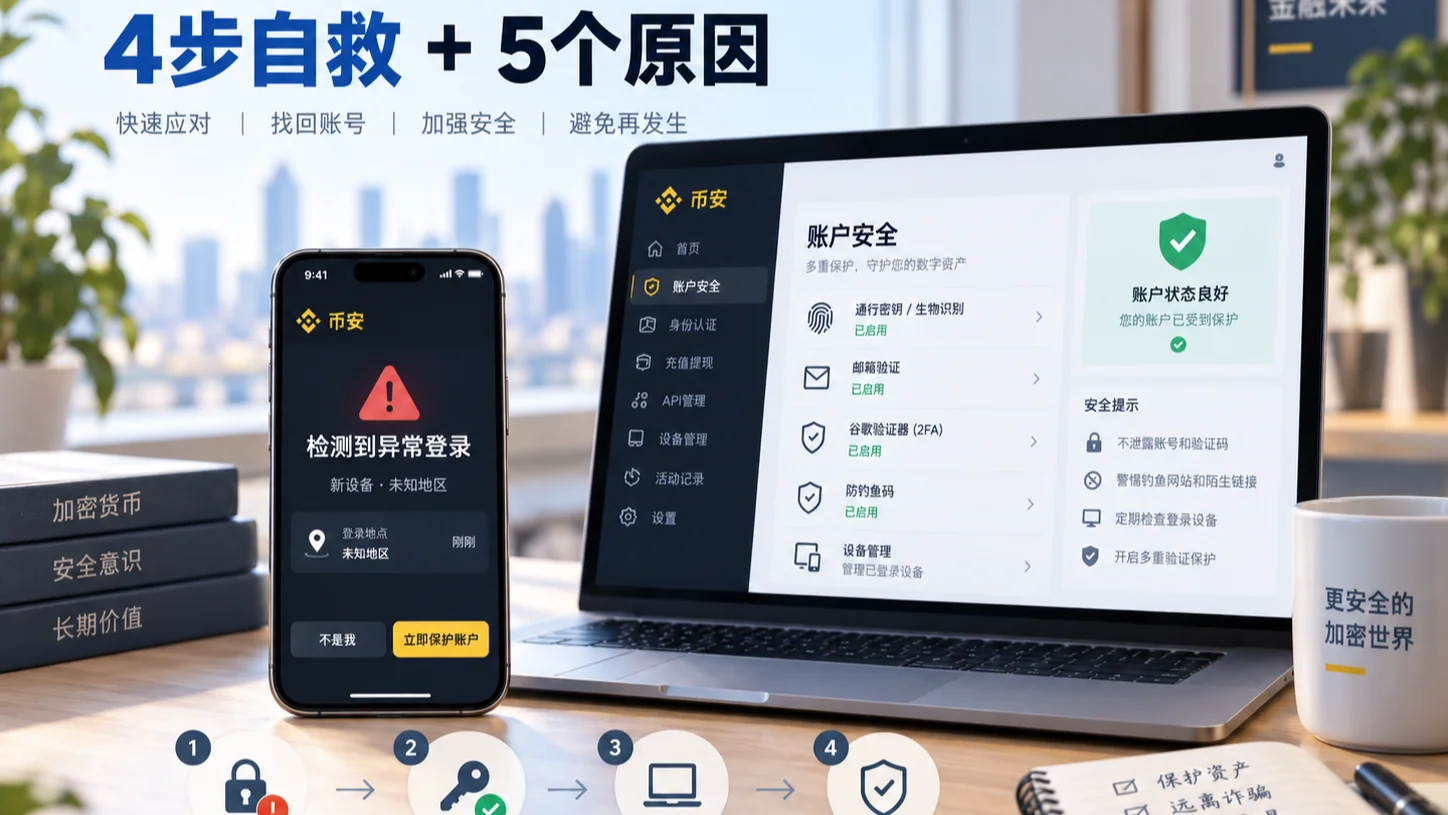
Table of contents

Binance new user rewards
20% trading fee rebate
Official Binance registration. Complete identity verification (KYC) to trade and withdraw.
Key points: If your Binance account shows unusual activity or is hacked, first stop the loss with this order — "disable the account → change password and email → clean up devices/API → contact official support and keep evidence" — then look at the 5 common causes, and how to judge whether already-withdrawn funds can still be recovered.
Contents: One-minute check · 4-step rescue · Can you still recover? · 5 causes · Security settings · FAQ
The conclusion first:
An unfamiliar login, unauthorized transaction, or transferred-out asset on your Binance account does not necessarily mean Binance itself was breached. Real-world account takeovers are more often the result of account-level attacks like phishing sites, fake support, leaked verification codes, a compromised email, SIM swapping, malware, and leaked API permissions.
If you've already noticed:
- Logins you didn't perform;
- Unfamiliar withdrawal notifications;
- 2FA, email, or password changed;
- An API you didn't create;
- Withdrawal addresses changed;
- Unauthorized transactions in the account;
Don't slowly research where the problem came from first. When clearly unauthorized activity has occurred, protect the account first, then investigate the cause.
Binance currently provides a direct account-disable feature. After noticing suspicious activity, you can go to:
Account → Security → Account Management → Disable Account
to stop the attack from spreading before dealing with the password, email, devices, and support appeals. Binance's official guidance also currently recommends using this feature to protect your assets when suspicious account activity is detected.
This article first gives a 4-step self-rescue order you can follow directly after noticing something wrong, then breaks down the 5 most common causes, and finally explains how to prevent it day to day.
If things go smoothly, you can finish the first 3 stop-loss steps within 10 minutes. The two places you're most likely to trip: handing a verification code to someone claiming to be support, and relying on SMS-only 2FA, which can't withstand SIM swapping.
One-minute check: does your Binance account have a problem?
If any of the following appear, it's worth checking right away:
| Unusual situation | Risk level |
|---|---|
| Login notification you didn't perform | High |
| Unfamiliar device or IP appears | High |
| Verification code you didn't request | Check immediately |
| Password, email, or phone number changed | Extremely high |
| 2FA or Passkey removed/changed | Extremely high |
| Unfamiliar API Key appears | Extremely high |
| Withdrawal address you didn't add | Extremely high |
| Unauthorized transaction or withdrawal | Extremely high |
If you only received an SMS saying "Binance account abnormal" but there's no unusual record after logging in, it doesn't mean your account has definitely been hacked.
In fact, it's very likely a scam message.
Don't click the link in the SMS, and don't call the number provided. Open the official Binance App or website yourself to check account activity, and use Binance Verify to verify the source when necessary.
Binance account abnormal or hacked? Follow these 4 steps
If there's already a clear anomaly, the priority isn't researching which method the scammer used.
Stop the loss from spreading first.
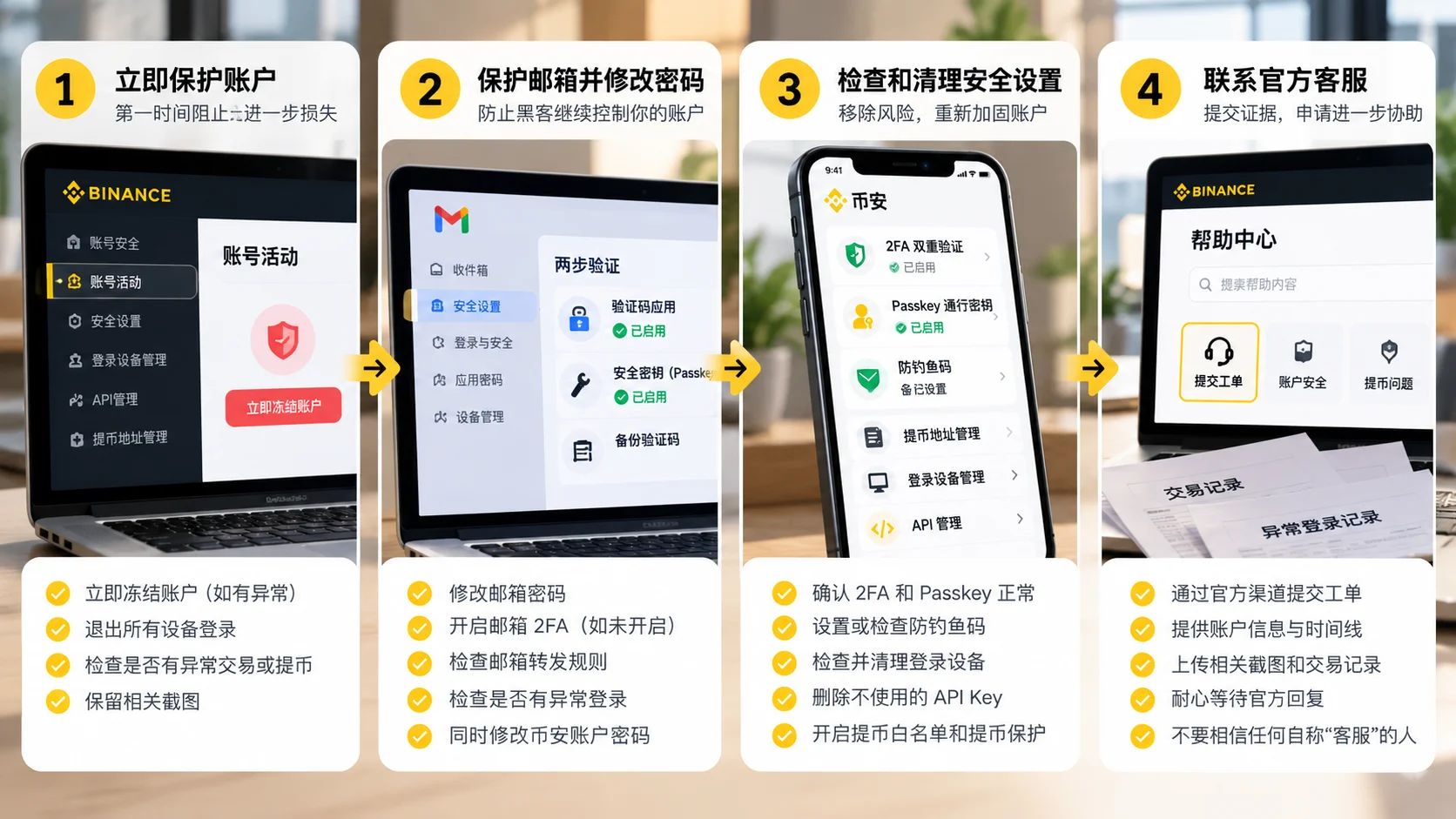
Step 1: Disable the account immediately
If you can still log into Binance and have already found:
- Unauthorized login;
- Unauthorized transaction;
- Abnormal withdrawal;
- Security settings changed;
prioritize disabling the account.
The current App entry is roughly:
Account Info → Security → Manage Account → Disable Account
Web:
Account → Security → Account Management → Disable Account
Exact names may vary slightly with the App version and language setting; use the actual account page as the reference.
Binance's official guidance clearly states you can disable the account to protect assets when suspicious activity is detected.
Don't assume you have lots of time to investigate just because you can still log in.
If the attacker also has access, they can keep operating while you investigate.
Disabling the account is not the same as a normal "log out." Binance's official guidance explains that disabling pauses trading and withdrawals while removing API Keys and authorized devices, making it suitable as an emergency stop-loss measure once abnormal access is confirmed.[1]
Step 2: Protect your email, and change your account password
Next, handle both entry points at the same time:
Binance account
Change to a new password that isn't used on any other site.
Linked email
Also check the email:
- Has the password been changed;
- Any unfamiliar logins;
- Any abnormal forwarding rules;
- Is 2FA normal;
- Have the recovery email and phone number changed.
If your old Binance password is the same as or similar to your email password, change both.
Don't change only the Binance password while leaving an already-compromised email in place.
Step 3: Clean up devices, 2FA, Passkey, API, and withdrawal permissions
Once the account is temporarily under control, start checking whether the attacker left any entry points.
Focus on:
Login devices
Go to the security page and check Device and Activities.
Remove devices you don't recognize.
Login IPs
Check recent login records for:
- Unfamiliar countries;
- Unfamiliar regions;
- IPs you don't recognize at all;
- Times you couldn't possibly have logged in.
However, IP is only a supplementary signal, because mobile networks, VPNs, and carrier networks all cause IP changes.
2FA
Confirm:
- The Authenticator is still yours;
- The phone number hasn't been changed;
- The email hasn't changed;
- There are no unfamiliar verification methods.
Passkey
Confirm there are no Passkeys you didn't add.
API Key
If you never use the API:
It's best not to keep any API.
If you do need it:
- Delete unused Keys;
- Check permissions;
- Check the IP whitelist;
- Don't grant permissions you don't need.
Withdrawal addresses
Check the address book and whitelist for addresses you didn't add.
Binance's official guidance also currently recommends regularly checking account activity and authorized devices, and removing unfamiliar devices immediately.
Step 4: Contact official Binance support, and keep evidence
Finally, go through the official support channel.
Focus on saving:
- The abnormal login time;
- The login IP;
- Screenshots of unfamiliar devices;
- Security notification emails;
- Abnormal transaction orders;
- Withdrawal records;
- TXID;
- The receiving address;
- Chat records with the scammer;
- The phone number;
- The phishing URL.
If assets have already been withdrawn on-chain, the TXID and receiving address are especially important.
When you need support, only enter from:
- The official Binance App;
- The official Binance website.
Don't believe:
"I know someone inside Binance." "Pay me 500 USDT and I'll recover it for you." "Pay a deposit first and it will be unfrozen." "Authorize a wallet and I'll recover your stolen assets."
After an account hack, users are very likely to encounter secondary scams.
Scammers know you're anxious to recover funds and will keep impersonating lawyers, hackers, official investigators, or so-called "asset recovery teams."
Can already-withdrawn funds still be recovered?
It depends.
Still inside Binance
If the funds are still within the platform's internal process and the security system or manual review intervenes in time, there's a chance they may be intercepted or further investigated.
But there's no guarantee.
Already withdrawn on-chain
If the transaction is already confirmed on the blockchain, it usually can't be simply reversed like a bank transfer.
At this point the most important thing is to keep:
- TXID;
- Receiving address;
- Time;
- Coin;
- Network;
- Amount.
Then immediately contact the platform's official support, and consider reporting to the relevant law-enforcement authorities as the situation warrants.
Don't believe anyone who promises:
"I can 100% hack it back."
That's usually the start of a second round of scams.
About SAFU and "paid recovery"
Binance's SAFU (Secure Asset Fund for Users) mainly covers user losses caused by platform-level security incidents, and usually does not cover losses caused by the user's own phishing, password, or verification-code leaks.
If someone contacts you proactively claiming "pay and I can recover it," "I know someone inside Binance," or "pay a deposit first," you can basically judge it as a secondary scam. Binance's official channels will never proactively ask for your password, verification code, or seed phrase, and will never ask you to transfer funds to any "secure account."
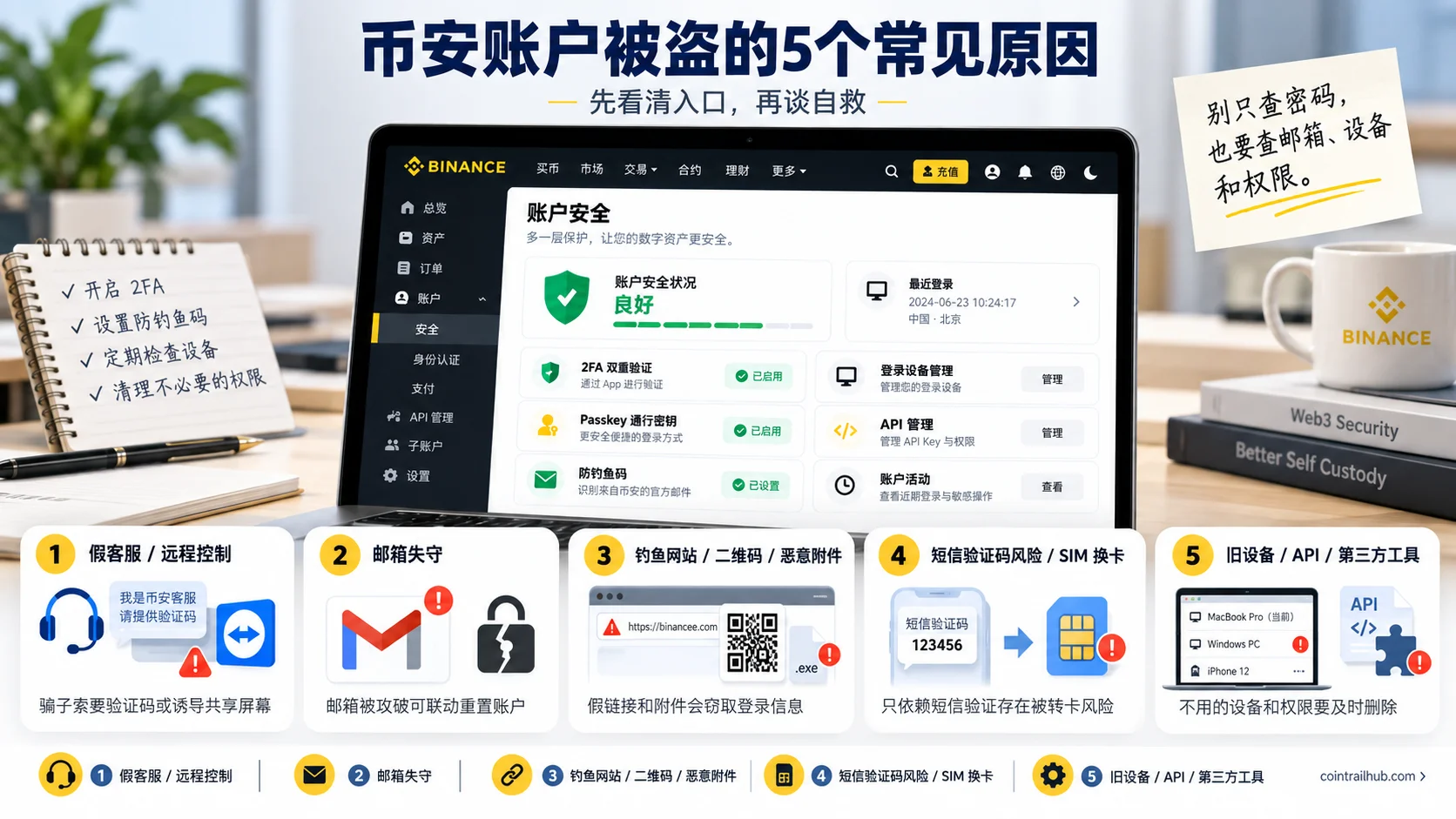
5 common causes of a hacked Binance account
Cause 1: Fake support tricks you out of verification codes, or tricks you into installing remote-control software
This is a very dangerous class of attack.
The common script is:
"Your Binance account has an anomaly." "We detected suspected money laundering and you need to cooperate with risk control." "Your assets are about to be frozen." "I'm Binance support, and I'll help lift the restriction now."
Then the other party further asks you to:
- Tell them the SMS verification code;
- Provide the email verification code;
- Show the Google Authenticator code;
- Scan a QR code;
- Install remote-assistance software;
- Share your phone or computer screen;
- Move assets according to their instructions.
What's truly dangerous is that many people didn't directly hand their password to the scammer.
The attacker may have already obtained the username and password through a phishing site, and now only needs the last verification code.
Handing over the verification code is effectively completing the last verification step for the attacker yourself.
An even more covert method is remote control.
The scammer gets you to install some remote-assistance App, then watches or even controls the device under the pretext of "helping you check the account." Verification codes, account balance, email, and login status can all be exposed as a result.
So remember:
Never hand over verification codes, passwords, Passkeys, or Authenticator codes to anyone who contacts you first.
When you encounter a so-called "account anomaly," close the chat yourself and re-enter support from the official Binance App or website.
Cause 2: The Binance password wasn't leaked, but the email was breached first
Many people only protect their Binance account and ignore the linked email.
This is a big hole.
If an attacker gets your email, they may further:
- Receive Binance verification emails;
- Get security notifications;
- Try to reset the account password;
- Complete identity verification in combination with other attacks;
- Delete some security emails so you notice the anomaly later.
Especially dangerous is:
Using the same email password as the Binance password, or just tweaking a few characters.
As soon as one site has a password leak, the attacker can "credential-stuff" — use the leaked email-and-password combination to try other platforms.
So my advice is:
- Use a unique, random password for Binance;
- Use a separate password for the linked email;
- Turn on 2FA for the email itself;
- Don't use the exact same password for the email and Binance;
- If possible, prepare a dedicated email for important financial accounts.
The email itself is part of the account security system; don't only protect the Binance App.
Cause 3: Clicking a fake site, scanning a fake QR code, or opening a malicious attachment
Many phishing pages now look almost identical to the real Binance login page.
The logo, colors, verification-code page, and even the domain are deliberately made very similar.
Common entry points include:
- Fake sites in search results;
- "Event links" sent in groups;
- "Account verification" pages sent in private messages;
- Links sent by fake support;
- Fake airdrops;
- Fake rebate upgrades;
- Fake KYC;
- Fake risk-control notices.
The attacker's goal is usually simple:
To get you to type your username, password, and verification code into a fake page.
There are two more things to be especially wary of right now.
Malicious attachments
For example, the other party sends you:
.rar.zip.exe.docx- Unknown installers
and tells you it's:
"A rebate file" "Verification materials" "A fund-proof tool" "A Binance upgrade program"
Opening it may install malware, steal browser data, or even take control of the device.
Fake QR codes
Scanning a code is not inherently safe.
A scammer may tell you:
"Scan this code to verify your Binance account." "Scan the code to contact support." "Scan the code to claim a reward."
But behind the QR code may be a phishing site, or even an induced authorization of a login session.
So important operations should preferably start from the official App you already have installed.
Don't skip checking the URL and the purpose of the operation just because the QR code looks convenient.
Cause 4: Relying only on SMS codes, with SIM swapping or the verification method broken through
Turning on 2FA doesn't mean absolute security.
Especially if you only use SMS codes, there's still an attack method:
SIM Swapping.
Through social engineering or other means, the attacker gets your carrier to transfer your phone number to another SIM card.
Once successful, they may receive the SMS verification codes that should have been sent to you.
Binance's 2026 security materials also clearly warn that while SMS 2FA is better than no 2FA at all, it still carries SIM swapping risk compared to Authenticator or Passkey.[2]
If you hold assets long-term, I'd rather recommend:
A unique password + Authenticator/Passkey + email security
than relying on SMS for every important operation.
In 2026 you can further set a 2FA verification strategy
Binance now provides 2FA Verification Strategy.
In simple terms:
Before:
Login → verification code Withdrawal → verification code
Now you can set different verification requirements for different scenarios, for example:
- Login;
- Asset operations;
- Account settings.
Then combine them separately:
- Authenticator;
- Passkey;
- SMS;
- Email.
The point isn't to make verification as complex as possible, but to avoid the attacker moving freely once one verification method is compromised.
Cause 5: Old devices, malware, API keys, and third-party tools leaving backdoors
There's another account risk beginners often ignore:
The attacker doesn't necessarily need to know your password.
For example, you previously:
- Logged into Binance on an old computer;
- Installed a browser extension from an unknown source;
- Used a trading bot;
- Used a copy-trading tool;
- Connected third-party trading software;
- Created an API Key;
- Sent an API Key to someone else.
Any of these can become an attack entry point.
So account security checks can't just look at:
"Was my password leaked?"
You should also check:
Are there devices, IPs, APIs, and third-party connections I don't recognize?
Binance currently lets you view authorized devices and recent login IPs in Device and Activities on the security page; remove unfamiliar devices promptly, and when there's an obvious anomaly you can also consider disabling the account directly.[3]
The API follows the same logic.
If you once tested a Bot and stopped using it, delete the API.
Don't keep it thinking:
"I might use it again someday."
An important principle of account security is:
The fewer permissions, the smaller the potential attack surface.
Get these basic security settings done first
Before anything abnormal happens, the most valuable thing to do is lower the chance of an account takeover.
| Setting | Recommendation |
|---|---|
| Unique password | Must |
| Email 2FA | Must |
| Binance 2FA | Strongly recommended |
| Passkey | Recommended |
| Anti-Phishing Code | Recommended |
| Withdrawal whitelist | Recommended once you hold assets |
| Withdraw Protection | Consider for large-asset accounts |
| Login devices | Check regularly |
| API permissions | Delete if unused |
| 2FA backup | Store offline |
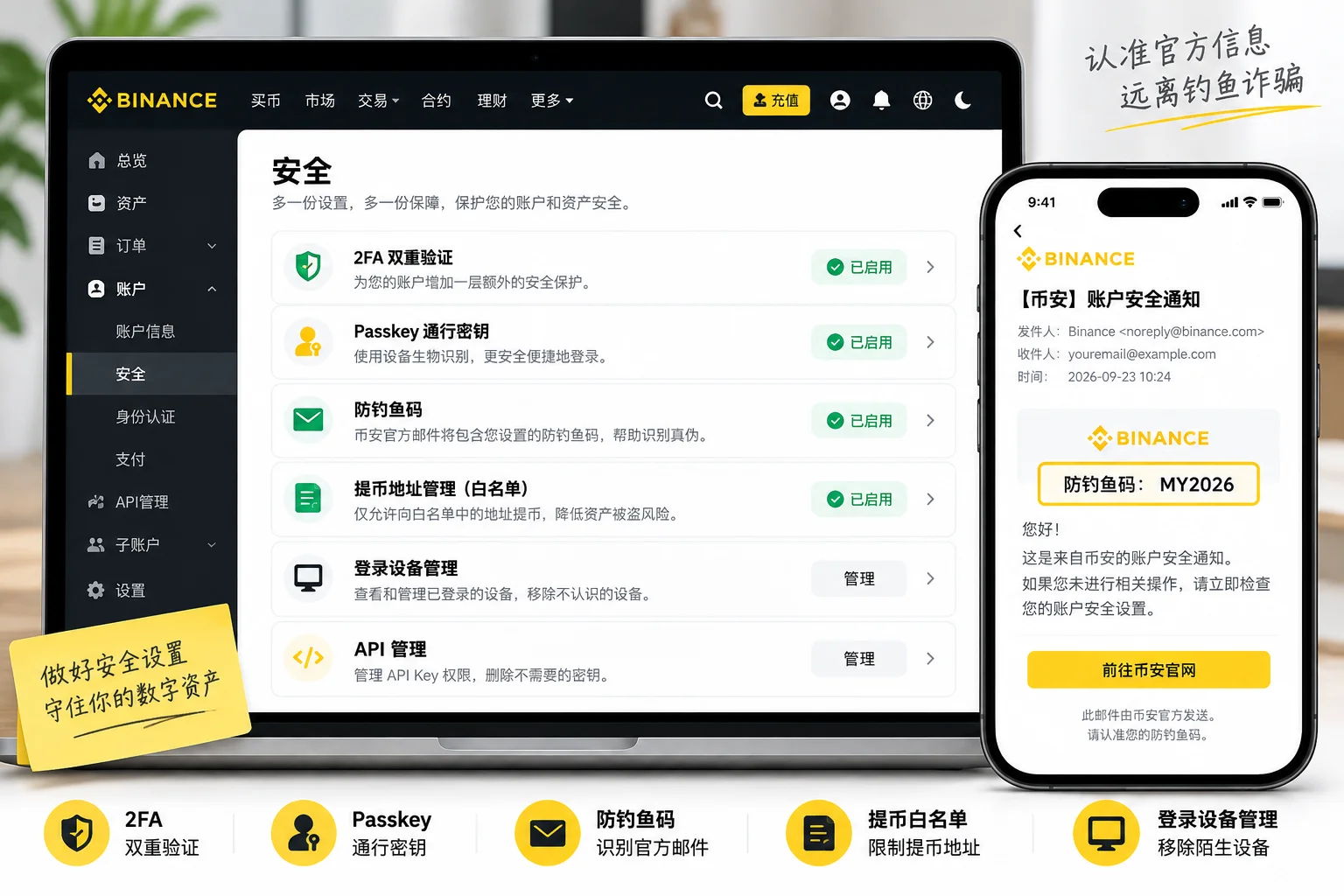
Two features are especially worth attention in 2026: Passkey and 2FA Verification Strategy.
Binance currently allows eligible users to configure different verification methods for login, asset operations, and account settings, combining Authenticator, Passkey, SMS, and email verification instead of relying on the same single code for every sensitive operation. The official guidance currently states you can use the feature if you've completed identity verification or your account assets exceed 100 USDT — meeting one of the two conditions is enough.[4]
Passkey uses encrypted credentials stored locally on the device to complete verification, and resists credential theft by fake login pages better than traditional passwords and verification codes.
To create a passkey, see: Binance Passkey hands-on video tutorial
New in 2026: you can also set Withdraw Protection
Binance currently provides Withdraw Protection. Once enabled, you can actively set a 1–7 day on-chain withdrawal lock period that blocks on-chain withdrawals during that time.[5]This feature is better for accounts that hold assets long-term and don't need frequent withdrawals; if you have on-chain withdrawal needs every day, it may not be suitable to enable.
For the full security settings entry and steps, see: Binance account security settings checklist: how to turn on 2FA, anti-phishing code, and withdrawal whitelist (2026)
If you receive a Binance email or SMS, don't rush to click
Phishing messages love to create urgency:
"Your account will be frozen in 24 hours." "Unusual login detected, verify immediately." "Your KYC has expired." "Your assets are at risk."
Seeing this kind of message, many people's first reaction is to click right away.
The safer order should be:
First open the official Binance App you already have installed, and check whether the account has the corresponding anomaly.
Don't enter directly from buttons in the SMS or email.

Setting up an Anti-Phishing Code is also very useful.
It shows an identifier only you set up in Binance's official communications, helping you recognize messages impersonating Binance.
But note:
Having an Anti-Phishing Code doesn't mean you can stop checking URLs and account activity entirely.
It's just a supplementary recognition mechanism, not a universal proof.
Binance's 2026 account security guide similarly recommends combining biometrics, Passkey, and Anti-Phishing Code, and using Binance Verify to further verify when you doubt a message's source.
For how to set up the Anti-Phishing Code, see: Binance anti-phishing code hands-on video tutorial
More scam cases: Crypto beginner anti-scam guide: 5 scams I've seen and 1 life-saving principle
If you see a Binance risk warning before transferring, don't force "continue"
An account doesn't have to be hacked for you to lose assets through fraud.
These two things should be distinguished:
Account takeover
The attacker gains account access, then moves assets without your authorization.
Fraud transfer
The account is still under your control, but the scammer tricks you into confirming the transfer yourself.
The second case is now very common.
Binance's 2026 security mechanisms don't just include pre-transfer risk warnings. The official guidance explains that when risk signals are high, the system may also temporarily pause withdrawals, resuming after a security check and confirmation of the account owner.[6]
If, when preparing to withdraw or transfer, the following suddenly appear:
- Risky address;
- Fraud risk;
- High-risk platform;
- Security verification;
- Withdrawal paused;
don't keep clicking or find ways around it just to save time.
Stop first and check:
- Who gave you the address?
- Do you actually know the recipient in real life?
- Is someone on the phone or in chat urging you to act?
- Did the other party promise "guaranteed profit," "lift the freeze," or "pay a deposit"?
- Is someone asking you to move funds to a so-called "secure account"?
Binance lists Early Alerts as one of the important security mechanisms for reducing fraud losses in its 2026 account security guide.
A new withdrawal address should still be tested with a small amount first
Although "a first large withdrawal" isn't a cause of account hacks, it's still a very important asset-safety habit.
When using an address for the first time, first confirm:
- The coin is right;
- The address is right;
- The network is right;
- Whether a Memo/Tag is needed;
- Whether the receiving platform supports the corresponding network.
You can do a small test first, and continue only after confirming arrival.
On-chain crypto transfers usually can't be simply reversed.
For what to do after a wrong-network transfer or a mistyped address, see:
Can wrong-chain transfers be recovered? Withdrawal network and wallet address (2026)
Exchange account security and wallet security are not the same thing
Many beginners assume:
"Moving coins to a wallet must be safe."
It's not.
| Type | Main risks |
|---|---|
| Exchange account | Password, email, 2FA, device, API, platform risk |
| Self-custody wallet | Seed phrase, private key, malicious approvals, fake wallet, phishing signatures |
A Binance account doesn't have you keep a "Binance account seed phrase."
Seed phrases mainly belong to the self-custody wallet security category.
If you use MetaMask, Trust Wallet, hardware wallets, and similar products, you need to learn separately how to protect the seed phrase and private key.
What is a crypto wallet? Wallet address, seed phrase, and asset security (2026)
Moving coins to a wallet just hands more of the asset control and risk to yourself; it doesn't mean the risk disappears automatically.
I'd rather you build these 5 account security habits
1. Do security settings first on a new account, then deposit
Don't deposit right after registering.
First handle:
- A unique password;
- 2FA;
- Passkey;
- Email security;
- Anti-Phishing Code.
2. Don't reuse passwords for important accounts
Don't share the same password across exchange, email, and social accounts.
3. Test a new address with a small amount on the first transfer
Confirm the address and network are right before transferring a large amount.
4. Regularly delete unused devices and APIs
Don't leave permissions long-term for old phones, old computers, trading bots, and third-party platforms.
5. Don't accept "remote guidance" from strangers
For issues involving accounts and assets, open the official App yourself and find support.
Don't follow the operations of strangers on the phone, Telegram, WeChat, WhatsApp, or SMS.
FAQ
What's the first thing to do if my Binance account is hacked?
If you've already found clear unauthorized login, transactions, withdrawals, or security-setting changes, you should prioritize protecting the account. While you can still log in, go to the Binance security page and find the "Disable Account" feature, then continue with password, email, device, API, and support appeals.
Does receiving an unfamiliar-login SMS mean my Binance account has been hacked?
Not necessarily.
Scammers also send bulk "account anomaly," "unfamiliar login," and "assets frozen" SMS to trick users into clicking phishing links.
Don't click the link in the SMS. Open the official Binance App yourself and check devices and account activity.
Can I tell a Binance support person my verification code?
Don't hand over SMS codes, email codes, Authenticator codes, passwords, or Passkeys to strangers who contact you first.
When you need support, enter support proactively from the official Binance App or website.
The hacker already changed my password and I can't log in. What now?
Don't keep trying "account recovery links" from unknown sources.
Enter the account recovery and support flow from the official Binance website or App, and prepare identity verification materials, anomaly notifications, and relevant transaction evidence.
Is SMS-only 2FA enough?
Safer than no 2FA at all, but SMS verification still carries risks like SIM swapping.
Binance currently supports Authenticator, Passkey, and other methods, and provides a 2FA Verification Strategy that lets eligible users set different verification combinations for different scenarios.
Why is Passkey more phishing-resistant than a password alone?
Passkey completes authentication using encrypted credentials on the device, without submitting a traditional password or one-time code to the website, so it has stronger resistance to fake login pages and traditional phishing.
But you still need to manage your own device and account recovery method.
After an account hack, can the assets still be recovered?
There's no single answer.
If the funds are still in the platform's internal process, they may be further handled by risk control or manual review; if an irreversible on-chain transfer has already completed, recovery becomes markedly harder.
The sooner you lock the account, contact support, and save evidence after noticing an anomaly, the better.
Is moving to a personal wallet necessarily safer than keeping funds on an exchange?
No.
An exchange and a self-custody wallet just have different risk models.
An exchange mainly faces account login, platform, and permission risks; a personal wallet requires you to bear the private key, seed phrase, and malicious approval risks yourself.
Final summary
What Binance account security should really guard against isn't just "the password being guessed."
More common attack paths include:
Fake support tricking out verification codes, a compromised email, phishing sites, malicious attachments, SIM swapping, old devices, API Keys, and third-party tools.
If you've already found a clear anomaly, remember this order:
Disable the account first → then protect the email and password → clean up devices, 2FA, Passkey, API, and withdrawal permissions → finally handle it through official support and save evidence.
Day to day, don't rely on just one protection method.
A unique password, email 2FA, Authenticator, Passkey, Anti-Phishing Code, and regular account-activity checks are more effective than "recovering after something happens."
Data verification notes
Key facts in this article were verified on 2026-10-16 against public materials from Binance's official help center, Binance Academy, and the Binance Blog, item by item:
- What disabling the account does: Binance's official guidance explains that disabling the account pauses trading and withdrawals while removing API Keys and authorized devices, making it suitable as an emergency stop-loss measure once abnormal access is confirmed. Source: Binance official: How to disable your Binance account.
- Residual risk of SMS-only 2FA: Binance's security materials warn that while SMS 2FA is better than no 2FA at all, it still carries SIM swapping risk compared to Authenticator or Passkey. Source: Binance Academy: What is two-factor authentication (2FA).
- Where to check login devices and IPs: Binance's security page Device and Activities lets you view authorized devices and recent login IPs; remove unfamiliar devices promptly. Source: Binance Academy: Secure your Binance account in 7 simple steps.
- Eligibility threshold for the 2FA verification strategy: Binance's official guidance states that completing identity verification or having account assets over 100 USDT — meeting one of the two — is enough to use the 2FA Verification Strategy. Source: Binance Academy: How to use Binance's 2FA verification strategy.
- Withdraw Protection lock period: After enabling Withdraw Protection, you can set a 1–7 day on-chain withdrawal lock period that blocks on-chain withdrawals during that time. Source: Binance official: How to set up Withdraw Protection.
- High-risk withdrawals may be temporarily paused: Binance's 2026 account security materials explain that when risk signals are high, the system may temporarily pause withdrawals, resuming after a security check and confirmation of the account owner. Source: Binance Blog: Account security 2026 edition.
Related articles
- Binance account security settings checklist: how to turn on 2FA, anti-phishing code, and withdrawal whitelist (2026)
- Crypto beginner anti-scam guide: 5 scams I've seen and 1 life-saving principle
- How to prevent wallet theft? Seed phrase, wrong-chain transfers, approval risks (2026)
- What is a cold wallet? How to store a seed phrase most safely (2026, 5 methods compared)
- How to set up Google 2FA? Binance / OKX binding steps (2026)
- Binance Passkey hands-on video tutorial
- Binance anti-phishing code hands-on video tutorial
Risk note: this article introduces cryptocurrency account security knowledge and is not investment, legal, or asset-recovery advice. When account anomalies and asset losses are involved, verify and handle them through Binance's official channels first.
- Binance official: How to disable your Binance account
- Binance Academy: How to use Binance's 2FA verification strategy
- Binance Academy: What is two-factor authentication (2FA)
- Binance Academy: Secure your Binance account in 7 simple steps
- Binance Blog: Account security 2026 edition
- Binance official: How to set up Withdraw Protection
- 2026-10-16UpdateAdded evidence-chain superscripts and data verification notes; updated the verification date for key facts.
- 2026-09-23UpdateRewrote into a "4-step self-rescue + 5 causes" structure, adding SIM swapping, compromised email, malicious attachments, the 2FA verification strategy, Early Alerts, and secondary scams.
See ourEditorial Policy and the correction process in ourCorrections Policy.
The CoinTrailHub editorial team focuses on crypto education for beginners, exchange security and P2P trading risk. This article is compiled from official sources and public data, reviewed by humans, and strives for accuracy but is not investment advice.
Last updated:2026-09-23 · Content reviewed by humans · Learn more
© 2026 CoinTrailHub · Original content. Reproduction or rewriting without permission is prohibited.