
How to Save on OKX Fees? Maker Rates + OK800 Rebate Combined, How Much You Save in 2026
Table of contents

Binance new user rewards
20% trading fee rebate
Official Binance registration. Complete identity verification (KYC) to trade and withdraw.
Core information
OKX regular-user (LV1) common rates:
| Trade type | Maker | Taker |
|---|---|---|
| Spot | 0.08% | 0.10% |
| USDT-margined / coin-margined futures | 0.02% | 0.05% |
You save by stacking two things:
- Place maker orders to get the Maker rate: spot drops from 0.10% to 0.08%, futures from 0.05% to 0.02%.[1]
- OK800 rebate: if your signup and account page shows a 20% fee rebate, then after you actually incur eligible fees, you get the corresponding rebate according to the page rules.
Note: OKB cannot offset fees — this is different from Binance's BNB discount, so don't carry over your Binance habits.[2]
Do the math: if your account is eligible for a 20% rebate, spot maker 0.08% × (1−20%) ≈ 0.064%; futures maker 0.02% × (1−20%) ≈ 0.016%. More below.
About 5 minutes to read. Remember the two easiest things to get wrong first: OKB can't offset fees, and a limit order is not the same as Maker.
When I first started using OKX, I also thought fees were too simple.
Spot is only 0.1% once — how much could it cost?
Later, after more trades, I checked my trade history and realized fees are charged on every trade: once when buying, once more when selling. Each one looks small, but they add up to a real amount.
Futures are even clearer — the fee is not based on margin, but on the entire position value. When you keep the margin the same but use higher leverage to enlarge the notional position, the bigger the position, the higher the open/close fees.
So now on OKX I make three habits first: confirm the OK800 rebate is active at signup, place maker orders whenever I can, and avoid unnecessary frequent trades.
OKX spot and futures base rates
Common base rates for regular users:
| Trade type | Maker | Taker |
|---|---|---|
| Spot | 0.08% | 0.10% |
| USDT-margined futures | 0.02% | 0.05% |
| Coin-margined futures | 0.02% | 0.05% |
These are the common rates for regular users (LV1).
VIP tiers, special trading pairs, zero-fee events and limited-time campaigns can all affect the final rate. Before actually placing an order, check your own fee tier in the account — don't just calculate from a rate table you found online.
For specific rates, see the OKX official fee page.
Spot buys and sells both charge fees
The spot fee formula is simple.
Fee = actual fill amount × rate
For example, buying BTC with 1,000 USDT at the 0.10% Taker rate:
1,000 × 0.10% = 1 USDT
This buy incurs about 1 USDT in fees.
If it fills as a maker order, at 0.08%:
1,000 × 0.08% = 0.8 USDT
When you sell, another fee is charged on the actual fill amount at that time. So one full buy-plus-sell round is two charges.
What's the difference between Maker and Taker
Many beginners record "limit order = Maker" and "market order = Taker." That's not entirely right.
The real criterion is whether the order immediately consumes existing orders in the order book:
- Order enters the order book and waits for someone to fill it → usually Maker
- Order fills immediately against an existing resting order → usually Taker
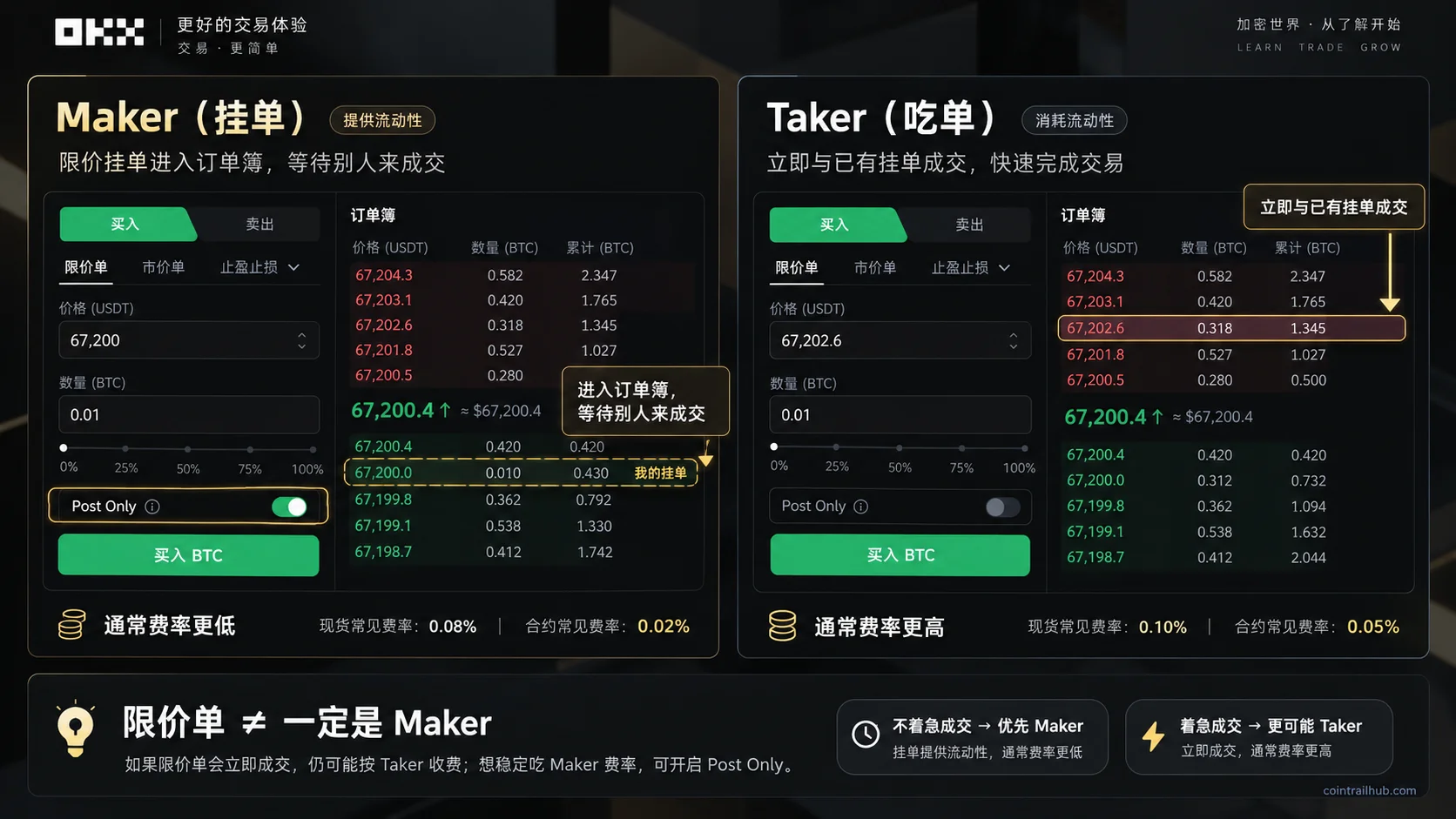
Figure: OKX Maker vs Taker. A Maker order enters the order book and waits to be filled, usually at a lower fee; a Taker fills immediately against an existing resting order. A limit order is not necessarily Maker; to avoid immediate consumption, use Post Only.
Example: suppose BTC's current lowest ask is 60,000 USDT and you place a 60,100 limit buy. Because your bid is above the lowest ask, this order is likely to fill immediately — and you'd still be charged the Taker rate.
So a limit order is not the same as Maker.
To avoid an order filling immediately as a Taker, enable Post Only (maker only) on the trading page. With it on, if the order would fill immediately, the system usually cancels it instead of letting it fill as a Taker.[3] Note that Post Only guarantees Maker status, not that the order will ultimately fill.
How futures fees are calculated
The easiest thing to get wrong with futures isn't the rate, but what amount the fee is based on.
It's based on the entire position value, not the margin.
Suppose you use 1,000 USDT of margin to open a 10,000 USDT position (10x leverage). A market order to open, at the 0.05% Taker rate:
10,000 × 0.05% = 5 USDT
Opening deducts about 5 USDT, and closing deducts another charge.
Opening with a maker order (Maker 0.02%): 10,000 × 0.02% = 2 USDT — the savings are obvious.
This is also why I don't recommend beginners frequently use high leverage to enlarge positions: before the price even moves far, the open fee, close fee, slippage and funding fee have already shaved off a layer.
The funding rate is not the same as a trading fee
The funding rate is a periodic payment between long and short sides of a perpetual futures contract, not an ordinary open/close fee.
Generally:
- When the funding rate is positive, longs pay shorts
- When the funding rate is negative, shorts pay longs
Most pairs settle every 8 hours, though some may use a 4-hour or other cycle. You only participate in a settlement if you hold a position across the settlement time.
So when calculating the real cost of futures, you can't look at the open fee alone — add the close fee, funding fee and slippage together.
Can OKB offset fees? No
This is where I got it wrong at first.
If you're used to Binance, you reflexively assume "holding the platform token offsets fees" — Binance's BNB discount is up to 25% on spot. But OKX's OKB is different.
OKB cannot be used to offset trading fees.
OKX's official fee savings mainly come from two things: placing maker orders for the Maker rate, and VIP tiers.
As of September 2026, OKX officially states: holding OKB cannot be used to offset trading fees, and OKB holdings do not count toward fee-tier upgrades. This is different from Binance's mechanism of using BNB to offset part of trading fees.[4]
Don't carry your Binance BNB discount experience directly over to OKX — the two platforms have different money-saving paths. To compare how the Binance approach saves, see How Much Are Binance Fees? Spot/Futures/Withdrawal Rates, BNB Discount + BN522 Rebate Saving Up to 40%.
How to save on fees
The paths to save, ordered from easiest to hardest:
- Place maker orders whenever you can, enable Post Only to get the Maker rate
- Sign up with OK800 to get the 20% rebate
- Reach VIP once your volume or assets qualify
- If you're already VIP on another exchange, ask support about tier matching
Place maker orders for the Maker rate
Spot Maker 0.08% is 20% lower than Taker 0.10%; futures Maker 0.02% is 60% lower than Taker 0.05%. The gap is obvious, especially for futures.
For orders that don't need to fill immediately, place a limit order + Post Only and let the order enter the book to wait.
VIP tier fee reduction
OKX's VIP tiers are mainly determined by account assets and 30-day trading volume, and the volume thresholds differ slightly across product lines. The platform recalculates the tier daily — the more assets and volume you have, the lower the fee; some high-tier users can even get a negative Maker rate (a rebate for placing orders).
For specific thresholds, check the official fee page, as they may adjust over time.
If you're already VIP on another exchange, ask OKX support whether tier matching is available. It's not guaranteed, but worth asking.
Sign up with OK800 for the 20% rebate
New users enter the referral code OK800 at signup; once the referral relationship is established, fees are rebated at the ratio shown on the page (the ratio confirmed on this site is 20%). More in the next section.
Using OK800: 20% fee rebate
New users signing up for OKX can enter:
OKX referral code: OK800
After signing up with OK800, don't rush to trade — go into your account and confirm the referral relationship / rebate is active.
The key is to check whether the page shows a fee rebate ratio. If it shows 20%, the code is bound successfully and the rebate relationship is established.
The "20% rebate" here means that when the referral relationship is valid, the account keeps meeting the conditions, and platform rules haven't changed, fees are continuously rebated at the ratio shown on the page — not a one-time signup reward.
The rebate also has boundaries: VIP tiers, regional restrictions, special trading pairs, zero-fee events and platform rule adjustments can all affect rebate eligibility and ratio. Orders that didn't incur fees have no corresponding rebate.
The referral relationship is usually established at signup and generally can't be changed later. Confirm you've entered the code correctly before completing signup.
Sign up with OK800 and see the 20% rebate
How much OK800 saves
Below is an estimate. The premise is: your OK800 signup / rebate page shows a 20% fee rebate, and your account's futures trading is also eligible for the 20% rebate. Actual fees and rebate amounts are what your account records show.
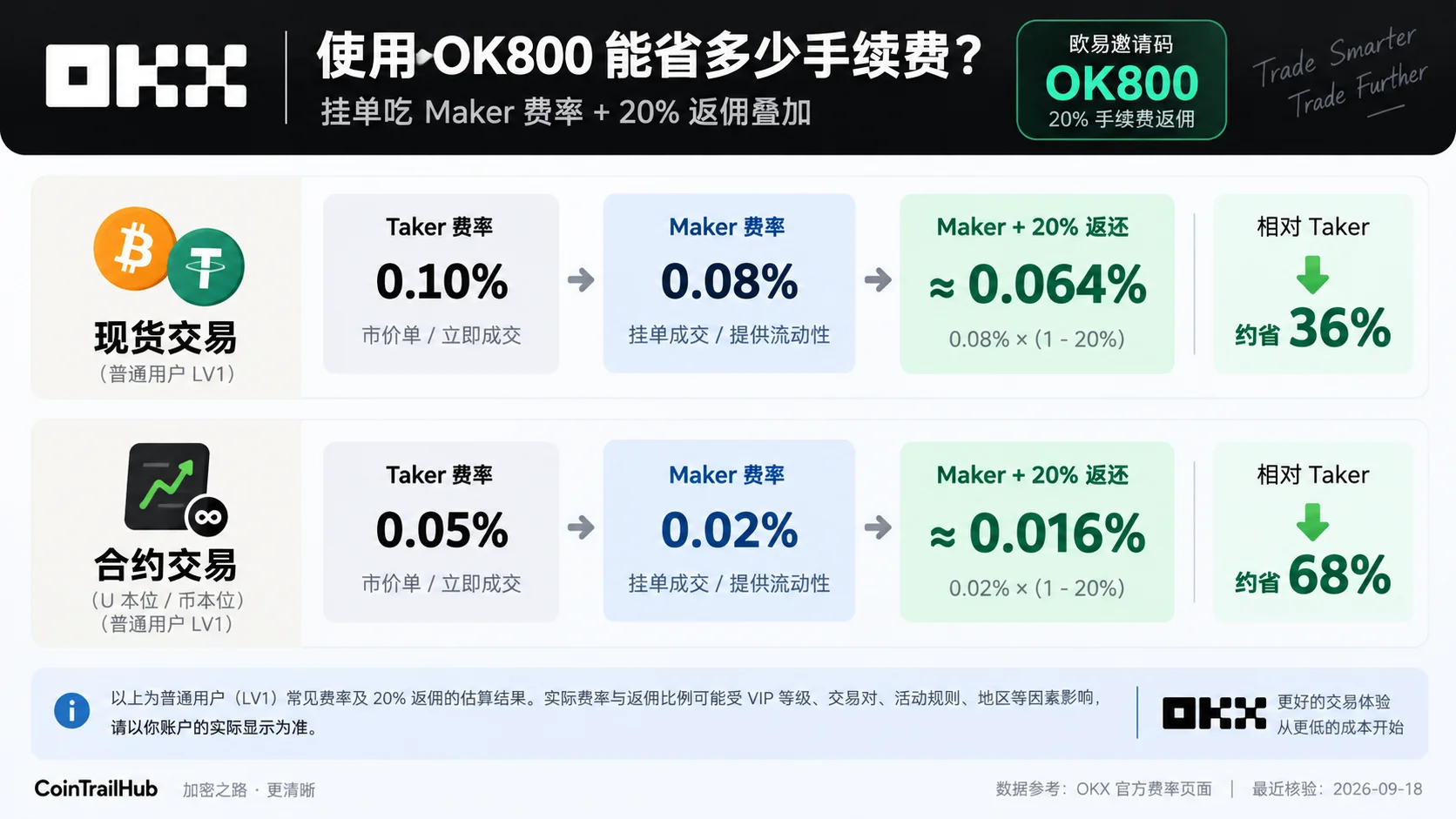
Figure: estimated cost after stacking Maker rate and the OK800 20% rebate. Regular-user spot drops from Taker 0.10% to Maker 0.08%, then with an estimated 20% rebate to about 0.064%; futures drops from Taker 0.05% to Maker 0.02%, then to about 0.016%. Actual results are what your account rate and rebate records show.
| Trade scenario | Regular-user Taker | Maker | Maker + estimated 20% rebate net cost | vs Taker |
|---|---|---|---|---|
| Spot | 0.10% | 0.08% | ~0.064% | ~36% less |
| Futures | 0.05% | 0.02% | ~0.016% | ~68% less |
The "36% / 68% savings" here is relative to a regular user filling directly as Taker, not the discount OK800 alone provides. The real savings come from stacking two parts: placing maker orders for the Maker rate + the eligible 20% rebate.
Futures maker orders save the most, because the gap between Maker and Taker rates is large there.
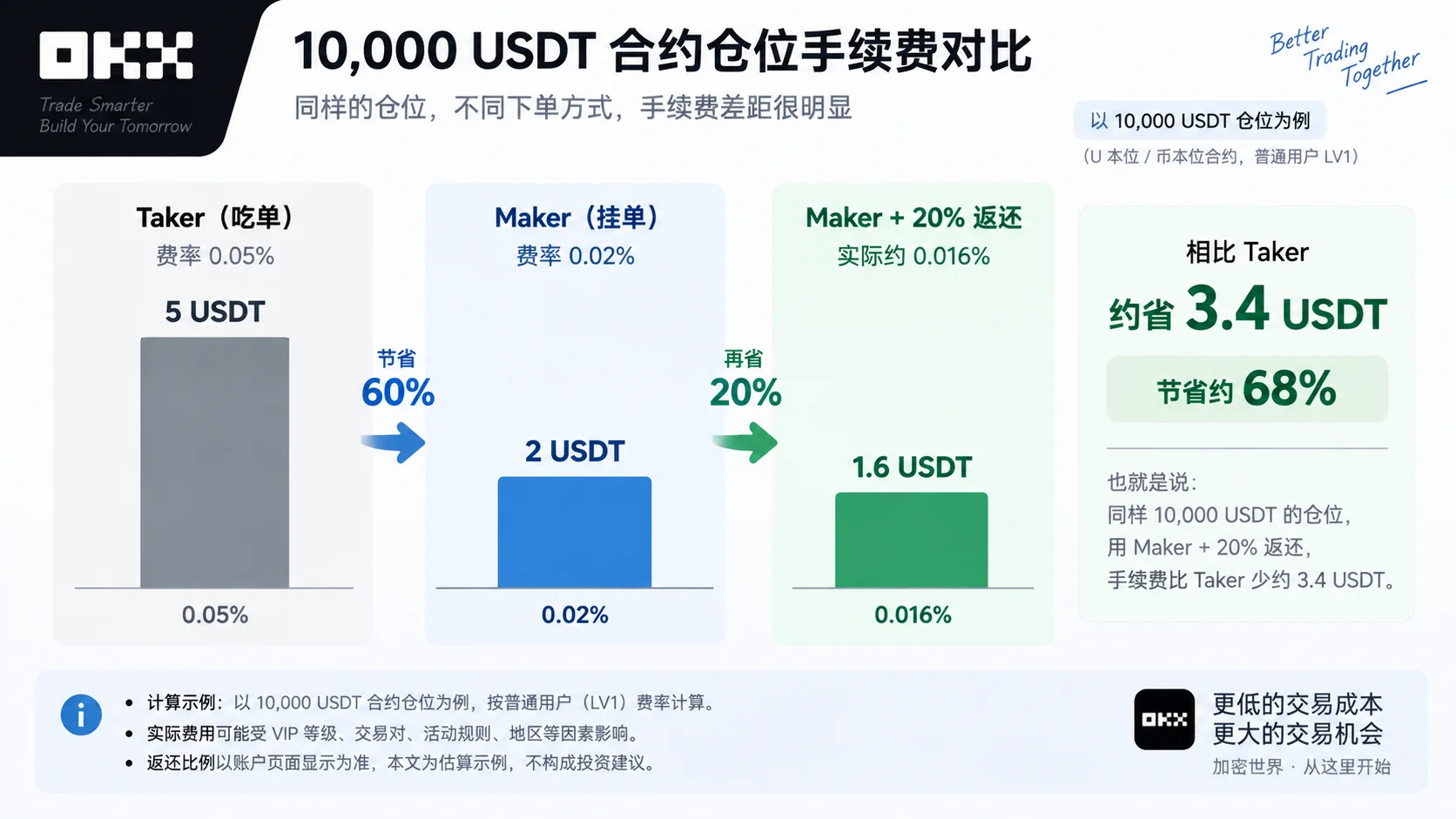
Figure: fee comparison for a 10,000 USDT futures position. Estimated with common regular-user rates: Taker about 5 USDT, Maker about 2 USDT; with a 20% fee rebate, the estimated net Maker cost is about 1.6 USDT, saving about 3.4 USDT vs Taker. Actual results are what your account rate and rebate records show.
By monthly futures volume bracket, to feel the scale (Taker base rate → Maker + estimated 20% rebate):
| Monthly futures volume | Base Taker fee | Maker + estimated 20% rebate | Saved per month |
|---|---|---|---|
| 10,000 USDT | 5 USDT | 1.6 USDT | 3.4 USDT |
| 100,000 USDT | 50 USDT | 16 USDT | 34 USDT |
| 500,000 USDT | 250 USDT | 80 USDT | 170 USDT |
This table is an estimate, to feel that "the bigger the scale, the more absolute amount you save." Actual results are what your account fill and rebate records show.
What fees do deposits and withdrawals have
OKX generally does not charge an on-chain deposit fee when you deposit digital assets to OKX, but moving assets off the platform or out of a wallet may incur a withdrawal fee or on-chain network fee.
When withdrawing from OKX to an external wallet, the page shows the fee by coin and selected network. The fee can vary with network congestion, coin and chain.
When actually operating, look at the real-time fee shown on the withdrawal page — don't memorize stale numbers from months ago. More important than the fee is picking the right network — choose whatever network the receiving side supports. Copy the address right but pick the wrong network, and the asset may not auto-credit, and in severe cases may not be recoverable.
Internal transfers between OKX accounts are usually free (e.g. from the funding account to the trading account) — that's an on-platform operation, not on-chain.
Where to see your actual fees
After a trade, look directly at your fill and fee records:
- Spot: Trade → Spot → Orders → Fill history
- Futures: Futures → Orders → Trade history
- Rebate: Account center → Referral / rebate page
Menu names can vary slightly between app versions — go by what your account shows.
The calculations in tutorials only help understanding. Your own fill records, fee records and rebate records are the final result.
Related reading
- OKX Referral Code 2026 Tested: OK800 Signup Tutorial & 20% Fee Rebate
- How to Spot Trade on OKX? Market Orders, Limit Orders and Steps (2026)
- Binance vs OKX: Which Is Better for Beginners? A 5-Dimension Hands-On Comparison
- How Much Are Binance Fees? Spot/Futures/Withdrawal Rates, BNB Discount + BN522 Rebate Saving Up to 40%
FAQ
What are OKX's spot and futures fees?
Regular users: spot Maker 0.08% / Taker 0.10%, futures Maker 0.02% / Taker 0.05%. Go by what your account actually shows.[5]
Can OKB offset fees?
No. OKX has no OKB offset mechanism — don't carry your Binance BNB discount experience over directly.
Does a limit order always count as Maker?
Not necessarily. If a limit order fills immediately after submission, it can still be charged as Taker. To reliably get the Maker rate, enable Post Only.
What is the futures fee based on?
The entire position value, not the margin. The higher the leverage, the bigger the position value for the same margin, and the higher the fee.
Where do I see OK800's 20% rebate?
After signing up, check the referral relationship / rebate page in the account center. If the page shows 20%, it's active.
Can I add OK800 after already signing up?
The referral relationship is usually established at signup; accounts that already signed up or already bound another referral relationship generally can't change it directly. Whether there's a rebind entry is what your account page shows.
Why does my actual fee differ from the numbers in this article?
Common reasons: a different VIP tier, using a special trading pair, whether the order was actually Maker or Taker, or the rebate hasn't settled yet. Your actual account records are the final word.
What I do myself
On OKX now, I confirm the OK800 rebate is active at signup, place maker orders whenever I can (with Post Only on), and after that I stop obsessing over every individual fee.
When actually trading, I care more about position size and frequency. What gets an account into trouble is usually not a few extra fees, but leverage too high, frequent open/close, or chasing rallies and dumping on every swing.
OK800 can save you part of the fees, but it can't solve the risk of trading itself. Don't get that order backwards.
To prepare your first deposit, see How to Buy USDT on OKX: P2P Step-by-Step, Payment Methods & Avoiding Account Freezes (2026).
Data verification notes
The key facts in this article were checked against OKX's official documentation on 2026-10-16, item by item:
- Maker and Taker rates: regular-user spot Maker 0.08% / Taker 0.10%, futures Maker 0.02% / Taker 0.05%; placing maker orders for the Maker rate reduces cost. Source: OKX official fee page.
- OKB offset: OKB cannot be used to offset trading fees, which is different from Binance's BNB discount mechanism. Source: OKX official help — how to reduce trading fees.
- Post Only: with Post Only on, if the order would fill immediately, the system usually cancels it instead of letting it fill as a Taker; Post Only guarantees Maker status, not that the order will fill. Source: OKX official help — how to trade with different order types.
- OKB and fee tiers: as of September 2026, OKX officially states that holding OKB cannot offset trading fees, and OKB holdings do not count toward fee-tier upgrades. Source: OKX official help — how to reduce trading fees.
- Rates go by the account: VIP tiers, special trading pairs and campaigns all affect the final rate; go by the rate your account actually shows. Source: OKX official fee page.
Risk notice
The "20% rebate" mentioned here means that when the referral relationship is valid, the account keeps meeting the rebate conditions, and platform rules haven't changed, fees are continuously rebated at the 20% ratio shown on the page — not a one-time signup reward.
Rebate eligibility, settlement asset, settlement timing, applicable products and ratio can all be affected by VIP tiers, regions, special trading pairs, campaign rules and platform policy.
If OKX later adjusts fees, features or rebate rules, the signup page, your actual account records and the latest official rules prevail.
Digital asset prices are highly volatile, and futures trading also carries leverage, funding fee, slippage and liquidation risks. This article is for learning and operational reference only and is not investment advice.
- 2026-10-16UpdateAdded evidence-chain superscripts and "Data verification notes"; updated the key-fact verification date.
See ourEditorial Policy and the correction process in ourCorrections Policy.
The CoinTrailHub editorial team focuses on crypto education for beginners, exchange security and P2P trading risk. This article is compiled from official sources and public data, reviewed by humans, and strives for accuracy but is not investment advice.
Last updated:2026-09-18 · Content reviewed by humans · Learn more
© 2026 CoinTrailHub · Original content. Reproduction or rewriting without permission is prohibited.