
How to Check If OKX Referral Code OK800 Is Bound? Where to See the Referral Relationship
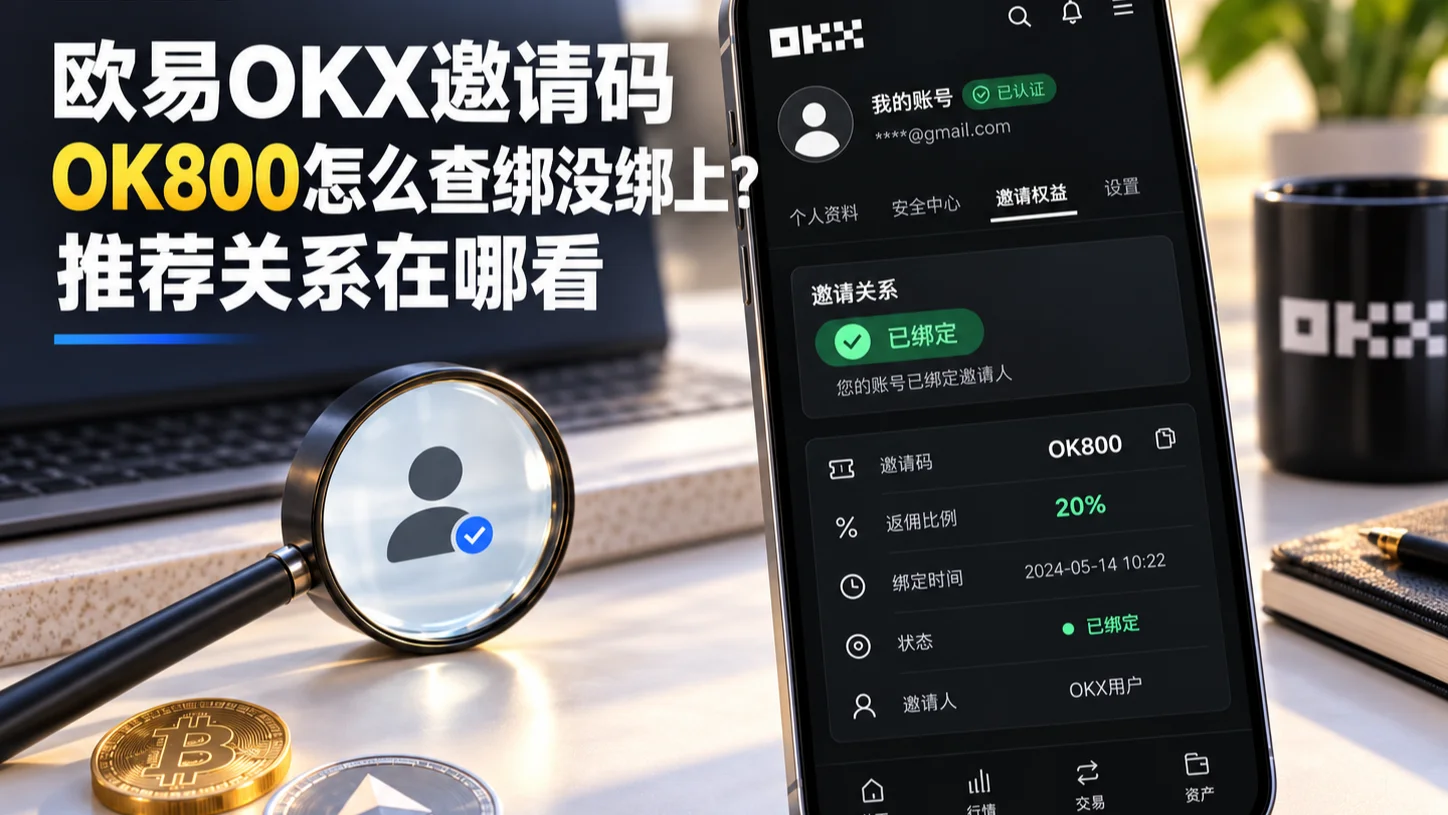
Table of contents

Binance new user rewards
20% trading fee rebate
Official Binance registration. Complete identity verification (KYC) to trade and withdraw.
A lot of people get stuck on the same question right after registering for OKX:
When I signed up, did I actually bind a referral code? Was it OK800? Where can I check?
The easiest mistake to make here is treating "your own referral code" and "the referral code you're bound with" as the same thing.
One note on wording first: in the OKX app and website the fields are called Invite code, Rebate rate and Invite perks. Different localizations use slightly different labels, but they're the same three things.
Straight to the conclusion: to check what you're bound with, look at the "Invite code" currently recorded on your account — not the referral code you see on the "Invite friends" page, which is the code you use to invite others.
If your account has the "Invite perks" entry, go to "User Center → Account info → Invite perks" and look at two fields:
- Invite code: the referral code your account is currently bound/attributed to. If it shows OK800, you're bound to OK800; if it shows a different code, your attribution points elsewhere.
- Rebate rate: the fee-rebate ratio currently applied to you (0%–20%).
If you can't find this entry, don't jump to the conclusion that "nothing is bound" — OKX's referral/Affiliate program menus and entries differ by account, region and app version, and the official help pages themselves note that "some rules may not apply to all customers".
So what this article solves isn't "memorizing one exact menu path" but helping you tell apart three things: your own referral code, the referral code you're bound with, and your rebate rate.
If all goes smoothly it takes under 3 minutes to check. The two easiest ways to stumble: mistaking your own code on the "Invite friends" page for your bound code, and treating a 0% rebate rate as "not bound".
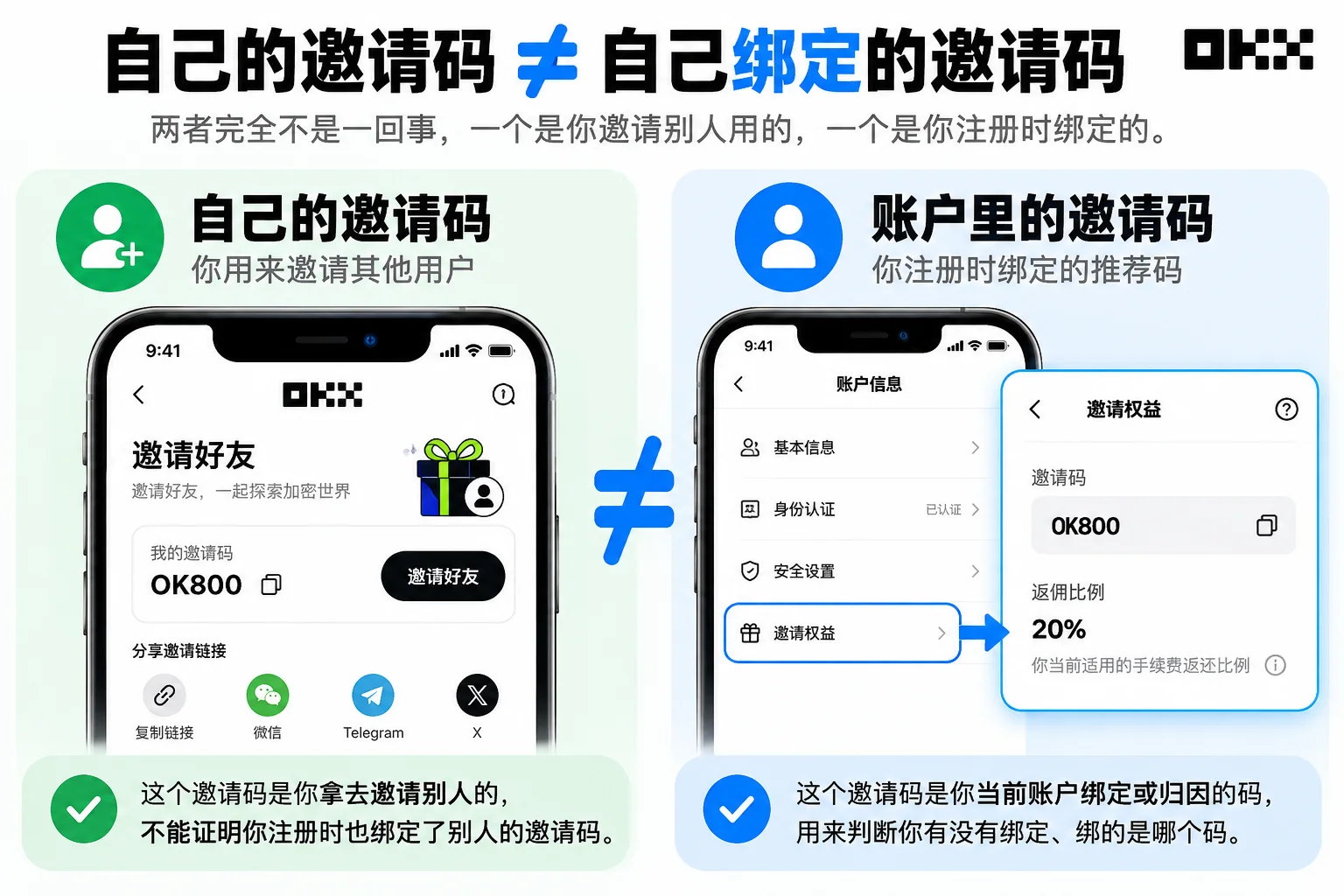
First, be clear: your own referral code ≠ the referral code you're bound with
This is the easiest thing to confuse when checking a referral relationship.
Open OKX's "Invite friends" page and you'll usually see your own referral code, your referral link, and the entry to invite other users.
But all that shows is: this is the code you use to invite others.
It does not prove: that you also bound someone else's referral code when you registered for OKX.
| Page information | What it represents |
|---|---|
| Your own referral code | The code you use to invite other users |
| Your own referral link | Others who register through this link establish a referral relationship with you |
| The Invite code in your account | The referral code your account is currently bound or attributed to |
| Rebate rate | The fee-rebate ratio currently applied to your account |
So if what you want to check is "did I actually bind OK800 when I registered?", don't stare at your own code on the "Invite friends" page — what you really need to confirm is the current account's Invite code.
Where to check: Invite perks
For accounts that support the feature, you can check your binding information at "User Center → Account info → Invite perks".[1]
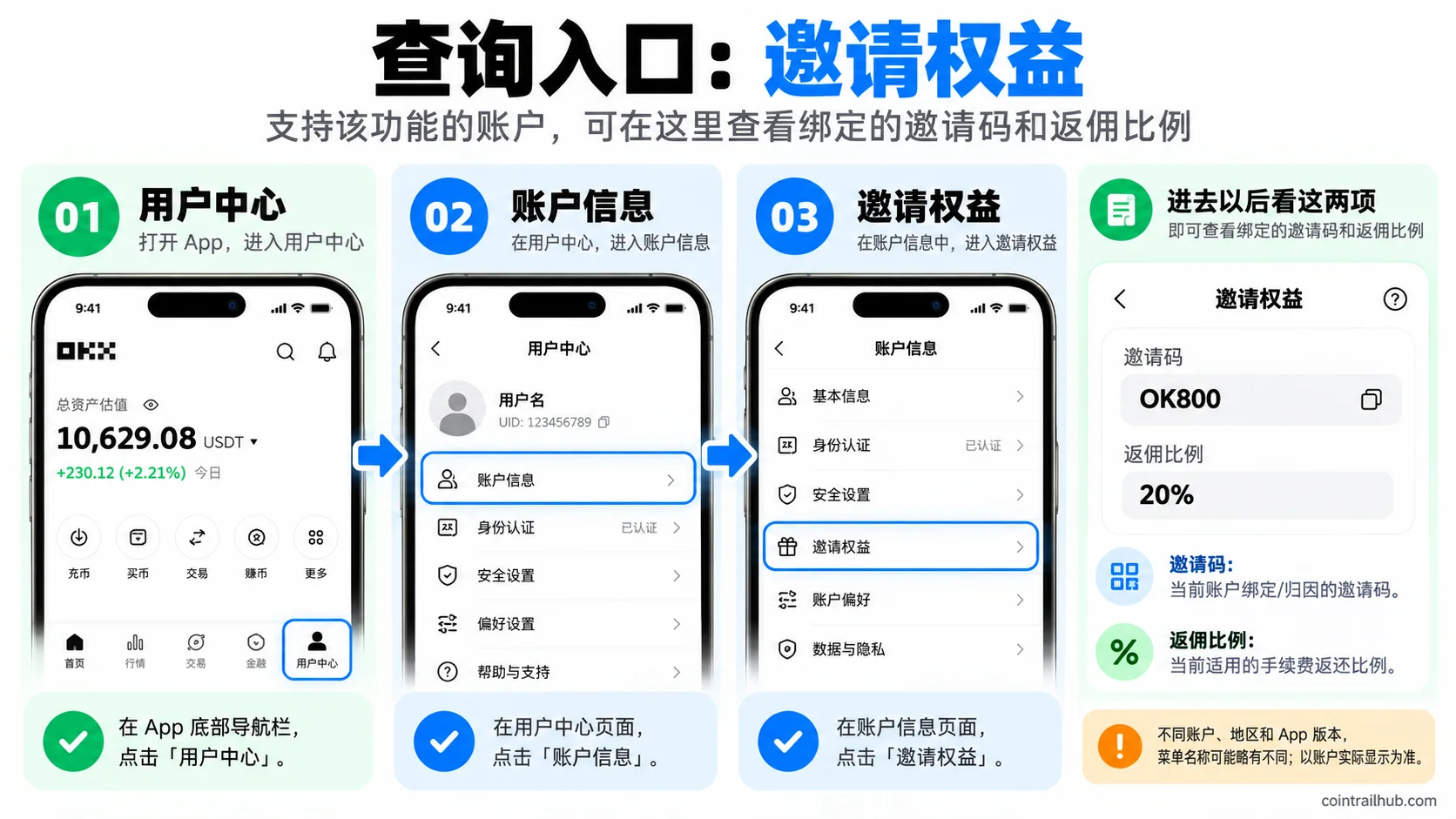
Once inside, focus on two fields:
Invite code — the most important one. If the page shows "Invite code: OK800", the referral attribution code currently recorded is OK800; if it shows a different code, your current attribution is not OK800.
Rebate rate — your fee-rebate ratio, e.g. 20%, 10%, 5%, 0%. It answers "do I have a rebate, and at what ratio", not "am I bound". These two concepts should be kept separate.
Entries differ by client and account; go by what you actually see:
- Web / App common: User Center → Account info → Invite perks. Some versions may label it "Invite rewards" or "Invite benefits" — it's the same entry.
- Users invited by an Affiliate (App): top-left 【grid icon】 → Account settings → Profile → Invite rewards, where you can find the Affiliate invite code used at registration.
- VIP users (App): top-left 【VIP icon】 → Account settings → Profile → Invite rewards; or 【VIP icon】 → My rewards → My benefits to see the rebate ratio.
One key judgment: if your "Profile" page has no "Invite rewards" button at all, the person who invited you isn't an "Affiliate" (Affiliate program user). In that case don't keep digging in the Profile page — go straight to "User Center → Account info → Invite perks" and look at the Invite code and Rebate rate.
⚠️ Menu entries differ by account, region and app version; go by the position actually shown in your account rather than memorizing a single path.
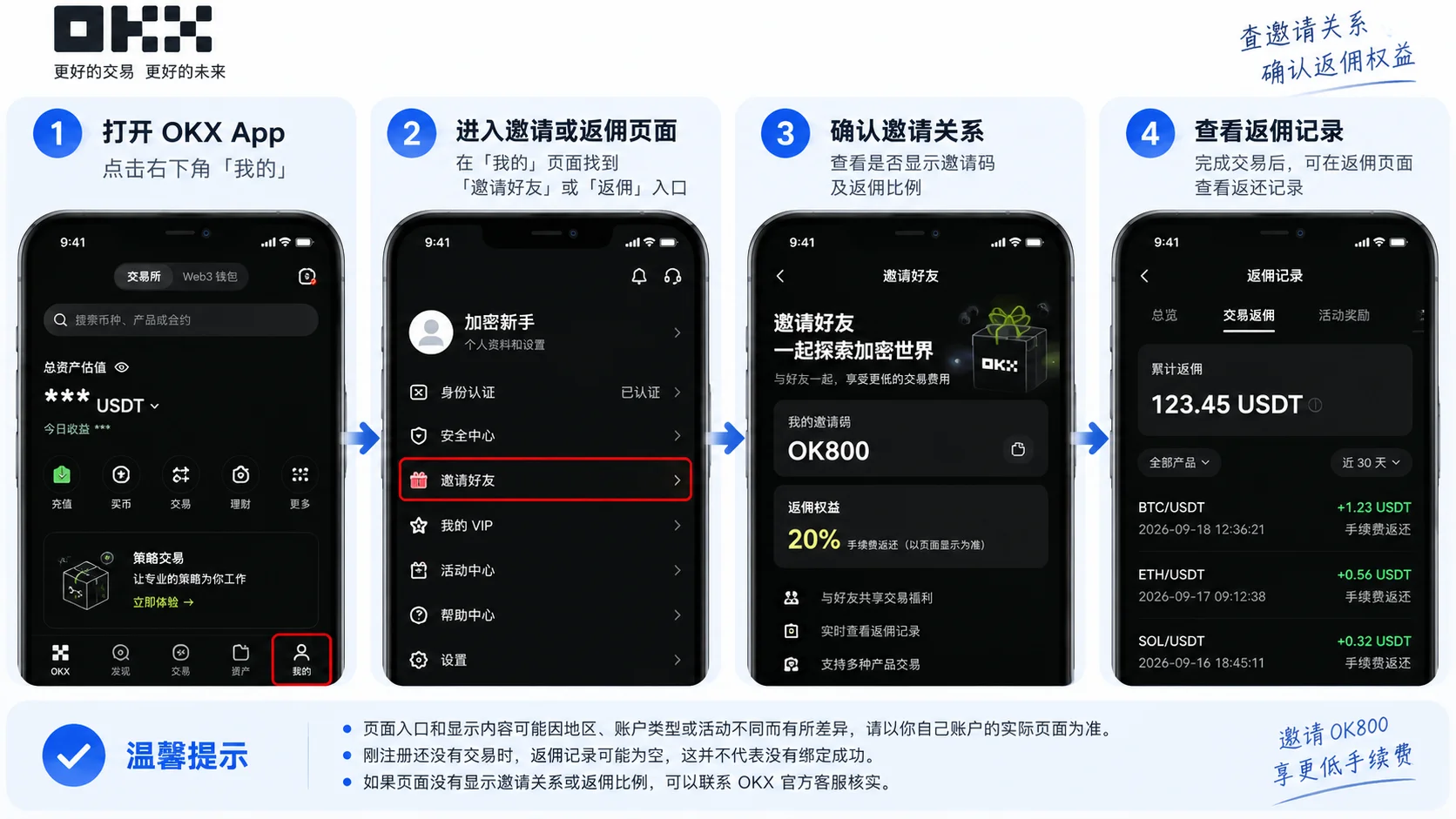
After checking, how do you tell whether it's OK800?
The simplest way is to look at the Invite code.
| What you see | How to interpret it |
|---|---|
| Invite code shows OK800 | The invite code currently recorded on the page is OK800 |
| Invite code shows a different code | Your current attribution is not OK800 |
| OK800 + Rebate rate 0% | You're bound to OK800, but the current rebate ratio is 0% |
| Only "your own referral code" | Cannot be used to judge who you bound at registration |
| Can't find "Invite perks" | There may be region, account or version differences; don't take it alone as a final conclusion |
One line: to judge whether OK800 is bound, the Invite code in your account matters far more than "your own referral code".
Keep three questions separate: binding, rebate, and a specific trade
This is the single most important point in this article — many people can't figure things out because they mix three different questions together:
| What you want to ask | Where to look |
|---|---|
| Am I bound to a referral code? | The Invite code in your account |
| Do I have a fee rebate? | The Rebate rate |
| Why didn't a specific trade rebate? | Whether that trade falls within the rebate-eligible scope |
Binding ≠ rebate. Your account may already be attributed to some channel, but that channel didn't set a fee rebate for this code.
Rebate ≠ rebated on every trade. Even if the Rebate rate shows 20%, not every trade unconditionally rebates 20%.
Let me explain both layers below.
A 0% Rebate rate does not mean you're not bound
OKX's official FAQ explicitly explains: if the Rebate rate shows 0%, it may be that the account is already attributed to a channel, but that channel has not set a fee rebate for this invite code.[2]
In other words, if you see:
Invite code: OK800 Rebate rate: 0%
This means the currently recorded invite code is OK800, but there's currently no fee rebate — not that you're not bound.
Conversely, having a rebate doesn't mean every trade rebates
Even if the page shows "Rebate rate: 20%", don't read it as "every trade's fee will unconditionally rebate 20% from now on".
Two things to know in advance:
- It rebates the fee, not the trade amount, and it's calculated on the net fee, not the total fee shown on the order — this is also why many people find "the rebate received doesn't match the numbers".[3]
- Not every case generates a rebate: fees offset by rebate cards, trial funds or futures trial vouchers, asset-management sub-account trades, broker/market-maker accounts, certain VIP tiers, and regions where rebates aren't supported may not rebate or may be restricted.
So when a specific trade didn't rebate, first check whether it falls within the rebate-eligible scope, rather than pinning it on "not bound".
Is OK800 a fixed 20% rebate?
Don't just go by online claims — go by the Rebate rate actually shown on your signup page and in your account.
OKX's official rules show that the fee-rebate ratio for invited users can differ by Affiliate, Node, region and campaign, and some Affiliate programs support setting a 0%–20% rebate ratio for invited users.[4]
So even if a channel advertises "20%", the verification step most worth doing after registering is still: log into your account and check the final recorded Invite code and Rebate rate.
To understand how much this code actually rebates and how it's calculated, see the on-site article OKX referral code OK800 tested 2026: how to get the 20% fee rebate (with back-end screenshots).
What you see is only the invite code — you usually can't see who invited you
Another commonly asked question: can I find out who actually invited me?
If you query through your account's "Invite perks", the page mainly shows the Invite code and Rebate rate, not the name, phone number, email or account identity of the person behind the code.
The official FAQ is also explicit: the page shows the invite code, not the identity of the person behind it.[5]
So you can usually confirm "which code I'm currently bound to", but you can't directly find out "who specifically is behind this code" from it.
Just registered, and can't find anything yet?
Don't draw conclusions by repeatedly checking within minutes of finishing registration.
OKX's official materials note that registration or recall-related data may not sync immediately: the official guidance suggests system data may not be updated within roughly 3 hours after registration/recall; while the Affiliate re-binding flow in some regions recommends checking the result 24 hours after submitting the application.[6]
So the safer approach is: right after completing registration, recall or other referral-relationship operations, wait for the system to sync before checking again. Don't treat "the page hasn't refreshed yet" as "definitely not bound".
Where do I see the rebate records?
After confirming the binding, whether the rebate arrived and how much is in the "fee rebate" statement, not on the "Invite perks" page:
- App: Assets → top-right 【Statement】 icon → filter the statement type to "Fee rebate".
- Web: Asset management → My assets → Order center → Fund statement, filtered by date and currency.
Menu names may differ across accounts ("My rewards", "Reward center", "Campaign center", "Statement", etc. can all appear). First confirm the two items — "the Invite code you're bound to" and "the Rebate rate" — then dig into the specific statement.
The full troubleshooting for "no rebate received" is a separate article and won't be covered here.
If you're not bound, can you still add it?
This needs to be split by situation, not cut with one stroke.
Situation one: registration not complete yet. The safest approach is to confirm the invite code field already shows OK800 before finishing. Go to the OK800 signup entry, confirm OK800 is filled in on the signup page, then continue.
Situation two: registration already complete. An ordinary referral code (like OK800) can't be filled in or changed afterward the way you'd change a nickname — the registration referral code only takes effect at signup.
Situation three: some regions' Affiliate system has a recall / re-binding mechanism. This is a separate eligibility flow — the official Affiliate rules have an "old-user recall" mechanism (a common condition being no deposit, trading, withdrawal or transfer activity in the past 180 days), and some regions' Affiliate system has a separate re-binding flow that requires system eligibility review through official pages. These are not entry points for "filling in an ordinary referral code".
So the accurate statement is: an ordinary referral code can't be filled in after registering; recall / re-binding is a separate eligibility mechanism, and whether you can use it and whether you qualify depends on your account's actual page and system review. For details, see OKX referral code entered wrong or not at all? You can't add it after registering — code OK800.
Don't close and re-register just to change the referral code
If it's only because you discovered you weren't bound to OK800, closing the account and re-registering just to change the code is not recommended.
OKX has explicitly warned that closing an account and re-registering to use a new referral code may be treated as a violation and affect your account or reward eligibility. (Account closing/freezing options and their rules also depend on your region and account status — for example, whether identity verification has been completed — and vary by OKX's local help center.)
If the account already exists, the safer order is: first confirm whether there's a binding relationship → which code you're currently bound to → whether it's a recallable / re-bindable account → then handle it per the official rules.
One table to understand: is OK800 actually bound?
| What you see | How to interpret it |
|---|---|
| Invite code shows OK800 | The invite code currently recorded on the page is OK800 |
| Invite code shows a different code | Your current attribution is not OK800 |
| OK800 + Rebate rate 20% | Currently shows OK800 with a 20% rebate ratio |
| OK800 + Rebate rate 0% | Currently shows OK800, but the rebate ratio is 0% |
| Only your own referral code | Doesn't show who you bound at registration |
| Can't find "Invite perks" | There may be region, account or version differences; don't take it alone as a final conclusion |
Just remember one line: to check whether you're bound to OK800, look at the Invite code currently recorded on your account — not your own code on the "Invite friends" page.
FAQ
How do I check whether the OKX referral code is bound?
If your account has the "Invite perks" entry, go to "User Center → Account info → Invite perks" and look at the Invite code. If it shows OK800, you're bound to OK800. If you can't find the entry, it may be a region, account or version difference — don't judge from that alone that nothing is bound.
I have my own referral code — does that mean I bound someone at registration?
No. Your own referral code is what you use to invite others; to judge what code you bound at registration, look at your current account's Invite code. The two point in opposite directions.
The Invite code shows OK800 — does that mean it bound successfully?
If the "Invite perks" page clearly shows "Invite code: OK800", it at least means the attribution code currently recorded on that page is OK800. If you just completed registration/recall/re-binding, wait for the system to sync and confirm again.
The Rebate rate is 0% — does that mean I'm not bound?
No. The official FAQ clearly explains that 0% can mean the account is already attributed to a channel, but that channel hasn't set a fee rebate. Binding and rebate are two different concepts.
Why is the rebate I received less than expected?
The rebate is calculated on the net fee, not the total fee shown on the order; also, fees offset by rebate cards, trial funds or futures trial vouchers, and asset-management sub-accounts, broker/market-maker accounts and certain VIP tiers may not generate a rebate.
Why is there no "Invite rewards" button on my Profile page?
It means the person who invited you isn't an "Affiliate" (Affiliate program user). In that case go to "User Center → Account info → Invite perks" instead and look at the Invite code and Rebate rate.
Does OK800 always rebate 20%?
Don't judge by promotional wording alone; go by the Rebate rate actually shown on your signup page and in your account. Some Affiliate systems allow invited users' rebate ratios to be set within 0%–20%, and it's also affected by region and account conditions.
Can I still fill in OK800 after registering?
An ordinary referral code can't be filled in after registering the way you'd change a nickname. Some regions have an old-user recall or re-binding mechanism, but that's a separate eligibility flow, not filling in an ordinary code. Whether you qualify depends on your account's page and system review.
Can I see who my inviter is on OKX?
Usually not. The "Invite perks" page mainly shows the Invite code and Rebate rate, and the official docs state the page shows the invite code, not the identity of the person behind it.
Do I need to hand my account to someone else to check the binding?
No. Never give your login password, SMS/Google Authenticator code, Passkey, API Key, seed phrase or private key to anyone claiming they can "check the invite code for you". The referral relationship can be checked through your own OKX account or official support.
Data verification notes
Key facts in this article were checked against OKX's official referral / Affiliate help documents on 2026-10-16, item by item:
- Where to check: For accounts that support the feature, you can check the currently bound Invite code and Rebate rate at "User Center → Account info → Invite perks". Source: OKX official help center — referral rebate program FAQ.
- Meaning of a 0% Rebate rate: The official FAQ explains that 0% may mean the account is already attributed to a channel, but that channel has not set a fee rebate for the invite code — it does not mean unbound. Source: OKX official help center — Affiliate program FAQ.
- Calculation basis: The rebate rebates the fee, not the trade amount, and is calculated on the net fee rather than the total fee shown on the order page, which is why "received doesn't match the numbers" happens. Source: OKX official help center — Affiliate program FAQ.
- Rebate ratio range: The fee-rebate ratio for invited users can differ by Affiliate, Node, region and campaign, and some Affiliate programs support setting a 0%–20% rebate ratio for invited users. Source: OKX Europe — Affiliate FAQ.
- What the page shows: The official docs state that the "Invite perks" page shows the invite code, not the identity of the person behind it. Source: OKX official help center — referral rebate program FAQ.
- Data sync timing: Official guidance suggests system data may not be updated within roughly 3 hours after registration/recall; the Affiliate re-binding flow in some regions recommends checking the result 24 hours after submitting. Source: OKX Europe — Affiliate FAQ.
Related articles
- OKX referral code OK800 tested 2026: how to get the 20% fee rebate (with back-end screenshots) — How much this code actually rebates and how it's calculated
- Where to enter OKX referral code OK800? Enter it at signup for 20% rebate — Read this first if you haven't registered
- OKX referral code entered wrong or not at all? You can't add it after registering — code OK800 — Handling a wrong or missed code after registering
- How to check whether Binance referral code BN522 is bound? Where to see the referral relationship — The Binance version, with a different mechanism from OKX
Risk note: this article introduces cryptocurrency exchange referral-code and rebate rules and does not constitute investment advice. The referral code rebate ratio, binding status, account entries and eligibility rules change by region, account entity and campaign — go by the actual page shown after logging into your own account and OKX's latest official rules.
- 2026-10-16UpdateAdded evidence-chain superscripts and the "Data verification notes"; updated the key-fact verification date.
See ourEditorial Policy and the correction process in ourCorrections Policy.
The CoinTrailHub editorial team focuses on crypto education for beginners, exchange security and P2P trading risk. This article is compiled from official sources and public data, reviewed by humans, and strives for accuracy but is not investment advice.
Last updated:2026-09-25 · Content reviewed by humans · Learn more
© 2026 CoinTrailHub · Original content. Reproduction or rewriting without permission is prohibited.