
OKX iPhone Download Tutorial 2026: Install the Official OKX App (Region Change + Anti-Phishing)
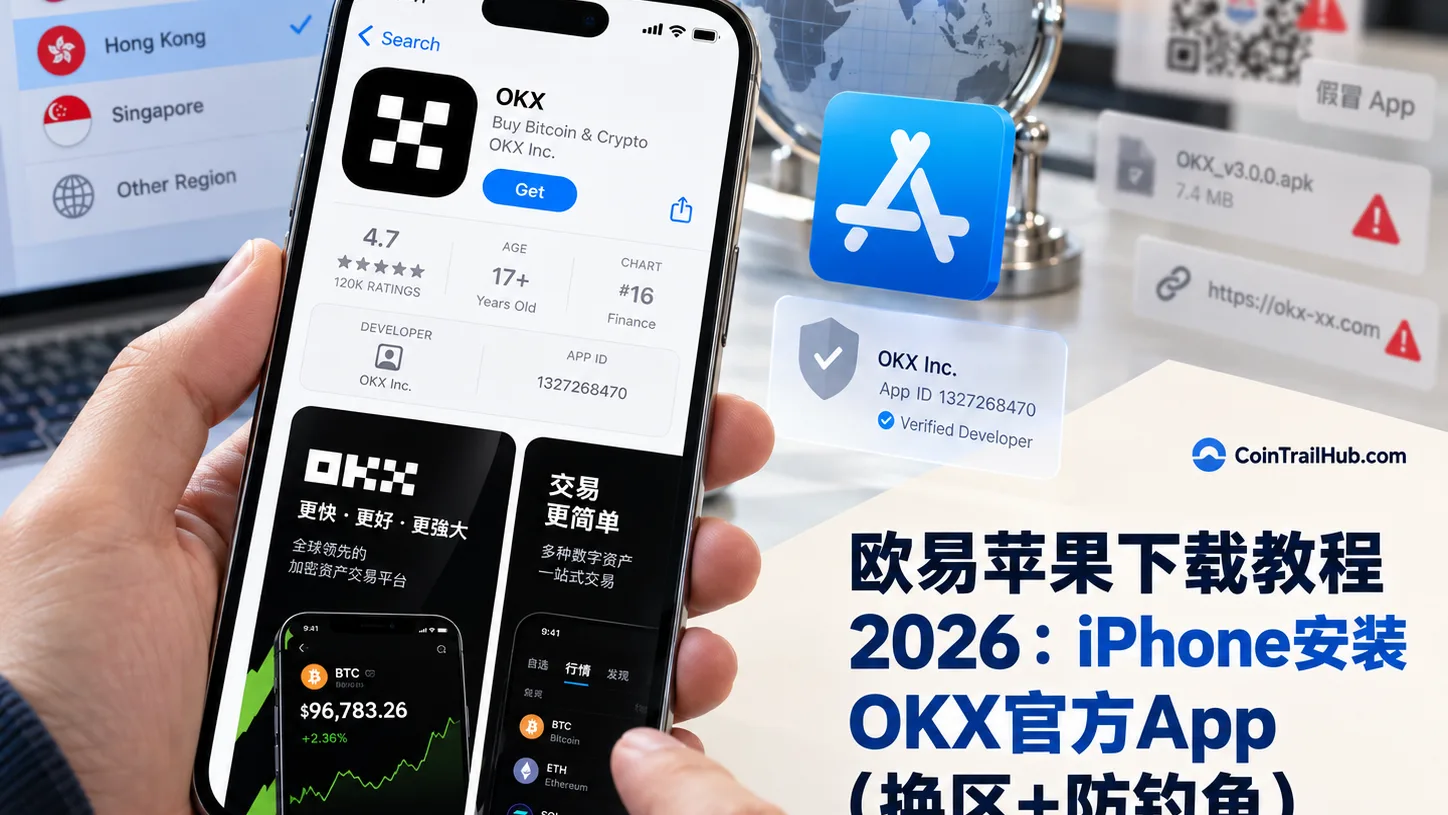
Table of contents

Binance new user rewards
20% trading fee rebate
Official Binance registration. Complete identity verification (KYC) to trade and withdraw.

OKX new user rewards
20% trading fee rebate
Official OKX registration. Complete identity verification (KYC) to trade and withdraw.
Let's state the conclusion first:
As of September 2026, the official OKX iOS app is not listed in the mainland China App Store. If you use a mainland China Apple Account, searching "OKX" in the App Store usually won't find the official version.[1]
iPhone is also different from Android: Apple has no APK, and the proper install channel for the official OKX iOS app is the Apple App Store.
If your current Apple Account's region doesn't support the download, you can follow OKX's official iPhone download guide and use an Apple Account in an OKX iOS supported region to sign in to the App Store, then search for and download the official app.
Currently the supported regions listed by OKX include Hong Kong, Taiwan, Singapore, Japan, and the United States; mainland China is not on its iOS download-region list.
When downloading, the most important thing isn't recognizing the icon — it's verifying:
Developer: OKX Inc. App Store ID: 1327268470
As of this verification, public App Store data still shows the app developer as OKX Inc. and the App ID as 1327268470.[2]
Quick overview
| Your question | Direct answer |
|---|---|
| Can I download OKX from the mainland China App Store | The official OKX app is currently not listed in the mainland China App Store |
| Is there an official APK for iPhone | No; APK is an Android installation file |
| What is the proper download channel for iPhone | The Apple App Store |
| What if a mainland China Apple Account can't find it | Follow OKX's official guide and use an Apple Account in a supported region to sign in to the App Store |
| How do I recognize the official app | Verify the developer OKX Inc. and App ID 1327268470 |
| Can the official site install an iOS package directly | The official guide requires installing through the App Store; don't install unverified enterprise-signed packages |
| Do I need to trust a profile after downloading | No, a normal App Store download doesn't require it |
| How do I update the app later | You may still need an Apple Account that supports downloading OKX |
One sentence to remember:
To install OKX on iPhone, trust the App Store and OKX Inc. Don't install through unverifiable QR codes, IPA packages, or so-called "enterprise-signed versions".
In the best case you'll be done within 10 minutes. The two easiest places to trip up are: downloading an IPA from a website or installing a so-called "enterprise-signed version", and assuming that once it's installed you're done forever — updating the app later may still require a supported-region Apple Account.
Why is iPhone harder than Android? First distinguish the App Store from APK
Many beginners search for:
- How to download OKX on iPhone
- OKX iPhone download
- OKX iOS installation package
- OKX iPhone APK
- What to do if OKX can't be found in the App Store
The first thing to clarify is the difference between Android and iPhone.
Android can install APKs
Beyond Google Play, Android in some regions can also get the official APK through the OKX official website.
iPhone has no APK
iOS does not use APKs.
OKX's current official download flow for iPhone users is:
Apple Account → App Store → search for OKX → download the official app.
In the official iPhone download guide updated in August 2026, OKX still clearly requires downloading through the Apple App Store and notes that the official iOS app developer is OKX Inc..[3]
So if someone asks you to download from a webpage things like:
- OKX iOS installation package
- OKX one-tap IPA install
- Enterprise-signed OKX
- "Never-expiring" OKX
- OKX without the App Store
- Scan-to-install OKX
Don't assume it's the official version just because it "can be installed".
For an exchange app:
Where you install from matters far more than how fast you install.
Why can't the mainland China App Store find OKX?
The core reason is usually not the phone model or the iOS version, but the App Store region.
Which apps the App Store shows depends on the country or region of the Apple Account signed in to the App Store.
OKX currently publishes a "countries and regions where the OKX app is available" list. Hong Kong, Taiwan, Singapore, Japan, and the United States are all on it, but mainland China is not on the list.
So if you use a mainland China Apple Account:
Not finding official OKX in the App Store doesn't mean OKX has no iPhone app.
And don't casually download an app whose name or icon looks similar just because you can't find it.
Which regions does the official OKX iOS app support?
OKX currently keeps a "countries and regions where the OKX app is available" list, last updated on May 22, 2025.[4]
It includes:
| Region | Representative regions on the official list |
|---|---|
| China and Asia | Hong Kong, Taiwan, Macau, Singapore, Japan, South Korea, Malaysia, Vietnam |
| Americas | United States, Canada, Brazil, Argentina, Mexico |
| Europe | United Kingdom, Germany, France, Spain, Italy, Switzerland, Netherlands |
| Middle East | UAE, Turkey, Saudi Arabia, Qatar, Israel |
| Oceania | Australia, New Zealand |
Mainland China is currently not on this list.
One important reminder:
"Can be downloaded from the App Store" is not the same as "you can definitely use every OKX product locally."
Different countries and regions may have different availability for account registration, KYC, fiat deposits, spot, futures, and other features.
This table answers only one question:
Whether that region's Apple App Store offers the OKX iOS app.
It can't be used alone to judge the local regulatory status, nor does it mean all OKX products are usable.
How to download OKX on iPhone? Official flow in 3 steps
If your mainland China Apple Account can't find OKX, you can follow the official approach below.
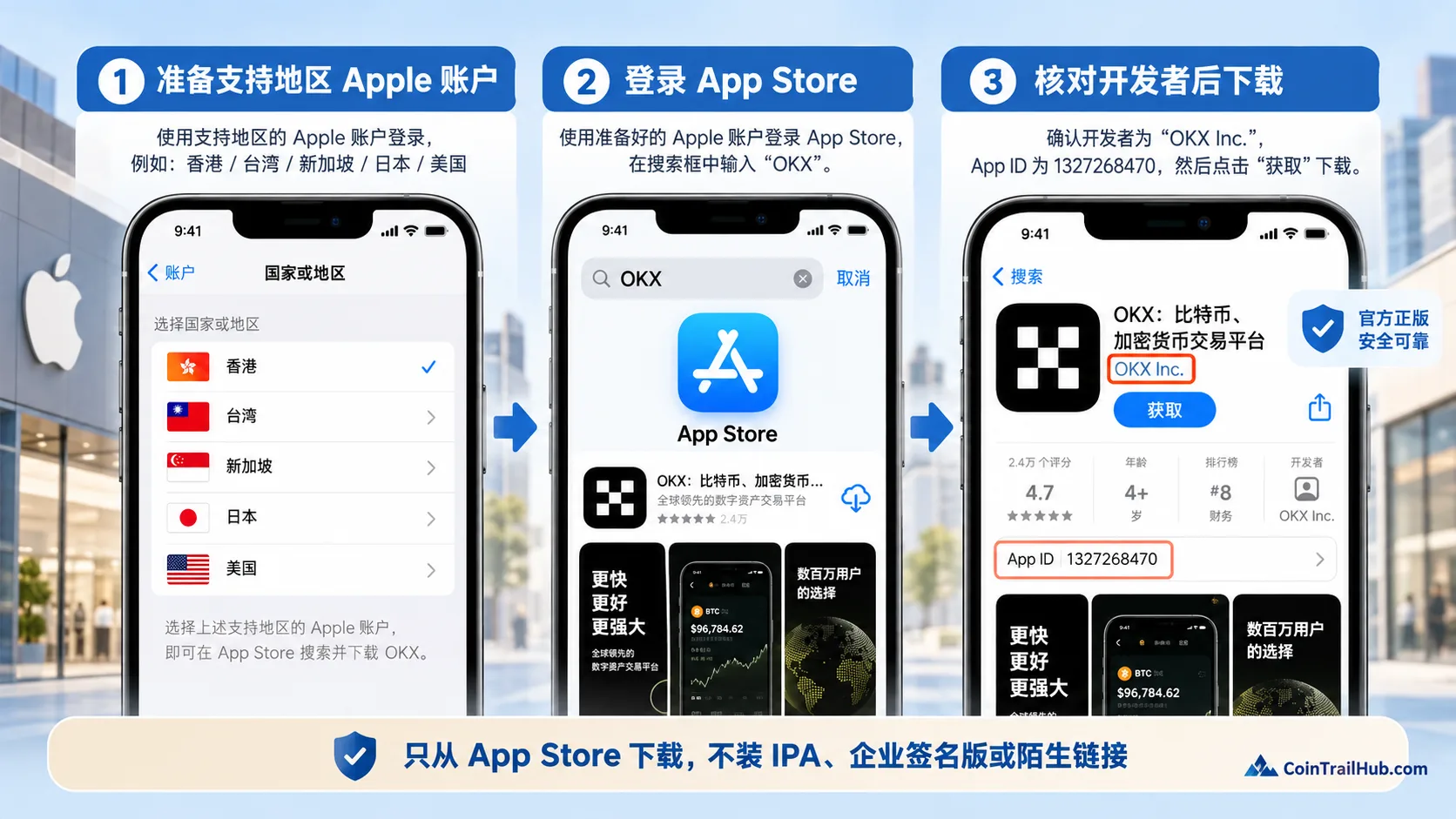
Figure: the 3-step flow for downloading the official OKX app on iPhone. First prepare a supported-region Apple Account, then sign in to the App Store, and finally verify the developer OKX Inc. and App ID 1327268470 before downloading.
Step 1: prepare an Apple Account in a supported region
OKX's official iPhone download guide states:
If you don't have an Apple ID registered in a supported region, you can go to Apple's official account page to create an Apple Account and select a country or region that supports downloading OKX.
Common supported regions include:
- Hong Kong
- Taiwan
- Singapore
- Japan
- United States
During registration you need to provide an email and a phone number that can receive verification codes.
All account information should be filled in according to Apple's account rules; it's not recommended to buy a "ready-made Apple ID" of unknown origin.
In particular, don't buy from Taobao, Telegram, or WeChat groups things like:
"OKX-only US-region ID" "Permanent Hong Kong Apple ID" "Shared OKX download account for multiple people"
Such accounts may have risks such as changed passwords, recovered accounts, or controlled verification methods.
Step 2: sign in to the App Store
After preparing a supported-region Apple Account:
- Open the App Store
- Tap your avatar in the top-right corner
- Go to the account page
- Sign in with the prepared supported-region Apple Account
- Confirm the account's country or region
- Return to the App Store
OKX's official download guide also signs in to the Apple ID through the App Store account page, then searches for OKX to download.
Downloading an app doesn't mean signing out of all of iCloud
Your:
- iCloud Photos
- Contacts
- Find My iPhone
- iCloud Drive
- Phone backup
all belong to the Apple Account and iCloud system.
Don't casually sign out of the entire iPhone's main iCloud account just to download an app without understanding the consequences.
What matters during the operation is:
The account and country/region currently used for downloading apps in the App Store.
If you're unfamiliar with switching Apple Accounts, first confirm that your photos, contacts, backups, and "Find My" won't be affected before continuing.
Step 3: search for OKX and verify the developer
After signing in to a supported-region App Store, search for:
OKX
In some Chinese-language environments you can also try searching:
OKX
After finding the app, don't just look at the name and icon; open the details page and verify:
| Check item | Official information |
|---|---|
| Developer | OKX Inc. |
| App ID | 1327268470 |
| Download source | Apple App Store |
| Category | Finance |
As of this verification, public App Store data shows the app developer is still OKX Inc. and the App ID is 1327268470.
Only after confirming tap:
Get → Install.
How to recognize the official OKX app? Focus on these 3 places
The biggest problem with fake apps is:
The name and icon can both be imitated.
So don't judge authenticity by the icon alone.
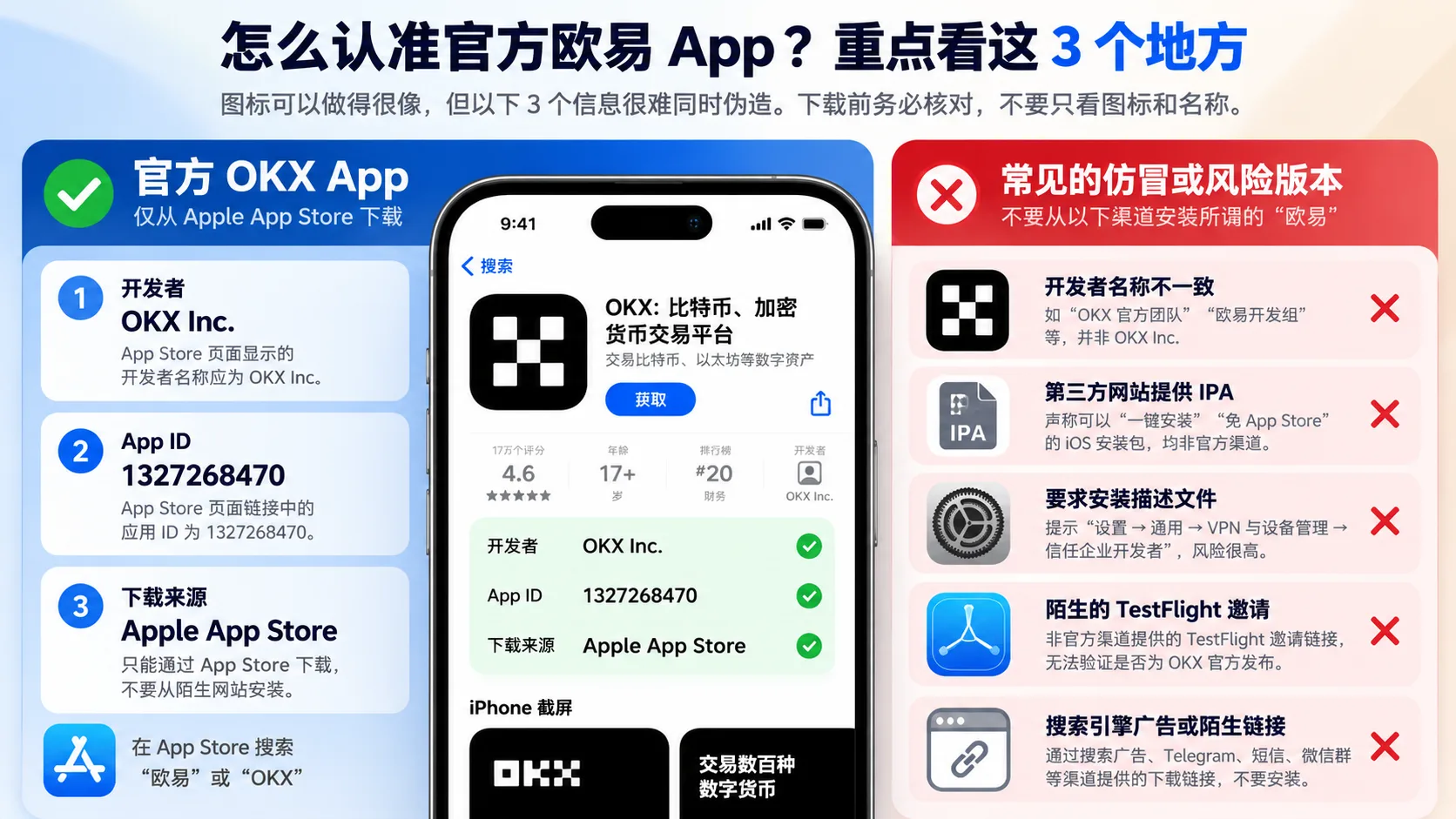
Figure: when identifying the official OKX iPhone app, focus on the developer OKX Inc., App ID 1327268470, and the Apple App Store download source; don't directly install third-party IPAs, enterprise profiles, unfamiliar TestFlight invitations, or suspicious links.
1. Check the developer
Official:
OKX Inc.
OKX's official iPhone download guide likewise clearly reminds:
The developer of the official iOS app is OKX Inc.
If the developer doesn't match, don't install.
2. Check the App ID
The official App Store page corresponds to:
1327268470
The app's display name, screenshots, and icon may change later, but the App Store page ID is a very useful auxiliary verification.
3. Check the install source
A normal user's official install flow should land on:
Apple App Store
Not a strange webpage suddenly asking you to:
"Allow installing a profile" "Trust an enterprise developer" "Download a permanently-signed version"
Don't touch these "OKX iPhone download methods"
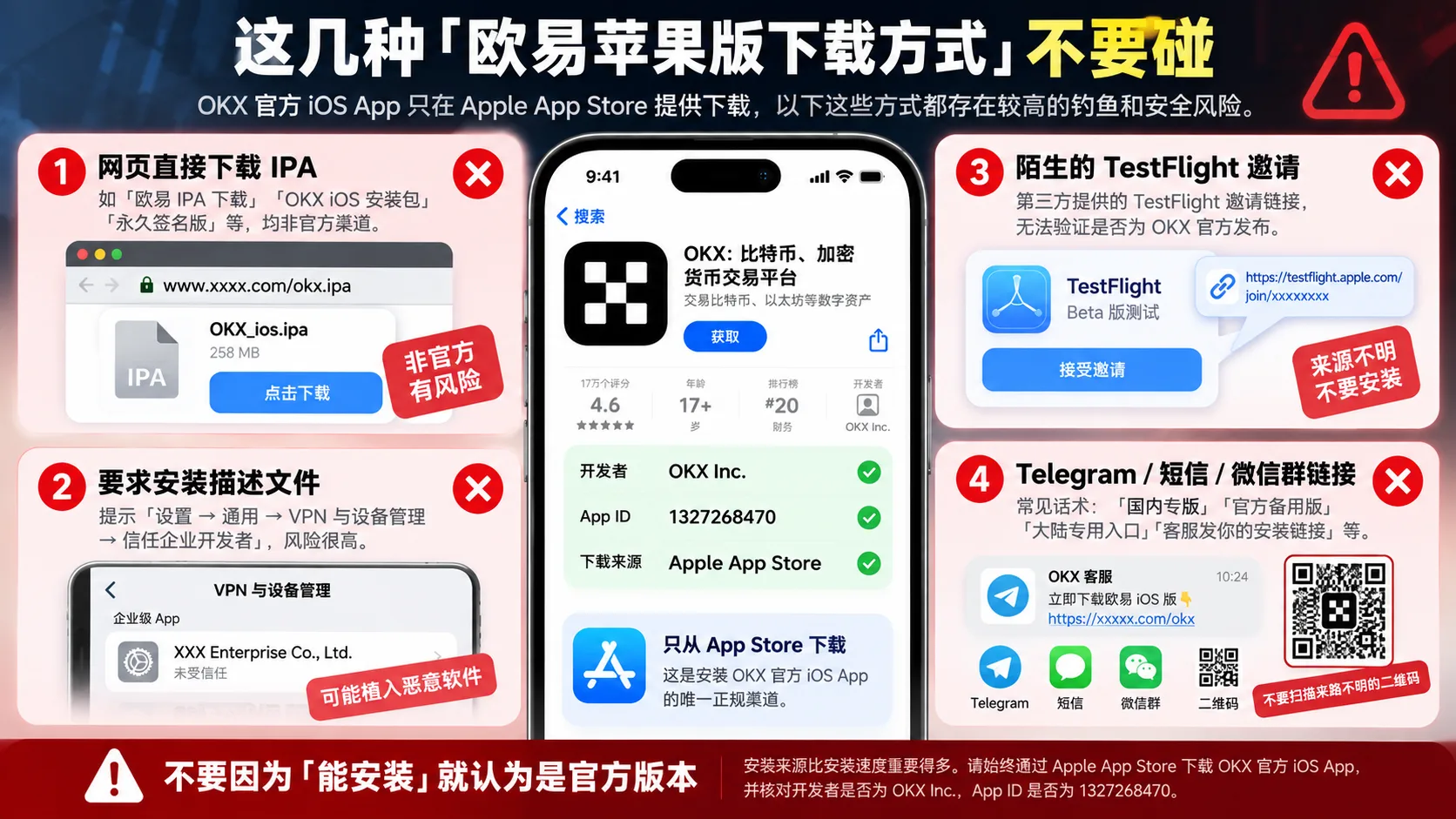
Figure: the 4 common high-risk entries for downloading OKX on iPhone. Web IPAs, enterprise profiles, unfamiliar TestFlight invitations, and links from Telegram, SMS, WeChat groups, or QR codes can't be judged official just because they "can be installed". The proper download is through the Apple App Store, verifying the developer OKX Inc. and App ID 1327268470.
1. Downloading IPA directly from a webpage
When you see:
OKX IPA download OKX iOS installation package OKX permanently-signed version
Stop first.
OKX's current official iPhone install guide goes through App Store download and does not ask normal users to get an IPA from a third-party website.
2. Being asked to install a profile
If a website tells you:
Settings → General → VPN & Device Management → Trust some enterprise
and only then can you use the so-called "OKX", be on high alert.
A normal App Store install of OKX:
does not require you to manually trust a third-party enterprise profile.
3. "OKX official site" in search-engine ads
When searching:
OKX download OKX iPhone download
Even if a page ranks very high in search results, don't judge authenticity by ranking alone.
First confirm:
- Whether the domain is OKX's official domain
- Whether it ultimately goes to the official App Store page
- Whether the developer is OKX Inc.
4. Install links in Telegram, SMS, or WeChat groups
Common phrases include:
"Mainland-exclusive version" "Official backup version" "Mainland-only entry" "An exclusive install link sent by customer service"
Don't install just because the other person's avatar says "OKX customer service".
If the link's source can't be verified from OKX's official website, don't enter in it:
- Login password
- SMS verification code
- 2FA code
- Seed phrase
- Private key
Can TestFlight download OKX?
Some old tutorials online write:
TestFlight → tap the invitation link → install OKX
We don't recommend treating TestFlight as a normal user's routine download method.
As of this verification, the standard path in OKX's current official iPhone download guide is still:
Supported-region Apple Account → App Store → search and download OKX
So if an unfamiliar website gives you a TestFlight invitation link alone, but you can't confirm its source from OKX's official page:
Don't assume it's official just because it uses TestFlight.
The point isn't whether TestFlight itself is safe as an Apple tool, but:
Who actually published the test app behind the invitation link.
If you can't verify it, don't install.
Region change vs. creating a new Apple Account: which is better?
Many people struggle with:
Should I change my mainland China Apple Account to Hong Kong directly, or prepare a separate supported-region account?
If your main Apple Account has been used for many years, changing the country or region directly may involve more things.
Apple currently clearly reminds that before changing your Apple Account country or region, you may need to handle:
- Apple Account balance
- Existing subscriptions
- Pending pre-orders or other items
- Family Sharing
- Payment method and billing address in the new region
So don't casually change your main account's region just to download an app without confirming these impacts.
From the perspective of reducing impact on the main account, preparing a separate supported-region account that complies with Apple's rules for App Store downloads is one of the feasible approaches in OKX's official download guide.
Whichever approach you use, follow Apple's account rules and don't buy shared accounts of unknown origin.
What's the difference between Hong Kong, Taiwan, and Singapore Apple Accounts?
If we only discuss:
Can I download the official OKX app from the App Store?
As of this verification, Hong Kong, Taiwan, and Singapore are all on OKX's official iOS supported-region list.
So there is no such official rule as:
"Only the Taiwan region can download OKX."
Many articles online recommend Taiwan or Hong Kong first, which is more the tutorial author's own habit than OKX supporting only that region.
But different-region Apple Accounts may differ in:
- Payment methods
- Apple services
- Address and billing requirements
- App availability
So there's no need to chase a particular region just to download OKX.
After downloading OKX, can I switch back to my original App Store account?
After the app is installed, you can handle the App Store signed-in account according to your own Apple Account situation.
But one point matters:
When updating OKX later, you may still need an Apple ID that supports downloading OKX.
In the official "How to update the OKX app on iPhone?" updated on September 15, 2026, OKX clearly reminds:
Updating on iPhone requires an Apple ID that supports the download.[5]
So don't casually discard the Apple Account you used to download OKX.
At minimum keep:
- Sign-in email
- Password
- Two-factor authentication method
- A phone number that can receive verification codes
And don't use an Apple ID shared by multiple people online, or you may lose account control when updating the app later.
After installing OKX, do these 4 things first
Successfully downloading the app doesn't mean your account is already secure.
After your first login, it's recommended to first complete:
- Confirm you're logged into your own OKX account
- Complete identity verification (KYC) as actually required by your account
- Enable 2FA, Passkey, and other login protection
- Enable anti-phishing code and other account security features
In particular, don't send any of the following to a so-called "OKX customer service":
- Login verification code
- Google Authenticator code
- Passkey
- Wallet seed phrase
- Private key
Especially:
The seed phrase and private key must never be given to anyone.
FAQ
Can the mainland China App Store find OKX?
As of September 2026, the official OKX iOS app is not listed in the mainland China App Store. Mainland China is also not on OKX's current public list of regions where the iOS app is available. So it's normal if a mainland China Apple Account can't find OKX.
How do I download OKX on iPhone?
The official install channel is:
Apple App Store
If your current Apple Account's region doesn't support OKX, you can follow OKX's official guide and use a supported-region Apple Account to sign in to the App Store, then search and download.
Is there an APK for OKX on iPhone?
No. APK is an Android installation file format; the iPhone doesn't install APKs.
When you see:
"OKX iPhone APK download"
you can basically judge that statement as wrong.
Can the Apple official site download the OKX iOS package directly?
OKX's current official guide for normal iPhone users requires downloading through:
Apple App Store
Don't treat third-party IPAs, enterprise-signed packages, or so-called "webpage direct-install packages" as the official OKX app.
Do I need to trust a profile to install OKX?
A normal download and install through the Apple App Store:
No.
If a so-called "OKX install tutorial" asks you to go to:
Settings → General → VPN & Device Management → trust some enterprise developer
be on high alert and verify the source first.
Who is the official OKX app developer?
Current official information and public App Store data show:
OKX Inc.
App ID:
1327268470
Can a Hong Kong Apple ID download OKX?
Yes. Hong Kong is still on OKX's official iOS app supported-region list.
Can a Taiwan Apple ID download OKX?
Yes. Taiwan is likewise still on OKX's official supported list.
Can a Singapore Apple ID download OKX?
Yes. Singapore is also on OKX's official iOS supported-region list.
After downloading, do I still need an overseas Apple ID to update OKX?
You may still need an Apple Account that supports downloading OKX. In the official iPhone app update guide updated in September 2026, OKX clearly reminds that updating on iPhone requires an Apple ID that supports the download. So don't casually discard the Apple Account you used to download OKX.
Is downloading OKX free?
The app itself is free to download. Trading fees, deposit/withdrawal fees, and other costs are incurred later from using the trading platform and are not the same as downloading the app.
Do I have to deposit right after downloading OKX?
No. For beginners, a more sensible order is:
Download → verify the official app → register/log in → security settings → KYC → then learn deposits and trading
Don't rush to transfer large funds just because the app is installed.
Related articles
- OKX Download 2026: Official App for Android APK, iPhone Install Guide & Security Verification — for Android users or the full download method, continue here
- How to Register for OKX — after installing the app, the next step is opening an account
- OKX KYC Verification Guide: How Long It Takes and How to Fix Failures (2026) — continue with identity verification after registering
- Binance/OKX Account Security Checklist: How to Enable 2FA, Anti-Phishing Code and Withdrawal Whitelist (2026) — handle account security first after registering
- Binance iOS Download: 2026 Detailed iPhone Install Guide — if you need to install Binance, compare here
Data verification notes
Key facts in this article were verified against official OKX and Apple documentation on 2026-10-16, item by item:
- Mainland China App Store availability:As of September 2026, the official OKX iOS app is not listed in the mainland China App Store, and a mainland China Apple Account usually can't find the official version. Source: OKX "Countries and regions where the OKX app is available".
- Developer and App ID:Public App Store data shows the OKX iOS app developer is OKX Inc. and the App ID is 1327268470. Source: Apple App Store: OKX (developer OKX Inc., App ID 1327268470).
- Official download requirement:OKX's official iPhone download guide updated in August 2026 requires downloading through the Apple App Store and notes the developer is OKX Inc. Source: OKX "How to download the OKX app on iPhone (iOS)".
- Supported-region list:OKX keeps a "countries and regions where the OKX app is available" list, last updated on May 22, 2025. Source: OKX "Countries and regions where the OKX app is available".
- Updating requires a supported Apple ID:OKX's official note updated on September 15, 2026 reminds that updating on iPhone requires an Apple ID that supports the download. Source: OKX "How to update the OKX app on iPhone?".
This article is only basic education on OKX app download, installation, and account security. It is not investment advice, legal opinion, or a judgment on the legality of providing services in any country or region. App Store listing regions, Apple Account rules, developer information, and OKX product availability may change. Please refer to the OKX official help center, Apple's official documentation, and the actual App Store page. Digital asset prices are highly volatile, and trading carries the risk of losing principal; participate cautiously according to your own situation.
- OKX "How to download the OKX app on iPhone (iOS)"Official iPhone download guide; App Store download and developer verification.
- OKX "Countries and regions where the OKX app is available"List of iOS supported regions; mainland China is not on the list.
- OKX "How to update the OKX app on iPhone?"Updating requires an Apple ID that supports the download.
- OKX official anti-fake-app and scam guideHow to avoid fake OKX apps and scams.
- Apple App Store: OKX (developer OKX Inc., App ID 1327268470)Public App Store listing showing the developer and App ID.
- Apple "Change your Apple Account country or region"Official Apple guidance on changing the Apple Account country or region.
- 2026-10-16UpdateAdded evidence superscripts and Data Verification Notes; updated the key fact verification date.
See ourEditorial Policy and the correction process in ourCorrections Policy.
The CoinTrailHub editorial team focuses on crypto education for beginners, exchange security and P2P trading risk. This article is compiled from official sources and public data, reviewed by humans, and strives for accuracy but is not investment advice.
Last updated:2026-09-28 · Content reviewed by humans · Learn more
© 2026 CoinTrailHub · Original content. Reproduction or rewriting without permission is prohibited.