
Binance iOS Download: Official App Store Entry & Install Guide for iPhone
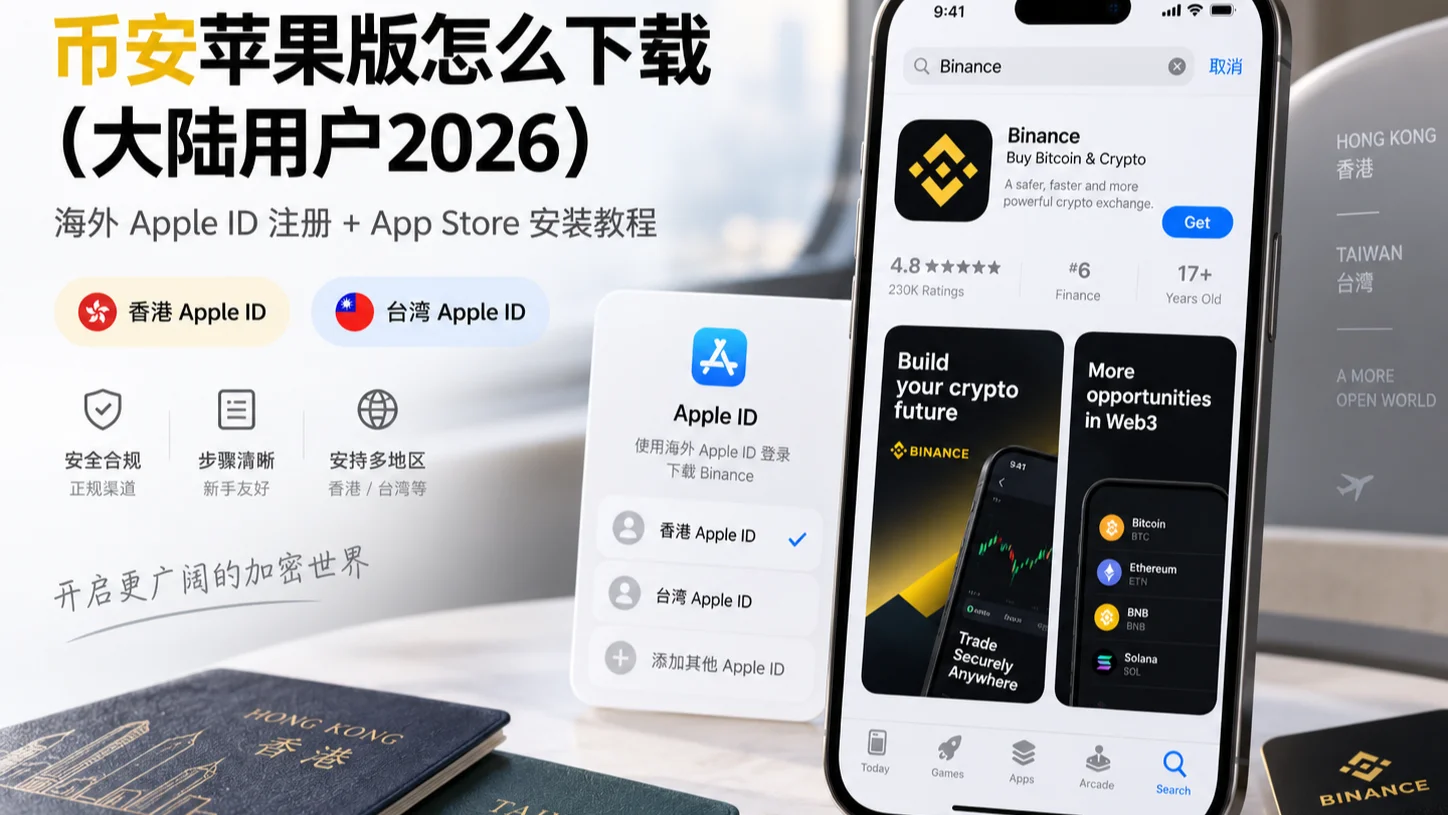
Table of contents

Binance new user rewards
20% trading fee rebate
Official Binance registration. Complete identity verification (KYC) to trade and withdraw.
Can't find "Binance" when you search on an iPhone in China? It's not your fault — the mainland China App Store doesn't list the official Binance app. You can still install it: sign in to the App Store with an Apple ID from a supported region (Hong Kong or Taiwan both work), search Binance and download the genuine app.[1] The only rule: download only from the official App Store, check the developer Binance Switzerland AG (App Store ID 1436799971), and ignore "ipa installer" links anywhere else. With luck you can be done in about 10 minutes — don't just recognize the icon.
Below are three steps: how to register an overseas Apple ID, how to sign in and download, and how to tell whether you downloaded the right one. Downloading and installing doesn't mean you're eligible to open an account or trade; see below for the applicable conditions.
Quick overview: three steps to install Binance
| Step | What to do | Key point |
|---|---|---|
| 1. Register an overseas Apple ID | Create it at appleid.apple.com, choose Hong Kong or Taiwan | Handle the payment method as the page prompts |
| 2. Sign in to the App Store | Sign out of the current account, sign in with the new Apple ID | Only change "Media & Purchases", not the main account |
| 3. Search and download Binance | Search "Binance", check the developer, then tap Get | Check the developer name + the white-background green B icon |
If you already have a usable overseas Apple ID, skip straight to step three. Android users don't need this article — use the APK channel in the Binance Android download tutorial.
The two easiest places to trip up: entering fake info when the payment method gets stuck during overseas Apple ID registration, and downloading Binance.US by mistake, which only serves US residents.
Before downloading: confirm three things
- Your Apple ID region: the mainland China App Store can't find Binance, so you need to sign in to the App Store with an overseas Apple ID first. This is a prerequisite, not optional.
- System version: follow the minimum iOS version shown on the App Store page; an OS that's too old may fail to install or show an incompatibility.
- Genuine-version awareness: the App Store also has fake apps — don't just look at the search ranking. See "How to tell whether it's genuine" below for how to check the developer info.
Three methods compared: which path to take
| Method | Who it suits | What to watch |
|---|---|---|
| Register a new overseas Apple ID (recommended) | Most China users without an existing foreign-region account | Register with a real email; see below on the payment method |
| Switch an existing Apple ID's region | You already have an Apple ID and are willing to change region | You must spend the balance first and cancel subscriptions; it may affect existing purchases |
| TestFlight / enterprise certificate | Special cases | Limited slots, mostly beta versions; certificates can be revoked and stability is poor — not recommended as your main app |
Most people take the first path — it's the least hassle. Switching an existing Apple ID's region has a real threshold: Apple officially requires you to spend your store balance first, cancel all subscriptions that would block the change, and some previously purchased content may not be available in the new region (Apple account support doc). So unless you already use a foreign-region account, registering a new one is cleaner.
Step 1: Register an overseas Apple ID
- Open Apple's website appleid.apple.com and choose "Create your Apple ID".
- Fill in a phone number that can receive the verification code and a commonly used email (the email must be real — two-factor auth and password recovery both rely on it later).
- Country or region: choose a country or region where Binance is supported. The common choices are Hong Kong or Taiwan — both regions' App Stores can find Binance, and they're the most-used choices among China users.[2] The Binance official download guide lists the full supported regions; follow the page as actually shown.
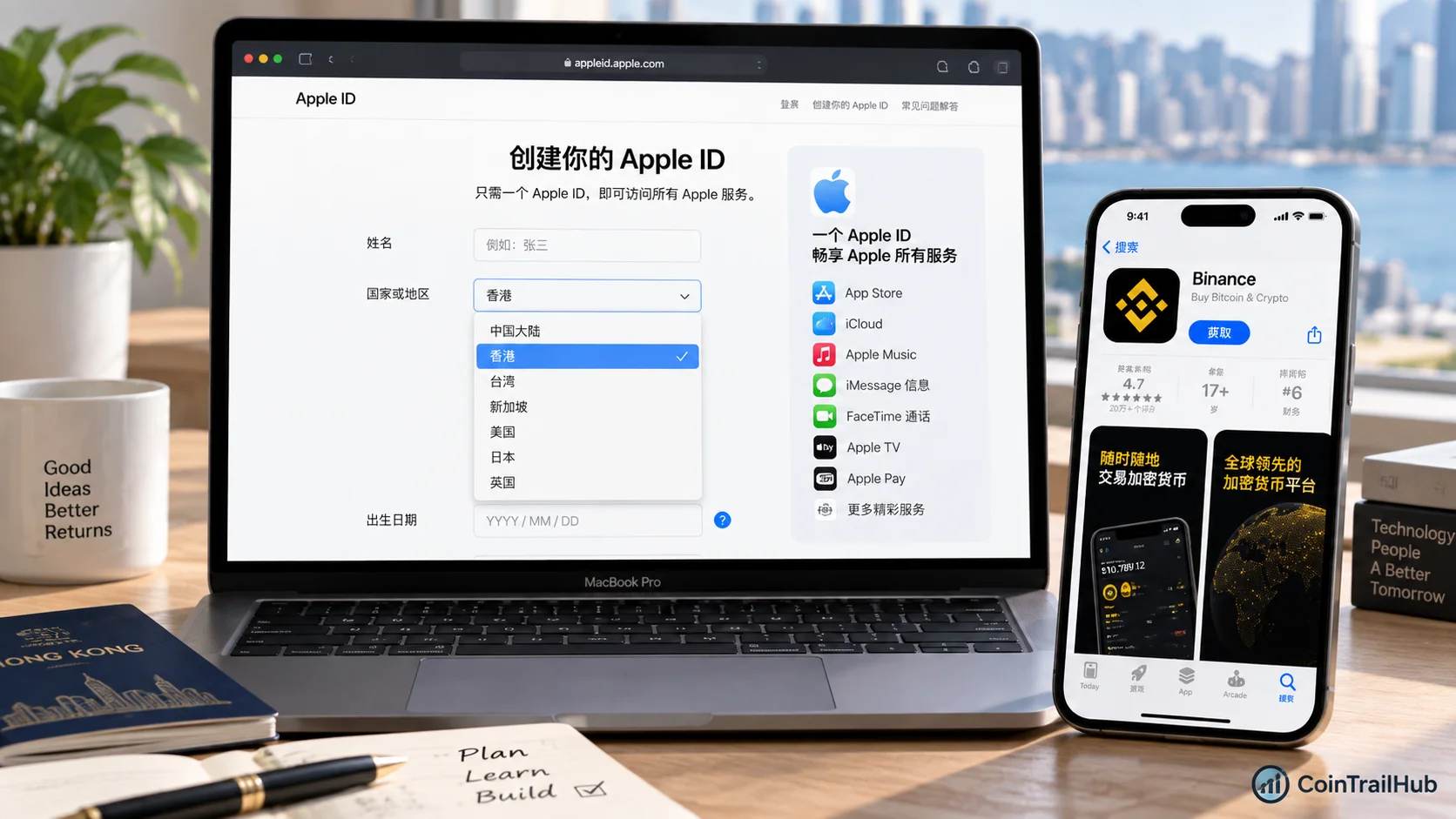
- Payment method: if the page offers a "None" option, choose it to download free apps. If the system requires a local payment method or billing info, follow Apple's current page prompt — don't enter fake payment info.
- Complete email verification as prompted. Once registered, this Apple ID is ready to use.
The country or region you choose when registering determines what App Store content you see. It doesn't affect the photos, contacts, existing apps or data on your phone.
Step 2: Sign in to the App Store and download Binance
- On your iPhone, open "Settings → your name at the top → Media & Purchases → Sign Out".
- Sign in with the overseas Apple ID you just registered (only change the App Store account — you don't need to change your phone's main account).
- Open the App Store and search "Binance".
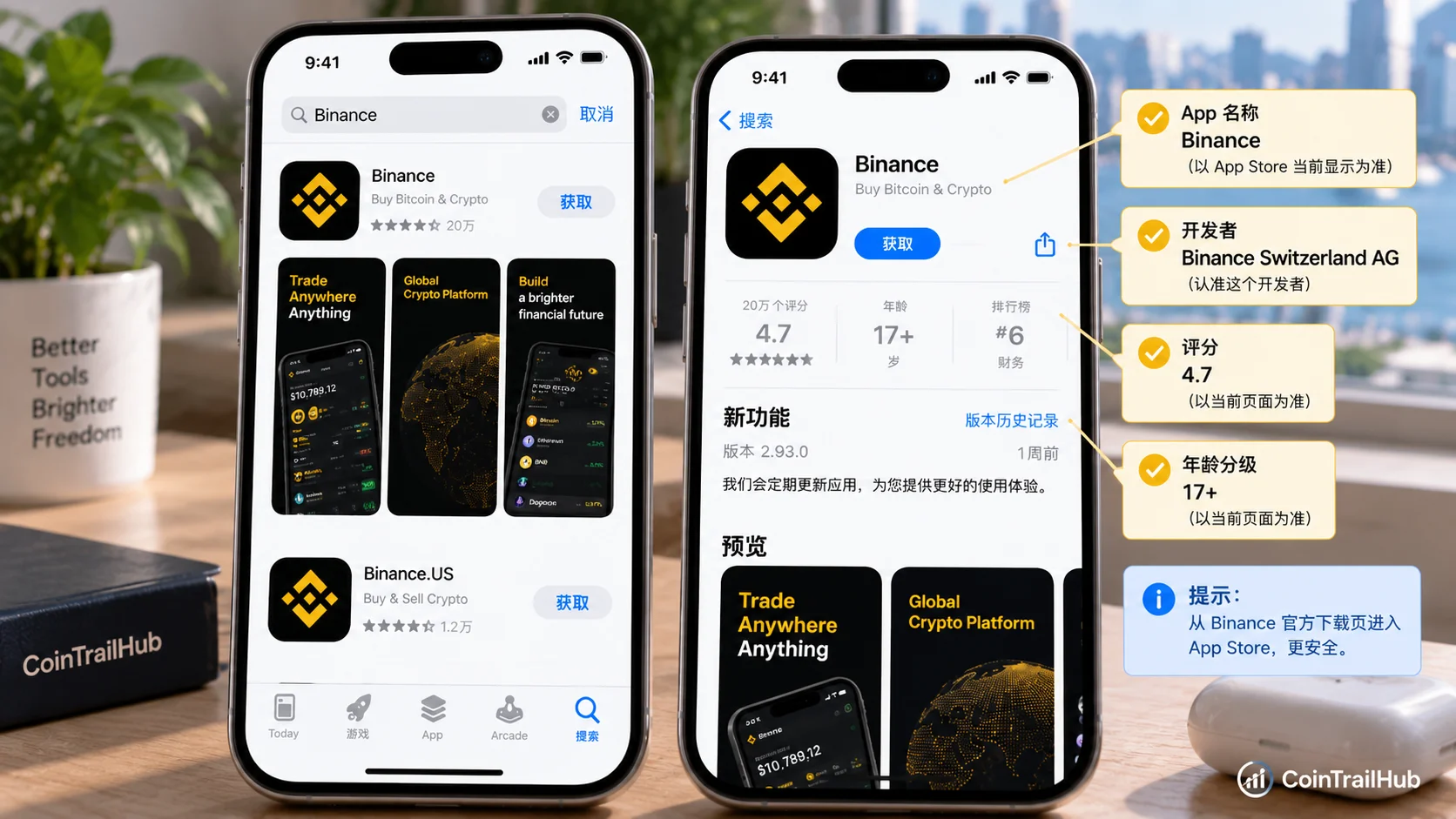
- Check the developer name and icon (see the next section), then tap "Get" to download.
- Once installed, you can sign out of the overseas ID and sign back in with your original Apple ID. The next time you update the Binance app, sign in with the overseas ID again.
How to tell whether it's genuine
Don't judge by the icon or search ranking alone — Binance may adjust the app name, icon and page display as versions update.
As of 15 September 2026, the Taiwan App Store Binance page we verified shows:
| Verification item | 2026-09-15 verified info |
|---|---|
| Developer | Binance Switzerland AG |
| App Store ID | 1436799971 |
| Minimum system version | iOS 15.0 or later (subject to what the page currently shows) |
| Hong Kong App Store | Binance official supported region |
| Taiwan App Store | Binance official supported region |
| Mainland China App Store | Official Binance app not directly provided |
The safest approach isn't to install whatever app called "Binance" appears in the App Store, but to enter the App Store through Binance's official download page or iPhone download guide, then check the developer info.
Special note: the international version and Binance.US are two different apps — both have a black background and yellow logo and look almost identical, so you can't tell them apart by the icon.
| Distinguishing item | Binance international (this article) | Binance.US |
|---|---|---|
| Developer | Binance Switzerland AG | BAM Trading Services, Inc. |
| App Store ID | 1436799971 | 1492670702 |
| Who it serves | Global users outside the US | US residents only |
| Chinese support | Switchable to simplified Chinese | No Chinese, English only |
China users should download the international version — check that the developer is Binance Switzerland AG (subject to what the App Store currently shows). Downloading Binance.US won't work for you.[3]
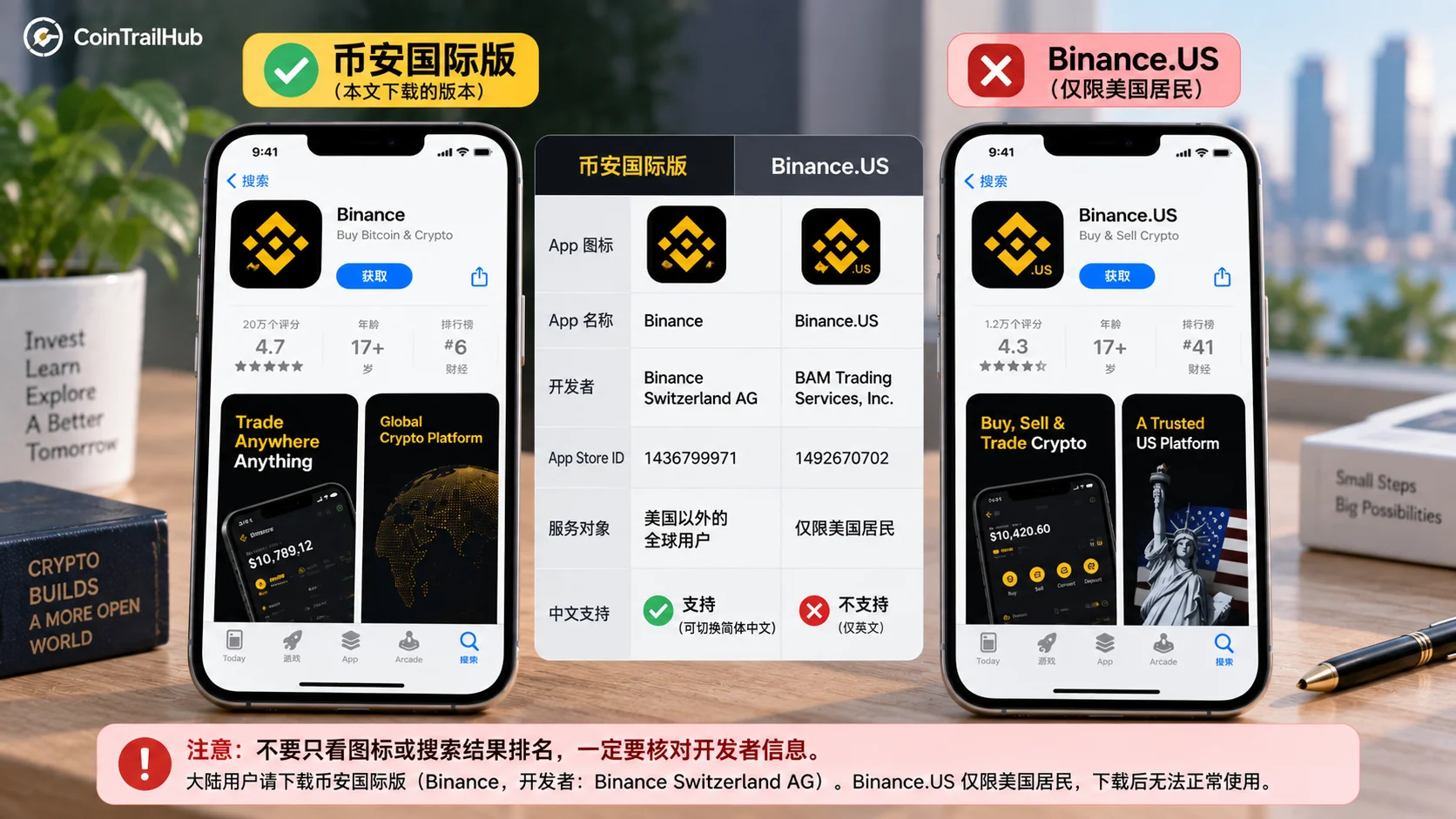
The developer name, app name, icon and minimum system version may all change later; follow the Binance official download entry and the info shown on the App Store at the time.
After installing: do these before funding
Installing the app is only the first step. Do three things in order — don't rush to deposit:
- Register an account: open the app and register with your email. New users should enter the referral code BN522 on the registration page for a 20% fee rebate (subject to the rebate rate shown on the Binance registration page at the time). For the full flow, see the Binance registration tutorial (2026).
- Identity verification (KYC): verification must pass before you can trade. For review time and failure reasons, see Binance KYC: How to Verify Your Identity — Review Time, Failure Reasons & Fixes (2026).
- Enable two-factor authentication (2FA): bind an authenticator and don't rely on SMS alone — this is the first line of account security. See How to Set Up Google 2FA: Binance/OKX Binding Steps (2026).
Once your account is verified and functioning normally, start your first trade with How to Buy USDT on Binance (2026): P2P Buying Steps, Choosing a Seller & Payment.
Pitfalls I hit
The payment method step trips up the most people
The first time I registered, I kept confirming one thing: whether I could download free apps without binding a card. It turned out whether you see the "None" option depends entirely on what Apple's page shows at the time — if it's there, choose "None" and move on; if not, fill in the local payment or billing info as prompted. Don't cut corners and enter fake info here — Apple's risk controls are stricter than a few years ago, and this step is where most people get stuck.
The subtler pitfall: downloading Binance.US by mistake
Searching "Binance" in the mainland China App Store, many of the results that pop up aren't the one you want. The subtlest is Binance.US — its icon is almost identical to the international version (both black background with a yellow logo), but it only serves US residents, and downloading the wrong one won't even let you register. So don't recognize the icon — recognize the developer name.
Before switching accounts, I worried whether my phone would get messed up
Before signing in with a foreign-region Apple ID, my biggest worry was losing my photos and contacts. It doesn't actually happen — a foreign-region ID only affects the App Store. WeChat, Alipay and your photo album all stay untouched. After downloading Binance, sign back in with your original account; switch to the foreign-region ID again the next time you update the app.
Security risk reminders
- Don't download "cracked", "accelerated" or third-party installers from unofficial channels — they may carry malicious code that steals your assets.
- Beware of "install-for-you" services and scams. Binance officially will never ask for your password, private key, seed phrase or verification code.
- Binance's servers are outside mainland China, so using the app needs a stable network environment. This article only covers app download and install, not network access methods.
- Downloading, installing and account-service eligibility are different matters. Whether you can register or trade depends on your location, identity conditions and the platform's current rules.
FAQ
Q1: Do I have to register an Apple ID from a supported region to download Binance? The mainland China App Store doesn't have the official Binance app, and a China Apple ID can't find it.[4] Either register an Apple ID from a supported region yourself, or sign in with an existing supported-region Apple ID to download.
Q2: How do I choose the payment method when registering an overseas Apple ID? Keep "None" — downloading free apps doesn't require binding any payment method. Don't believe claims that "you must bind a card to download".
Q3: Will signing in with a foreign-region Apple ID affect the existing data on my phone? No. A foreign-region Apple ID only affects App Store downloads. After signing in, your photos, contacts and existing apps are unaffected, and you can sign back in with your original account after downloading.
Q4: A bunch of "Binance" results came up — how do I tell which is official? Check the developer info (as of 2026-09-15 the Taiwan region shows Binance Switzerland AG, subject to what the App Store currently shows), and enter the App Store through the Binance official download entry. Developer names with strange suffixes are all fakes.
Q5: The download succeeded — does that mean I can open an account and trade now? Not necessarily. Downloading, installing and account-service eligibility are different matters; whether you can register or trade depends on your location, identity conditions and the platform's current rules.
Q6: What if it says "untrusted developer"? This usually appears with TestFlight or enterprise-certificate installs. A normal App Store download generally won't hit it; if it does, first confirm the download source and don't blindly trust a configuration profile.
Related reading
- Binance Download 2026: Official Android APK / iOS / Desktop — How to Spot a Fake Binance — overview of official download methods and fake-version checks across all three platforms
- How to Download the Binance Android App? 2026 Official APK & Google Play Guide — Android users take the APK channel, a completely different situation
- Binance Desktop Download 2026: Official Windows/Mac Client Install Guide — install the desktop client if you need a bigger screen for charting
- How to register on Binance: email/phone sign-up, verification code and referral code (2026) — the first step after installing: register
- Binance KYC: How to Verify Your Identity — Review Time, Failure Reasons & Fixes (2026) — identity verification is the prerequisite for trading
Data verification notes
The key facts in this article were checked on 2026-10-16 against Binance's official download entry and the App Store page, point by point:
- iOS developer and App Store ID: the developer of the Binance App Store page is Binance Switzerland AG, and the App Store ID is 1436799971. Source: Binance app (Taiwan App Store).
- Regions that support downloading: the Hong Kong and Taiwan App Stores are both Binance official supported regions and can find the Binance app. Source: Binance official download guide.
- International vs Binance.US: China users should download the Binance international version, whose developer is shown as Binance Switzerland AG; Binance.US only serves US residents and won't work if downloaded by mistake. Source: Binance official download page.
- Mainland China App Store situation: the mainland China App Store doesn't provide the official Binance app, and a China Apple ID can't find it by searching. Source: Binance official download guide.
The developer display name, app name, icon and supported regions may change with updates and regional policy; follow the Binance official download entry and the info shown on the App Store at the time.
Disclaimer
This article is only for the operational knowledge and anti-scam reminders of downloading and installing the Binance iOS app, and does not constitute any investment, financial or trading advice.
Crypto assets are volatile and may carry platform, market, cybersecurity and operational risks. Complete the download and account setup through official channels, never reveal your seed phrase, private key or verification code to anyone, and make careful judgments based on your own risk tolerance and local laws and regulations.
- Binance official download guideDeveloper Binance Switzerland AG and supported regions
- Binance official download pageOfficial App Store download entry
- Apple account support (change country or region)Apple account region change rules
- Apple ID websiteApple ID registration entry
- Binance app (Taiwan App Store)Taiwan App Store Binance app page
- 2026-10-20UpdateAdded a "download only from the official App Store, check the developer Binance Switzerland AG" rule and time estimate to the intro.
- 2026-10-16UpdateAdded evidence-chain superscripts and Data Verification Notes; updated the key-fact verification date.
See ourEditorial Policy and the correction process in ourCorrections Policy.
The CoinTrailHub editorial team focuses on crypto education for beginners, exchange security and P2P trading risk. This article is compiled from official sources and public data, reviewed by humans, and strives for accuracy but is not investment advice.
Last updated:2026-10-20 · Content reviewed by humans · Learn more
© 2026 CoinTrailHub · Original content. Reproduction or rewriting without permission is prohibited.