
No OKX Referral Rebate? OK800 Fee Rebate Not Showing — 8 Causes Checked One by One (2026)
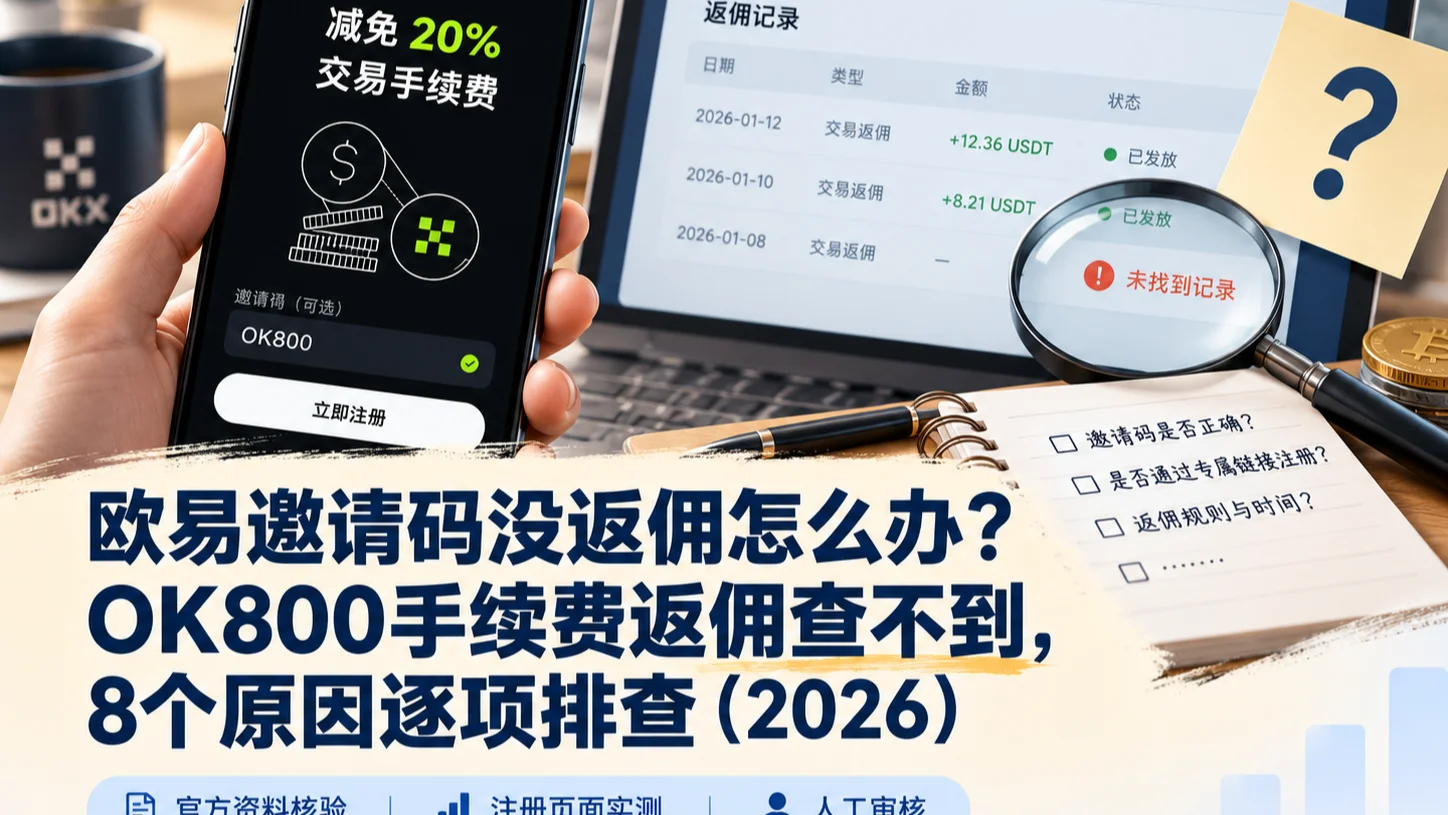
Table of contents

Binance new user rewards
20% trading fee rebate
Official Binance registration. Complete identity verification (KYC) to trade and withdraw.
You entered the OKX referral code, traded for a while, and checked your account — where is the fee rebate?
Did OK800 not bind? The signup page clearly said 20%, so why can't I see it after trading? And some people online say 30%, 40%, 50% — do other referral codes rebate more?
Let's get the most important point out of the way first.
As of September 27, 2026, when CoinTrailHub's current OK800 signup entry is actually opened, the OKX signup page clearly shows:
20% off trading fees
So the 20% on this OK800 signup entry isn't our own estimate, nor third-party marketing copy — it's the benefit shown directly on the OKX signup page.
But the signup page showing 20% doesn't mean every future trade will produce a separate "20% rebate" record.
You need to separate at least three things here:
- How much fee discount this referral code gives invited users;
- Whether your account actually bound this referral code;
- Whether the trade you made falls within the rebate-eligible scope.
A note on wording: in the OKX app and website the fields are called Invite code, Rebate rate and Invite perks. Different localizations use slightly different labels, but they're the same feature.
Let me first clarify the most confusing figures — 20%, 30%, 40%, 50% — and then start troubleshooting.
Core info: OK800 currently tests at 20%
We re-opened CoinTrailHub's current OK800 signup entry on 2026-09-27.
The OKX page clearly shows:
20% off trading fees
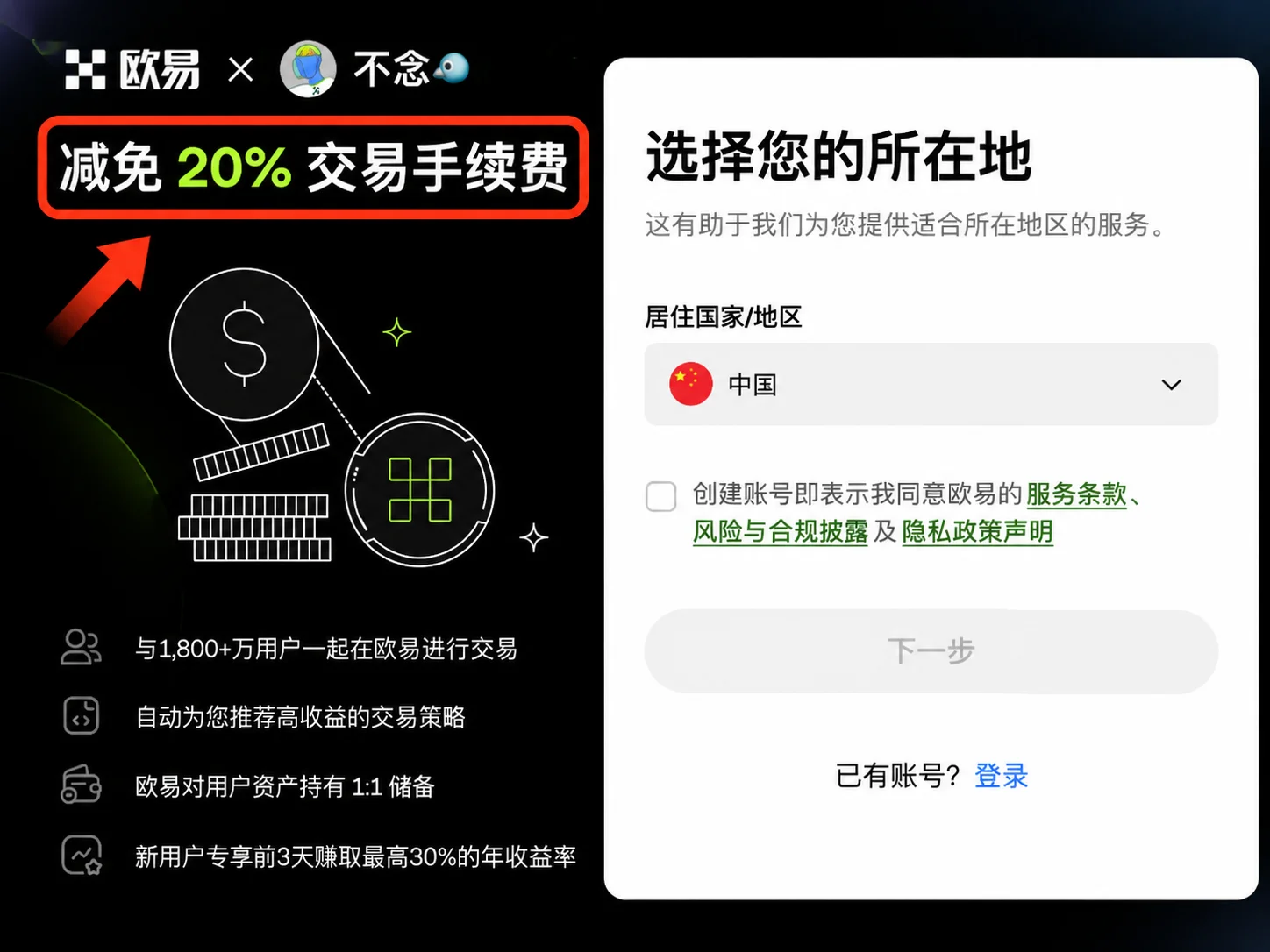
This means:
For users who enter through the current OK800 signup entry and complete channel attribution normally, the invited-user fee discount currently shown on the signup page is 20%.
So for this specific signup link, there's no need to keep writing it vaguely as "possibly 0%–20%".
That said, after registering you should still check your account's:
- Invite code
- Rebate rate
- Actual fee-rebate records
Because OKX officially distinguishes channel attribution from fee rebate. An account being attributed to some channel doesn't mean that channel necessarily set up a fee rebate; the actual rebate ratio is what your account shows.
About 10 minutes to read. Remember the two most confusing points first: it rebates the net fee, not the trade amount; and a 0% rebate rate doesn't equal "not bound".
What's the difference between OK800 and other OKX referral codes?
Search "OKX referral code" and you'll often see:
- 10%
- 20%
- 30%
- 40%
- 50%
Many people's first reaction is:
"Does a 40% referral code necessarily beat OK800's 20%?"
Not necessarily.
Because those percentages may not even be talking about the same thing.
Look at this table first
| Figure you see | What it may represent | Can you read it directly as the user's actual rebate? |
|---|---|---|
| 10% | Invited-user fee discount | Possibly |
| 20% | Invited-user fee discount | Possibly |
| 30% | Inviter commission, Node tier, or another system's ratio | Not necessarily |
| 40% | Inviter commission, Node tier, or another system's ratio | Not necessarily |
| 50% | Some referral systems' total inviter-commission ratio | Does not equal the user rebating 50% |
The key isn't how big the number is, but asking first:
Who actually receives this percentage?
Why do 30%, 40%, 50% appear online?
One qualification has to be made up front:
The 30%–50% below are the "total inviter-commission tiers" in OKX's DEX / Web3 referral system, not the fee-rebate tiers for ordinary invited users on OKX's centralized exchange.
OKX DEX's current inviter tiers are:
| DEX referral tier | Total inviter-commission ratio |
|---|---|
| Tier 1 | 20% |
| Tier 2 | 30% |
| Tier 3 | 35% |
| Tier 4 | 40% |
| Tier 5 | 45% |
| Tier 6 | 50% |
Meanwhile, the fee-discount range OKX DEX officially allows an inviter to set for invited users is:
0%–20%.[1]
So it's entirely possible to see both:
Total inviter commission 50%
and:
Invited-user fee discount 20%
The two don't contradict each other.
What you should really remember is:
How much the inviter earns and how much the invited user saves are two different percentages.
So when you see "30%", "40%", "50%" online, don't read them directly as the registration user being able to get an equal fee rebate.
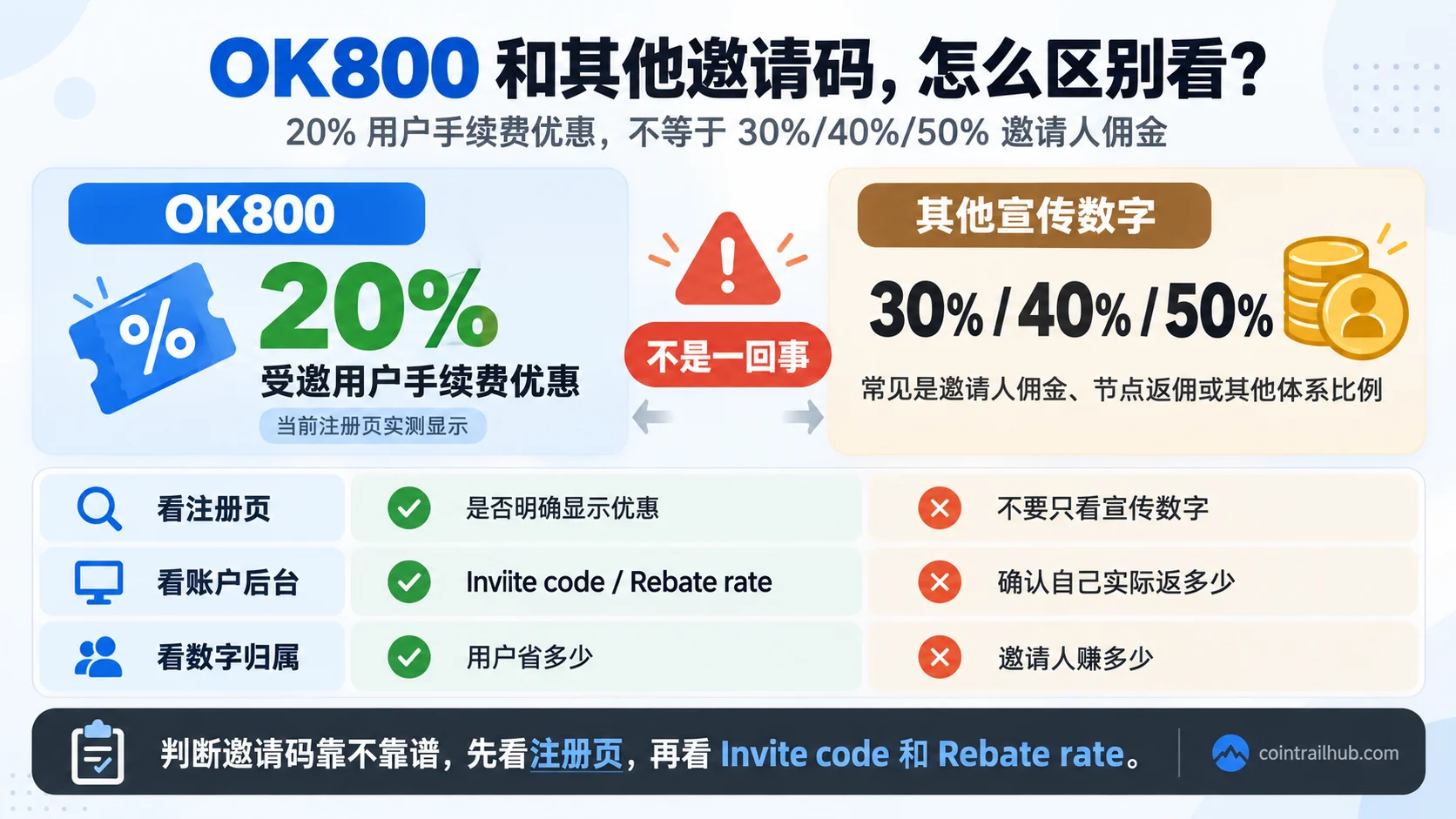
Caption: OK800's current signup page shows a 20% user fee discount in our test, while the 30%, 40% and 50% commonly seen online may be inviter commission or another referral system's ratios — the two are not the same concept.
How to compare OK800 against other referral codes correctly?
What's really worth comparing isn't whether the code is easy to remember, but these four things.
1. Does the signup page clearly show the benefit?
OK800's current test result:
20%
This is the most direct layer of evidence.
2. What your account actually shows after registering
Some OKX accounts can see, at:
User Center → Account info → Invite perks
these two fields:
- Invite code
- Rebate rate
OKX officially explains that if Invite perks exist, the page shows the currently bound invite code and the actually-applied rebate ratio.[2]
3. Don't mistake inviter commission for user rebate
If a promotional page only writes:
"Commission 40%"
but doesn't clearly say:
"Invited-user fee rebate 40%"
you can't read it directly as the registered user getting 40%.
4. Prioritize official pages and your own back end
More reliable than marketing text are:
- The OKX signup page
- Your own account back end
- The official Affiliate FAQ
- Actual rebate records
OK800 vs other referral codes
| Item | OK800 | Other referral codes |
|---|---|---|
| Does the current signup page clearly show the benefit? | Yes, 20% in our test | Needs individual verification |
| Can you confirm after registering? | Yes, via Invite code / Rebate rate | Yes |
| Does every trade rebate? | No | No either |
| Are the online 30%/40%/50% necessarily the user rebate? | No | Can't be read that way either |
| Can you change the referral code at will after registering? | Usually can't directly | Same, subject to the rules |
| Is re-binding possible? | Some accounts may qualify for Rebind / Win Back | Depends on the account and channel |
Separate first: binding, rebate ratio, and a specific trade
Many people can't figure things out because they mix three questions together.
| What you really want to check | What to focus on |
|---|---|
| Am I bound to OK800? | Invite code |
| How much do I currently rebate? | Rebate rate |
| Why didn't a specific trade rebate? | Trade type, region, net fee |
| Why didn't the inviter get commission? | Affiliate / Node back end |
The most important line is:
Binding ≠ necessarily rebating; having a rebate ratio ≠ every trade rebating; inviter commission ≠ invited-user fee discount.
Step one: first confirm you're checking your own fee rebate
The easiest thing to confuse on OKX is identity.
Invited user
If you're an ordinary user who registered through OK800, you care about:
Whether you got a fee rebate after your own trading.
Entries differ by region and version; common locations include:
- My Rewards
- Invite perks
- Fund statement
- Fee-rebate-related records
OKX's US Affiliate FAQ currently gives this path:
App → Main menu → User Center → My Rewards
Invited users can also see their assigned rebate ratio there; if the module doesn't show anything, no rebate ratio has been assigned.
And in accounts that support Invite perks, you can also go to:
User Center → Account info → Invite perks
to see the Invite code and Rebate rate.
Inviter / Affiliate
If you're the one inviting others, what you check is:
Affiliate commission / inviter commission
That's a separate set of records.
Don't use the inviter's commission back end to judge whether you, as an invited user, got a fee discount.
Step two: OK800 fee rebate not showing — 8 causes checked one by one
Cause 1: OK800 didn't actually bind
You may have opened the OK800 signup page, and it showed:
20% off trading fees
but when you finally registered, the channel attribution may not have succeeded.
Common situations include:
- The referral code was entered wrong;
- You switched to another channel during registration;
- You didn't finish registering through the OK800 page;
- The app or browser already had attribution to another channel.
How to check?
If your account offers "Invite perks":
User Center → Account info → Invite perks
and look at:
Invite code
If it shows:
OK800
then the current account is indeed attributed to OK800.
OKX also officially explains that the Invite perks page shows the invite code actually bound to the current account.
Cause 2: the back end shows a 0% rebate rate
If the invite code is bound but the back end shows a 0% rebate rate, it doesn't necessarily mean the code isn't bound.
OKX officially distinguishes:
- Invite code / channel attribution
- Rebate rate / fee-rebate ratio
An account can be attributed to some invite channel while currently having no applicable invited-user fee-rebate ratio.
The official docs also explicitly write: if the rebate rate shows 0%, it means the currently bound channel hasn't set a fee rebate for this invite code; this ratio doesn't need to be "activated".[3]
Therefore:
Invite code bound ≠ fee rebate necessarily exists.
However, for CoinTrailHub's current OK800 signup entry, our 2026-09-27 test showed the signup page clearly displaying:
20% off trading fees
So if you did register through this entry, the invite code shows OK800, but the back end shows 0% for a long time, it's worth saving:
- Signup page screenshot
- Invite code screenshot
- Rebate rate screenshot
- Related trade records
then contacting OKX support to verify your account's actual attribution and benefits.
Cause 3: this trade wasn't in the rebate scope in the first place
Even if the account shows 20%, not every OKX operation rebates.
Different regions may have different rules for:
- Spot
- Futures
- Buy
- Sell
- Convert
- C2C
- Other products
For example, OKX's current EEA Affiliate FAQ clearly states that eligible Spot and Futures trades can participate in fee rebates, but Buy, Sell and Convert are not rebate-eligible trades; the Netherlands, Malta and Spain have additional restrictions.[4]
So first confirm:
Which type of trade did you actually make?
Cause 4: the actual fee is too small, so you think nothing rebated
20% is:
a fee discount
not:
20% of the trade amount
For example, if you trade:
1,000 USDT
and that trade actually generates a 1 USDT eligible net fee, then 20% corresponds to:
0.2 USDT
not 200 USDT.
So even when a small trade rebates normally, the amount can be very unnoticeable.
Cause 5: it's actually calculated on the net fee
This is the easiest item to miscalculate.
OKX's current Affiliate FAQ clearly states:
The rebate ratio is calculated on the net trading fee, not simply the total fee shown on the order page.[5]
So don't see an order showing a 1 USDT fee and mechanically think:
1 × 20% = 0.2 USDT
If there are other rebates, offsets or special fee conditions, the final calculation basis may differ.
Cause 6: zero-fee trades, discounts and special accounts affect the rebate
Across OKX's different Affiliate / Node rules, common situations that affect the rebate include:
- Zero-fee trades
- Special fee discounts
- Trial funds
- Rebate cards
- Futures trial vouchers
- Certain special accounts or sub-accounts
These can lower the actually-calculable net fee.
So a large trading volume doesn't mean the rebate is necessarily large.
What you should really look at is:
The eligible net fee.
Cause 7: applying the inviter-commission timing rule to yourself
People often write online:
"OKX rebates settle hourly"
or:
"It arrives in 1–2 hours"
You have to be clear about which side this is talking about.
OKX's official Affiliate FAQ currently writes explicitly:
The inviter commission is usually paid within 1–2 hours after the trade; it may be delayed by several hours under extreme market conditions.[6]
But this is talking about:
Affiliate commission / inviter commission
It can't be directly extended to:
All ordinary invited users' fee rebates must strictly follow the same 1–2 hour cycle.
Ordinary users should instead check in this order:
- See whether the invite code is bound;
- See the rebate ratio;
- See whether the trade meets rebate conditions;
- Check My Rewards or the relevant rebate records;
- If it still doesn't match, contact support with the order ID.
Cause 8: region, account entity, or rules differ
OKX reminds you right at the top of the Affiliate pages:
This information may not apply to all customers.
Different regions can affect:
- Participating products
- Fee-rebate scope
- Back-end entry
- Rebind feature
- Futures eligibility
- Reward rules
For example, the EEA currently distinguishes explicitly:
- Netherlands: spot only
- Malta: spot only
- Spain: this fee rebate is currently not offered
So even using the same OK800, different accounts may see slightly different pages and applicable scopes.
In the end, go by the rules of your own account after logging in.
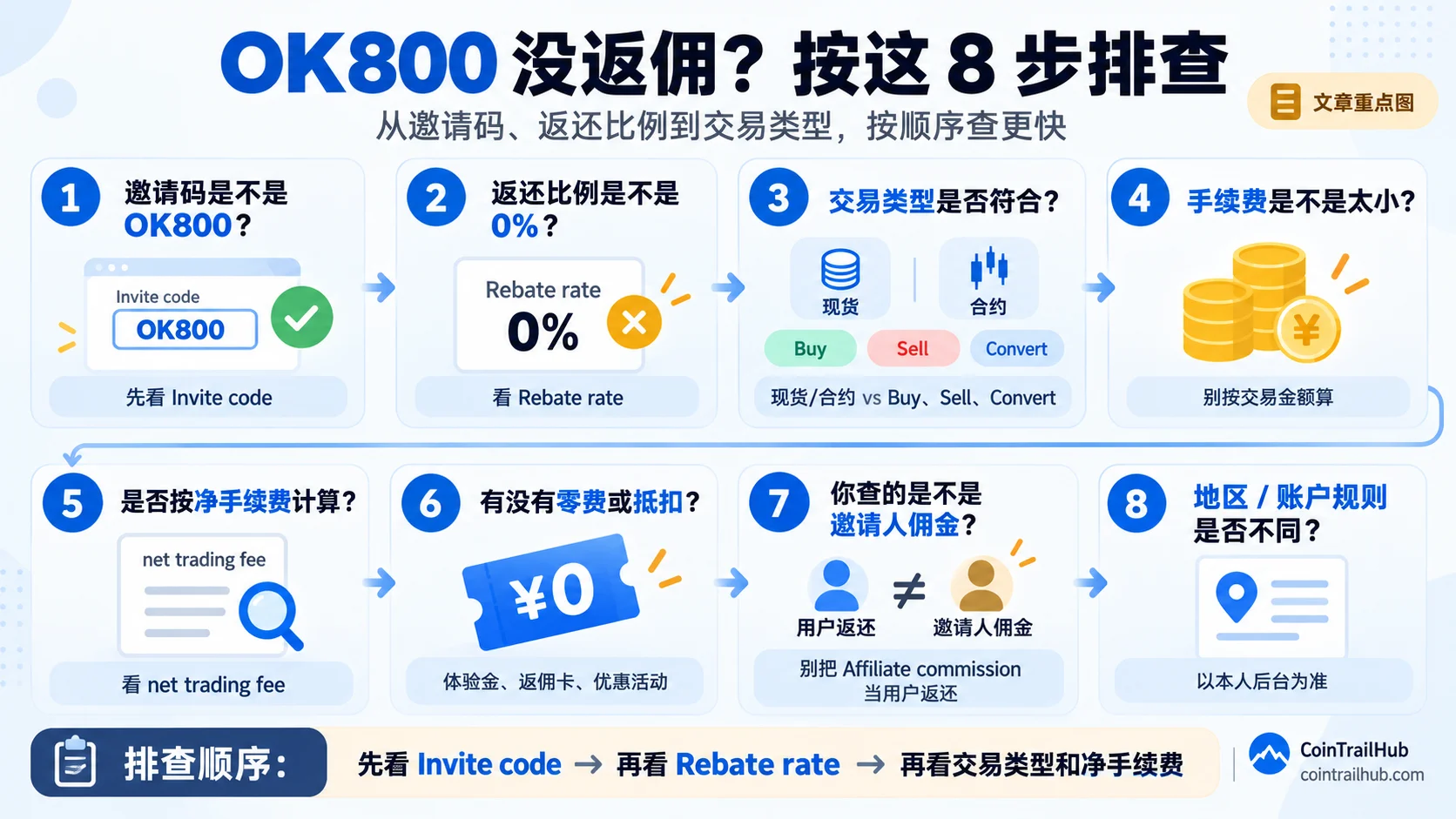
Caption: When the OK800 fee rebate can't be found, check the 8 steps in order: invite code, rebate ratio, trade type, fee size, net fee, discount offsets, inviter commission and region rules.
One table to see it all: how to check when OK800 doesn't rebate
| Cause | How to judge | What to do |
|---|---|---|
| OK800 not bound | Invite code isn't OK800 | Check the actual attribution |
| Rebate ratio abnormal | Back end differs from the signup page's benefit | Save screenshots and verify |
| Trade type ineligible | Buy / Sell / Convert, etc. | Check the region's rules |
| Fee too small | Estimating the rebate by trade amount | Look at the actual fee instead |
| Net fee low | Nominal fee differs from the actual rebate | Judge by the net fee |
| Discount or offset present | Zero-fee, trial funds, etc. | Look at the actually chargeable amount |
| Confusing Node rules | Using the inviter's settlement timing for yourself | Distinguish the two systems |
| Region rules differ | Page differs from tutorials | Go by your own account |
OK800-specific: how to confirm whether it's actually bound
If you registered through CoinTrailHub's OK800 signup entry, it's worth confirming once more after registering.
If your account supports:
User Center → Account info → Invite perks
focus on two fields.
1. Invite code
If it shows:
OK800
then the current account is bound to OK800.
2. Rebate rate
The ratio shown here is the fee-rebate ratio currently applied to your account.
OKX officially explains that the Invite perks page shows both the current invite code and the rebate ratio.
As of 2026-09-27, CoinTrailHub's current OK800 signup page showed in our test:
20% off trading fees
So if the signup page shows 20% and the back end also shows OK800 + 20%, the two sides are consistent.
For the complete self-check method, see:
How to check if OKX referral code OK800 is bound? Where to see the referral relationship
Why do some people online say the OKX referral code rebates 30%, 40%, 50%?
This part requires special care.
In OKX's different referral systems, inviter-commission ratios above 20% can indeed appear.
For example, in the current OKX DEX / Web3 referral system:
- The total inviter-commission ratio can reach up to 50%
- The invited-user fee discount can be set up to 20%
Therefore:
Inviter commission 50% ≠ invited-user fee discount 50%.
So when you see ads writing:
- 30%
- 40%
- 50%
ask first:
Is this what the inviter gets, or what the registered user gets?
If it isn't clearly distinguished, don't judge by the number alone.
Found the referral code entered wrong after registering — can it still be changed?
An ordinary referral code usually can't be filled in directly after registration the way you'd change a nickname.
OKX's current EEA Affiliate FAQ clearly writes:
The referral code only takes effect at registration; once the account is created it can't be back-filled.
But 2026 has added an official re-binding mechanism:
Win Back Invitation / Reconnect users
The official page explains that if the target Affiliate's back end has opened:
Marketing Centre → Reconnect users
that Affiliate can generate a Win Back Invitation link, and eligible existing users can submit a re-binding application after logging in.
So the more accurate statement is:
After registration is complete you usually can't directly change the referral code manually, but some eligible accounts can apply for re-binding through the official Rebind / Win Back flow.
And OKX clearly states:
- Whether you qualify is judged automatically by the system;
- The official doesn't disclose the specific eligibility conditions;
- After submitting, you can check the result on the Invite perks page about 24 hours later;
- There's a 30-day cooldown between two applications.
This is not the same thing as "directly changing the referral code after registering".
Don't close and re-register just to change to OK800
If you find you weren't bound to OK800, don't directly:
Close the old account → re-register → fill in the referral code again
OKX officially reminds:
Closing an account and re-registering to use a referral code may be treated as a violation, and may affect the account and reward eligibility.
The safer order is:
- Check the Invite code;
- Check the Rebate rate;
- See whether Reconnect users / Win Back exists;
- Contact OKX support if you're still unsure.
FAQ
What do I do if the OKX referral code doesn't rebate?
First check the three core questions:
① Did OK800 actually bind
② Does the rebate ratio match the signup page's benefit
③ Does this trade meet the rebate conditions
Then look at the actual fee and the rebate records.
Is OK800 20% right now?
As of 2026-09-27, when CoinTrailHub's current OK800 signup entry is opened, the OKX signup page clearly shows:
20% off trading fees
So the invited-user fee discount currently shown on this entry is 20%.
After registering, still check the Invite code and Rebate rate in your account.
Are other OKX referral codes also 20%?
No.
Different referral codes' actual rebate depends on the corresponding channel's configuration, region and campaign rules — you can't assume they're all like OK800.
OKX officially states:
Not all Affiliate invite codes include a fee rebate; whether there's a rebate and how much is set by the corresponding channel.
Are the online 30%, 40%, 50% a scam?
You can't say that across the board.
Those numbers sometimes refer to:
the inviter's own commission ratio
rather than:
the invited-user fee-rebate ratio
For example, the OKX DEX / Web3 referral program's total inviter commission can currently reach 50%, but the invited-user discount is still capped at 20%.
The key is to see first:
Who receives this percentage.
Is 20% a rebate of 20% of the trade amount?
No.
20% applies to eligible fees.
For example:
- Trade amount: 1,000 USDT
- Net fee: 1 USDT
- Rebate ratio: 20%
The corresponding amount is about:
0.2 USDT
not 200 USDT.
Why is the actual rebate less than expected?
Because the relevant rebate is calculated on the:
net trading fee
not the trade amount, and not necessarily the nominal total fee shown on the order page.
The rebate rate shows 0% — does that mean I'm not bound?
Not necessarily.
OKX officially distinguishes:
- Channel attribution (Affiliate attribution)
- Fee rebate
An account can be bound to some channel, but that channel hasn't set an invited-user fee rebate, so the rebate rate shows 0%.
So check separately:
- Invite code: who you're bound to
- Rebate rate: how much you actually rebate
How do I confirm whether OK800 is bound?
If your account supports:
User Center → Account info → Invite perks
check:
- Invite code
- Rebate rate
If the invite code shows:
OK800
then the current binding is OK800.
Can I still fill it in after entering the referral code wrong?
Usually you can't fill it in directly after registration is complete.
But some accounts may meet the:
Reconnect users / Win Back Invitation
conditions and can apply for re-binding through the official flow.
How long until I can see the Rebind result?
OKX currently explains:
After submitting the re-binding application, you can check about 24 hours later at:
User Center → Account info → Invite perks
to see whether the invite code has changed to the new code.
If it's still the old code, or the Invite perks page has disappeared, the application wasn't successful.
Can I close and re-register to use OK800?
Not recommended.
OKX officially reminds that closing an account and re-registering to use a referral code may be treated as a violation, and may affect the account and reward eligibility.
Data verification notes
Key facts in this article were checked against OKX's official Affiliate / referral program help documents on 2026-10-16, item by item:
- DEX referral tiers and user discount: OKX DEX's total inviter-commission tiers are Tier 1 20%, Tier 2 30%, Tier 3 35%, Tier 4 40%, Tier 5 45%, Tier 6 50%; the official allows an inviter to set the invited-user fee discount within 0%–20%. Source: OKX Web3 — DEX Referral FAQ.
- What the Invite perks page shows: OKX officially explains that if Invite perks exist, the page shows the currently bound invite code and the actually-applied rebate ratio. Source: OKX official help center — referral rebate program FAQ.
- Meaning of a 0% rebate rate: The official docs state that a 0% rebate rate means the currently bound channel hasn't set a fee rebate for the invite code, and this ratio doesn't need to be "activated". Source: OKX official help center — Affiliate FAQ.
- Rebate-eligible trade types: The EEA Affiliate FAQ states that eligible Spot and Futures trades can participate in fee rebates, while Buy, Sell and Convert are not rebate-eligible; the Netherlands, Malta and Spain have additional restrictions. Source: OKX Europe — Affiliate FAQ (Invite perks / Rebate rate / Rebind).
- Calculation basis: The rebate ratio is calculated on the net trading fee, not simply the total fee shown on the order page. Source: OKX official help center — Affiliate commission FAQ.
- Commission payout timing: OKX officially states the inviter commission is usually paid within 1–2 hours after the trade, and may be delayed by several hours under extreme conditions; this cycle is for inviter commission and can't be applied directly to ordinary invited users' fee rebates. Source: OKX official help center — Affiliate commission FAQ.
Related articles
- How to check if OKX referral code OK800 is bound? Where to see the referral relationship — First confirm who your account is actually bound to
- OKX referral code OK800 tested 2026: how to get the 20% fee rebate (with back-end screenshots) — See the 20% actual back-end records
- Where to enter OKX referral code OK800? Enter it at signup for 20% rebate — Read this first if you haven't registered
- OKX referral code entered wrong or not at all? You can't add it after registering — code OK800 — What to do when the code wasn't attributed correctly
- Entered a Binance referral code but got no rebate? Rebate-arrival troubleshooting (2026) — The Binance version; don't mix up the two rule sets
Risk note: this article introduces cryptocurrency exchange referral codes, fee discounts and Affiliate rules and does not constitute investment advice. As of 2026-09-27, CoinTrailHub's current OK800 signup entry shows "20% off trading fees" on the OKX page in our test. The referral code rebate ratio, applicable trade types, back-end entry, regional eligibility and account entity may change with OKX's rules — go by the signup page, your own account back end and OKX's latest official materials.
- 2026-10-16UpdateAdded evidence-chain superscripts and the "Data verification notes"; updated the key-fact verification date.
See ourEditorial Policy and the correction process in ourCorrections Policy.
The CoinTrailHub editorial team focuses on crypto education for beginners, exchange security and P2P trading risk. This article is compiled from official sources and public data, reviewed by humans, and strives for accuracy but is not investment advice.
Last updated:2026-09-27 · Content reviewed by humans · Learn more
© 2026 CoinTrailHub · Original content. Reproduction or rewriting without permission is prohibited.