
How to deposit on OKX? Full P2P USDT buying flow, fees, limits and avoiding a frozen account
Table of contents

Binance new user rewards
20% trading fee rebate
Official Binance registration. Complete identity verification (KYC) to trade and withdraw.

OKX new user rewards
20% trading fee rebate
Official OKX registration. Complete identity verification (KYC) to trade and withdraw.
Many people using OKX for the first time don't get stuck on "how to download or register" — they get stuck here:
"I have some fiat money. How do I turn it into USDT in my account?"
In the crypto community this is usually called "depositing." But what many people don't know is that OKX actually has two completely different "deposit" routes, and plenty of people walk down the wrong one.
This article covers one thing only: how to deposit fiat into OKX (buying USDT via P2P), how it works, how much it costs, and the pitfalls to avoid.
The conclusion up front: the most common deposit method is buying USDT via P2P. The OKX P2P platform itself charges no fee, and the minimum is about 10 units of fiat per order. But after buying, risk control may trigger a T+N lock that temporarily blocks withdrawals, and during the buy you may run into risk-control or payment-failure issues from your bank or payment provider. If you later sell coins via P2P and receive fiat, you also need to watch out for the risk of your receiving account being frozen due to abnormal funds — these are the things worth knowing before your first deposit.
This article does not encourage frequent trading and makes no price judgments. USDT is a stablecoin, but a stablecoin is neither a bank deposit nor risk-free.
If you don't have an OKX account yet, start here: How to register on OKX.
This article is for account-flow and deposit-safety education only, and does not constitute investment, trading, legal or tax advice. P2P features, payment methods, limits, freeze rules and page displays vary by region — always follow the actual OKX App page and the official Help Center.
Quick overview: the 7 most important things before your first deposit
- OKX has two "deposit" routes: buying USDT with fiat via P2P, or depositing coins from another platform/wallet. Fiat deposits take the first route.
- The OKX P2P platform charges no fee, but your own bank or payment provider may charge separately when you transfer.
- The P2P minimum is about 10 units of fiat per order (it varies by channel — check the page).
- The payment account must match your own verified identity; don't let someone else pay for you, and leave the transfer note empty.
- Once your cumulative P2P buying reaches 20,000 units of fiat, you'll need to complete video verification as prompted to keep raising your cumulative limit.
- After buying, a T+N lock may trigger, blocking withdrawals, selling or DEX trades for a few days — the exact number of days is shown on the page.
- What's more common during a buy is a risk-control notice or payment failure from your bank or payment provider; a real judicial freeze of your bank account happens more in the selling/receiving scenario. The two are handled differently.
If all goes well, one order takes about 5 minutes. The two easiest places to trip up: writing "USDT" or "Bitcoin" in the transfer note; and forgetting to return to the order to tap "I have paid" and upload proof as prompted.
1. OKX actually has two "deposit" routes — know the difference first
The most common beginner confusion is treating "depositing" as a single action. In fact, OKX has two completely different ways to put money into your account:
| Route | Best for | What it is | Note |
|---|---|---|---|
| P2P buying USDT | You have fiat and want to buy coins with it | Buy USDT from a merchant on the platform; the platform charges no fee | Payment account must be your own identity; a T+N lock may trigger after buying |
| On-chain deposit | You already have coins on another platform/wallet | Transfer coins from another address to your OKX deposit address | The deposit network must match on both ends, otherwise coins may be lost |
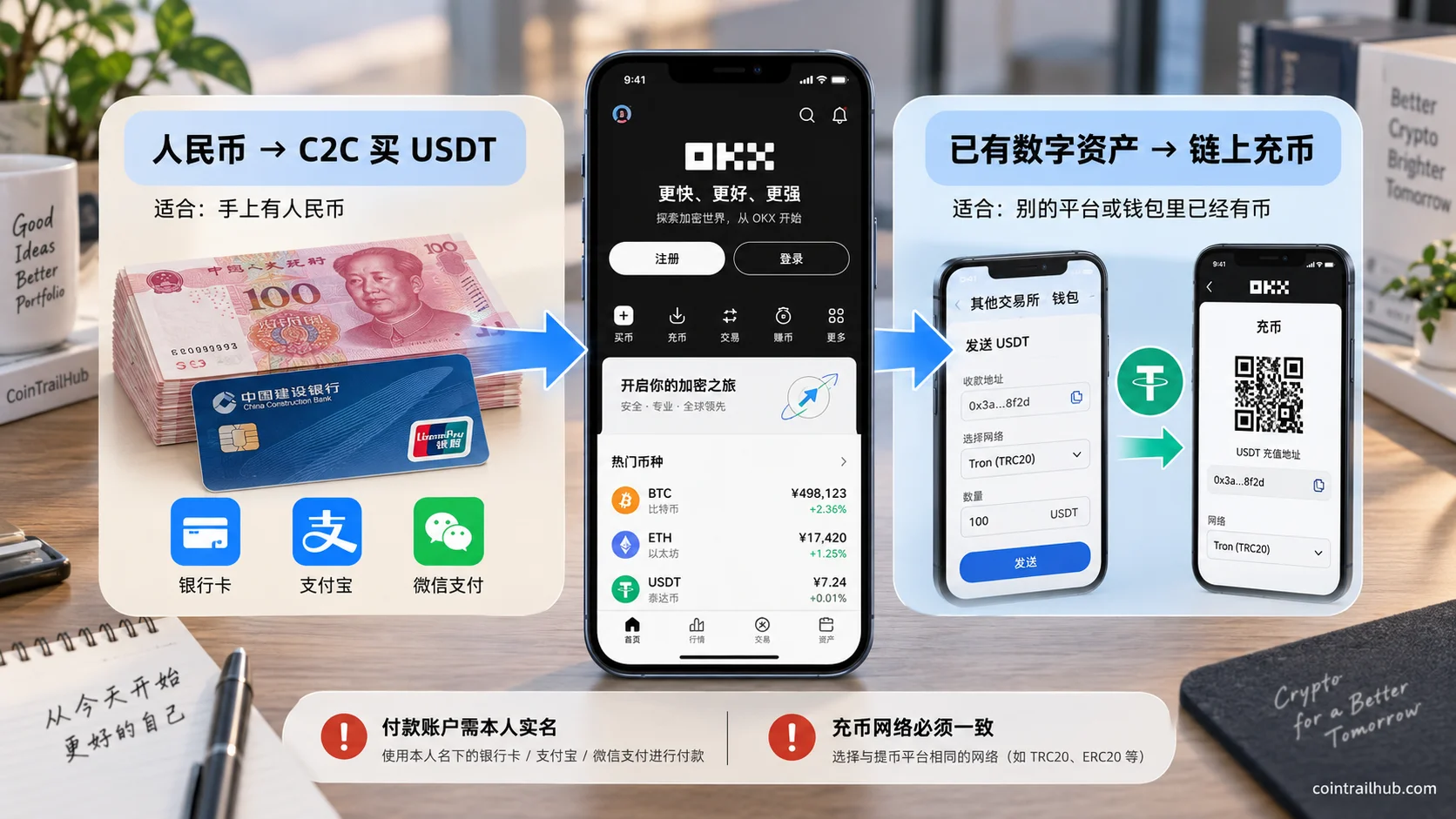
Figure 1: OKX's two common deposit routes — fiat goes through P2P to buy USDT; existing digital assets come in via on-chain deposit.
This article focuses on the first one — buying USDT with fiat via P2P — because it's the most common and least avoidable route for getting fiat into OKX.
If you already have USDT and just want to move it in from another wallet, that's "depositing," and the only thing that matters is choosing the right network. See: Sent to the wrong chain? Withdrawal networks and wallet addresses (2026).
2. Before P2P deposit, confirm these first
Go through the conditions before you start — many people get stuck repeatedly right here, where "the conditions aren't met."
1. Complete identity verification (KYC)
P2P buying usually requires identity verification. Without KYC you may be unable to place orders, have limited amounts, or find payment methods unavailable.
If you haven't done it yet, see: OKX KYC identity verification tutorial (2026).
2. Link a payment method under your own name
The name on your payment account must match your OKX verified name. Having someone else pay for you can trigger order disputes or even risk control.
3. Video verification at a certain threshold
There's an easily missed point in OKX's official rules: once your cumulative P2P buying reaches 20,000 units of fiat, you need to complete video verification (facial recognition) as prompted to keep raising your cumulative buying limit.[1]
If you don't buy much, you may never see this prompt; but if you're planning to buy a lot at once, knowing this ahead of time saves trouble.
4. Minimum order amount
OKX P2P has a minimum per order, officially around 10 units of fiat (some channels or regions may start at 1 USDT — check the actual page).[2] In other words, if you want to try a tiny test order first, it may not go through.
3. Full steps to buy USDT via P2P
The whole flow in one sentence: pick coins and place the order → review → transfer → tap "I have paid" → wait for coin release.
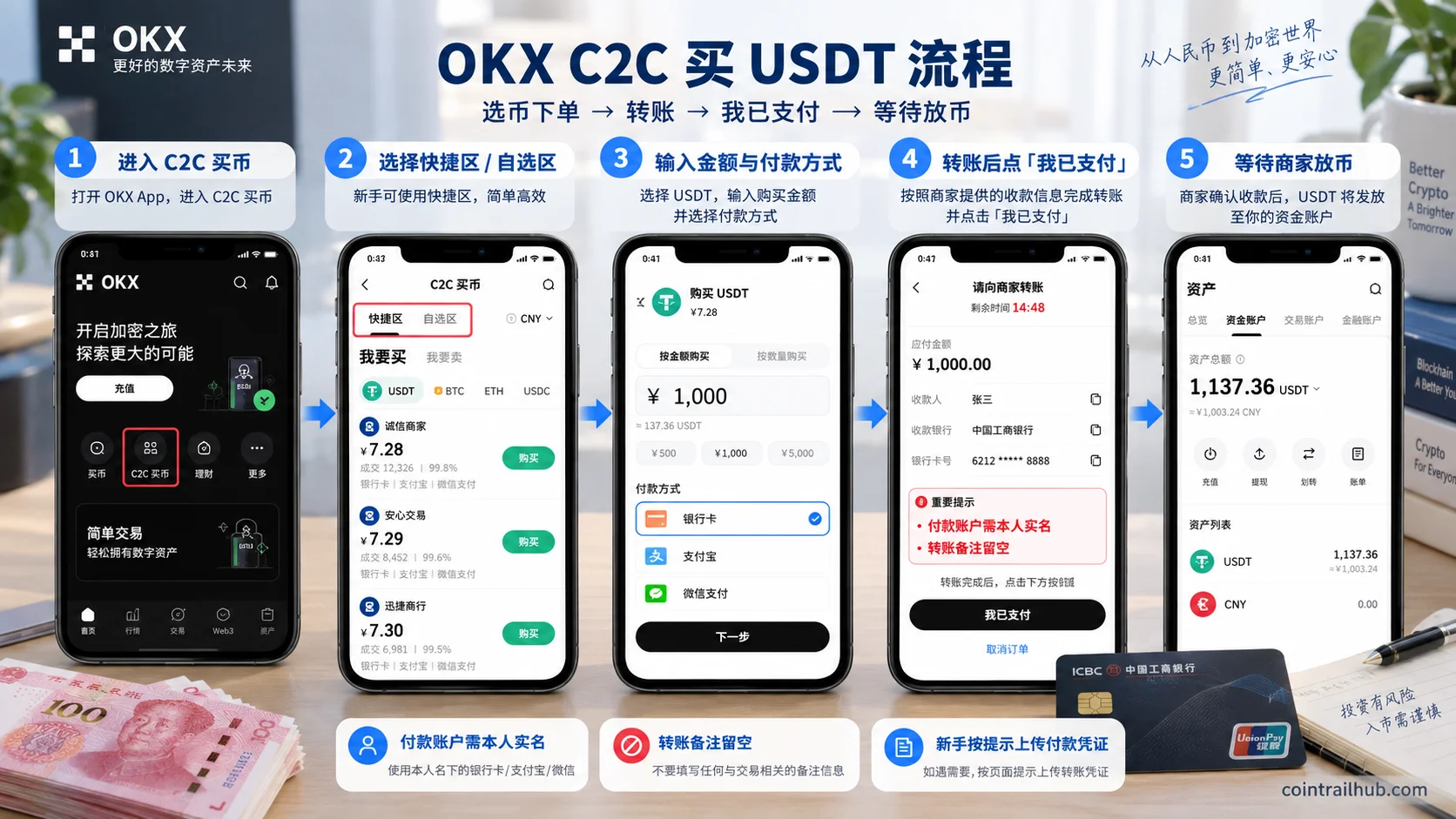
Figure 2: The full OKX P2P USDT buying flow, from entering P2P buying, choosing a merchant and payment method, to confirming payment and waiting for the merchant to release the coins.
There are two modes: "Express" and "Self-select."
Express zone (recommended for beginners): the system matches a merchant for you — you don't pick one yourself.
- On the App home, go to [P2P buying] → [Express] → [Buy].
- Enter the fiat amount and choose USDT.
- Choose your payment method.
- Preview the order, confirm, and get the merchant's payment details.
- Transfer to the receiving account shown on the order page, and leave the note empty.
- Return to the OKX order page and tap [I have paid]; if prompted, upload proof of payment.
- Wait for the merchant to confirm receipt and release the coins; the USDT arrives in your funding account.
Self-select zone: you pick the merchant yourself — for people who want to check price, volume and completion rate first.
- On the App home, [P2P buying] → [Self-select] → pick a merchant and tap [Buy].
- Fill in the amount or quantity, choose a payment method, and tap [Buy with 0 fee].
- After the order is created, get the payment details and transfer to the merchant's account.
- After paying, tap [I have paid] → [Confirm transfer], and wait for the merchant to release the coins.
Here's a point beginners easily miss: after paying, you must return to the OKX order page and tap "I have paid." If the page asks you to upload proof of payment, complete that too. Finishing the bank or payment-app transfer alone does not end the order flow; whether you need to upload proof depends on the current order page.
For more detailed step-by-step screenshots, and how to pick a merchant and verify payment, see the dedicated flow article: How to buy USDT on OKX? P2P flow and pitfalls (2026). This article won't repeat the merchant-selection details, and instead focuses on the "money" and "risk" parts below.
4. Fees: the platform is 0-fee, but the transfer may cost extra
This is where OKX P2P differs from many people's intuition.
OKX does not charge ordinary users a platform fee for P2P buying and selling — which is why the official page says "0 fee buying."[3] Your real "cost" is mainly these:
| Item | Charged? | Note |
|---|---|---|
| P2P platform fee | No | OKX charges no platform fee for P2P buys/sells by ordinary users |
| Bank / payment-app transfer fee | Maybe | Depends on the payment tool you use — unrelated to OKX |
| Merchant price spread | Yes | The merchant's listed price already includes a spread; it varies by merchant |
So "0 fee" means the platform layer charges nothing — it doesn't mean there's zero cost between your fiat and the USDT you receive. What really affects how much you get is the merchant's price spread and your payment tool's own transfer fee.
As for saving on trading fees (spot buys/sells), that's a separate topic — see: How to save on OKX fees (2026).
5. Limits and T+N: why you can't withdraw right after buying
After your first USDT purchase, some people find they temporarily can't withdraw. This isn't necessarily an account problem — more often the order triggered the C2C 30-day buying limit or the T+N safety protection.
These two mechanisms are not the same:
| Mechanism | How it triggers | Main effect |
|---|---|---|
| C2C 30-day buying limit | Dynamically calculated from your rolling 30-day P2P buying | The full amount of an order over the limit is restricted from withdrawal, P2P selling and DEX trades |
| T+N safety protection | Triggered after the platform's real-time risk assessment of a specific order | An amount of assets equal to that order cannot be withdrawn, sold via P2P, or used for DEX trades for T+3, T+7 or T+15 |
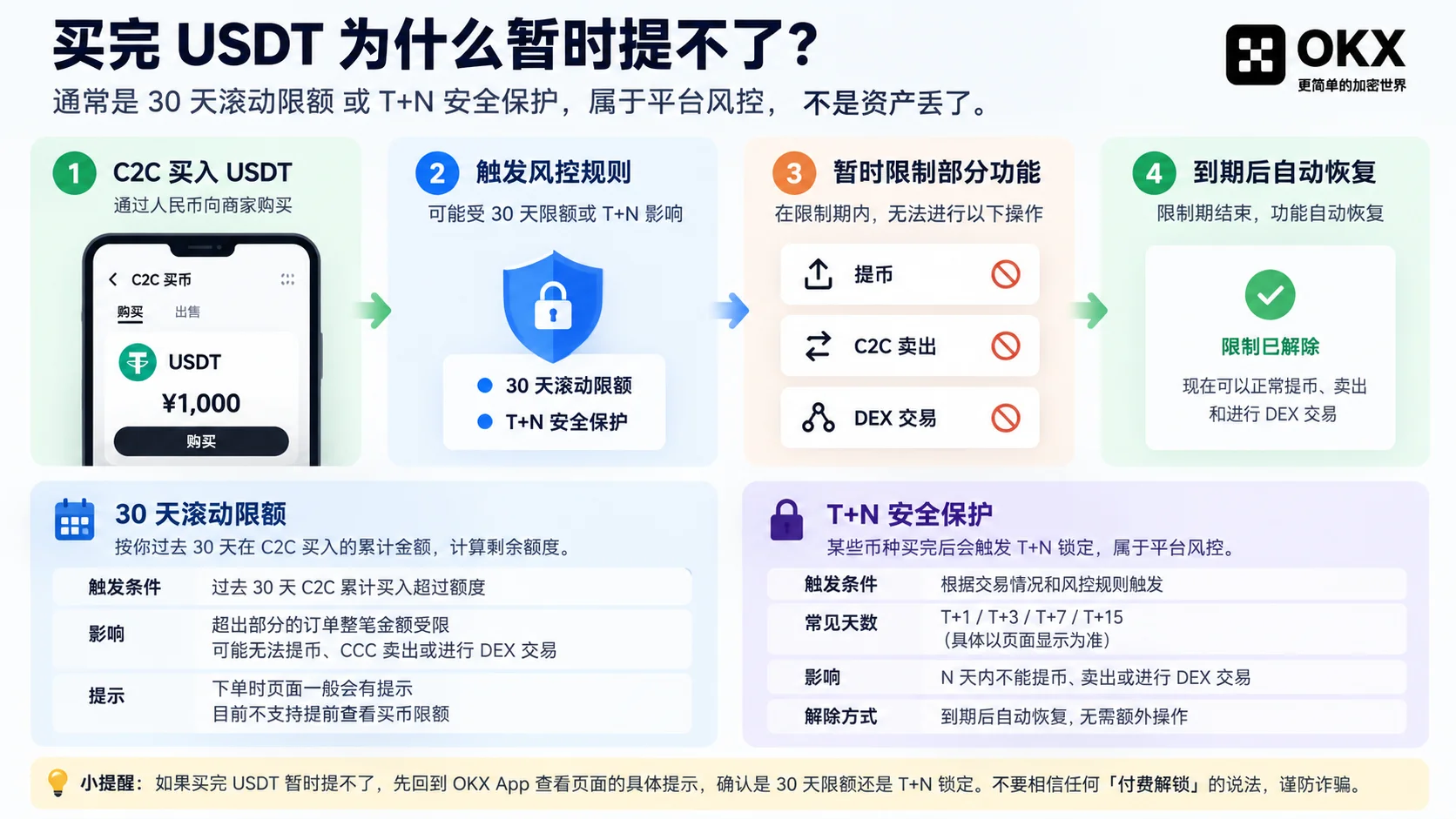
Figure 3: The common reasons you temporarily can't withdraw after buying USDT on OKX are the C2C 30-day buying limit or T+N safety protection; both usually lift automatically when the period ends.
C2C 30-day buying limit
OKX calculates your P2P buying over a rolling 30 days and dynamically decides your remaining buying limit.
If an order exceeds the current limit, you can still buy, but the entire amount of that order enters a restricted state and temporarily can't be withdrawn, sold via P2P, or used for DEX trades.
OKX currently offers no entry point to check the exact remaining limit in advance. If an order will trigger the restriction, the page shows a notice before you place it.
Note: a lock caused by the 30-day buying limit currently can't be appealed and lifted early — you need to wait for the restriction period shown on the page to end.[4]
T+N safety protection
The other case is when an order triggers T+N risk control.
As of September 2026, the common restriction periods listed by OKX are:
- T+3: 3 calendar days
- T+7: 7 calendar days
- T+15: 15 calendar days
The exact period is shown on the order page.
What's restricted is the amount of assets corresponding to that order, mainly affecting withdrawal, P2P selling and DEX trades; it generally doesn't affect other unrestricted assets in your account, nor does it mean your USDT is lost.[5]
If the page offers an appeal entry, you can submit one appeal as prompted, but early release isn't guaranteed. In normal cases, once the unlock time shown on the order page arrives, the system lifts the restriction automatically.
So when you run into "why can't I withdraw the USDT I bought via P2P," the first step isn't looking for a so-called "paid unlock" — it's opening the order details and checking whether the page points to the 30-day buying limit or the T+N safety protection.
6. Will buying USDT via P2P freeze my bank account?
Let's correct an easily confused point first:
Buying USDT via P2P and selling USDT via P2P face different bank-account risks.
When you buy USDT, you usually transfer fiat from your own bank or payment account to the seller; when you sell, someone else transfers fiat into your receiving account.
The "bank account judicially frozen after receiving funds of questionable origin" you often read about happens more in the selling/receiving scenario, because there your account is receiving the other party's funds.
But buying isn't risk-free either. During payment you may still encounter:
- Your bank or payment provider flags the transaction as abnormal;
- The recipient account can no longer accept funds;
- The payment platform requires further verification;
- The merchant says they didn't receive the payment after you paid;
- Your bank or payment provider's own risk control.
If you see an abnormal notice while paying, don't retry the transfer repeatedly, and don't handle it privately with the merchant outside the OKX order page. First keep the order number, payment records and related screenshots, then handle it through the order chat or the platform's appeal entry.
What if your bank account really gets frozen?
First contact your bank to confirm the freezing authority, the reason and how it's handled, because different types of freezes are handled differently.
One judicial scenario mentioned in OKX's official materials is:
- Temporary police freeze: usually 36–72 hours;
- Police petition to a court for a freeze: may last 6 months to 1 year, and may be extended by law.[6]
If a judicial authority needs OKX to provide order or account information, the investigating agency can submit the corresponding legal documents per the platform's requirements. The official judicial-assistance contact email published by OKX is evidence@okx.com.
A point worth special attention:
OKX's "freeze coverage" mainly targets qualified P2P seller receiving accounts that get frozen — it does not mean that if the bank account you used to pay for a P2P buy gets frozen, you'll definitely be covered. So don't interpret "freeze coverage" as covering every P2P bank-account problem.
7. Which payment method to choose? There's no absolute "safest" option
There is no absolute "safest" payment method. Whether you use a bank transfer, card or a payment app, always use an account under your own identity and pay normally according to your bank or payment provider's rules.
If the payment page shows a risk notice, an account anomaly, or the recipient can't accept funds, don't retry the transfer just to complete the order, and don't switch to someone else's account to pay. You can cancel an unpaid order and pick another eligible merchant or payment method.
If a payment account is used for many of your daily transactions, also consider the real impact an account anomaly might have. But no matter which bank or payment tool you switch to, you can't eliminate the payment risk-control that P2P trading itself may trigger.
8. A pre-payment checklist for your first deposit
Here's a table of the most error-prone points — go through it before paying:
| Pitfall | How to avoid it |
|---|---|
| Writing "USDT / Bitcoin" in the transfer note | Leave the note empty — write nothing |
| Having someone else pay on your behalf | Only pay from an account matching your own identity |
| Forgetting to tap "I have paid" / upload proof | After paying, confirm in the order; if prompted, upload proof |
| Cancelling the order after paying | Don't cancel after paying — contact the merchant first |
| Being led to a private chat outside OKX | Keep order issues in the OKX order chat window |
"Cancelling the order after paying" deserves a separate emphasis: P2P is a person-to-person trade, and the platform can't refund you directly like an e-commerce site. So once you've transferred per the order, don't cancel unless the merchant explicitly refunds — after cancelling, recovering either the money or the coins becomes much harder.
FAQ
Does OKX P2P deposit charge a fee?
OKX charges ordinary users no platform fee for P2P buying and selling; but your bank or payment provider may charge its own transfer fee, which is unrelated to OKX. How much USDT you actually receive is also affected by the merchant's price spread.
What's the minimum for OKX P2P deposit?
The official minimum is about 10 units of fiat per order (some channels or regions may start at 1 USDT — check the actual page). A tiny test order may not go through.
Does OKX deposit require video verification?
Usually completing identity verification (KYC) lets you buy small amounts first. Once your cumulative P2P buying reaches 20,000 units of fiat, you need to complete video verification (facial recognition) as prompted to keep raising your cumulative buying limit.
Why can't I withdraw right after buying USDT?
It usually relates to the C2C 30-day buying limit or the T+N safety protection. T+N restricts an amount equal to that order from withdrawal, selling or DEX trades for T+3, T+7 or T+15; a lock from the 30-day limit can't currently be appealed early. First check the specific notice in the App — don't believe in "paid unlocks."
What if my bank account gets frozen?
First contact your bank to confirm the freezing authority, reason and handling. Judicial freezes split into a temporary police freeze (usually 36–72 hours) and a court freeze (6 months to 1 year, extendable); if an investigating agency needs OKX to cooperate, the relevant legal documents can be sent to evidence@okx.com. Note: OKX's "freeze coverage" mainly targets seller receiving accounts that get frozen — a buying payment account being frozen doesn't necessarily qualify for coverage.
Are depositing and on-chain depositing the same thing?
No. Depositing (buying USDT with fiat via P2P) is buying coins from a merchant; on-chain depositing is moving coins you already have from another platform/wallet to your OKX deposit address. The key is that the network matches on both ends, otherwise coins may be lost.
My payment app says the recipient is flagged by risk control — what do I do?
This means the current payment may have triggered your payment provider's risk control, but you usually can't tell the specific reason from the notice alone. Don't retry the transfer repeatedly, and don't bypass the risk notice to keep paying.
If the order isn't paid yet, go back to OKX and choose another eligible merchant or payment method; if you've already paid, don't cancel the order — keep the payment records and handle it through the OKX order chat or appeal entry.
Data verification notes
All key facts in this article were verified on 2026-10-16 against OKX's official Help Center documents on P2P buying, limit protection and freeze handling, item by item:
- Cumulative video verification: once cumulative P2P buying reaches 20,000 units of fiat, video verification (facial recognition) is required as prompted to keep raising the cumulative buying limit. Source: OKX Help Center — C2C buying limit and security protection.
- Minimum order amount: the official minimum is about 10 units of fiat per order; some channels or regions may start at 1 USDT — check the actual page. Source: OKX Help Center — P2P trading FAQ.
- P2P platform fee: OKX charges ordinary users no platform fee for P2P buying and selling, which is why the official page shows "0 fee buying." Source: OKX Help Center — How to buy crypto via P2P.
- 30-day buying limit: the remaining limit is dynamically calculated over a rolling 30 days; the full amount of an order over the limit enters a restricted state. This lock currently can't be appealed and lifted early — you must wait for the restriction period shown on the page. Source: OKX Help Center — C2C buying limit and security protection.
- T+N restriction scope: the official common restriction periods are T+3 (3 calendar days), T+7 (7 calendar days) and T+15 (15 calendar days). The restriction applies to assets equal to that order, generally doesn't affect other assets in the account, and doesn't mean the USDT is lost. Source: OKX Help Center — What to do if T+N risk control blocks withdrawals or deposits.
- Judicial freeze duration reference: one judicial scenario in OKX's official materials is a temporary police freeze of usually 36–72 hours, and a police petition to a court for a freeze that may last 6 months to 1 year and may be extended by law. Source: OKX Help Center — What to do if a P2P payment account is frozen.
Related articles
- How to buy USDT on OKX? P2P flow and pitfalls (2026) — Step-by-step screenshots for P2P buying
- How to register on OKX — Start here if you don't have an account yet
- OKX KYC identity verification tutorial (2026) — Stuck on identity verification?
- How to save on OKX fees (2026) — Trading fees after you deposit
- Where to keep the USDT you bought on Binance/OKX? (2026) — Where to store USDT more safely
- Sent to the wrong chain? Withdrawal networks and wallet addresses (2026) — How to choose deposit/withdrawal networks
Risk disclosure
This article is for crypto beginner onboarding and deposit-flow education only, and does not constitute investment, trading, legal or tax advice. Digital asset prices are volatile, and a stablecoin is not the same as a bank deposit. Before trading, understand the platform rules, local regulations and your own risk tolerance.
P2P buying involves third-party fiat transfers and may run into risk control, payment failure or account restrictions from banks or payment providers; if you later sell coins via P2P and receive fiat, also watch out for the risk of a judicial freeze on your receiving account after it touches abnormal funds.
All P2P features, payment methods, minimum amounts, buying limits, T+N days, freeze rules and coverage conditions are subject to the current OKX App page and the latest official Help Center documentation.
- OKX Help Center — How to buy crypto via P2POfficial steps for buying crypto through P2P trading
- OKX Help Center — P2P buying guideStep-by-step guide for buying on the C2C/P2P marketplace
- OKX Help Center — P2P trading FAQCommon questions about P2P trading
- OKX Help Center — C2C buying limit and security protectionBuying limits, video verification and safety protections
- OKX Help Center — Beginner's guide to identity verificationIdentity verification (KYC) requirements and FAQ
- OKX Help Center — What to do if T+N risk control blocks withdrawals or depositsT+N safety protection and common lock periods
- OKX Help Center — Freeze coverage FAQCoverage for frozen seller payment accounts
- OKX Help Center — What to do if a P2P payment account is frozenHandling frozen third-party payment accounts in P2P trades
- OKX Help Center — How to deposit (App)On-chain deposit steps in the App
- 2026-10-16UpdateAdded evidence-chain superscripts and "Data verification notes"; refreshed key fact verification date.
See ourEditorial Policy and the correction process in ourCorrections Policy.
The CoinTrailHub editorial team focuses on crypto education for beginners, exchange security and P2P trading risk. This article is compiled from official sources and public data, reviewed by humans, and strives for accuracy but is not investment advice.
Last updated:2026-09-22 · Content reviewed by humans · Learn more
© 2026 CoinTrailHub · Original content. Reproduction or rewriting without permission is prohibited.