
Binance P2P says "not eligible" when buying crypto? 6 causes + fixes (2026)
Table of contents

Binance new user rewards
20% trading fee rebate
Official Binance registration. Complete identity verification (KYC) to trade and withdraw.
When Binance P2P shows "not eligible" when you try to buy, or won't let you create an order, don't keep tapping the buy button.
There's only one fastest way to diagnose it: switch to another ad and another merchant, then try again.
- You can place an order after switching ads: usually the problem is in the original ad — the amount limit, the counterparty conditions, or the ad's remaining balance;
- You still can't place an order after trying a few ads: check your account's identity verification, today's order cancellation count, and the P2P "Cancellation Limits Center";
- The order is created, but payment is blocked by your bank or payment app: this is usually third-party payment risk control, not a "not eligible" Binance account;
- USDT was already bought, but you can't withdraw it to an external wallet: check the P2P T+1/T+2 withdrawal limit instead of switching ads again.
Going through this order makes it easier to locate the problem than contacting support right away. For the normal P2P flow, see Binance buy USDT tutorial 2026: P2P buying process, choosing a merchant and paying.
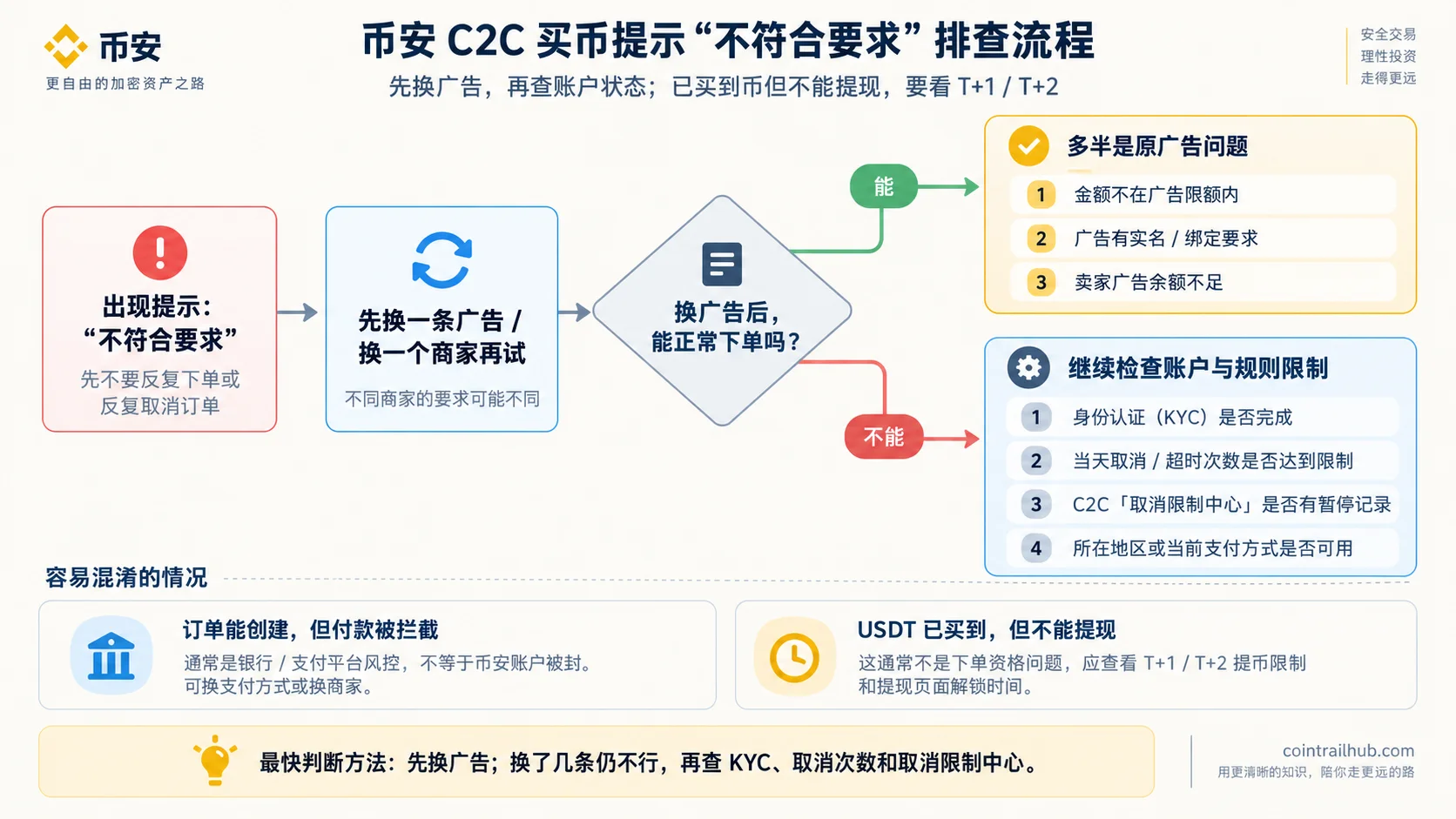
Figure: the troubleshooting order for the Binance P2P "not eligible" prompt — switch ads first, then check KYC, cancellation count and the Cancellation Limits Center; if USDT was already bought but can't be withdrawn, check the T+1/T+2 limit.
About 8 minutes to read.
Cause 1: You hit today's order cancellation limit
This is one of the situations most easily misread as "my account was frozen."
Binance currently calculates limits separately based on the cancellation reason and the order role. For an ordinary taker buyer, cancellations caused by the buyer, auto-cancellations from order timeout, and some other cancellation cases can all stop you from placing further P2P orders for the rest of the day once they reach the platform limit. Binance cancel buy order instructions
Among these, for cancellations caused by the buyer, an ordinary taker buyer can cancel up to 3 times per day; cancellations caused by the system or order timeout also count toward these 3 buyer-caused cancellations. Once these limits are exceeded, the P2P order function is temporarily restricted, and you can't create another order before 24:00 (UTC) that day.[1]
In addition, Binance's current P2P user policy states: if a taker buyer creates 5 consecutive orders without paying within the required time, the system may restrict them from buying as a taker for 24 hours.[2]What's restricted here is P2P taker buying, not the whole Binance account being frozen. The specific policy version applied may differ by region; follow the account page and your local P2P rules.
What to do
Don't keep creating and cancelling orders.
Go to "P2P → Profile → Cancellation Limits Center" and check whether there's a suspension record, its reason and its expiry time.
If an order genuinely can't proceed because the seller can't receive payment or the payment details are abnormal, choose the matching reason when cancelling; if your account has already been suspended, appeal through the "Cancellation Limits Center" as shown. Cancellation Limits Center instructions
Note: different cancellation reasons count differently. Don't simply assume that "as long as it's not my fault, it won't count against the cancellation limit."
Cause 2: Identity verification not completed
Using Binance P2P requires meeting the platform's identity verification requirements. Binance P2P user trading policy
If your account hasn't completed the required KYC, or its verification status has changed, you may not be able to create P2P orders.
What to do
Check your identity verification status in Binance's "Account Center", then complete it as guided. Don't place orders repeatedly before confirming your status — that may trigger more risk controls instead. For the specific registration and KYC flow, see Binance registration tutorial (2026).
Cause 3: Account restricted or suspended, or your region isn't supported
A P2P account may be suspended for reaching the cancellation limit, abnormal trading behavior, risk review, or other violations of platform rules. Don't guess the reason — go to the "Cancellation Limits Center" to see the suspension reason, case number and expiry time shown by the system. A region that doesn't support P2P or a specific payment method will also prevent orders.
Check the "Cancellation Limits Center" first
This is the first place to check. App path: P2P → Profile → Cancellation Limits Center.[3]You can see the suspended function, reason, case number and expiry time there.
What to do
- Appeal through the "Cancellation Limits Center" as guided, and provide the relevant proof (such as identity verification video, payment proof, bank statements from the last 3 months, etc.);
- For metrics like completion rate or payment time, request a review under the order's "Performance and feedback appeal";
- If only the current fiat or payment method is unavailable, use another available method shown on the page; if your region doesn't support the relevant P2P service, follow the availability limits on Binance's local page — don't try to bypass regional restrictions.
Account restrictions can only be lifted through Binance's official appeal. Any "paid unblocking" is a scam. See Binance's official Cancellation Limits Center.
Cause 4: This ad set requirements you don't meet
P2P ads are posted by merchants, and each ad can set order conditions. Common unmet conditions:
- Single-order amount limit: the ad sets a minimum/maximum trade amount; the amount you enter must fall within the ad's allowed order range, otherwise you can't place the order;
- Real-name / binding requirements: some ads require the buyer to have completed real-name verification, or to have bound a phone number or email;
- Insufficient ad balance: a "remaining ad balance is below the order limit" prompt means the seller's balance isn't enough to cover this order — not a problem with your account. The ad will be temporarily taken down by the system.
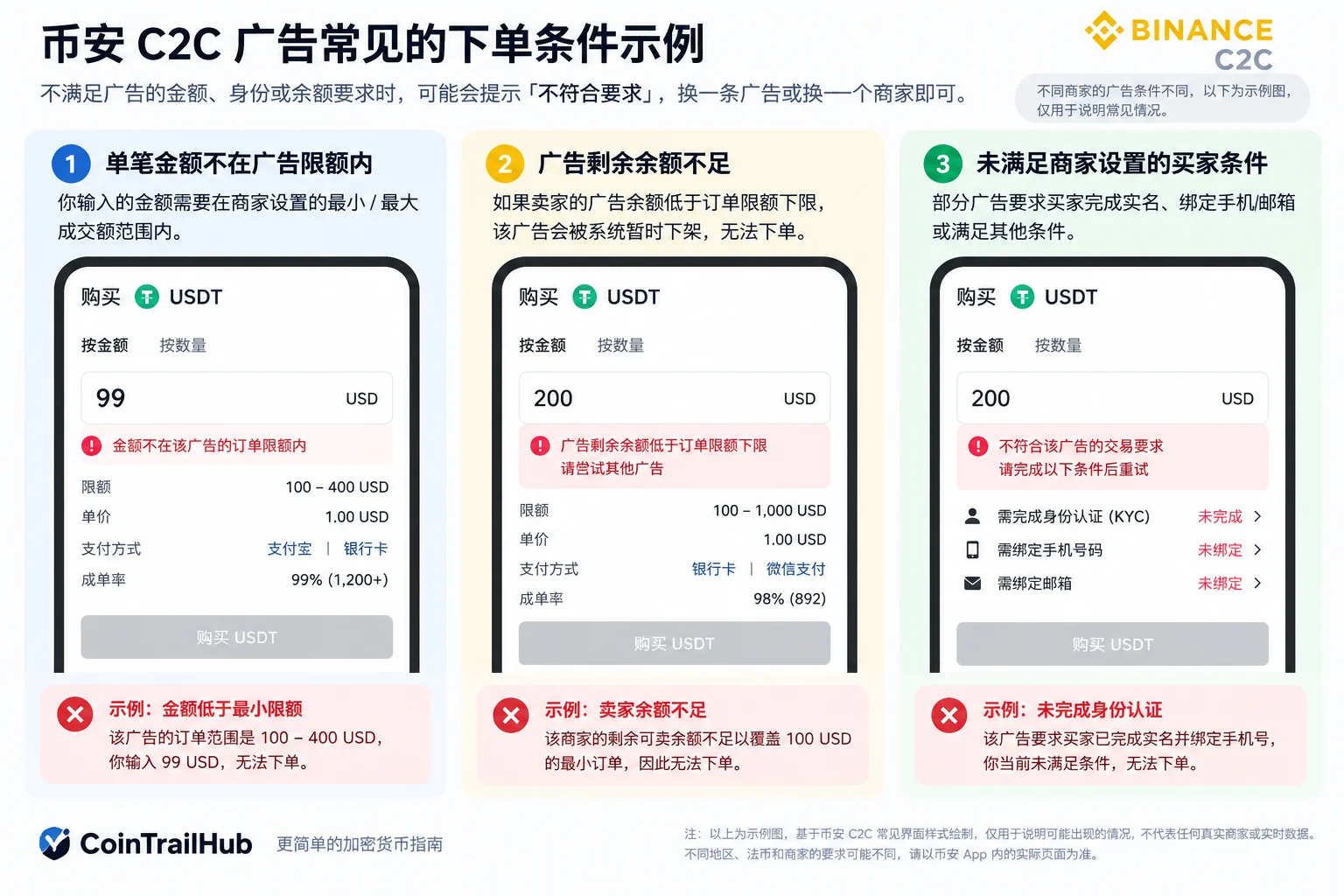
Figure: common order conditions on Binance P2P ads — an amount over the limit, insufficient seller ad balance, or unmet buyer conditions set by the merchant can all prevent an order.
What to do
Switch to an ad with a suitable amount range that you meet, or switch merchants. The amount you enter must fall within the ad's currently allowed order range. For example, if an ad shows $100–400, then $99 or $401 is clearly out of range and can't be filled; whether boundary values are usable depends on what the current order page shows. For the full limit rules, see Binance's official Introduction to P2P trading order limits.
Cause 5: Previous P2P violations restricted your trading permissions
If you previously clicked "Paid" without actually paying, cancelled orders abnormally, refused risk-control verification, or similar, Binance may restrict part or all P2P functions depending on the violation type.
The restriction duration isn't the same in every case; follow the reason, expiry time and appeal entry shown in the "Cancellation Limits Center".
Note here: Binance's P2P user trading rules vary by fiat currency and region — the Chinese-language version of the rules explicitly states it applies only to the CNY trading zone.[4]P2P user trading rules So don't treat one region's penalty figures as global rules; follow the actual restrictions shown on your account page.
What to do
Appeal or wait for the expiry as shown in the "Cancellation Limits Center". During the freeze, don't use another account to bypass the restriction, which could trigger heavier penalties.
Cause 6: Payment channel blocked by risk control ("fraud risk" prompt)
Sometimes the order can be created, but the payment step is blocked by a third-party payment channel — for example, your bank or payment app shows "fraud risk, transaction interrupted."
This is risk control by a third-party payment channel such as a bank or payment app, not necessarily a Binance account problem, and it's on a different level from the "not eligible" P2P order qualification.
What to do
- Switch payment method or switch to another receiving merchant and try again;
- Don't continue transferring when a risk prompt appears, and don't leave the platform to trade privately via contact details. Binance also stresses not to judge a payment as complete based on screenshots alone; for common tricks, see How to avoid P2P scams, and see Recognizing common crypto scams on this site.
Don't confuse this: order succeeded but withdrawal is restricted (T+1 / T+2)
There's another situation easily mixed up with "not eligible": you've already bought USDT and the assets are in your Binance account, but when transferring to an external wallet you see a "temporarily can't withdraw" prompt.
This is usually not a "not eligible to place orders" issue, but may relate to Binance P2P's T+1 / T+2 withdrawal limit.
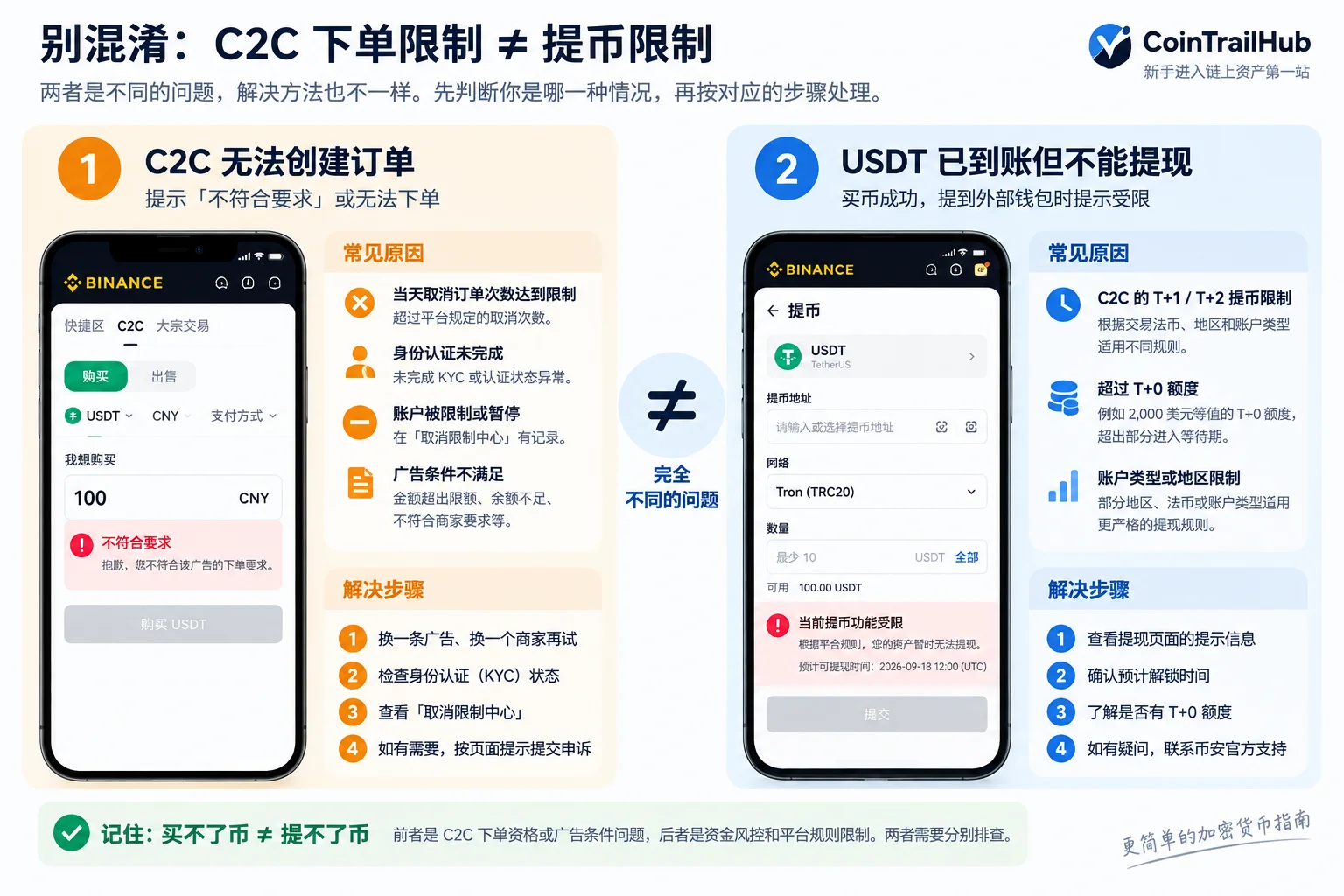
Figure: "P2P can't create an order" and "USDT arrived but can't be withdrawn" are two different problems. The former mainly checks ad conditions, KYC, cancellation count and account restrictions; the latter mainly checks T+1/T+2, the T+0 quota and the unlock time shown on the withdrawal page.
Note that T+1 isn't simply "new users are uniformly frozen for 24 hours." Whether it applies depends on the trading fiat, region, account type and current platform rules. Binance's currently listed scope, for example, includes some verified users in Egypt, Bahrain and Bangladesh, and scenarios involving CNY, EUR, TWD, UAH, KZT, BYN and others.[5]What are T+1 and T+2 withdrawal limits
In Binance's currently published T+1 plan, users get a $2,000 USD-equivalent T+0 withdrawal quota; amounts above that enter the waiting period under the applicable rules, and Trading Stars users are exempt from the T+1 limit.[6]Still follow your account page for specifics. Binance announcement on P2P T+1 withdrawal mechanism adjustments
So if you've already bought crypto and just can't transfer it to an external wallet, check the unlock time and restriction reason shown on the withdrawal page directly, instead of switching P2P ads again.
What to prepare before contacting official support
A complete record helps locate the problem better than "I can't buy crypto":
| Information | What to provide |
|---|---|
| Exact prompt | The full "not eligible" text or a screenshot (covering UID and other sensitive info) |
| Ad info | Which ad, merchant name or ad ID |
| Timing | When it started, and how many times you cancelled/timed out today |
| Account status | Identity verification status, case number and expiry time in the Cancellation Limits Center |
| What you tried | Whether you switched ads or payment methods |
Cover your UID, phone number, email and other personal info before screenshotting. Don't give anyone your password, verification code, seed phrase or private key.
FAQ
Does a "not eligible" prompt mean my account is frozen?
Not necessarily. Common causes are unmet ad conditions, hitting today's cancellation limit, abnormal identity verification status, or the account's P2P function being suspended. Switch ads first; if you still can't order after switching, check the "Cancellation Limits Center" for account status.
How many cancellations restrict buying?
Per Binance's official instructions, for buyer-caused cancellations an ordinary taker buyer can cancel up to 3 times per day, and system-caused or timeout cancellations also count toward these 3 chances; Binance's current P2P user policy also states that a taker buyer who creates 5 consecutive orders without paying on time may be restricted from buying as a taker for 24 hours. The applicable policy version may differ by region; follow your account page and local rules.
The ad shows "insufficient remaining balance" — is that my problem?
No. It's the seller's ad balance being insufficient to cover the order, and the ad will be temporarily taken down by the system. Switch to another ad or merchant.
Why can I place an order after switching ads?
Because each ad's order conditions (amount limit, real-name requirement, balance) are set by its merchant individually. Not meeting one ad's conditions doesn't mean your account has a problem.
I had P2P violations before — how long until the restriction is lifted?
The duration depends on the specific violation type and your regional rules, and isn't uniform. Follow the reason, expiry time and appeal entry shown in the "Cancellation Limits Center".
I bought USDT but can't withdraw it — is something wrong?
It may be the P2P T+1/T+2 withdrawal limit, which applies by trading fiat, region and account type, and some scenarios also have a T+0 quota. This isn't asset loss; the specific unlock time follows the withdrawal page's prompt.
Data verification notes
This article's key facts were checked against Binance's official P2P help documents and announcements on 2026-10-16, as follows:
- Order cancellation limit: for buyer-caused cancellations, an ordinary taker buyer can cancel up to 3 times per day, and system-caused or timeout cancellations also count toward these 3; once exceeded, the P2P order function is temporarily restricted and no new order can be created before 24:00 (UTC) that day. Source: Binance — How to cancel a Binance P2P buy order.
- Consecutive non-payment restriction: a taker buyer who creates 5 consecutive orders without paying within the required time may be restricted from buying as a taker for 24 hours. Source: Binance — P2P user trading policy (identity verification requirements).
- Cancellation Limits Center entry: the App path is "P2P → Profile → Cancellation Limits Center", where you can see the suspended function, reason, case number and expiry time. Source: Binance — Cancellation Limits Center (how to lift a P2P account suspension).
- Rule scope: Binance's Chinese-language "P2P user trading rules" state they apply only to the CNY trading zone; rules differ by fiat currency and region. Source: Binance — P2P user trading rules (CNY trading zone).
- T+1 scope: whether T+1 applies depends on the trading fiat, region, account type and current platform rules; the currently listed scope includes some verified users in Egypt, Bahrain and Bangladesh, and scenarios involving CNY, EUR, TWD, UAH, KZT, BYN and others. Source: Binance — What are T+1 and T+2 withdrawal limits.
- T+0 withdrawal quota: in Binance's currently published T+1 plan, users get a $2,000 USD-equivalent T+0 withdrawal quota, amounts above that enter the waiting period under applicable rules, and Trading Stars users are exempt from the T+1 limit. Source: Binance announcement — P2P adjusts the T+1 withdrawal mechanism.
Related reading
- Binance buy USDT tutorial 2026: P2P buying process, choosing a merchant and paying
- Binance registration tutorial (2026)
- Withdraw USDT to a bank: steps + fees + arrival time + frozen-card risk (2026)
- Recognizing common crypto scams
Content compiled on September 16, 2026. This article is organized from Binance's official P2P user policy, order cancellation rules, Cancellation Limits Center and withdrawal limit instructions. Different regions, fiat currencies, account types and App versions may show different rules; follow the actual prompts on your account page.
- Binance — How to cancel a Binance P2P buy order
- Binance — Cancellation Limits Center (how to lift a P2P account suspension)
- Binance — Introduction to P2P trading order limits
- Binance — P2P user trading policy (identity verification requirements)
- Binance — What are T+1 and T+2 withdrawal limits
- Binance announcement — P2P adjusts the T+1 withdrawal mechanism
- Binance — P2P user trading rules (CNY trading zone)
- Binance — How to avoid common P2P scams
- 2026-10-16UpdateAdded evidence-chain superscripts and "Data verification notes", updated key fact verification dates.
See ourEditorial Policy and the correction process in ourCorrections Policy.
The CoinTrailHub editorial team focuses on crypto education for beginners, exchange security and P2P trading risk. This article is compiled from official sources and public data, reviewed by humans, and strives for accuracy but is not investment advice.
Last updated:2026-09-16 · Content reviewed by humans · Learn more
© 2026 CoinTrailHub · Original content. Reproduction or rewriting without permission is prohibited.