
Is the Lightning Network Worth It? Fees, Speed, and Common Pitfalls (2026)
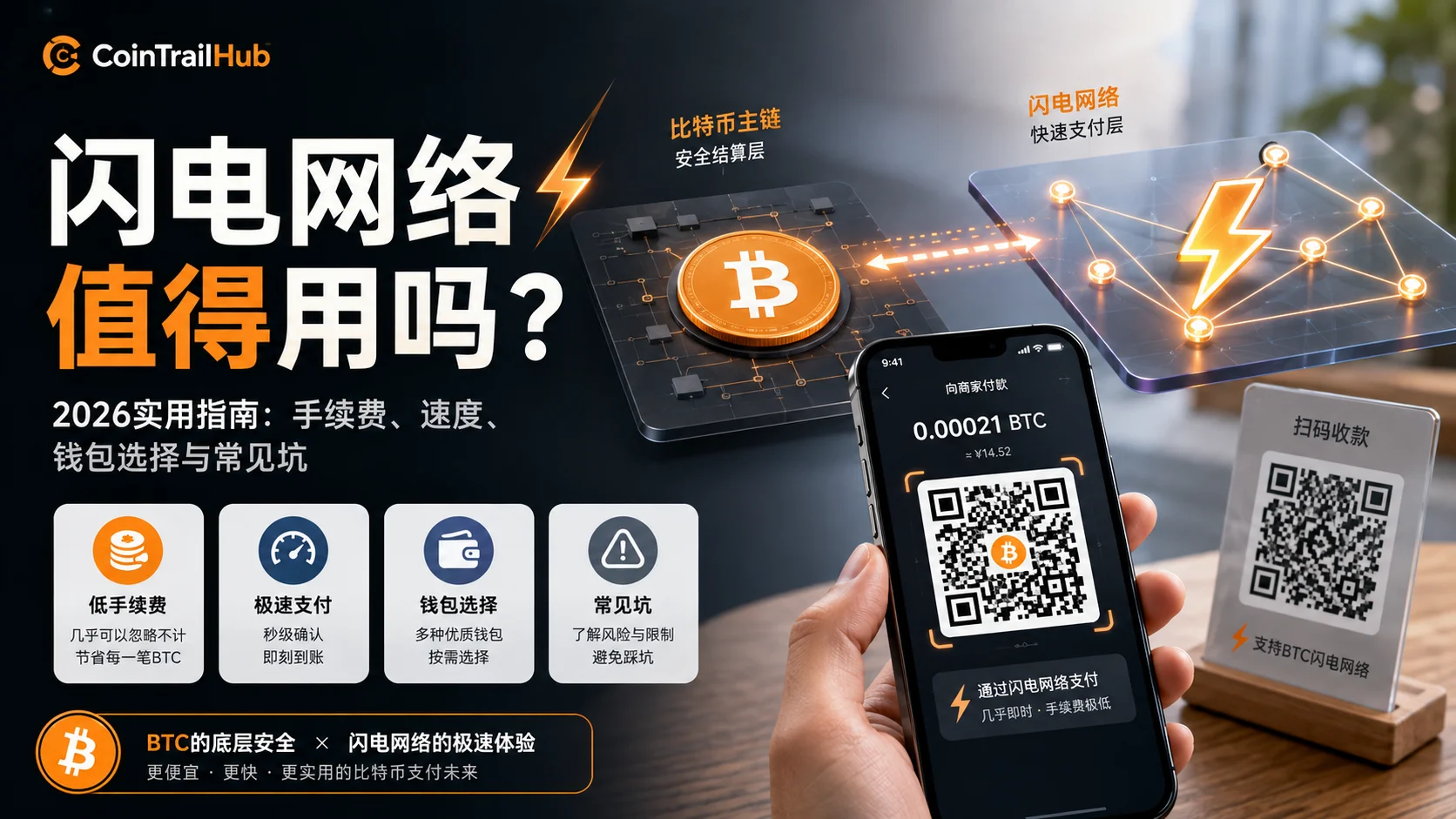
Table of contents

Binance new user rewards
20% trading fee rebate
Official Binance registration. Complete identity verification (KYC) to trade and withdraw.
If you frequently transfer small amounts of BTC, the Lightning Network is worth serious consideration — it can push small-payment fees to near zero and settle in seconds. But if you mainly hold BTC long-term or make large transfers, Lightning is not a necessity.
The purpose of this article is not to explain Lightning's technical principles — the official docs and encyclopedias already cover that thoroughly. Here we focus on: from a practical-usage standpoint, is Lightning easy to use, does it save money, what should you watch out for, and how should users with different needs choose?
Note: This article is based on wallet testing and public data, and does not constitute investment advice. Lightning wallets involve private-key management and channel operations; test with small amounts first.
The Gist
| Question | Answer |
|---|---|
| Is Lightning worth it for small BTC payments? | Worth considering — clear fee and speed advantages |
| Do you need Lightning to hold BTC long-term? | No — a hardware wallet is more suitable |
| Can Lightning replace the BTC main chain? | No — it only does payments, not storage |
| Do beginners need to run a node? | No — a mobile wallet is enough |
| What's the biggest pain point? | Receiving requires inbound liquidity (explained below) |
Who Is Lightning For? A Quick Check First
Before going deeper, judge whether you're the target user:
| Your goal | Do you need Lightning? |
|---|---|
| Hold BTC long-term (>1 year untouched) | No |
| Send a few small BTC transfers each month | Worth considering |
| Overseas small payments or tipping | Very suitable |
| Store a large amount of BTC | A hardware wallet is more suitable |
| First time with BTC | Learn on-chain operations first |
| Want to learn the BTC payment ecosystem | Worth trying |
| Doing DeFi, NFTs, contract trading | Not applicable (go to Ethereum) |
Core conclusion: Lightning solves BTC's "payment efficiency" problem, not its "storage security" problem. The two are completely different jobs.
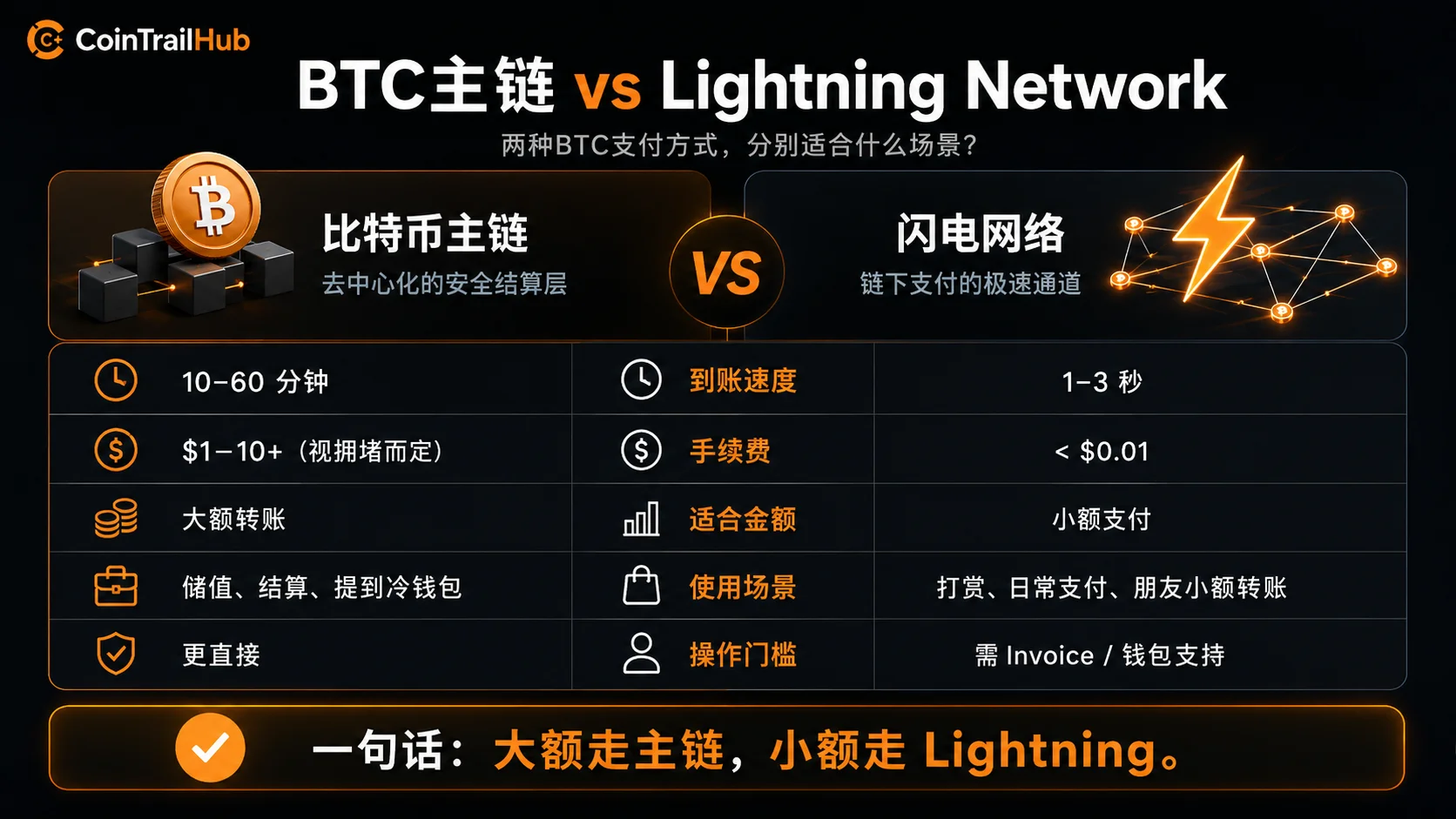
Quick Comparison: On-Chain Transfer vs Lightning
| Dimension | Bitcoin on-chain transfer | Lightning Network |
|---|---|---|
| Small-payment fee | Usually a few dollars, higher when congested | Usually near zero; per-payment routing fee can be under 1 satoshi |
| Large-transfer fee | Independent of amount, depends on congestion | Not suitable (channel capacity limited) |
| Arrival time | Waits for block confirmation (usually 10–60 min) | Seconds (usually 1–3 seconds) |
| What the other party needs to do | Just provide a BTC address | Generate a Lightning invoice (one extra step) |
| Suitable for | Large transfers, long-term holding | Daily payments, small transfers, tipping |
One-liner: for small payments, Lightning has a clear advantage; for large transfers, on-chain is more direct. The receiving experience still has room to improve.
Why BTC Needs a Second-Layer Payment Network
The main chain's design
The Bitcoin main chain produces a block roughly every 10 minutes, with about 4,000 transactions per block — roughly 7 TPS of throughput. Compared with everyday payment systems:
| System | Throughput | Confirmation time for one payment |
|---|---|---|
| Bitcoin main chain | ~7 TPS | 10–60 minutes |
| Visa network | Tens of thousands of TPS | Seconds |
If one billion people each bought one coffee a day with BTC, the Bitcoin main chain would need more than 160 years to process it all. That's why the Bitcoin community settled on a division of labor early on: the main chain handles final settlement, and second-layer networks handle payment efficiency.
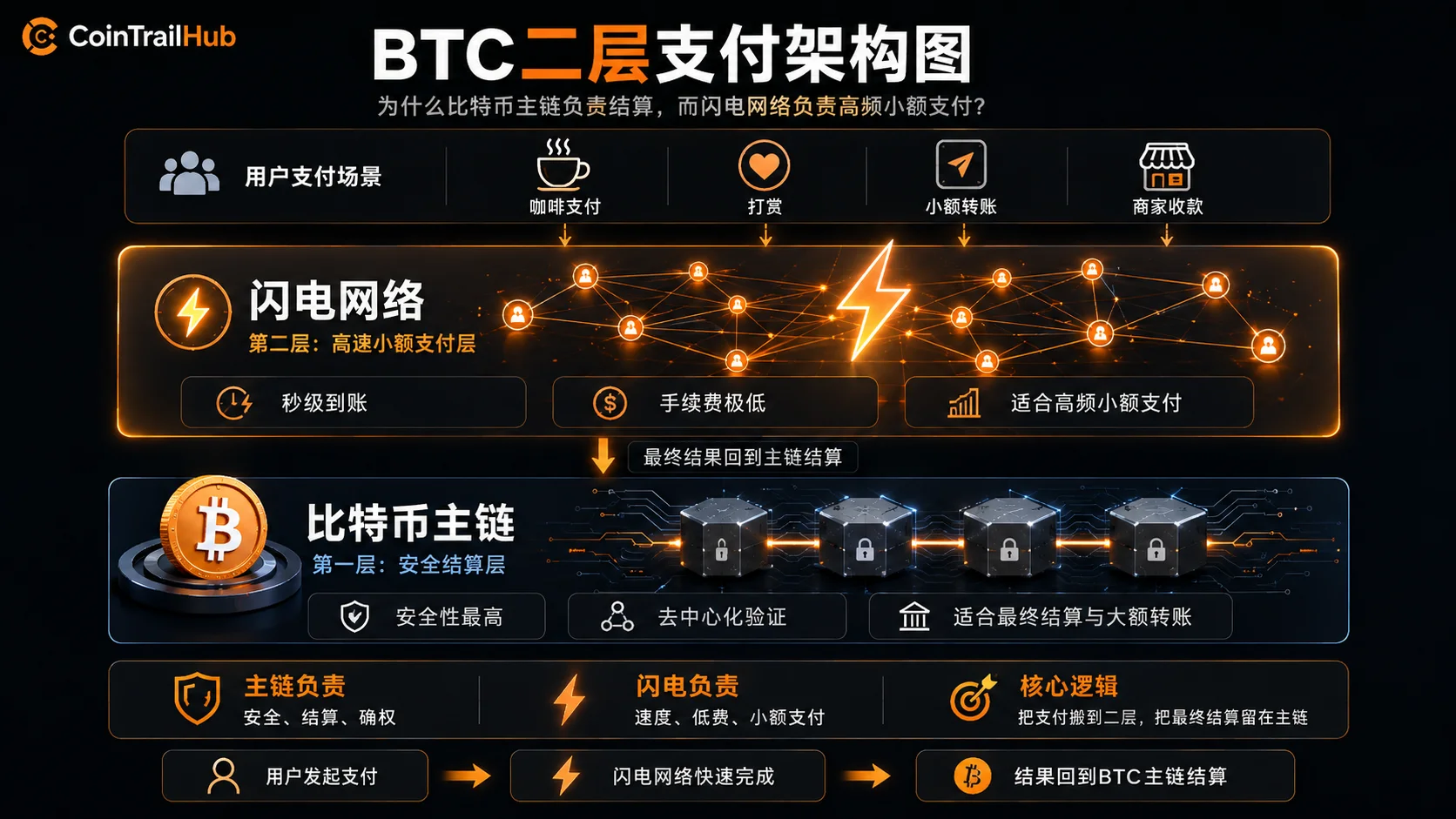
This mirrors the layered architecture of traditional payment systems: the underlying clearing system handles final settlement, while upper systems handle high-frequency processing. Lightning plays a similar role in the Bitcoin ecosystem: the main chain settles, and the second layer handles payment efficiency.
The idea was first proposed by Joseph Poon and Thaddeus Dryja in the 2016 Lightning Network whitepaper, and after years of development, it's now supported by multiple mature wallets and payment scenarios.
For a fuller explanation of the main chain's consensus mechanism and transaction principles, see Why Bitcoin Doesn't Need Banks: UTXO, Nodes, PoW, which helps you understand why the main chain is inherently unsuited to high-frequency small payments.
Why not just make blocks bigger?
Someone might ask: can't we just make Bitcoin blocks bigger and turn 7 TPS into 7,000?
That's a decentralization trade-off. Bigger blocks → higher cost to run a full node → fewer people running full nodes → a more centralized network. After the 2017 "Blocksize War," the Bitcoin community basically reached consensus: keep the main chain lean and scale on layer two. That's the background for Lightning's birth.
Lightning Usage Experience: How Much Do Fees and Speed Really Differ
As of 2026, Lightning has become a fairly mature global payment infrastructure, with public node counts in the tens of thousands and network capacity in the thousands of BTC (data from 1ML.com). That means the network has enough liquidity to support everyday small payments.
Transfer comparison across different times
Here's an on-chain vs Lightning comparison (using small transfers as the example), based on mempool.space public data and wallet testing:
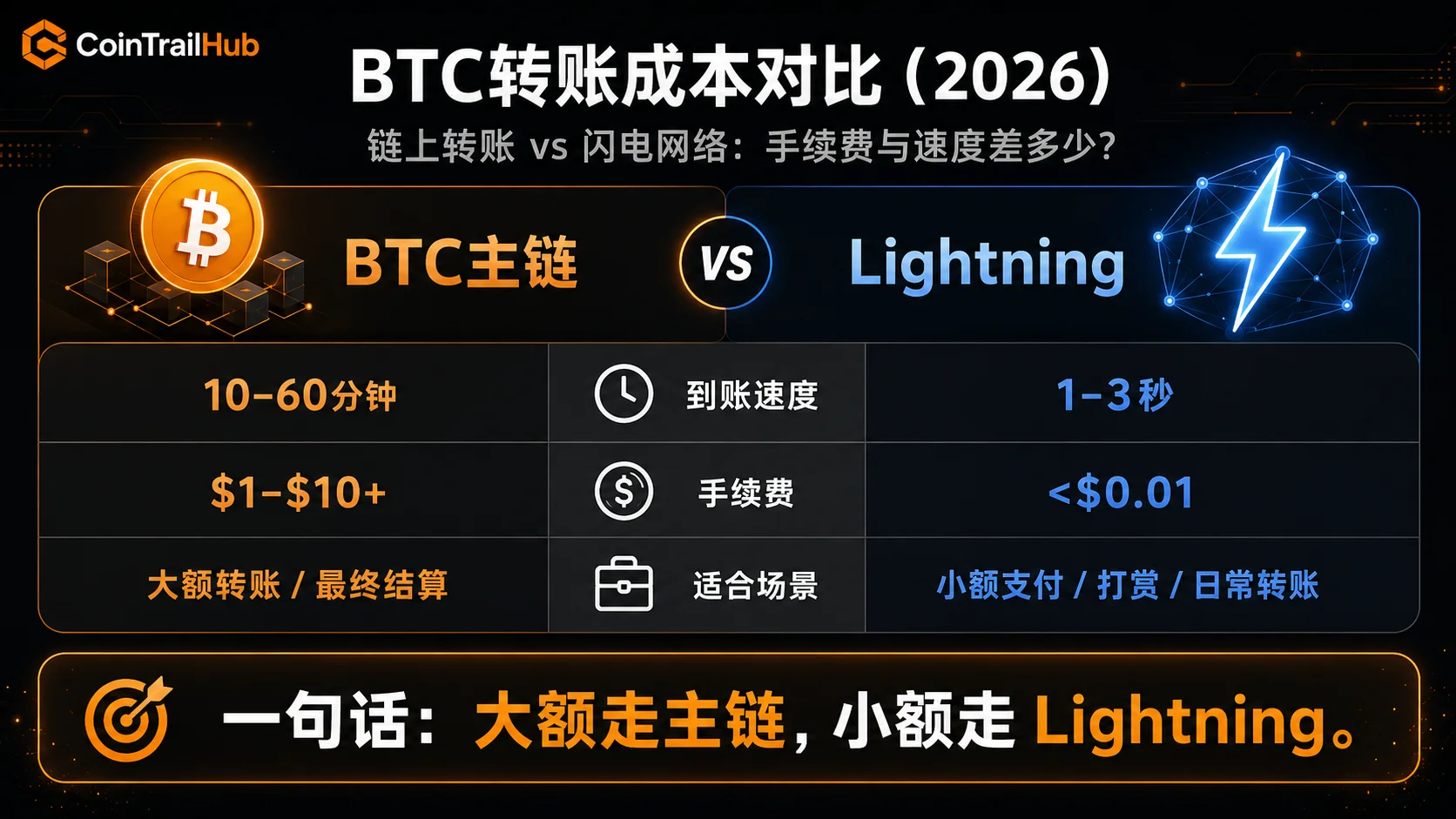
| Test time | On-chain fee (est.) | On-chain arrival (est.) | Lightning fee | Lightning arrival |
|---|---|---|---|---|
| Weekday 14:00 (congested) | $8–12 | 30–60 min | <$0.01 | 1–3 sec |
| Weekday 22:00 (normal) | $3–5 | 10–30 min | <$0.01 | 1–3 sec |
| Weekend 09:00 (idle) | $1–3 | 5–15 min | <$0.01 | 1–3 sec |
| 03:00 (least busy) | $1–2 | 5–10 min | <$0.01 | 1–3 sec |
On-chain fee data source: mempool.space historical data. Lightning testing based on Phoenix Wallet and Wallet of Satoshi.
Key findings
On-chain fees swing wildly: $8+ when congested, just over $1 when idle. If you don't mind waiting, transferring in the early morning saves fees — but in practice most people won't do this.
Lightning fees are basically zero: the routing fee per payment is usually under 1 satoshi (about <$0.001). The only real cost is the on-chain fee when opening/closing a channel ($2–5), but that can be spread across all transactions in the channel.
The speed difference is stark: Lightning settles in 1–3 seconds, close to a QR-code payment experience. On-chain needs 6 confirmations, usually 10–60 minutes.
Lightning has an entry barrier: the price of near-zero fees is setting up a wallet, opening a channel, and ensuring liquidity. It's not a "download and go" experience.
Understanding the on-chain confirmation mechanism makes Lightning's instant-settlement advantage clearer — How Long Does a BTC Transfer Take? From Signing to 6 Confirmations discusses block confirmation and the mempool in detail.
Which Lightning Wallet? 4 Usage Paths
In 2026 you don't need to run your own node. Different users have different suitable options:
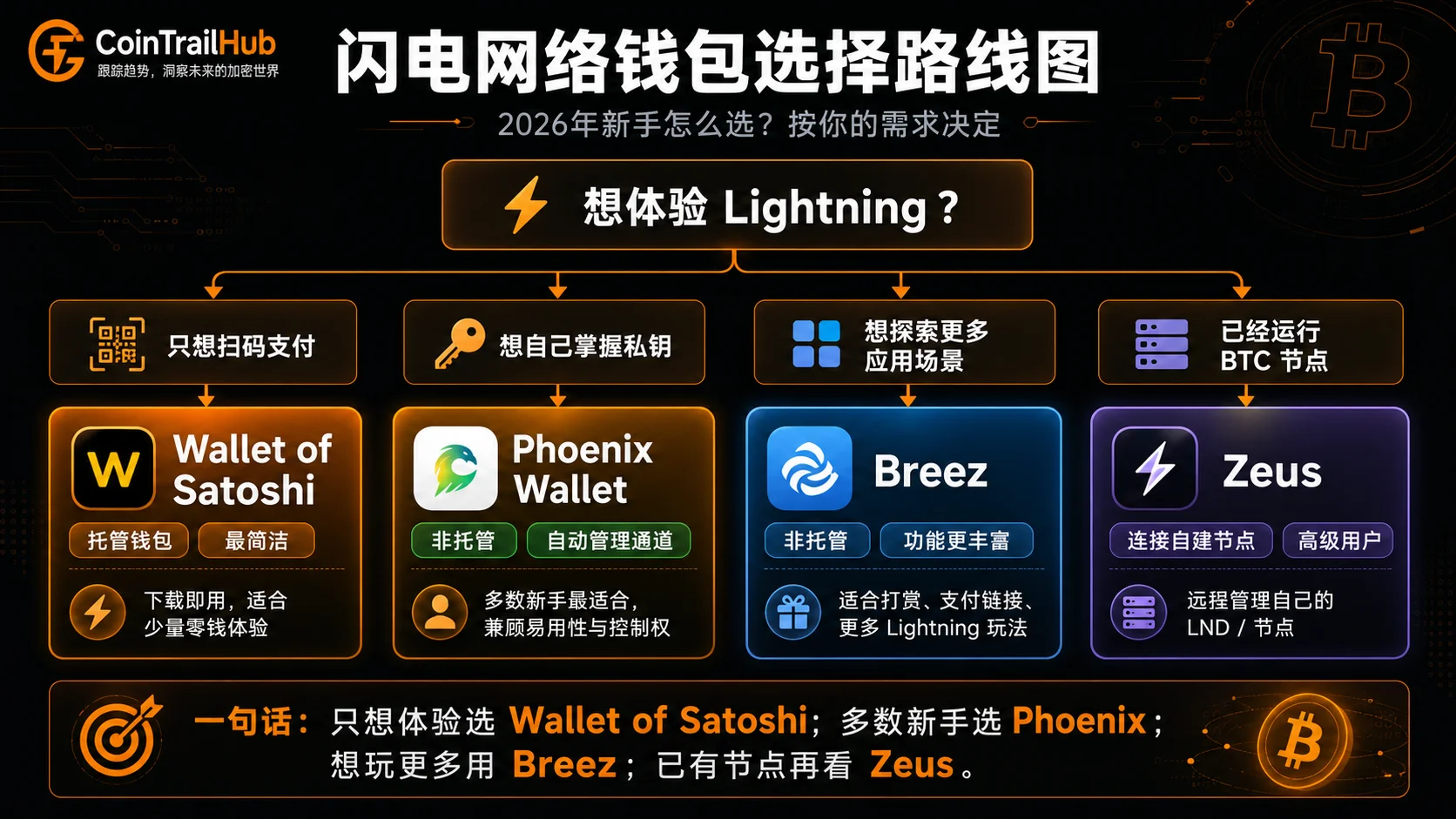
| Your need | Suitable option |
|---|---|
| Just want to try Lightning payments | Wallet of Satoshi (custodial, simplest) |
| Want to control your own keys | Phoenix Wallet (non-custodial, auto-managed channels) |
| Want to explore more app scenarios | Breez (non-custodial, built-in tipping etc.) |
| Already running a BTC node | Zeus (remote management of your own node) |
Details on each option
Phoenix Wallet (phoenix.acinq.co) — the common choice for non-custodial users
Phoenix is developed by ACINQ and automatically manages channels and liquidity, so users don't need to understand concepts like "inbound capacity" or "outbound capacity." After download, create a wallet, back up the seed phrase, and withdraw BTC from an exchange to a Phoenix address; the system automatically creates or manages channels based on wallet policy. The first channel may require an on-chain transaction cost, depending on network congestion and wallet policy. After that, in-channel transfers are nearly free.
Suits: users who want to control their own keys but don't want to manage channels manually.
Wallet of Satoshi (walletofsatoshi.com) — the simplest experience
A custodial option; no need to open a channel, download and use. QR-code payments are smooth. But you don't control the private keys — the BTC in the wallet is essentially custodied by the platform. Suits small-change amounts for testing, not your main assets.
Suits: users who want to try Lightning payments and don't plan to put in much money.
Breez (breez.technology) — richer features
A non-custodial option with auto-managed channels. Extra built-in features like podcast tipping and Lightning payment links. Built-in "Watchtower" anti-theft mechanism that monitors channel state even when the app is offline.
Suits: users who want to explore more Lightning app scenarios.
Zeus (zeusln.com) — for users who already have a node
An app for remotely managing a self-hosted Lightning node. If you already run a node on a Raspberry Pi with Umbrel or Start9, Zeus lets you manage it from your phone. Not suitable for users without their own node.
Suits: technical users who already run their own node.
Binance currently supports Lightning BTC withdrawals (Binance Referral Code 2026 Tested: Which Code Actually Gets the 20% Rebate? BN522 Test Results), so you can withdraw from an exchange directly over Lightning without installing a separate wallet.
Choice Logic for Different Scenarios
There's no "best" wallet — only the option that best fits your current need.
Choose by amount
| How much you keep in Lightning | Common option | Why |
|---|---|---|
| Small change (<$50) | Wallet of Satoshi (custodial) | Not worth the channel hassle for small change; convenience first |
| Medium amount ($50–500) | Phoenix Wallet | You control the keys; channels auto-managed |
| Larger amount (>$500) | Phoenix + periodically withdraw back on-chain | Lightning isn't for long-term storage; move larger amounts back to an on-chain or hardware wallet |
Choose by usage frequency
| Frequency | Common option | Why |
|---|---|---|
| Once or twice a year | No need to use Lightning specifically | Learning a whole new tool for a few transfers isn't worth it |
| A few times a month | Exchange Lightning withdrawal | Withdraw directly over Lightning from Binance/OKX |
| Weekly | Phoenix Wallet | A standalone wallet is more flexible |
| High frequency | Phoenix + consider a self-hosted node | A self-hosted node saves routing fees and can earn forwarding fees |
Choose by technical ability
| Technical level | Common option |
|---|---|
| "Just want to pay by QR code" | Wallet of Satoshi |
| "Want my own keys, but no tech" | Phoenix Wallet |
| "Technical, want to explore more" | Breez |
| "Already have a Bitcoin node" | Zeus + self-hosted LND node |
| "Want to contribute to the network" | Umbrel/Start9 + ThunderHub |
Most users can stop at Phoenix. Lightning's core value is letting you conveniently pay with BTC — not turning you into a node operator.
Getting Started From Zero
Using Phoenix Wallet as an example, the rough flow from zero to your first Lightning payment:
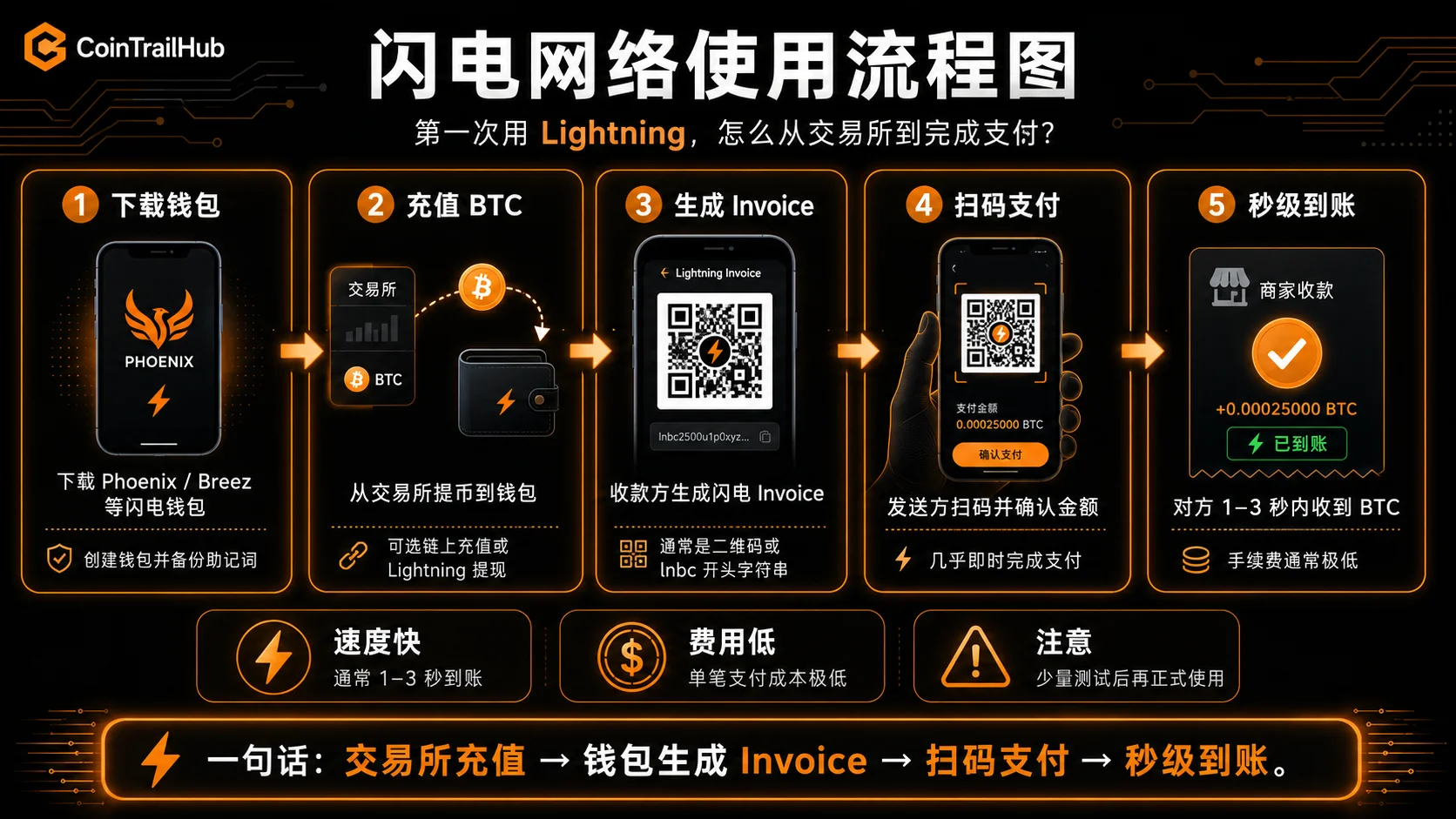
Step 1: Download and create the wallet
- Download Phoenix Wallet from the official app store (note: make sure it's developed by ACINQ)
- Create a new wallet → immediately back up the 12-word seed phrase (must be handwritten; no screenshots, no phone notes)
- Set an app password
The safe way to back up a seed phrase is detailed in What Is a Seed Phrase? Why No One Can Recover Your Assets If You Lose It (2026).
Step 2: Fund the wallet
A Phoenix BTC address supports both on-chain and Lightning deposits:
- Open Phoenix → tap "Receive" → choose "On-chain" → copy the BTC address
- Withdraw BTC from an exchange to this address
- Wait for on-chain confirmation (10–60 min) → Phoenix automatically detects the deposit and opens a Lightning channel
A faster way: if the exchange supports Lightning withdrawals (Binance/OKX both do), choose the "Lightning" withdrawal method and scan the Lightning invoice Phoenix generates — it arrives in seconds.
Step 3: Pay
- The other party generates a Lightning invoice (a string starting with
lnbc, or a QR code) - Phoenix scans it → confirms the amount → sends
- The other party receives it in 1–3 seconds
Step 4: Withdraw back on-chain (if needed)
- Phoenix → Send → enter an on-chain BTC address
- Phoenix automatically does "splicing" — adjusting the channel while moving BTC to the on-chain address
- This operation incurs an on-chain fee ($2–5) and needs on-chain confirmation
Note: if it's just a small amount (<$20), withdrawing back on-chain may not be worth it — the fee could approach the balance.
The 3 Most Common Lightning Pitfalls
Here are the problems that come up most often, so you can avoid them in advance.
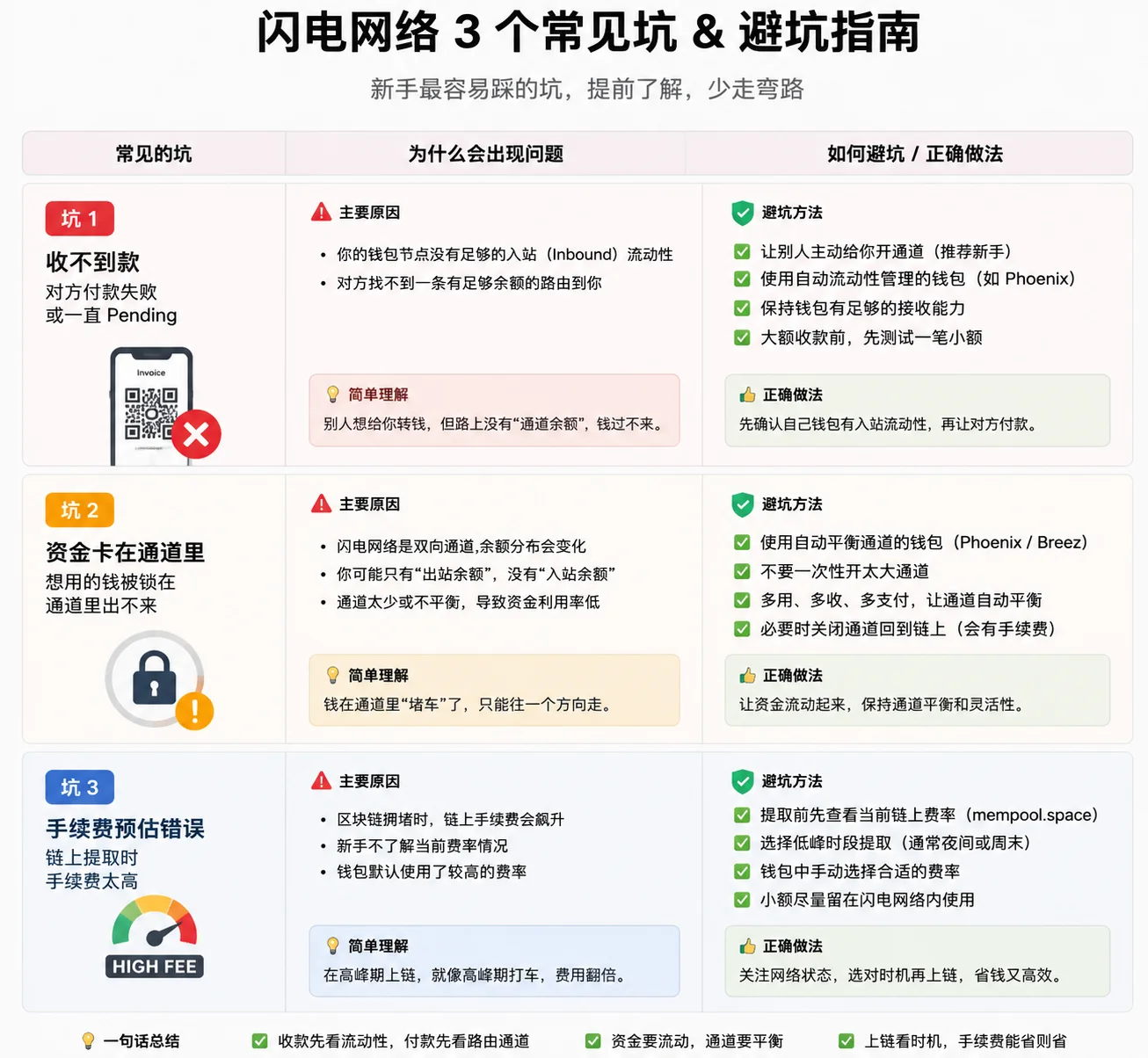
Pitfall 1: Not enough channel balance, payment fails
Common scenario: Phoenix shows a balance, and you try to send an amount near the limit, but the transaction fails.
Cause: the BTC in a channel isn't "all usable" — some is reserved for the on-chain fee to close the channel. The actually usable amount is 10–15% less than the displayed total balance.
Tip: before paying, check the wallet's "maximum sendable amount" and don't plan around the total balance.
Pitfall 2: Receiving requires "inbound liquidity"
Common scenario: someone tries to send you BTC over Lightning, and it fails several times.
Cause: Lightning sending and receiving are asymmetric. Being able to pay doesn't mean being able to receive. The prerequisite for receiving is that someone has placed BTC on "your side" of the channel — called "inbound liquidity." In a newly opened channel, all the BTC is on your own side, so you can only pay, not receive.
Solutions:
- Wallets like Phoenix manage this automatically — when you need to receive, they do splicing in the background to adjust capacity
- Or spend some BTC first (increasing inbound capacity), then have the other party send
- Or have the other party use an on-chain transfer (but that defeats the purpose of Lightning)
This is the most commonly cited pain point in Lightning's current user experience. New protocols like Bolt12 are trying to improve it.
Pitfall 3: Invoices expire
Common scenario: you generate a Lightning invoice and send it, but the other party scans it an hour or two later and gets an "invoice expired" message.
Cause: Lightning invoices have a default expiry (usually 1 hour). After expiry the invoice is automatically void — money won't be taken, but the other party can no longer send.
Solution: have the other party generate a new invoice. Breez and Phoenix support "never-expiring" receive links (LNURL-pay), but the other party's wallet also needs to support it.
All three problems point to the same thing: Lightning's "paying" experience is already decent, but "receiving" and "fund management" still have room to improve. 2026 is a clear improvement over a few years ago, but it's still some distance from a completely frictionless user experience.
Why Lightning Isn't a BTC Storage Solution
This is an important distinction: Lightning solves "payment efficiency," not "storage security."
| BTC use | Suitable option | Why |
|---|---|---|
| Long-term storage (>1 year untouched) | Hardware wallet (cold storage) | Lightning needs an online node; channels risk forced closure |
| Exchange trading | Exchange account | Trading needs liquidity; channel balance is insufficient |
| Daily small payments | Lightning | Fast, near-zero fees |
| Small transfers between friends | Lightning | Suitable for up to a few hundred dollars |
| On-chain interaction (DeFi/Ordinals) | A regular BTC wallet | Lightning doesn't support smart contracts |
| Large savings | Hardware wallet + multisig | Channel capacity is limited; not for long-term storage |
You can think of it this way: BTC in Lightning is "checking-account change," not a "term deposit." Money you'll spend soon fits there; long-term storage should still go back to a cold wallet — that's the safest place for BTC.
For the full discussion of hardware-wallet selection and BTC storage security, see Bitcoin Wallets Compared: Cold, Hot, and Hardware Wallets (2026).
How Lightning and Regular BTC Wallets Work Together
A common misconception is that once you use Lightning, you no longer need a regular BTC wallet.
It's actually the opposite — they're complementary:
| Wallet type | Use | How much to keep |
|---|---|---|
| Hardware wallet (Ledger/Trezor) | Long-term asset storage | Most of your BTC |
| Regular BTC wallet (on-chain) | On-chain interaction, medium transfers | As needed |
| Lightning wallet | Daily change, small payments | A small amount of BTC |
The relationship can be understood this way:
- Hardware wallet = a bank safe (safest, but inconvenient to access)
- Regular BTC wallet = a bank checking account (daily use, incurs fees)
- Lightning wallet = cash in your pocket (spend anytime, but you don't carry all your money)
This layered model is expanded in these articles:
- Bitcoin Wallets Compared: Cold, Hot, and Hardware Wallets (2026) — full comparison of wallet types
- Bitcoin Private-Key Security: 6 Decisions That Determine Whether You Lose BTC (2026) — private-key management practice
- What Is a Seed Phrase? Why No One Can Recover Your Assets If You Lose It (2026) — backup fundamentals
Why Many BTC Holders Still Don't Use Lightning
Understanding "who doesn't use it and why" matters for your own decision too.
Three main reasons
1. BTC's main use is still a store of value
For most BTC holders, BTC is "digital gold" — buy it and leave it for a year or even years. In that scenario, an on-chain address or hardware wallet is completely sufficient, and Lightning's channel-management and liquidity concepts just add unnecessary complexity.
2. Large transfers are more direct on-chain
If you're sending 0.1 BTC or more, an on-chain payment of $2–15 and a half-hour wait is simpler and more direct than wrestling with channel capacity and liquidity. In large-amount scenarios, the "fee saving" advantage isn't prominent — "simple operation" matters more.
3. New concepts to learn
Lightning introduces a set of concepts that on-chain BTC users don't need — channels, inbound capacity, outbound capacity, invoices, routing fees. The learning curve isn't high, but for users who "just want to hold BTC," there isn't enough motivation to learn.
What this means
Lightning is not "an upgraded BTC" — it's "a purpose-built tool for the BTC payment scenario." It doesn't need every BTC user to adopt it, and it shouldn't be promoted as "a more advanced BTC." The more accurate framing is as a functional module in the BTC ecosystem — "when you need frequent small payments, this module makes the experience better."
Choosing a BTC Payment Method: One Table to Decide
Bringing it all together, here are the recommended options for different BTC needs:
| Your need | Recommended option | Why |
|---|---|---|
| Store BTC long-term (>1 year untouched) | Hardware wallet (Ledger/Trezor) | Offline storage is safest |
| Buy BTC and wait for appreciation | Cold wallet or exchange | No frequent operations needed |
| Small transfers between friends | Lightning (Phoenix Wallet) | Settles in seconds, fee <$0.01 |
| Large transfers between friends | BTC main chain | Channel capacity is limited; on-chain is more direct |
| Fast exchange withdrawal | Choose Lightning withdrawal (if supported) | Usually much faster than waiting for on-chain confirmation |
| Pay overseas services / creators | Lightning | A low-friction option for cross-border small payments |
| Move a large amount of BTC to a cold wallet | BTC main chain | One on-chain transaction, safely stored after confirmation |
| Daily spending (coffee, tipping) | Lightning (Wallet of Satoshi change) | Pay by QR code |
| Run a BTC node | Self-hosted LND node + Zeus | Full control of channels and routing fees |
| First time with BTC | Start with an on-chain wallet | Understand the basics before considering Lightning |
A simple decision flow:
What do you mainly use BTC for?
  ├─ Long-term storage → hardware wallet; nothing to do with Lightning
  ├─ Exchange trading → keep on the exchange; no Lightning needed
  ├─ Daily small payments → Lightning ✓
  └─ Sending to friends →
       small amount  AND  the friend has a Lightning wallet → Lightning ✓
       otherwise → on-chain transfer
Security Risk Reminders
Lightning has a few security points that differ from on-chain wallets:
1. Custodial-wallet risk
Custodial options like Wallet of Satoshi are essentially third-party asset custody. If the platform has operational problems, user funds could be affected. I suggest keeping only a small amount there, not your main assets.
2. The wait period for force-closing a channel
When using a non-custodial wallet (Phoenix/Breez), if the counterparty node suddenly goes offline, you can "force-close the channel." But there's a wait period (usually 144 blocks, about 1 day). During that time the BTC is locked. You'll eventually get it back, but if you urgently need cash, you're in a passive position.
3. The importance of backing up the seed phrase
A non-custodial Lightning wallet's seed phrase recovers not only the BTC balance but all channel states. If you lose the seed phrase but still have the app, close all channels and withdraw back on-chain as soon as possible.
4. Fake-wallet risk
Lightning wallets aren't as well-known as MetaMask or Trust Wallet, so fake wallet apps find it easier to sneak into app stores. Be sure to download from the link on the wallet's official site.
For more wallet-security practice, see Bitcoin Wallets Compared: Cold, Hot, and Hardware Wallets (2026) and Bitcoin Private-Key Security: 6 Decisions That Determine Whether You Lose BTC (2026).
FAQ
Q1: Is the Lightning Network worth it?
If you frequently transfer small BTC amounts (a few hundred dollars or less), it's worth considering. Fees drop from a few dollars to a few cents, and it's much faster. But if you only occasionally make large transfers, or the other party doesn't use Lightning, there's no need to bother.
Q2: Is Lightning safe? Can I lose coins?
The technology itself is safe — final settlement is guaranteed by the Bitcoin main chain. Usage-level risks mainly include: third-party risk of custodial wallets, fake wallet apps, lost seed phrases, and the wait period for force-closing channels. A non-custodial option (Phoenix/Breez) with a properly backed-up seed phrase is comparable in safety to an on-chain wallet.
Q3: Are Lightning fees really that low?
Yes. The routing fee per payment is usually under 1 satoshi (<$0.001). The main cost is the on-chain fee when opening/closing a channel, but that can be spread across all the channel's transactions — if a few dollars of on-chain cost is spread over many payments, the average per-payment cost can drop very low.
Q4: Why does receiving keep failing?
Most likely an "inbound liquidity" problem — all the channel's BTC is on your own side, so there's no receiving capacity. Phoenix and Breez handle this in the background, but sometimes it takes a few minutes. See Pitfall 2 above.
Q5: Can I use the Lightning Network for everyday payments where I live?
Lightning is a technical protocol and can be used anywhere in the world. But merchant acceptance varies greatly by region — in many places, few local merchants accept Lightning, so real-world daily spending is limited. The main uses for most users are: small transfers between friends, paying overseas services, and learning/experimenting.
Q6: Do I need to set up Lightning after buying BTC?
No. If you bought BTC to hold long-term and wait for appreciation, keeping it on an exchange or in a hardware wallet is enough. Lightning is designed for "frequently using BTC to pay." Only when you have a monthly need for small BTC transfers is it worth the time to download and try.
Q7: What's the difference between a Lightning wallet and a regular BTC wallet?
A regular BTC wallet (like Trust Wallet or Ledger) can only send and receive on-chain transactions, each of which waits for block confirmation and pays a gas fee. A Lightning wallet (like Phoenix) additionally supports sending and receiving over Lightning — fast and cheap, but the BTC in channels must first return to the main chain (by closing a channel or splicing) before it can participate in on-chain interaction (like buying an NFT or using DeFi). The relationship: keep large amounts in a regular wallet, keep change in a Lightning wallet.
Q8: Is Lightning the same thing as Ethereum Layer 2 (Arbitrum/Optimism)?
Not at all. Lightning only does BTC payments and cannot run smart contracts, DeFi, or NFTs. Ethereum Layer 2 is a general-purpose computing platform; the two have completely different positioning and technical paths. For a comparison and selection guide on Ethereum Layer 2, see Ethereum Gas Too Expensive? How to Choose Between Arbitrum/Optimism/Base (2026).
Q9: Do I need to run my own Lightning node?
In 2026, absolutely not. Wallets like Phoenix and Breez already auto-manage channels. Unless you're a tech enthusiast who wants to contribute to the network, a mobile wallet is enough.
Q10: Which network should I choose to withdraw BTC from an exchange to a Lightning wallet?
If the exchange supports the "Bitcoin Lightning" withdrawal method, choose that directly — it settles in seconds with near-zero fees. If not, choose regular BTC on-chain withdrawal; after 10–60 minutes of confirmation, the wallet automatically opens a channel.
Disclaimer
This article is for sharing the Lightning Network usage experience and technical education only, and does not constitute investment, financial, or trading advice.
Crypto asset prices are volatile, and related services may carry platform risk, market risk, network-security risk, and operational risk. Lightning custodial wallets carry third-party custody risk that users must evaluate themselves. Any activity involving private-key management, transfers, or asset custody should be fully understood before testing with small amounts.
Users should judge carefully based on their own risk tolerance and follow local laws and regulations.
- mempool.spaceOn-chain gas fees and congestion data
- 1ML.comLightning Network size and channel data
- Lightning Network whitepaperLightning Network technical principles
See ourEditorial Policy and the correction process in ourCorrections Policy.
The CoinTrailHub editorial team focuses on crypto education for beginners, exchange security and P2P trading risk. This article is compiled from official sources and public data, reviewed by humans, and strives for accuracy but is not investment advice.
Last updated:2026-08-11 · Content reviewed by humans · Learn more
© 2026 CoinTrailHub · Original content. Reproduction or rewriting without permission is prohibited.